key CHEVROLET IMPALA 2003 8.G Owner's Manual
[x] Cancel search | Manufacturer: CHEVROLET, Model Year: 2003, Model line: IMPALA, Model: CHEVROLET IMPALA 2003 8.GPages: 408, PDF Size: 2.75 MB
Page 96 of 408

Steering Column Shift Lever
1. Hold the brake pedal down with your right foot and
set the parking brake.
2. Move the shift lever into PARK (P) like this:
·Pull the lever toward you.
·Move the lever up as far as it will go.
3. Turn the ignition key to OFF.
4. Remove the key and take it with you. If you can
leave your vehicle with the ignition key in your
hand, your vehicle is in PARK (P).
2-28
Page 97 of 408
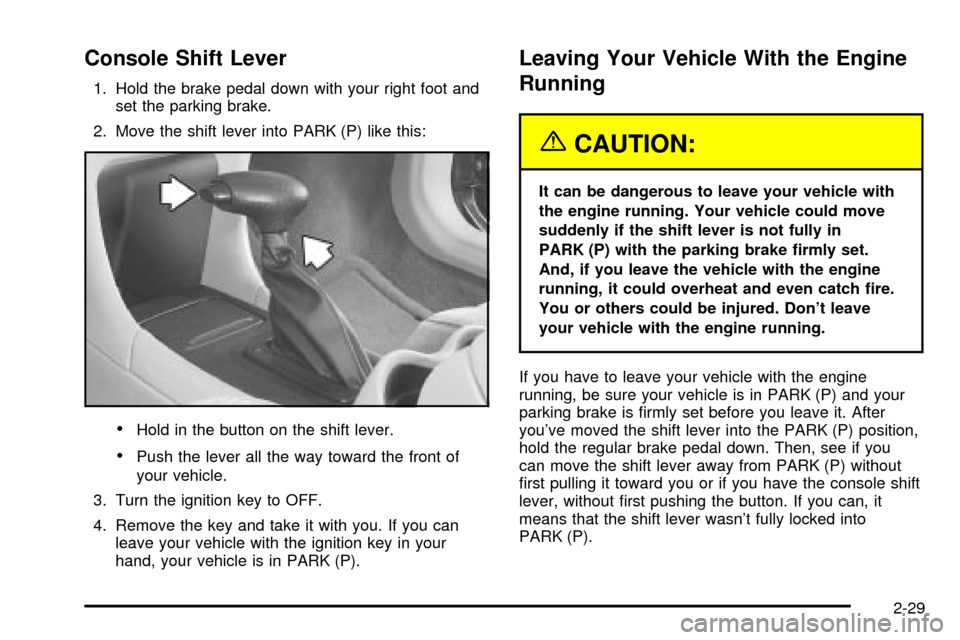
Console Shift Lever
1. Hold the brake pedal down with your right foot and
set the parking brake.
2. Move the shift lever into PARK (P) like this:
·Hold in the button on the shift lever.
·Push the lever all the way toward the front of
your vehicle.
3. Turn the ignition key to OFF.
4. Remove the key and take it with you. If you can
leave your vehicle with the ignition key in your
hand, your vehicle is in PARK (P).
Leaving Your Vehicle With the Engine
Running
{CAUTION:
It can be dangerous to leave your vehicle with
the engine running. Your vehicle could move
suddenly if the shift lever is not fully in
PARK (P) with the parking brake ®rmly set.
And, if you leave the vehicle with the engine
running, it could overheat and even catch ®re.
You or others could be injured. Don't leave
your vehicle with the engine running.
If you have to leave your vehicle with the engine
running, be sure your vehicle is in PARK (P) and your
parking brake is ®rmly set before you leave it. After
you've moved the shift lever into the PARK (P) position,
hold the regular brake pedal down. Then, see if you
can move the shift lever away from PARK (P) without
®rst pulling it toward you or if you have the console shift
lever, without ®rst pushing the button. If you can, it
means that the shift lever wasn't fully locked into
PARK (P).
2-29
Page 98 of 408

Torque Lock
If you are parking on a hill and you don't shift your
transaxle into PARK (P) properly, the weight of
the vehicle may put too much force on the parking pawl
in the transaxle. You may ®nd it difficult to pull the
shift lever out of PARK (P). This is called ªtorque lock.º
To prevent torque lock, set the parking brake and
then shift into PARK (P) properly before you leave the
driver's seat. To ®nd out how, see
Shifting Into Park (P)
on page 2-27.
When you are ready to drive, move the shift lever out of
PARK (P)
beforeyou release the parking brake.
If torque lock does occur, you may need to have another
vehicle push yours a little uphill to take some of the
pressure from the parking pawl in the transaxle, so you
can pull the shift lever out of PARK (P).
Shifting Out of Park (P)
Your vehicle has an automatic transaxle shift lock
control system. You must fully apply your regular brakes
before you can shift from PARK (P) when the ignition
is in ON. See
Automatic Transaxle Operation on
page 2-23.
If you cannot shift out of PARK (P), ease pressure on
the shift lever by pushing it all the way into PARK (P)
while keeping the brake pedal pushed down. Release
the shift lever button if you have a console shift.
Then move the shift lever out of PARK (P), being sure
to press the shift lever button if you have a console shift.
If you ever hold the brake pedal down but still can't
shift out of PARK (P), try this:
1. Turn the ignition key to ACC.
2. Apply and hold the brake pedal down until the end
of Step 4.
3. Shift to NEUTRAL (N).
4. Start the engine and shift to the drive gear
you want.
5. Have the vehicle ®xed as soon as you can.
2-30
Page 111 of 408

Storage Areas
Glove Box
Use the key to lock and unlock the glove box. To open,
lift the latch.
Front Storage Area
If your vehicle has the split bench front seat, there is an
armrest located in the center of the seat. Dual
cupholders are located in front of the armrest.
Center Console Storage Area
Your vehicle may be equipped with a center console. It
has cupholders, a cassette tape and CD storage
area. To open the console's storage area, pull up on the
latch located in the front of the console lid.
Rear Storage Area
If your vehicle has the split folding rear seat, there will
be two cupholders in the rear seat armrest. To
access them, pull down on the cloth strap located
toward the top of your center back seat cushion.
Convenience Net
Your vehicle may have a convenience net. You'll see it
on the back wall of the trunk.
Put small loads, like grocery bags, behind or inside the
net. It can help keep them from falling over during
sharp turns or quick starts and stops.
The net isn't for larger, heavier loads. Store those in the
trunk as far forward as you can.
You can unhook the net so that it will lie ¯at when
you're not using it.
2-43
Page 113 of 408

Vehicle Personalization
Some of the convenience features can be reset or
customized to perform according to your preference.
Features you can program depend upon the options that
came with your vehicle. The following list shows
features that can be reset or customized along with the
options.
·Settings (Available for All)
·GM Oil Life System Reset (Available for All)
·Low Tire Pressure Reset (If Equipped)
·Delayed Headlamp Illumination (Available for All)
·Automatic Door Lock and Unlock (Available for All)
·Remote Visual Veri®cation (Available with Remote
Keyless Entry)
·Remote Audible Veri®cation (Available with Remote
Keyless Entry)
·Content Theft Operation (Optional with Content
Theft System)
·Trunk Jamb (Optional with Content Theft System)
·Horn Chirp On Timer (Available with Remote
Keyless Entry)
·Remote Keyless Entry Transmitter Programming
(Available with Remote Keyless Entry)
·Return to Original Factory Settings (Available
for All)
·Exit Vehicle Customization Mode
Programmable Modes
To reset or customize the features, ®rst enter the
vehicle customization main menu. To enter the main
menu, do the following:
1. Turn the ignition to ACC or ON. The radio must be
off.
2. Press and hold the TUNE or DISP knob on the
radio for at least ®ve seconds until SETTINGS is
displayed.
3. Press the SEEK or PSCAN up or down arrows to
scroll through each available feature on your main
menu.
4. Press the PREV or NEXT buttons to scroll through
the lower menu. An asterisk (*) will appear next to
the item that is the current setting.
The following information shows how to reset or
customize features after entering the main menu.
SETTINGS (Display Current Settings)
This feature displays your vehicle personalization
settings.
2-45
Page 116 of 408

Your vehicle was originally programmed to Mode 4. The
mode may have been changed since then. To
determine the current mode, or to change the mode, do
the following:
1. Scroll, using the SEEK/PSCAN up or down arrows,
until AUTOLOCK appears on the display.
2. Press the PREV or NEXT button to enter the
submenu. The current selection will have an
asterisk (*) next to it. If you do not wish to change
the current mode, you can either exit the
programming mode by following the directions later
in this section or program the next feature
available on your vehicle.
3. Scroll, using the PREV or NEXT buttons, through
the modes to change the current mode.
4. With your preference displayed, press the
TUNE/DISP button to select. A chime will be heard
to verify the new setting. The new selection will
be displayed with an asterisk (*) for one second.
The mode you selected is now set. You can either exit
the programming mode by following the instructions
later in this section or program the next feature available
on your vehicle.FOB LIGHT (Remote Visual
Veri®cation)
This feature allows the exterior lights to ¯ash when the
remote keyless entry transmitter is used to lock or
unlock the vehicle or to program no veri®cation.
Programmable Modes
Mode 1:OFF
Mode 2:ON Ð One ¯ash for each remote lock/two
¯ashes for each remote unlock.
Your vehicle was originally programmed to Mode 2. The
mode may have been changed since then. To
determine the current mode, or to change the mode, do
the following:
1. Scroll, using the SEEK/PSCAN up or down arrows,
until FOB LIGHT appears on the display.
2. Press the PREV or NEXT button to enter the
submenu. The current selection will have an
asterisk (*) next to it. If you do not wish to change
the current mode, you can either exit the
programming mode by following the directions later
in this section or program the next feature
available on your vehicle.
2-48
Page 117 of 408

3. Scroll, using the PREV or NEXT buttons, through
the modes to change the current mode.
4. With your preference displayed, press the
TUNE/DISP button to select. A chime will be heard
to verify the new setting. A new selection will be
displayed with an asterisk (*) for one second.
If your vehicle has the optional content theft-deterrent
system, the ®rst time a remote UNLOCK command
is received, three ¯ashes will be seen and three horn
chirps heard to indicate an alarm condition has occurred
since last arming. See
Theft-Deterrent Systems on
page 2-16.
The mode you selected is now set. You can either exit
the programming mode by following the instructions
later in this section or program the next feature available
on your vehicle.
FOB HORN (Remote Audible
Veri®cation)
This feature allows the horn to chirp when the remote
keyless entry transmitter is used to lock or unlock
the vehicle or to program no veri®cation.
Programmable Modes
Mode 1:OFF
Mode 2:PARTIAL Ð One chirp for each remote LOCK
command/no chirp for remote UNLOCK command.
Mode 3:FULL Ð One chirp for each remote LOCK
command/two chirps for the ®rst remote UNLOCK
command.
Your vehicle was originally programmed to Mode 1. The
mode may have been changed since then. To
determine the current mode, or to change the mode, do
the following:
1. Scroll, using the SEEK/PSCAN up or down arrows,
until FOB HORN appears on the display.
2. Press the PREV or NEXT button to enter the
submenu. The current selection will have an
asterisk (*) next to it. If you do not wish to change
the current mode, you can either exit the
programming mode by following the directions later
in this section or program the next feature
available on your vehicle.
3. Scroll, using the PREV or NEXT buttons, through
the modes to change the current mode.
2-49
Page 119 of 408

TRNKJAMB (Trunk Jamb)
This feature allows the content theft system trunk lock
sensor to be disabled or enabled.
Programmable Modes
Mode 1:TRNK OFF
Mode 2:TRNK ON
Your vehicle was originally programmed to Mode 2. The
mode may have been changed since then. To
determine the current mode, or to change the mode, do
the following:
1. Scroll, using the SEEK /PSCAN up or down arrows,
until TRNKJAMB appears on the display.
2. Press the PREV or NEXT button to enter the
submenu. The current selection will have an
asterisk (*) next to it. If you do not wish to change
the current mode, you can either exit the
programming mode by following the directions later
in this section or program the next feature
available on your vehicle.
3. Scroll, using the PREV or NEXT buttons, through
the modes to change the current mode.4. With your preference displayed, press the
TUNE/DISP button to select. A chime will be heard
to verify the new setting. The new selection will
be displayed with an asterisk (*) for one second.
The mode you selected is now set. You can either exit
the programming mode by following the instructions
later in this section or program the next feature available
on your vehicle.
CHIRP (Horn Chirp Timer)
This feature allows you to choose between short or long
horn chirp sounds when the remote keyless entry
transmitter is used.
Programmable Modes
Mode 1:SHORT
Mode 2:LONG
Your vehicle was originally programmed to Mode 1. The
mode may have been changed since then. To
determine the current mode, or to change the mode, do
the following:
1. Scroll, using the SEEK/PSCAN up or down arrows,
until CHIRP appears on the display.
2-51
Page 121 of 408

FOB PROG (Remote Keyless Entry
Transmitter Programming)
This feature allows you to match the remote keyless
entry transmitter to your vehicle. To match the
transmitter do the following:
1. Scroll, using the SEEK/PSCAN up or down arrows,
until FOB PROG appears on the display.
2. Press the PREV or NEXT button to enter the
submenu. BEGIN will be displayed.
3. Press the TUNE/DISP button to start programming.
When the message PUSH FOB ¯ashes, press and
hold the LOCK and UNLOCK buttons on the
®rst transmitter at the same time for 15 seconds. A
chime will be heard to verify the transmitter is
learned.
4. Repeat Step 3 for each additional transmitter.
The transmitter is programmed now. You can either exit
the programming mode by following the instructions
later in this section or program the next feature available
on your vehicle.
EXIT (Exit Feature Customization
Mode)
This feature allows you to exit the vehicle customization
programming. To exit do the following:
·Scroll until EXIT appears on the display.
·Press the TUNE/DISP button to exit programming.
A chime will be heard to verify the exit.
2-53
Page 128 of 408
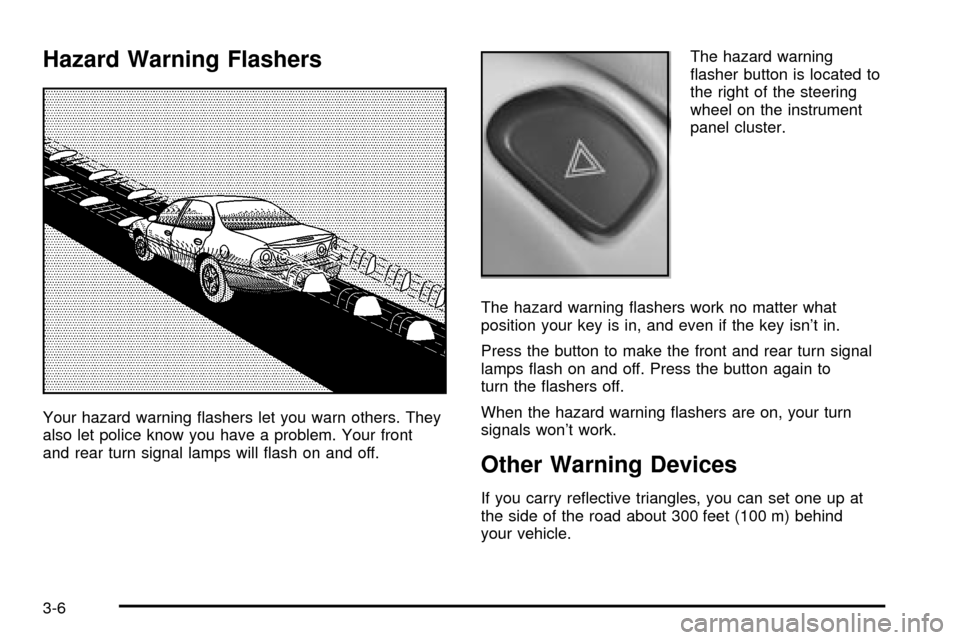
Hazard Warning Flashers
Your hazard warning ¯ashers let you warn others. They
also let police know you have a problem. Your front
and rear turn signal lamps will ¯ash on and off.The hazard warning
¯asher button is located to
the right of the steering
wheel on the instrument
panel cluster.
The hazard warning ¯ashers work no matter what
position your key is in, and even if the key isn't in.
Press the button to make the front and rear turn signal
lamps ¯ash on and off. Press the button again to
turn the ¯ashers off.
When the hazard warning ¯ashers are on, your turn
signals won't work.
Other Warning Devices
If you carry re¯ective triangles, you can set one up at
the side of the road about 300 feet (100 m) behind
your vehicle.
3-6