ECO mode CHEVROLET IMPALA 2004 8.G Owner's Manual
[x] Cancel search | Manufacturer: CHEVROLET, Model Year: 2004, Model line: IMPALA, Model: CHEVROLET IMPALA 2004 8.GPages: 420, PDF Size: 2.73 MB
Page 185 of 420
Playing a Cassette Tape
The tape player is built to work best with tapes that are
up to 30 to 45 minutes long on each side. Tapes
longer than that are so thin they may not work well in
this player. The longer side with the tape visible should
face to the right. If you hear nothing or hear a garbled
sound, the tape may not be in squarely. Press the EJT
button to remove the tape and start over.
If the ignition and radio are off, press the EJT button or
the DISPL knob to insert and to begin play of a tape.
If the ignition is on and the radio is off, the tape can be
inserted and will begin playing. A tape symbol will
appear on the display when a tape is inserted.
While the tape is playing, use VOL, TUNE, SEEK, and
PSCAN controls just as you do for the radio. The
tape symbol and an arrow showing which side of the
tape is playing will appear on the display.
Cassette tape adapter kits for portable CD players will
work in the cassette tape player. See “CD Adapter Kits”
later for more information.Your tape bias is set automatically when a metal or
chrome tape is inserted.
If an error appears on the display, see “Cassette Tape
Messages” later in this section.
1 PREV (Previous):The tape must have at least three
seconds of silence between each selection for previous to
work. Press this pushbutton to go to the previous
selection on the tape if the current selection has been
playing for less than three seconds. If pressed when the
current selection has been playing from three to
13 seconds, it will go to the beginning of the previous
selection or the beginning of the current selection,
depending on the position on the tape. If pressed when
the current selection has been playing for more than
13 seconds, it will go to the beginning of the current
selection.
SEEK and a negative number will appear on the display
while the cassette player is in the previous mode.
Pressing this pushbutton multiple times will increase the
number of selections to be searched back, up to -9.
3-65
Page 189 of 420
Playing the Radio
PWR (Power):Press this knob to turn the system on
and off.
VOL (Volume):Turn this knob to increase or to
decrease volume.
AUTO VOL (Automatic Volume):With automatic
volume, your audio system adjusts automatically
to make up for road and wind noise as you drive.
Set the volume at the desired level. Press this button to
select LOW, MEDIUM, or HIGH. AVOL will appear
on the display. Each higher setting will allow for more
volume compensation at faster vehicle speeds. Then as
you drive, automatic volume increases the volume,
as necessary, to overcome noise at any speed.
The volume level should always sound the same to you
as you drive. NONE will appear on the display if the
radio cannot determine the vehicle speed. If you do not
want to use automatic volume, select OFF.
DISPL (Display):For RDS, press this knob to change
what appears on the display while using RDS. The
display options are station name, RDS station frequency,
PTY, and the name of the program (if available).For XM™ (48 contiguous US states, if equipped), press
the DISPL knob while in XM mode to retrieve four
different categories of information related to the current
song or channel: Artist, Song Title, Category or PTY,
Channel Number/Channel Name.
To change the default on the display, press the DISPL
knob until you see the display you want, then hold
the knob for two seconds. The radio will produce one
beep and the selected display will now be the default.
Finding a Station
BAND:Press this button to switch between FM1, FM2,
AM, or XM1 or XM2 (48 contiguous US states, if
equipped). The display will show your selection.
TUNE:Turn this knob to select radio stations.
qSEEKr:Press the right or the left arrow to seek
to the next or to the previous station and stay there.
The radio will seek only to stations that are in the
selected band and only to those with a strong signal.
3-69
Page 200 of 420
DISPL (Display):For RDS, press this knob to change
what appears on the display while using RDS. The
display options are station name, RDS station frequency,
PTY, and the name of the program (if available).
For XM™ (48 contiguous US states, if equipped), press
the DISPL knob while in XM mode to retrieve four
different categories of information related to the current
song or channel: Artist, Song Title, Category or PTY,
Channel Number/Channel Name.
To change the default on the display, press the DISPL
knob until you see the display you want, then hold
the knob for two seconds. The radio will produce one
beep and the selected display will now be the default.
Finding a Station
BAND:Press this button to switch between FM1, FM2,
AM, or XM1 or XM2 (48 contiguous US states, if
equipped). The display will show your selection.
TUNE:Turn this knob to select radio stations.
qSEEKr:Press the right or the left arrow to seek
to the next or to the previous station and stay there.
The radio will seek only to stations that are in the
selected band and only to those with a strong signal.
qPSCAN (Preset Scan)r:Press and hold
either arrow for more than two seconds and the radio
will produce one beep. The radio will scan to the
rst preset station stored on the pushbuttons, play for
a few seconds, then go on to the next preset station.
SCAN will appear on the display. Press either
arrow again or one of the pushbuttons to stop
scanning presets.
The radio will scan only to the preset stations that are
in the selected band and only to those with a strong
signal.
3-80
Page 207 of 420
Playing a Cassette Tape
Your tape player is built to work best with tapes that are
up to 30 to 45 minutes long on each side. Tapes
longer than that are so thin they may not work well in
this player. The longer side with the tape visible should
face to the right. If the ignition is on and the radio is
off, the tape can be inserted and will begin playing.
A tape symbol is shown on the display whenever a tape
is inserted. If you hear nothing but a garbled sound,
the tape may not be in squarely. Press EJT to remove
the tape and start over. If you want to insert a tape
while the ignition is off, rst press the EJT button or the
DISPL knob.
While the tape is playing, use VOL, TUNE, SEEK, and
PSCAN controls just as you do for the radio. The
radio will display TAPE and an arrow showing which
side of the tape is playing.
Your tape bias is set automatically when a metal or
chrome tape is inserted.
If an error appears on the display, see “Cassette Tape
Messages” later in this section.1 PREV (Previous):Your tape must have at least three
seconds of silence between each selection for previous
to work. Press this pushbutton to go to the previous
selection on the tape if the current selection has been
playing for less than three seconds. If pressed when the
current selection has been playing from 3 to 13 seconds,
it will go to the beginning of the previous selection or
the beginning of the current selection, depending upon
the position on the tape. If pressed when the current
selection has been playing for more than 13 seconds, it
will go to the beginning of the current selection.
SEEK and a negative number will appear on the display
while the cassette player is in the previous mode.
Pressing this pushbutton multiple times will increase the
number of selections to be searched back, up to -9.
2 NEXT:Your tape must have at least three seconds of
silence between each selection for next to work.
Press this pushbutton to go to the next selection on the
tape. If you press this pushbutton more than once,
the player will continue moving forward through the tape.
SEEK and a positive number will appear on the
display. To forward through each selection press the
right SEEK arrow.
3-87
Page 213 of 420
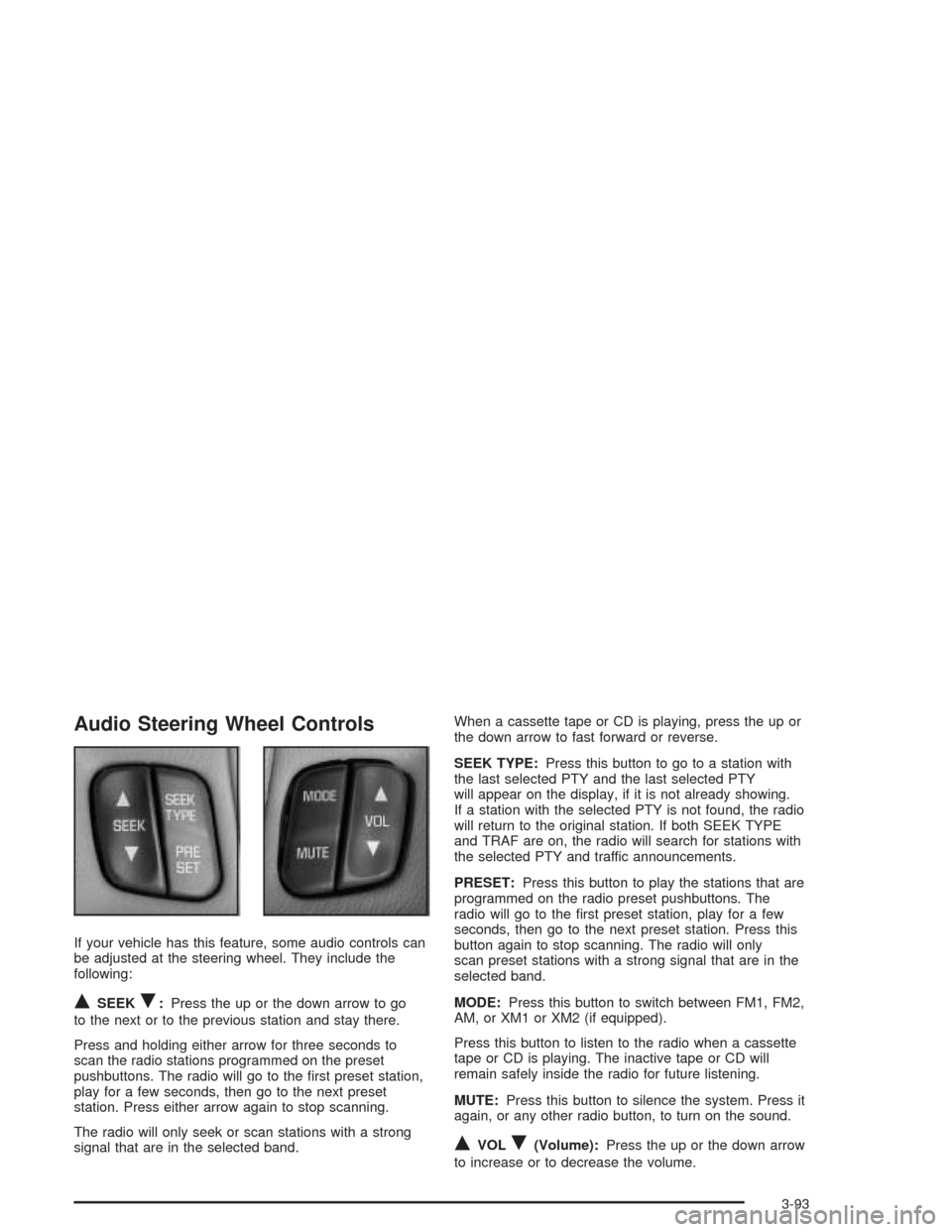
Audio Steering Wheel Controls
If your vehicle has this feature, some audio controls can
be adjusted at the steering wheel. They include the
following:
QSEEKR:Press the up or the down arrow to go
to the next or to the previous station and stay there.
Press and holding either arrow for three seconds to
scan the radio stations programmed on the preset
pushbuttons. The radio will go to the rst preset station,
play for a few seconds, then go to the next preset
station. Press either arrow again to stop scanning.
The radio will only seek or scan stations with a strong
signal that are in the selected band.When a cassette tape or CD is playing, press the up or
the down arrow to fast forward or reverse.
SEEK TYPE:Press this button to go to a station with
the last selected PTY and the last selected PTY
will appear on the display, if it is not already showing.
If a station with the selected PTY is not found, the radio
will return to the original station. If both SEEK TYPE
and TRAF are on, the radio will search for stations with
the selected PTY and traffic announcements.
PRESET:Press this button to play the stations that are
programmed on the radio preset pushbuttons. The
radio will go to the rst preset station, play for a few
seconds, then go to the next preset station. Press this
button again to stop scanning. The radio will only
scan preset stations with a strong signal that are in the
selected band.
MODE:Press this button to switch between FM1, FM2,
AM, or XM1 or XM2 (if equipped).
Press this button to listen to the radio when a cassette
tape or CD is playing. The inactive tape or CD will
remain safely inside the radio for future listening.
MUTE:Press this button to silence the system. Press it
again, or any other radio button, to turn on the sound.
QVOLR(Volume):Press the up or the down arrow
to increase or to decrease the volume.
3-93
Page 299 of 420
If there seems to be no leak, with the engine on, check
to see if the electric engine cooling fans are running.
If the engine is overheating, both fans should be
running. If they aren’t, your vehicle needs service.
Notice:Engine damage from running your engine
without coolant is not covered by your warranty. See
“Overheated Engine Protection Operating Mode”
in the Index for information on driving to a safe
place in an emergency.
Notice:Using coolant other than DEX-COOL
®may
cause premature engine, heater core or radiator
corrosion. In addition, the engine coolant may
require changing sooner, at 30,000 miles (50 000 km)
or 24 months, whichever occurs rst. Any repairs
would not be covered by your warranty. Always use
DEX-COOL
®(silicate-free) coolant in your vehicle.
How to Add Coolant to the Coolant
Recovery Tank
If you haven’t found a problem yet, but the coolant level
isn’t at the COLD mark, add a 50/50 mixture ofclean,
drinkable waterand DEX-COOL
®engine coolant at
the coolant recovery tank. SeeEngine Coolant on
page 5-29
{CAUTION:
Adding only plain water to your cooling
system can be dangerous. Plain water, or
some other liquid such as alcohol, can boil
before the proper coolant mixture will. Your
vehicle’s coolant warning system is set for the
proper coolant mixture. With plain water or the
wrong mixture, your engine could get too hot
but you would not get the overheat warning.
Your engine could catch re and you or others
could be burned. Use a 50/50 mixture of clean,
drinkable water and DEX-COOL
®coolant.
5-37
Page 332 of 420
Intended Outboard Sidewall:The side of an
asymmetrical tire that must always face outward when
mounted on a vehicle.
Kilopascal (kPa):The metric unit for air pressure.
There are 6.9 kPa’s to one psi.
Light Truck (LT-Metric) Tire:A tire used on light duty
trucks and some multipurpose passenger vehicles.
Load Index:An assigned number ranging from 1 to 279
that corresponds to the load carrying capacity of a
tire.
Maximum Ination Pressure:The maximum air
pressure to which a cold tire may be inated. The
maximum air pressure is molded onto the sidewall.
Maximum Load Rating:The load rating for a tire at the
maximum permissible ination pressure for that tire.
Maximum Loaded Vehicle Weight:The sum of curb
weight; accessory weight; vehicle capacity weight;
and production options weight.
Normal Occupant Weight:The number of occupants a
vehicle is designed to seat multiplied by 150 pounds
(68 kg). SeeLoading Your Vehicle on page 4-32.Occupant Distribution:Designated seating positions.
Outward Facing Sidewall:The side of a asymmetrical
tire that has a particular side that faces outward
when mounted on a vehicle. The side of the tire that
contains a whitewall, bears white lettering or bears
manufacturer, brand and or model name molding that is
higher or deeper than the same moldings on the
other sidewall of the tire.
Passenger (P-Metric) Tire:A tire used on passenger
cars and some light duty trucks and multipurpose
vehicles.
Recommended Ination Pressure:Vehicle
manufacturer’s recommended tire ination pressure and
shown on the tire placard. SeeInation - Tire Pressure
on page 5-72andLoading Your Vehicle on page 4-32.
Radial Ply tire:A pneumatic tire in which the ply cords
that extend to the beads are laid at 90 degrees to the
centerline of the tread.
Rim:A metal support for a tire and upon which the tire
beads are seated.
Sidewall:The portion of a tire between the tread and
the bead.
5-70
Page 397 of 420
For prompt and efficient assistance when calling, please
provide the following to the Roadside Assistance
Representative:
Your name, home address, and home telephone
number
Telephone number of your location
Location of the vehicle
Model, year, color, and license plate number
Mileage, Vehicle Identication Number and delivery
date of the vehicle
Description of the problem
While we hope you never have the occasion to use our
service, it is added security while traveling for you
and your family. Remember, we are only a phone
call away. Chevrolet Roadside Assistance:
1-800-CHEV-USA (1-800-234-8872), text
telephone (TTY) users, call 1-888-889-2438.
Chevrolet reserves the right to limit services or
reimbursement to an owner or driver when, in
Chevrolet’s judgement, the claims become excessive
in frequency or type of occurrence.
Roadside Assistance is not part of or included in the
coverage provided by the New Vehicle Limited Warranty.
Chevrolet reserves the right to make any changes or
discontinue the Roadside Assistance program at
any time without notication.
Canadian Roadside Assistance
Vehicles purchased in Canada have an extensive
roadside assistance program accessible from anywhere
in Canada or the United States. Please refer to the
Warranty and Owner Assistance Information book.
Courtesy Transportation
Chevrolet has always exemplied quality and value in
its offering of motor vehicles. To enhance your
ownership experience, we and our participating dealers
are proud to offer Courtesy Transportation, a customer
support program for new vehicles.
The Courtesy Transportation program is offered to retail
purchase/lease customers in conjunction with the
Bumper-to-Bumper coverage provided by the New
Vehicle Limited Warranty. Several transportation options
are available when warranty repairs are required.
This will reduce your inconvenience during warranty
repairs.
7-7
Page 400 of 420
Vehicle Data Collection and Event
Data Recorders
Your vehicle, like other modern motor vehicles, has a
number of sophisticated computer systems that monitor
and control several aspects of the vehicle’s
performance. Your vehicle uses on-board vehicle
computers to monitor emission control components to
optimize fuel economy, to monitor conditions for air bag
deployment and, if so equipped, to provide anti-lock
braking and to help the driver control the vehicle
in difficult driving situations. Some information may be
stored during regular operations to facilitate repair
of detected malfunctions; other information is stored only
in a crash or near crash event by computer systems
commonly called event data recorders (EDR).
In a crash or near crash event, computer systems, such
as the Air Bag Sensing and Diagnostic Module (SDM)
in your vehicle may record information about the
condition of the vehicle and how it was operated, such
as engine speed, brake applications, throttle position,
vehicle speed, safety belt usage, air bag readiness, air
bag performance data, and the severity of a collision.
This information has been used to improve vehicle crash
performance and may be used to improve crash
performance of future vehicles and driving safety. Unlike
the data recorders on many airplanes, these on-board
systems do not record sounds, such as conversation of
vehicle occupants.To read this information, special equipment is needed
and access to the vehicle or the SDM is required.
GM will not access information about a crash event or
share it with others other thanwith the consent of the vehicle owner or, if the
vehicle is leased, with the consent of the lessee,
in response to an official request of police or similar
government office,
as part of GM’s defense of litigation through the
discovery process, or
as required by law.
In addition, once GM collects or receives data, GM may
use the data for GM research needs,
make it available for research where appropriate
condentiality is to be maintained and need is
shown, or
share summary data which is not tied to a specic
vehicle with non-GM organizations for research
purposes.
Others, such as law enforcement, may have access to
the special equipment that can read the information
if they have access to the vehicle or SDM.
If your vehicle is equipped with OnStar
®, please check
the OnStar®subscription service agreement or manual
for information on its operations and data collection.
7-10
Page 410 of 420
Engine (cont.)
Overheating................................................5-32
Starting......................................................2-18
Supercharger Oil.........................................5-24
Engine Cooling When Trailer Towing..................4-43
Engine Oil Additives........................................5-21
Entry Lighting.................................................3-17
Erasing HomeLink
®Buttons..............................2-41
Event Data Recorders (EDR)............................7-10
EXIT (Exit Feature Customization Mode)..............2-52
Express-Down Window....................................2-14
Extender, Safety Belt.......................................1-30
Exterior Lamps...............................................3-14
F
Filter
Engine Air Cleaner......................................5-25
Finding a Program Type (PTY) Station
(RDS and XM™).........................3-60, 3-71, 3-82
Finding a Station............................3-58, 3-69, 3-80
Finish Care....................................................5-98
Finish Damage.............................................5-100
Flash-to-Pass................................................... 3-9
Flat Tire........................................................5-81
Flat Tire, Changing.........................................5-82Fluid
Automatic Transaxle.....................................5-26
Power Steering...........................................5-45
Windshield Washer......................................5-46
FM Stereo.....................................................3-94
FOB HORN (Remote Audible Verication)...........2-48
FOB LIGHT (Remote Visual Verication)............2-47
FOB PROG (Remote Keyless Entry Transmitter
Programming).............................................2-52
Fog Lamps....................................................3-16
Folding Rear Seat............................................ 1-6
Following Distance..........................................4-41
Front Storage Area.........................................2-42
Fuel............................................................... 5-5
Additives...................................................... 5-6
California Fuel.............................................. 5-6
Filling a Portable Fuel Container....................5-10
Filling Your Tank........................................... 5-7
Fuels in Foreign Countries.............................. 5-7
Gage.........................................................3-42
Gasoline Octane........................................... 5-5
Gasoline Specications.................................. 5-5
Low Warning Message.................................3-50
Fuses
Fuses and Circuit Breakers.........................5-103
Windshield Wiper.......................................5-103
6