ECO mode CHEVROLET IMPALA 2005 8.G User Guide
[x] Cancel search | Manufacturer: CHEVROLET, Model Year: 2005, Model line: IMPALA, Model: CHEVROLET IMPALA 2005 8.GPages: 398, PDF Size: 10.04 MB
Page 130 of 398

Delayed Entry Lighting
Delayed entry lighting illuminates the interior for a
period of time after all the doors have been closed.
The ignition must be off for delayed entry lighting
to work. Immediately after all the doors have been
closed, the delayed entry lighting feature will continue to
work until one of the following occurs:
The ignition is ON,
the doors are locked, or
an illumination period of 25 seconds has elapsed.
If during the illumination period a door is opened,
the timed illumination period will be canceled and the
interior lamps will remain on because a door is open.
Delayed Exit Lighting
This feature illuminates the interior for a period of time
after the key is removed from the ignition.
The ignition must be off for delayed exit lighting to work.
When the key is removed, interior illumination will
activate and remain on until one of the following occurs:
The ignition is ON,
the power door locks are activated, or
an illumination period of 25 seconds has elapsed.If during the illumination period a door is opened, the
timed illumination period will be canceled and the interior
lamps will remain on because a door is open.
Parade Dimming
The instrument panel has an added feature called
parade mode. This feature prohibits the dimming of your
instrument panel displays during the daylight while
the headlamps are on so that you’ll still be able to see
the displays.
Reading Lamps
Your vehicle may be equipped with reading lamps that
are located on the assist handles in the headliner.
These lamps and the interior courtesy lamps come on
when any door is opened. Press the lens to turn them on
and off.
3-18
Page 135 of 398

For quick cool down on hot days, do the following:
1. Select the vent mode.
2. Select the recirculation mode.
3. Select A/C.
4. Select the coolest temperature for both zones.
5. Select the highest fan speeds.
Using these settings together for long periods of time
may cause the air inside of your vehicle to become too
dry. To prevent this from happening, after the air
inside of your vehicle has cooled, turn the recirculation
mode off.
The air conditioning system removes moisture from the
air, so you may sometimes notice a small amount of
water dripping underneath your vehicle while idling
or after turning off the engine. This is normal.
Defogging and Defrosting
Fog on the inside of the windows is a result of high
humidity (moisture) condensing on the cool window
glass. This can be minimized if the climate control
system is used properly. There are two modes to clear
fog or frost from your windshield. Use the defog
mode to clear the windows of fog or moisture and warm
the passengers. Use the defrost mode to remove fog
or frost from the windshield more quickly.Turn the right knob clockwise to select the defog or
defrost mode.
-(Defog):This mode directs air equally to the
windshield and the oor outlets. When you select this
mode, the system turns off recirculation and runs the air
conditioning compressor unless the outside temperature
is below 40°F (4°C). The recirculation mode cannot
be selected while in the defog mode.
Do not drive the vehicle until all the windows are clear.
0(Defrost):This mode directs half of the air to
the windshield and side window vents and half to the
oor vents. In this mode, the system will automatically
force outside air into your vehicle. The recirculation
mode cannot be selected while in the defog mode.
The air conditioning compressor will run automatically in
this setting, unless the outside temperature is below
40°F (4°C).
Do not drive the vehicle until all the windows are clear.
3-23
Page 142 of 398

Speedometer and Odometer
Your speedometer lets you see your speed in both
miles per hour (mph) and kilometers per hour (km/h).
Your odometer shows how far your vehicle has
been driven in either miles (used in the United States)
or in kilometers (used in Canada).
Your vehicle has a tamper-resistant odometer. If you
see ERROR, you’ll know someone has probably
tampered with it and the numbers may not be accurate.
You may wonder what happens if your vehicle needs a
new odometer installed. If the new one can be set to the
mileage total of the old odometer, then that will be done.
But if it can’t, then it will be set at zero and a label must be
put on the driver’s door to show the old mileage reading
when the new odometer was installed.
Trip Odometer
Your trip odometer tells how far you have driven since
you last reset it.
Your trip/select reset switch will go back and forth
between the odometer and the trip odometer if the button
is pressed and released within 1.5 seconds. If the button
is pressed and held for longer than 1.5 seconds while in
the trip odometer mode, it will be reset to zero. If the
button is pressed and held for longer than 1.5 seconds
while in the odometer mode, it will have no effect.
Your trip odometer will work no matter what position
your key is in, and even if the key isn’t in.
Tachometer
Your vehicle may have a
tachometer that displays
the engine speed in
thousands of revolutions
per minute (rpm).
Safety Belt Reminder Light
When the key is turned to ON, a chime will come on for
several seconds to remind people to fasten their safety
belts, unless the driver’s safety belt is already buckled.
The safety belt light will
also come on and stay on
for several seconds,
then it will ash for
several more.
3-30
Page 161 of 398
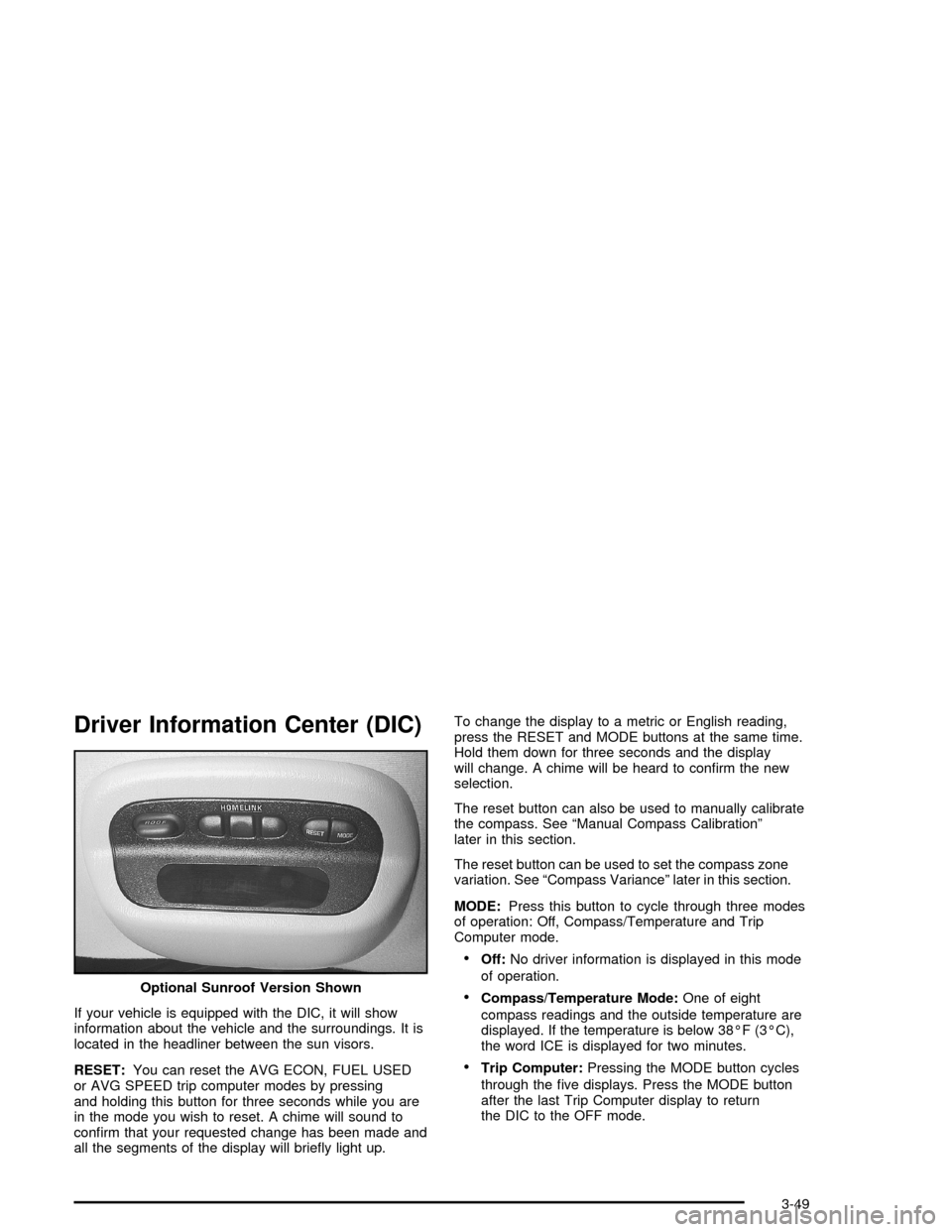
Driver Information Center (DIC)
If your vehicle is equipped with the DIC, it will show
information about the vehicle and the surroundings. It is
located in the headliner between the sun visors.
RESET:You can reset the AVG ECON, FUEL USED
or AVG SPEED trip computer modes by pressing
and holding this button for three seconds while you are
in the mode you wish to reset. A chime will sound to
conrm that your requested change has been made and
all the segments of the display will briey light up.To change the display to a metric or English reading,
press the RESET and MODE buttons at the same time.
Hold them down for three seconds and the display
will change. A chime will be heard to conrm the new
selection.
The reset button can also be used to manually calibrate
the compass. See “Manual Compass Calibration”
later in this section.
The reset button can be used to set the compass zone
variation. See “Compass Variance” later in this section.
MODE:Press this button to cycle through three modes
of operation: Off, Compass/Temperature and Trip
Computer mode.
Off:No driver information is displayed in this mode
of operation.
Compass/Temperature Mode:One of eight
compass readings and the outside temperature are
displayed. If the temperature is below 38°F (3°C),
the word ICE is displayed for two minutes.
Trip Computer:Pressing the MODE button cycles
through the ve displays. Press the MODE button
after the last Trip Computer display to return
the DIC to the OFF mode. Optional Sunroof Version Shown
3-49
Page 162 of 398

Compass Variance
Compass variance is the difference between magnetic
north and geographic north. In some areas of the
country, the difference is great enough to cause the
compass to give false readings. If this occurs, the
compass variance must be set.
Setting the Variance
Turn the ignition on and cycle the DIC to the
Compass/Temperature mode. Press the RESET button
for about ve seconds.The last entered variance zone number and VAR will be
displayed. Press the MODE button until the proper
variance zone number on the map is shown. Press the
RESET button to set the new variance zone and
resume normal operation.
All the display segments will be illuminated briey to
acknowledge the change in zone number. A chime will
sound to conrm that the new zone number has
been set.
Automatic Compass Calibration
The compass is self-calibrating, which eliminates the
need to manually set the compass. When the vehicle is
new, the calibration process may not be complete. In
these cases CAL will be displayed, and all segments of
the compass will be illuminated where the compass
reading is normally displayed.
To calibrate the compass, in an area free from large
metal objects, make one to two 360° turns. The
calibration symbol will turn off and the compass reading
will be displayed.
3-50
Page 163 of 398

Manual Compass Calibration
If the compass appears erratic and the calibration
symbol does not appear, you must manually put the
compass into the calibration mode.
Turn the ignition on and cycle the DIC to the
Compass/Temperature mode. Press the RESET button
for at least 10 seconds until the calibration symbol
appears and all segments of the compass display are
illuminated. A chime will sound to conrm that the
calibration mode is active. Release the button and
complete two or three 360° turns in an area free from
large metal objects. The calibration symbol will turn
off and the compass reading will be displayed. A chime
will sound to verify that the calibration is complete.
Error Displays
An error of the speed sensor or fuel sender will
cause -E- to be displayed.
In the absence of vehicle communications,
adash--isdisplayed.
If one of these error messages appear, see your
GM dealer.
Trip Computer
There are ve trip computer displays which may be
stepped through by pushing the MODE button.
The information will appear in the following order:
AVG ECON (Average Fuel Economy):This shows the
average fuel economy since the last reset.
INST ECON (Instantaneous Fuel Economy):This
shows fuel economy for the most recent second of driving.
RANGE (Trip Range):This shows the estimated
distance that can be traveled with the remaining fuel.
The fuel economy used to calculate range is based
on the last few hours of driving. When in a low
fuel condition, LO is displayed.
FUEL USED (Trip Fuel Used):This shows the
accumulated fuel used since the last reset.
AVG SPEED (Average Speed):This shows the
average speed since the last reset.
Resetting the Trip Computer
Press and hold the RESET button for at least
three seconds. The reset is acknowledged with all
segments of the display lit briey and a chime. A reset
can only be done in AVG ECON, FUEL USED and
AVG SPEED displays. Each setting must be reset
individually.
3-51
Page 166 of 398

Playing the Radio
PWR (Power):Press this knob to turn the system on
and off.
VOL (Volume):Turn this knob to increase or to
decrease the volume.
DISPL (Display):Press this knob to switch the display
between the radio station frequency and the time.
When the ignition is off, press this knob to display
the time.
For RDS, press the DISPL knob to change what
appears on the display while using RDS. The display
options are station name, RDS station frequency, PTY,
and the name of the program (if available).
For XM™ (if equipped), press the DISPL knob while in
XM mode to retrieve four different categories of
information related to the current song or channel:
Artist, Song Title, Category or PTY, Channel
Number/Channel Name.
To change the default on the display, press the DISPL
knob until you see the display you want, then hold
the knob for two seconds. The radio will produce one
beep and the selected display will now be the default.AUTO VOL (Automatic Volume):With automatic
volume, the audio system adjusts automatically to make
up for road and wind noise as you drive.
Set the volume at the desired level. Press this button to
select LOW, MEDIUM, or HIGH. AVOL will appear
on the display. Each higher setting will allow for more
volume compensation at faster vehicle speeds. Then as
you drive, automatic volume increases the volume,
as necessary, to overcome noise at any speed.
The volume level should always sound the same to you
as you drive. NONE will appear on the display if the
radio cannot determine the vehicle speed. To turn
automatic volume off, press this button until OFF
appears on the display.
Finding a Station
BAND:Press this button to switch between FM1, FM2,
AM, or XM1 or XM2 (if equipped). The display will
show the selection.
TUNE:Turn this knob to select radio stations.
qSEEKr:Press the right or the left arrow to go to
the next or to the previous station and stay there.
The radio will only seek stations with a strong signal
that are in the selected band.
3-54
Page 167 of 398

qPSCANr(Preset Scan):Press and hold either
arrow for more than two seconds until SCAN appears on
the display and you hear a beep. The radio will go to
the rst preset station stored on the pushbuttons,
play for a few seconds, then go on to the next preset
station. Press either arrow again or one of the
pushbuttons to stop scanning presets.
The radio will only scan the preset stations with a strong
signal that are in the selected band.
Setting Preset Stations
Up to 30 stations (six FM1, six FM2, and six AM,
six XM1 and six XM2 (if equipped)), can be programmed
on the six numbered pushbuttons, by performing the
following steps:
1. Turn the radio on.
2. Press BAND to select FM1, FM2, AM, or XM1
or XM2.
3. Tune in the desired station.
4. Press AUTO TONE to select the equalization.
5. Press and hold one of the six numbered
pushbuttons until you hear a beep. Whenever that
numbered pushbutton is pressed, the station
that was set will return and the equalization that
was selected will be stored for that pushbutton.
6. Repeat the steps for each pushbutton.
Setting the Tone (Bass/Treble)
AUDIO:Push and release the AUDIO knob until BASS
or TREB appears on the display. Then turn the knob
to increase or to decrease. The display will show
the bass or the treble level. If a station is weak or noisy,
decrease the treble.
To adjust the bass and the treble to the middle position,
push and hold the AUDIO knob. The radio will produce
one beep and adjust the display level to the middle
position.
To adjust all tone and speaker controls to the middle
position, push and hold the AUDIO knob when no tone
or speaker control is displayed. ALL will appear on
the display and you will hear a beep.
AUTO TONE (Automatic Tone):Press this button to
select customized equalization settings designed
for country/western, jazz, talk, pop, rock, and classical.
To return the bass and treble to the manual mode,
push and release the AUDIO knob until MANUAL
appears on the display.
3-55
Page 173 of 398

Playing a Cassette Tape
The tape player is built to work best with tapes that are
up to 30 to 45 minutes long on each side. Tapes
longer than that are so thin they may not work well in
this player. The longer side with the tape visible should
face to the right. If you hear nothing or hear a garbled
sound, the tape may not be in squarely. Press the
EJT button to remove the tape and start over.
If the ignition and radio are off, press the EJT button or
the DISPL knob to insert and to begin play of a tape.
If the ignition is on and the radio is off, the tape can be
inserted and will begin playing. A tape symbol will
appear on the display when a tape is inserted.
While the tape is playing, use VOL, TUNE, SEEK, and
PSCAN controls just as you do for the radio. The
tape symbol and an arrow showing which side of the
tape is playing will appear on the display.
Cassette tape adapter kits for portable CD players will
work in the cassette tape player. See “CD Adapter Kits”
later for more information.Your tape bias is set automatically when a metal or
chrome tape is inserted.
If an error appears on the display, see “Cassette Tape
Messages” later in this section.
1 PREV (Previous):The tape must have at least
three seconds of silence between each selection for
previous to work. Press this pushbutton to go to
the previous selection on the tape if the current selection
has been playing for less than three seconds. If pressed
when the current selection has been playing from
three to 13 seconds, it will go to the beginning of the
previous selection or the beginning of the current
selection, depending on the position on the tape.
If pressed when the current selection has been playing
for more than 13 seconds, it will go to the beginning
of the current selection.
SEEK and a negative number will appear on the display
while the cassette player is in the previous mode.
Pressing this pushbutton multiple times will increase the
number of selections to be searched back, up to -9.
3-61
Page 177 of 398

Playing the Radio
PWR (Power):Press this knob to turn the system on
and off.
VOL (Volume):Turn this knob to increase or to
decrease the volume.
AUTO VOL (Automatic Volume):With automatic
volume, the audio system adjusts automatically to make
up for road and wind noise as you drive.
Set the volume at the desired level. Press this button to
select LOW, MEDIUM, or HIGH. AVOL will appear on the
display. Each higher setting will allow for more volume
compensation at faster vehicle speeds. Then, as you
drive, automatic volume increases the volume, as
necessary, to overcome noise at any speed. The volume
level should always sound the same to you as you drive.
NONE will appear on the display if the radio cannot
determine the vehicle speed. To turn automatic volume
off, press this button until OFF appears on the display.
DISPL (Display):Press this knob to switch the display
between the radio station frequency and the time. When
the ignition is off, press this knob to display the time.
For RDS, press the DISPL knob to change what appears
on the display while using RDS. The display options are
station name, RDS station frequency, PTY, and the name
of the program (if available).For XM™ (if equipped), press the DISPL knob while
in XM™ mode to retrieve four different categories
of information related to the current song or channel:
Artist, Song Title, Category or PTY, Channel
Number/Channel Name.
To change the default on the display, press the DISPL
knob until you see the display you want, then hold the
knob for two seconds. The radio will produce a beep and
the selected display will now be the default.
Finding a Station
BAND:Press this button to switch between FM1, FM2,
AM, or XM1 or XM2 (if equipped). The display will
show the selection.
TUNE:Turn this knob to select radio stations.
qSEEKr:Press the right or the left arrow to go to
the next or to the previous station and stay there.
The radio will only seek stations with a strong signal
that are in the selected band.
3-65