engine overheat CHEVROLET IMPALA 2005 8.G User Guide
[x] Cancel search | Manufacturer: CHEVROLET, Model Year: 2005, Model line: IMPALA, Model: CHEVROLET IMPALA 2005 8.GPages: 398, PDF Size: 10.04 MB
Page 274 of 398

4. Inspect or replace the engine air cleaner/lter.
5. To reinstall the cover, position the tabs through the
slots on the housing. A notch on the sides of the
lter cover will indicate the correct engagement.
Reinstall the two clips on the top of the housing
when you are nished.
{CAUTION:
Operating the engine with the air cleaner/lter
off can cause you or others to be burned.
The air cleaner not only cleans the air; it helps
to stop ame if the engine backres. If it is
not there and the engine backres, you could
be burned. Do not drive with it off, and be
careful working on the engine with the air
cleaner/lter off.
Notice:If the air cleaner/lter is off, a backre
can cause a damaging engine re. And, dirt
can easily get into your engine, which will damage
it. Always have the air cleaner/lter in place
when you are driving.
Automatic Transaxle Fluid
When to Check and Change Automatic
Transaxle Fluid
A good time to check your automatic transaxle uid
level is when the engine oil is changed.
Change the uid and lter at the intervals listed in
Additional Required Services on page 6-6, and be sure
to use the transaxle uid listed inRecommended
Fluids and Lubricants on page 6-12.
How to Check Automatic Transaxle
Fluid
Because this operation can be a little difficult, you may
choose to have this done at the dealership service
department.
If you do it yourself, be sure to follow all the instructions
here, or you could get a false reading on the dipstick.
Notice:Too much or too little uid can damage the
transaxle. Too much can mean that some of the uid
could come out and fall on hot engine or exhaust
system parts, starting a re. Too little uid could
cause the transaxle to overheat. Be sure to get an
accurate reading if you check the transaxle uid.
5-26
Page 277 of 398

Engine Coolant
The cooling system in your vehicle is lled with
DEX-COOL®engine coolant. This coolant is designed
to remain in your vehicle for ve years or 150,000 miles
(240 000 km), whichever occurs rst, if you add only
DEX-COOL
®extended life coolant.
The following explains your cooling system and how to
add coolant when it is low. If you have a problem
with engine overheating or if you need to add coolant to
your radiator, seeEngine Overheating on page 5-32.A 50/50 mixture of clean, drinkable water and
DEX-COOL
®coolant will:
Give freezing protection down to−34°F (−37°C).
Give boiling protection up to 265°F (129°C).
Protect against rust and corrosion.
Help keep the proper engine temperature.
Let the warning lights and gages work as they
should.
Notice:Using coolant other than DEX-COOL
®may
cause premature engine, heater core or radiator
corrosion. In addition, the engine coolant may
require changing sooner, at 30,000 miles (50 000 km)
or 24 months, whichever occurs rst. Any repairs
would not be covered by your warranty. Always use
DEX-COOL
®(silicate-free) coolant in your vehicle.
5-29
Page 278 of 398

What to Use
Use a mixture of one-half clean, drinkable water and
one-half DEX-COOL®coolant which will not damage
aluminum parts. If you use this coolant mixture, you do
not need to add anything else.
{CAUTION:
Adding only plain water to your cooling
system can be dangerous. Plain water, or
some other liquid such as alcohol, can boil
before the proper coolant mixture will. Your
vehicle’s coolant warning system is set for the
proper coolant mixture. With plain water or the
wrong mixture, your engine could get too hot
but you would not get the overheat warning.
Your engine could catch re and you or others
could be burned. Use a 50/50 mixture of clean,
drinkable water and DEX-COOL
®coolant.
Notice:If you use an improper coolant mixture,
your engine could overheat and be badly damaged.
The repair cost would not be covered by your
warranty. Too much water in the mixture can freeze
and crack the engine, radiator, heater core and
other parts.If you have to add coolant more than four times a year,
have your dealer check your cooling system.
Notice:If you use the proper coolant, you do not
have to add extra inhibitors or additives which claim
to improve the system. These can be harmful.
Checking Coolant
The coolant recovery tank
is located between the
power steering uid
reservoir and the
underhood fuse block, in
the engine compartment,
on the passenger’s
side of the vehicle.
SeeEngine Compartment
Overview on page 5-12
for more information
on location.
The vehicle must be on a level surface. When your
engine is cold, the coolant level should be at the
COLD mark or a little higher. When your engine is
warm, the level should be up to the HOT mark or
a little higher.
5-30
Page 279 of 398
Adding Coolant
If you need more coolant, add the proper DEX-COOL®
coolant mixture at the coolant recovery tank, but be
careful not to spill it.
If the coolant recovery tank is completely empty,
add coolant to the radiator. SeeEngine Overheating on
page 5-32.
{CAUTION:
Turning the radiator pressure cap when the
engine and radiator are hot can allow steam
and scalding liquids to blow out and burn you
badly. With the coolant recovery tank, you will
almost never have to add coolant at the
radiator. Never turn the radiator pressure
cap — even a little — when the engine and
radiator are hot.
{CAUTION:
You can be burned if you spill coolant on hot
engine parts. Coolant contains ethylene glycol,
and it will burn if the engine parts are hot
enough. Do not spill coolant on a hot engine.
Occasionally check the coolant level in the radiator.
For information on how to add coolant to the radiator,
seeCooling System on page 5-34.
Radiator Pressure Cap
Notice:The radiator cap on your vehicle is a
pressure-type cap and must be tightly installed to
prevent coolant loss and possible engine damage
from overheating. Be sure the arrows on the cap line
up with the overow tube on the radiator ller neck.
The radiator pressure cap is located in the front of the
engine compartment on the passenger’s side of the
vehicle, near the diagonal cross brace. SeeEngine
Compartment Overview on page 5-12for more
information on location.
5-31
Page 280 of 398
Engine Overheating
You will nd a coolant temperature gage and a warning
message about a hot engine on your instrument
panel cluster. SeeEngine Coolant Temperature Gage
on page 3-34andHot Coolant Temperature Warning
Message on page 3-42.
If Steam Is Coming From Your Engine
{CAUTION:
Steam from an overheated engine can burn
you badly, even if you just open the hood.
Stay away from the engine if you see or hear
steam coming from it. Just turn it off and get
everyone away from the vehicle until it cools
down. Wait until there is no sign of steam or
coolant before you open the hood.
CAUTION: (Continued)
CAUTION: (Continued)
If you keep driving when your engine is
overheated, the liquids in it can catch re.
You or others could be badly burned.
Stop your engine if it overheats, and get out
of the vehicle until the engine is cool.
SeeOverheated Engine Protection Operating
Mode on page 5-34for information on driving
to a safe place in an emergency.
Notice:If your engine catches re because you
keep driving with no coolant, your vehicle can
be badly damaged. The costly repairs would not be
covered by your warranty. SeeOverheated Engine
Protection Operating Mode on page 5-34for
information on driving to a safe place in an
emergency.
5-32
Page 281 of 398

If No Steam Is Coming From Your
Engine
An overheat warning along with a low coolant message
can indicate a serious problem.
If you get an engine overheat warning, but see or hear
no steam, the problem may not be too serious.
Sometimes the engine can get a little too hot when you:
Climb a long hill on a hot day.
Stop after high-speed driving.
Idle for long periods in traffic.
Tow a trailer.
If you get the overheat warning with no sign of steam,
try this for a minute or so:
1. In heavy traffic, let the engine idle in NEUTRAL (N)
while stopped. If it is safe to do so, pull off the road,
shift to PARK (P) or NEUTRAL (N) and let the
engine idle.
2. Turn on your heater to full hot at the highest fan
speed and open the windows as necessary.If you no longer have the overheat warning, you can
drive. Just to be safe, drive slower for about 10 minutes.
If the warning does not come back on, you can drive
normally.
If the warning continues, pull over, stop, and park your
vehicle right away.
If there is still no sign of steam, you can idle the engine
for three minutes while you are parked. If you still
have the warning, turn off the engine and get everyone
out of the vehicle until it cools down. Also, see
“Overheated Engine Protection Operating Mode” later
in this section.
You may decide not to lift the hood but to get service
help right away.
5-33
Page 282 of 398
Overheated Engine Protection
Operating Mode
This emergency operating mode allows your vehicle to
be driven to a safe place in an emergency situation.
If an overheated engine condition exists, an overheat
protection mode which alternates ring groups of
cylinders helps prevent engine damage. In this mode,
you will notice a signicant loss in power and engine
performance. The low coolant light may come on
and the temperature gage will indicate an overheat
condition exists. Driving extended miles (km) and/or
towing a trailer in the overheat protection mode should
be avoided.
Notice:After driving in the overheated engine
protection operating mode, to avoid engine damage,
allow the engine to cool before attempting any
repair. The engine oil will be severely degraded.
Repair the cause of coolant loss, change the oil
and reset the oil life system. SeeEngine Oil
on page 5-18.
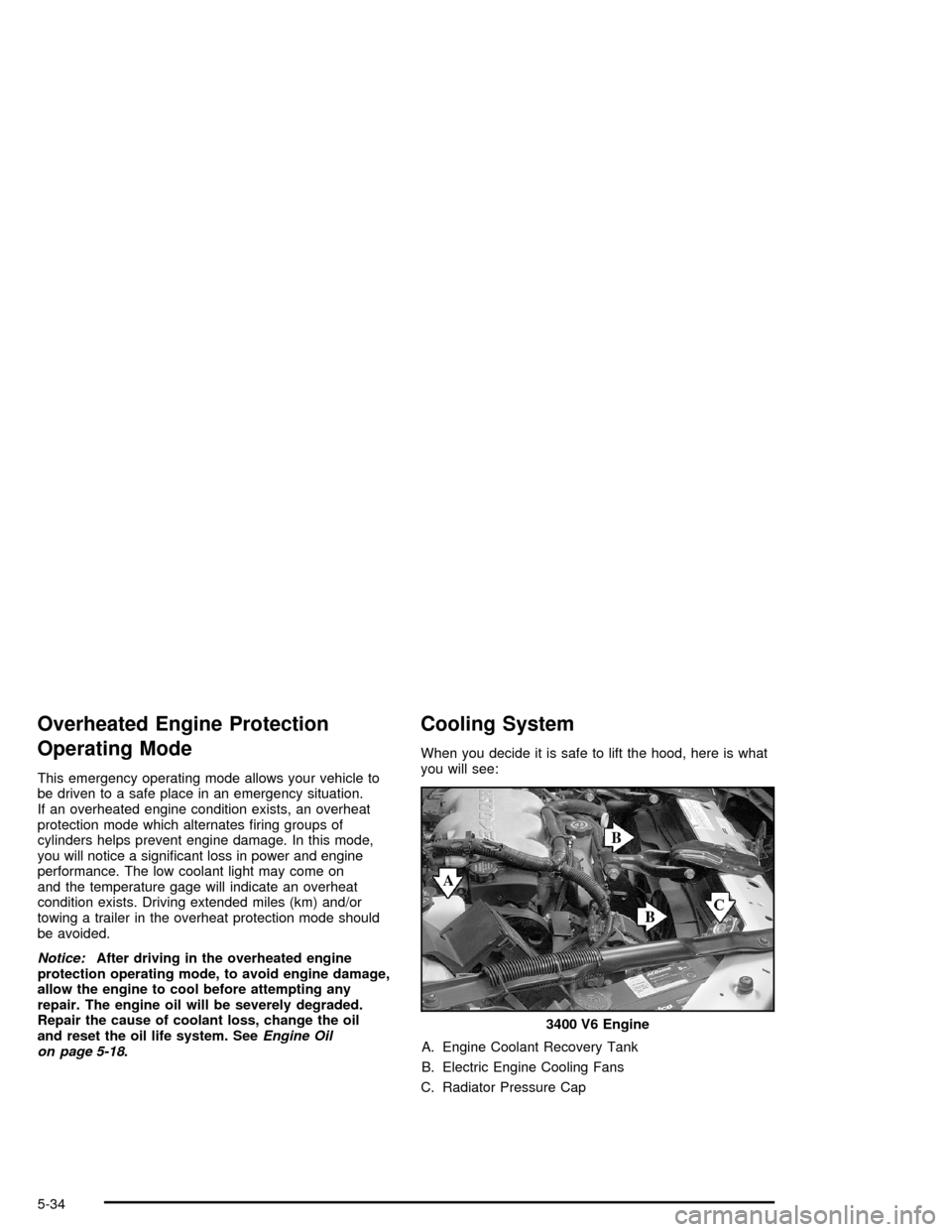
Cooling System
When you decide it is safe to lift the hood, here is what
you will see:
A. Engine Coolant Recovery Tank
B. Electric Engine Cooling Fans
C. Radiator Pressure Cap3400 V6 Engine
5-34
Page 284 of 398

To check the coolant level, look for the COLD mark on
the side of the coolant recovery tank that faces the
engine. When the engine is cold, the coolant level
should be at or above the COLD mark on the coolant
recovery tank. If it is not, you may have a leak at
the pressure cap or in the radiator hoses, heater hoses,
radiator, water pump, or somewhere else in the
cooling system.
{CAUTION:
Heater and radiator hoses, and other engine
parts, can be very hot. Do not touch them.
If you do, you can be burned.
Do not run the engine if there is a leak. If you
run the engine, it could lose all coolant.
That could cause an engine re, and you could
be burned. Get any leak xed before you drive
the vehicle.If there seems to be no leak, with the engine on, check
to see if the electric engine cooling fans are running.
If the engine is overheating, both fans should be
running. If they are not, your vehicle needs service.
Notice:Engine damage from running your engine
without coolant is not covered by your warranty.
SeeOverheated Engine Protection Operating Mode
on page 5-34for information on driving to a safe
place in an emergency.
Notice:Using coolant other than DEX-COOL
®may
cause premature engine, heater core or radiator
corrosion. In addition, the engine coolant may
require changing sooner, at 30,000 miles (50 000 km)
or 24 months, whichever occurs rst. Any repairs
would not be covered by your warranty. Always use
DEX-COOL
®(silicate-free) coolant in your vehicle.
5-36
Page 285 of 398

How to Add Coolant to the Coolant
Recovery Tank
If you have not found a problem yet, but the coolant
level is not at the COLD mark, add a 50/50 mixture of
clean, drinkable water and DEX-COOL
®engine
coolant at the coolant recovery tank. SeeEngine
Coolant on page 5-29.
{CAUTION:
Adding only plain water to your cooling
system can be dangerous. Plain water, or
some other liquid such as alcohol, can boil
before the proper coolant mixture will.
Your vehicle’s coolant warning system is set
for the proper coolant mixture. With plain
water or the wrong mixture, your engine could
get too hot but you would not get the overheat
warning. Your engine could catch re and you
or others could be burned. Use a 50/50 mixture
of clean, drinkable water and DEX-COOL
®
coolant.Notice:In cold weather, water can freeze and crack
the engine, radiator, heater core and other parts.
Use the recommended coolant and the proper
coolant mixture.
{CAUTION:
You can be burned if you spill coolant on hot
engine parts. Coolant contains ethylene glycol
and it will burn if the engine parts are hot
enough. Do not spill coolant on a hot engine.
When the coolant in the coolant recovery tank is at the
COLD mark, start your vehicle.
5-37
Page 286 of 398
If the overheat warning continues, there is one more
thing you can try. You can add the proper coolant
mixture directly to the radiator, but be sure the cooling
system is cool before you do it.
{CAUTION:
Steam and scalding liquids from a hot cooling
system can blow out and burn you badly.
They are under pressure, and if you turn the
radiator pressure cap — even a little — they
can come out at high speed. Never turn the
cap when the cooling system, including the
radiator pressure cap, is hot. Wait for the
cooling system and radiator pressure cap to
cool if you ever have to turn the pressure cap.
How to Add Coolant to the Radiator
Notice:Your engine has a specic radiator ll
procedure. Failure to follow this procedure could
cause your engine to overheat and be severely
damaged.
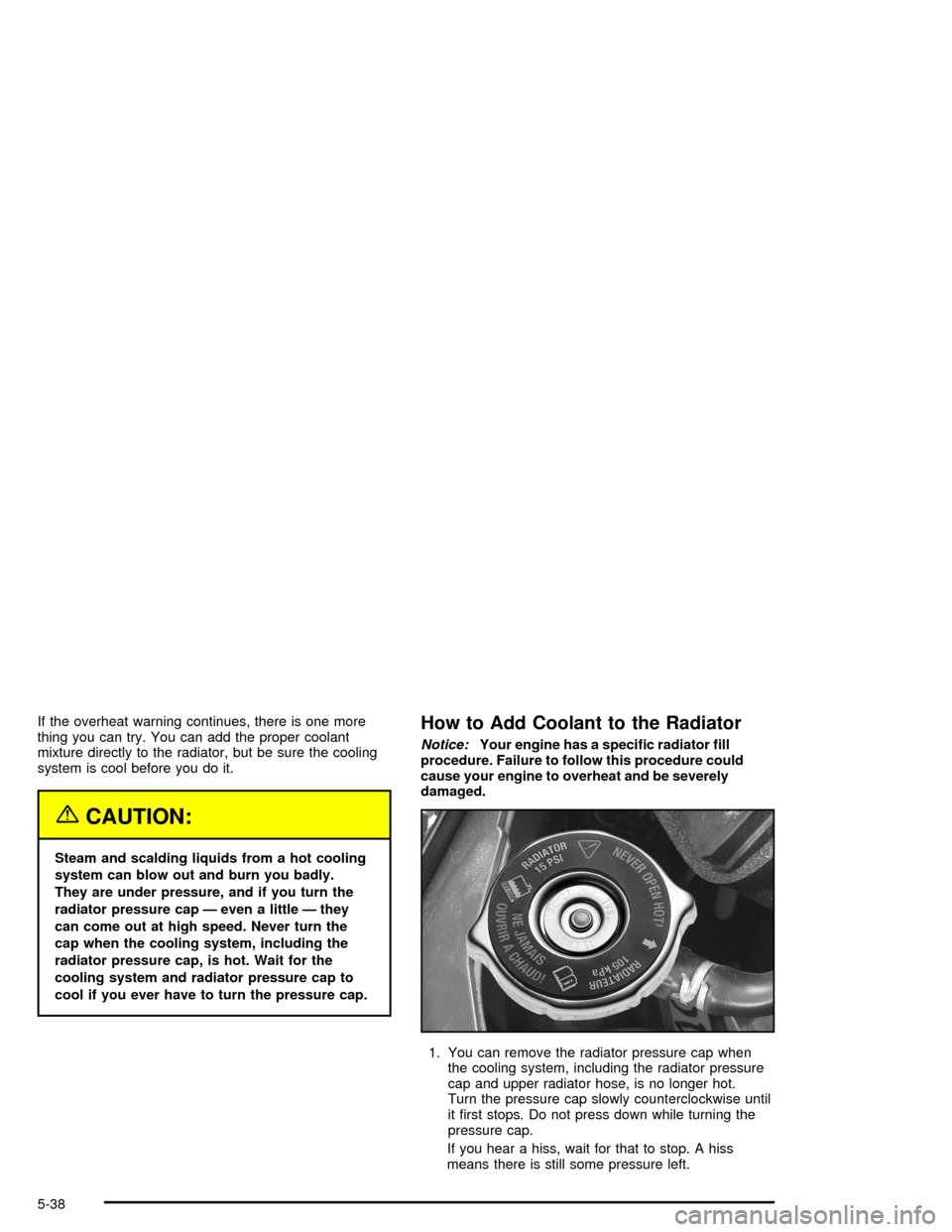
1. You can remove the radiator pressure cap when
the cooling system, including the radiator pressure
cap and upper radiator hose, is no longer hot.
Turn the pressure cap slowly counterclockwise until
it rst stops. Do not press down while turning the
pressure cap.
If you hear a hiss, wait for that to stop. A hiss
means there is still some pressure left.
5-38