trunk CHEVROLET IMPALA 2005 8.G User Guide
[x] Cancel search | Manufacturer: CHEVROLET, Model Year: 2005, Model line: IMPALA, Model: CHEVROLET IMPALA 2005 8.GPages: 398, PDF Size: 10.04 MB
Page 104 of 398

Vehicle Personalization
Some of the convenience features can be reset or
customized to perform according to your preference.
Features you can program depend upon the options
that came with your vehicle. The following list shows
features that can be reset or customized along with
the options.
Settings (Available for All)
Engine Oil Life System Reset (Available for All)
Low Tire Pressure Reset (If Equipped)
Delayed Headlamp Illumination (Available for All)
Automatic Door Lock and Unlock (Available for All)
Remote Visual Verication (Available with Remote
Keyless Entry)
Remote Audible Verication (Available with Remote
Keyless Entry)
Content Theft Operation (Optional with Content
Theft System)
Trunk Jamb (Optional with Content Theft System)
Horn Chirp On Timer (Available with Remote
Keyless Entry)
Remote Keyless Entry Transmitter Programming
(Available with Remote Keyless Entry)
Return to Original Factory Settings
(Available for All)
Exit Vehicle Customization Mode
Programmable Modes
To reset or customize the features, rst enter the
vehicle customization main menu. To enter the main
menu, do the following:
1. Turn the ignition to ACC or ON. The radio must
be off.
2. Press and hold the TUNE or DISP knob on the
radio for at least ve seconds until SETTINGS
is displayed.
3. Press the SEEK or PSCAN up or down arrows to
scroll through each available feature on your
main menu.
4. Press the PREV or NEXT buttons to scroll through
the lower menu. An asterisk (*) will appear next to
the item that is the current setting.
The following information shows how to reset or
customize features after entering the main menu.
2-38
Page 110 of 398

TRNKJAMB (Trunk Jamb)
This feature allows the content theft system trunk lock
sensor to be disabled or enabled.
Programmable Modes
Mode 1:TRNK OFF
Mode 2:TRNK ON
Your vehicle was originally programmed to Mode 2.
The mode may have been changed since then.
To determine the current mode, or to change the mode,
do the following:
1. Scroll, using the SEEK/PSCAN up or down arrows,
until TRNKJAMB appears on the display.
2. Press the PREV or NEXT button to enter the
submenu. The current selection will have an
asterisk (*) next to it. If you do not wish to change the
current mode, you can either exit the programming
mode by following the directions later in this section
or program the next feature available on your vehicle.
3. Scroll, using the PREV or NEXT buttons, through
the modes to change the current mode.
4. With your preference displayed, press the
TUNE/DISP button to select. A chime will be heard
to verify the new setting. The new selection will
be displayed with an asterisk (*) for one second.The mode you selected is now set. You can either exit
the programming mode by following the instructions
later in this section or program the next feature available
on your vehicle.
CHIRP (Horn Chirp Timer)
This feature allows you to choose between short or long
horn chirp sounds when the remote keyless entry
transmitter is used.
Programmable Modes
Mode 1:SHORT
Mode 2:LONG
Your vehicle was originally programmed to Mode 1.
The mode may have been changed since then.
To determine the current mode, or to change the mode,
do the following:
1. Scroll, using the SEEK/PSCAN up or down arrows,
until CHIRP appears on the display.
2. Press the PREV or NEXT button to enter the
submenu. The current selection will have an
asterisk (*) next to it. If you do not wish to change the
current mode, you can either exit the programming
mode by following the directions later in this section
or program the next feature available on your vehicle.
3. Scroll, using the PREV or NEXT buttons, through
the modes to change the current mode.
2-44
Page 114 of 398

Message Center.............................................3-40
Service Traction System Warning Message......3-40
Traction Active Message................................3-41
Battery Warning Message..............................3-41
Hot Coolant Temperature Warning Message.....3-42
Low Oil Pressure Message............................3-42
Low Engine Oil Level Message.......................3-43
Change Engine Oil Message..........................3-44
Low Tire Message........................................3-44
Door Ajar Warning Message...........................3-45
Trunk Ajar Warning Message.........................3-45
Security Message.........................................3-46
Low Washer Fluid Warning Message...............3-46
Low Fuel Warning Message...........................3-47
Low Brake Fluid Warning Message.................3-47
Service Vehicle Soon Message.......................3-48
Highbeam Out Warning Message....................3-48Driver Information Center (DIC).......................3-49
Trip Computer................................................3-51
Audio System(s).............................................3-52
Setting the Time...........................................3-52
Radio with Cassette......................................3-53
Radio with CD..............................................3-64
Radio with Cassette and CD..........................3-74
Theft-Deterrent Feature..................................3-87
Audio Steering Wheel Controls.......................3-87
Radio Reception...........................................3-88
Care of the Cassette Tape Player...................3-88
Care of Your CDs.........................................3-90
Care of the CD Player...................................3-90
Backglass Antenna.......................................3-90
XM™ Satellite Radio Antenna System.............3-91
Vehicle Customization Settings.......................3-91
Chime Level Adjustment................................3-91
Section 3 Instrument Panel
3-2
Page 117 of 398

The main components of your instrument panel are listed here:
A. Instrument Panel Fuse Block. SeeFuses and Circuit
Breakers on page 5-99.
B. Traction Control On/Off Button (If Equipped). See
Traction Control System (TCS) on page 4-9.
C. Multifunction Lever. SeeTurn Signal/Multifunction
Lever on page 3-7.
D. Audio Steering Wheel Controls (Option). SeeAudio
Steering Wheel Controls on page 3-87.
E. Hazard Warning Flasher Button. SeeHazard
Warning Flashers on page 3-6.
F. Audio System. SeeAudio System(s) on page 3-52.
G. Air Vent. SeeOutlet Adjustment on page 3-24.
H. Exterior Lamps Control. SeeExterior Lamps
on page 3-14.I. Remote Trunk Release Button. See “Remote Trunk
Release” underTrunk on page 2-10.
J. Tilt Steering Wheel Lever. SeeTilt Wheel on
page 3-6.
K. Hood Release. SeeHood Release on page 5-11.
L. Steering Wheel Cruise Control (If Equipped).
SeeCruise Control on page 3-11.
M. Ignition Switch. SeeIgnition Positions on page 2-16.
N. Center Console Shift Lever (If Equipped). See
“Console Shift Lever” underShifting Into Park (P) on
page 2-23.
O. Climate Controls. SeeDual Climate Control System
on page 3-21.
P. Glove Box. SeeGlove Box on page 2-36.
3-5
Page 131 of 398

Battery Run-Down Protection
Your vehicle has a feature to help prevent you from
draining the battery in case you accidentally leave on the
interior courtesy lamps, reading/map lamps, visor
vanity lamps or trunk lamp. If you leave any of these
lamps on, they will automatically turn off after
10 minutes, if the ignition is off. The lamps won’t come
back on again until you do the following:
Turn the ignition on, or
turn the exterior lamps control off, then on again.
If your vehicle has less than 15 miles (25 km) on
the odometer, the battery saver will turn off the lamps
after only three minutes.
Battery rundown protection will also work if the
headlamps are left on. After having been left on for
10 minutes, the headlamps and the parking lamps will
ash three times. They will remain on for one more
minute before turning off automatically.
Accessory Power Outlets
Your vehicle has a
12-volt outlet which can
be used to plug in
electrical equipment such
as a cellular telephone,
a compact disc player, etc.
On vehicles with a center console, it is located in the
console. Lift the cover to access the outlet. Close
the cover when not using the outlet.
On vehicles without a center console, it is located in the
ashtray drawer to the right of the ashtray. Remove
the rubber cover to access the outlet. When not using
the outlet, make sure the cover is on it.
Notice:Leaving electrical equipment on for
extended periods will drain the battery. Always turn
off electrical equipment when not in use and do
not plug in equipment that exceeds the maximum
amperage rating.Console Version shown
3-19
Page 157 of 398

Door Ajar Warning Message
This message will appear if one of the doors is not
completely closed and the ignition is in ON.
If you are in a forward or reverse gear position you will
also hear four chimes.
Trunk Ajar Warning Message
This message will appear if the trunk is not completely
closed and the ignition is in ON.
If you are in a forward or reverse gear position you will
also hear four chimes. United States
CanadaUnited StatesCanada
3-45
Page 229 of 398
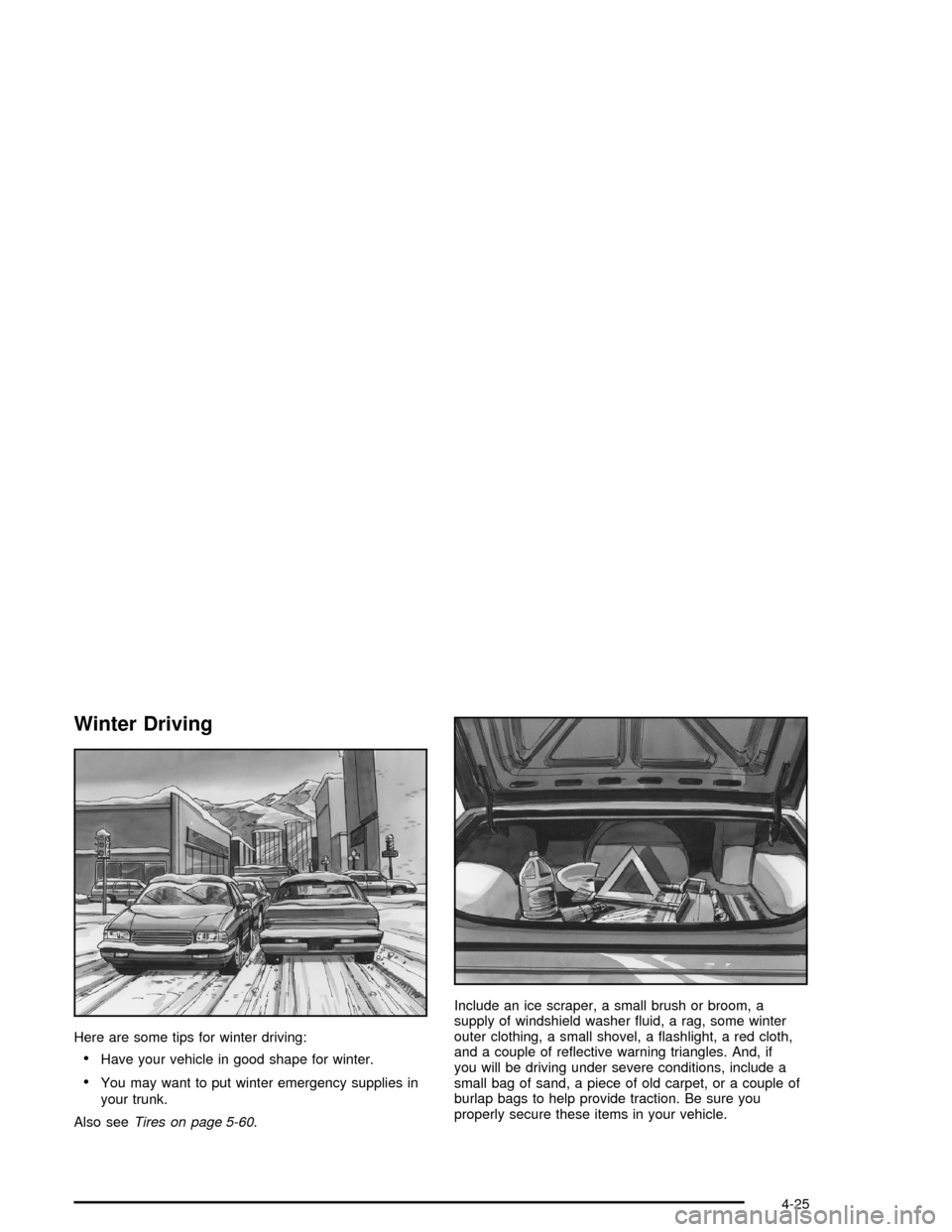
Winter Driving
Here are some tips for winter driving:
Have your vehicle in good shape for winter.
You may want to put winter emergency supplies in
your trunk.
Also seeTires on page 5-60.Include an ice scraper, a small brush or broom, a
supply of windshield washer uid, a rag, some winter
outer clothing, a small shovel, a ashlight, a red cloth,
and a couple of reective warning triangles. And, if
you will be driving under severe conditions, include a
small bag of sand, a piece of old carpet, or a couple of
burlap bags to help provide traction. Be sure you
properly secure these items in your vehicle.
4-25
Page 238 of 398

Certication Label
A vehicle specic Certication label is found on the
rear edge of the driver’s door.
The label shows the gross weight capacity of your
vehicle, called the Gross Vehicle Weight Rating (GVWR).
The GVWR includes the weight of the vehicle, all
occupants, fuel, and cargo.Never exceed the GVWR for your vehicle or the
Gross Axle Weight Rating (GAWR) for either the front
or rear axle.
If the vehicle is going to carry a heavy load, spread it
out. Do not carry more than 167 lbs (75 kg) in
your trunk.
{CAUTION:
Do not load your vehicle any heavier than the
Gross Vehicle Weight Rating (GVWR), or either
the maximum front or rear Gross Axle Weight
Rating (GAWR). If you do, parts on your
vehicle can break, and it can change the way
your vehicle handles. These could cause you
to lose control and crash. Also, overloading
can shorten the life of your vehicle.
Notice:Overloading your vehicle may cause
damage. Repairs would not be covered by your
warranty. Do not overload your vehicle.
4-34
Page 239 of 398

If things like suitcases, tools, packages, or anything else
are put inside the vehicle, they will go as fast as the
vehicle goes. If you have to stop or turn quickly,
or if there is a crash, they will keep going.
{CAUTION:
Things you put inside your vehicle can strike
and injure people in a sudden stop or turn, or
in a crash.
Put things in the trunk of your vehicle. In a
trunk, put them as far forward as you can.
Try to spread the weight evenly.
Never stack heavier things, like suitcases,
inside the vehicle so that some of them
are above the tops of the seats.
Do not leave an unsecured child restraint
in your vehicle.
When you carry something inside the
vehicle, secure it whenever you can.
Do not leave a seat folded down unless
you need to.
Towing
Towing Your Vehicle
Consult your dealer or a professional towing service
if you need to have your disabled vehicle towed.
SeeRoadside Assistance Program on page 7-6.
If you want to tow your vehicle behind another vehicle
for recreational purposes (such as behind a motorhome),
see “Recreational Vehicle Towing” following.
Recreational Vehicle Towing
Recreational vehicle towing means towing your vehicle
behind another vehicle – such as behind a motorhome.
The two most common types of recreational vehicle
towing are known as “dinghy towing” (towing your vehicle
with all four wheels on the ground) and “dolly towing”
(towing your vehicle with two wheels on the ground and
two wheels up on a device known as a “dolly”).
With the proper preparation and equipment, many
vehicles can be towed in these ways. See “Dinghy
Towing” and “Dolly Towing,” following.
4-35
Page 258 of 398
Filling a Portable Fuel Container
{CAUTION:
Never ll a portable fuel container while it is in
your vehicle. Static electricity discharge from
the container can ignite the gasoline vapor.
You can be badly burned and your vehicle
damaged if this occurs. To help avoid injury to
you and others:
Dispense gasoline only into approved
containers.
Do not ll a container while it is inside a
vehicle, in a vehicle’s trunk, pickup bed, or
on any surface other than the ground.
Bring the ll nozzle in contact with the
inside of the ll opening before operating
the nozzle. Contact should be maintained
until the lling is complete.
Do not smoke while pumping gasoline.
Checking Things Under
the Hood
{CAUTION:
An electric fan under the hood can start up
and injure you even when the engine is not
running. Keep hands, clothing and tools away
from any underhood electric fan.
{CAUTION:
Things that burn can get on hot engine parts
and start a re. These include liquids like fuel,
oil, coolant, brake uid, windshield washer and
other uids, and plastic or rubber. You or
others could be burned. Be careful not to drop
or spill things that will burn onto a hot engine.
5-10