reset CHEVROLET IMPALA 2005 8.G Owner's Manual
[x] Cancel search | Manufacturer: CHEVROLET, Model Year: 2005, Model line: IMPALA, Model: CHEVROLET IMPALA 2005 8.GPages: 398, PDF Size: 10.04 MB
Page 200 of 398

MODE:Press this button to switch between FM1, FM2,
AM, or XM1 or XM2 (if equipped).
Press this button to listen to the radio when a cassette
tape or CD is playing. The inactive tape or CD will
remain safely inside the radio for future listening.
MUTE:Press this button to silence the system. Press it
again, or any other radio button, to turn on the sound.
QVOLR(Volume):Press the up or the down arrow
to increase or to decrease the volume.
Radio Reception
AM
The range for most AM stations is greater than for FM,
especially at night. The longer range can cause
station frequencies to interfere with each other. Static
can occur on AM stations caused by things like
storms and power lines. Try reducing the treble to
reduce this noise.
FM Stereo
FM stereo will give the best sound, but FM signals
will reach only about 10 to 40 miles (16 to 65 km).
Tall buildings or hills can interfere with FM signals,
causing the sound to fade in and out.
XM™ Satellite Radio Service
XM™ Satellite Radio Service gives digital radio
reception from coast to coast. Just as with FM, tall
buildings or hills can interfere with satellite radio signals,
causing the sound to fade in and out. The radio may
display NO SIGNAL to indicate interference.
Care of the Cassette Tape Player
A tape player that is not cleaned regularly can cause
reduced sound quality, ruined cassettes, or a damaged
mechanism. Cassette tapes should be stored in their
cases away from contaminants, direct sunlight, and
extreme heat. If they are not, they may not operate
properly or may cause failure of the tape player.
The tape player should be cleaned regularly after every
50 hours of use. The radio may display CLEAN to
indicate that the tape player has been used for 50 hours
without resetting the tape clean timer. If this message
appears on the display, the cassette tape player
needs to be cleaned. It will still play tapes, but it should
be cleaned as soon as possible to prevent damage
to the tapes and player. If there is a reduction in sound
quality, try a known good cassette to see if the tape
or the tape player is at fault. If this other cassette has no
improvement in sound quality, clean the tape player.
3-88
Page 201 of 398

For best results, use a scrubbing action, non-abrasive
cleaning cassette with pads which scrub the tape
head as the hubs of the cleaner cassette turn.
The recommended cleaning cassette is available
through your dealer.
The broken tape detection feature of the cassette tape
player may identify the cleaning cassette as a
damaged tape, in error. To prevent the cleaning cassette
from being ejected, use the following steps:
1. Turn the ignition on.
2. Turn the radio off.
3. Press and hold the TAPE AUX or the TAPE CD
button for ve seconds. READY will appear on
the display and a cassette symbol will ash for
ve seconds.
4. Insert the scrubbing action cleaning cassette.
5. Eject the cleaning cassette after the manufacturer’s
recommended cleaning time.
After the cleaning cassette is ejected, the broken
tape detection feature will be active again.A non-scrubbing action, wet-type cleaner which uses a
cassette with a fabric belt to clean the tape head
can be used. This type of cleaning cassette will not
eject on its own. A non-scrubbing action cleaner may not
clean as thoroughly as the scrubbing type cleaner.
The use of a non-scrubbing action, dry-type cleaning
cassette is not recommended.
After the player is cleaned, press and hold the EJT
button for ve seconds to reset the CLEAN indicator.
The radio will display CLEANED to show the indicator
was reset.
Cassettes are subject to wear and the sound quality
may degrade over time. Always make sure the cassette
tape is in good condition before the tape player is
serviced.
3-89
Page 269 of 398

If you are in an area of extreme cold, where the
temperature falls below−20°F (−29°C), it is
recommended that you use either an SAE 5W-30
synthetic oil or an SAE 0W-30 oil. Both will provide
easier cold starting and better protection for your engine
at extremely low temperatures.
Engine Oil Additives
Do not add anything to your oil. The recommended oils
with the starburst symbol that meet GM Standard
GM6094M are all you will need for good performance
and engine protection.
Engine Oil Life System
When to Change Engine Oil
Your vehicle has a computer system that lets you know
when to change the engine oil and lter. This is based on
engine revolutions and engine temperature, and not on
mileage. Based on driving conditions, the mileage at
which an oil change will be indicated can vary
considerably. For the oil life system to work properly,
you must reset the system every time the oil is changed.When the system has calculated that oil life has been
diminished, it will indicate that an oil change is
necessary. A CHANGE ENGINE OIL message will
come on. SeeChange Engine Oil Message on
page 3-44. Change your oil as soon as possible within
the next 600 miles (1 000 km). It is possible that,
if you are driving under the best conditions, the oil life
system may not indicate that an oil change is necessary
for over a year. However, your engine oil and lter
must be changed at least once a year and at this time
the system must be reset. Your dealer has GM-trained
service people who will perform this work using
genuine GM parts and reset the system. It is also
important to check your oil regularly and keep it at the
proper level.
If the system is ever reset accidentally, you must
change your oil at 3,000 miles (5 000 km) since your
last oil change. Remember to reset the oil life system
whenever the oil is changed.
5-21
Page 270 of 398

How to Reset the Engine Oil Life
System
The Engine Oil Life System calculates when to change
your engine oil and lter based on vehicle use.
Anytime your oil is changed, reset the system so it can
calculate when the next oil change is required. If a
situation occurs where you change your oil prior to a
CHANGE ENGINE OIL message being turned on, reset
the system.
After changing the engine oil, the system must be reset.
To reset the CHANGE ENGINE OIL message, use
one of the following procedures:
Using the Radio
1. Turn the ignition to ACC or ON, with the radio off.
2. Press and hold the TUNE DISP knob on the
radio for at least ve seconds until SETTINGS
is displayed.3. Press the SEEK PSCAN up or down arrow to scroll
through the main menu.
4. Scroll until OIL LIFE appears on the display.
5. Press the 1 PREV or 2 NEXT buttons to enter the
submenu. RESET will be displayed.
6. Press the TUNE DISP knob to reset. A chime will
be heard to verify the new setting and DONE will
be displayed for one second.
7. Once the indicator has been reset, scroll until EXIT
appears on the display.
8. Press the TUNE DISP knob to exit programming.
A chime will be heard to verify the exit.
9. Turn the key to OFF.
If the CHANGE ENGINE OIL message comes back on
when you start your vehicle, the engine oil life system
has not reset. Repeat the procedure.
5-22
Page 271 of 398

Using the Accelerator Pedal
1. Turn the ignition to ON, with the engine off.
2. Fully press and release the accelerator pedal slowly
three times within ve seconds. If the CHANGE
ENGINE OIL message ashes, the system is reset.
However, if it stays on, it did not reset. Repeat the
procedure.
3. Turn the key to OFF.
If the CHANGE ENGINE OIL message comes back on
when you start your vehicle, the engine oil life system
has not reset. Repeat the procedure.
What to Do with Used Oil
Used engine oil contains certain elements that may be
unhealthy for your skin and could even cause cancer.
Do not let used oil stay on your skin for very long.
Clean your skin and nails with soap and water, or a
good hand cleaner. Wash or properly dispose of
clothing or rags containing used engine oil. See the
manufacturer’s warnings about the use and disposal of
oil products.
Used oil can be a threat to the environment. If you
change your own oil, be sure to drain all the oil from the
lter before disposal. Never dispose of oil by putting it
in the trash, pouring it on the ground, into sewers,
or into streams or bodies of water. Instead, recycle it by
taking it to a place that collects used oil. If you have
a problem properly disposing of your used oil, ask your
dealer, a service station or a local recycling center
for help.
5-23
Page 282 of 398
Overheated Engine Protection
Operating Mode
This emergency operating mode allows your vehicle to
be driven to a safe place in an emergency situation.
If an overheated engine condition exists, an overheat
protection mode which alternates ring groups of
cylinders helps prevent engine damage. In this mode,
you will notice a signicant loss in power and engine
performance. The low coolant light may come on
and the temperature gage will indicate an overheat
condition exists. Driving extended miles (km) and/or
towing a trailer in the overheat protection mode should
be avoided.
Notice:After driving in the overheated engine
protection operating mode, to avoid engine damage,
allow the engine to cool before attempting any
repair. The engine oil will be severely degraded.
Repair the cause of coolant loss, change the oil
and reset the oil life system. SeeEngine Oil
on page 5-18.
Cooling System
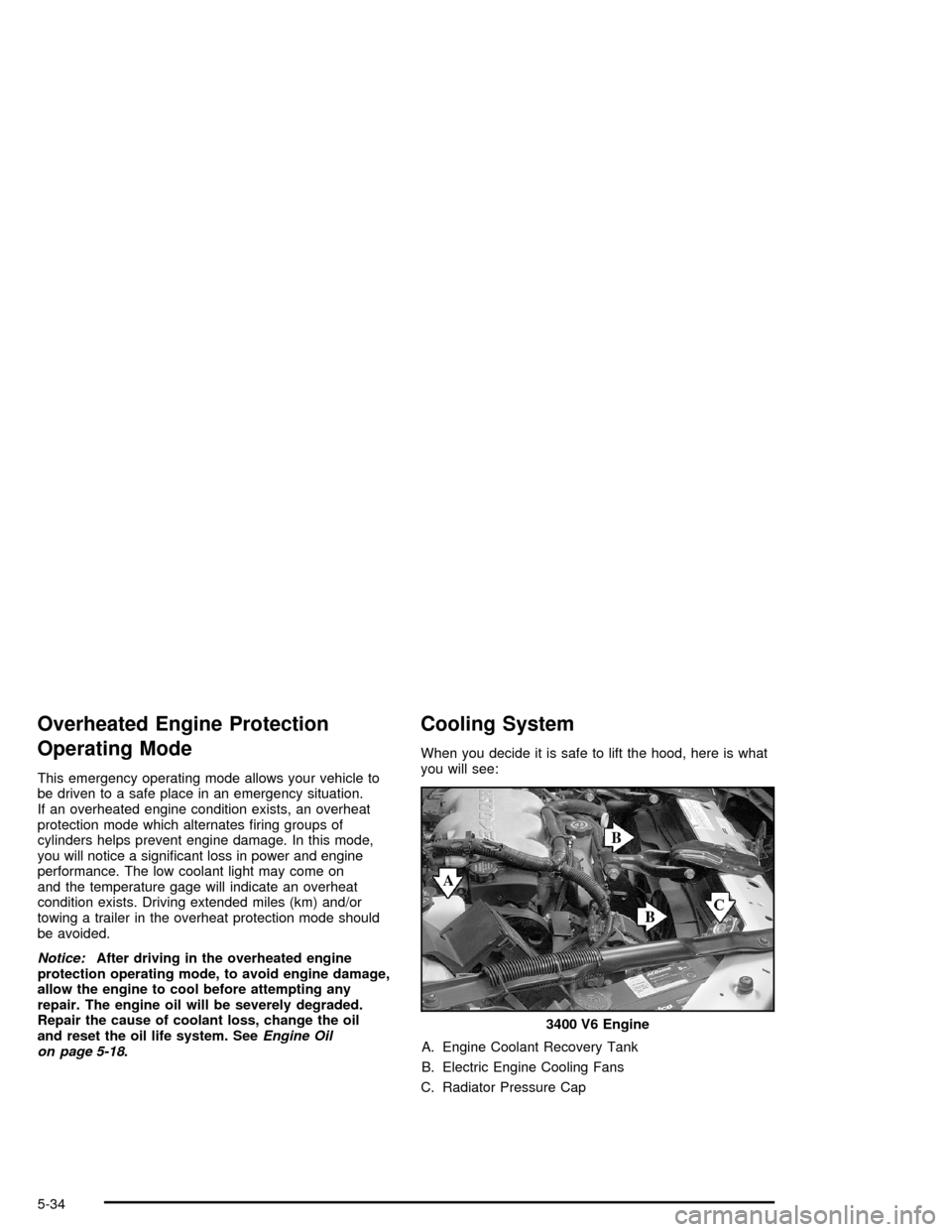
When you decide it is safe to lift the hood, here is what
you will see:
A. Engine Coolant Recovery Tank
B. Electric Engine Cooling Fans
C. Radiator Pressure Cap3400 V6 Engine
5-34
Page 302 of 398

Headlamp Aiming
Headlamp aim has been preset at the factory and
should need no further adjustment.
If your vehicle is damaged in an accident, the headlamp
aim may be affected. Aim adjustment to the low-beam
headlamps may be necessary if it is difficult to see
the lane markers (for horizontal aim), or if oncoming
drivers ash their high-beam headlamps at you
(for vertical aim). If you believe your headlamps need
to be re-aimed, we recommend that you take your
vehicle to your dealer for service.
Bulb Replacement
For the proper type of replacement bulbs, see
Replacement Bulbs on page 5-58.
For any bulb changing procedure not listed in this
section, contact your dealer.
Halogen Bulbs
{CAUTION:
Halogen bulbs have pressurized gas inside and
can burst if you drop or scratch the bulb. You or
others could be injured. Be sure to read and
follow the instructions on the bulb package.
5-54
Page 316 of 398

Tire Pressure Monitor System
If your vehicle has the tire pressure monitor system,
it can alert you to a large change in the pressure of one
tire. The system “learns” the pressure at each tire
throughout the operating speed range of your vehicle.
The system normally takes between 45 and 90 minutes
of driving to learn the tire pressures. This time may
be longer depending on your individual driving habits.
Learning need not be accumulated during a single
trip. Once learned, the system will remember the tire
pressures until the system is recalibrated.
After the system has learned tire pressures with
properly inated tires, the LOW TIRE PRESSURE
message will come on if the pressure in one tire
becomes 12 psi (83 kPa) lower than the other
three tires. The tire pressure monitor system won’t
alert you if the pressure in more than one tire is low,
if the system is not properly calibrated, or if the vehicle
is moving faster than 70 mph (110 km/h).
The tire pressure monitor system detects differences
in tire rotation speeds that are caused by changes
in tire pressure. The system can alert you about a
low tire — but it doesn’t replace normal tire
maintenance. SeeTires on page 5-60.When the LOW TIRE PRESSURE message comes on,
you should stop as soon as you can and check all
your tires for damage. (If a tire is at, seeIf a Tire Goes
Flat on page 5-77.) Also check the tire pressure in all
four tires as soon as you can. SeeInation - Tire
Pressure on page 5-66.
The LOW TIRE PRESSURE message will also be
displayed (while the ignition is on) until you reset
(calibrate) the system.
Don’t reset the tire pressure monitor system without rst
correcting the cause of the problem and checking
and adjusting the pressure in all four tires. If you reset
the system when the tire pressures are incorrect,
the system will not work properly and may not alert you
when a tire is low.
Any time you adjust a tire’s pressure, rotate your tires,
or have one or more tires repaired or replaced, you’ll
need to reset (calibrate) the tire pressure monitor
system. You’ll also need to reset the system whenever
you buy new tires and whenever the vehicle’s battery
has been disconnected.
5-68
Page 317 of 398

The tire pressure monitor system can be reset two ways.
To reset (calibrate) the system using the ignition, do the
following:
1. Turn the ignition position to ON.
2. Pull the exterior lamp control from the ON position
to the OFF position three times.
To reset (calibrate) the system through the radio,
do the following:
1. Turn the ignition to ACC or ON and turn the
radio off.
2. Press and hold the TUNE DISPL button on the
radio for at least ve seconds until SETTINGS is
displayed.
3. Press the SEEK PSCAN up or down arrow to scroll
through the main menu.
4. Scroll until TIRE MON appears on the display.
5. Press the 1 PREV or 2 NEXT button to enter the
submenu. RESET will be displayed.6. Press the TUNE DISPL button to reset. A chime will
be heard to verify the new setting and DONE will
be displayed for one second.
7. Once the monitor has been reset, scroll until EXIT
appears on the display.
8. Press the TUNE DISPL button to exit programming.
A chime will be heard to verify exit.
The system completes the calibration process during
driving.
The system normally takes 15 to 20 minutes of driving
in each of three speed ranges to “learn” tire pressures.
The speed ranges are 15 to 40 mph (25 to 65 km/h),
40 to 65 mph (65 to 105 km/h) and above 65 mph
(105 km/h). When learning is complete, the system will
alert you after two to eight minutes if a tire is 12 psi
(83 kPa) different from the other three tires. Detection
thresholds may be higher and detection times may
be longer on rough roads, curves and at high speeds.
The system is not capable of detection at speeds greater
than 70 mph (110 km/h).
5-69
Page 318 of 398

Tire Inspection and Rotation
Tires should be rotated every 5,000 to 8,000 miles
(8 000 to 13 000 km).
Any time you notice unusual wear, rotate your tires as
soon as possible and check wheel alignment. Also check
for damaged tires or wheels. SeeWhen It Is Time for
New Tires on page 5-71andWheel Replacement on
page 5-74for more information.
The purpose of regular rotation is to achieve more
uniform wear for all tires on the vehicle. The rst rotation
is the most important. SeeScheduled Maintenance
on page 6-4for scheduled rotation intervals.When rotating your tires, always use the correct rotation
pattern shown here.
Don’t include the compact spare tire in your tire rotation.
After the tires have been rotated, adjust the front and
rear ination pressures as shown on the Tire and
Loading Information label.
Reset the Tire Ination Monitor System. SeeTire
Pressure Monitor System on page 5-68.
5-70