remote start CHEVROLET IMPALA 2006 9.G User Guide
[x] Cancel search | Manufacturer: CHEVROLET, Model Year: 2006, Model line: IMPALA, Model: CHEVROLET IMPALA 2006 9.GPages: 394, PDF Size: 2.42 MB
Page 177 of 394
CHIME VOLUME
This feature allows you to select the volume level of
the chime.
Press the customization button until CHIME VOLUME
appears on the DIC display. Press the set/reset button to
access the settings for this feature. Then press the
customization button to scroll through the following
choices:
NORMAL (default):The chime volume will be set to a
normal level.
LOUD:The chime volume will be set to a loud level.
NO CHANGE:No change will be made to this feature.
The current setting will remain.
Select one of the available choices and press the
set/reset button while it is displayed on the DIC to
select it.
REMOTE START
If your vehicle has this feature, it allows you to turn the
remote start off or on. The remote start feature allows
you to start the engine from outside of the vehicle using
your Remote Keyless Entry (RKE) transmitter. See
“Remote Vehicle Start” underRemote Keyless Entry
System Operation on page 2-4for more information.Press the customization button until REMOTE START
appears on the DIC display. Press the set/reset button to
access the settings for this feature. Then press the
customization button to scroll through the following
choices:
OFF:The remote start feature will be disabled.
ON (default):The remote start feature will be enabled.
NO CHANGE:No change will be made to this
feature. The current setting will remain.
Select one of the available choices and press the
set/reset button while it is displayed on the DIC to
select it.
FACTORY SETTINGS
This feature allows you to set all of the customization
features back to their factory default settings.
Press the customization button until FACTORY
SETTINGS appears on the DIC display. Press the
set/reset button to access the settings for this feature.
Then press the customization button to scroll through
the following choices:
RESTORE ALL (default):The customization features
will be set to their factory default settings.
3-57
Page 261 of 394
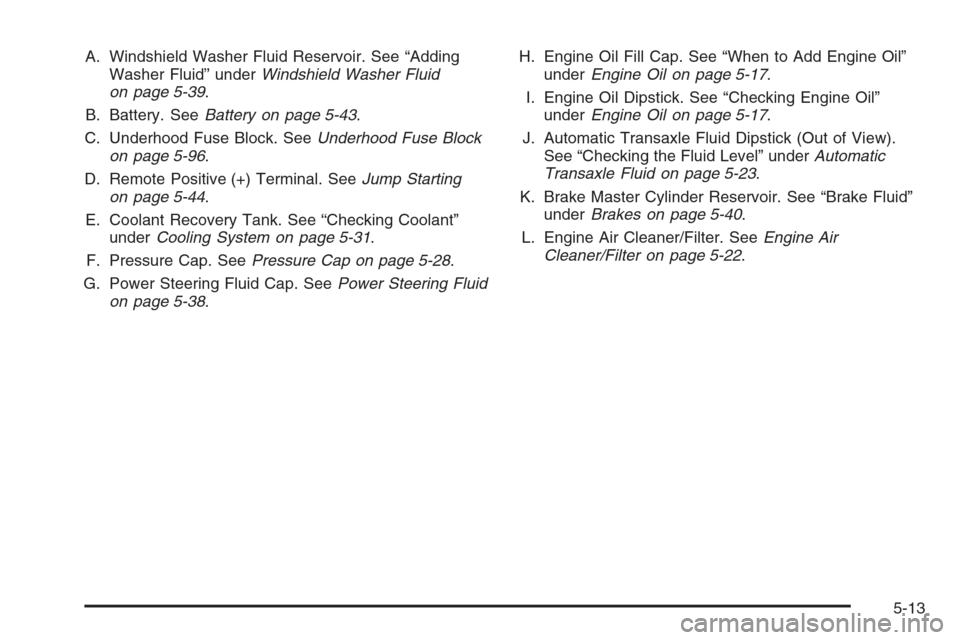
A. Windshield Washer Fluid Reservoir. See “Adding
Washer Fluid” underWindshield Washer Fluid
on page 5-39.
B. Battery. SeeBattery on page 5-43.
C. Underhood Fuse Block. SeeUnderhood Fuse Block
on page 5-96.
D. Remote Positive (+) Terminal. SeeJump Starting
on page 5-44.
E. Coolant Recovery Tank. See “Checking Coolant”
underCooling System on page 5-31.
F. Pressure Cap. SeePressure Cap on page 5-28.
G. Power Steering Fluid Cap. SeePower Steering Fluid
on page 5-38.H. Engine Oil Fill Cap. See “When to Add Engine Oil”
underEngine Oil on page 5-17.
I. Engine Oil Dipstick. See “Checking Engine Oil”
underEngine Oil on page 5-17.
J. Automatic Transaxle Fluid Dipstick (Out of View).
See “Checking the Fluid Level” underAutomatic
Transaxle Fluid on page 5-23.
K. Brake Master Cylinder Reservoir. See “Brake Fluid”
underBrakes on page 5-40.
L. Engine Air Cleaner/Filter. SeeEngine Air
Cleaner/Filter on page 5-22.
5-13
Page 263 of 394
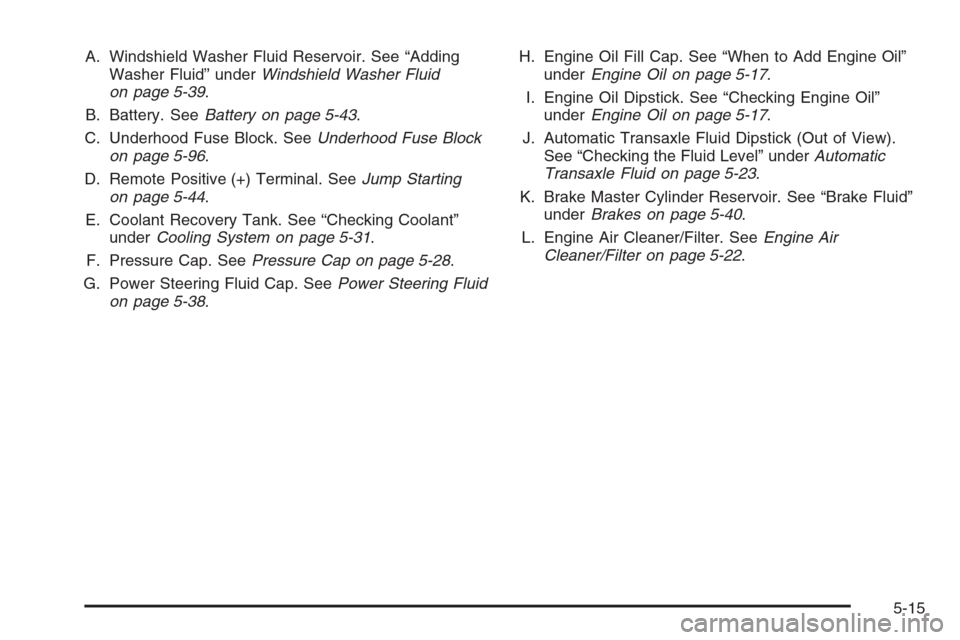
A. Windshield Washer Fluid Reservoir. See “Adding
Washer Fluid” underWindshield Washer Fluid
on page 5-39.
B. Battery. SeeBattery on page 5-43.
C. Underhood Fuse Block. SeeUnderhood Fuse Block
on page 5-96.
D. Remote Positive (+) Terminal. SeeJump Starting
on page 5-44.
E. Coolant Recovery Tank. See “Checking Coolant”
underCooling System on page 5-31.
F. Pressure Cap. SeePressure Cap on page 5-28.
G. Power Steering Fluid Cap. SeePower Steering Fluid
on page 5-38.H. Engine Oil Fill Cap. See “When to Add Engine Oil”
underEngine Oil on page 5-17.
I. Engine Oil Dipstick. See “Checking Engine Oil”
underEngine Oil on page 5-17.
J. Automatic Transaxle Fluid Dipstick (Out of View).
See “Checking the Fluid Level” underAutomatic
Transaxle Fluid on page 5-23.
K. Brake Master Cylinder Reservoir. See “Brake Fluid”
underBrakes on page 5-40.
L. Engine Air Cleaner/Filter. SeeEngine Air
Cleaner/Filter on page 5-22.
5-15
Page 265 of 394
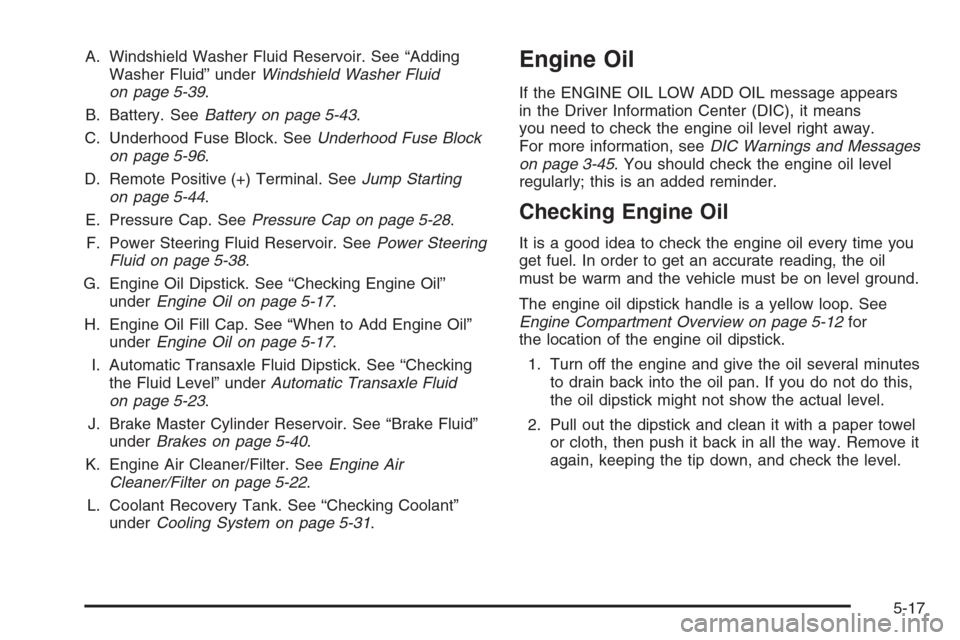
A. Windshield Washer Fluid Reservoir. See “Adding
Washer Fluid” underWindshield Washer Fluid
on page 5-39.
B. Battery. SeeBattery on page 5-43.
C. Underhood Fuse Block. SeeUnderhood Fuse Block
on page 5-96.
D. Remote Positive (+) Terminal. SeeJump Starting
on page 5-44.
E. Pressure Cap. SeePressure Cap on page 5-28.
F. Power Steering Fluid Reservoir. SeePower Steering
Fluid on page 5-38.
G. Engine Oil Dipstick. See “Checking Engine Oil”
underEngine Oil on page 5-17.
H. Engine Oil Fill Cap. See “When to Add Engine Oil”
underEngine Oil on page 5-17.
I. Automatic Transaxle Fluid Dipstick. See “Checking
the Fluid Level” underAutomatic Transaxle Fluid
on page 5-23.
J. Brake Master Cylinder Reservoir. See “Brake Fluid”
underBrakes on page 5-40.
K. Engine Air Cleaner/Filter. SeeEngine Air
Cleaner/Filter on page 5-22.
L. Coolant Recovery Tank. See “Checking Coolant”
underCooling System on page 5-31.Engine Oil
If the ENGINE OIL LOW ADD OIL message appears
in the Driver Information Center (DIC), it means
you need to check the engine oil level right away.
For more information, seeDIC Warnings and Messages
on page 3-45. You should check the engine oil level
regularly; this is an added reminder.
Checking Engine Oil
It is a good idea to check the engine oil every time you
get fuel. In order to get an accurate reading, the oil
must be warm and the vehicle must be on level ground.
The engine oil dipstick handle is a yellow loop. See
Engine Compartment Overview on page 5-12for
the location of the engine oil dipstick.
1. Turn off the engine and give the oil several minutes
to drain back into the oil pan. If you do not do this,
the oil dipstick might not show the actual level.
2. Pull out the dipstick and clean it with a paper towel
or cloth, then push it back in all the way. Remove it
again, keeping the tip down, and check the level.
5-17
Page 293 of 394
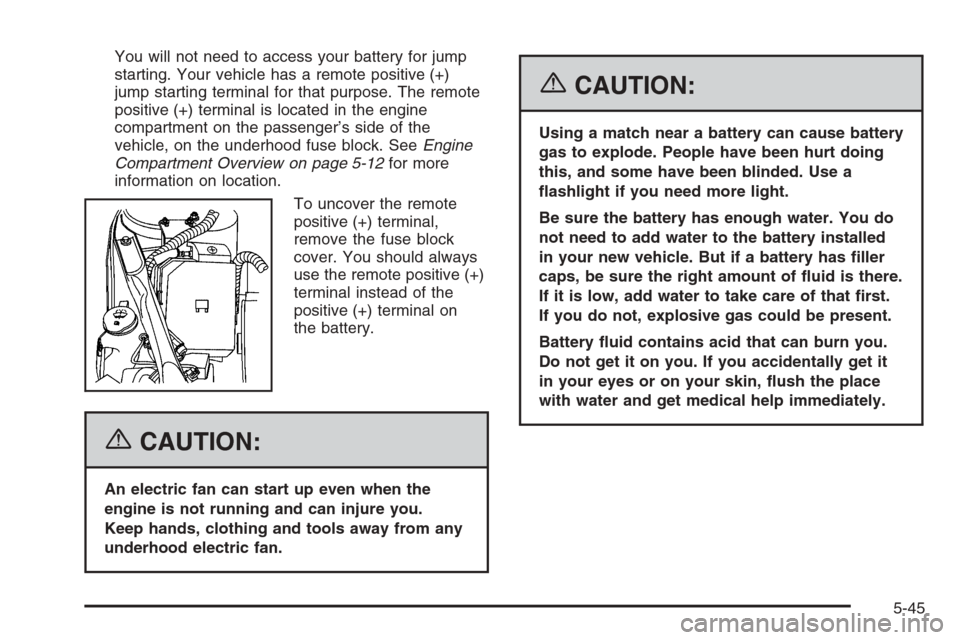
You will not need to access your battery for jump
starting. Your vehicle has a remote positive (+)
jump starting terminal for that purpose. The remote
positive (+) terminal is located in the engine
compartment on the passenger’s side of the
vehicle, on the underhood fuse block. SeeEngine
Compartment Overview on page 5-12for more
information on location.
To uncover the remote
positive (+) terminal,
remove the fuse block
cover. You should always
use the remote positive (+)
terminal instead of the
positive (+) terminal on
the battery.
{CAUTION:
An electric fan can start up even when the
engine is not running and can injure you.
Keep hands, clothing and tools away from any
underhood electric fan.
{CAUTION:
Using a match near a battery can cause battery
gas to explode. People have been hurt doing
this, and some have been blinded. Use a
ashlight if you need more light.
Be sure the battery has enough water. You do
not need to add water to the battery installed
in your new vehicle. But if a battery has ller
caps, be sure the right amount of uid is there.
If it is low, add water to take care of that rst.
If you do not, explosive gas could be present.
Battery uid contains acid that can burn you.
Do not get it on you. If you accidentally get it
in your eyes or on your skin, ush the place
with water and get medical help immediately.
5-45
Page 294 of 394
{CAUTION:
Fans or other moving engine parts can injure
you badly. Keep your hands away from moving
parts once the engine is running.
5. Check that the jumper cables do not have loose
or missing insulation. If they do, you could get a
shock. The vehicles could be damaged too.
Before you connect the cables, here are some
basic things you should know. Positive (+) will go
to positive (+) or to a remote positive (+) terminal
if the vehicle has one. Negative (−) will go to a
heavy, unpainted metal engine part or to a remote
negative (−) terminal if the vehicle has one.
Do not connect positive (+) to negative (−), or you
will get a short that would damage the battery
and maybe other parts too. And do not connect the
negative (−) cable to the negative (−) terminal on
the dead battery because this can cause sparks.
6. Connect the red positive (+) cable to the positive (+)
terminal location of the vehicle with the dead
battery. Use a remote positive (+) terminal if the
vehicle has one.7. Do not let the other end touch metal. Connect it to
the positive (+) terminal location of the vehicle with
the good battery. Use a remote positive (+)
terminal if the vehicle has one.
8. Now connect the black negative (−) cable to the
negative (−) terminal location of the vehicle with
the good battery. Use a remote negative (−) terminal
if the vehicle has one.
Do not let the other end touch anything until the
next step. The other end of the negative (−) cable
does not go to the dead battery. It goes to a
heavy, unpainted metal engine part or to a remote
negative (−) terminal on the vehicle with the
dead battery.
9. Connect the other end of the negative (−) cable at
least 18 inches (45 cm) away from the dead battery,
but not near engine parts that move. The electrical
connection is just as good there, and the chance
of sparks getting back to the battery is much less.
10. Now start the vehicle with the good battery and run
the engine for a while.
11. Try to start the vehicle that had the dead battery.
If it will not start after a few tries, it probably needs
service.
5-46