instrument panel CHEVROLET IMPALA 2006 9.G Owner's Manual
[x] Cancel search | Manufacturer: CHEVROLET, Model Year: 2006, Model line: IMPALA, Model: CHEVROLET IMPALA 2006 9.GPages: 394, PDF Size: 2.42 MB
Page 125 of 394
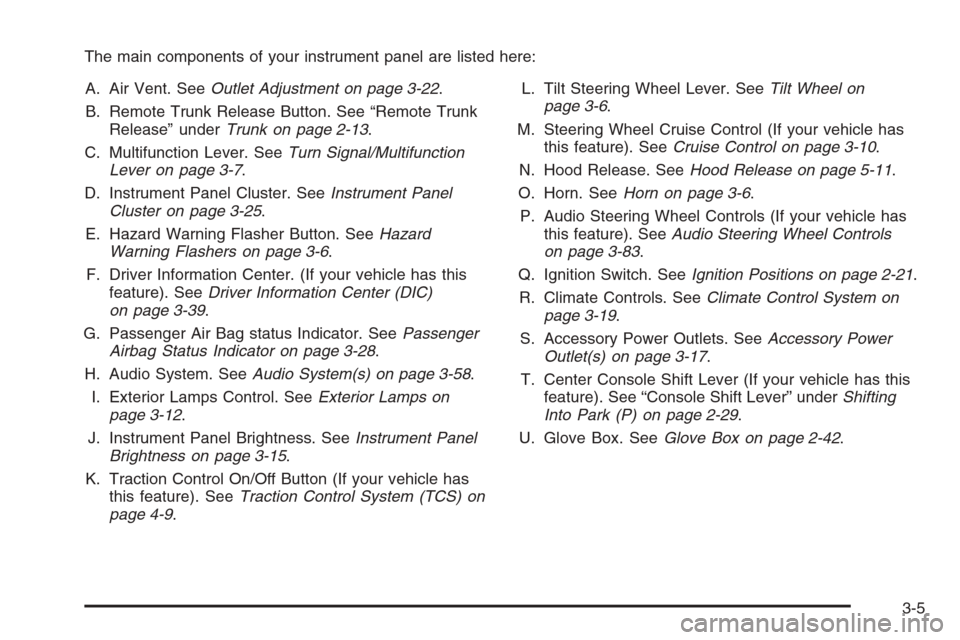
The main components of your instrument panel are listed here:
A. Air Vent. SeeOutlet Adjustment on page 3-22.
B. Remote Trunk Release Button. See “Remote Trunk
Release” underTrunk on page 2-13.
C. Multifunction Lever. SeeTurn Signal/Multifunction
Lever on page 3-7.
D. Instrument Panel Cluster. SeeInstrument Panel
Cluster on page 3-25.
E. Hazard Warning Flasher Button. SeeHazard
Warning Flashers on page 3-6.
F. Driver Information Center. (If your vehicle has this
feature). SeeDriver Information Center (DIC)
on page 3-39.
G. Passenger Air Bag status Indicator. SeePassenger
Airbag Status Indicator on page 3-28.
H. Audio System. SeeAudio System(s) on page 3-58.
I. Exterior Lamps Control. SeeExterior Lamps on
page 3-12.
J. Instrument Panel Brightness. SeeInstrument Panel
Brightness on page 3-15.
K. Traction Control On/Off Button (If your vehicle has
this feature). SeeTraction Control System (TCS) on
page 4-9.L. Tilt Steering Wheel Lever. SeeTilt Wheel on
page 3-6.
M. Steering Wheel Cruise Control (If your vehicle has
this feature). SeeCruise Control on page 3-10.
N. Hood Release. SeeHood Release on page 5-11.
O. Horn. SeeHorn on page 3-6.
P. Audio Steering Wheel Controls (If your vehicle has
this feature). SeeAudio Steering Wheel Controls
on page 3-83.
Q. Ignition Switch. SeeIgnition Positions on page 2-21.
R. Climate Controls. SeeClimate Control System on
page 3-19.
S. Accessory Power Outlets. SeeAccessory Power
Outlet(s) on page 3-17.
T. Center Console Shift Lever (If your vehicle has this
feature). See “Console Shift Lever” underShifting
Into Park (P) on page 2-29.
U. Glove Box. SeeGlove Box on page 2-42.
3-5
Page 127 of 394
Turn Signal/Multifunction Lever
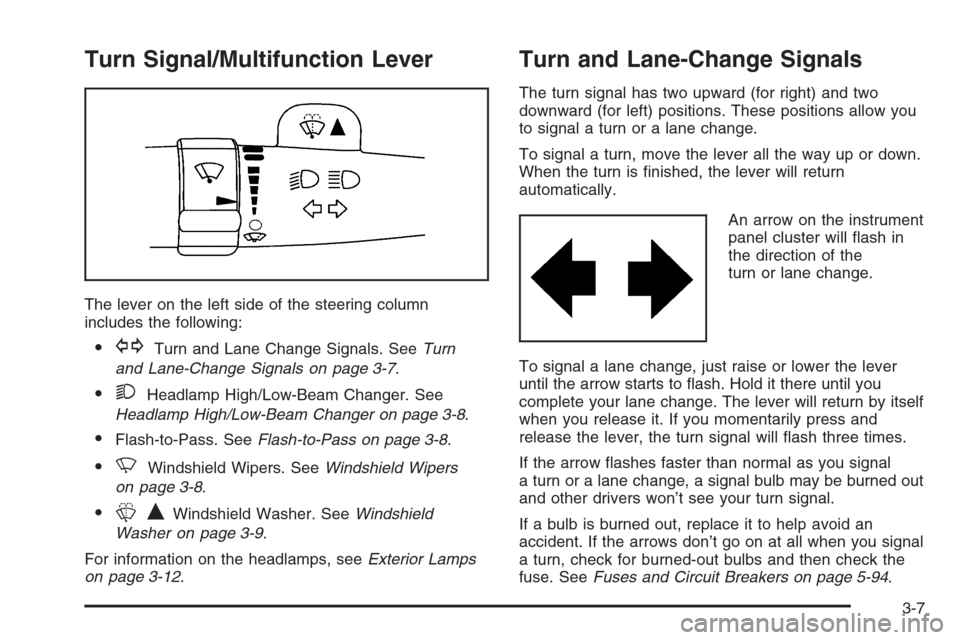
The lever on the left side of the steering column
includes the following:
GTurn and Lane Change Signals. SeeTurn
and Lane-Change Signals on page 3-7.
2Headlamp High/Low-Beam Changer. See
Headlamp High/Low-Beam Changer on page 3-8.
Flash-to-Pass. SeeFlash-to-Pass on page 3-8.
NWindshield Wipers. SeeWindshield Wipers
on page 3-8.
LQWindshield Washer. SeeWindshield
Washer on page 3-9.
For information on the headlamps, seeExterior Lamps
on page 3-12.
Turn and Lane-Change Signals
The turn signal has two upward (for right) and two
downward (for left) positions. These positions allow you
to signal a turn or a lane change.
To signal a turn, move the lever all the way up or down.
When the turn is nished, the lever will return
automatically.
An arrow on the instrument
panel cluster will ash in
the direction of the
turn or lane change.
To signal a lane change, just raise or lower the lever
until the arrow starts to ash. Hold it there until you
complete your lane change. The lever will return by itself
when you release it. If you momentarily press and
release the lever, the turn signal will ash three times.
If the arrow ashes faster than normal as you signal
a turn or a lane change, a signal bulb may be burned out
and other drivers won’t see your turn signal.
If a bulb is burned out, replace it to help avoid an
accident. If the arrows don’t go on at all when you signal
a turn, check for burned-out bulbs and then check the
fuse. SeeFuses and Circuit Breakers on page 5-94.
3-7
Page 128 of 394
Turn Signal On Chime
If you leave either one of your turn signals on and drive
more than 3/4 mile (1.2 km), a chime will sound to
alert you.
Headlamp High/Low-Beam Changer
To change the headlamps from low beam to high beam,
push the turn signal/multifunction lever away from you.
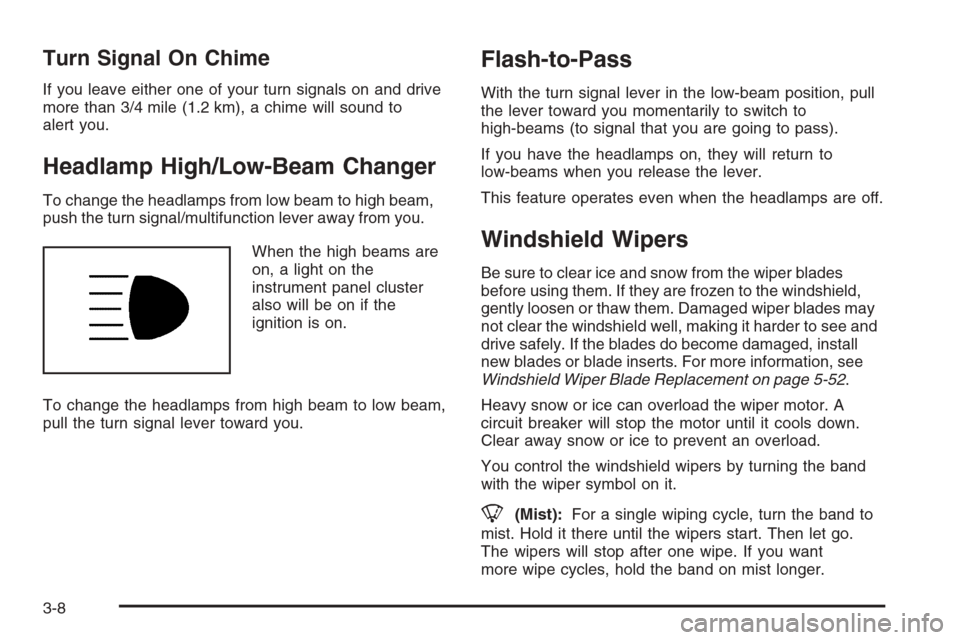
When the high beams are
on, a light on the
instrument panel cluster
also will be on if the
ignition is on.
To change the headlamps from high beam to low beam,
pull the turn signal lever toward you.
Flash-to-Pass
With the turn signal lever in the low-beam position, pull
the lever toward you momentarily to switch to
high-beams (to signal that you are going to pass).
If you have the headlamps on, they will return to
low-beams when you release the lever.
This feature operates even when the headlamps are off.
Windshield Wipers
Be sure to clear ice and snow from the wiper blades
before using them. If they are frozen to the windshield,
gently loosen or thaw them. Damaged wiper blades may
not clear the windshield well, making it harder to see and
drive safely. If the blades do become damaged, install
new blades or blade inserts. For more information, see
Windshield Wiper Blade Replacement on page 5-52.
Heavy snow or ice can overload the wiper motor. A
circuit breaker will stop the motor until it cools down.
Clear away snow or ice to prevent an overload.
You control the windshield wipers by turning the band
with the wiper symbol on it.
8(Mist):For a single wiping cycle, turn the band to
mist. Hold it there until the wipers start. Then let go.
The wipers will stop after one wipe. If you want
more wipe cycles, hold the band on mist longer.
3-8
Page 131 of 394
Setting Cruise Control
Cruise control will not work if your parking brake is set,
or if the master cylinder brake uid level is low.
The cruise control light on the instrument panel cluster
will come on after the cruise control has been set to
the desired speed.
{CAUTION:
If you leave your cruise control on when you
are not using cruise, you might hit a button
and go into cruise when you do not want to.
You could be startled and even lose control.
Keep the cruise control switch off until you
want to use cruise control.
1. Press the cruise control on/off button.
2. Get up to the speed you want.
3. Press and release the SET– button located on the
steering wheel.
4. Take your foot off the accelerator.
Resuming a Set Speed
Suppose you set your cruise control at a desired speed
and then you apply the brake. This shuts off the
cruise control. But you do not need to reset it.
Once you are driving about 25 mph (40 km/h) or more,
press the +RES button on your steering wheel. The
vehicle will go back to your chosen speed and
stay there.
Increasing Speed While Using
Cruise Control
To increase the cruise speed while using cruise control:
Press and hold the +RES button on the steering
wheel until you reach your new desired speed,
then release it.
To increase vehicle speed in small increments,
press the +RES button.
3-11
Page 132 of 394
Reducing Speed While Using
Cruise Control
To reduce your speed while using cruise control:
Press and hold the SET– button on the steering
wheel until you reach the lower speed you want,
then release it.
To slow down in very small amounts, press
the SET– button on the steering wheel briey.
Each time you do this, you will go about
1 mph (1.6 km/h) slower.
Passing Another Vehicle While Using
Cruise Control
Use the accelerator pedal to increase vehicle speed.
When you take your foot off the pedal, your vehicle will
slow down to the cruise speed you set earlier.
Using Cruise Control on Hills
How well your cruise control will work on hills depends
upon your speed, load and the steepness of the
hills. When going up steep hills, you may have to step
on the accelerator pedal to maintain your speed.
When going downhill, you may have to brake or shift to
a lower gear to keep your speed down. Of course,
applying the brake takes you out of cruise control. Many
drivers nd this to be too much trouble and do not
use cruise control on steep hills.
Ending Cruise Control
There are three ways to end cruise control:
Step lightly on the brake pedal.
Press the[(cancel) button on the steering wheel.
Press theT(on/off) button on the steering wheel.
Erasing Speed Memory
The cruise control set speed memory is erased by
turning off the cruise control or the ignition, or by
pressing the cancel button.
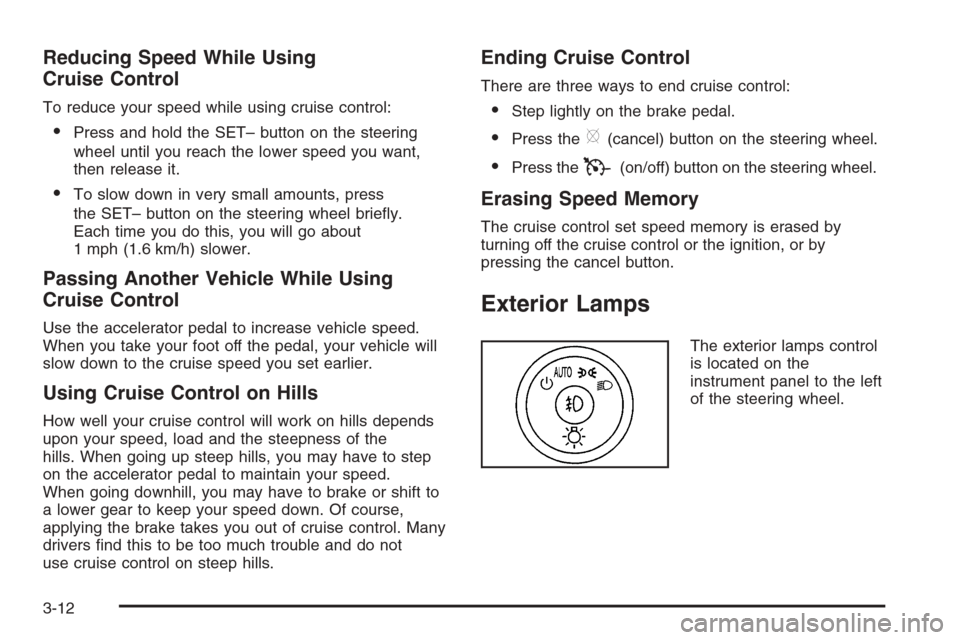
Exterior Lamps
The exterior lamps control
is located on the
instrument panel to the left
of the steering wheel.
3-12
Page 133 of 394
It controls the following systems:
Headlamps
Taillamps
Parking Lamps
License Plate Lamps
Instrument Panel Lights
Fog Lamps (if equipped)
The exterior lamps control has four positions:
O(Off):Momentarily turn the control to this position
to turn off the automatic light control. Momentarily turn to
this position again to turn automatic light control on
again.
AUTO (Automatic):Turn the control to this position to
automatically turn on the headlamps at normal
brightness, together with the following:
Parking Lamps
Taillamps
License Plate Lamps
Instrument Panel Lights
;(Parking Lamps):Turn the control to this position
to turn on the parking lamps together with the
following:
Taillamps
License Plate Lamps
Instrument Panel Lights
2(Headlamps):Turn the control to this position to
turn on the headlamps together with the following lamps
listed below. A warning chime will sound if you open
the driver’s door when the ignition switch is off and the
headlamps are on.
Parking Lamps
Taillamps
License Plate Lamps
Instrument Panel Lights
-(Fog Lamps, If Equipped):Push the fog lamps
control in to turn on the fog lamps.
SeeFog Lamps on page 3-15.
3-13
Page 134 of 394
Delayed Headlamps
The delayed headlamps feature provides a period of
exterior lighting as you leave the area around your
vehicle. The feature is activated when the headlamps
are on due to the automatic headlamps control
feature described previously in this section, and when
the ignition is turned off. Your headlamps will then
remain on until the exterior lamps control is moved to
the parking lamps position or until the pre-selected
delayed headlamp lighting period has ended.
If you turn off the ignition with the headlamps switch in
the parking lamps or headlamps position, the delayed
headlamps cycle will not occur.
To disable the delayed headlamps feature or change
the time of delay, seeDIC Vehicle Customization
on page 3-52.
Daytime Running Lamps (DRL)/
Automatic Headlamp System
Daytime Running Lamps (DRL) can make it easier for
others to see the front of your vehicle during the
day. DRL can be helpful in many different driving
conditions, but they can be especially helpful in the short
periods after dawn and before sunset. Fully functional
daytime running lamps are required on all vehicles
rst sold in Canada.A light sensor on top of the instrument panel makes the
DRL work, so be sure it is not covered.
The DRL system’s automatic headlamp control will
make the low-beam headlamps come on at a reduced
brightness when the following conditions are met:
The ignition is in RUN.
The exterior lamps control is in AUTO.
The engine is running.
When the DRL are on, only the low-beam headlamps,
at a reduced level of brightness, will be on. The
headlamps, taillamps, sidemarker, and other lamps will
not be on. The instrument panel and cluster will also
not be lit.
When it is dark enough outside, your low-beam
headlamps will turn off and the headlamps and parking
lamps will turn on. The other lamps that come on
with the headlamps will also come on.
When it is bright enough outside, the headlamps will go
off and the DRL will come on.
As with any vehicle, you should turn on the regular
headlamp system when you need it.
3-14
Page 135 of 394
Fog Lamps
-(Fog Lamps):If your vehicle has fog lamps, the
control is located on the exterior lamps control. The
exterior lamps control is located on the instrument panel
to the left of the steering column.
Your ignition must be in the RUN position for the fog
lamps to come on.
To turn the fog lamps on, press the exterior lamps button.
A light will come on in the instrument panel cluster to let
you know that the fog lamps are on. Press the exterior
lamps button again to turn the fog lamps off.
When the headlamps are changed to high-beam, the
fog lamps also go off.
Some localities have laws that require the headlamps to
be on along with the fog lamps.
Instrument Panel Brightness
D(Instrument Panel Brightness):The knob with this
symbol on it is located next to the exterior lamps
control. Press the knob until it pops out and then turn
the knob clockwise to brighten or counterclockwise
to dim the lights.
Courtesy Lamps
When a door is opened, the courtesy lamps
automatically come on. They make it easy for you to
enter and leave your vehicle. You can also manually turn
these lamps on by turning the instrument panel
brightness control clockwise all the way.
The reading lamps, located on the rearview mirror, can
be turned on or off independent of the automatic
courtesy lamps, when the doors are closed.
Dome Lamp
The dome lamp will come on when you open a door.
You can also turn this lamp on by turning the instrument
panel brightness control clockwise.
3-15
Page 137 of 394
Parade Dimming
The instrument panel has an added feature called
parade mode. This feature prohibits the dimming of your
instrument panel displays during the daylight while
the headlamps are on so that you will still be able to see
the displays.
Reading Lamps
Your vehicle may have reading lamps that are located
in the dome lamp. Press the button to turn them on
and off.
Battery Run-Down Protection
Your vehicle has a feature to help prevent you from
draining the battery in case you accidentally leave on the
interior courtesy lamps, reading/map lamps, visor
vanity lamps or trunk lamp. If you leave any of these
lamps on, they will automatically turn off after
10 minutes, if the ignition is off. The lamps won’t come
back on again until you do the following:
Turn the ignition on, or
turn the exterior lamps control off, then on again.
If your vehicle has less than 15 miles (25 km) on
the odometer, the battery saver will turn off the
lamps after only three minutes.Battery rundown protection will also work if the
headlamps are left on. After having been left on for
10 minutes, the headlamps and the parking lamps will
ash three times. They will remain on for one more
minute before turning off automatically.
Accessory Power Outlet(s)
Your vehicle has three 12-volt outlets which can be
used to plug in electrical equipment such as a cellular
telephone, a compact disc player, etc.
On vehicles with a center console, one outlet is located
at the rear of the console in the bottom of the bin
and two outlets are located at the front of the console
bin under the instrument panel. Lift the cover to access
the outlet. Close the cover when not using the outlet.
On vehicles without a center console, two are located
under the climate controls and another outlet for the rear
seat passengers is at the rear of the center front seat.
Remove the rubber cover to access the outlets.
When not using the outlet, make sure the cover is on it.
Notice:Leaving electrical equipment on for
extended periods will drain the battery. Always
unplug electrical equipment when not in use and do
not plug in equipment that exceeds the maximum
20 ampere rating.
3-17
Page 139 of 394
Climate Controls
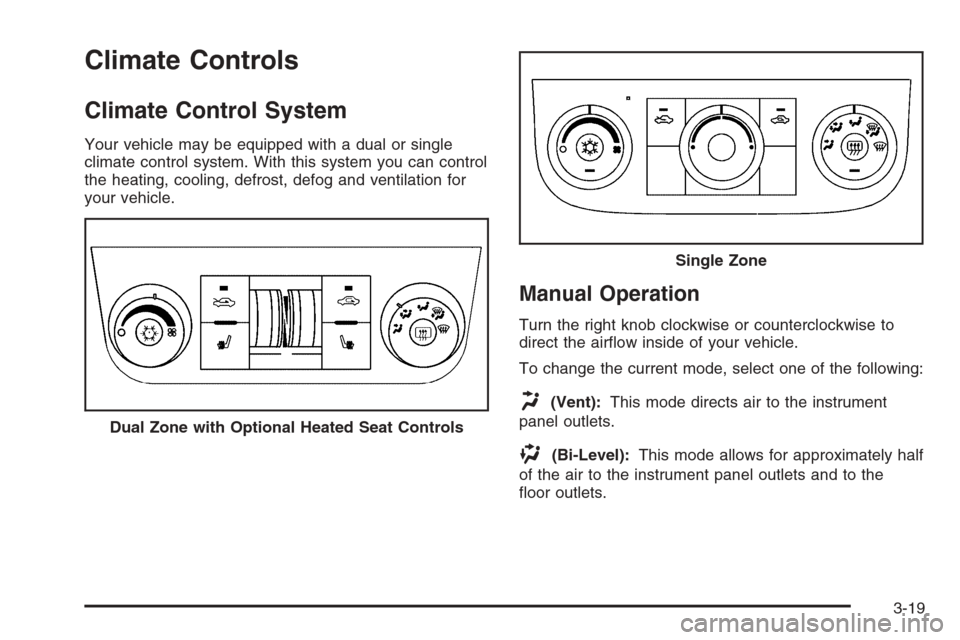
Climate Control System
Your vehicle may be equipped with a dual or single
climate control system. With this system you can control
the heating, cooling, defrost, defog and ventilation for
your vehicle.
Manual Operation
Turn the right knob clockwise or counterclockwise to
direct the airow inside of your vehicle.
To change the current mode, select one of the following:
H(Vent):This mode directs air to the instrument
panel outlets.
)(Bi-Level):This mode allows for approximately half
of the air to the instrument panel outlets and to the
oor outlets. Dual Zone with Optional Heated Seat Controls
Single Zone
3-19