radio CHEVROLET IMPALA 2006 9.G Owner's Guide
[x] Cancel search | Manufacturer: CHEVROLET, Model Year: 2006, Model line: IMPALA, Model: CHEVROLET IMPALA 2006 9.GPages: 394, PDF Size: 2.42 MB
Page 204 of 394
g(Mute/Voice Recognition):Press and release this
button to silence the system. Press and release this
button again, to turn the sound on.
If your vehicle has OnStar
®, press and hold this button
for longer than one second to interact with the OnStar
system. See theOnStar
®System on page 2-36in
this manual for more information.
SRCE (Source):Press this button to switch between
AM, FM, XM (if equipped), CD, and AUX jack.
+−(Volume):Press the plus or minus button to
increase or to decrease the radio volume.
¨(Seek):Press the seek arrow to go to the next
radio station and stay there.
Radio Reception
You may experience frequency interference and static
during normal radio reception if items such as cellphone
chargers, vehicle convenience accessories, and
external electronic devices are plugged into the
accessory power outlet. If there is interference or static,
unplug the item from the accessory power outlet.
AM
The range for most AM stations is greater than for FM,
especially at night. The longer range can cause
station frequencies to interfere with each other. For
better radio reception, most AM radio stations will boost
the power levels during the day, and then reduce
these levels during the night. Static can also occur when
things like storms and power lines interfere with radio
reception. When this happens, try reducing the treble on
your radio.
FM Stereo
FM stereo will give the best sound, but FM signals will
reach only about 10 to 40 miles (16 to 65 km). Tall
buildings or hills can interfere with FM signals, causing
the sound to fade in and out.
3-84
Page 205 of 394
XM™ Satellite Radio Service
XM™ Satellite Radio Service gives digital radio
reception from coast-to-coast in the 48 contiguous
United States, and in Canada (if available). Just as with
FM, tall buildings or hills can interfere with satellite
radio signals, causing the sound to fade in and out.
In addition, traveling or standing under heavy foliage,
bridges, garages, or tunnels may cause loss of the XM™
signal for a period of time. The radio may display NO
SIGNAL to indicate interference.
Care of Your CDs
Handle CDs carefully. Store them in their original cases
or other protective cases and away from direct
sunlight and dust. The CD player scans the bottom
surface of the disc. If the surface of a CD is damaged,
such as cracked, broken, or scratched, the CD will
not play properly or not at all. If the surface of a CD is
soiled, take a soft, lint free cloth or dampen a clean, soft
cloth in a mild, neutral detergent solution mixed with
water, and clean it. Make sure the wiping process starts
from the center to the edge.Do not touch the bottom side of a CD while handling it;
this could damage the surface. Pick up CDs by
grasping the outer edges or the edge of the hole and
the outer edge.
Care of the CD Player
Do not use CD lens cleaners for CD players because
the lens of the CD optics can become contaminated by
lubricants.
Backglass Antenna
The AM-FM antenna is integrated with the rear window
defogger, located in the rear window. Make sure that the
inside surface of the rear window is not scratched and
that the lines on the glass are not damaged. If the inside
surface is damaged, it could interfere with radio
reception. Also, for proper radio reception, the antenna
connector at the top-center of the rear window needs to
be properly attached to the post on the glass.
Notice:Do not apply aftermarket glass tinting with
metallic lm. The metallic lm in some tinting
materials will interfere with or distort the incoming
radio reception. Any damage caused to your
backglass antenna due to metallic tinting materials
will not be covered by your warranty.
3-85
Page 206 of 394
Notice:Using a razor blade or sharp object to clear
the inside rear window may damage the rear
window antenna and/or the rear window defogger.
Repairs would not be covered by your warranty.
Do not clear the inside rear window with sharp
objects.
Because this antenna is built into your rear window,
there is a reduced risk of damage caused by car washes
and vandals.
If static is heard on the radio, when the rear window
defogger is turned on, it could mean that a defogger grid
line has been damaged. If this is true, the grid line
must be repaired.
If you choose to add a cellular telephone to your
vehicle, and the antenna needs to be attached to the
glass, make sure that you do not damage the grid lines
for the AM-FM antenna. There is enough space
between the lines to attach a cellular telephone antenna
without interfering with radio reception.XM™ Satellite Radio Antenna
System
The XM™ Satellite Radio antenna is located on the roof
of your vehicle. Keep this antenna clear of snow and
ice build up for clear radio reception.
If your vehicle has a sunroof, the performance of the
XM™ system may be affected if the sunroof is open.
Loading items onto the roof of your vehicle can interfere
with the performance of the XM™ system. Make sure
the XM™ Satellite Radio antenna is not obstructed.
3-86
Page 292 of 394
Jump Starting
If your vehicle’s battery has run down, you may want to
use another vehicle and some jumper cables to start your
vehicle. Be sure to use the following steps to do it safely.
{CAUTION:
Batteries can hurt you. They can be dangerous
because:
They contain acid that can burn you.
They contain gas that can explode or ignite.
They contain enough electricity to burn you.
If you do not follow these steps exactly, some
or all of these things can hurt you.
Notice:Ignoring these steps could result in costly
damage to your vehicle that would not be covered
by your warranty.
Trying to start your vehicle by pushing or pulling it
will not work, and it could damage your vehicle.
1. Check the other vehicle. It must have a 12-volt
battery with a negative ground system.Notice:If the other vehicle’s system is not a 12-volt
system with a negative ground, both vehicles can
be damaged. Only use vehicles with 12-volt systems
with negative grounds to jump start your vehicle.
2. Get the vehicles close enough so the jumper cables
can reach, but be sure the vehicles are not touching
each other. If they are, it could cause a ground
connection you do not want. You would not be able
to start your vehicle, and the bad grounding
could damage the electrical systems.
To avoid the possibility of the vehicles rolling, set
the parking brake rmly on both vehicles involved
in the jump start procedure. Put an automatic
transaxle in PARK (P) or a manual transaxle in
NEUTRAL before setting the parking brake.
Notice:If you leave your radio or other accessories
on during the jump starting procedure, they could
be damaged. The repairs would not be covered
by your warranty. Always turn off your radio and
other accessories when jump starting your vehicle.
3. Turn off the ignition on both vehicles. Unplug
unnecessary accessories plugged into the cigarette
lighter or the accessory power outlets. Turn off
the radio and all lamps that are not needed. This
will avoid sparks and help save both batteries.
And it could save the radio!
4. Open the hoods and locate the batteries. Find the
positive (+) and negative (−) terminal locations on
each vehicle.
5-44
Page 309 of 394
Check the tire’s ination pressure when the tires
are cold. Cold means your vehicle has been sitting
for at least three hours or driven no more than
1 mile (1.6 km).
Remove the valve cap from the tire valve stem. Press
the tire gage rmly onto the valve to get a pressure
measurement. If the cold tire ination pressure matches
the recommended pressure on the Tire and Loading
Information label, no further adjustment is necessary.
If the ination pressure is low, add air until you reach the
recommended amount.
If you overll the tire, release air by pushing on the
metal stem in the center of the tire valve. Re-check the
tire pressure with the tire gage.
Be sure to put the valve caps back on the valve stems.
They help prevent leaks by keeping out dirt and
moisture.
Tire Pressure Monitor System
Your vehicle may have a Tire Pressure Monitor
System (TPMS). This system uses radio and sensor
technology to check tire pressure levels. If your vehicle
has this feature, sensors are mounted onto each tire
and wheel assembly, except for the spare tire. The
TPMS sensors monitor the air pressure in your vehicle’s
tires and transmit tire pressure readings to a receiver
located in the vehicle.Each tire, including the spare (if provided), should be
checked monthly when cold and inated to the ination
pressure recommended by the vehicle manufacturer
on the vehicle placard or tire ination pressure label.
(If your vehicle has tires of a different size than the
size indicated on the vehicle placard or tire ination
pressure label, you should determine the proper ination
pressure for those tires.)
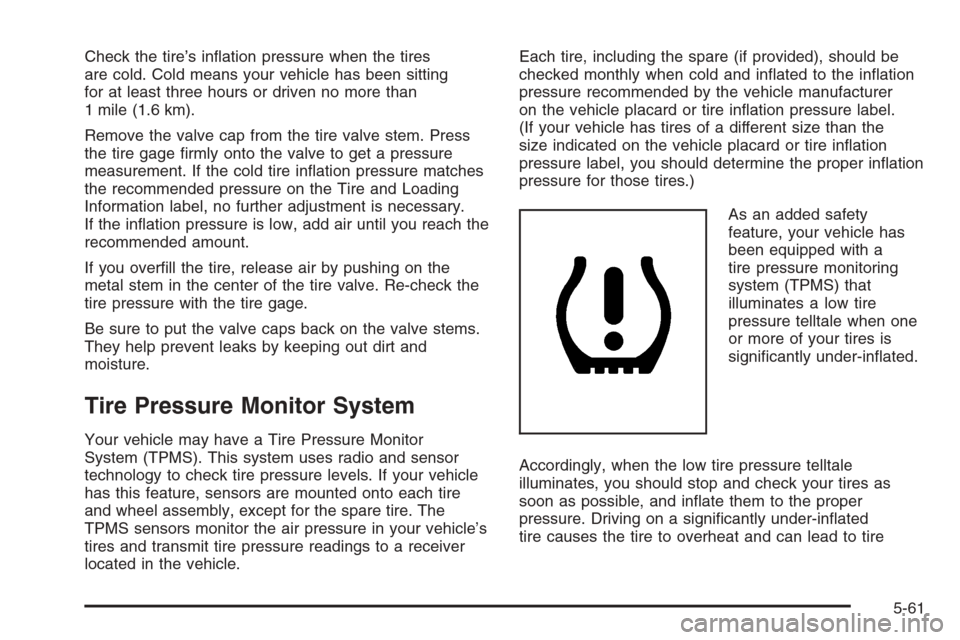
As an added safety
feature, your vehicle has
been equipped with a
tire pressure monitoring
system (TPMS) that
illuminates a low tire
pressure telltale when one
or more of your tires is
signicantly under-inated.
Accordingly, when the low tire pressure telltale
illuminates, you should stop and check your tires as
soon as possible, and inate them to the proper
pressure. Driving on a signicantly under-inated
tire causes the tire to overheat and can lead to tire
5-61
Page 312 of 394
Federal Communications
Commission (FCC) and Industry
and Science Canada
The Tire Pressure Monitor System (TPMS) operates
on a radio frequency and complies with Part 15 of
the FCC Rules and with RSS-210 of Industry and
Science Canada. Operation is subject to the following
two conditions:
1. This device may not cause harmful interference.
2. This device must accept any interference received,
including interference that may cause undesired
operation.
Changes or modications to this system by other than
an authorized service facility could void authorization
to use this equipment.
Tire Inspection and Rotation
Tires should be rotated every 5,000 to 8,000 miles
(8 000 to 13 000 km).
Any time you notice unusual wear, rotate your tires as
soon as possible and check wheel alignment. Also
check for damaged tires or wheels. SeeWhen It Is Time
for New Tires on page 5-65andWheel Replacement
on page 5-69for more information.The purpose of regular rotation is to achieve more
uniform wear for all tires on the vehicle. The rst rotation
is the most important. SeeScheduled Maintenance
on page 6-4for scheduled rotation intervals.
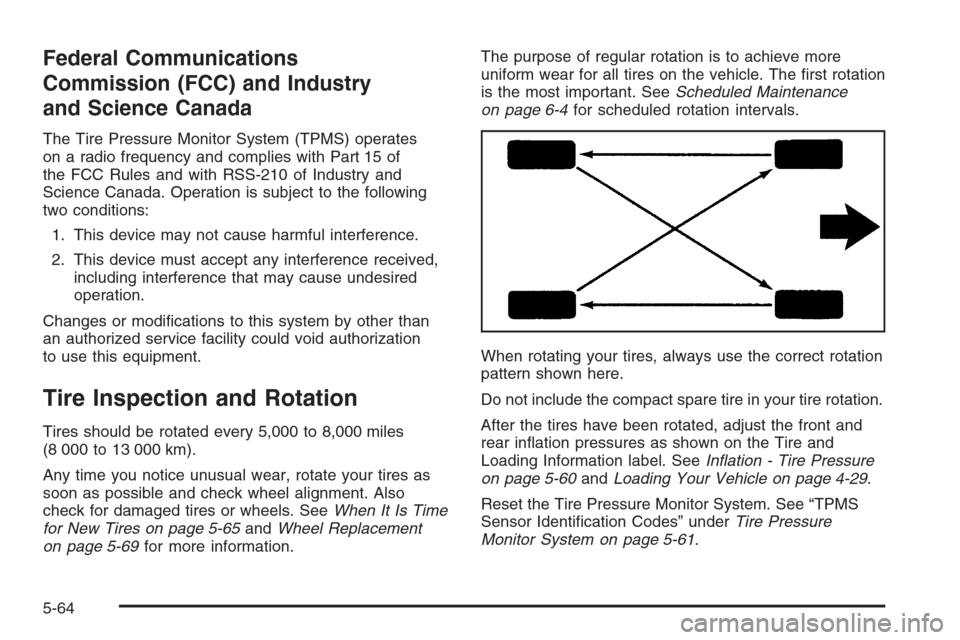
When rotating your tires, always use the correct rotation
pattern shown here.
Do not include the compact spare tire in your tire rotation.
After the tires have been rotated, adjust the front and
rear ination pressures as shown on the Tire and
Loading Information label. SeeInation - Tire Pressure
on page 5-60andLoading Your Vehicle on page 4-29.
Reset the Tire Pressure Monitor System. See “TPMS
Sensor Identication Codes” underTire Pressure
Monitor System on page 5-61.
5-64
Page 332 of 394
Appearance Care
Cleaning the Inside of Your Vehicle
Your vehicle’s interior will continue to look its best
if it is cleaned often. Although not always visible,
dust and dirt can accumulate on your upholstery.
Dirt can damage carpet, fabric, leather, and plastic
surfaces. Regular vacuuming is recommended to
remove particles from your upholstery. It is important
to keep your upholstery from becoming and remaining
heavily soiled. Soils should be removed as quickly
as possible. Your vehicle’s interior may experience
extremes of heat that could cause stains to set rapidly.
Lighter colored interiors may require more frequent
cleaning. Use care because newspapers and garments
that transfer color to your home furnishings may also
transfer color to your vehicle’s interior.
When cleaning your vehicle’s interior, only use cleaners
specically designed for the surfaces being cleaned.
Permanent damage may result from using cleaners on
surfaces for which they were not intended. Use glass
cleaner only on glass. Remove any accidental over-spray
from other surfaces immediately. To prevent over-spray,
apply cleaner directly to the cleaning cloth.Notice:If you use abrasive cleaners when cleaning
glass surfaces on your vehicle, you could scratch
the glass and/or cause damage to the integrated
radio antenna and the rear window defogger. When
cleaning the glass on your vehicle, use only a
soft cloth and glass cleaner.
Many cleaners contain solvents that may become
concentrated in your vehicle’s breathing space.
Before using cleaners, read and adhere to all safety
instructions on the label. While cleaning your vehicle’s
interior, maintain adequate ventilation by opening
your vehicle’s doors and windows.
Dust may be removed from small buttons and knobs
using a small brush with soft bristles.
Your dealer has a product for cleaning your vehicle’s
glass. Should it become necessary, you can also obtain
a product from your dealer to remove odors from
your vehicle’s upholstery.
Do not clean your vehicle using the following cleaners
or techniques:
Never use a knife or any other sharp object to
remove a soil from any interior surface.
Never use a stiff brush. It can cause damage to
your vehicle’s interior surfaces.
Never apply heavy pressure or rub aggressively
with a cleaning cloth. Use of heavy pressure
can damage your interior and does not improve
the effectiveness of soil removal.
5-84
Page 345 of 394
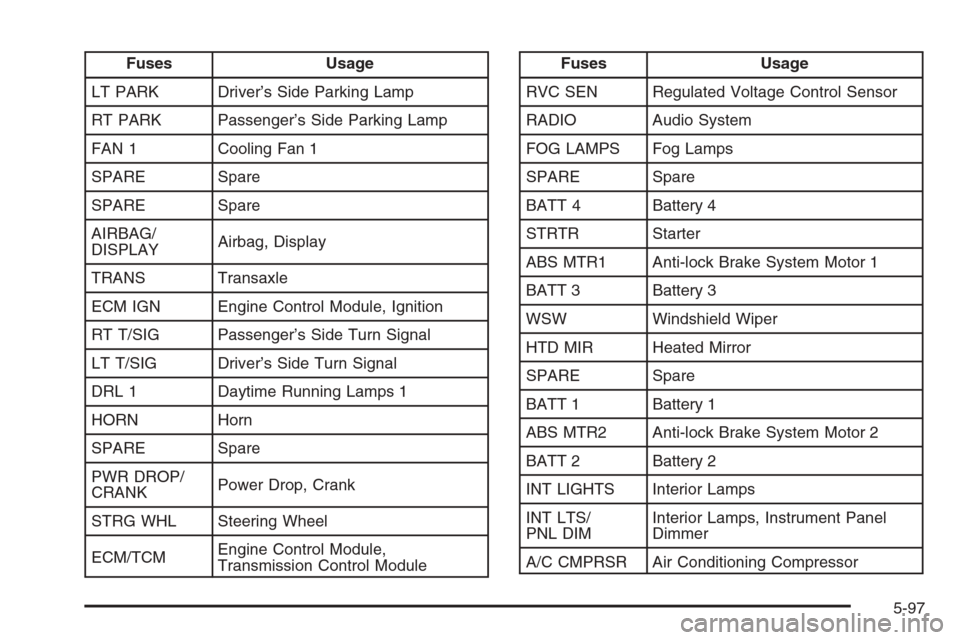
Fuses Usage
LT PARK Driver’s Side Parking Lamp
RT PARK Passenger’s Side Parking Lamp
FAN 1 Cooling Fan 1
SPARE Spare
SPARE Spare
AIRBAG/
DISPLAYAirbag, Display
TRANS Transaxle
ECM IGN Engine Control Module, Ignition
RT T/SIG Passenger’s Side Turn Signal
LT T/SIG Driver’s Side Turn Signal
DRL 1 Daytime Running Lamps 1
HORN Horn
SPARE Spare
PWR DROP/
CRANKPower Drop, Crank
STRG WHL Steering Wheel
ECM/TCMEngine Control Module,
Transmission Control ModuleFuses Usage
RVC SEN Regulated Voltage Control Sensor
RADIO Audio System
FOG LAMPS Fog Lamps
SPARE Spare
BATT 4 Battery 4
STRTR Starter
ABS MTR1 Anti-lock Brake System Motor 1
BATT 3 Battery 3
WSW Windshield Wiper
HTD MIR Heated Mirror
SPARE Spare
BATT 1 Battery 1
ABS MTR2 Anti-lock Brake System Motor 2
BATT 2 Battery 2
INT LIGHTS Interior Lamps
INT LTS/
PNL DIMInterior Lamps, Instrument Panel
Dimmer
A/C CMPRSR Air Conditioning Compressor
5-97
Page 381 of 394
A
Accessories and Modications............................ 5-3
Accessory Power Outlet(s)...............................3-17
Adding Equipment to Your Airbag-Equipped
Vehicle.......................................................1-68
Additives, Fuel................................................. 5-6
Add-On Electrical Equipment............................5-93
Air Cleaner/Filter, Engine.................................5-22
Air Conditioning..............................................3-19
Airbag
Passenger Status Indicator...........................3-28
Readiness Light..........................................3-27
Airbag Sensing and Diagnostic Module (SDM)...... 7-9
Airbag System................................................1-55
Adding Equipment to Your Airbag-Equipped
Vehicle...................................................1-68
How Does an Airbag Restrain?......................1-61
Passenger Sensing System...........................1-63
Servicing Your Airbag-Equipped Vehicle..........1-67
What Makes an Airbag Inate?......................1-61
What Will You See After an Airbag Inates?....1-62
When Should an Airbag Inate?....................1-60
Where Are the Airbags?...............................1-57
Antenna, Backglass.........................................3-85
Antenna, XM™ Satellite Radio Antenna
System......................................................3-86Anti-Lock Brake System (ABS)........................... 4-7
Anti-Lock Brake, System Warning Light..............3-31
Appearance Care
Aluminum Wheels........................................5-89
Care of Safety Belts....................................5-87
Chemical Paint Spotting...............................5-90
Cleaning Exterior Lamps/Lenses....................5-87
Cleaning the Inside of Your Vehicle................5-84
Fabric/Carpet..............................................5-85
Finish Care.................................................5-88
Finish Damage............................................5-90
Instrument Panel, Vinyl, and Other Plastic
Surfaces.................................................5-86
Leather......................................................5-86
Sheet Metal Damage...................................5-90
Tires..........................................................5-89
Underbody Maintenance...............................5-90
Vehicle Care/Appearance Materials................5-91
Washing Your Vehicle...................................5-87
Weatherstrips..............................................5-87
Windshield and Wiper Blades........................5-88
Ashtray(s)......................................................3-18
Audio System(s).............................................3-58
Audio Steering Wheel Controls......................3-83
Backglass Antenna......................................3-85
Care of Your CD Player...............................3-85
Care of Your CDs ........................................3-85
1
Page 382 of 394
Audio System(s) (cont.)
Radio with CD....................................3-62, 3-67
Setting the Time..........................................3-60
Theft-Deterrent Feature................................3-83
Understanding Radio Reception.....................3-84
XM™ Satellite Radio Antenna System............3-86
Automatic Door Lock.......................................2-11
Automatic Transaxle
Fluid..........................................................5-23
Operation...................................................2-25
B
Backglass Antenna..........................................3-85
Battery..........................................................5-43
Run-Down Protection...................................3-17
Before Leaving on a Long Trip.........................4-21
Brake
Anti-Lock Brake System (ABS)........................ 4-7
Emergencies................................................ 4-9
Parking......................................................2-28
System Warning Light..................................3-30
Brakes..........................................................5-40
Braking........................................................... 4-6
Braking in Emergencies..................................... 4-9
Break-In, New Vehicle.....................................2-20Bulb Replacement...........................................5-48
Halogen Bulbs............................................5-48
Headlamp Aiming........................................5-47
Headlamps, Front Turn Signal, Sidemarker,
and Parking Lamps..................................5-48
Replacement Bulbs......................................5-52
Taillamps, Turn Signal, Sidemarker,
Stoplamps, and Back-Up Lamps.................5-50
Buying New Tires...........................................5-66
C
Calibration.....................................................3-44
California Fuel.................................................. 5-5
California Proposition 65 Warning....................... 5-3
Canadian Owners................................................ ii
Capacities and Specications............................5-99
Carbon Monoxide...................2-13, 2-32, 4-24, 4-36
Care of
Safety Belts................................................5-87
Your CD Player...........................................3-85
Your CDs ...................................................3-85
Center Console Storage Area...........................2-43
Center Front Passenger Position, Safety Belts....1-25
Center Seat..................................................... 1-9
Chains, Tire...................................................5-71
2