keyless CHEVROLET IMPALA 2007 9.G User Guide
[x] Cancel search | Manufacturer: CHEVROLET, Model Year: 2007, Model line: IMPALA, Model: CHEVROLET IMPALA 2007 9.GPages: 460, PDF Size: 2.56 MB
Page 101 of 460
To use these locks, do the following:
1. Insert the key into the security lock slot and
turn it so the slot is in the horizontal position.
2. Close the door.
3. Do the same for the other rear door.
When you want to open a rear door when the
security lock is on, do the following:
1. Unlock the door using the remote keyless
entry transmitter, if the vehicle has one, the
power door lock switch, or by lifting the
rear door manual lock.
2. Open the door from the outside.
To cancel the rear door security lock, do the
following:
1. Unlock the door and open it from the outside.
2. Insert the key into the security lock slot
and turn it so the slot is in the vertical position.
3. Do the same for the other rear door.Lockout Protection
This feature helps prevent you from locking the
doors while your key is in the ignition. Always
remember to take your key with you when exiting
your vehicle.
If the lock switch is pressed on the door that is
open and the key is in the ignition, all of the doors
will lock and then the driver’s door will unlock.
A chime will sound continuously until all doors are
closed.
101
Page 103 of 460
Trunk Release
To open the trunk from the outside, press the
open trunk button on the remote keyless entry
transmitter, if equipped.
Remote Trunk Release
You can also open the trunk from inside the
vehicle.
G(Remote Trunk Release):Press the button
with the open trunk symbol on it. The button is
located next to the exterior lamps control on
the left side of the instrument panel. The shift lever
must be in PARK (P) for the remote trunk
release button to work.
If your vehicle ever loses power, you can open the
trunk by lowering the rear seat and pulling the
emergency trunk release handle located inside the
trunk. SeeSplit Folding Rear Seat on page 15
and “Emergency Trunk Release Handle” following.
Emergency Trunk Release Handle
Notice:Do not use the emergency trunk
release handle as a tie-down or anchor point
when securing items in the trunk as it could
damage the handle. The emergency trunk
release handle is only intended to aid a person
trapped in a latched trunk, enabling them to
open the trunk from the inside.
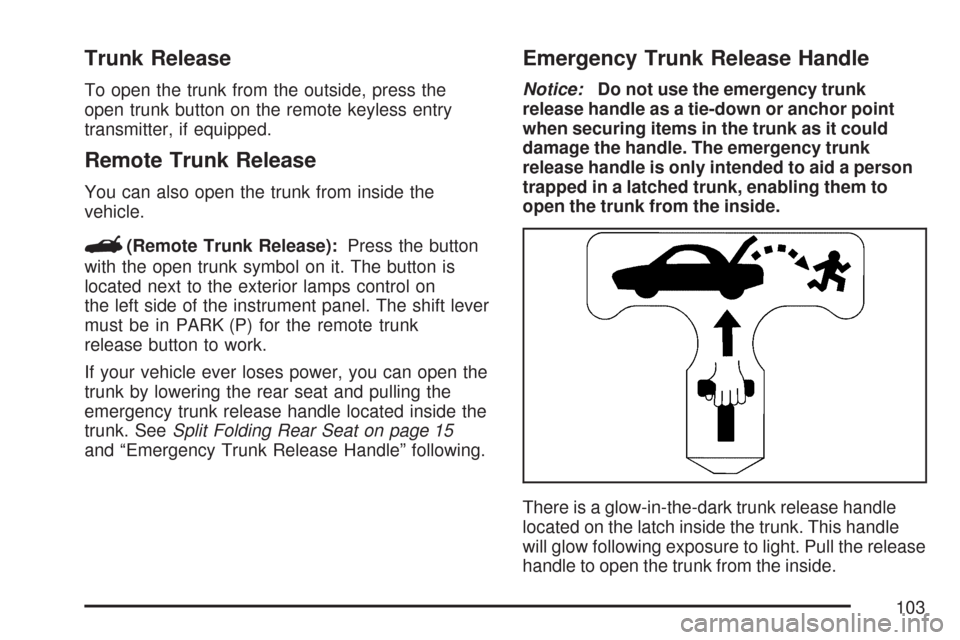
There is a glow-in-the-dark trunk release handle
located on the latch inside the trunk. This handle
will glow following exposure to light. Pull the release
handle to open the trunk from the inside.
103
Page 107 of 460
Sun Visors
To block out glare, swing down the sun visors.
They can be detached from the center retainer and
slid along the rod to cover different areas of the
front window and turned to cover the side
windows.
Visor Vanity Mirror
Swing down the sun visors and lift the cover to
expose the vanity mirror. Do not drive with
the cover lifted due to possible glare impeding
other drivers behind or to the side of the vehicle.
Theft-Deterrent Systems
Vehicle theft is big business, especially in some
cities. Although your vehicle has a number of
theft-deterrent features, we know that nothing we
put on it can make it impossible to steal.
Content Theft-Deterrent
Your vehicle may have the optional content
theft-deterrent alarm system.
To activate the theft-deterrent system:
1. Open the door.
2. Lock the door with the power door lock switch
or the Remote Keyless Entry (RKE) transmitter.
If you are using the RKE transmitter, the door
does not need to be open.
3. Close all doors.
Once armed, the alarm will go off if someone
tries to enter the vehicle without using the RKE
transmitter or a key or turns the ignition on with an
incorrect key. The horn will sound and the turn
signal lamps will ash for about two minutes.
When the alarm is armed, the trunk may be opened
with the RKE transmitter. The power door lock
switches are disabled and the doors remain locked.
You must use your RKE transmitter or your key to
unlock the doors when the system is armed.
107
Page 164 of 460
Dome Lamp
The dome lamp will come on when you open a
door. You can also turn this lamp on by turning the
instrument panel brightness control clockwise.
Entry Lighting
Your vehicle may have courtesy lamps that will
come on and stay on for a set time whenever the
unlock symbol is pressed on the Remote
Keyless Entry (RKE) Transmitter, if the vehicle
has one.
If a door is opened, the lamps will stay on while it
is open and then turn off automatically about
25 seconds after the door is closed. If the unlock
symbol is pressed and you do not open a
door, the lamps will turn off after about
20 seconds.
Entry lighting includes a feature called theater
dimming. With theater dimming, the lamps do not
turn off at the end of the delay time. Instead,
they slowly dim after the delay time until they go
out. The delay time is canceled if you turn the
ignition key to ON or press the power door
lock switch. The lamps will dim right away.When the ignition is on, illuminated entry is
inactive, which means the courtesy lamps will not
come on unless a door is opened.
Delayed Entry Lighting
Delayed entry lighting illuminates the interior for a
period of time after all the doors have been closed.
The ignition must be off for delayed entry lighting
to work. Immediately after all the doors have been
closed, the delayed entry lighting feature will
continue to work until one of the following occurs:
The ignition is in ON.
The doors are locked.
An illumination period of 25 seconds has
elapsed.
If during the illumination period a door is opened,
the timed illumination period will be canceled
and the interior lamps will remain on because a
door is open.
164
Page 191 of 460
If your vehicle has these features, the DIC also
displays the compass direction and the outside
air temperature when viewing the trip and fuel
information. The compass direction appears on the
top right corner of the DIC display. The outside air
temperature automatically appears in the bottom
right corner of the DIC display. If there is a problem
with the system that controls the temperature
display, the numbers will be replaced with dashes.
If this occurs, have the vehicle serviced by your
dealer.
The DIC also allows some features to be
customized. SeeDIC Vehicle Customization on
page 208for more information.
DIC Operation and Displays
The DIC has different displays which can be
accessed by pressing the DIC buttons located
on the instrument panel, to the right of the
instrument panel cluster.
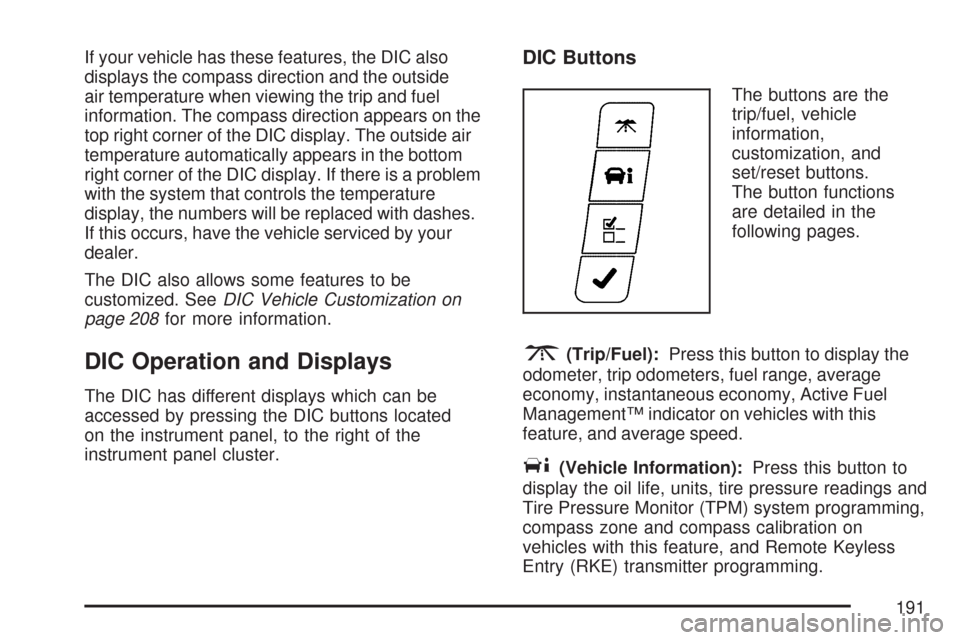
DIC Buttons
The buttons are the
trip/fuel, vehicle
information,
customization, and
set/reset buttons.
The button functions
are detailed in the
following pages.
3(Trip/Fuel):Press this button to display the
odometer, trip odometers, fuel range, average
economy, instantaneous economy, Active Fuel
Management™ indicator on vehicles with this
feature, and average speed.
T(Vehicle Information):Press this button to
display the oil life, units, tire pressure readings and
Tire Pressure Monitor (TPM) system programming,
compass zone and compass calibration on
vehicles with this feature, and Remote Keyless
Entry (RKE) transmitter programming.
191
Page 196 of 460
If a low or high tire pressure condition is detected
by the system while driving, a message advising
you to check the pressure in a specic tire
will appear in the display. SeeInation - Tire
Pressure on page 359andDIC Warnings
and Messages on page 199for more information.
If the tire pressure display shows dashes
instead of a value, there may be a problem with
your vehicle. If this consistently occurs, see
your dealer/retailer for service.
Learn Tire Positions
To access this display, the vehicle must be in
PARK (P). After rotating the tires or after replacing
a tire or sensor, the Tire Pressure Monitor
(TPM) system must re-learn the tire positions.
To re-learn the tire positions, seeTire Pressure
Monitor System on page 360. SeeTire Inspection
and Rotation on page 364andDIC Warnings
and Messages on page 199for more information.
Compass Zone
Your vehicle may have this feature. Under certain
circumstances, such as during a long distance
cross-country trip, it will be necessary to
compensate for compass variance and reset the
zone. To change the compass zone through
the DIC, seeDIC Compass on page 197.
Compass Calibration
The compass can be manually calibrated.
To calibrate the compass through the DIC,
seeDIC Compass on page 197.
Remote Key
To access this display, the vehicle must be in
PARK (P). This display allows you to match the
Remote Keyless Entry (RKE) transmitter to
your vehicle. To match an RKE transmitter to
your vehicle, do the following:
1. Press the vehicle information button until
PRESS
VTO RELEARN REMOTE KEY
displays.
2. Press the set/reset button.
The message REMOTE KEY LEARNING
ACTIVE will display.
196
Page 204 of 460
PASSENGER DOOR OPEN
This message displays when the front passenger’s
door is not closed properly. When this message
appears, make sure that the front passenger’s
door is closed completely.
REMOTE KEY LEARNING ACTIVE
This message displays while you are matching
a Remote Keyless Entry (RKE) transmitter to your
vehicle. See “Matching Transmitter(s) to Your
Vehicle” underRemote Keyless Entry (RKE)
System Operation on page 91andDIC Operation
and Displays on page 191for more information.
REPLACE BATTERY IN REMOTE KEY
This message displays when the battery in
the Remote Keyless Entry (RKE) transmitter
needs to be replaced. To replace the battery,
see “Battery Replacement” underRemote Keyless
Entry (RKE) System Operation on page 91.
RIGHT REAR DOOR OPEN
This message displays when the passenger’s
side rear door is not closed properly. When this
message appears, make sure that the passenger’s
side rear door is closed completely.
SERVICE A/C (Air Conditioning)
SYSTEM
This message displays when the electronic
sensors that control the air conditioning and
heating systems are no longer working. Have the
climate control system serviced by your dealer
if you notice a drop in heating and air conditioning
efficiency.
SERVICE AIR BAG
This message displays when there is a problem
with the airbag system. Have your vehicle serviced
by your dealer immediately. SeeAirbag Readiness
Light on page 178for more information.
204
Page 210 of 460
AUTO DOOR UNLOCK
This feature allows you to select whether or not
to turn off the automatic door unlocking feature.
It also allows you to select which doors and
when the doors will automatically unlock.
SeeProgrammable Automatic Door Unlock
on page 100for more information.
Press the customization button until AUTO DOOR
UNLOCK appears on the DIC display. Press
the set/reset button to access the settings for this
feature. Then press the customization button
to scroll through the following choices:
OFF:None of the doors will automatically unlock.
DRIVER AT KEY OUT:Only the driver’s door
will unlock when the key is taken out of the
ignition.
DRIVER IN PARK:Only the driver’s door will
unlock when the vehicle is shifted into PARK (P).
ALL AT KEY OUT:All of the doors will unlock
when the key is taken out of the ignition.
ALL IN PARK (default):All of the doors will
unlock when the vehicle is shifted into PARK (P).NO CHANGE:No change will be made to this
feature. The current setting will remain.
Select one of the available choices and press the
set/reset button while it is displayed on the
DIC to select it.
REMOTE DOOR LOCK
This feature allows you to select the type of
feedback you will receive when locking the vehicle
with the Remote Keyless Entry (RKE) transmitter.
You will not receive feedback when locking
the vehicle with the RKE transmitter if any of the
doors are open. SeeRemote Keyless Entry (RKE)
System Operation on page 91for more
information.
Press the customization button until REMOTE
DOOR LOCK appears on the DIC display. Press
the set/reset button to access the settings for
this feature. Then press the customization button
to scroll through the following choices:
HORN & LIGHTS OFF:There will be no feedback
when you press the lock button on the RKE
transmitter.
210
Page 211 of 460
LIGHTS ONLY:The exterior lamps will ash
when you press the lock button on the RKE
transmitter.
HORN ONLY:The horn will sound on the second
press of the lock button on the RKE transmitter.
HORN & LIGHTS ON (default):The exterior
lamps will ash when you press the lock button on
the RKE transmitter, and the horn will sound
when the lock button is pressed again within
ve seconds of the previous command.
NO CHANGE:No change will be made to this
feature. The current setting will remain.
Select one of the available choices and press the
set/reset button while it is displayed on the
DIC to select it.
REMOTE DOOR UNLOCK
This feature allows you to select the type of
feedback you will receive when unlocking the
vehicle with the Remote Keyless Entry (RKE)
transmitter. You will not receive feedback when
unlocking the vehicle with the RKE transmitter
if the doors are open. SeeRemote Keyless Entry
(RKE) System Operation on page 91for more
information.Press the customization button until REMOTE
DOOR UNLOCK appears on the DIC display.
Press the set/reset button to access the settings
for this feature. Then press the customization
button to scroll through the following choices:
LIGHTS OFF:The exterior lamps will not ash
when you press the unlock button on the RKE
transmitter.
LIGHTS ON (default):The exterior lamps will
ash when you press the unlock button on
the RKE transmitter.
NO CHANGE:No change will be made to this
feature. The current setting will remain.
Select one of the available choices and press the
set/reset button while it is displayed on the
DIC to select it.
211
Page 212 of 460
EXIT LIGHTING
This feature allows you to select the amount of
time you want the exterior lamps to remain
on when it is dark enough outside. This happens
after the key is turned from RUN to OFF.
Press the customization button until EXIT
LIGHTING appears on the DIC display. Press the
set/reset button to access the settings for this
feature. Then press the customization button to
scroll through the following choices:
OFF:The exterior lamps will not turn on.
30 SECONDS (default):The exterior lamps will
stay on for 30 seconds.
1 MINUTE:The exterior lamps will stay on for
one minute.
2 MINUTES:The exterior lamps will stay on for
two minutes.
NO CHANGE:No change will be made to this
feature. The current setting will remain.
Select one of the available choices and press the
set/reset button while it is displayed on the
DIC to select it.
APPROACH LIGHTING
This feature allows you to select whether or not to
have the exterior lights turn on briey during
low light periods after unlocking the vehicle using
the Remote Keyless Entry (RKE) transmitter.
Press the customization button until APPROACH
LIGHTING appears on the DIC display. Press
the set/reset button to access the settings for this
feature. Then press the customization button
to scroll through the following choices:
OFF:The exterior lights will not turn on when you
unlock the vehicle with the RKE transmitter.
ON (default):If it is dark enough outside, the
exterior lights will turn on briey when you unlock
the vehicle with the RKE transmitter.
The lights will remain on for 20 seconds or until
the lock button on the RKE transmitter is pressed,
or the vehicle is no longer off. SeeRemote
Keyless Entry (RKE) System Operation on page 91
for more information.
212