service CHEVROLET IMPALA 2007 9.G Owner's Guide
[x] Cancel search | Manufacturer: CHEVROLET, Model Year: 2007, Model line: IMPALA, Model: CHEVROLET IMPALA 2007 9.GPages: 460, PDF Size: 2.56 MB
Page 206 of 460
SERVICE TIRE MONITOR SYSTEM
This message displays if a part on the Tire
Pressure Monitor (TPM) system is not working
properly. If you drive your vehicle while any of the
four sensors are missing or inoperable, the warning
comes on in about 20 minutes. A sensor would be
missing, for example, if you put different wheels on
your vehicle without transferring the sensors. If the
warning comes on and stays on, there may be a
problem with the TPM. See your dealer.
SERVICE TRACTION CONTROL
If your vehicle has the Traction Control System
(TCS), this message displays when the system is
not functioning properly. A warning light also
appears on the instrument panel cluster. See
Traction Control System (TCS) Warning Light on
page 183. SeeTraction Control System (TCS) on
page 256for more information. Have the TCS
serviced by your dealer as soon as possible.
SERVICE TRANSMISSION
This message displays when there is a problem
with the transaxle. See your dealer for service.
SERVICE VEHICLE SOON
This message displays when a non-emissions
related malfunction occurs. Have the vehicle
serviced by your dealer as soon as possible.
STARTING DISABLED SERVICE
THROTTLE
This message displays if the starting of the engine
is disabled due to the electronic throttle control
system. Have your vehicle serviced by your dealer
immediately.
This message only appears while the ignition is in
RUN, and will not disappear until the problem
is resolved.
This message cannot be acknowledged.
THEFT ATTEMPTED
This message displays if the content theft-deterrent
system has detected a break-in attempt while
you were away from your vehicle. SeeContent
Theft-Deterrent on page 107for more information.
206
Page 207 of 460
TIGHTEN GAS CAP
This message may be displayed if the gas cap is
not on, or is not fully tightened. Check the gas
cap to ensure that it is on properly. SeeFilling the
Tank on page 302for more information.
TIRE LEARNING ACTIVE
This message displays when the Tire Pressure
Monitor (TPM) system is re-learning the tire
positions. SeeTire Pressure Monitor System on
page 360. The tire positions must be re-learned
after rotating the tires or after replacing a tire
or sensor. SeeTire Inspection and Rotation on
page 364andInation - Tire Pressure on page 359
for more information.
TRACTION CONTROL OFF
If your vehicle has the Traction Control System
(TCS), this message displays when the TCS turns
off. SeeTraction Control System (TCS) on
page 256for more information.
This message only displays while the ignition is in
RUN and disappears after 10 seconds, unless
it is acknowledged or an urgent warning appears.Any of the following conditions may cause the
TCS to turn off:
The TCS is turned off by pressing the traction
control button. SeeTraction Control System
(TCS) on page 256for more information.
The battery is low.
There is a TCS failure. See your dealer for
service.
TRACTION CONTROL ON
If your vehicle has the Traction Control System
(TCS), this message displays when the TCS
is turned on. SeeTraction Control System (TCS)
on page 256for more information.
TRANSMISSION HOT IDLE ENGINE
This message displays when the transaxle uid in
your vehicle is too hot. Stop the vehicle and
allow it to idle until it cools down. If the warning
message continues to display, have the vehicle
serviced by your dealer as soon as possible.
207
Page 220 of 460
Setting Preset Stations
Up to 18 stations (six FM1, six FM2, and six AM),
can be programmed on the six numbered
pushbuttons, by performing the following steps:
1. Turn the radio on.
2. Press BAND to select FM1, FM2, or AM.
3. Tune in the desired station.
4. Press and hold one of the six numbered
pushbuttons for three seconds until a beep
sounds. When that pushbutton is pressed and
released, the station that was set, returns.
5. Repeat the Steps 2 through 4 for each
pushbutton.
Setting the Tone (Bass/Treble)
BASS/TREB (Bass/Treble):To adjust the bass or
treble, press the
fknob or the pushbuttons located
under the BASS/TREB (treble) display, until the
desired tone control label displays. Turn the
fknob
clockwise or counterclockwise to increase or
decrease the setting. Adjust the setting by
pressing either SEEK arrow,
\FWD (forward),
or
sREV (reverse) buttons. The current bass or
treble level displays. If a station’s frequency is
weak, or has static, decrease the treble.EQ (Equalization):Press this button to select
preset equalization settings.
To return to the manual mode, press the EQ button
until Manual displays or starts to manually adjust
the bass or treble by pressing the
fknob.
Adjusting the Speakers (Balance/Fade)
`
BAL/FADE (Balance/Fade):To adjust the
balance or fade, press the
`button or thefknob
until the desired speaker control label displays.
Turn the
fknob clockwise or counterclockwise to
adjust the setting. The setting can also be adjusted
by pressing either SEEK arrow,
\FWD,
or
sREV buttons.
Radio Messages
Calibration Error:The audio system has been
calibrated for your vehicle from the factory. If
Calibration Error displays, it means that the radio
has not been congured properly for your
vehicle and it must be returned to your
dealer/retailer for service.
220
Page 221 of 460
Loc (Locked):This message displays while the
THEFTLOCK®system has locked up the radio.
Take the vehicle to your dealer/retailer for service.
If any error occurs repeatedly or if an error
cannot be corrected, contact your dealer/retailer.
Playing a CD (Single CD Player)
Insert a CD partway into the slot, label side up.
The player pulls it in and the CD should begin
playing.
If the ignition or radio is turned off with a CD in the
player, it stays in the player. When the ignition or
radio is turned on, the CD starts playing where it
stopped, if it was the last selected audio source.
When a CD is inserted, the CD symbol displays.
As each new track starts to play, the track number
displays.
The CD player can play the smaller 3 inch (8 cm)
single CDs with an adapter ring. Full-size CDs and
the smaller CDs are loaded in the same manner.
If playing a CD-R, the sound quality can be reduced
due to CD-R quality, the method of recording, the
quality of the music that has been recorded, and the
way the CD-R has been handled.There can be an increase in skipping, difficulty in
nding tracks, and/or difficulty in loading and
ejecting. If these problems occur, check the bottom
surface of the CD. If the surface of the CD is
damaged, such as cracked, broken, or scratched,
the CD does not play properly. If the surface of the
CD is soiled, seeCare of Your CDs on page 245for
more information.
If there is no apparent damage, try a known
good CD.
Notice:If a label is added to a CD, or more
than one CD is inserted into the slot at a time,
or an attempt is made to play scratched or
damaged CDs, the CD player could be
damaged. While using the CD player, use only
CDs in good condition without any label,
load one CD at a time, and keep the CD player
and the loading slot free of foreign materials,
liquids, and debris.
Do not add any label to a CD, it could get caught
in the CD player. If a CD is recorded on a
personal computer and a description label is
needed, try labeling the top of the recorded CD
with a marking pen.
221
Page 225 of 460
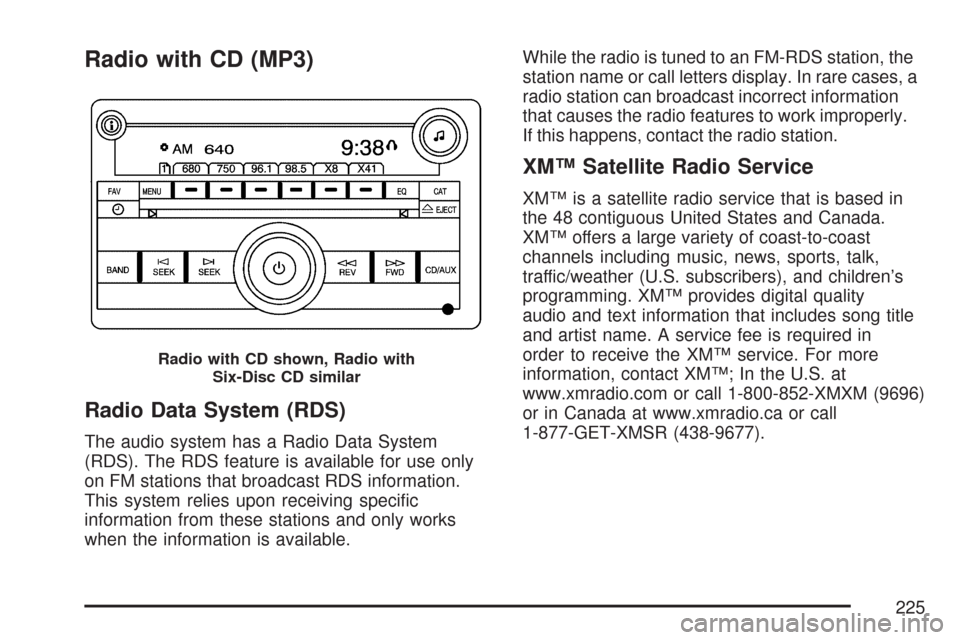
Radio with CD (MP3)
Radio Data System (RDS)
The audio system has a Radio Data System
(RDS). The RDS feature is available for use only
on FM stations that broadcast RDS information.
This system relies upon receiving specic
information from these stations and only works
when the information is available.While the radio is tuned to an FM-RDS station, the
station name or call letters display. In rare cases, a
radio station can broadcast incorrect information
that causes the radio features to work improperly.
If this happens, contact the radio station.
XM™ Satellite Radio Service
XM™ is a satellite radio service that is based in
the 48 contiguous United States and Canada.
XM™ offers a large variety of coast-to-coast
channels including music, news, sports, talk,
traffic/weather (U.S. subscribers), and children’s
programming. XM™ provides digital quality
audio and text information that includes song title
and artist name. A service fee is required in
order to receive the XM™ service. For more
information, contact XM™; In the U.S. at
www.xmradio.com or call 1-800-852-XMXM (9696)
or in Canada at www.xmradio.ca or call
1-877-GET-XMSR (438-9677).
Radio with CD shown, Radio with
Six-Disc CD similar
225
Page 227 of 460
4(Information) (XM™ Satellite Radio Service,
MP3, and RDS Features):Press this button
to display additional text information related to the
current FM-RDS or XM™ station, or MP3 song.
A choice of additional information such as:
Channel, Song, Artist, and CAT (category) can
appear. Continue pressing this button to highlight
the desired label, or press the pushbutton
positioned under any one of the labels and
the information about that label displays.
While information is not available, No Info displays.
Storing a Radio Station as a Favorite
Drivers are encouraged to set up their radio station
favorites while the vehicle is in PARK (P). Tune
to your favorite stations using the presets, favorites
button, and steering wheel controls if the vehicle
has this feature. SeeDefensive Driving on
page 248.FAV (Favorites):A maximum of 36 stations
can be programmed as favorites using the
six pushbuttons positioned below the radio station
frequency labels and by using the radio favorites
page button (FAV button). Press the FAV button to
go through up to six pages of favorites, each having
six favorite stations available per page. Each page
of favorites can contain any combination of AM, FM,
or XM™ (if equipped) stations. To store a station as
a favorite, perform the following steps:
1. Tune to the desired radio station.
2. Press the FAV button to display the page
where you want the station stored.
3. Press and hold one of the six pushbuttons
until a beep sounds. When that pushbutton
is pressed and released, the station that was
set, returns.
4. Repeat the steps for each pushbutton radio
station you want stored as a favorite.
227
Page 230 of 460
Undesired XM™ categories can be removed
through the setup menu. To remove an undesired
category, perform the following:
1. Press the MENU button to display the radio
setup menu.
2. Press the pushbutton located below the XM
CAT label.
3. Turn the
fknob to display the category you
want removed.
4. Press the pushbutton located under the
Remove label until the category name
along with the word Removed displays.
5. Repeat the steps to remove more categories.
Removed categories can be restored by pressing
the pushbutton under the Add label when a
removed category displays or by pressing the
pushbutton under the Restore All label.
The radio does not allow you to remove or add
categories while the vehicle is moving faster than
5 mph (8 km/h).
Radio Messages
Calibration Error:The audio system has been
calibrated for your vehicle from the factory. If
Calibration Error displays, it means that the radio
has not been congured properly for your
vehicle and it must be returned to your
dealer/retailer for service.
Locked:This message displays when the
THEFTLOCK
®system has locked up the radio.
Take the vehicle to your dealer/retailer for service.
If any error occurs repeatedly or if an error
cannot be corrected, contact your dealer/retailer.
Radio Messages for XM Only
SeeXM Radio Messages on page 241later in this
section for further detail.
Playing a CD (Single CD Player)
Insert a CD partway into the slot, label side up.
The player pulls it in and the CD should begin
playing.
230
Page 241 of 460
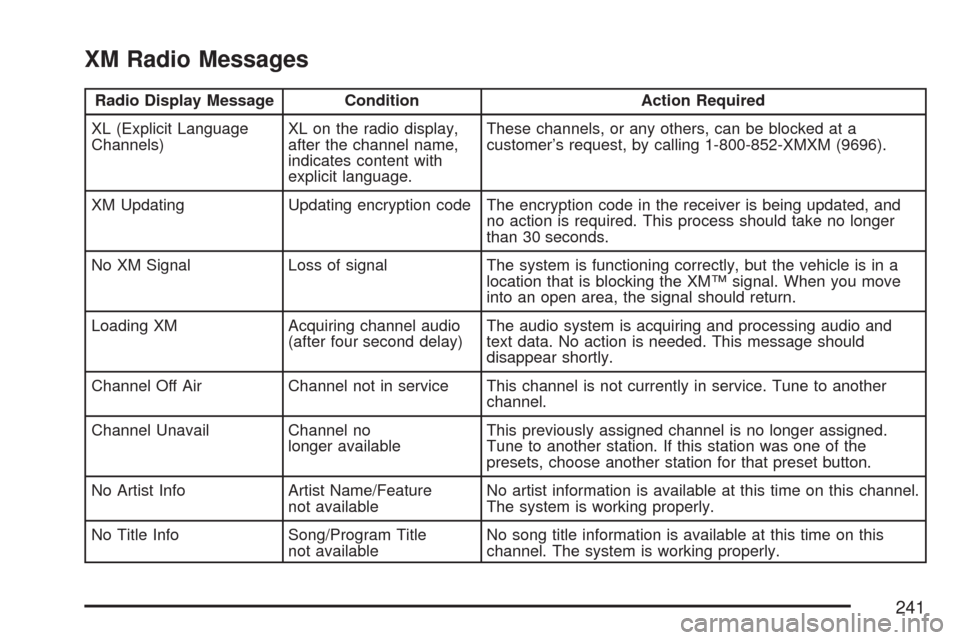
XM Radio Messages
Radio Display Message Condition Action Required
XL (Explicit Language
Channels)XL on the radio display,
after the channel name,
indicates content with
explicit language.These channels, or any others, can be blocked at a
customer’s request, by calling 1-800-852-XMXM (9696).
XM Updating Updating encryption code The encryption code in the receiver is being updated, and
no action is required. This process should take no longer
than 30 seconds.
No XM Signal Loss of signal The system is functioning correctly, but the vehicle is in a
location that is blocking the XM™ signal. When you move
into an open area, the signal should return.
Loading XM Acquiring channel audio
(after four second delay)The audio system is acquiring and processing audio and
text data. No action is needed. This message should
disappear shortly.
Channel Off Air Channel not in service This channel is not currently in service. Tune to another
channel.
Channel Unavail Channel no
longer availableThis previously assigned channel is no longer assigned.
Tune to another station. If this station was one of the
presets, choose another station for that preset button.
No Artist Info Artist Name/Feature
not availableNo artist information is available at this time on this channel.
The system is working properly.
No Title Info Song/Program Title
not availableNo song title information is available at this time on this
channel. The system is working properly.
241
Page 242 of 460
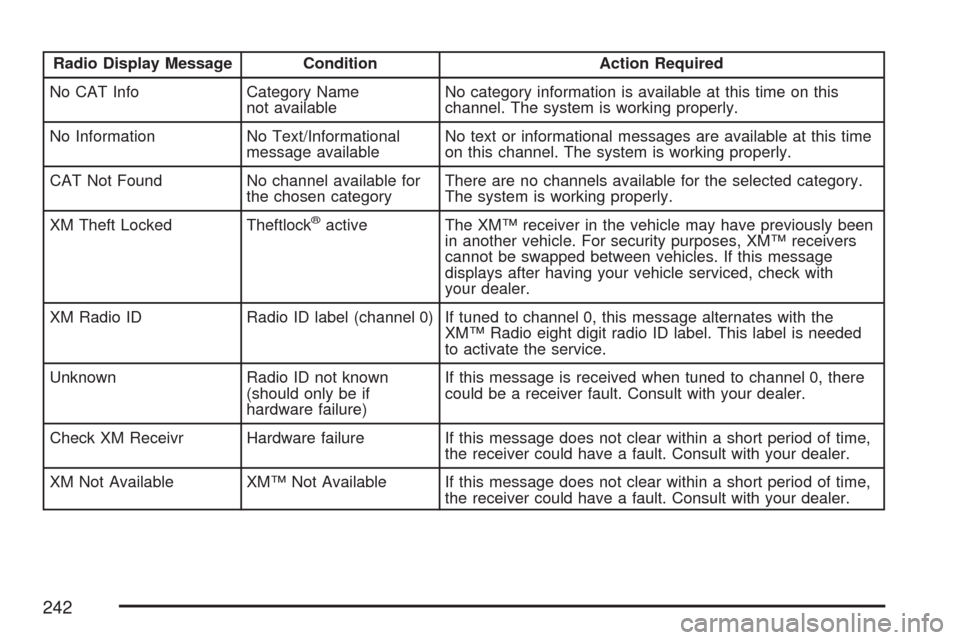
Radio Display Message Condition Action Required
No CAT Info Category Name
not availableNo category information is available at this time on this
channel. The system is working properly.
No Information No Text/Informational
message availableNo text or informational messages are available at this time
on this channel. The system is working properly.
CAT Not Found No channel available for
the chosen categoryThere are no channels available for the selected category.
The system is working properly.
XM Theft Locked Theftlock
®active The XM™ receiver in the vehicle may have previously been
in another vehicle. For security purposes, XM™ receivers
cannot be swapped between vehicles. If this message
displays after having your vehicle serviced, check with
your dealer.
XM Radio ID Radio ID label (channel 0) If tuned to channel 0, this message alternates with the
XM™ Radio eight digit radio ID label. This label is needed
to activate the service.
Unknown Radio ID not known
(should only be if
hardware failure)If this message is received when tuned to channel 0, there
could be a receiver fault. Consult with your dealer.
Check XM Receivr Hardware failure If this message does not clear within a short period of time,
the receiver could have a fault. Consult with your dealer.
XM Not Available XM™ Not Available If this message does not clear within a short period of time,
the receiver could have a fault. Consult with your dealer.
242
Page 245 of 460
FM Stereo
FM stereo gives the best sound, but FM signals
only reach about 10 to 40 miles (16 to 65 km). Tall
buildings or hills can interfere with FM signals,
causing the sound to fade in and out.
XM™ Satellite Radio Service
XM™ Satellite Radio Service gives digital radio
reception from coast-to-coast in the 48 contiguous
United States, and in Canada. Just as with FM,
tall buildings or hills can interfere with satellite
radio signals, causing the sound to fade in and out.
In addition, traveling or standing under heavy
foliage, bridges, garages, or tunnels could cause
loss of the XM™ signal for a period of time.
The radio might display NO XM SIGNAL to
indicate interference.
Care of Your CDs
Handle CDs carefully. Store them in their original
cases or other protective cases and away from
direct sunlight and dust. The CD player scans the
bottom surface of the disc. If the surface of a CD is
damaged, such as cracked, broken, or scratched,
the CD does not play properly or not at all. If the
surface of a CD is soiled, take a soft, lint free cloth
or dampen a clean, soft cloth in a mild, neutral
detergent solution mixed with water, and clean it.
Make sure the wiping process starts from the center
to the edge.
Do not touch the bottom side of a CD while
handling it; this could damage the surface. Pick up
CDs by grasping the outer edges or the edge of
the hole and the outer edge.
Care of the CD Player
Do not use CD lens cleaners for CD players
because the lens of the CD optics can become
contaminated by lubricants.
245