audio CHEVROLET IMPALA 2008 9.G User Guide
[x] Cancel search | Manufacturer: CHEVROLET, Model Year: 2008, Model line: IMPALA, Model: CHEVROLET IMPALA 2008 9.GPages: 400, PDF Size: 5.37 MB
Page 203 of 400

Playing an MP3 CD-R or CD-RW Disc
Your radio may have MP3 CD-R or CD-RW disc
capability. For more information, seeUsing an MP3
on page 3-80later in this section.
CD Messages
CHECK DISC:If an error message displays and/or the
CD comes out, it could be for one of the following reasons:
It is very hot. When the temperature returns to
normal, the CD should play.
You are driving on a very rough road. When the road
becomes smoother, the CD should play.
The CD is dirty, scratched, wet, or upside down.
The air is very humid. If so, wait about an hour and
try again.
There could have been a problem while burning
the CD.
The label could be caught in the CD player.
If there is no apparent damage, try a known good CD.
If any error occurs repeatedly or if an error cannot
be corrected, contact your dealer/retailer. If the radio
displays an error message, write it down and provide it
to your dealer/retailer while reporting the problem.
Using the Auxiliary Input Jack
The radio system has an auxiliary input jack located on
the lower right side of the faceplate. This is not an
audio output; do not plug the headphone set into the
front auxiliary input jack. However, an external audio
device such as an iPod, laptop computer, MP3 player,
CD changer, or cassette tape player, etc. can be
connected to the auxiliary input jack for use as another
source for audio listening.
Drivers are encouraged to set up any auxiliary device
while the vehicle is in PARK (P). SeeDefensive Driving
on page 4-2for more information on driver distraction.
To use a portable audio player, connect a 3.5 mm
(1/8 inch) cable to the radio’s front auxiliary input jack.
While a device is connected, press the radio CD/AUX
button to begin playing audio from the device over
the vehicle speakers.
O(Power/Volume):Turn clockwise or
counterclockwise to increase or decrease the volume of
the portable player. Additional volume adjustments
might need to be made from the portable device.
3-79
Page 204 of 400
BAND:Press to listen to the radio while a portable audio
device is playing. The portable audio device continues
playing, so you might want to stop it or turn it off.
CD/AUX (CD/Auxiliary):Press to play a CD while a
portable audio device is playing. Press again and
the system begins playing audio from the connected
portable audio player. If a portable audio player is
not connected, No Aux Input Device Found may display.
Using an MP3
MP3 CD-R or CD-RW Disc
Your radio may have MP3 capability. With this feature,
the radio plays MP3 les that were recorded on
a CD-R or CD-RW disc. Song title, artist name, and
album can display when les are recorded using
ID3 tags version 1 and 2.
Compressed Audio
The radio also plays discs that contain both
uncompressed CD audio (.CDA les) and MP3 les.
By default the radio reads only the uncompressed audio
and ignore the MP3 les. Pressing the CAT button
toggles between compressed and uncompressed
audio format.
MP3 Format
If you burn your own MP3 disc on a personal computer:
Make sure the MP3 les are recorded on a CD-R
or CD-RW disc.
Do not mix standard audio and MP3 les on
one disc.
The CD player is able to read and play a maximum
of 50 folders, 50 playlists, and 255 les.
Create a folder structure that makes it easy to nd
songs while driving. Organize songs by albums
using one folder for each album. Each folder
or album should contain 18 songs or less.
Avoid subfolders. The system can support up to
8 subfolders deep, however, keep the total
number of folders to a minimum in order to reduce
the complexity and confusion in trying to locate
a particular folder during playback.
Make sure playlists have a .m3u or .wpl extension
(other le extensions might not work).
3-80
Page 205 of 400
Minimize the length of the le, folder or playlist
names. Long le, folder, or playlist names, or a
combination of a large number of les and folders,
or playlists can cause the player to be unable to
play up to the maximum number of les, folders,
playlists, or sessions. If you wish to play a
large number of les, folders, playlists, or sessions,
minimize the length of the le, folder, or playlist
name. Long names also take up more space on the
display, potentially getting cut off.
Finalize the audio disc before burning it. Trying to
add music to an existing disc can cause the disc
not to function in the player.
Playlists can be changed by using the previous and next
folder buttons, the
fknob, or the seek buttons. An MP3
CD-R or CD-RW that was recorded using no le folders
can also be played. If a CD contains more than the
maximum of 50 folders, 50 playlists, and 255 les, the
player lets you access and navigate up to the maximum,
but all items over the maximum cannot be accessed.
Root Directory
The root directory of the CD is treated as a folder. If the
root directory has compressed audio les, the directory
displays as F1 ROOT. All les contained directlyunder the root directory are accessed prior to any root
directory folders. However, playlists (Px) are always
accessed before root folders or les.
Empty Directory or Folder
If a root directory or a folder exists somewhere in the
le structure that contains only folders/subfolders and
no compressed les directly beneath them, the
player advances to the next folder in the le structure
that contains compressed audio les. The empty
folder does not display.
No Folder
When the CD contains only compressed les, the les
are located under the root folder. The next and previous
folder functions do not function on a CD that was
recorded without folders or playlists. When displaying
the name of the folder the radio displays ROOT.
When the CD contains only playlists and compressed
audio les, but no folders, all les are located under the
root folder. The folder down and the folder up buttons
searches playlists (Px) rst and then goes to the
root folder. When the radio displays the name of the
folder the radio displays ROOT.
3-81
Page 206 of 400
Order of Play
Tracks recorded to the CD-R or CD-RW are played in
the following order:
Play begins from the rst track in the rst playlist
and continues sequentially through all tracks in
each playlist. When the last track of the last playlist
has played, play continues from the rst track of
the rst playlist.
Play begins from the rst track in the rst folder and
continues sequentially through all tracks in each
folder. When the last track of the last folder has
played, play continues from the rst track of the
rst folder.
When play enters a new folder, the display does not
automatically show the new folder name unless
the folder mode has been chosen as the default display.
The new track name displays.
File System and Naming
The song name that displays is the song name that is
contained in the ID3 tag. If the song name is not present
in the ID3 tag, then the radio displays the le name
without the extension (such as .mp3) as the track name.
Track names longer than 32 characters or four pages
are shortened. The display does not show parts of words
on the last page of text and the extension of the
lename is not displayed.
Preprogrammed Playlists
Preprogrammed playlists that were created using
WinAmp™, MusicMatch™, or Real Jukebox™ software
can be accessed, however, you do not have playlist
editing capability using the radio. These playlists
are treated as special folders containing compressed
audio song les.
3-82
Page 208 of 400
h(Music Navigator):If your radio has the MP3
feature, it has the music navigator feature to play
MP3 les on the CD-R or CD-RW in order by artist or
album. Press the pushbutton located below the
music navigator label. The player scans the disc to sort
the les by artist and album ID3 tag information. It
can take several minutes to scan the disc depending on
the number of MP3 les recorded to the CD-R or
CD-RW. The radio might begin playing while it is
scanning the disc in the background. When the scan is
nished, the CD begins playing again.
Once the disc has scanned, the player defaults to
playing MP3 les in order by artist. The current artist
playing is shown on the second line of the display
between the arrows. Once all songs by that artist are
played, the player moves to the next artist in
alphabetical order on the CD and begins playing MP3
les by that artist. If you want to listen to MP3 les
by another artist, press the pushbutton located below
either arrow button. The CD goes to the next or previous
artist in alphabetical order. Continue pressing either
button until the desired artist displays.
To change from playback by artist to playback by
album, press the pushbutton located below the Sort By
label. From the sort screen, push one of the buttons
below the album button. Press the pushbutton belowthe back label to return to the main music navigator
screen. Now the album name displays on the second
line between the arrows and songs from the current
album begins to play. Once all songs from that album
have played, the player moves to the next album in
alphabetical order on the CD and begins playing MP3
les from that album.
To exit music navigator mode, press the pushbutton
below the Back label to return to normal MP3 playback.
XM Radio Messages
XL (Explicit Language Channels):These channels, or
any others, can be blocked at a customer’s request,
by calling 1-800-852-XMXM (9696).
XM Updating:The encryption code in the receiver is
being updated, and no action is required. This process
should take no longer than 30 seconds.
No XM Signal:The system is functioning correctly, but
the vehicle is in a location that is blocking the XM™
signal. When you move into an open area, the signal
should return.
Loading XM:The audio system is acquiring and
processing audio and text data. No action is needed.
This message should disappear shortly.
3-84
Page 210 of 400
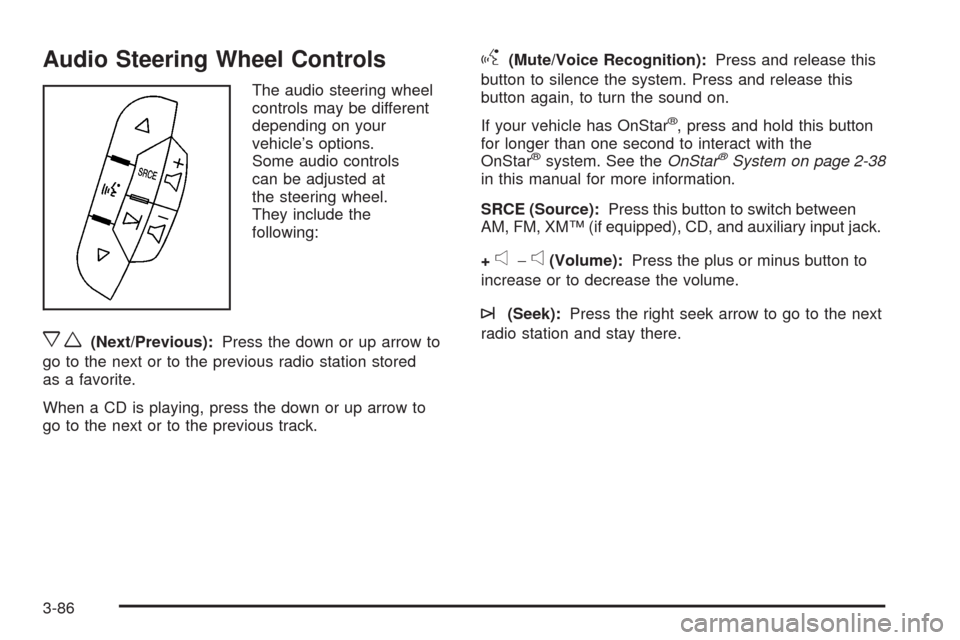
Audio Steering Wheel Controls
The audio steering wheel
controls may be different
depending on your
vehicle’s options.
Some audio controls
can be adjusted at
the steering wheel.
They include the
following:
xw(Next/Previous):Press the down or up arrow to
go to the next or to the previous radio station stored
as a favorite.
When a CD is playing, press the down or up arrow to
go to the next or to the previous track.
g(Mute/Voice Recognition):Press and release this
button to silence the system. Press and release this
button again, to turn the sound on.
If your vehicle has OnStar
®, press and hold this button
for longer than one second to interact with the
OnStar
®system. See theOnStar®System on page 2-38
in this manual for more information.
SRCE (Source):Press this button to switch between
AM, FM, XM™ (if equipped), CD, and auxiliary input jack.
+
e−e(Volume):Press the plus or minus button to
increase or to decrease the volume.
¨(Seek):Press the right seek arrow to go to the next
radio station and stay there.
3-86
Page 347 of 400
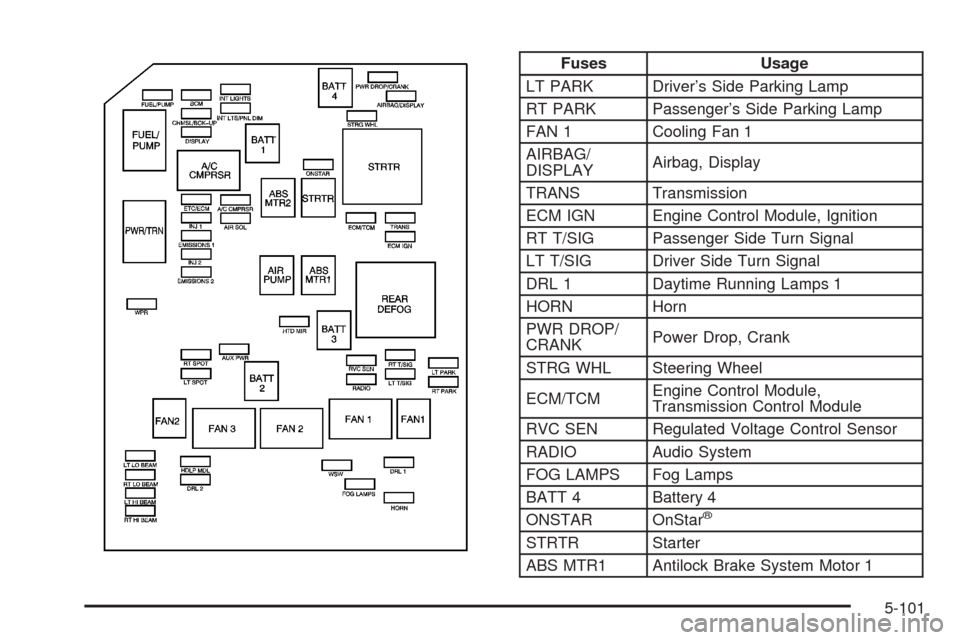
Fuses Usage
LT PARK Driver’s Side Parking Lamp
RT PARK Passenger’s Side Parking Lamp
FAN 1 Cooling Fan 1
AIRBAG/
DISPLAYAirbag, Display
TRANS Transmission
ECM IGN Engine Control Module, Ignition
RT T/SIG Passenger Side Turn Signal
LT T/SIG Driver Side Turn Signal
DRL 1 Daytime Running Lamps 1
HORN Horn
PWR DROP/
CRANKPower Drop, Crank
STRG WHL Steering Wheel
ECM/TCMEngine Control Module,
Transmission Control Module
RVC SEN Regulated Voltage Control Sensor
RADIO Audio System
FOG LAMPS Fog Lamps
BATT 4 Battery 4
ONSTAR OnStar
®
STRTR Starter
ABS MTR1 Antilock Brake System Motor 1
5-101
Page 387 of 400
A
Accessories and Modications............................ 5-3
Adding Equipment to Your Airbag-Equipped
Vehicle.......................................................1-67
Additives, Fuel................................................. 5-7
Add-On Electrical Equipment............................5-98
Air Cleaner/Filter, Engine.................................5-22
Air Conditioning..............................................3-22
Airbag
Passenger Status Indicator...........................3-32
Readiness Light..........................................3-31
Airbag System................................................1-54
What Will You See After an Airbag Inates?........1-60
When Should an Airbag Inate?....................1-59
Where Are the Airbags?...............................1-57
Airbag Systems
Adding Equipment to Your
Airbag-Equipped Vehicle............................1-67
How Does an Airbag Restrain?......................1-60
Passenger Sensing System...........................1-62
Servicing Your Airbag-Equipped Vehicle..........1-66
What Makes an Airbag Inate?......................1-60
Antenna, Backglass.........................................3-88
Antenna, XM™ Satellite Radio
Antenna System..........................................3-88
Antilock Brake System (ABS)............................. 4-4
Antilock Brake, System Warning Light................3-35Appearance Care
Aluminum Wheels........................................5-95
Care of Safety Belts....................................5-93
Chemical Paint Spotting...............................5-96
Cleaning Exterior Lamps/Lenses....................5-94
Fabric/Carpet..............................................5-91
Finish Care.................................................5-94
Finish Damage............................................5-96
Instrument Panel, Vinyl, and Other Plastic
Surfaces.................................................5-92
Interior Cleaning..........................................5-90
Leather......................................................5-92
Sheet Metal Damage...................................5-96
Tires
..........................................................5-96
Underbody Maintenance...............................5-96
Vehicle Care/Appearance Materials................5-97
Washing Your Vehicle...................................5-93
Weatherstrips..............................................5-93
Windshield and Wiper Blades........................5-95
Appointments, Scheduling Service....................... 7-9
Ashtray.........................................................3-21
Audio System.................................................3-66
Audio Steering Wheel Controls......................3-86
Backglass Antenna......................................3-88
Radio Reception..........................................3-87
Setting the Time..........................................3-67
Theft-Deterrent Feature................................3-85
XM™ Satellite Radio Antenna System............3-88
1
Page 388 of 400
Audio System(s).............................................3-69
Automatic Door Lock.......................................2-12
Automatic Transmission
Fluid..........................................................5-24
Operation...................................................2-26
B
Backglass Antenna..........................................3-88
Battery..........................................................5-42
Electric Power Management..........................3-19
Run-Down Protection...................................3-20
Brake
Emergencies................................................ 4-5
Brakes..........................................................5-39
System Warning Light..................................3-34
Braking........................................................... 4-3
Braking in Emergencies..................................... 4-5
Break-In, New Vehicle.....................................2-21
Bulb Replacement...........................................5-47
Halogen Bulbs............................................5-47
Headlamp Aiming........................................5-47
Headlamps, Front Turn Signal, Sidemarker,
and Parking Lamps..................................5-48Bulb Replacement (cont.)
License Plate Lamps....................................5-51
Replacement Bulbs......................................5-52
Taillamps, Turn Signal, Sidemarker,
Stoplamps, and Back-Up Lamps.................5-50
Buying New Tires...........................................5-71C
Calibration.....................................................3-49
California Fuel.................................................. 5-6
California Perchlorate Materials Requirements....... 5-4
California Proposition 65 Warning....................... 5-4
Canadian Owners................................................ ii
Capacities and Specications..........................5-103
Carbon Monoxide...................2-13, 2-34, 4-16, 4-27
Care of
Safety Belts................................................5-93
CD, MP3 .......................................................3-80
Center Console Storage Area...........................2-48
Center Seat..................................................... 1-8
Chains, Tire...................................................5-76
Charging System Light....................................3-34
Check
Engine Light...............................................3-39
Checking Things Under the Hood......................5-12
Chemical Paint Spotting...................................5-96
2
Page 398 of 400
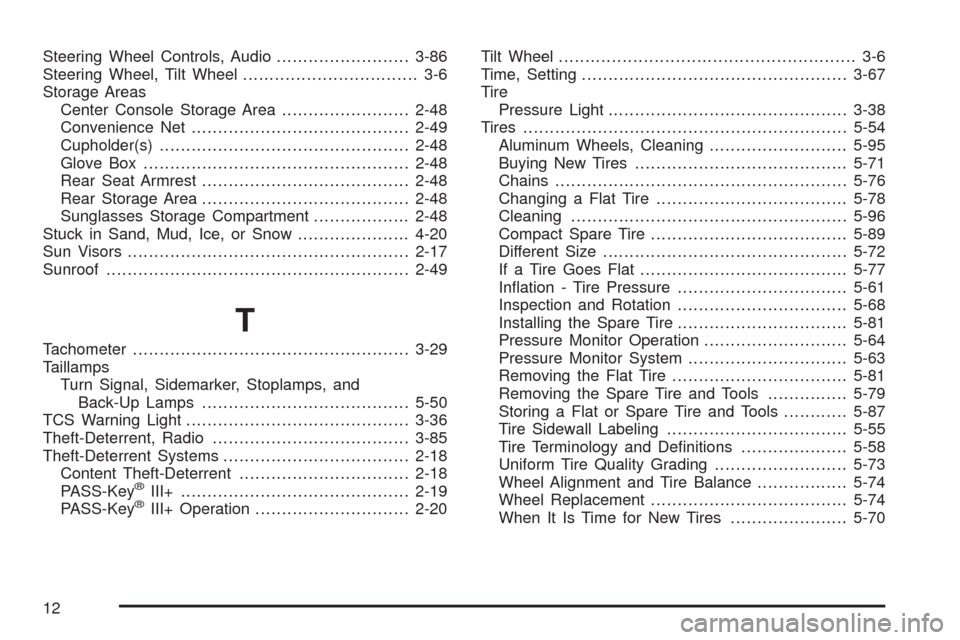
Steering Wheel Controls, Audio.........................3-86
Steering Wheel, Tilt Wheel................................. 3-6
Storage Areas
Center Console Storage Area........................2-48
Convenience Net.........................................2-49
Cupholder(s)...............................................2-48
Glove Box..................................................2-48
Rear Seat Armrest.......................................2-48
Rear Storage Area.......................................2-48
Sunglasses Storage Compartment..................2-48
Stuck in Sand, Mud, Ice, or Snow.....................4-20
Sun Visors.....................................................2-17
Sunroof.........................................................2-49
T
Tachometer....................................................3-29
Taillamps
Turn Signal, Sidemarker, Stoplamps, and
Back-Up Lamps.......................................5-50
TCS Warning Light..........................................3-36
Theft-Deterrent, Radio.....................................3-85
Theft-Deterrent Systems...................................2-18
Content Theft-Deterrent................................2-18
PASS-Key
®III+...........................................2-19
PASS-Key®III+ Operation.............................2-20Tilt Wheel........................................................ 3-6
Time, Setting..................................................3-67
Tire
Pressure Light.............................................3-38
Tires.............................................................5-54
Aluminum Wheels, Cleaning..........................5-95
Buying New Tires........................................5-71
Chains.......................................................5-76
Changing a Flat Tire....................................5-78
Cleaning....................................................5-96
Compact Spare Tire.....................................5-89
Different Size..............................................5-72
If a Tire Goes Flat.......................................5-77
Ination - Tire Pressure................................5-61
Inspection and Rotation................................5-68
Installing the Spare Tire................................5-81
Pressure Monitor Operation...........................5-64
Pressure Monitor System..............................5-63
Removing the Flat Tire.................................5-81
Removing the Spare Tire and Tools...............5-79
Storing a Flat or Spare Tire and Tools............5-87
Tire Sidewall Labeling..................................5-55
Tire Terminology and Denitions....................5-58
Uniform Tire Quality Grading.........................5-73
Wheel Alignment and Tire Balance.................5-74
Wheel Replacement.....................................5-74
When It Is Time for New Tires......................5-70
12