transmission CHEVROLET IMPALA 2009 9.G User Guide
[x] Cancel search | Manufacturer: CHEVROLET, Model Year: 2009, Model line: IMPALA, Model: CHEVROLET IMPALA 2009 9.GPages: 406, PDF Size: 2.25 MB
Page 109 of 406
Running the Vehicle While Parked
It is better not to park with the engine running. But if you
ever have to, here are some things to know.
{CAUTION:
Idling a vehicle in an enclosed area with poor
ventilation is dangerous. Engine exhaust may
enter the vehicle. Engine exhaust contains Carbon
Monoxide (CO) which cannot be seen or smelled.
It can cause unconsciousness and even death.
Never run the engine in an enclosed area that has
no fresh air ventilation. For more information, see
Engine Exhaust on page 2-30.
{CAUTION:
It can be dangerous to get out of the vehicle if the
automatic transmission shift lever is not fully in
P (Park) with the parking brake rmly set. The
vehicle can roll. Do not leave the vehicle when the
engine is running unless you have to. If you have
left the engine running, the vehicle can move
suddenly. You or others could be injured. To be
sure the vehicle will not move, even when you are
on fairly level ground, always set the parking
brake and move the shift lever to P (Park).
Follow the proper steps to be sure the vehicle will not
move. SeeShifting Into Park on page 2-27.
If parking on a hill and pulling a trailer, seeTowing a
Trailer on page 4-28.
2-31
Page 158 of 406
Malfunction Indicator Lamp
Check Engine Light
A computer system called OBD II (On-Board
Diagnostics-Second Generation) monitors operation
of the fuel, ignition, and emission control systems.
It ensures that emissions are at acceptable levels for
the life of the vehicle, helping to produce a cleaner
environment.
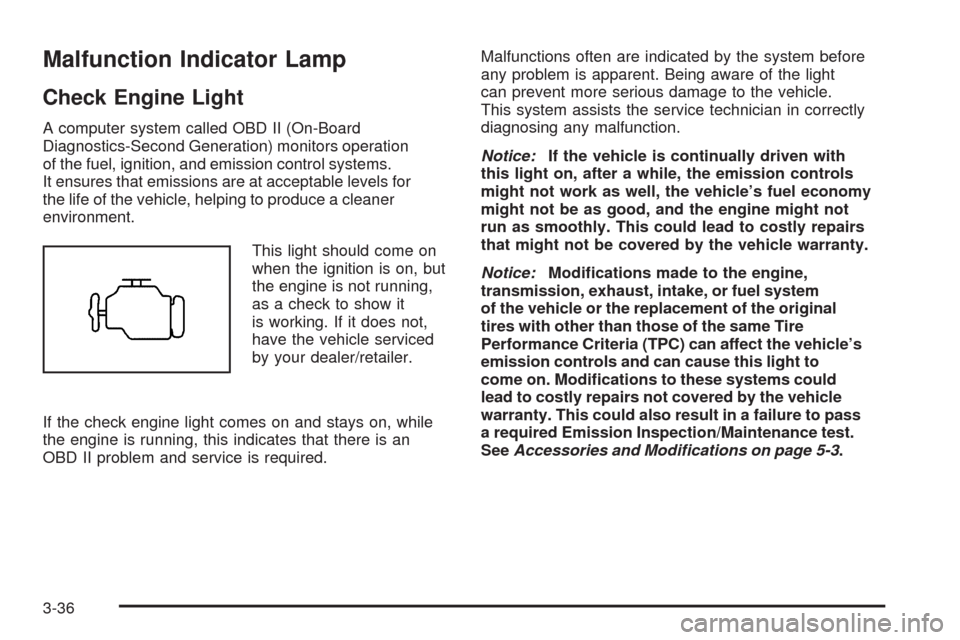
This light should come on
when the ignition is on, but
the engine is not running,
as a check to show it
is working. If it does not,
have the vehicle serviced
by your dealer/retailer.
If the check engine light comes on and stays on, while
the engine is running, this indicates that there is an
OBD II problem and service is required.Malfunctions often are indicated by the system before
any problem is apparent. Being aware of the light
can prevent more serious damage to the vehicle.
This system assists the service technician in correctly
diagnosing any malfunction.
Notice:If the vehicle is continually driven with
this light on, after a while, the emission controls
might not work as well, the vehicle’s fuel economy
might not be as good, and the engine might not
run as smoothly. This could lead to costly repairs
that might not be covered by the vehicle warranty.
Notice:Modications made to the engine,
transmission, exhaust, intake, or fuel system
of the vehicle or the replacement of the original
tires with other than those of the same Tire
Performance Criteria (TPC) can affect the vehicle’s
emission controls and can cause this light to
come on. Modications to these systems could
lead to costly repairs not covered by the vehicle
warranty. This could also result in a failure to pass
a required Emission Inspection/Maintenance test.
SeeAccessories and Modifications on page 5-3.
3-36
Page 164 of 406
Driver Information Center (DIC)
Your vehicle has a Driver Information Center (DIC).
All messages will appear in the DIC display located
below the speedometer in the instrument panel cluster.
The DIC buttons are located on the instrument panel,
to the right of the instrument panel cluster.
The DIC comes on when the ignition is on. After a short
delay, the DIC will display the information that was
last displayed before the engine was turned off.
The DIC displays trip, fuel, and vehicle system
information, and warning messages if a system problem
is detected. The bottom line of the DIC shows the shift
lever position indicator. SeeAutomatic Transmission
Operation on page 2-24for more information.
If your vehicle has these features, the DIC also displays
the compass direction and the outside air temperature
when viewing the trip and fuel information. The compass
direction appears on the top right corner of the DIC
display. The outside air temperature automatically
appears in the bottom right corner of the DIC display.
If there is a problem with the system that controls the
temperature display, the numbers will be replaced with
dashes. If this occurs, have the vehicle serviced by your
dealer/retailer.
The DIC also allows some features to be customized.
SeeDIC Vehicle Customization on page 3-57for
more information.
DIC Operation and Displays
The DIC has different displays which can be accessed
by pressing the DIC buttons located on the instrument
panel, to the right of the instrument panel cluster.
DIC Buttons
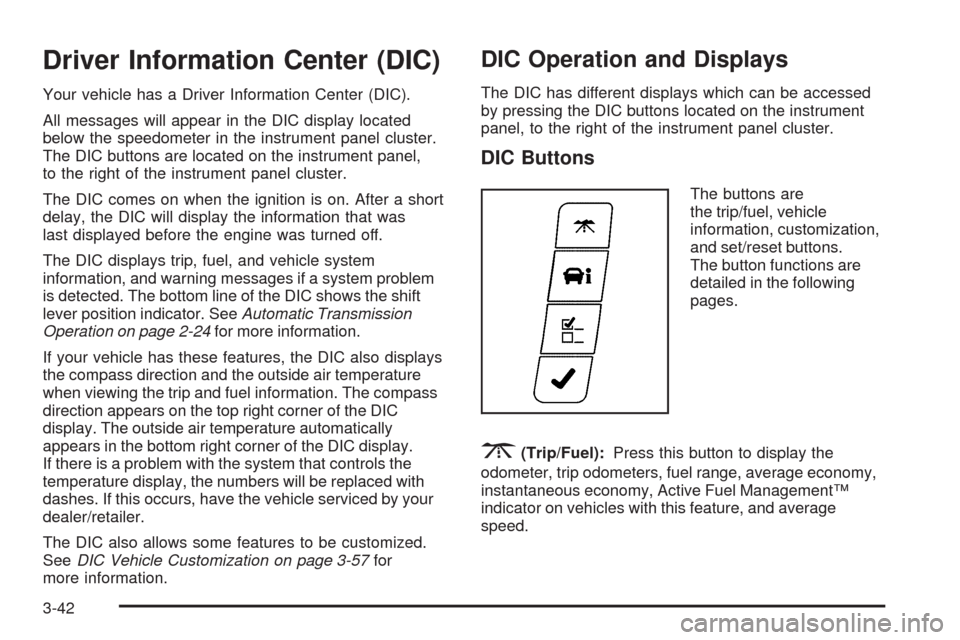
The buttons are
the trip/fuel, vehicle
information, customization,
and set/reset buttons.
The button functions are
detailed in the following
pages.
3(Trip/Fuel):Press this button to display the
odometer, trip odometers, fuel range, average economy,
instantaneous economy, Active Fuel Management™
indicator on vehicles with this feature, and average
speed.
3-42
Page 177 of 406
SERVICE TRACTION CONTROL
If your vehicle has the Traction Control System (TCS),
this message displays when the system is not functioning
properly. A warning light also appears on the instrument
panel cluster. SeeTraction Control System (TCS)
Warning Light on page 3-32. SeeTraction Control
System (TCS) on page 4-8for more information.
Have the TCS serviced by your dealer/retailer as
soon as possible.
SERVICE TRANSMISSION
This message displays when there is a problem with the
transmission. See your dealer/retailer for service.
SERVICE VEHICLE SOON
This message displays when a non-emissions related
malfunction occurs. Have the vehicle serviced by
your dealer/retailer as soon as possible.
STABILITRAK NOT READY
If your vehicle has Electronic Stability Control (ESC),
this message may display and the ESC/TCS light on the
instrument panel cluster may be on after rst driving the
vehicle and exceeding 19 mph (30 km/h) for 30 seconds.
The ESC system is not functional until the light has turned
off. SeeElectronic Stability Control (ESC) on page 4-6for
more information.
STARTING DISABLED SERVICE
THROTTLE
This message displays if the starting of the engine is
disabled due to the electronic throttle control system.
Have your vehicle serviced by your dealer/retailer
immediately.
This message only appears while the ignition is in
ON/RUN, and will not disappear until the problem is
resolved.
This message cannot be acknowledged.
THEFT ATTEMPTED
This message displays if the content theft-deterrent
system has detected a break-in attempt while you were
away from your vehicle. SeeContent Theft-Deterrent
on page 2-16for more information.
TIGHTEN GAS CAP
This message may be displayed if the gas cap is not
on, or is not fully tightened. Check the gas cap to ensure
that it is on properly. SeeFilling the Tank on page 5-10
for more information.
3-55
Page 178 of 406
TIRE LEARNING ACTIVE
On vehicles with the Tire Pressure Monitor
System (TPMS), this message displays when
the TPMS is re-learning the tire positions on your
vehicle. The tire positions must be re-learned after
rotating the tires or after replacing a tire or sensor.
SeeTire Inspection and Rotation on page 5-67,
Tire Pressure Monitor System on page 5-62, and
Inflation - Tire Pressure on page 5-60for more
information.
TRACTION CONTROL OFF
If your vehicle has the Traction Control System (TCS),
this message displays when the TCS turns off.
SeeTraction Control System (TCS) on page 4-8
for more information.
This message only displays while the ignition is in
ON/RUN and disappears after 10 seconds, unless
it is acknowledged or an urgent warning appears.
Any of the following conditions may cause the TCS to
turn off:
The TCS is turned off by pressing the traction
control button. SeeTraction Control System (TCS)
on page 4-8for more information.
The battery is low.
There is a TCS failure. See your dealer/retailer for
service.
TRACTION CONTROL ON
If your vehicle has the Traction Control System (TCS),
this message displays when the TCS is turned on.
SeeTraction Control System (TCS) on page 4-8
for more information.
TRANSMISSION HOT IDLE ENGINE
This message displays when the transmission uid in
your vehicle is too hot. Stop the vehicle and allow
it to idle until it cools down. If the warning message
continues to display, have the vehicle serviced by
your dealer/retailer as soon as possible.
TRUNK OPEN
This message displays when the trunk is not closed
completely. Make sure that the trunk is closed
completely. SeeTrunk on page 2-12.
TURN SIGNAL ON
This message displays as a reminder to turn off the
turn signal if you drive your vehicle for more than about
0.75 mile (1.2 km) with a turn signal on. SeeTurn
Signal/Multifunction Lever on page 3-7.
This message displays and a chime sounds only
when the ignition is in ON/RUN. The message will not
disappear until the turn signal is manually turned off,
or a turn is completed.
3-56
Page 226 of 406
If the problem does not clear after restarting the vehicle,
you should see your dealer/retailer for service. See
DIC Warnings and Messages on page 3-49for more
information.
Adding non-dealer/non-retailer accessories can affect
your vehicle’s performance. SeeAccessories and
Modifications on page 5-3for more information.
Traction Control System (TCS)
The vehicle may have a Traction Control System (TCS)
that limits wheel spin. This is especially useful in slippery
road conditions. The system operates only if it senses
that one or both of the front wheels are spinning or
beginning to lose traction. When this happens, the
system reduces engine power and may also upshift
the transmission and apply the front brakes to limit
wheel spin.
This light will ash
when the TCS is limiting
wheel spin.
The system may be heard or felt while it is working, but
this is normal.If cruise control is being used when TCS begins to limit
wheel spin, the cruise control will automatically
disengage. Cruise control may be reengaged when road
conditions allow. SeeCruise Control on page 3-9.
The TCS operates in all transmission shift lever
positions. But the system can upshift the transmission
only as high as the shift lever position chosen, so
use the lower gears only when necessary. See
Automatic Transmission Operation on page 2-24.
When the system is on,
this warning light comes
on and stays on if there is
a problem.
A SERVICE TRACTION CONTROL message also
appears on the DIC. When this warning light is on, the
system will not limit wheel spin. Adjust your driving
accordingly. SeeDIC Warnings and Messages
on page 3-49for more information.
To limit wheel spin, especially in slippery road
conditions, TCS should always be left on. But the
system can be turned off if needed.
4-8
Page 234 of 406
Hill and Mountain Roads
Driving on steep hills or through mountains is different
than driving on at or rolling terrain. Tips for driving
in these conditions include:
Keep the vehicle serviced and in good shape.
Check all uid levels and brakes, tires, cooling
system, and transmission.
Going down steep or long hills, shift to a
lower gear.
{CAUTION:
If you do not shift down, the brakes could get so
hot that they would not work well. You would then
have poor braking or even none going down a hill.
You could crash. Shift down to let the engine
assist the brakes on a steep downhill slope.
{CAUTION:
Coasting downhill in N (Neutral) or with the ignition
off is dangerous. The brakes will have to do all the
work of slowing down and they could get so hot
that they would not work well. You would then
have poor braking or even none going down a hill.
You could crash. Always have the engine running
and the vehicle in gear when going downhill.
Stay in your own lane. Do not swing wide or cut
across the center of the road. Drive at speeds
that let you stay in your own lane.
Top of hills: Be alert — something could be in your
lane (stalled car, accident).
Pay attention to special road signs (falling rocks
area, winding roads, long grades, passing or
no-passing zones) and take appropriate action.
4-16
Page 238 of 406
Rocking Your Vehicle to Get It Out
Turn the steering wheel left and right to clear the
area around the front wheels. Turn off any traction
system. Shift back and forth between R (Reverse) and a
forward gear, spinning the wheels as little as possible.
To prevent transmission wear, wait until the wheels stop
spinning before shifting gears. Release the accelerator
pedal while shifting, and press lightly on the accelerator
pedal when the transmission is in gear. Slowly
spinning the wheels in the forward and reverse
directions causes a rocking motion that could free the
vehicle. If that does not get the vehicle out after a
few tries, it might need to be towed out. If the vehicle
does need to be towed out, seeTowing Your Vehicle on
page 4-26.
Loading the Vehicle
It is very important to know how much weight your
vehicle can carry. Two labels on your vehicle
show how much weight it may properly carry, the
Tire and Loading Information label and the
Vehicle Certication label.
{CAUTION:
Do not load the vehicle any heavier than the
Gross Vehicle Weight Rating (GVWR), or
either the maximum front or rear Gross Axle
Weight Rating (GAWR). If you do, parts on the
vehicle can break, and it can change the way
your vehicle handles. These could cause you
to lose control and crash. Also, overloading
can shorten the life of the vehicle.
4-20
Page 245 of 406
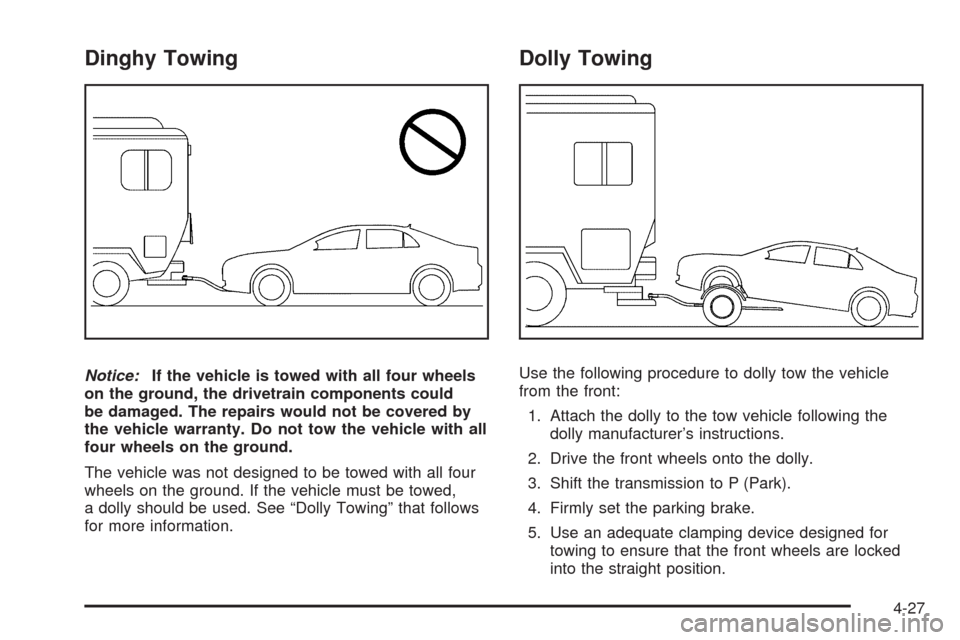
Dinghy Towing
Notice:If the vehicle is towed with all four wheels
on the ground, the drivetrain components could
be damaged. The repairs would not be covered by
the vehicle warranty. Do not tow the vehicle with all
four wheels on the ground.
The vehicle was not designed to be towed with all four
wheels on the ground. If the vehicle must be towed,
a dolly should be used. See “Dolly Towing” that follows
for more information.
Dolly Towing
Use the following procedure to dolly tow the vehicle
from the front:
1. Attach the dolly to the tow vehicle following the
dolly manufacturer’s instructions.
2. Drive the front wheels onto the dolly.
3. Shift the transmission to P (Park).
4. Firmly set the parking brake.
5. Use an adequate clamping device designed for
towing to ensure that the front wheels are locked
into the straight position.
4-27
Page 246 of 406
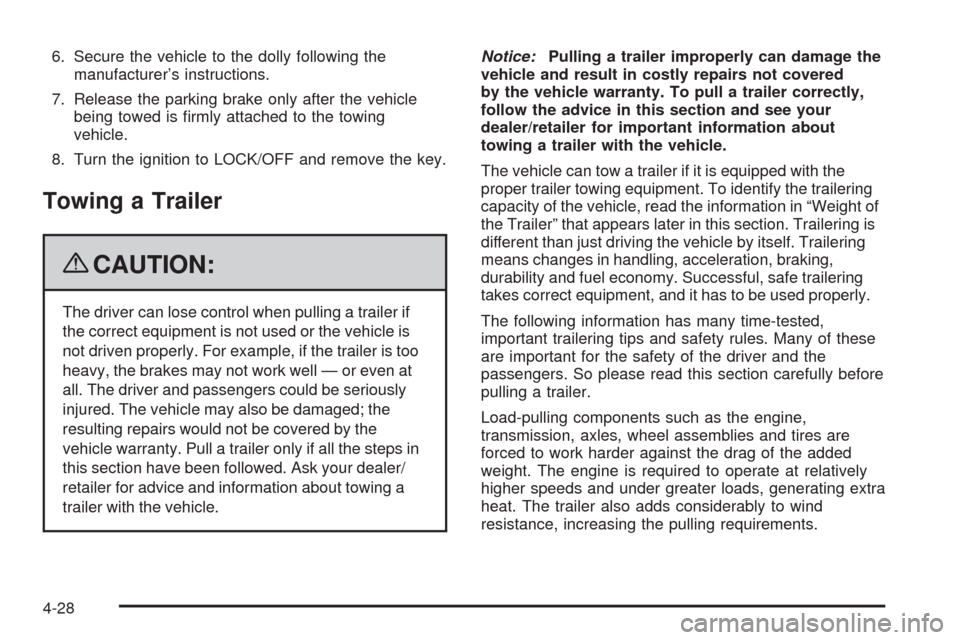
6. Secure the vehicle to the dolly following the
manufacturer’s instructions.
7. Release the parking brake only after the vehicle
being towed is rmly attached to the towing
vehicle.
8. Turn the ignition to LOCK/OFF and remove the key.
Towing a Trailer
{CAUTION:
The driver can lose control when pulling a trailer if
the correct equipment is not used or the vehicle is
not driven properly. For example, if the trailer is too
heavy, the brakes may not work well — or even at
all. The driver and passengers could be seriously
injured. The vehicle may also be damaged; the
resulting repairs would not be covered by the
vehicle warranty. Pull a trailer only if all the steps in
this section have been followed. Ask your dealer/
retailer for advice and information about towing a
trailer with the vehicle.Notice:Pulling a trailer improperly can damage the
vehicle and result in costly repairs not covered
by the vehicle warranty. To pull a trailer correctly,
follow the advice in this section and see your
dealer/retailer for important information about
towing a trailer with the vehicle.
The vehicle can tow a trailer if it is equipped with the
proper trailer towing equipment. To identify the trailering
capacity of the vehicle, read the information in “Weight of
the Trailer” that appears later in this section. Trailering is
different than just driving the vehicle by itself. Trailering
means changes in handling, acceleration, braking,
durability and fuel economy. Successful, safe trailering
takes correct equipment, and it has to be used properly.
The following information has many time-tested,
important trailering tips and safety rules. Many of these
are important for the safety of the driver and the
passengers. So please read this section carefully before
pulling a trailer.
Load-pulling components such as the engine,
transmission, axles, wheel assemblies and tires are
forced to work harder against the drag of the added
weight. The engine is required to operate at relatively
higher speeds and under greater loads, generating extra
heat. The trailer also adds considerably to wind
resistance, increasing the pulling requirements.
4-28