air condition CHEVROLET IMPALA 2010 9.G User Guide
[x] Cancel search | Manufacturer: CHEVROLET, Model Year: 2010, Model line: IMPALA, Model: CHEVROLET IMPALA 2010 9.GPages: 432, PDF Size: 1.89 MB
Page 166 of 432
Ashtray(s) and Cigarette LighterThe vehicle may have an ashtray and a cigarette lighter.
The ashtray and cigarette lighter may be located in the
console, if the vehicle has one, otherwise, they may be
located in the center armrest of the front seat.
Notice:If papers, pins, or other flammable items
are put in the ashtray, hot cigarettes or other
smoking materials could ignite them and possibly
damage the vehicle. Never put flammable items
in the ashtray.
Notice:Holding a cigarette lighter in while it is
heating does not let the lighter back away from
the heating element when it is hot. Damage from
overheating can occur to the lighter or heating
element, or a fuse could be blown. Do not hold
a cigarette lighter in while it is heating.
To use the lighter, just push it in all the way and let go.
When it is ready, it will pop back out by itself.
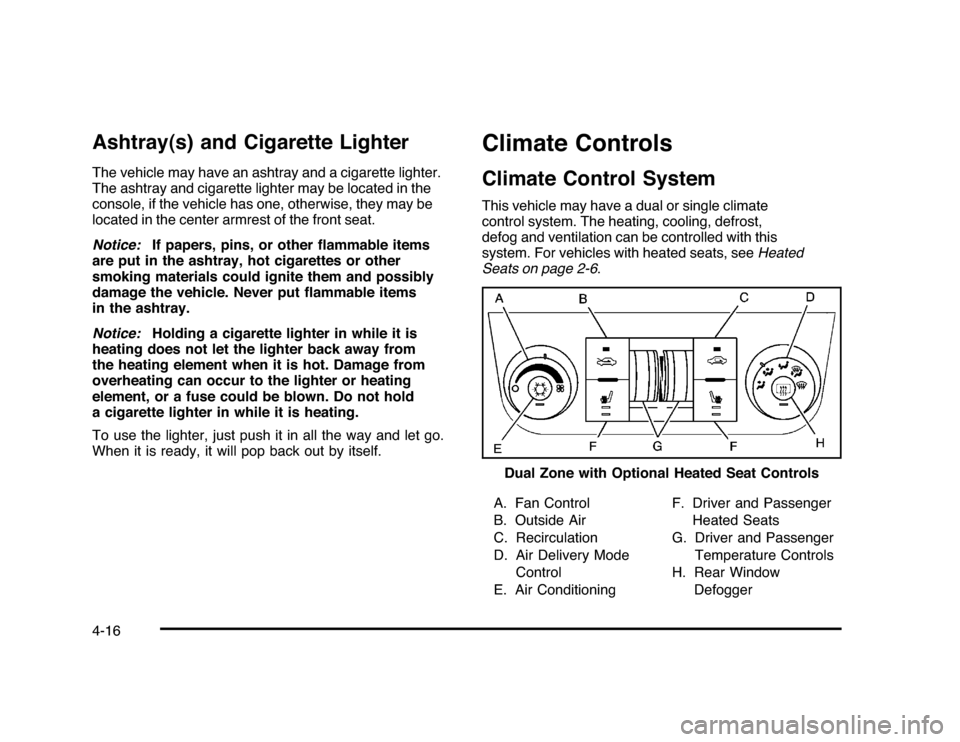
Climate ControlsClimate Control SystemThis vehicle may have a dual or single climate
control system. The heating, cooling, defrost,
defog and ventilation can be controlled with this
system. For vehicles with heated seats, seeHeated
Seats on page 2-6.
A. Fan Control
B. Outside Air
C. Recirculation
D. Air Delivery Mode
Control
E. Air ConditioningF. Driver and Passenger
Heated Seats
G. Driver and Passenger
Temperature Controls
H. Rear Window
Defogger Dual Zone with Optional Heated Seat Controls
4-16
Page 167 of 432

A. Fan Control
B. Outside Air
C. Temperature Control
D. RecirculationE. Air Delivery Mode
Control
F. Air Conditioning
G. Rear Window
Defogger
Temperature Control:For dual zone, turn the
thumbwheels up or down to increase or decrease
the temperature on the driver or the passenger side
of the vehicle. For single zone, turn the knob clockwise
or counterclockwise to increase or decrease the
temperature.
9
(Fan Control):Turn clockwise or counterclockwise to
increase or decrease the fan speed. Positioning the knob
between two modes, can select a combination of those
modes.
If the airflow seems low when the fan is at the highest
setting, the passenger compartment air filter may need to
be replaced. There will be some airflow noticeable from
the various outlets when driving, even with the fan in
the off position. For more information, seePassenger
Compartment Air Filter on page 4-20andScheduled
Maintenance on page 7-3.
Air Delivery Mode Control:Turn clockwise or
counterclockwise to change the direction of the airflow
inside the vehicle.
To change the current mode, select one of the following:
H
(Vent):Air is directed to the instrument panel
outlets.
)
(Bi-Level):Air is divided between the instrument
panel outlets and the floor outlets. Single Zone
4-17
Page 168 of 432

6
(Floor):Air is directed to the floor outlets, with
some of the air directed to the windshield and side
window outlets. In this mode, the system automatically
selects outside air.
-
(Defog):This mode clears the windshield of fog
or moisture. Air is directed equally to the windshield and
the floor outlets. When defog is selected, the system
turns off recirculation and runs the air conditioning
compressor unless the outside temperature is below
40°F (4°C).
0
(Defrost):This mode clears the windshield of fog or
frost more quickly. Air is directed to the windshield with
some air to the side window vents and the floor vents.
When defrost is selected, the system automatically
forces outside air into the vehicle. The air conditioning
compressor will run automatically in this setting, unless
the outside temperature is below 40°F (4°C).
#
(Air Conditioning):Press to turn the air conditioning
system on or off. An indicator light comes on to show that
it is on. The air conditioning can be selected in any mode
as long as the fan is on and the outside temperature is
above freezing. A flashing indicator light indicates that the
air conditioning compressor is currently not available.
On hot days, open the windows to let hot inside air
escape; then close them. This helps to reduce the time
it takes for the vehicle to cool down. It also helps the
system to operate more efficiently.
For quick cool down on hot days, do the following:
1. Select the
H
mode.
2. Press the
#
button.
3. Select the coolest temperature for both zones.
4. Select the highest
9
speed.
5. When the coolest temperature is selected in the
A/C mode, the system automatically goes into the
recirculation mode to improve cooling.
4-18
Page 169 of 432

Using these settings together for long periods of time
may cause the air inside the vehicle to become too dry.
To prevent this from happening, after the air inside
the vehicle has cooled, turn the recirculation mode off.
The air conditioning system removes moisture from
the air, so a small amount of water may drip under
the vehicle while idling or after turning off the engine.
This is normal.:
(Outside Air):Press to turn on outside air.
An indicator light comes on to show that it is on.
Outside air will circulate throughout the vehicle.
?
(Recirculation):Press to turn on the recirculation
mode. An indicator light comes on to show that
it is on.
This mode helps to quickly heat or cool the air inside the
vehicle once the temperature inside the vehicle is equal
to or better than the outside temperature. It can be used
to prevent outside air and odors from entering the vehicle.
The recirculation mode is not available in outside air,
floor, defog or defrost modes. If the button is selected
while in these modes, the indicator flashes three times.
Rear Window DefoggerThe rear window defogger uses a warming grid to
remove fog from the rear window.<
(Rear Window Defogger):The rear window
defogger turns off automatically after it has been
activated for 10 minutes. It can be turned off manually,
by pressing the button again or by turning the ignition
to the LOCK/OFF position. The rear window defogger
can be turned on again for additional window clearing.
The length of defogger operation will increase if the
vehicle is being driven.
For vehicles with heated outside rearview mirrors, the
mirrors heat to help clear fog or frost from the surface of
the mirror when the rear window defog button is
pressed. SeeOutside Power Mirrors on page 3-34.
Do not drive the vehicle until all the windows are clear.
Notice:Do not use anything sharp on the inside
of the rear window. If you do, you could cut or
damage the warming grid, and the repairs would not
be covered by the vehicle warranty. Do not attach
a temporary vehicle license, tape, a decal or
anything similar to the defogger grid.
4-19
Page 170 of 432

Outlet AdjustmentUse the thumbwheel located below or to the side of the
outlet, to change the direction of the air flow.Operation Tips•
Clear away any ice, snow or leaves from the air
inlets at the base of the windshield that may
block the flow of air into the vehicle.
•
Use of non-GM approved hood deflectors may
adversely affect the performance of the system.
•
Keep the path under the front seats clear of objects
to help circulate the air inside the vehicle more
effectively.
•
If the airflow seems low when the fan is at the
highest setting, the passenger compartment
air filter, if equipped, may need to replaced.
For more information, seePassenger Compartment
Air Filter on page 4-20andScheduled Maintenance
on page 7-3.
•
If fogging reoccurs while in vent or bi-level modes
with mild temperature throughout the vehicle, turn
on the air conditioner to reduce windshield fogging.
Passenger Compartment Air FilterThe vehicle has a passenger compartment particulate
air filter. It is located in the engine compartment,
below the air inlet grille on the passenger side.
The filter traps most of the pollen from air entering
the climate control system. It needs to be changed
periodically to ensure system performance. For
information on how often to change the passenger
compartment air filter, seeScheduled Maintenance
on page 7-3.
To change the passenger compartment air filter:
1. Turn off the ignition when the windshield wipers are
in the up position.
2. Raise the vehicle hood.
3. Pull back the hood weatherstrip from the
passengers side of the vehicle halfway to center.
4-20
Page 176 of 432
If the word ON or the on symbol is lit on the passenger
airbag status indicator, it means that the right front
passenger frontal airbag is enabled (may inflate).
If the word OFF or the off symbol is lit on the airbag
status indicator, it means that the passenger sensing
system has turned off the right front passenger
frontal airbag.
If, after several seconds, both status indicator lights
remain on, or if there are no lights at all, there may be
a problem with the lights or the passenger sensing
system. See your dealer/retailer for service.
{
WARNING:
If the airbag readiness light ever comes on and
stays on, it means that something may be wrong
with the airbag system. To help avoid injury to
yourself or others, have the vehicle serviced right
away. SeeAirbag Readiness Light on page 4-24
for more information, including important safety
information.
Charging System Light
This light comes on briefly
when the ignition key is
turned to START, but
the engine is not running,
as a check to show it
is working.
If it does not, have the vehicle serviced by your
dealer/retailer.
The light should go out once the engine starts. If it stays
on, or comes on while driving, there could be a problem
with the charging system. A charging system message
in the Driver Information Center (DIC) can also appear.
SeeDIC Warnings and Messages on page 4-44for more
information. This light could indicate that there are
problems with a generator drive belt, or that there is an
electrical problem. Have it checked right away. If the
vehicle must be driven a short distance with the light
on, turn off accessories, such as the radio and air
conditioner.
4-26
Page 182 of 432

If the check engine light comes on and stays on, while
the engine is running, this indicates that there is an
OBD II problem and service is required.
Malfunctions often are indicated by the system before
any problem is apparent. Being aware of the light
can prevent more serious damage to the vehicle.
This system assists the service technician in correctly
diagnosing any malfunction.
Notice:If the vehicle is continually driven with
this light on, after a while, the emission controls
might not work as well, the vehicle’s fuel economy
might not be as good, and the engine might not
run as smoothly. This could lead to costly repairs
that might not be covered by the vehicle warranty.
Notice:Modifications made to the engine,
transmission, exhaust, intake, or fuel system of the
vehicle or the replacement of the original tires with
other than those of the same Tire Performance
Criteria (TPC) can affect the vehicle’s emission
controls and can cause this light to come on.
Modifications to these systems could lead to
costly repairs not covered by the vehicle warranty.
This could also result in a failure to pass a required
Emission Inspection/Maintenance test. See
Accessories and Modifications on page 6-3.This light comes on during a malfunction in one of
two ways:
Light Flashing:A misfire condition has been detected.
A misfire increases vehicle emissions and could
damage the emission control system on the vehicle.
Diagnosis and service might be required.
To prevent more serious damage to the vehicle:
•
Reduce vehicle speed.
•
Avoid hard accelerations.
•
Avoid steep uphill grades.
•
If towing a trailer, reduce the amount of cargo being
hauled as soon as it is possible.
If the light continues to flash, when it is safe to do so,
stop the vehicle. Find a safe place to park the vehicle.
Turn the key off, wait at least 10 seconds, and restart
the engine. If the light is still flashing, follow the previous
steps and see your dealer/retailer for service as soon
as possible.
4-32
Page 190 of 432

Vehicle Information Menu Items
T
(Vehicle Information):Press this button to scroll
through the following menu items:
Oil LifePress the vehicle information button until OIL LIFE
REMAINING displays. This display shows an estimate of
the oil’s remaining useful life. If you see 99% OIL LIFE
REMAINING on the display, that means 99% of the
current oil life remains. The engine oil life system will alert
you to change the oil on a schedule consistent with your
driving conditions.
When the remaining oil life is low, the CHANGE ENGINE
OIL SOON message will appear on the display. See
“CHANGE ENGINE OIL SOON” underDIC Warnings
and Messages on page 4-44. You should change the
oil as soon as possible. SeeEngine Oil on page 6-15.
In addition to the engine oil life system monitoring the
oil life, additional maintenance is recommended in the
Maintenance Schedule in this manual. SeeScheduled
Maintenance on page 7-3for more information.
Remember, you must reset the OIL LIFE yourself after
each oil change. It will not reset itself. Also, be careful not
to reset the OIL LIFE accidentally at any time other than
when the oil has just been changed. It cannot be reset
accurately until the next oil change. To reset the engine
oil life system, seeEngine Oil Life System on page 6-18.
UnitsPress the vehicle information button until UNITS
displays. This display allows you to select between
English or Metric units of measurement. Once in this
display, press the set/reset button to select between
ENGLISH or METRIC units.Tire PressureOn vehicles with the Tire Pressure Monitor System
(TPMS), the pressure for each tire can be viewed in the
DIC. The tire pressure will be shown in either pounds per
square inch (psi) or kilopascals (kPa). Press the vehicle
information button until the DIC displays FRONT TIRES
PSI (kPa) LEFT ## RIGHT ##. Press the vehicle
information button again until the DIC displays REAR
TIRES PSI (kPa) LEFT ## RIGHT ##.
If a low tire pressure condition is detected by the system
while driving, a message advising you to add air to a
specific tire will appear in the display. SeeInflation - Tire
Pressure on page 6-59andDIC Warnings and Messages
on page 4-44for more information.
If the tire pressure display shows dashes instead of a
value, there may be a problem with your vehicle. If this
consistently occurs, see your dealer/retailer for service.
4-40
Page 195 of 432
DRIVER DOOR OPENThis message displays when the driver door is not
closed properly. Make sure that the door is closed
completely.ENGINE HOT A/C
(Air Conditioning) OFFThis message displays when the engine coolant
becomes hotter than the normal operating temperature.
To avoid added strain on a hot engine, the air
conditioning compressor is automatically turned off.
When the coolant temperature returns to normal, the A/C
operation automatically resumes. You can continue to
drive your vehicle. If this message continues to appear,
have the system repaired by your dealer/retailer as soon
as possible to avoid compressor damage.ENGINE OVERHEATED IDLE ENGINENotice:If you drive your vehicle while the engine
is overheating, severe engine damage may occur.
If an overheat warning appears on the instrument
panel cluster and/or DIC, stop the vehicle as soon as
possible. Do not increase the engine speed above
normal idling speed. SeeEngine Overheating
on page 6-29for more information.This message displays when the engine coolant
temperature is too hot. Stop and allow the vehicle to
idle until it cools down.
ENGINE OVERHEATED STOP ENGINENotice:If you drive your vehicle while the engine
is overheating, severe engine damage may occur.
If an overheat warning appears on the instrument
panel cluster and/or DIC, stop the vehicle as soon
as possible. SeeEngine Overheating on page 6-29
for more information.
This message displays along with a continuous chime
when the engine has overheated. Stop and turn the
engine off immediately to avoid severe engine damage.
SeeEngine Overheating on page 6-29.ENGINE POWER IS REDUCEDThis message displays when the vehicle’s engine power
is reduced. Reduced engine power can affect the
vehicle’s ability to accelerate. If this message is on, but
there is no reduction in performance, proceed to your
destination. The performance may be reduced the next
time the vehicle is driven. The vehicle may be driven at a
reduced speed while this message is on, but acceleration
and speed may be reduced. Anytime this message stays
on, the vehicle should be taken to your dealer/retailer for
service as soon as possible.
4-45
Page 196 of 432
ERRORThis message displays while viewing the odometer or
trip odometers if there is a problem with the instrument
panel cluster. See your dealer/retailer for service.FUEL LEVEL LOWThis message displays when your vehicle is low on
fuel. Refill the fuel tank as soon as possible. SeeFuel
Gage on page 4-36andFilling the Tank on page 6-10
for more information.HOOD OPENIf your vehicle has the remote start feature, this
message displays when the hood is not closed
properly. Make sure that the hood is closed completely.
SeeHood Release on page 6-13.ICE POSSIBLE DRIVE WITH CAREThis message displays when the outside air temperature
is cold enough to create icy road conditions. Adjust
your driving accordingly.LEFT REAR DOOR OPENThis message displays when the driver side rear door is
not closed properly. Make sure that the door is closed
completely.
OIL PRESSURE LOW STOP ENGINENotice:If you drive your vehicle while the engine
oil pressure is low, severe engine damage may
occur. If a low oil pressure warning appears on the
Driver Information Center (DIC), stop the vehicle
as soon as possible. Do not drive the vehicle until
the cause of the low oil pressure is corrected.
SeeEngine Oil on page 6-15for more information.
This message displays when the vehicle’s engine
oil pressure is low. The oil pressure light also appears
on the instrument panel cluster. SeeOil Pressure
Light on page 4-34.
Stop the vehicle immediately, as engine damage can
result from driving a vehicle with low oil pressure.
Have the vehicle serviced by your dealer/retailer as
soon as possible when this message is displayed.PASSENGER DOOR OPENThis message displays when the front passenger door
is not closed properly. Make sure that the door is closed
completely.
4-46