wheel CHEVROLET IMPALA 2010 9.G Owner's Manual
[x] Cancel search | Manufacturer: CHEVROLET, Model Year: 2010, Model line: IMPALA, Model: CHEVROLET IMPALA 2010 9.GPages: 432, PDF Size: 1.89 MB
Page 153 of 432
Instrument Panel OverviewHazard Warning FlashersThe hazard warning flashers let you warn others that
you have a problem.
The hazard warning flasher button is located on top of
the steering column.|
:Press to make the front and rear turn signal lamps
flash on and off. Press the button again to turn the
flashers off.
When the hazard warning flashers are on, the turn
signals will not work.
HornPress near or on the horn symbols on the steering
wheel pad to sound the horn.
Tilt WheelA tilt wheel allows the steering wheel to be adjusted
before driving. The steering wheel can be raised to
the highest level for more room when entering
and exiting the vehicle.
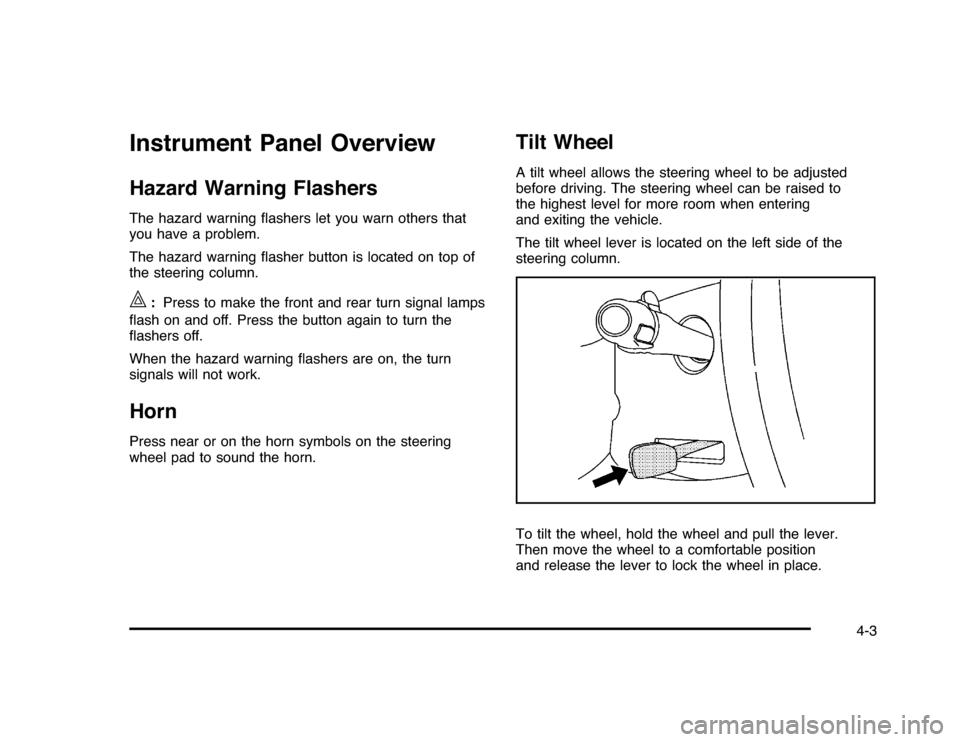
The tilt wheel lever is located on the left side of the
steering column.
To tilt the wheel, hold the wheel and pull the lever.
Then move the wheel to a comfortable position
and release the lever to lock the wheel in place.
4-3
Page 156 of 432
Windshield WasherAt the top of the multifunction lever, there is a paddle
with
L
on it. Push the paddle to spray washer fluid on
the windshield. The wipers run for several sweeps and
then either stop or return to the preset speed. The ignition
key must be in ACC/ACCESSORY or ON/RUN for this to
work. SeeWindshield Washer Fluid on page 6-33.
{
WARNING:
In freezing weather, do not use your washer until
the windshield is warmed. Otherwise the washer
fluid can form ice on the windshield, blocking your
vision.
When the vehicle is low on washer fluid, the WASHER
FLUID LOW ADD FLUID displays in the Driver
Information Center (DIC) for 60 seconds. When the
ignition is turned off, this message displays again for
three seconds to remind you that the fluid level is low.
Until the fluid reservoir is refilled, every time the vehicle
is started, the WASHER FLUID LOW ADD FLUID
message displays in the Driver Information Center (DIC)
for 60 seconds. SeeDIC Warnings and Messages on
page 4-44.
Cruise ControlWith cruise control, you can maintain a speed of about
40 km/h (25 mph) or more without keeping your foot
on the accelerator. Cruise control does not work
at speeds below about 40 km/h (25 mph).
{
WARNING:
Cruise control can be dangerous where you
cannot drive safely at a steady speed. So, do
not use the cruise control on winding roads or
in heavy traffic.
Cruise control can be dangerous on slippery roads.
On such roads, fast changes in tire traction can
cause excessive wheel slip, and you could lose
control. Do not use cruise control on slippery roads.
If your vehicle has the Traction Control System (TCS)
and the cruise control is on, TCS will begin to limit
wheel spin and the cruise control automatically turns off.
SeeTraction Control System (TCS) on page 5-7. When
road conditions allow you to safely use it again, the cruise
control can be turned back on.
4-6
Page 157 of 432
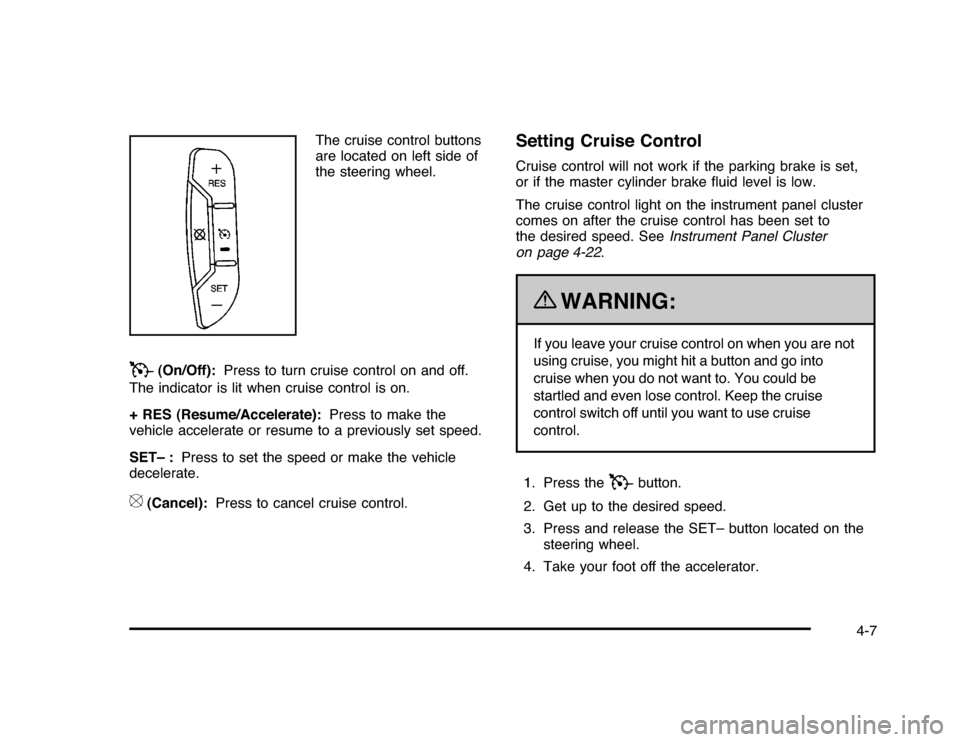
The cruise control buttons
are located on left side of
the steering wheel.
T
(On/Off):Press to turn cruise control on and off.
The indicator is lit when cruise control is on.
+ RES (Resume/Accelerate):Press to make the
vehicle accelerate or resume to a previously set speed.
SET– :Press to set the speed or make the vehicle
decelerate.
[
(Cancel):Press to cancel cruise control.
Setting Cruise ControlCruise control will not work if the parking brake is set,
or if the master cylinder brake fluid level is low.
The cruise control light on the instrument panel cluster
comes on after the cruise control has been set to
the desired speed. SeeInstrument Panel Cluster
on page 4-22.
{
WARNING:
If you leave your cruise control on when you are not
using cruise, you might hit a button and go into
cruise when you do not want to. You could be
startled and even lose control. Keep the cruise
control switch off until you want to use cruise
control.
1. Press the
T
button.
2. Get up to the desired speed.
3. Press and release the SET– button located on the
steering wheel.
4. Take your foot off the accelerator.
4-7
Page 158 of 432

Resuming a Set SpeedIf cruise control is set at a desired speed and the
brakes are applied, this shuts off the cruise control.
However, it does not need to be reset.
Once your vehicle reaches a speed of about 40 km/h
(25 mph) or more, press the +RES button on the
steering wheel. The vehicle goes back to the previously
selected speed and stays there.Increasing Speed While Using Cruise
ControlTo increase the cruise speed while using cruise control:•
Press and hold the +RES button on the steering
wheel until the desired speed is reached, then
release it.
•
To increase vehicle speed in small increments,
press the +RES button. Each time this is done,
the vehicle goes about 1.6 km/h (1 mph) faster.
Reducing Speed While Using Cruise
ControlTo reduce your speed while using cruise control:•
Press and hold the SET– button on the steering
wheel until the desired lower speed is reached,
then release it.
•
To slow down in very small amounts, press the
SET– button on the steering wheel briefly. Each
time this is done, the vehicle goes about 1.6 km/h
(1 mph) slower.
Passing Another Vehicle While Using
Cruise ControlUse the accelerator pedal to increase vehicle speed.
When you take your foot off the pedal, the vehicle
will slow down to the cruise speed you set earlier.Using Cruise Control on HillsHow well the cruise control will work on hills depends
upon the vehicle speed, load and the steepness of the
hills. When going up steep hills, you might have to
step on the accelerator pedal to maintain your speed.
When going downhill, you might have to brake or shift
to a lower gear to keep your speed down. If the brakes
are applied the cruise control will turn off.
4-8
Page 159 of 432
Ending Cruise ControlThere are three ways to end cruise control:•
Step lightly on the brake pedal.
•
Press the
[
button on the steering wheel.
•
Press the
T
button on the steering wheel.
Erasing Speed MemoryThe cruise control set speed memory is erased by
turning off the cruise control or the ignition.Exterior Lamps
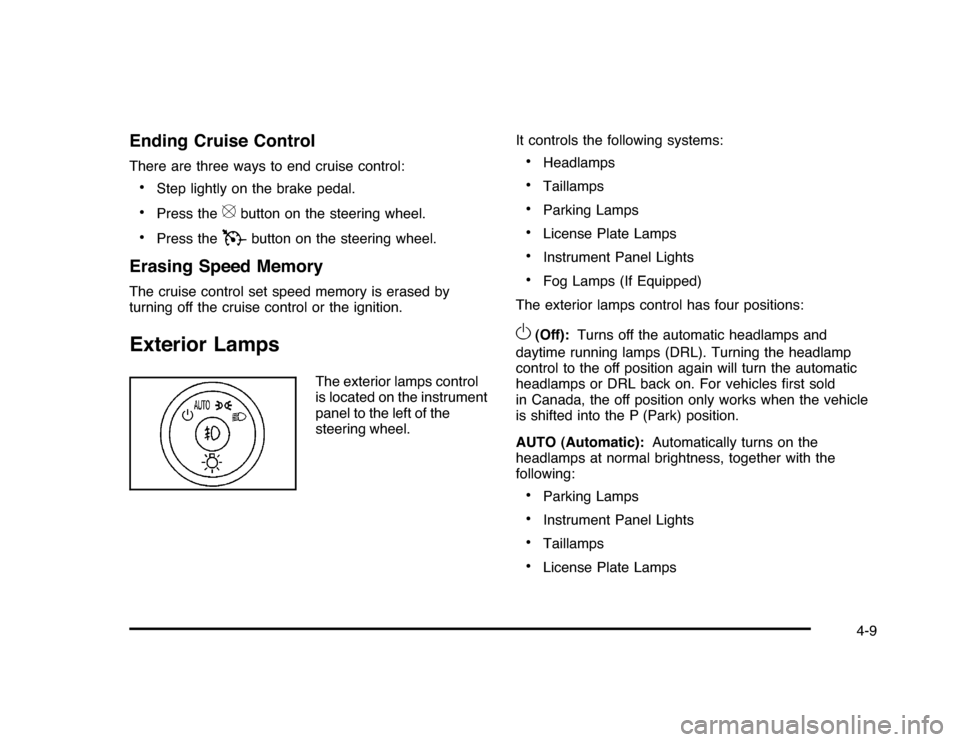
The exterior lamps control
is located on the instrument
panel to the left of the
steering wheel.It controls the following systems:
•
Headlamps
•
Taillamps
•
Parking Lamps
•
License Plate Lamps
•
Instrument Panel Lights
•
Fog Lamps (If Equipped)
The exterior lamps control has four positions:
O
(Off):Turns off the automatic headlamps and
daytime running lamps (DRL). Turning the headlamp
control to the off position again will turn the automatic
headlamps or DRL back on. For vehicles first sold
in Canada, the off position only works when the vehicle
is shifted into the P (Park) position.
AUTO (Automatic):Automatically turns on the
headlamps at normal brightness, together with the
following:•
Parking Lamps
•
Instrument Panel Lights
•
Taillamps
•
License Plate Lamps
4-9
Page 161 of 432
Fog Lamps#
(Fog Lamps):For vehicles with fog lamps,
the button is located on the exterior lamps control.
The exterior lamps control is located on the instrument
panel to the left of the steering column.
The ignition must be in the ON/RUN position for the fog
lamps to come on.
Press
#
to turn the fog lamps on or off. A light will
come on in the instrument panel cluster.
When the headlamps are changed to high-beam, the
fog lamps also go off.
Some localities have laws that require the headlamps to
be on along with the fog lamps.
Instrument Panel BrightnessD
(Instrument Panel Brightness):The knob with this
symbol on it is located next to the exterior lamps control
to the left of the steering wheel. Push the knob in all the
way until it extends out and then turn the knob clockwise
or counterclockwise to brighten or dim the lights. Push
the knob back in when finished.
Courtesy LampsWhen a door is opened, the courtesy lamps
automatically come on. They make it easy for you to
enter and leave your vehicle. You can also manually
turn these lamps on by fully turning the instrument
panel brightness control clockwise.
The reading lamps, located on the rearview mirror,
can be turned on or off independent of the automatic
courtesy lamps, when the doors are closed.Dome LampThe center mounted dome lamp overhead comes on
when a door is opened. This lamp can also be turned
on by turning the instrument panel brightness control
clockwise.
4-11
Page 167 of 432
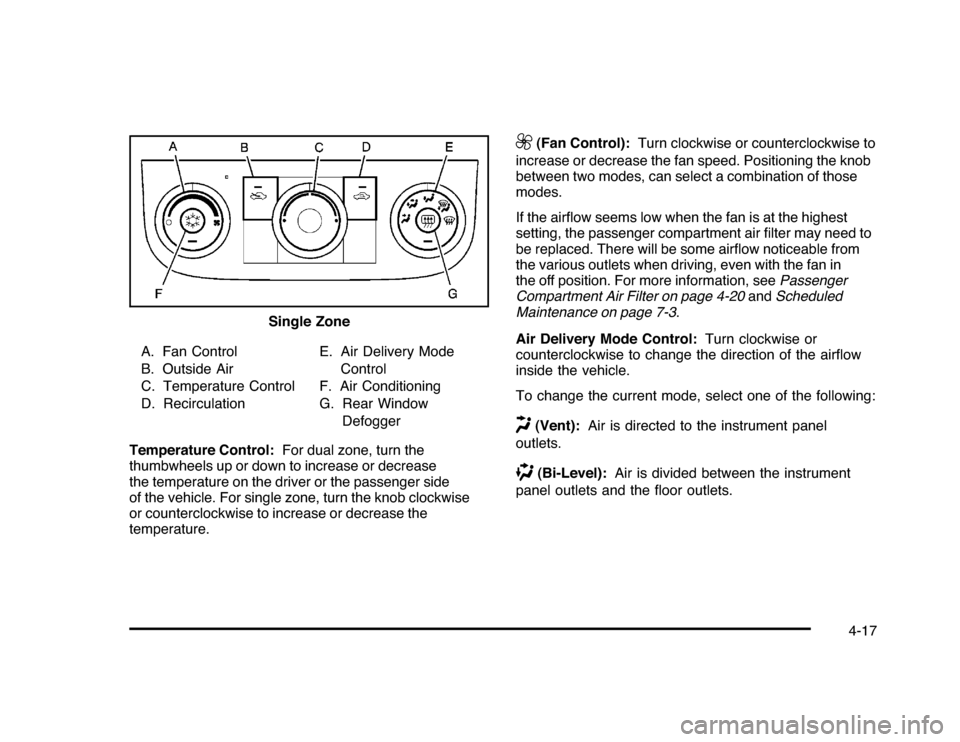
A. Fan Control
B. Outside Air
C. Temperature Control
D. RecirculationE. Air Delivery Mode
Control
F. Air Conditioning
G. Rear Window
Defogger
Temperature Control:For dual zone, turn the
thumbwheels up or down to increase or decrease
the temperature on the driver or the passenger side
of the vehicle. For single zone, turn the knob clockwise
or counterclockwise to increase or decrease the
temperature.
9
(Fan Control):Turn clockwise or counterclockwise to
increase or decrease the fan speed. Positioning the knob
between two modes, can select a combination of those
modes.
If the airflow seems low when the fan is at the highest
setting, the passenger compartment air filter may need to
be replaced. There will be some airflow noticeable from
the various outlets when driving, even with the fan in
the off position. For more information, seePassenger
Compartment Air Filter on page 4-20andScheduled
Maintenance on page 7-3.
Air Delivery Mode Control:Turn clockwise or
counterclockwise to change the direction of the airflow
inside the vehicle.
To change the current mode, select one of the following:
H
(Vent):Air is directed to the instrument panel
outlets.
)
(Bi-Level):Air is divided between the instrument
panel outlets and the floor outlets. Single Zone
4-17
Page 170 of 432
Outlet AdjustmentUse the thumbwheel located below or to the side of the
outlet, to change the direction of the air flow.Operation Tips•
Clear away any ice, snow or leaves from the air
inlets at the base of the windshield that may
block the flow of air into the vehicle.
•
Use of non-GM approved hood deflectors may
adversely affect the performance of the system.
•
Keep the path under the front seats clear of objects
to help circulate the air inside the vehicle more
effectively.
•
If the airflow seems low when the fan is at the
highest setting, the passenger compartment
air filter, if equipped, may need to replaced.
For more information, seePassenger Compartment
Air Filter on page 4-20andScheduled Maintenance
on page 7-3.
•
If fogging reoccurs while in vent or bi-level modes
with mild temperature throughout the vehicle, turn
on the air conditioner to reduce windshield fogging.
Passenger Compartment Air FilterThe vehicle has a passenger compartment particulate
air filter. It is located in the engine compartment,
below the air inlet grille on the passenger side.
The filter traps most of the pollen from air entering
the climate control system. It needs to be changed
periodically to ensure system performance. For
information on how often to change the passenger
compartment air filter, seeScheduled Maintenance
on page 7-3.
To change the passenger compartment air filter:
1. Turn off the ignition when the windshield wipers are
in the up position.
2. Raise the vehicle hood.
3. Pull back the hood weatherstrip from the
passengers side of the vehicle halfway to center.
4-20
Page 178 of 432
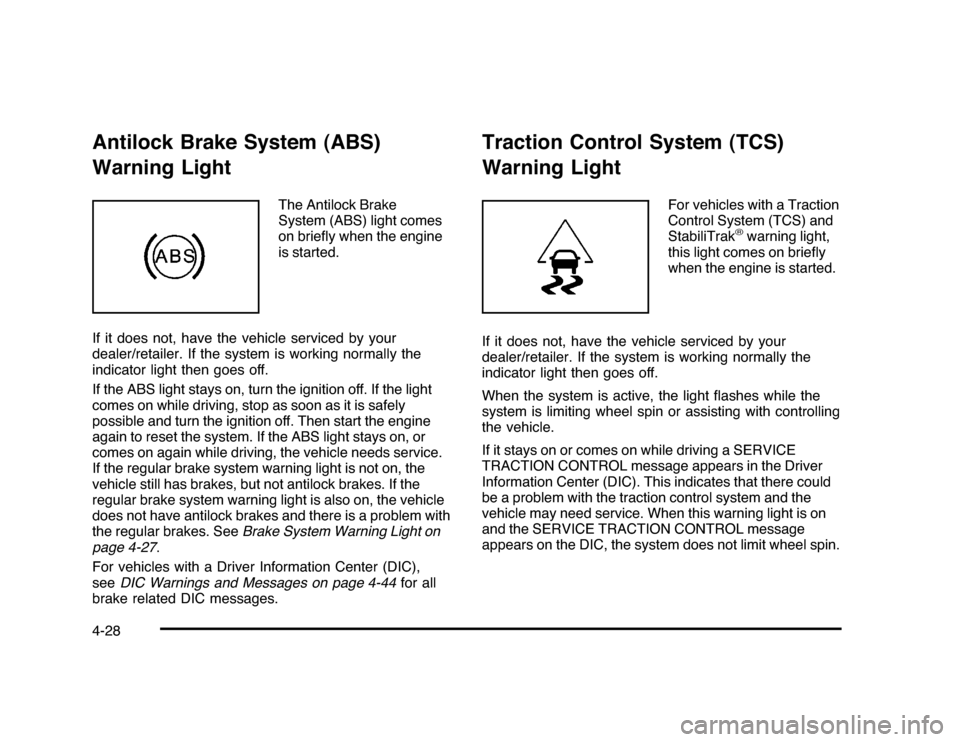
Antilock Brake System (ABS)
Warning Light
The Antilock Brake
System (ABS) light comes
on briefly when the engine
is started.
If it does not, have the vehicle serviced by your
dealer/retailer. If the system is working normally the
indicator light then goes off.
If the ABS light stays on, turn the ignition off. If the light
comes on while driving, stop as soon as it is safely
possible and turn the ignition off. Then start the engine
again to reset the system. If the ABS light stays on, or
comes on again while driving, the vehicle needs service.
If the regular brake system warning light is not on, the
vehicle still has brakes, but not antilock brakes. If the
regular brake system warning light is also on, the vehicle
does not have antilock brakes and there is a problem with
the regular brakes. SeeBrake System Warning Light on
page 4-27.
For vehicles with a Driver Information Center (DIC),
seeDIC Warnings and Messages on page 4-44for all
brake related DIC messages.
Traction Control System (TCS)
Warning Light
For vehicles with a Traction
Control System (TCS) and
StabiliTrak
®warning light,
this light comes on briefly
when the engine is started.
If it does not, have the vehicle serviced by your
dealer/retailer. If the system is working normally the
indicator light then goes off.
When the system is active, the light flashes while the
system is limiting wheel spin or assisting with controlling
the vehicle.
If it stays on or comes on while driving a SERVICE
TRACTION CONTROL message appears in the Driver
Information Center (DIC). This indicates that there could
be a problem with the traction control system and the
vehicle may need service. When this warning light is on
and the SERVICE TRACTION CONTROL message
appears on the DIC, the system does not limit wheel spin.
4-28
Page 212 of 432
Setting Preset Stations (Radio with CD)If the radio does not have XM, up to 18 stations
(six FM1, six FM2, and six AM), can be programmed on
the six numbered pushbuttons. To program presets:
1. Turn the radio on.
2. Press BAND to select FM1, FM2, or AM.
3. Tune in the desired station.
4. Press and hold one of the six numbered
pushbuttons for three seconds until a beep sounds.
When that pushbutton is pressed and released,
the station that was set, returns.
5. Repeat the Steps 2 through 4 for each pushbutton.Storing a Radio Station as a Favorite
(Radio with CD (MP3))Drivers are encouraged to set up their radio station
favorites while the vehicle is in P (Park). Tune to
favorite stations using the presets, favorites button,
and steering wheel controls if the vehicle has this feature.
SeeDefensive Driving on page 5-2.
If the vehicle has XM and has a FAV button, a maximum
of 36 stations can be programmed as favorites using the
six softkeys below the radio station frequency tabs and by
using the radio favorites page button (FAV button).FAV (Favorites):Press to go through up to six pages
of favorites, each having six favorite stations available
per page. Each page of favorites can contain any
combination of AM, FM, or XM stations. To store a
station as a favorite:
1. Tune to the desired radio station.
2. Press the FAV button to display the page where
you want the station stored.
3. Press and hold one of the six softkeys until a beep
sounds. When that softkey is pressed and released,
the station that was set, returns.
4. Repeat the steps for each radio station you want
stored as a favorite.
The number of favorites pages can be setup using the
MENU button. To setup the number of favorites pages:
1. Press the MENU button to display the radio
setup menu.
2. Press the softkey below the FAV 1-6 tab.
3. Select the desired number of favorites pages by
pressing the softkey below the displayed page
numbers.
4. Press the FAV button, or let the menu time out, to
return to the original main radio screen showing the
radio station frequency tabs and to begin the process
of programming favorites for the chosen amount of
numbered pages.
4-62