radio CHEVROLET IMPALA 2010 9.G Owners Manual
[x] Cancel search | Manufacturer: CHEVROLET, Model Year: 2010, Model line: IMPALA, Model: CHEVROLET IMPALA 2010 9.GPages: 432, PDF Size: 1.89 MB
Page 7 of 432

Instrument Panel..............................................1-2
Initial Drive Information....................................1-4
Remote Keyless Entry (RKE) System................1-4
Remote Vehicle Start......................................1-4
Door Locks....................................................1-5
Trunk Release...............................................1-5
Windows.......................................................1-6
Seat Adjustment.............................................1-6
Second Row Seats.........................................1-8
Head Restraint Adjustment...............................1-8
Safety Belt....................................................1-9
Sensing System for Passenger Airbag...............1-9
Mirror Adjustment.........................................1-10
Steering Wheel Adjustment............................1-11
Interior Lighting............................................1-11
Exterior Lighting...........................................1-12
Windshield Wiper/Washer...............................1-13
Climate Controls...........................................1-14Vehicle Features.............................................1-15
Radio(s)......................................................1-15
Satellite Radio..............................................1-16
Portable Audio Devices ..................................1-16
Steering Wheel Controls . . ..............................1-17
Bluetooth
®
...................................................1-17
Cruise Control..............................................1-18
Power Outlets..............................................1-18
Performance and Maintenance.........................1-19
Traction Control System (TCS).......................1-19
Electronic Stability Control (ESC)....................1-19
Tire Pressure Monitor....................................1-20
Engine Oil Life System ..................................1-20
Fuel E85 (85% Ethanol) . . ..............................1-20
Driving for Better Fuel Economy . . ...................1-21
Roadside Assistance Program........................1-21
OnStar
®
......................................................1-22
Section 1 In Brief
1-1
Page 21 of 432

Vehicle FeaturesRadio(s)O
:Press to turn the system on and off. Turn to
increase or decrease the volume.
BAND:Press to switch between FM1, FM2 and AM on
the Radio with CD. The selection displays. Press to
switch between FM, AM, and XM™ on the Radio with
CD (MP3).
f
:Select radio stations.
©¨
:Seek or scan stations.
4:Press to display additional text information related to
the current FM-RDS or XM station; or CD, MP3 or
WMA song. If information is available during XM, CD,
MP3 or WMA playback, the song title information
displays on the top line of the display and artist
information displays on the bottom line. When
information is not available, “No Info” displays.
For more information about these and other radio
features, seeAudio System(s) on page 4-57.Storing a Favorite StationDepending on which radio the vehicle has, radio
stations are stored as either favorites or presets.
For radios with a FAV button, a maximum of 36 stations
can be stored as favorites using the six softkeys located
below the radio station frequency tabs and by using the
radio FAV button. Press FAV to go through up to six
pages of favorites, each having six favorite stations
available per page. Each page of favorites can contain
any combination of AM, FM, or XM stations.
For radios without a FAV button, up to 18 stations
(six FM1, six FM2, and six AM), can be programmed
on the six numbered buttons.
SeeRadio(s) on page 4-59. Radio with CD (MP3)
1-15
Page 22 of 432

Setting the ClockTo set the time and date for the Radio with CD (MP3):
1. Turn the radio on.
2. Press
H
and the HR, MIN, MM, DD, YYYY
(hour, minute, month, day, and year) displays.
3. Press the pushbutton located below any one of the
tabs that you want to change.
4. Increase or decrease the time or date by
turningf
clockwise or counterclockwise.
For detailed instructions on setting the clock for your
specific audio system, seeSetting the Clock on
page 4-58.
Satellite RadioXM is a satellite radio service that is based in the
48 contiguous United States and 10 Canadian
provinces. XM satellite radio has a wide variety
of programming and commercial-free music,
coast-to-coast, and in digital-quality sound.
A fee is required to receive the XM service.
For more information, refer to:•
www.xmradio.com or call 1-800-929-2100 (U.S.)
•
www.xmradio.ca or call 1-877-438-9677 (Canada)
See “XM Satellite Radio Service” underRadio(s)
on page 4-59.
Portable Audio DevicesThis vehicle may have an auxiliary input jack, located
on the audio faceplate. External devices such as iPod
®,
MP3 players, etc. can be connected to the auxiliary
input jack using a 3.5 mm (1/8 in) input jack cable.
See “Using the Auxiliary Input Jack” underRadio(s) on
page 4-59.
1-16
Page 23 of 432
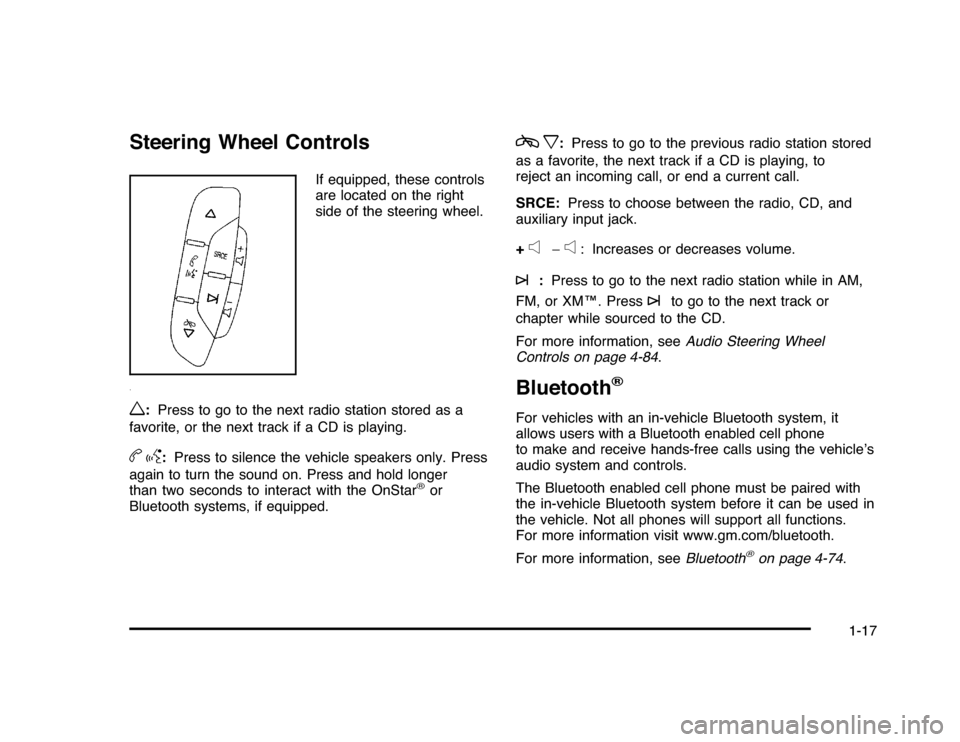
Steering Wheel Controls
If equipped, these controls
are located on the right
side of the steering wheel.
w
:Press to go to the next radio station stored as a
favorite, or the next track if a CD is playing.
bg
:Press to silence the vehicle speakers only. Press
again to turn the sound on. Press and hold longer
than two seconds to interact with the OnStar
®
or
Bluetooth systems, if equipped.
cx
:Press to go to the previous radio station stored
as a favorite, the next track if a CD is playing, to
reject an incoming call, or end a current call.
SRCE:Press to choose between the radio, CD, and
auxiliary input jack.
+
e
−
e
: Increases or decreases volume.
¨
:Press to go to the next radio station while in AM,
FM, or XM™. Press
¨
to go to the next track or
chapter while sourced to the CD.
For more information, seeAudio Steering Wheel
Controls on page 4-84.
Bluetooth
®
For vehicles with an in-vehicle Bluetooth system, it
allows users with a Bluetooth enabled cell phone
to make and receive hands-free calls using the vehicle’s
audio system and controls.
The Bluetooth enabled cell phone must be paired with
the in-vehicle Bluetooth system before it can be used in
the vehicle. Not all phones will support all functions.
For more information visit www.gm.com/bluetooth.
For more information, seeBluetooth
®
on page 4-74.
1-17
Page 29 of 432
![CHEVROLET IMPALA 2010 9.G Owners Manual The OnStar system can record and transmit vehicle
information. This information is automatically sent to an
OnStar call center when
Q
is pressed,
]
is pressed, or
if the airbags or ACR system deploy.](/img/24/8202/w960_8202-28.png "CHEVROLET IMPALA 2010 9.G Owners Manual The OnStar system can record and transmit vehicle
information. This information is automatically sent to an
OnStar call center when
Q
is pressed,
]
is pressed, or
if the airbags or ACR system deploy.")
The OnStar system can record and transmit vehicle
information. This information is automatically sent to an
OnStar call center when
Q
is pressed,
]
is pressed, or
if the airbags or ACR system deploy. This information
usually includes the vehicle’s GPS location and, in the
event of a crash, additional information regarding the
crash that the vehicle was involved in (e.g. the direction
from which the vehicle was hit). When the virtual advisor
feature of OnStar hands-free calling is used, the vehicle
also sends OnStar the vehicle’s GPS location so they can
provide services where it is located.
Location information about the vehicle is only available
if the GPS satellite signals are unobstructed and
available.
The vehicle must have a working electrical system,
including adequate battery power, for the OnStar
equipment to operate. There are other problems OnStar
cannot control that may prevent OnStar from providing
OnStar service at any particular time or place. Some
examples are damage to important parts of the vehicle
in a crash, hills, tall buildings, tunnels, weather or
wireless phone network congestion.
OnStar Steering Wheel ControlsThis vehicle may have a Talk/Mute button that can be
used to interact with OnStar hands-free calling. See
Audio Steering Wheel Controls on page 4-84for more
information.
On some vehicles, the mute button can be used to dial
numbers into voice mail systems, or to dial phone
extensions. See the OnStar Owner’s Guide for more
information.Your ResponsibilityIncrease the volume of the radio if the OnStar advisor
cannot be heard.
If the light next to the OnStar buttons is red, the system
may not be functioning properly. Press
Q
and request
a vehicle diagnostic. If the light appears clear (no light is
appearing), your OnStar subscription has expired and
all services have been deactivated. PressQ
to confirm
that the OnStar equipment is active.
1-23
Page 110 of 432
Remote Keyless Entry (RKE)
SystemSeeRadio Frequency Statement on page 8-20for
information regarding Part 15 of the Federal
Communications Commission (FCC) Rules and
RSS-210/211 of Industry and Science Canada.
Changes or modifications to this system by other than
an authorized service facility could void authorization to
use this equipment.
If there is a decrease in the RKE operating range,
try this:•
Check the distance. The transmitter may be too far
from the vehicle. Stand closer during rainy or
snowy weather.
•
Check the location. Other vehicles or objects may
be blocking the signal. Take a few steps to the
left or right, hold the transmitter higher, and
try again.
•
Check the transmitter’s battery. See “Battery
Replacement” later in this section.
•
If the transmitter is still not working correctly, see
your dealer/retailer or a qualified technician for
service.
Remote Keyless Entry (RKE)
System OperationThe Remote Keyless Entry (RKE) transmitter functions
work up to 195 feet (60 m) away from the vehicle.
There are other conditions which can affect the
performance of the transmitter. SeeRemote Keyless
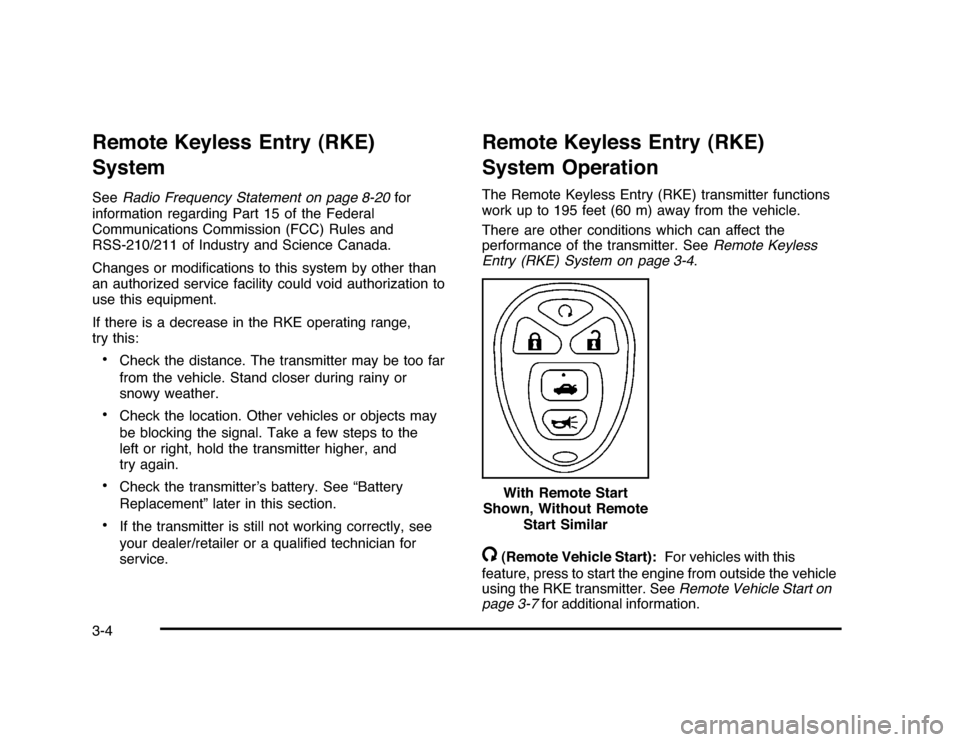
Entry (RKE) System on page 3-4./
(Remote Vehicle Start):For vehicles with this
feature, press to start the engine from outside the vehicle
using the RKE transmitter. SeeRemote Vehicle Start on
page 3-7for additional information. With Remote Start
Shown, Without Remote
Start Similar
3-4
Page 124 of 432
PASS-Key
®
III+ Electronic
Immobilizer
SeeRadio Frequency Statement on page 8-20for
information regarding Part 15 of the Federal
Communications Commission (FCC) Rules and
RSS-210/211 of Industry and Science Canada.PASS-Key
®
III+ Electronic
Immobilizer Operation
Your vehicle has PASS-Key
®III+ (Personalized
Automotive Security System) theft-deterrent system.
PASS-Key
®III+ is a passive theft-deterrent system.
The system is automatically armed when the key
is removed from the ignition.
The system is automatically disarmed when the key is
turned to ON/RUN, ACC/ACCESSORY or START
from the LOCK/OFF position.
You do not have to manually arm or disarm the system.
The security light will come on if there is a problem
with arming or disarming the theft-deterrent system.When the PASS-Key
®III+ system senses that someone
is using the wrong key, it prevents the vehicle from
starting. Anyone using a trial-and-error method to start
the vehicle will be discouraged because of the high
number of electrical key codes.
If the engine does not start and the security light on the
instrument panel cluster comes on when trying to
start the vehicle, there may be a problem with your
theft-deterrent system. Turn the ignition off and try again.
If the engine still does not start, and the key appears
to be undamaged, try another ignition key. At this time,
you may also want to check the fuse, seeFuses
and Circuit Breakers on page 6-96. If the engine still
does not start with the other key, your vehicle needs
service. If your vehicle does start, the first key may be
faulty. See your dealer/retailer who can service the
PASS-Key
®III+ to have a new key made. In an
emergency, contact Roadside Assistance.
It is possible for the PASS-Key
®III+ decoder to learn
the transponder value of a new or replacement key.
Up to 10 keys may be programmed for the vehicle.
The following procedure is for programming additional
keys only. If all the currently programmed keys are
lost or do not operate, you must see your dealer/retailer
or a locksmith who can service PASS-Key
®III+ to
have keys made and programmed to the system.
3-18
Page 126 of 432
Ignition Positions
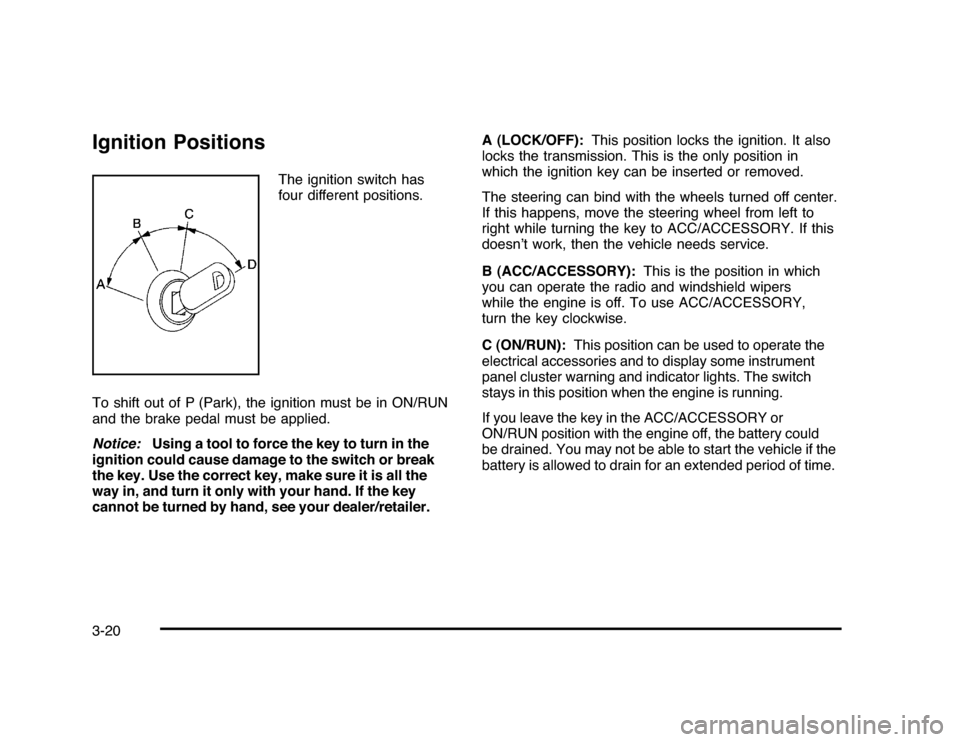
The ignition switch has
four different positions.
To shift out of P (Park), the ignition must be in ON/RUN
and the brake pedal must be applied.
Notice:Using a tool to force the key to turn in the
ignition could cause damage to the switch or break
the key. Use the correct key, make sure it is all the
way in, and turn it only with your hand. If the key
cannot be turned by hand, see your dealer/retailer.A (LOCK/OFF):This position locks the ignition. It also
locks the transmission. This is the only position in
which the ignition key can be inserted or removed.
The steering can bind with the wheels turned off center.
If this happens, move the steering wheel from left to
right while turning the key to ACC/ACCESSORY. If this
doesn’t work, then the vehicle needs service.
B (ACC/ACCESSORY):This is the position in which
you can operate the radio and windshield wipers
while the engine is off. To use ACC/ACCESSORY,
turn the key clockwise.
C (ON/RUN):This position can be used to operate the
electrical accessories and to display some instrument
panel cluster warning and indicator lights. The switch
stays in this position when the engine is running.
If you leave the key in the ACC/ACCESSORY or
ON/RUN position with the engine off, the battery could
be drained. You may not be able to start the vehicle if the
battery is allowed to drain for an extended period of time.
3-20
Page 127 of 432
D (START):This is the position that starts the engine.
When the engine starts, release the key. The ignition
switch returns to ON/RUN for driving.
A warning chime will sound and the Driver Information
Center (DIC) will display DRIVER’S DOOR AJAR
when the driver door is opened, the ignition is in
ACC/ACCESSORY or LOCK/OFF and the key is in
the ignition. SeeDIC Warnings and Messages on
page 4-44for more information.Retained Accessory Power (RAP)These vehicle accessories can be used for up to
10 minutes after the engine turned off:•
Audio System
•
Power WindowsThe radio will work when the key is in ON/RUN or
ACC/ACCESSORY. Once the key is turned from
ON/RUN to LOCK/OFF the radio will continue to
work 10 minutes or until the driver’s door is opened.
The power windows will continue to work for up to
10 minutes or until any door is opened.
Starting the EngineMove the shift lever to P (Park) or N (Neutral).
The engine will not start in any other position.
To restart the engine when the vehicle is already
moving, use N (Neutral) only.
Notice:Do not try to shift to P (Park) if the
vehicle is moving. If you do, you could damage
the transmission. Shift to P (Park) only when the
vehicle is stopped.
3-21
Page 141 of 432
Universal Home Remote
SystemSeeRadio Frequency Statement on page 8-20for
information regarding Part 15 of the Federal
Communications Commission (FCC) Rules and
RSS-210/211 of Industry and Science Canada.Universal Home Remote System
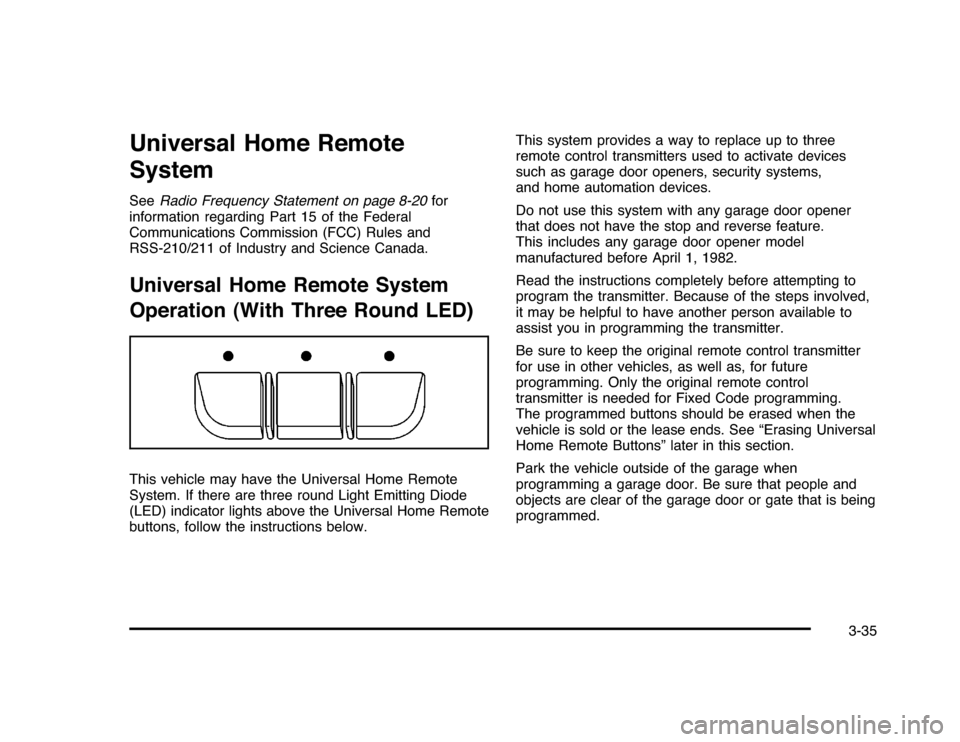
Operation (With Three Round LED)This vehicle may have the Universal Home Remote
System. If there are three round Light Emitting Diode
(LED) indicator lights above the Universal Home Remote
buttons, follow the instructions below.This system provides a way to replace up to three
remote control transmitters used to activate devices
such as garage door openers, security systems,
and home automation devices.
Do not use this system with any garage door opener
that does not have the stop and reverse feature.
This includes any garage door opener model
manufactured before April 1, 1982.
Read the instructions completely before attempting to
program the transmitter. Because of the steps involved,
it may be helpful to have another person available to
assist you in programming the transmitter.
Be sure to keep the original remote control transmitter
for use in other vehicles, as well as, for future
programming. Only the original remote control
transmitter is needed for Fixed Code programming.
The programmed buttons should be erased when the
vehicle is sold or the lease ends. See “Erasing Universal
Home Remote Buttons” later in this section.
Park the vehicle outside of the garage when
programming a garage door. Be sure that people and
objects are clear of the garage door or gate that is being
programmed.
3-35