rear view mirror CHEVROLET IMPALA 2010 9.G Owners Manual
[x] Cancel search | Manufacturer: CHEVROLET, Model Year: 2010, Model line: IMPALA, Model: CHEVROLET IMPALA 2010 9.GPages: 432, PDF Size: 1.89 MB
Page 1 of 432
In Brief........................................................... 1-1
Instrument Panel
........................................ 1-2
Initial Drive Information
............................... 1-4
Vehicle Features
......................................1-15
Performance and Maintenance
...................1-19
Seats and Restraint System............................. 2-1
Head Restraints
......................................... 2-2
Front Seats
............................................... 2-4
Rear Seats
..............................................2-10
Safety Belts
.............................................2-12
Child Restraints
.......................................2-32
Airbag System
.........................................2-56
Restraint System Check
............................2-74
Features and Controls..................................... 3-1
Keys
........................................................ 3-3
Doors and Locks
....................................... 3-9
Windows
.................................................3-14
Theft-Deterrent Systems
............................3-16
Starting and Operating Your Vehicle
...........3-19
Mirrors
....................................................3-33Universal Home Remote System
................3-35
Storage Areas
.........................................3-42
Sunroof
..................................................3-43
Instrument Panel............................................. 4-1
Instrument Panel Overview
.......................... 4-3
Climate Controls
......................................4-16
Warning Lights, Gages, and Indicators
. . . . . . . . 4-21
Driver Information Center (DIC)
..................4-37
Audio System(s)
.......................................4-57
Driving Your Vehicle....................................... 5-1
Your Driving, the Road, and the Vehicle
....... 5-2
Towing
...................................................5-26
Service and Appearance Care.......................... 6-1
Service
..................................................... 6-3
Fuel
......................................................... 6-5
Checking Things Under the Hood
...............6-12
Headlamp Aiming
.....................................6-43
Bulb Replacement
....................................6-43
Windshield Wiper Blade Replacement
. . . . . . . . . 6-49
2010 Chevrolet Impala Owner Manual
M
Page 16 of 432
Mirror AdjustmentExterior Mirrors
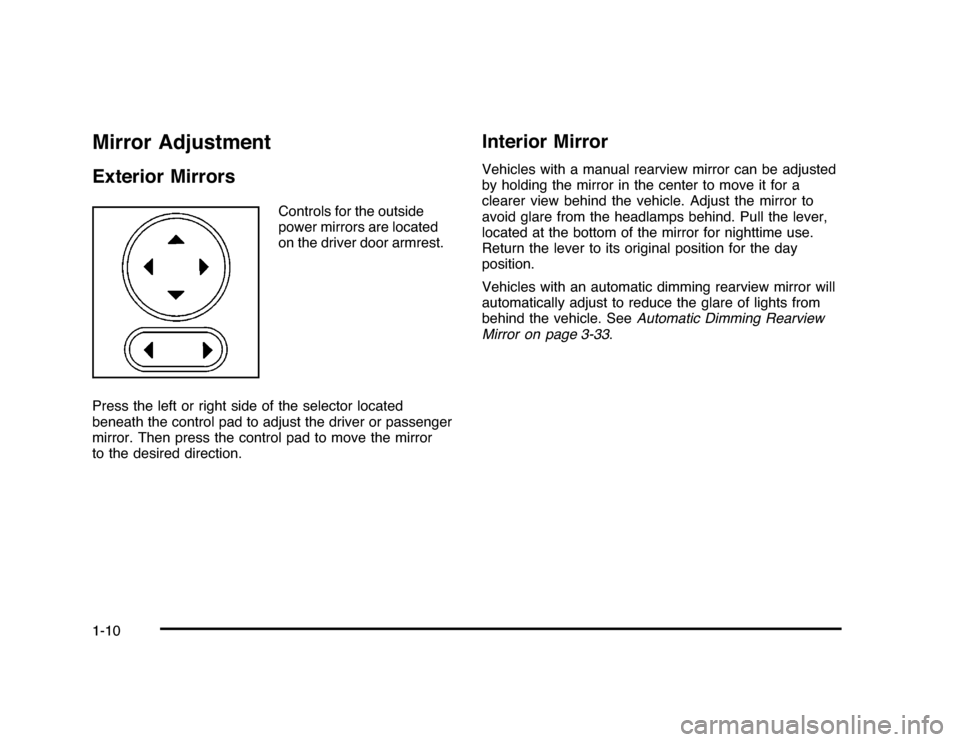
Controls for the outside
power mirrors are located
on the driver door armrest.
Press the left or right side of the selector located
beneath the control pad to adjust the driver or passenger
mirror. Then press the control pad to move the mirror
to the desired direction.
Interior MirrorVehicles with a manual rearview mirror can be adjusted
by holding the mirror in the center to move it for a
clearer view behind the vehicle. Adjust the mirror to
avoid glare from the headlamps behind. Pull the lever,
located at the bottom of the mirror for nighttime use.
Return the lever to its original position for the day
position.
Vehicles with an automatic dimming rearview mirror will
automatically adjust to reduce the glare of lights from
behind the vehicle. SeeAutomatic Dimming Rearview
Mirror on page 3-33.
1-10
Page 17 of 432
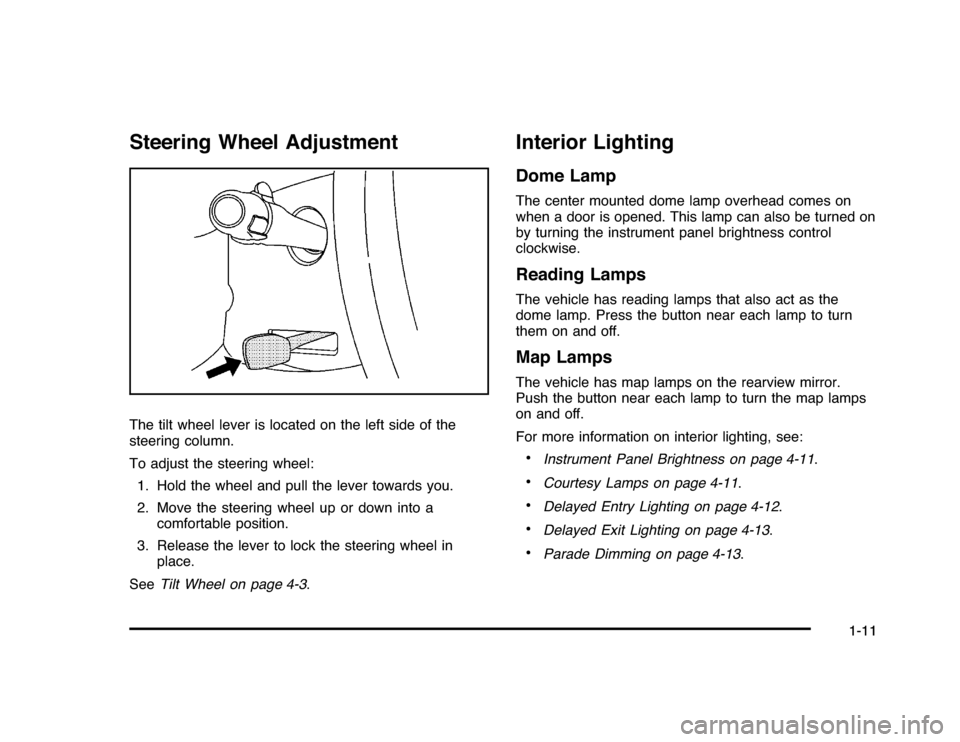
Steering Wheel AdjustmentThe tilt wheel lever is located on the left side of the
steering column.
To adjust the steering wheel:
1. Hold the wheel and pull the lever towards you.
2. Move the steering wheel up or down into a
comfortable position.
3. Release the lever to lock the steering wheel in
place.
SeeTilt Wheel on page 4-3.
Interior LightingDome LampThe center mounted dome lamp overhead comes on
when a door is opened. This lamp can also be turned on
by turning the instrument panel brightness control
clockwise.Reading LampsThe vehicle has reading lamps that also act as the
dome lamp. Press the button near each lamp to turn
them on and off.Map LampsThe vehicle has map lamps on the rearview mirror.
Push the button near each lamp to turn the map lamps
on and off.
For more information on interior lighting, see:•
Instrument Panel Brightness on page 4-11.
•
Courtesy Lamps on page 4-11.
•
Delayed Entry Lighting on page 4-12.
•
Delayed Exit Lighting on page 4-13.
•
Parade Dimming on page 4-13.
1-11
Page 107 of 432
Keys...............................................................3-3
Remote Keyless Entry (RKE) System................3-4
Remote Keyless Entry (RKE) System
Operation . . .................................................3-4
Remote Vehicle Start......................................3-7
Doors and Locks.............................................3-9
Door Locks....................................................3-9
Power Door Locks........................................3-10
Delayed Locking...........................................3-10
Automatic Door Lock.....................................3-10
Programmable Automatic Door Unlock.............3-11
Rear Door Security Locks..............................3-11
Lockout Protection........................................3-12
Trunk . . . . . . ....................................................3-12
Windows........................................................3-14
Power Windows............................................3-15
Sun Visors...................................................3-16
Theft-Deterrent Systems..................................3-16
Content Theft-Deterrent.................................3-17
PASS-Key
®
III+ Electronic Immobilizer.............3-18
PASS-Key
®
III+ Electronic Immobilizer
Operation . . ...............................................3-18Starting and Operating Your Vehicle................3-19
New Vehicle Break-In....................................3-19
Ignition Positions..........................................3-20
Retained Accessory Power (RAP)...................3-21
Starting the Engine.......................................3-21
Engine Coolant Heater ..................................3-23
Automatic Transmission Operation...................3-24
Parking Brake..............................................3-27
Shifting Into Park..........................................3-28
Shifting Out of Park......................................3-29
Parking Over Things That Burn.......................3-30
Engine Exhaust............................................3-31
Running the Vehicle While Parked..................3-32
Mirrors...........................................................3-33
Manual Rearview Mirror.................................3-33
Automatic Dimming Rearview Mirror................3-33
Outside Power Mirrors . . .................................3-34
Outside Convex Mirror . . .................................3-34
Outside Heated Mirrors ..................................3-34
Universal Home Remote System......................3-35
Universal Home Remote System Operation
(With Three Round LED)............................3-35
Section 3 Features and Controls
3-1
Page 139 of 432
MirrorsManual Rearview MirrorHold the inside rearview mirror in the center to move it
for a clearer view behind your vehicle. Adjust the
mirror to avoid glare from the headlamps behind you.
Pull the lever, located at the bottom of the mirror
for nighttime use. Return the lever to its original position
for the day position.
If the vehicle has map lamps, press the buttons located
at the bottom of the mirror to turn them on or off.
Vehicles with OnStar
®
have three additional control
buttons located at the bottom of the mirror. See
your dealer/retailer for more information about OnStar
®
and how to subscribe to it. See the OnStar
®
owner’s
guide for more information about the services OnStar
®
provides.
Automatic Dimming Rearview MirrorThe vehicle may have an automatic dimming rearview
mirror with the OnStar
®
System.
Press the button located below the mirror, on the far
left, for up to three seconds to turn the dimming feature
off and on.
There are two map lamps located on the bottom of the
mirror. Press the button next to each lamp to turn it
on and off.
There are also OnStar®
buttons located at the bottom of
the mirror. See your dealer/retailer for more information
about OnStar
®
and how to subscribe to it. See the
OnStar
®
owner’s guide for more information about the
service OnStar
®
provides.
3-33
Page 140 of 432
Outside Power Mirrors
Controls for the outside
power mirrors are located
on the driver door armrest.
1. Press the left or right side of the selector switch
located beneath the control pad, to select the
driver or passenger mirror.
2. Press one of the four buttons located on the control
pad to move the mirror to the desired direction.
3. Adjust each outside mirror so that a little of the
vehicle and the area behind it can be seen.
Keep the selector switch in the center position when not
adjusting either outside mirror.
Outside Convex Mirror
{
WARNING:
A convex mirror can make things, like other
vehicles, look farther away than they really are.
If you cut too sharply into the right lane, you could
hit a vehicle on the right. Check the inside mirror
or glance over your shoulder before changing
lanes.
The passenger side mirror is convex shaped. A convex
mirror’s surface is curved so more can be seen from
the driver seat.
Outside Heated MirrorsFor vehicles with heated mirrors:=
(Rear Window Defogger):Press to heat the
outside rearview mirrors. See “Rear Window Defogger”
underClimate Control System on page 4-16for more
information.
3-34
Page 148 of 432
Storage AreasGlove BoxLift up on the glove box lever to open it.CupholdersCupholders may be built into the front center console,
front portion of the front center seat, and rear armrest of
the vehicle.Sunglasses Storage CompartmentA storage compartment for sunglasses may be located
above the rearview mirror. Push on cover to open
the compartment.Center Console StorageFor vehicles with a front center console storage area,
open it by pulling up on the latch located in the front of
the console cover.
Rear Storage AreaFor vehicles with a split folding rear seat, there are two
storage areas underneath. Pull the tab(s) located by
the passenger side safety belt buckle and the driver
side rear seat to access the storage areas. See
Split Folding Rear Seat on page 2-10for more
information.Rear Seat ArmrestFor vehicles with a rear seat armrest, pull the tab on the
armrest forward to access it.Convenience NetFor vehicles with a convenience net, it is located in
the rear. Use it to store small loads as far forward as
possible. The net should not be used to store heavy
loads.
3-42
Page 161 of 432
Fog Lamps#
(Fog Lamps):For vehicles with fog lamps,
the button is located on the exterior lamps control.
The exterior lamps control is located on the instrument
panel to the left of the steering column.
The ignition must be in the ON/RUN position for the fog
lamps to come on.
Press
#
to turn the fog lamps on or off. A light will
come on in the instrument panel cluster.
When the headlamps are changed to high-beam, the
fog lamps also go off.
Some localities have laws that require the headlamps to
be on along with the fog lamps.
Instrument Panel BrightnessD
(Instrument Panel Brightness):The knob with this
symbol on it is located next to the exterior lamps control
to the left of the steering wheel. Push the knob in all the
way until it extends out and then turn the knob clockwise
or counterclockwise to brighten or dim the lights. Push
the knob back in when finished.
Courtesy LampsWhen a door is opened, the courtesy lamps
automatically come on. They make it easy for you to
enter and leave your vehicle. You can also manually
turn these lamps on by fully turning the instrument
panel brightness control clockwise.
The reading lamps, located on the rearview mirror,
can be turned on or off independent of the automatic
courtesy lamps, when the doors are closed.Dome LampThe center mounted dome lamp overhead comes on
when a door is opened. This lamp can also be turned
on by turning the instrument panel brightness control
clockwise.
4-11
Page 163 of 432
Delayed Exit LightingThis feature illuminates the interior for a period of time
after the key is removed from the ignition.
The ignition must be off for delayed exit lighting to work.
When the key is removed, interior illumination activates
and remains on until one of the following occurs:•
The ignition is in ON/RUN.
•
The power door locks are activated.
•
An illumination period of 20 seconds has elapsed.
If during the illumination period a door is opened,
the timed illumination period will be canceled and the
interior lamps will remain on because a door is open.
Parade DimmingParade mode automatically prohibits the dimming of
the instrument panel displays during the daylight while
the headlamps are on so that the displays are still
able to be seen.Reading LampsThe vehicle has reading lamps that also act as the
dome lamp. Press the button near each lamp to turn
them on and off.
Map LampsThe vehicle has map lamps on the rearview mirror.
Press the button near each lamp on the mirror to turn
the map lamps on and off.Electric Power ManagementThe vehicle has Electric Power Management (EPM) that
estimates the battery’s temperature and state of charge.
It then adjusts the voltage for best performance and
extended life of the battery.
When the battery’s state of charge is low, the voltage is
raised slightly to quickly bring the charge back up. When
the state of charge is high, the voltage is lowered slightly
to prevent overcharging. If the vehicle has a voltmeter
gage or a voltage display on the Driver Information
Center (DIC), you may see the voltage move up or down.
This is normal. If there is a problem, an alert will be
displayed.
The battery can be discharged at idle if the electrical
loads are very high. This is true for all vehicles. This is
because the generator (alternator) may not be spinning
fast enough at idle to produce all the power that is
needed for very high electrical loads.
4-13
Page 169 of 432
Using these settings together for long periods of time
may cause the air inside the vehicle to become too dry.
To prevent this from happening, after the air inside
the vehicle has cooled, turn the recirculation mode off.
The air conditioning system removes moisture from
the air, so a small amount of water may drip under
the vehicle while idling or after turning off the engine.
This is normal.:
(Outside Air):Press to turn on outside air.
An indicator light comes on to show that it is on.
Outside air will circulate throughout the vehicle.
?
(Recirculation):Press to turn on the recirculation
mode. An indicator light comes on to show that
it is on.
This mode helps to quickly heat or cool the air inside the
vehicle once the temperature inside the vehicle is equal
to or better than the outside temperature. It can be used
to prevent outside air and odors from entering the vehicle.
The recirculation mode is not available in outside air,
floor, defog or defrost modes. If the button is selected
while in these modes, the indicator flashes three times.
Rear Window DefoggerThe rear window defogger uses a warming grid to
remove fog from the rear window.<
(Rear Window Defogger):The rear window
defogger turns off automatically after it has been
activated for 10 minutes. It can be turned off manually,
by pressing the button again or by turning the ignition
to the LOCK/OFF position. The rear window defogger
can be turned on again for additional window clearing.
The length of defogger operation will increase if the
vehicle is being driven.
For vehicles with heated outside rearview mirrors, the
mirrors heat to help clear fog or frost from the surface of
the mirror when the rear window defog button is
pressed. SeeOutside Power Mirrors on page 3-34.
Do not drive the vehicle until all the windows are clear.
Notice:Do not use anything sharp on the inside
of the rear window. If you do, you could cut or
damage the warming grid, and the repairs would not
be covered by the vehicle warranty. Do not attach
a temporary vehicle license, tape, a decal or
anything similar to the defogger grid.
4-19