manual radio set CHEVROLET IMPALA 2011 9.G Owners Manual
[x] Cancel search | Manufacturer: CHEVROLET, Model Year: 2011, Model line: IMPALA, Model: CHEVROLET IMPALA 2011 9.GPages: 376, PDF Size: 5.71 MB
Page 20 of 376
Black plate (14,1)Chevrolet Impala Owner Manual - 2011
1-14 In Brief
Vehicle Features
Radio(s)
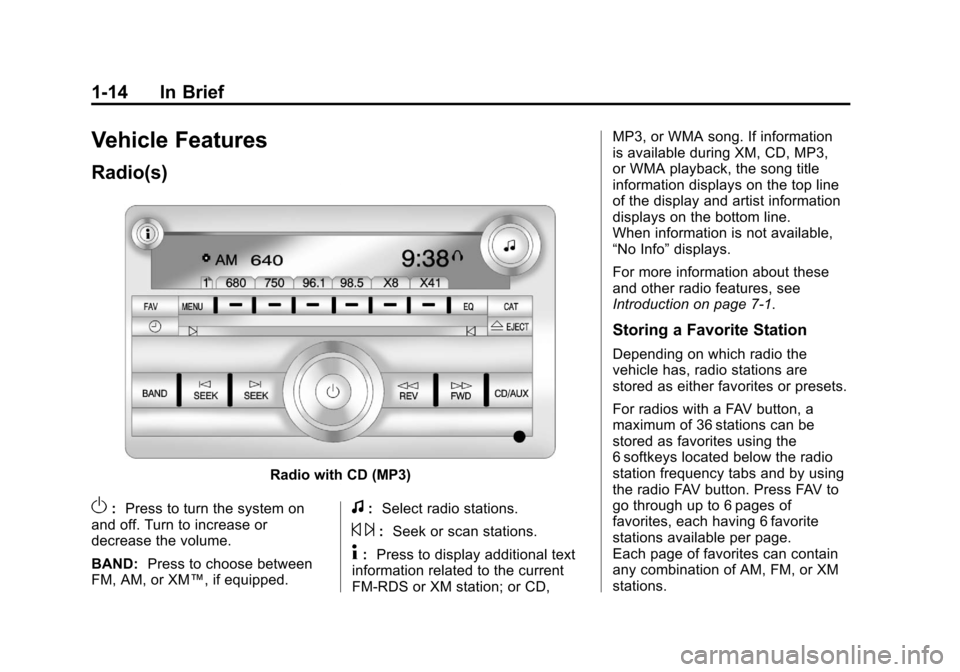
Radio with CD (MP3)
O:Press to turn the system on
and off. Turn to increase or
decrease the volume.
BAND: Press to choose between
FM, AM, or XM™, if equipped.f: Select radio stations.
© ¨:Seek or scan stations.
4: Press to display additional text
information related to the current
FM-RDS or XM station; or CD, MP3, or WMA song. If information
is available during XM, CD, MP3,
or WMA playback, the song title
information displays on the top line
of the display and artist information
displays on the bottom line.
When information is not available,
“No Info”
displays.
For more information about these
and other radio features, see
Introduction on page 7‑1.
Storing a Favorite Station
Depending on which radio the
vehicle has, radio stations are
stored as either favorites or presets.
For radios with a FAV button, a
maximum of 36 stations can be
stored as favorites using the
6 softkeys located below the radio
station frequency tabs and by using
the radio FAV button. Press FAV to
go through up to 6 pages of
favorites, each having 6 favorite
stations available per page.
Each page of favorites can contain
any combination of AM, FM, or XM
stations.
Page 21 of 376
Black plate (15,1)Chevrolet Impala Owner Manual - 2011
In Brief 1-15
For radios without a FAV button, up
to 18 stations (6 FM1, 6 FM2, and
6 AM), can be programmed on the
6 numbered buttons.
SeeOperation on page 7‑2.
Setting the Clock
To set the time and date for the
Radio with CD (MP3):
1. Turn the radio on.
2. Press
Hand the HR, MIN, MM,
DD, and YYYY (hour, minute,
month, day, and year) display.
3. Press the pushbutton located below any one of the tabs that
you want to change.
4. Increase or decrease the time or date by turning
fclockwise or
counterclockwise.
For detailed instructions on setting
the clock for your specific audio
system, see Clock on page 5‑7.
Satellite Radio
XM is a satellite radio service
that is based in the 48 contiguous
United States and 10 Canadian
provinces. XM satellite radio has a
wide variety of programming and
commercial-free music, coast to
coast, and in digital-quality sound.
A fee is required to receive the
XM service.
For more information, refer to:
.www.xmradio.com or call
1-800-929-2100 (U.S.)
.www.xmradio.ca or call
1-877-438-9677 (Canada)
See “XM Satellite Radio Service”
under Satellite Radio on page 7‑8.
Portable Audio Devices
This vehicle may have an auxiliary
input jack, located on the audio
faceplate. External devices such as iPod
®, MP3 players, etc. can be
connected to the auxiliary input jack
using a 3.5 mm (1/8 in) input jack
cable.
See “Using the Auxiliary Input Jack”
under Auxiliary Devices on
page 7‑19.
Bluetooth®
For vehicles with a Bluetooth
system, it allows users with a
Bluetooth‐enabled cell phone to
make and receive hands-free calls
using the vehicle’ s audio system
and controls.
The Bluetooth‐enabled cell phone
must be paired with the Bluetooth
system before it can be used in the
vehicle. Not all phones will support
all functions. For more information,
visit www.gm.com/bluetooth.
For more information, see Bluetooth
on page 7‑20.
Page 22 of 376
Black plate (16,1)Chevrolet Impala Owner Manual - 2011
1-16 In Brief
Steering Wheel Controls
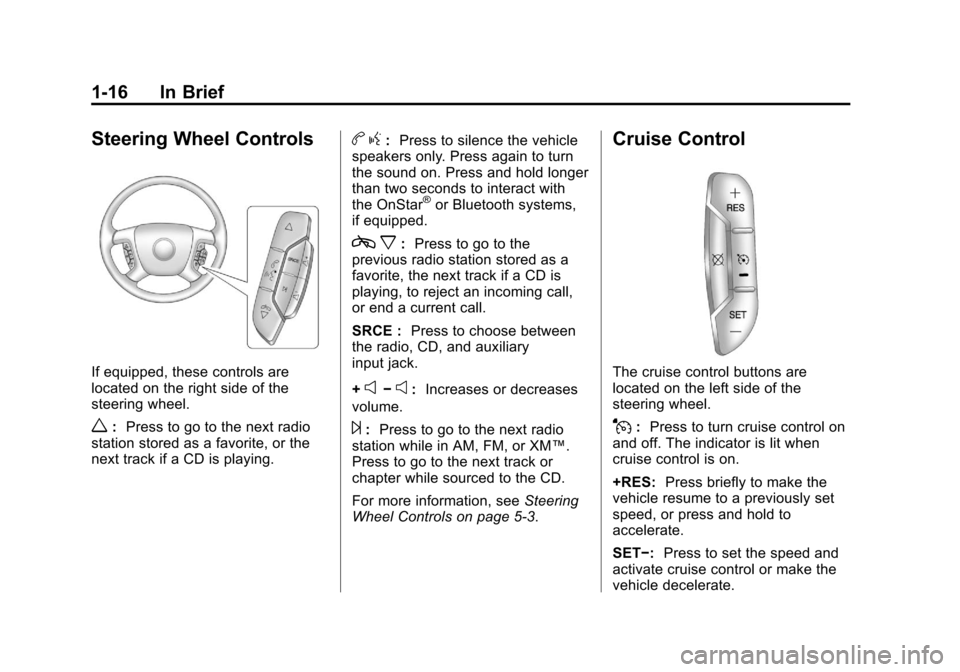
If equipped, these controls are
located on the right side of the
steering wheel.
w:Press to go to the next radio
station stored as a favorite, or the
next track if a CD is playing.
b g: Press to silence the vehicle
speakers only. Press again to turn
the sound on. Press and hold longer
than two seconds to interact with
the OnStar
®or Bluetooth systems,
if equipped.
c x:Press to go to the
previous radio station stored as a
favorite, the next track if a CD is
playing, to reject an incoming call,
or end a current call.
SRCE : Press to choose between
the radio, CD, and auxiliary
input jack.
+
e−e: Increases or decreases
volume.
¨: Press to go to the next radio
station while in AM, FM, or XM™.
Press to go to the next track or
chapter while sourced to the CD.
For more information, see Steering
Wheel Controls on page 5‑3.
Cruise Control
The cruise control buttons are
located on the left side of the
steering wheel.
J: Press to turn cruise control on
and off. The indicator is lit when
cruise control is on.
+RES: Press briefly to make the
vehicle resume to a previously set
speed, or press and hold to
accelerate.
SET−: Press to set the speed and
activate cruise control or make the
vehicle decelerate.
Page 117 of 376
Black plate (7,1)Chevrolet Impala Owner Manual - 2011
Instruments and Controls 5-7
Clock
Without Date Display
AM/FM Base Radio with a Single
CD Player
This radio has a
Hbutton for setting
the time.
To set the time:
1. Press the
Hbutton until the
hour begins flashing on the
display. Press
Ha second time
and the minutes begin flashing
on the display. 2. To increase or decrease the
time, do one of the following
while the hours or minutes
are flashing:
.Turn thefknob.
.Press¨SEEK or©SEEK.
.Press\FWD orsREV.
3. Press the
Hbutton again until
the clock display stops flashing
to set the currently displayed
time, or wait five seconds until
the flashing stops and the
current time displayed is
automatically set. To change the time default setting
from 12 hour to 24 hour, press the
Hbutton until 12H or 24H is
displayed. Once 12H or 24H is
displayed, turn the
fknob to the
desired option to select the setting.
Press the
Hbutton again to apply
the setting, or let the screen
time out.
Page 118 of 376
Black plate (8,1)Chevrolet Impala Owner Manual - 2011
5-8 Instruments and Controls
With Date Display
Single CD (MP3) Player
This radio has a
Hbutton for
setting the time.
To set the time and date:
1. Turn the radio on.
2. Press the
Hbutton and the
HR, MIN, MM, DD, and YYYY
(hour, minute, month, day,
and year) display.
3. Press the pushbutton located under any one of the tabs to
be changed. 4. To increase the time or date, do
one of the following:
.Press the pushbutton below
the selected tab.
.Turn thefknob clockwise.
.Press¨SEEK.
.Press\FWD.
5. To decrease the time or date, do one of the following:
.Turn thefknob
counter‐clockwise.
.Press©SEEK.
.PresssREV.
The date does not automatically
display. To see the date press the
Hbutton while the radio is on. The
date with display times out after a
few seconds and goes back to the
normal radio and time display. To change the time default setting
from 12 hour to 24 hour or to
change the date default setting from
month/day/year to day/month/year:
1. Press the
Hbutton and then
the pushbutton located under
the forward arrow tab. The time
12H and 24H, and the date
MM/DD/YYYY (month, day,
and year) and DD/MM/YYYY
(day, month, and year) displays.
2. Press the pushbutton located under the desired option.
3. Press the
Hor MENU button
again to apply the selected
default, or let the screen
time out.
Page 167 of 376
Black plate (1,1)Chevrolet Impala Owner Manual - 2011
Infotainment System 7-1
Infotainment
System
Introduction
Introduction . . . . . . . . . . . . . . . . . . . 7-1
Theft-Deterrent Feature . . . . . . . 7-1
Operation . . . . . . . . . . . . . . . . . . . . . 7-2
Radio
AM-FM Radio . . . . . . . . . . . . . . . . . 7-6
Satellite Radio . . . . . . . . . . . . . . . . 7-8
Radio Reception . . . . . . . . . . . . . 7-12
Backglass Antenna . . . . . . . . . . 7-13
Satellite Radio Antenna . . . . . . 7-13
Audio Players
CD Player . . . . . . . . . . . . . . . . . . . 7-14
Auxiliary Devices . . . . . . . . . . . . 7-19
Phone
Bluetooth . . . . . . . . . . . . . . . . . . . . 7-20
Introduction
Determine which radio the vehicle
has and read the following pages to
become familiar with its features.
{WARNING
Taking your eyes off the road for
extended periods could cause a
crash resulting in injury or death
to you or others. Do not give
extended attention to
entertainment tasks while driving.
This system provides access to
many audio and non-audio listings.
To minimize taking your eyes off the
road while driving, do the following
while the vehicle is parked:
.Become familiar with the
operation and controls of the
audio system.
.Set up the tone, speaker
adjustments, and preset radio
stations. For more information, see
Defensive
Driving on page 9‑2.
Notice: Contact your dealer
before adding any equipment.
Adding audio or communication
equipment could interfere with
the operation of the vehicle's
engine, radio, or other systems,
and could damage them. Follow
federal rules covering mobile
radio and telephone equipment.
The vehicle has Retained
Accessory Power (RAP). With RAP,
the audio system can be played
even after the ignition is turned off.
See Retained Accessory Power
(RAP) on page 9‑18 for more
information.
Theft-Deterrent Feature
TheftLock®is designed to
discourage theft of the vehicle's
radio by learning a portion of the
Vehicle Identification Number (VIN).
The radio does not operate if it is
stolen or moved to a different
vehicle.
Page 169 of 376
Black plate (3,1)Chevrolet Impala Owner Manual - 2011
Infotainment System 7-3
Radio with CD (MP3)
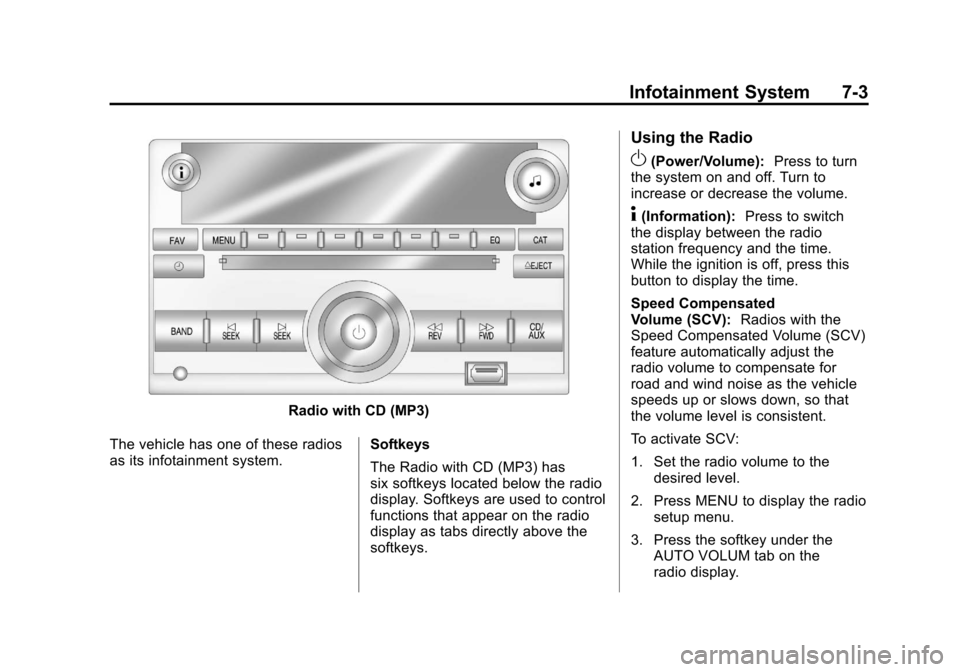
The vehicle has one of these radios
as its infotainment system. Softkeys
The Radio with CD (MP3) has
six softkeys located below the radio
display. Softkeys are used to control
functions that appear on the radio
display as tabs directly above the
softkeys.
Using the Radio
O(Power/Volume):
Press to turn
the system on and off. Turn to
increase or decrease the volume.
4(Information): Press to switch
the display between the radio
station frequency and the time.
While the ignition is off, press this
button to display the time.
Speed Compensated
Volume (SCV): Radios with the
Speed Compensated Volume (SCV)
feature automatically adjust the
radio volume to compensate for
road and wind noise as the vehicle
speeds up or slows down, so that
the volume level is consistent.
To activate SCV:
1. Set the radio volume to the desired level.
2. Press MENU to display the radio setup menu.
3. Press the softkey under the AUTO VOLUM tab on the
radio display.
Page 170 of 376
Black plate (4,1)Chevrolet Impala Owner Manual - 2011
7-4 Infotainment System
4. Press the softkey under thedesired Speed Compensated
Volume setting (OFF, Low, Med,
or High) to select the level of
radio volume compensation.
The display times out after
approximately 10 seconds. Each
higher setting allows for more
radio volume compensation at
faster vehicle speeds.
Setting the Tone (Bass/Treble)
Radio with CD
To adjust the bass or treble:
1. Press the
fknob until Bass or
Treble displays.
2. To adjust the setting, do one of the following:
.Turn thefknob.
.Press¨SEEK or©SEEK.
.Press\FWD orsREV. EQ (Equalization):
Press this
button to choose bass and treble
equalization settings designed for
different types of music. Selecting
MANUAL or changing bass or
treble, returns the EQ to the manual
bass and treble settings.
Unique EQ settings can be saved
for each source.
Setting the Tone
(Bass/Midrange/Treble)
Radio with CD (MP3)
BASS/MID/TREB (Bass, Midrange,
or Treble): To adjust the bass,
midrange, or treble:
1. Press the
fknob until the tone
control tabs display.
2. Highlight the desired tone control tab by doing one of the
following:
.Press thefknob.
.Press the softkey under the
desired tab. 3. Adjust the setting by doing one
of the following:
.Turn thefknob clockwise
or counterclockwise.
.Press¨SEEK or©SEEK.
.Press\FWD orsREV.
If a station's frequency is weak or if
there is static, decrease the treble.
To quickly adjust bass, midrange,
or treble to the middle position,
press the softkey positioned under
the BASS, MID, or TREB tab for
more than two seconds. A beep
sounds and the level adjusts to the
middle position.
To quickly adjust all tone and
speaker controls to the middle
position, press the
fknob for
more than two seconds until a
beep sounds.
Page 171 of 376
Black plate (5,1)Chevrolet Impala Owner Manual - 2011
Infotainment System 7-5
EQ (Equalization):Press this
button to choose bass and treble
equalization settings designed for
different types of music. Selecting
MANUAL or changing bass or treble
returns the EQ to the manual bass
and treble settings.
Unique EQ settings can be saved
for each source.
If the radio has a Bose
®audio
system, the EQ settings are either
MANUAL or TALK.
Adjusting the Speakers
(Balance/Fade) Radio with CD
To adjust the balance or fade:
1. Press the
`button or press the
fknob until the speaker control
label displays.
2. To adjust the setting, do one of the following:
.Turn thefknob.
.Press¨SEEK or©SEEK.
.Press\FWD orsREV.
Adjusting the Speakers
(Balance/Fade) Radio with
CD (MP3)
BAL/FADE (Balance/Fade): To
adjust the balance or fade:
1. Press the
fknob until the
speaker control tabs display.
2. Highlight the desired speaker control tab by doing one of
the following:
.Press thefknob.
.Press the softkey under the
desired tab.
3. Adjust the setting by doing one of the following:
.Turn thefknob clockwise
or counterclockwise.
.Press¨SEEK or©SEEK.
.Press\FWD orsREV. To quickly adjust all speaker and
tone controls to the middle position,
press the
fknob for more than
two seconds.
If the Rear Seat Audio (RSA) is
turned on, the radio disables FADE
and mutes the rear speakers.
Radio Messages
Calibration Error: Displays if
the radio is no longer calibrated
properly for the vehicle. The vehicle
must be returned to your dealer
for service.
Loc or Locked: Displays when the
THEFTLOCK system has activated.
Take the vehicle to your dealer
for service.
If any error occurs repeatedly or if
an error cannot be corrected,
contact your dealer.
Page 172 of 376
Black plate (6,1)Chevrolet Impala Owner Manual - 2011
7-6 Infotainment System
Radio
AM-FM Radio
Radio Data System (RDS)
The radio may have RDS. The RDS
feature is available for use only on
FM stations that broadcast RDS
information. This system relies upon
receiving specific information from
these stations and only works when
the information is available. While
the radio is tuned to an FM-RDS
station, the station name or call
letters display. In rare cases, a radio
station could broadcast incorrect
information that causes the radio
features to work improperly. If this
happens, contact the radio station.
4(Information) (RDS Features):
For vehicles with RDS features,
press
4to display additional text
information related to the current
FM-RDS station. If information is
available, the song title information
displays on the top line of the display and artist information
displays on the bottom line. When
information is not available,
“NO
INFO” displays.
Auto Text (RDS Features): If
additional information is available
for the current song being played,
Auto Text will automatically page/
scroll the information every
three seconds above the FAV
presets on the radio display. By
default, Auto Text is enabled.
To change the Auto Text setting:
1. Press MENU to display the radio
setup menu.
2. Press the softkey under AUTO TXT tab on the radio display.
3. Press the softkey under the ON or OFF tab on the radio display.
If4is pressed and the song title
or artist information is longer than
what can be displayed, the extra
information will page every
three seconds when Auto Text is
activated.
Finding a Station
BAND: Press to choose
between FM1, FM2, AM, or
XM™ (if equipped) on the Radio
with CD (Base). Press to choose
between FM, AM, XM (if equipped)
on the Radio with CD (MP3).
f(Tune): Turn to select radio
stations.
©SEEK: Press to seek or scan
stations with a strong signal in the
selected band.
.To seek stations, press and
release
©SEEK to go to the
previous station and stay there.
.To scan stations, press and hold©SEEK for a few seconds until
the radio beeps once. The radio
goes to a station, plays for a
few seconds, then goes to the
next station. Press
©SEEK
again to stop scanning.