air condition CHEVROLET IMPALA 2012 9.G User Guide
[x] Cancel search | Manufacturer: CHEVROLET, Model Year: 2012, Model line: IMPALA, Model: CHEVROLET IMPALA 2012 9.GPages: 374, PDF Size: 5.73 MB
Page 119 of 374
Black plate (17,1)Chevrolet Impala Owner Manual - 2012
Instruments and Controls 5-17
Notice:Modifications made to the
engine, transmission, exhaust,
intake, or fuel system of the
vehicle or the replacement of the
original tires with other than
those of the same Tire
Performance Criteria (TPC) can
affect the vehicle's emission
controls and can cause this light
to come on. Modifications to
these systems could lead to
costly repairs not covered by the
vehicle warranty. This could also
result in a failure to pass a
required Emission Inspection/
Maintenance test. See
Accessories and Modifications on
page 10‑3.
This light comes on during a
malfunction in one of two ways:
Light Flashing: A misfire condition
has been detected. A misfire
increases vehicle emissions and
could damage the emission control
system on the vehicle. Diagnosis
and service might be required. To prevent more serious damage to
the vehicle:
.Reduce vehicle speed.
.Avoid hard accelerations.
.Avoid steep uphill grades.
.If towing a trailer, reduce the
amount of cargo being hauled as
soon as it is possible.
If the light continues to flash, stop
and park the vehicle. Turn the
vehicle off, wait at least 10 seconds,
and restart the engine. If the light is
still flashing, follow the previous
steps and see your dealer for
service as soon as possible.
Light On Steady: An emission
control system malfunction has
been detected on the vehicle.
Diagnosis and service might be
required. The following may correct an
emission system malfunction:
.Check that the fuel cap is fully
installed. See
Filling the Tank on
page 9‑40. The diagnostic
system can determine if the
fuel cap has been left off or
improperly installed. A loose or
missing fuel cap allows fuel to
evaporate into the atmosphere.
A few driving trips with the cap
properly installed should turn the
light off.
.Check that good quality fuel is
used. Poor fuel quality causes
the engine not to run as
efficiently as designed and may
cause stalling after start-up,
stalling when the vehicle is
changed into gear, misfiring,
hesitation on acceleration,
or stumbling on acceleration.
These conditions might go away
once the engine is warmed up.
Page 130 of 374
Black plate (28,1)Chevrolet Impala Owner Manual - 2012
5-28 Instruments and Controls
When the remaining oil life is low,
the CHANGE ENGINE OIL SOON
message will appear on the display.
SeeEngine Oil Messages on
page 5‑31. You should change the
oil as soon as possible. See Engine
Oil on page 10‑7. In addition to the
engine oil life system monitoring the
oil life, additional maintenance is
recommended in the Maintenance
Schedule in this manual. See
Maintenance Schedule on
page 11‑3 for more information.
Remember, you must reset the OIL
LIFE yourself after each oil change.
It will not reset itself. Also, be
careful not to reset the OIL LIFE
accidentally at any time other than
when the oil has just been changed.
It cannot be reset accurately until
the next oil change. To reset the
engine oil life system, see Engine
Oil Life System on page 10‑10. Units
Press the vehicle information
button until UNITS displays.
This display allows you to select
between English or Metric units of
measurement. Once in this display,
press the set/reset button to select
between ENGLISH or METRIC
units.
Tire Pressure
On vehicles with the Tire Pressure
Monitor System (TPMS), the
pressure for each tire can be viewed
in the DIC. The tire pressure will be
shown in either pounds per square
inch (psi) or kilopascals (kPa). Press
the vehicle information button until
the DIC displays FRONT TIRES
PSI (kPa) LEFT ## RIGHT ##. Press
the vehicle information button again
until the DIC displays REAR TIRES
PSI (kPa) LEFT ## RIGHT ##.
If a low tire pressure condition is
detected by the system while
driving, a message advising you to
add air to a specific tire will appearin the display. See
Tire Pressure on
page 10‑41 andTire Messages on
page 5‑36 for more information.
If the tire pressure display shows
dashes instead of a value, there
may be a problem with your vehicle.
If this consistently occurs, see your
dealer for service.
Change Compass Zone
Your vehicle may have this feature.
To change the compass zone
through the DIC, see Compass on
page 5‑5.
Calibrate Compass
Your vehicle may have this feature.
The compass can be manually
calibrated. To calibrate the compass
through the DIC, see Compass on
page 5‑5.
Blank Display
This display shows no information.
Page 132 of 374
Black plate (30,1)Chevrolet Impala Owner Manual - 2012
5-30 Instruments and Controls
Door Ajar Messages
DRIVER DOOR OPEN
This message displays when the
driver door is not closed properly.
Make sure that the door is closed
completely.
HOOD OPEN
If your vehicle has the remote start
feature, this message displays when
the hood is not closed properly.
Make sure that the hood is closed
completely. SeeHood on page 10‑5.
LEFT REAR DOOR OPEN
This message displays when the
driver side rear door is not closed
properly. Make sure that the door is
closed completely.
PASSENGER DOOR OPEN
This message displays when the
front passenger door is not closed
properly. Make sure that the door is
closed completely.
RIGHT REAR DOOR OPEN
This message displays when the
passenger side rear door is not
closed properly. Make sure that the
door is closed completely.
TRUNK OPEN
This message displays when the
trunk is not closed completely. Make
sure that the trunk is closed
completely. SeeTrunk on
page 2‑10.
Engine Cooling System
Messages
ENGINE HOT A/C
(Air Conditioning) OFF
This message displays when the
engine coolant becomes hotter than
the normal operating temperature.
To avoid added strain on a hot
engine, the air conditioning
compressor is automatically turned
off. When the coolant temperature
returns to normal, the A/C operation
automatically resumes. You can
continue to drive your vehicle. If this
message continues to appear, have
the system repaired by your dealer
as soon as possible to avoid
compressor damage.
Page 133 of 374
Black plate (31,1)Chevrolet Impala Owner Manual - 2012
Instruments and Controls 5-31
ENGINE OVERHEATED IDLE
ENGINE
Notice:If you drive your vehicle
while the engine is overheating,
severe engine damage may
occur. If an overheat warning
appears on the instrument panel
cluster and/or DIC, stop the
vehicle as soon as possible. Do
not increase the engine speed
above normal idling speed. See
Engine Overheating on
page 10‑16 for more information.
This message displays when the
engine coolant temperature is too
hot. Stop and allow the vehicle to
idle until it cools down.
ENGINE OVERHEATED STOP
ENGINE
Notice: If you drive the vehicle
while the engine is overheating,
severe engine damage may
occur. If an overheat warning
appears on the instrument panel
cluster and/or DIC, stop the vehicle as soon as possible.
See
Engine Overheating on
page 10‑16 for more information.
This message displays along with a
continuous chime when the engine
has overheated. Stop and turn the
engine off immediately to avoid
severe engine damage. See Engine
Overheating on page 10‑16.
SERVICE A/C
(Air Conditioning) SYSTEM
This message displays when the
electronic sensors that control the
air conditioning and heating
systems are no longer working.
Have the climate control system
serviced by your dealer if you notice
a drop in heating and air
conditioning efficiency.
Engine Oil Messages
CHANGE ENGINE OIL SOON
This message displays when
service is required for the vehicle.
See your dealer. See Engine Oil on
page 10‑7 andMaintenance
Schedule on page 11‑3 for more
information.
Acknowledging the CHANGE
ENGINE OIL SOON message will
not reset the OIL LIFE REMAINING.
That must be done at the OIL LIFE
screen under the vehicle information
menu. See “Oil Life”underDriver
Information Center (DIC) on
page 5‑24 andEngine Oil Life
System on page 10‑10.
Page 136 of 374
Black plate (34,1)Chevrolet Impala Owner Manual - 2012
5-34 Instruments and Controls
SERVICE TRACTION
CONTROL
If your vehicle has the Traction
Control System (TCS), this message
displays when the system is not
functioning properly. The ESC/TCS
light also appears on the instrument
panel cluster. SeeElectronic
Stability Control (ESC)/Traction
Control System (TCS) Indicator/
Warning Light on page 5‑21. See
Traction Control System (TCS) on
page 9‑30 for more information.
Have the TCS serviced by your
dealer as soon as possible.
STABILITRAK INITIALIZING
If your vehicle has Electronic
Stability Control (ESC), this
message may display and the ESC/
TCS light on the instrument panel
cluster may be on after first driving
the vehicle and exceeding 30 km/h
(19 mph) for 30 seconds. The ESC
system is not functional until the
light has turned off. See Electronic
Stability Control (ESC) on
page 9‑32 for more information.
STABILITRAK OFF
If your vehicle has Electronic
Stability Control (ESC), this
message displays when the ESC is
turned off manually. See Electronic
Stability Control (ESC) on
page 9‑32 for more information.
TRACTION CONTROL OFF
If your vehicle has the Traction
Control System (TCS), this
message displays when the TCS
turns off. See Traction Control
System (TCS) on page 9‑30 for
more information.
This message may display when the
ignition is in ON/RUN and
disappears after 10 seconds, unless
it is acknowledged or an urgent
warning appears. Any of the following conditions may
cause the TCS to turn off:
.The TCS is turned off by
pressing the traction control
button. See
Traction Control
System (TCS) on page 9‑30 for
more information.
.The battery is low.
TRACTION CONTROL ON
If your vehicle has the Traction
Control System (TCS), this message
displays when the TCS is turned on.
See Traction Control System (TCS)
on page 9‑30 for more information.
Airbag System Messages
SERVICE AIR BAG
This message displays when there
is a problem with the airbag system.
Have your vehicle serviced by your
dealer immediately. See Airbag
Readiness Light on page 5‑14 for
more information.
Page 138 of 374
Black plate (36,1)Chevrolet Impala Owner Manual - 2012
5-36 Instruments and Controls
Tire Messages
SERVICE TIRE MONITOR
SYSTEM
On vehicles with the Tire Pressure
Monitor System (TPMS), this
message displays if a part on the
TPMS is not working properly. The
tire pressure light also flashes and
then remains on during the same
ignition cycle. SeeTire Pressure
Light on page 5‑22. Several
conditions may cause this message
to appear. See Tire Pressure
Monitor Operation on page 10‑44 for
more information. If the warning
comes on and stays on, there may
be a problem with the TPMS. See
your dealer.
TIRE LEARNING ACTIVE
On vehicles with the Tire Pressure
Monitor System (TPMS), this
message displays when the TPMS
is re-learning the tire positions on
your vehicle. The tire positions must
be re-learned after rotating the tires
or after replacing a tire or sensor.
See Tire Inspection on page 10‑47,
Tire Rotation on page 10‑47, Tire
Pressure Monitor System on
page 10‑43, and Tire Pressure on
page 10‑41 for more information.
TIRE LOW ADD AIR TO TIRE
On vehicles with the Tire Pressure
Monitor System (TPMS), this
message displays when the
pressure in one or more of the
vehicle's tires is low. This message
also displays LEFT FRT (left front),
RIGHT FRT (right front), LEFT RR
(left rear), or RIGHT RR (right rear)
to indicate the location of the low
tire. The low tire pressure warning light will also come on. See
Tire
Pressure Light on page 5‑22. You
can receive more than one tire
pressure message at a time. To
read the other messages that may
have been sent at the same time,
press the set/reset button. If a tire
pressure message appears on the
DIC, stop as soon as you can. Have
the tire pressures checked and set
to those shown on the Tire and
Loading Information label. See Tires
on page 10‑35, Vehicle Load Limits
on page 9‑11, and Tire Pressure on
page 10‑41. The DIC also shows
the tire pressure values. See Driver
Information Center (DIC) on
page 5‑24.
Transmission Messages
SERVICE TRANSMISSION
This message displays when there
is a problem with the transmission.
See your dealer for service.
Page 139 of 374
Black plate (37,1)Chevrolet Impala Owner Manual - 2012
Instruments and Controls 5-37
TRANSMISSION HOT IDLE
ENGINE
This message displays when the
transmission fluid in your vehicle is
too hot. Stop the vehicle and allow it
to idle until it cools down. If the
warning message continues to
display, have the vehicle serviced
by your dealer as soon as possible.
Vehicle Reminder
Messages
ICE POSSIBLE DRIVE
WITH CARE
This message displays when the
outside air temperature is cold
enough to create icy road
conditions. Adjust your driving
accordingly.
Washer Fluid Messages
WASHER FLUID LOW ADD
FLUID
This message displays when the
windshield washer fluid is low. Fill
the windshield washer reservoir as
soon as possible. SeeEngine
Compartment Overview on
page 10‑6 for the location of the
windshield washer reservoir. Also,
see Washer Fluid on page 10‑18 for
more information.
Vehicle
Personalization
Your vehicle has customization
capabilities that allow you to
program certain features to one
preferred setting. Customization
features can only be programmed to
one setting on the vehicle and
cannot be programmed to a
preferred setting for two different
drivers.
All of the customization options may
not be available on your vehicle.
Only the options available will be
displayed on the DIC.
The default settings for the
customization features were set
when your vehicle left the factory,
but may have been changed from
their default state since then.
Page 187 of 374
Black plate (1,1)Chevrolet Impala Owner Manual - 2012
Climate Controls 8-1
Climate Controls
Climate Control Systems
Climate Control Systems . . . . . . 8-1
Air Vents
Air Vents . . . . . . . . . . . . . . . . . . . . . . 8-5
Maintenance
Passenger Compartment AirFilter . . . . . . . . . . . . . . . . . . . . . . . . . 8-5
Climate Control Systems
This vehicle may have a dual or single climate control system. The heating,
cooling, defrost, defog and ventilation can be controlled with this system.
For vehicles with heated seats, see Heated Front Seats on page 3‑7.
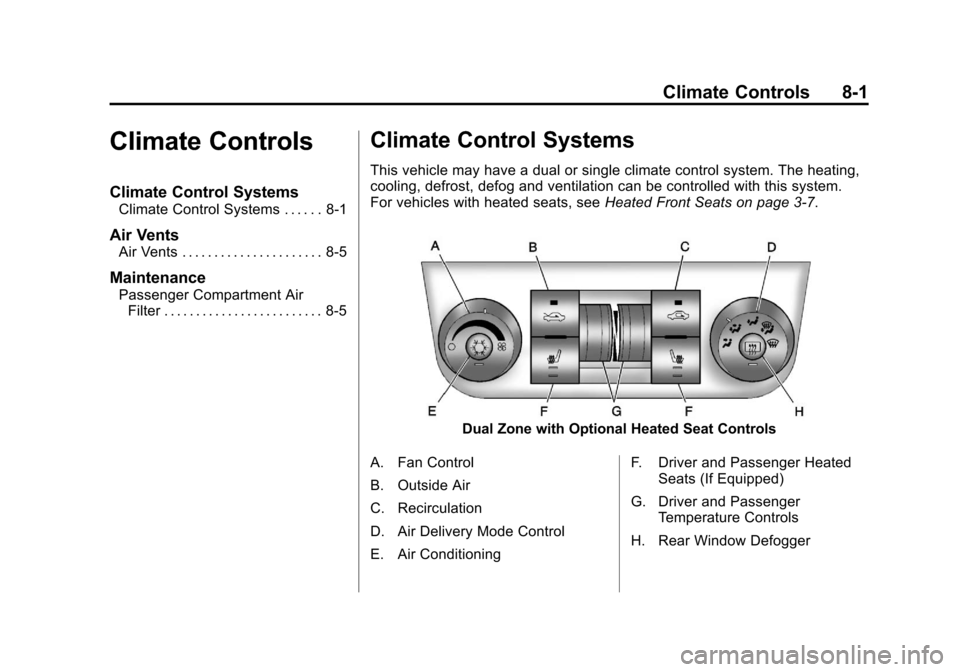
Dual Zone with Optional Heated Seat Controls
A. Fan Control
B. Outside Air
C. Recirculation
D. Air Delivery Mode Control
E. Air Conditioning F. Driver and Passenger Heated
Seats (If Equipped)
G. Driver and Passenger Temperature Controls
H. Rear Window Defogger
Page 188 of 374
Black plate (2,1)Chevrolet Impala Owner Manual - 2012
8-2 Climate Controls
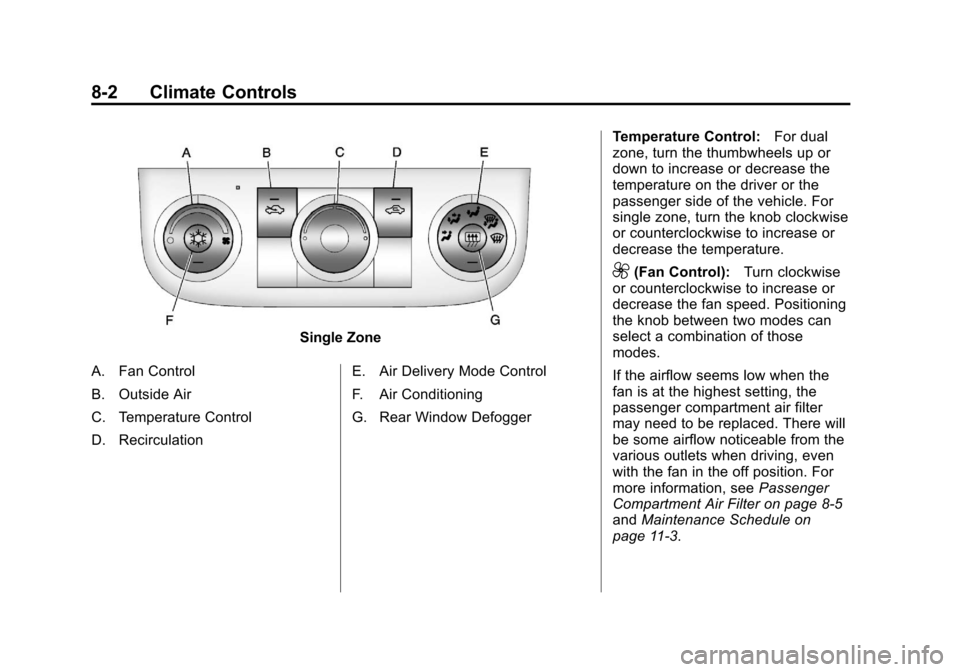
Single Zone
A. Fan Control
B. Outside Air
C. Temperature Control
D. Recirculation E. Air Delivery Mode Control
F. Air Conditioning
G. Rear Window DefoggerTemperature Control:
For dual
zone, turn the thumbwheels up or
down to increase or decrease the
temperature on the driver or the
passenger side of the vehicle. For
single zone, turn the knob clockwise
or counterclockwise to increase or
decrease the temperature.
9(Fan Control): Turn clockwise
or counterclockwise to increase or
decrease the fan speed. Positioning
the knob between two modes can
select a combination of those
modes.
If the airflow seems low when the
fan is at the highest setting, the
passenger compartment air filter
may need to be replaced. There will
be some airflow noticeable from the
various outlets when driving, even
with the fan in the off position. For
more information, see Passenger
Compartment Air Filter on page 8‑5
and Maintenance Schedule on
page 11‑3.
Page 189 of 374
Black plate (3,1)Chevrolet Impala Owner Manual - 2012
Climate Controls 8-3
Air Delivery Mode Control:Turn
clockwise or counterclockwise to
change the direction of the airflow
inside the vehicle.
To change the current mode, select
one of the following:
H(Vent): Air is directed to the
instrument panel outlets.
)(Bi-Level): Air is divided
between the instrument panel
outlets and the floor outlets.
6(Floor): Air is directed to the
floor outlets, with some of the air
directed to the windshield and side
window outlets. In this mode, the
system automatically selects
outside air.
-(Defog): This mode clears the
windshield of fog or moisture. Air is
directed equally to the windshield
and the floor outlets. When defog is
selected, the system turns off
recirculation and runs the air
conditioning compressor unless the
outside temperature is below
4°C (40°F).
0(Defrost): This mode clears the
windshield of fog or frost more
quickly. Air is directed to the
windshield with some air to the side
window vents and the floor vents.
When defrost is selected, the
system automatically forces outside
air into the vehicle. The air
conditioning compressor will run
automatically in this setting, unless
the outside temperature is below
4°C (40°F).
#(Air Conditioning): Press to
turn the air conditioning system
on or off. An indicator light comes
on to show that it is on. The air
conditioning can be selected in any
mode as long as the fan is on and
the outside temperature is above
freezing. A flashing indicator light
indicates that the air conditioning
compressor is currently not
available.
On hot days, open the windows to
let hot inside air escape; then close
them. This helps to reduce the time it takes for the vehicle to cool down.
It also helps the system to operate
more efficiently.
For quick cool down on hot days, do
the following:
1. Select the
Hmode.
2. Press the
#button.
3. Select the coolest temperature for both zones.
4. Select the highest
9speed.
5. When the coolest temperature is selected in the A/C mode, the
system automatically goes into
the recirculation mode to
improve cooling.
Using these settings together for
long periods of time may cause the
air inside the vehicle to become too
dry. To prevent this from happening,
after the air inside the vehicle has
cooled, turn the recirculation
mode off.