trunk CHEVROLET IMPALA 2012 9.G User Guide
[x] Cancel search | Manufacturer: CHEVROLET, Model Year: 2012, Model line: IMPALA, Model: CHEVROLET IMPALA 2012 9.GPages: 374, PDF Size: 5.73 MB
Page 132 of 374
Black plate (30,1)Chevrolet Impala Owner Manual - 2012
5-30 Instruments and Controls
Door Ajar Messages
DRIVER DOOR OPEN
This message displays when the
driver door is not closed properly.
Make sure that the door is closed
completely.
HOOD OPEN
If your vehicle has the remote start
feature, this message displays when
the hood is not closed properly.
Make sure that the hood is closed
completely. SeeHood on page 10‑5.
LEFT REAR DOOR OPEN
This message displays when the
driver side rear door is not closed
properly. Make sure that the door is
closed completely.
PASSENGER DOOR OPEN
This message displays when the
front passenger door is not closed
properly. Make sure that the door is
closed completely.
RIGHT REAR DOOR OPEN
This message displays when the
passenger side rear door is not
closed properly. Make sure that the
door is closed completely.
TRUNK OPEN
This message displays when the
trunk is not closed completely. Make
sure that the trunk is closed
completely. SeeTrunk on
page 2‑10.
Engine Cooling System
Messages
ENGINE HOT A/C
(Air Conditioning) OFF
This message displays when the
engine coolant becomes hotter than
the normal operating temperature.
To avoid added strain on a hot
engine, the air conditioning
compressor is automatically turned
off. When the coolant temperature
returns to normal, the A/C operation
automatically resumes. You can
continue to drive your vehicle. If this
message continues to appear, have
the system repaired by your dealer
as soon as possible to avoid
compressor damage.
Page 158 of 374
Black plate (8,1)Chevrolet Impala Owner Manual - 2012
6-8 Lighting
Battery Load
Management
The vehicle has Electric Power
Management (EPM) that estimates
the battery's temperature and state
of charge. It then adjusts the voltage
for best performance and extended
life of the battery.
When the battery's state of charge
is low, the voltage is raised slightly
to quickly bring the charge back up.
When the state of charge is high,
the voltage is lowered slightly to
prevent overcharging. If the vehicle
has a voltmeter gauge or a voltage
display on the Driver Information
Center (DIC), you may see the
voltage move up or down. This is
normal. If there is a problem, an
alert will be displayed.
The battery can be discharged at
idle if the electrical loads are very
high. This is true for all vehicles.
This is because the generator
(alternator) may not be spinning fastenough at idle to produce all the
power that is needed for very high
electrical loads.
A high electrical load occurs when
several of the following are on, such
as: headlamps, high beams, fog
lamps, rear window defogger,
climate control fan at high speed,
heated seats, engine cooling fans,
trailer loads, and loads plugged into
accessory power outlets.
EPM works to prevent excessive
discharge of the battery. It does this
by balancing the generator's output
and the vehicle's electrical needs.
It can increase engine idle speed to
generate more power, whenever
needed. It can temporarily reduce
the power demands of some
accessories.
Normally, these actions occur in
steps or levels, without being
noticeable. In rare cases at the
highest levels of corrective action,
this action may be noticeable to the
driver. If so, a Driver Information
Center (DIC) message might bedisplayed, such as BATTERY
SAVER ACTIVE. If this messages
displays, it is recommended that the
driver reduce the electrical loads as
much as possible. See
Driver
Information Center (DIC) on
page 5‑24.
Battery Power Protection
This feature helps prevent the
battery from being drained, if the
interior courtesy lamps, reading/map
lamps, visor vanity lamps, or trunk
lamp are accidentally left on. If any
of these lamps are left on, they
automatically turn off after
10 minutes, if the ignition is off. The
lamps will not come back on again
until one of the following occurs:
.The ignition is turned on.
.The exterior lamps control is
turned off, then on again.
The headlamps will time out after
10 minutes, if they are manually
turned on with the ignition on or off.
Page 234 of 374
Black plate (42,1)Chevrolet Impala Owner Manual - 2012
9-42 Driving and Operating
Filling a Portable Fuel
Container
{WARNING
Never fill a portable fuel container
while it is in the vehicle. Static
electricity discharge from the
container can ignite the fuel
vapor. You can be badly burned
and the vehicle damaged if this
occurs. To help avoid injury to you
and others:
.Dispense fuel only into
approved containers.
.Do not fill a container while it
is inside a vehicle, in a
vehicle's trunk, pickup bed,
or on any surface other than
the ground.(Continued)
WARNING (Continued)
.Bring the fill nozzle in contact
with the inside of the fill
opening before operating the
nozzle. Contact should be
maintained until the filling is
complete.
.Do not smoke while
pumping fuel.
.Do not use a cellular phone
while pumping fuel.
Towing
General Towing
Information
Only use towing equipment that has
been designed for the vehicle.
Contact your dealer or trailering
dealer for assistance with preparing
the vehicle for towing a trailer.
See the following trailer towing
information in this section:
.For information on driving while
towing a trailer, see “Driving
Characteristics and
Towing Tips.”
.For maximum vehicle and trailer
weights, see “Trailer Towing.”
.For information on equipment to
tow a trailer, see “Towing
Equipment.”
Page 270 of 374
Black plate (28,1)Chevrolet Impala Owner Manual - 2012
10-28 Vehicle Care
Taillamps, Turn Signal,
Sidemarker, Stoplamps,
and Back-Up Lamps
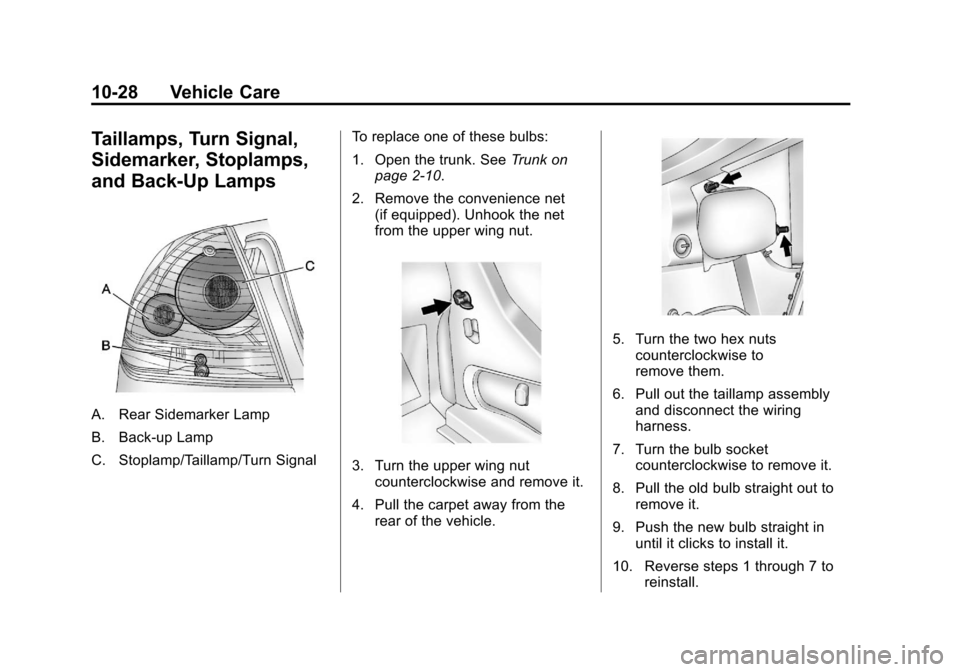
A. Rear Sidemarker Lamp
B. Back-up Lamp
C. Stoplamp/Taillamp/Turn SignalTo replace one of these bulbs:
1. Open the trunk. See
Trunk on
page 2‑10.
2. Remove the convenience net (if equipped). Unhook the net
from the upper wing nut.
3. Turn the upper wing nutcounterclockwise and remove it.
4. Pull the carpet away from the rear of the vehicle.
5. Turn the two hex nutscounterclockwise to
remove them.
6. Pull out the taillamp assembly and disconnect the wiring
harness.
7. Turn the bulb socket counterclockwise to remove it.
8. Pull the old bulb straight out to remove it.
9. Push the new bulb straight in until it clicks to install it.
10. Reverse steps 1 through 7 to reinstall.
Page 276 of 374
Black plate (34,1)Chevrolet Impala Owner Manual - 2012
10-34 Vehicle Care
Instrument Panel Fuse
Block
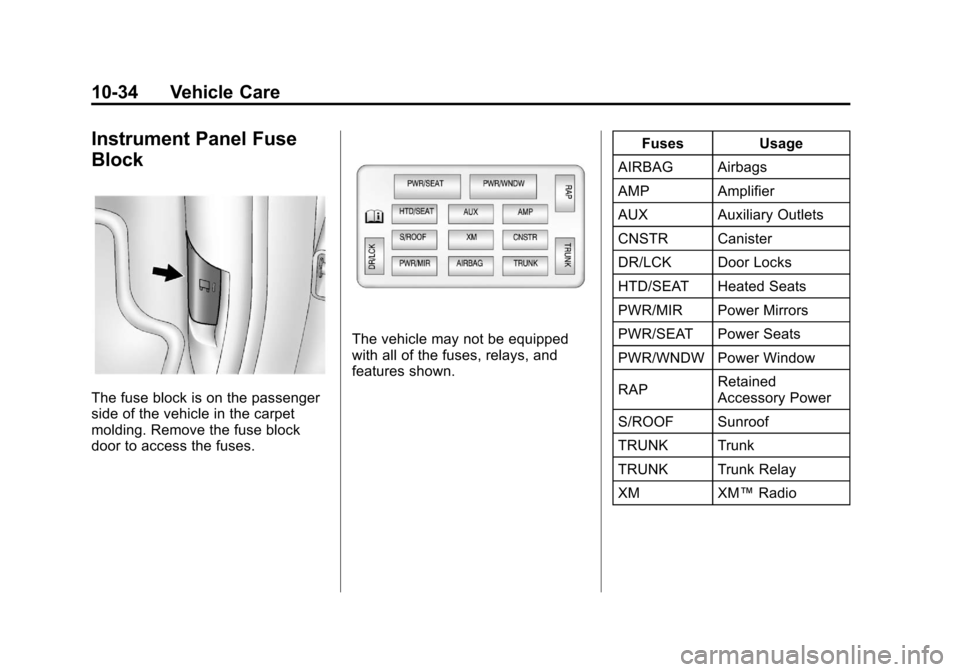
The fuse block is on the passenger
side of the vehicle in the carpet
molding. Remove the fuse block
door to access the fuses.
The vehicle may not be equipped
with all of the fuses, relays, and
features shown.Fuses Usage
AIRBAG Airbags
AMP Amplifier
AUX Auxiliary Outlets
CNSTR Canister
DR/LCK Door Locks
HTD/SEAT Heated Seats
PWR/MIR Power Mirrors
PWR/SEAT Power Seats
PWR/WNDW Power Window
RAP Retained
Accessory Power
S/ROOF Sunroof
TRUNK Trunk
TRUNK Trunk Relay
XM XM™Radio
Page 298 of 374
Black plate (56,1)Chevrolet Impala Owner Manual - 2012
10-56 Vehicle Care
Tire Changing
Removing the Spare Tire and
Tools
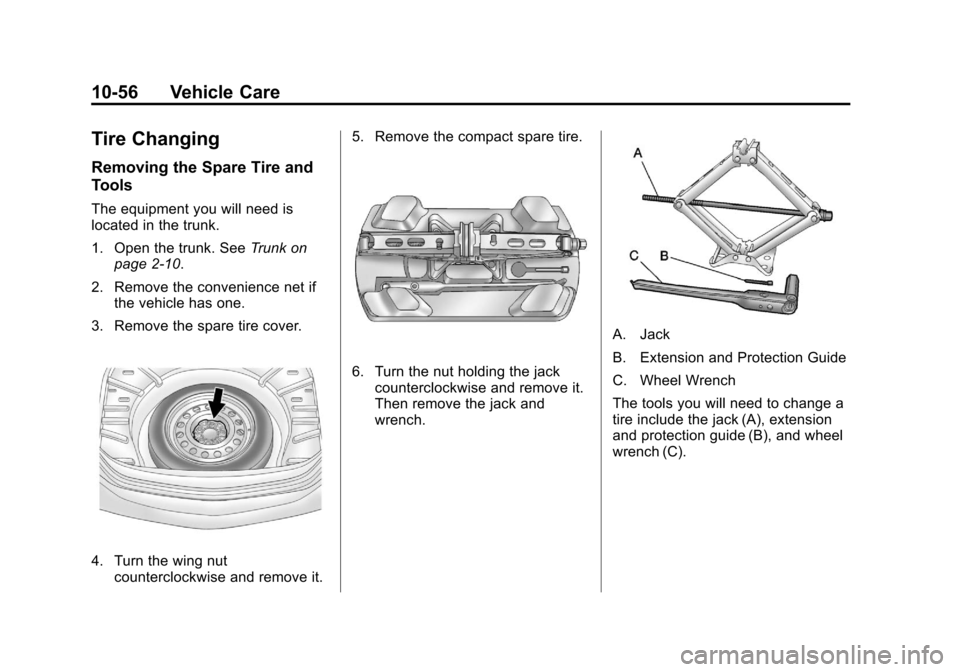
The equipment you will need is
located in the trunk.
1. Open the trunk. SeeTrunk on
page 2‑10.
2. Remove the convenience net if the vehicle has one.
3. Remove the spare tire cover.
4. Turn the wing nut counterclockwise and remove it. 5. Remove the compact spare tire.
6. Turn the nut holding the jack
counterclockwise and remove it.
Then remove the jack and
wrench.
A. Jack
B. Extension and Protection Guide
C. Wheel Wrench
The tools you will need to change a
tire include the jack (A), extension
and protection guide (B), and wheel
wrench (C).
Page 299 of 374
Black plate (57,1)Chevrolet Impala Owner Manual - 2012
Vehicle Care 10-57
Removing the Flat Tire and
Installing the Spare Tire
This vehicle may have aluminum
wheels with exposed wheel nuts.
Use the wheel wrench to loosen all
the wheel nuts. Do not remove
them yet.
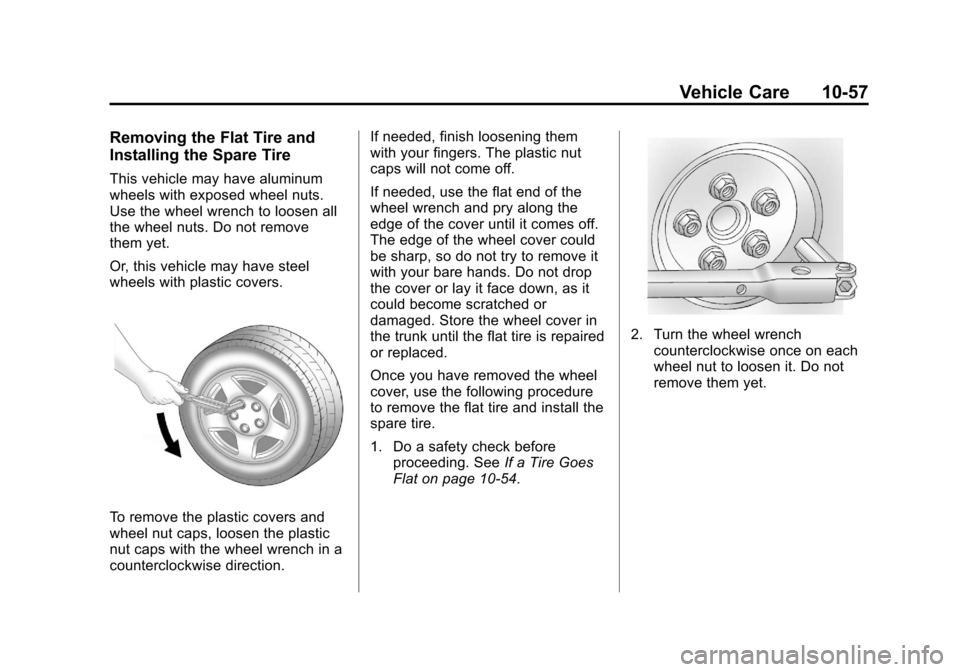
Or, this vehicle may have steel
wheels with plastic covers.
To remove the plastic covers and
wheel nut caps, loosen the plastic
nut caps with the wheel wrench in a
counterclockwise direction.If needed, finish loosening them
with your fingers. The plastic nut
caps will not come off.
If needed, use the flat end of the
wheel wrench and pry along the
edge of the cover until it comes off.
The edge of the wheel cover could
be sharp, so do not try to remove it
with your bare hands. Do not drop
the cover or lay it face down, as it
could become scratched or
damaged. Store the wheel cover in
the trunk until the flat tire is repaired
or replaced.
Once you have removed the wheel
cover, use the following procedure
to remove the flat tire and install the
spare tire.
1. Do a safety check before
proceeding. See If a Tire Goes
Flat on page 10‑54.
2. Turn the wheel wrench counterclockwise once on each
wheel nut to loosen it. Do not
remove them yet.
Page 303 of 374
Black plate (61,1)Chevrolet Impala Owner Manual - 2012
Vehicle Care 10-61
Notice:Wheel covers will not fit
on the vehicle's compact spare.
If you try to put a wheel cover on
the compact spare, the cover or
the spare could be damaged.
Storing a Flat or Spare Tire
and Tools
{WARNING
Storing a jack, a tire, or other
equipment in the passenger
compartment of the vehicle could
cause injury. In a sudden stop or
collision, loose equipment could
strike someone. Store all these in
the proper place. After the compact spare tire has
been installed on the vehicle, store
the flat tire in the trunk.
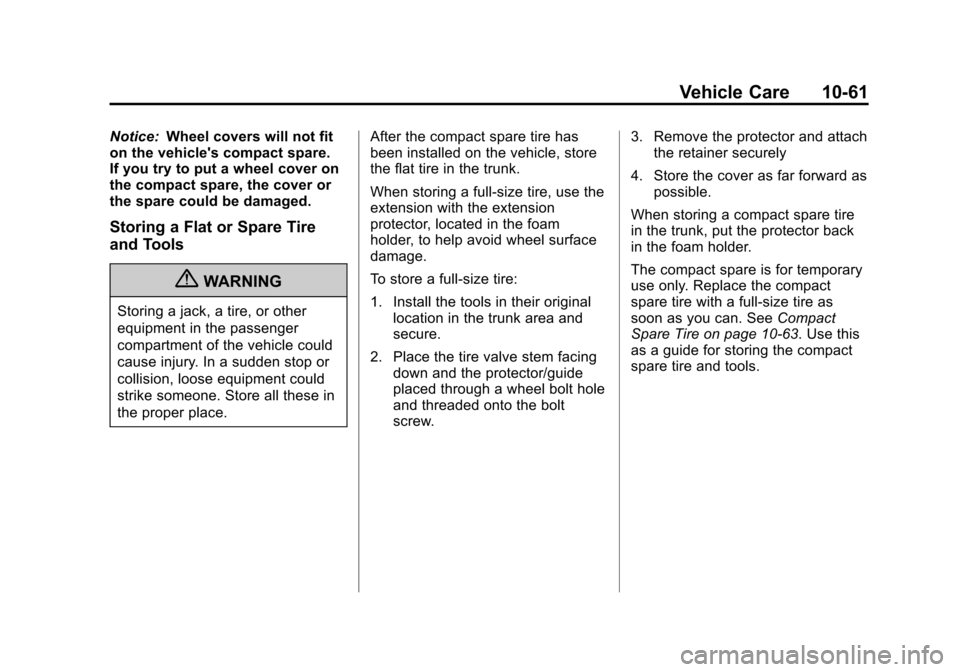
When storing a full-size tire, use the
extension with the extension
protector, located in the foam
holder, to help avoid wheel surface
damage.
To store a full-size tire:
1. Install the tools in their original
location in the trunk area and
secure.
2. Place the tire valve stem facing down and the protector/guide
placed through a wheel bolt hole
and threaded onto the bolt
screw. 3. Remove the protector and attach
the retainer securely
4. Store the cover as far forward as possible.
When storing a compact spare tire
in the trunk, put the protector back
in the foam holder.
The compact spare is for temporary
use only. Replace the compact
spare tire with a full-size tire as
soon as you can. See Compact
Spare Tire on page 10‑63. Use this
as a guide for storing the compact
spare tire and tools.
Page 335 of 374
Black plate (1,1)Chevrolet Impala Owner Manual - 2012
Technical Data 12-1
Technical Data
Vehicle Identification
Vehicle IdentificationNumber (VIN) . . . . . . . . . . . . . . 12-1
Service Parts Identification Label . . . . . . . . . . . . . . . . . . . . . . . 12-1
Vehicle Data
Capacities andSpecifications . . . . . . . . . . . . . . 12-2
Engine Drive Belt Routing . . . 12-3
Vehicle Identification
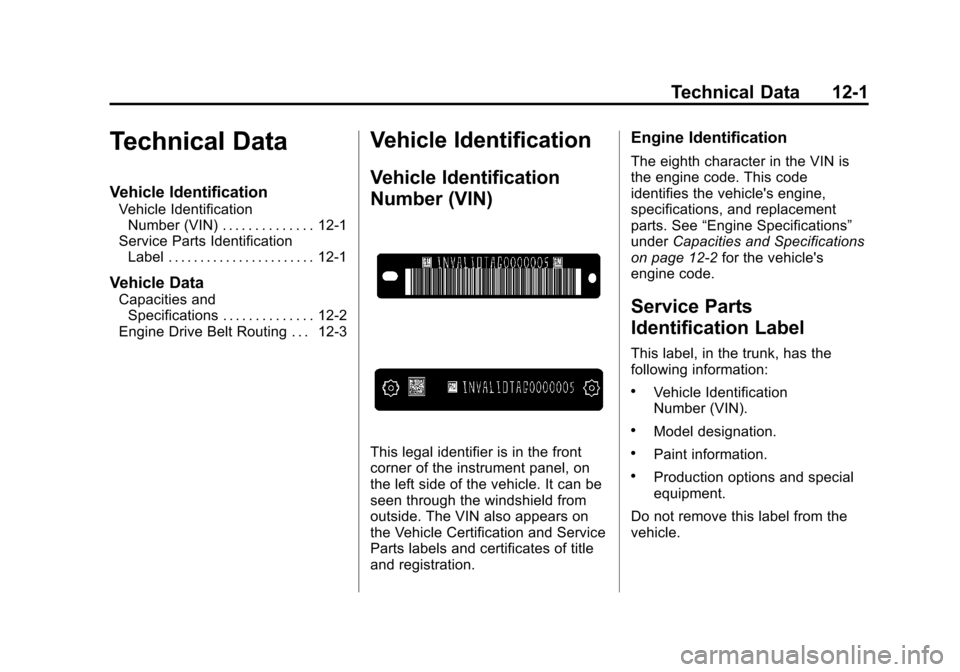
Vehicle Identification
Number (VIN)
This legal identifier is in the front
corner of the instrument panel, on
the left side of the vehicle. It can be
seen through the windshield from
outside. The VIN also appears on
the Vehicle Certification and Service
Parts labels and certificates of title
and registration.
Engine Identification
The eighth character in the VIN is
the engine code. This code
identifies the vehicle's engine,
specifications, and replacement
parts. See “Engine Specifications”
under Capacities and Specifications
on page 12‑2 for the vehicle's
engine code.
Service Parts
Identification Label
This label, in the trunk, has the
following information:
.Vehicle Identification
Number (VIN).
.Model designation.
.Paint information.
.Production options and special
equipment.
Do not remove this label from the
vehicle.
Page 364 of 374

Black plate (2,1)Chevrolet Impala Owner Manual - 2012
i-2 INDEX
B
Battery . . . . . . . . . . . . . . . . . . . . . . . 10-21Jump Starting . . . . . . . . . . . . . . . 10-64
Load Management . . . . . . . . . . . . . 6-8
Power Protection . . . . . . . . . . . . . . 6-8
Voltage and ChargingMessages . . . . . . . . . . . . . . . . . . . 5-29
Blade Replacement, Wiper . . . 10-24
Bluetooth . . . . . . . . . . . . . . . . . . . . . . 7-20
Brake System Warning Light . . . 5-19
Brakes . . . . . . . . . . . . . . . . . . . . . . . . 10-19 Antilock . . . . . . . . . . . . . . . . . . . . . . . 9-29
Fluid . . . . . . . . . . . . . . . . . . . . . . . . 10-20
Parking . . . . . . . . . . . . . . . . . . . . . . . 9-30
System Messages . . . . . . . . . . . . 5-29
Braking . . . . . . . . . . . . . . . . . . . . . . . . . 9-3
Break-In, New Vehicle . . . . . . . . . 9-16
Bulb Replacement . . . . . . . . . . . . 10-29
Fog Lamps . . . . . . . . . . . . . . . . . . . . 6-5
Halogen Bulbs . . . . . . . . . . . . . . 10-25
Headlamp Aiming . . . . . . . . . . . 10-25
Headlamps . . . . . . . . . . . . . . . . . 10-25 Bulb Replacement (cont.)
Headlamps, Front Turn
Signal, Sidemarker, and
Parking Lamps . . . . . . . . . . . . 10-25
License Plate Lamps . . . . . . . 10-29
Taillamps, Turn Signal, Sidemarker, Stoplamps,
and Backup Lamps . . . . . . . . 10-28
Buying New Tires . . . . . . . . . . . . . 10-49
C
Calibration . . . . . . . . . . . . . . . . . . . . . . 5-5
California
Fuel Requirements . . . . . . . . . . . 9-37
Perchlorate MaterialsRequirements . . . . . . . . . . . . . . . 10-3
Warning . . . . . . . . . . . . . . . . . . . . . . 10-3
Canadian Vehicle Owners . . . . . . . . iii
Capacities and Specifications . . . . . . . . . . . . . . . . 12-2
Carbon Monoxide Engine Exhaust . . . . . . . . . . . . . . . 9-24
Trunk . . . . . . . . . . . . . . . . . . . . . . . . . 2-10
Winter Driving . . . . . . . . . . . . . . . . . 9-8
Cautions, Danger, and
Warnings . . . . . . . . . . . . . . . . . . . . . . . . iv CD Player . . . . . . . . . . . . . . . . . . . . . 7-14
Center Console Storage . . . . . . . . 4-2
Center Seat . . . . . . . . . . . . . . . . . . . . 3-4
Chains, Tire . . . . . . . . . . . . . . . . . . 10-54
Charging System Light . . . . . . . . 5-16
Check
Engine Light . . . . . . . . . . . . . . . . . . 5-16
Ignition
Transmission Lock . . . . . . . . 10-23
Child Restraints Infants and Young
Children . . . . . . . . . . . . . . . . . . . . . 3-38
Lower Anchors and Tethers for Children . . . . . . . . . 3-45
Older Children . . . . . . . . . . . . . . . . 3-36
Securing . . . . . . . . . . . . . . . . 3-51, 3-53
Systems . . . . . . . . . . . . . . . . . . . . . . 3-41
Cigarette Lighter . . . . . . . . . . . . . . . . 5-8
Circuit Breakers . . . . . . . . . . . . . . 10-30
Cleaning Exterior Care . . . . . . . . . . . . . . . 10-69
Interior Care . . . . . . . . . . . . . . . . 10-72
Climate Control Systems . . . . . . . 8-1 Air Conditioning . . . . . . . . . . . . . . . 8-1
Heating . . . . . . . . . . . . . . . . . . . . . . . . 8-1
Clock . . . . . . . . . . . . . . . . . . . . . . . . . . . 5-6