audio CHEVROLET IMPALA 2012 9.G Owners Manual
[x] Cancel search | Manufacturer: CHEVROLET, Model Year: 2012, Model line: IMPALA, Model: CHEVROLET IMPALA 2012 9.GPages: 374, PDF Size: 5.73 MB
Page 1 of 374

Black plate (1,1)Chevrolet Impala Owner Manual - 2012
2012 Chevrolet Impala Owner ManualM
In Brief. . . . . . . . . . . . . . . . . . . . . . . . 1-1
Instrument Panel . . . . . . . . . . . . . . 1-2
Initial Drive Information . . . . . . . . 1-3
Vehicle Features . . . . . . . . . . . . . 1-13
Performance and Maintenance . . . . . . . . . . . . . . . . 1-17
Keys, Doors, and Windows . . . . . . . . . . . . . . . . . . . . 2-1
Keys and Locks . . . . . . . . . . . . . . . 2-2
Doors . . . . . . . . . . . . . . . . . . . . . . . . 2-10
Vehicle Security . . . . . . . . . . . . . . 2-11
Exterior Mirrors . . . . . . . . . . . . . . . 2-14
Interior Mirrors . . . . . . . . . . . . . . . . 2-15
Windows . . . . . . . . . . . . . . . . . . . . . 2-16
Roof . . . . . . . . . . . . . . . . . . . . . . . . . . 2-18
Seats and Restraints . . . . . . . . . 3-1
Head Restraints . . . . . . . . . . . . . . . 3-2
Front Seats . . . . . . . . . . . . . . . . . . . . 3-3
Rear Seats . . . . . . . . . . . . . . . . . . . . 3-8
Safety Belts . . . . . . . . . . . . . . . . . . 3-10
Airbag System . . . . . . . . . . . . . . . . 3-20
Child Restraints . . . . . . . . . . . . . . 3-36 Storage
. . . . . . . . . . . . . . . . . . . . . . . 4-1
Storage Compartments . . . . . . . . 4-1
Additional Storage Features . . . 4-2
Instruments and Controls . . . . 5-1
Controls . . . . . . . . . . . . . . . . . . . . . . . 5-2
Warning Lights, Gauges, and
Indicators . . . . . . . . . . . . . . . . . . . . 5-9
Information Displays . . . . . . . . . . 5-24
Vehicle Messages . . . . . . . . . . . . 5-29
Vehicle Personalization . . . . . . . 5-37
Universal Remote System . . . . 5-43
Lighting . . . . . . . . . . . . . . . . . . . . . . . 6-1
Exterior Lighting . . . . . . . . . . . . . . . 6-1
Interior Lighting . . . . . . . . . . . . . . . . 6-5
Lighting Features . . . . . . . . . . . . . . 6-7
Infotainment System . . . . . . . . . 7-1
Introduction . . . . . . . . . . . . . . . . . . . . 7-1
Radio . . . . . . . . . . . . . . . . . . . . . . . . . . 7-6
Audio Players . . . . . . . . . . . . . . . . 7-14
Phone . . . . . . . . . . . . . . . . . . . . . . . . 7-20 Climate Controls
. . . . . . . . . . . . . 8-1
Climate Control Systems . . . . . . 8-1
Air Vents . . . . . . . . . . . . . . . . . . . . . . . 8-5
Maintenance . . . . . . . . . . . . . . . . . . . 8-5
Driving and Operating . . . . . . . . 9-1
Driving Information . . . . . . . . . . . . . 9-2
Starting and Operating . . . . . . . 9-16
Engine Exhaust . . . . . . . . . . . . . . 9-24
Automatic Transmission . . . . . . 9-26
Brakes . . . . . . . . . . . . . . . . . . . . . . . 9-29
Ride Control Systems . . . . . . . . 9-30
Cruise Control . . . . . . . . . . . . . . . . 9-34
Fuel . . . . . . . . . . . . . . . . . . . . . . . . . . 9-36
Towing . . . . . . . . . . . . . . . . . . . . . . . 9-42
Conversions and Add-Ons . . . 9-49
Vehicle Care . . . . . . . . . . . . . . . . . 10-1
General Information . . . . . . . . . . 10-2
Vehicle Checks . . . . . . . . . . . . . . . 10-4
Headlamp Aiming . . . . . . . . . . . 10-25
Bulb Replacement . . . . . . . . . . 10-25
Page 5 of 374

Black plate (5,1)Chevrolet Impala Owner Manual - 2012
Introduction v
Vehicle Symbol Chart
Here are some additional symbols
that may be found on the vehicle
and what they mean. For more
information on the symbol, refer to
the Index.
9:Airbag Readiness Light
#:Air Conditioning
!:Antilock Brake System (ABS)
%:Audio Steering Wheel Controls
or OnStar®
$: Brake System Warning Light
":Charging System
I:Cruise Control
B: Engine Coolant Temperature
O:Exterior Lamps
#:Fog Lamps
.: Fuel Gauge
+:Fuses
3: Headlamp High/Low-Beam
Changer
j: LATCH System Child
Restraints
*: Malfunction Indicator Lamp
::Oil Pressure
}:Power
/:Remote Vehicle Start
>:Safety Belt Reminders
7:Tire Pressure Monitor
d:Traction Control/Stabilitrak®
M:Windshield Washer Fluid
Page 7 of 374
Black plate (1,1)Chevrolet Impala Owner Manual - 2012
In Brief 1-1
In Brief
Instrument Panel
Instrument Panel . . . . . . . . . . . . . . 1-2
Initial Drive Information
Initial Drive Information . . . . . . . . 1-3
Remote Keyless Entry (RKE)System . . . . . . . . . . . . . . . . . . . . . . 1-3
Remote Vehicle Start . . . . . . . . . 1-4
Door Locks . . . . . . . . . . . . . . . . . . . 1-5
Trunk Release . . . . . . . . . . . . . . . . 1-5
Windows . . . . . . . . . . . . . . . . . . . . . . 1-5
Seat Adjustment . . . . . . . . . . . . . . 1-6
Second Row Seats . . . . . . . . . . . 1-7
Head Restraint Adjustment . . . . 1-7
Safety Belts . . . . . . . . . . . . . . . . . . . 1-7
Passenger Sensing System . . . 1-8
Mirror Adjustment . . . . . . . . . . . . . 1-8
Steering Wheel Adjustment . . . 1-9
Interior Lighting . . . . . . . . . . . . . . . 1-9
Exterior Lighting . . . . . . . . . . . . . 1-10
Windshield Wiper/Washer . . . . 1-10
Climate Controls . . . . . . . . . . . . . 1-11
Vehicle Features
Radio(s) . . . . . . . . . . . . . . . . . . . . . 1-13
Satellite Radio . . . . . . . . . . . . . . . 1-14
Portable Audio Devices . . . . . . 1-15
Bluetooth
®. . . . . . . . . . . . . . . . . . . 1-15
Steering Wheel Controls . . . . . 1-15
Cruise Control . . . . . . . . . . . . . . . 1-16
Power Outlets . . . . . . . . . . . . . . . 1-16
Performance and Maintenance
Traction Control
System (TCS) . . . . . . . . . . . . . . 1-17
Electronic Stability Control (ESC) . . . . . . . . . . . . . . 1-17
Tire Pressure Monitor . . . . . . . . 1-17
Engine Oil Life System . . . . . . 1-18
Fuel E85 (85% Ethanol) . . . . . 1-18
Driving for Better Fuel Economy . . . . . . . . . . . . . . . . . . . 1-18
Roadside Assistance Program . . . . . . . . . . . . . . . . . . . . 1-19
OnStar
®. . . . . . . . . . . . . . . . . . . . . 1-19
Page 20 of 374
Black plate (14,1)Chevrolet Impala Owner Manual - 2012
1-14 In Brief
For radios with a FAV button, a
maximum of 36 stations can be
stored as favorites using the
6 softkeys located below the radio
station frequency tabs and by using
the radio FAV button. Press FAV to
go through up to 6 pages of
favorites, each having 6 favorite
stations available per page. Each
page of favorites can contain any
combination of AM, FM, or XM
stations.
For radios without a FAV button, up
to 18 stations (6 FM1, 6 FM2, and
6 AM), can be programmed on the
6 numbered buttons.
SeeOperation on page 7‑2.
Setting the Clock
To set the time for the Radio with
CD (Base):
1. Press the
Hbutton until the hour
begins flashing on the display.
Press
Ha second time and the
minutes begin flashing on the
display. 2. To increase or decrease the
time, do one of the following
while the hours or minutes are
flashing:
.Turn thefknob.
.Press¨SEEK or©SEEK.
.Press\FWD orsREV.
3. Press the
Hbutton again until
the clock display stops flashing
to set the currently displayed
time, or wait five seconds until
the flashing stops and the
current time displayed is
automatically set.
For detailed instructions on setting
the clock for your specific audio
system, see Clock on page 5‑6.
Satellite Radio
XM is a satellite radio service based
in the 48 contiguous United States
and 10 Canadian provinces.
XM satellite radio has a wide variety
of programming and
commercial-free music, coast to
coast, and in digital-quality sound.
A fee is required to receive the
XM service.
For more information, refer to:
.www.xmradio.com or call
1-800-929-2100 (U.S.)
.www.xmradio.ca or call
1-877-438-9677 (Canada)
See Satellite Radio on page 7‑8.
Page 21 of 374
Black plate (15,1)Chevrolet Impala Owner Manual - 2012
In Brief 1-15
Portable Audio Devices
This vehicle may have an auxiliary
input jack, located on the audio
faceplate. External devices such as
iPods
®, MP3 players, etc. can be
connected to the auxiliary input jack
using a 3.5 mm (1/8 in) input jack
cable.
See “Using the Auxiliary Input Jack”
under Auxiliary Devices on
page 7‑19.
Bluetooth®
For vehicles with a Bluetooth
system, it allows users with a
Bluetooth‐enabled cell phone to
make and receive hands-free calls
using the vehicle’ s audio system
and controls.
The Bluetooth‐enabled cell phone
must be paired with the Bluetooth
system before it can be used in the
vehicle. Not all phones will support
all functions. For more information,
visit www.gm.com/bluetooth. For more information, see
Bluetooth
on page 7‑20.
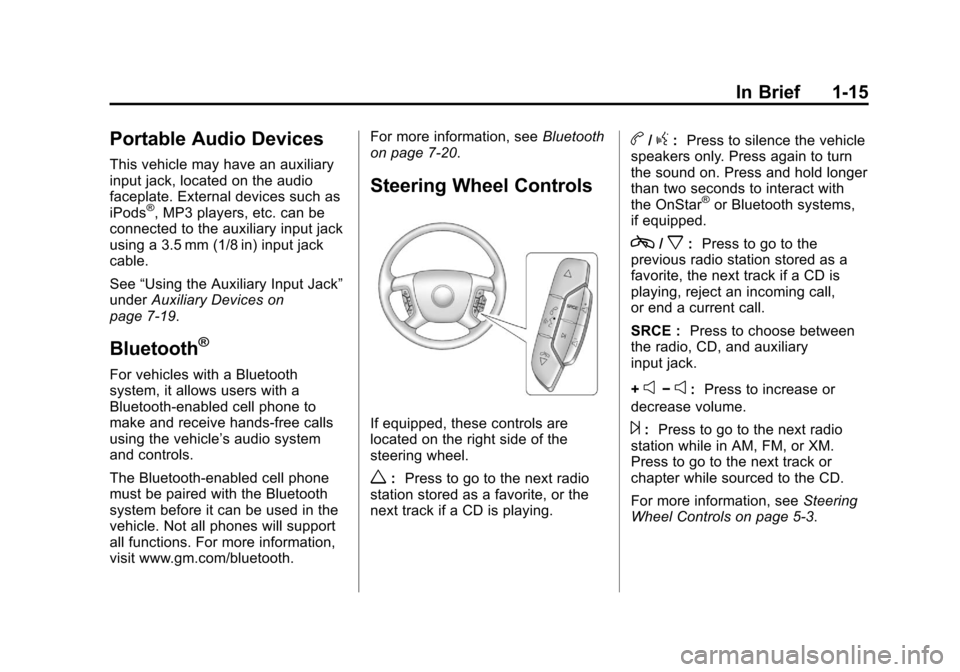
Steering Wheel Controls
If equipped, these controls are
located on the right side of the
steering wheel.
w: Press to go to the next radio
station stored as a favorite, or the
next track if a CD is playing.
b/g: Press to silence the vehicle
speakers only. Press again to turn
the sound on. Press and hold longer
than two seconds to interact with
the OnStar
®or Bluetooth systems,
if equipped.
c/x: Press to go to the
previous radio station stored as a
favorite, the next track if a CD is
playing, reject an incoming call,
or end a current call.
SRCE : Press to choose between
the radio, CD, and auxiliary
input jack.
+
e−e: Press to increase or
decrease volume.
¨: Press to go to the next radio
station while in AM, FM, or XM.
Press to go to the next track or
chapter while sourced to the CD.
For more information, see Steering
Wheel Controls on page 5‑3.
Page 105 of 374
Black plate (3,1)Chevrolet Impala Owner Manual - 2012
Instruments and Controls 5-3
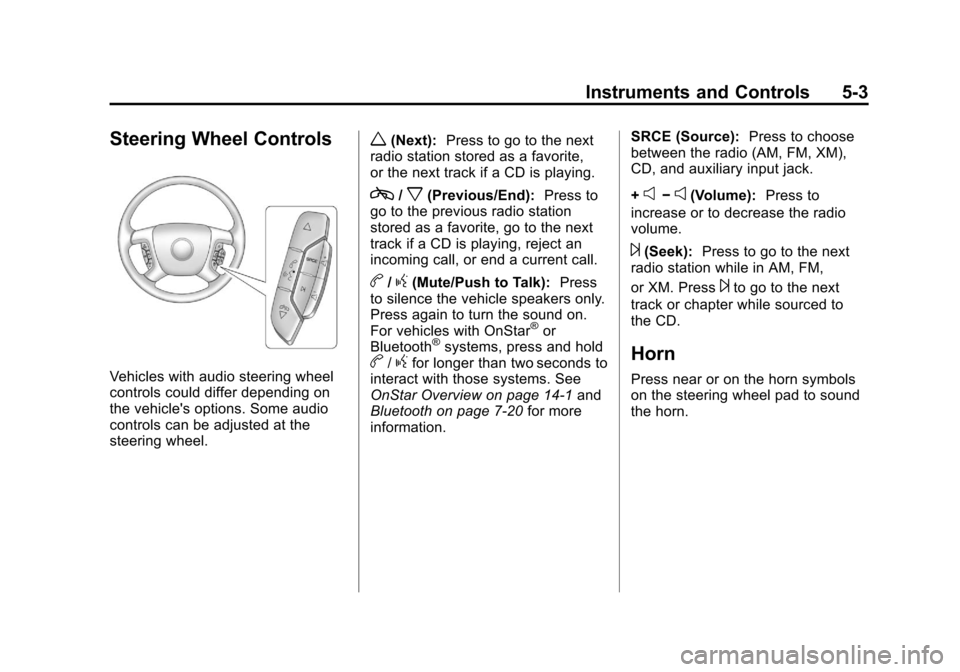
Steering Wheel Controls
Vehicles with audio steering wheel
controls could differ depending on
the vehicle's options. Some audio
controls can be adjusted at the
steering wheel.
w(Next):Press to go to the next
radio station stored as a favorite,
or the next track if a CD is playing.
c/x(Previous/End): Press to
go to the previous radio station
stored as a favorite, go to the next
track if a CD is playing, reject an
incoming call, or end a current call.
b/g(Mute/Push to Talk): Press
to silence the vehicle speakers only.
Press again to turn the sound on.
For vehicles with OnStar
®or
Bluetooth®systems, press and holdb/gfor longer than two seconds to
interact with those systems. See
OnStar Overview on page 14‑1 and
Bluetooth on page 7‑20 for more
information. SRCE (Source):
Press to choose
between the radio (AM, FM, XM),
CD, and auxiliary input jack.
+
e−e(Volume): Press to
increase or to decrease the radio
volume.
¨(Seek): Press to go to the next
radio station while in AM, FM,
or XM. Press
¨to go to the next
track or chapter while sourced to
the CD.
Horn
Press near or on the horn symbols
on the steering wheel pad to sound
the horn.
Page 159 of 374
Black plate (1,1)Chevrolet Impala Owner Manual - 2012
Infotainment System 7-1
Infotainment
System
Introduction
Infotainment . . . . . . . . . . . . . . . . . . . 7-1
Theft-Deterrent Feature . . . . . . . 7-2
Operation . . . . . . . . . . . . . . . . . . . . . 7-2
Radio
AM-FM Radio . . . . . . . . . . . . . . . . . 7-6
Satellite Radio . . . . . . . . . . . . . . . . 7-8
Radio Reception . . . . . . . . . . . . . 7-12
Backglass Antenna . . . . . . . . . . 7-13
Satellite Radio Antenna . . . . . . 7-13
Audio Players
CD Player . . . . . . . . . . . . . . . . . . . 7-14
Auxiliary Devices . . . . . . . . . . . . 7-19
Phone
Bluetooth . . . . . . . . . . . . . . . . . . . . 7-20
Introduction
Infotainment
Determine which radio the vehicle
has and read the following pages to
become familiar with its features.
{WARNING
Taking your eyes off the road
for extended periods could
cause a crash resulting in injury
or death to you or others. Do not
give extended attention to
entertainment tasks while driving.
This system provides access to
many audio and non-audio listings.
To minimize taking your eyes off the
road while driving, do the following
while the vehicle is parked:
.Become familiar with the
operation and controls of the
audio system.
.Set up the tone, speaker
adjustments, and preset radio
stations.
For more information, see Defensive
Driving on page 9‑3.
Notice: Contact your dealer
before adding any equipment.
Adding audio or communication
equipment could interfere with
the operation of the engine, radio,
or other systems, and could
damage them. Follow federal
rules covering mobile radio and
telephone equipment.
The vehicle has Retained
Accessory Power (RAP). With RAP,
the audio system can be played
even after the ignition is turned off.
See Retained Accessory Power
(RAP) on page 9‑20 for more
information.
Page 163 of 374
Black plate (5,1)Chevrolet Impala Owner Manual - 2012
Infotainment System 7-5
EQ (Equalization):Press this
button to choose bass and treble
equalization settings designed for
different types of music. Selecting
MANUAL or changing bass or treble
returns the EQ to the manual bass
and treble settings.
Unique EQ settings can be saved
for each source.
If the radio has a Bose
®audio
system, the EQ settings are either
MANUAL or TALK.
Adjusting the Speakers
(Balance/Fade) Radio with CD
To adjust the balance or fade:
1. Press the
`button or press the
fknob until the speaker control
label displays.
2. To adjust the setting, do one of the following:
.Turn thefknob.
.Press¨SEEK or©SEEK.
.Press\FWD orsREV.
Adjusting the Speakers
(Balance/Fade) Radio with
CD (MP3)
BAL/FADE (Balance/Fade): To
adjust the balance or fade:
1. Press the
fknob until the
speaker control tabs display.
2. Highlight the desired speaker control tab by doing one of the
following:
.Press thefknob.
.Press the softkey under the
desired tab.
3. Adjust the setting by doing one of the following:
.Turn thefknob clockwise
or counterclockwise.
.Press¨SEEK or©SEEK.
.Press\FWD orsREV. To quickly adjust all speaker and
tone controls to the middle position,
press the
fknob for more than
two seconds.
If the Rear Seat Audio (RSA) is
turned on, the radio disables FADE
and mutes the rear speakers.
Radio Messages
Calibration Error: Displays if the
radio is no longer calibrated
properly for the vehicle. The vehicle
must be returned to your dealer for
service.
Loc or Locked: Displays when the
TheftLock
®system has activated.
Take the vehicle to your dealer for
service.
If any error occurs repeatedly or if
an error cannot be corrected,
contact your dealer.
Page 169 of 374

Black plate (11,1)Chevrolet Impala Owner Manual - 2012
Infotainment System 7-11
XM Radio Messages
XL (Explicit Language
Channels):These channels, or any
others, can be blocked at a
customer's request, by calling
1-800-929-2100 in the U.S. and
1-877-438-9677 in Canada.
XM Updating: The encryption code
in the receiver is being updated, and
no action is required. This process
should take no longer than
30 seconds.
No XM Signal: The system is
functioning correctly, but the vehicle
is in a location that is blocking the
XM signal. When the vehicle is
moved into an open area, the signal
should return.
Loading XM: The audio system is
acquiring and processing audio and
text data. No action is needed. This
message should disappear shortly. Channel Off Air:
This channel is
not currently in service. Tune in to
another channel.
Channel Unauth : This channel is
blocked or cannot be received with
your XM subscription package.
Channel Unavail: This previously
assigned channel is no longer
assigned. Tune to another station.
If this station was one of the
presets, choose another station for
that preset button.
No Artist Info: No artist
information is available at this time
on this channel. The system is
working properly.
No Title Info: No song title
information is available at this time
on this channel. The system is
working properly.
No CAT Info: No category
information is available at this time
on this channel. The system is
working properly. No Information:
No text or
informational messages are
available at this time on this
channel. The system is working
properly.
No Subscription Please Renew:
XM subscription needs to be
reactivated. Contact XM at
www.xmradio.com or call
1-800-929-2100 in the U.S. and
www.xmradio.ca or call
1-877-438-9677 in Canada.
CAT Not Found: There are no
channels available for the selected
category. The system is working
properly.
XM Theftlocked: The XM receiver
in the vehicle could have previously
been in another vehicle. For security
purposes, XM receivers cannot be
swapped between vehicles. If this
message is received after having
the vehicle serviced, check with
your dealer.
Page 172 of 374
Black plate (14,1)Chevrolet Impala Owner Manual - 2012
7-14 Infotainment System
Audio Players
CD Player
Some CD players can play MP3
CD-R or CD-RW discs. See“MP3”
later in this section for more
information.
The CD player can play the smaller
8 cm (3 in) single discs with an
adapter ring.
Care of the CD Player
Do not add labels to a disc. It could
get caught in the CD player. Use a
marking pen to write on the top of
the disc if a description is needed.
Do not use CD lens cleaners. They
could damage the CD player.
Notice: If a label is added to a
CD, more than one CD is inserted
into the slot at a time, or an
attempt is made to play scratched
or damaged CDs, the CD player
could be damaged. While using
the CD player, use only CDs in
good condition without any label, load one CD at a time, and keep
the CD player and the loading slot
free of foreign materials, liquids,
and debris.
If an error displays, see
“CD
Messages” later in this section.
Care of CDs
Store a disc in its original case or a
protective case and away from
direct sunlight and dust. If the
bottom of a disc is damaged it may
not play properly or at all. Do not
touch the bottom of a disc while
handling it, pick it up by grasping
the outer edges or the edge of the
hole and the outer edge.
If the surface of a disc is dirty, take
a soft, lint‐free cloth or dampen a
clean, soft cloth in a mild, neutral
detergent solution mixed with water,
and clean it. Make sure the wiping
process starts from the center to
the edge.
Inserting a Disc
Insert the disc partway into the slot,
label side up. The player pulls it in
and the disc begins playing.
Use an adapter ring when playing
the smaller 8 cm (3 in) discs.
Smaller discs with the adapter ring
are loaded the same way as a
full-size disc.
Ejecting a Disc
ZEJECT:Press to eject the disc.
If the disc is not removed after
several seconds, the CD player
automatically pulls the disc back in.
Playing a CD
When a CD is inserted into the
player, the CD symbol displays. As
each new track starts to play, the
track number displays.