mirror CHEVROLET IMPALA 2014 10.G User Guide
[x] Cancel search | Manufacturer: CHEVROLET, Model Year: 2014, Model line: IMPALA, Model: CHEVROLET IMPALA 2014 10.GPages: 422, PDF Size: 5.62 MB
Page 66 of 422
Black plate (8,1)Chevrolet Impala Owner Manual (GMNA-Localizing-U.S./Canada-5772216) -
2014 - 2nd crc - 5/14/13
3-8 Seats and Restraints
Storing Memory Positions
To save positions to the“1”and “2”
buttons:
1. Adjust the driver seat, outside mirrors, and the power tilt and
telescoping steering column (if
equipped) to the desired driving
positions.
2. Press and holdSET and “1”at
the same time until a beep
sounds.
3. Repeat Steps 1 and 2 for a second driver using “2.”
To save positions to the
B(Exit)
button and easy exit features:
1. Adjust the driver seat, power tilt and telescoping steering column
(if equipped), and the outside
mirrors on some vehicles to the
desired positions for getting out
of the vehicle.
2. Press and hold SET and
Bat
the same time until a beep
sounds. Manually Recalling Memory
Positions
If the vehicle is off, or in ON/RUN/
START but not in P (Park), press
and hold "1," "2," or
Bto manually
recall the previously stored memory
positions. Releasing "1,” "2," or
B
before the stored positions are
reached stops the recall.
If the vehicle is in ON/RUN/START
and in P (Park), press and release
“1,” “2,”or
Bto manually recall the
previously stored memory positions.
Placing the ignition in OFF before
the stored positions are reached
stops the recall.
If something has blocked the driver
seat and/or power tilt and
telescoping steering column (if
equipped) while recalling a memory
position, the recall may stop.
Remove the obstruction; then press
and hold the appropriate manual
control for the memory item that is
not recalling for two seconds. Try
recalling the memory position again by pressing the appropriate memory
button. If the memory position is still
not recalling, see your dealer for
service.
Automatically Recalling Memory
Positions (Auto Memory Recall)
The Auto (Automatic) Memory
Recall feature automatically recalls
the current driver
’s previously stored
“1” or“2” position when entering the
vehicle.
Depending upon the Auto Memory
Recall feature enabled in the vehicle
personalization menu, memory “1”
or “2” positions are recalled in the
following ways:
To activate the recall when On -
Driver Door Open is selected in the
personalization menu, do one of the
following:
.On vehicles with RKE, pressK
on the RKE transmitter and open
the driver door.
.On vehicles with Keyless
Access, press the lock/unlock
button on the outside driver door
Page 67 of 422
Black plate (9,1)Chevrolet Impala Owner Manual (GMNA-Localizing-U.S./Canada-5772216) -
2014 - 2nd crc - 5/14/13
Seats and Restraints 3-9
handle and open the driver door.
The RKE transmitter must be
present for the recall to activate.
.If the driver door is already
open, press
Kon the RKE
transmitter to activate the recall.
To activate the recall when On - At
Ignition On is selected in the vehicle
personalization menu:
.Place the ignition in ON/RUN/
START.
See Vehicle Personalization on
page 5-40.
To stop recall movement, press one
of the memory, power mirror or
power seat controls; or press the
power tilt and telescoping steering
column control (if equipped). If On -
At Ignition On is selected in the
vehicle personalization menu,
placing the ignition in OFF/LOCK
also stops the recall.
If something has blocked the driver
seat and/or the power tilt and
telescoping steering column (if
equipped) while recalling a memory position, the recall may stop.
Remove the obstruction; then press
and hold the appropriate manual
control for the memory item that is
not recalling for two seconds. Try
recalling the memory position again
by opening the driver door and
pressing
Kon the RKE transmitter.
If the memory position is still not
recalling, see your dealer for
service.
Easy Exit Recall
If programmed on in the vehicle
personalization menu, the easy exit
feature automatically moves the
driver seat, power tilt and
telescoping steering column (if
equipped), and outside mirrors on
some vehicles to the memory
positions saved to the
B(Exit)
button. See “Storing Memory
Positions” listed previously. See
also Vehicle Personalization on
page 5-40. Easy exit recall automatically
activates when one of the following
occurs:
.The vehicle is turned off and the
driver door is opened within a
short time.
.The vehicle is turned off with the
driver door open.
If something has blocked the driver
seat and/or power tilt and
telescoping steering column (if
equipped) while recalling the exit
position, the recall may stop.
Remove the obstruction; then press
and hold the appropriate manual
control for the exit feature not
recalling for two seconds. Try
recalling the exit position again.
If the exit position is still not
recalling, see your dealer for
service.
Page 150 of 422
Black plate (36,1)Chevrolet Impala Owner Manual (GMNA-Localizing-U.S./Canada-5772216) -
2014 - 2nd crc - 5/14/13
5-36 Instruments and Controls
FORWARD COLLISION
ALERT OFF
This message displays when the
Forward Collision Alert has been
turned off.
FRONT CAMERA BLOCKED
CLEAN WINDSHIELD
This message displays when the
camera is blocked. Cleaning the
outside of the windshield behind the
rearview mirror may correct the
issue. The Lane Departure Warning
system will not operate. Forward
Collision Alert (FCA) may not work
or may not work as well.
LANE DEPARTURE WARNING
UNAVAILABLE
This message displays when
attempting to activate the Lane
Departure Warning (LDW) system
when it is temporarily unavailable.
The LDW system does not need
service.This message could be due to the
camera being blocked. Cleaning the
outside of the windshield behind the
rearview mirror may correct the
issue.
PARK ASSIST OFF
This message displays when the
Parking Assist system has been
turned off or when there is a
temporary condition causing the
system to be disabled.
REAR CROSS TRAFFIC
ALERT OFF
This message displays when the
Rear Cross Traffic Alert has been
turned off.
SERVICE AUTOMATIC
COLLISION PREP
If this message displays, take the
vehicle to your dealer to repair the
system. Adaptive Cruise Control
(ACC), Forward Collision Alert
(FCA), and/or the Active EmergencyBraking System may not work. Do
not use these systems until the
vehicle has been repaired.
SERVICE FRONT CAMERA
If this message remains on after
continued driving, the vehicle needs
service. Do not use the Lane
Departure Warning (LDW) and
Forward Collision Alert (FCA)
features. Take the vehicle to your
dealer.
SERVICE PARKING ASSIST
This message displays if there is a
problem with the Parking Assist
system. Do not use this system to
help you park. See your dealer for
service.
SERVICE SIDE DETECTION
SYSTEM
If this message remains on after
continued driving, the vehicle needs
service. Side Blind Zone Alert
(SBZA) and Rear Cross Traffic Alert
(RCTA) features will not work. Take
the vehicle to your dealer.
Page 202 of 422
Black plate (2,1)Chevrolet Impala Owner Manual (GMNA-Localizing-U.S./Canada-5772216) -
2014 - 2nd crc - 5/14/13
8-2 Climate Controls
Air Delivery Modes:PressY,\,
[, or-to change the direction of
the airflow. An indicator light comes
on in the selected mode button.
Y(Vent): Air is directed to the
instrument panel outlets.
\(Bi-Level): Air is directed to the
instrument panel outlets and the
floor outlets.
[(Floor): Air is directed to the
floor outlets.
-(Defog): Air is directed to the
windshield and floor outlets to clear
the windows of fog or moisture.
0(Defrost): Press to clear the
windshield of fog or frost more
quickly. Air is directed to the
windshield and side window outlets.
For best results, clear all snow and
ice from the windshield before
defrosting. A/C (Air Conditioning):
Press to
turn the air conditioning on or off.
If the fan is turned off, the air
conditioner will not run and the
indicator light may turn off.
L(Recirculation): Press to turn
on recirculation. An indicator light
comes on. Air is recirculated to
quickly cool the inside of the vehicle
or prevent outside air and odors
from entering.
Rear Window Defogger
K(Rear Window Defogger):
Press to turn the rear window
defogger on or off.
The rear window defogger turns off
automatically after about
10 minutes. If turned on again, it
runs for about five minutes before
turning off. At higher speeds, the
rear window defogger may stay on
continuously.
The upper region of gridlines on the
rear window are antenna lines and
are not intended to heat when the
defogger is activated. If equipped with heated outside
rearview mirrors, they turn on with
the rear window defogger and help
to clear fog or frost from the surface
of the mirror. See
Heated Mirrors on
page 2-20.
{Caution
Using a razor blade or sharp
object on the inside rear window
can damage the antenna or
defogger. Repairs would not be
covered by the vehicle warranty.
Do not stick anything to the rear
window.
Page 206 of 422
Black plate (6,1)Chevrolet Impala Owner Manual (GMNA-Localizing-U.S./Canada-5772216) -
2014 - 2nd crc - 5/14/13
8-6 Climate Controls
Auto Defog:The climate control
system may have a sensor to
automatically detect high humidity
inside the vehicle. When high
humidity is detected, the climate
control system may adjust to
outside air supply and turn on the
air conditioner. The fan speed may
slightly increase to help prevent
fogging. If the climate control
system does not detect possible
window fogging, it returns to normal
operation. To turn Auto Defog off or
on, see “Climate and Air Quality”
under Vehicle Personalization on
page 5-40.
Rear Window Defogger
K(Rear Window Defogger):
Press to turn the rear window
defogger on or off.
The rear window defogger turns off
automatically after about
10 minutes. If turned on again, it
runs for about five minutes before
turning off. At higher speeds, the
rear window defogger may stay on
continuously. The upper region of gridlines on the
rear window are antenna lines and
are not intended to heat when the
defogger is activated.
If equipped with heated outside
rearview mirrors, they turn on with
the rear window defogger and help
to clear fog or frost from the surface
of the mirror. See
Heated Mirrors on
page 2-20.
{Caution
Using a razor blade or sharp
object on the inside rear window
can damage the antenna or
defogger. Repairs would not be
covered by the vehicle warranty.
Do not stick anything to the rear
window.
Remote Start Climate Control
Operation (If Equipped):
If equipped with remote start, the
climate control system may run
when the vehicle is started remotely.
The system uses the driver ’s previous settings to heat or cool the
inside of the vehicle. The rear defog
may come on during remote start
based on cold ambient conditions.
The rear defog indicator light may
not come on during a remote start.
The front heated seats may turn on
if it is cold outside. The heated seat
indicator lights may not come on
during a remote start. See
Remote
Vehicle Start on page 2-9 and
Heated and Ventilated Seats on
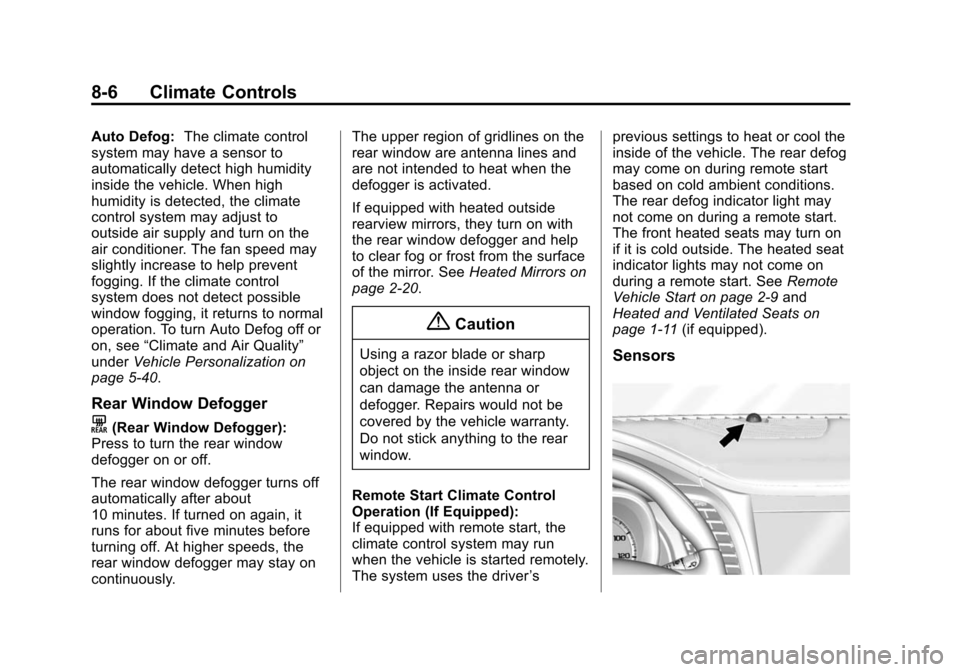
page 1-11 (if equipped).Sensors
Page 213 of 422
Black plate (5,1)Chevrolet Impala Owner Manual (GMNA-Localizing-U.S./Canada-5772216) -
2014 - 2nd crc - 5/14/13
Driving and Operating 9-5
The vehicle's right wheels can drop
off the edge of a road onto the
shoulder while driving. Follow
these tips:
1. Ease off the accelerator andthen, if there is nothing in the
way, steer the vehicle so that it
straddles the edge of the
pavement.
2. Turn the steering wheel about one-eighth of a turn, until the
right front tire contacts the
pavement edge.
3. Turn the steering wheel to go straight down the roadway.
Loss of Control
Skidding
There are three types of skids that
correspond to the vehicle's three
control systems:
.Braking Skid —wheels are not
rolling.
.Steering or Cornering Skid —
too much speed or steering in a
curve causes tires to slip and
lose cornering force.
.Acceleration Skid —too much
throttle causes the driving
wheels to spin.
Defensive drivers avoid most skids
by taking reasonable care suited to
existing conditions, and by not
overdriving those conditions. But
skids are always possible.
If the vehicle starts to slide, follow
these suggestions:
.Ease your foot off the
accelerator pedal and steer the
way you want the vehicle to go.
The vehicle may straighten out.
Be ready for a second skid if it
occurs.
.Slow down and adjust your
driving according to weather
conditions. Stopping distance
can be longer and vehicle
control can be affected when
traction is reduced by water,
snow, ice, gravel, or other material on the road. Learn to
recognize warning clues
—such
as enough water, ice, or packed
snow on the road to make a
mirrored surface —and slow
down when you have any doubt.
.Try to avoid sudden steering,
acceleration, or braking,
including reducing vehicle speed
by shifting to a lower gear. Any
sudden changes could cause
the tires to slide.
Remember: Antilock brakes help
avoid only the braking skid.
Track Events and
Competitive Driving
Racing, track testing, or competitive
driving may affect the vehicle
warranty. See the warranty manual
before using the vehicle for racing
or other competitive driving.
Page 215 of 422
Black plate (7,1)Chevrolet Impala Owner Manual (GMNA-Localizing-U.S./Canada-5772216) -
2014 - 2nd crc - 5/14/13
Driving and Operating 9-7
Hydroplaning
Hydroplaning is dangerous. Water
can build up under the vehicle's
tires so they actually ride on the
water. This can happen if the road is
wet enough and you are going fast
enough. When the vehicle is
hydroplaning, it has little or no
contact with the road.
There is no hard and fast rule about
hydroplaning. The best advice is to
slow down when the road is wet.
Other Rainy Weather Tips
Besides slowing down, other wet
weather driving tips include:
.Allow extra following distance.
.Pass with caution.
.Keep windshield wiping
equipment in good shape.
.Keep the windshield washer fluid
reservoir filled.
.Have good tires with proper
tread depth. SeeTires on
page 10-42.
.Turn off cruise control.
Highway Hypnosis
Always be alert and pay attention to
your surroundings while driving.
If you become tired or sleepy, find a
safe place to park the vehicle
and rest.
Other driving tips include:
.Keep the vehicle well ventilated.
.Keep the interior
temperature cool.
.Keep your eyes moving —scan
the road ahead and to the sides.
.Check the rearview mirror and
vehicle instruments often.
Hill and Mountain Roads
Driving on steep hills or through
mountains is different than driving
on flat or rolling terrain. Tips for
driving in these conditions include:
.Keep the vehicle serviced and in
good shape.
.Check all fluid levels and brakes,
tires, cooling system, and
transmission.
.Shift to a lower gear when going
down steep or long hills.
{Warning
Using the brakes to slow the
vehicle on a long downhill slope
can cause brake overheating, can
reduce brake performance, and
could result in a loss of braking.
Shift the transmission to a lower
gear to let the engine assist the
brakes on a steep downhill slope.
Page 217 of 422
Black plate (9,1)Chevrolet Impala Owner Manual (GMNA-Localizing-U.S./Canada-5772216) -
2014 - 2nd crc - 5/14/13
Driving and Operating 9-9
.Tie a red cloth to an outside
mirror.
{Warning
Snow can trap engine exhaust
under the vehicle. This may
cause exhaust gases to get
inside. Engine exhaust contains
carbon monoxide (CO) which
cannot be seen or smelled. It can
cause unconsciousness and even
death.
If the vehicle is stuck in the snow:
.Clear away snow from around
the base of your vehicle,
especially any that is blocking
the exhaust pipe.
.Check again from time to
time to be sure snow does
not collect there.
.Open a window about 5 cm
(2 in) on the side of the
vehicle that is away from the
wind to bring in fresh air.(Continued)
Warning (Continued)
.Fully open the air outlets on
or under the instrument
panel.
.Adjust the climate control
system to a setting that
circulates the air inside the
vehicle and set the fan speed
to the highest setting. See
“Climate Control Systems” in
the Index.
For more information about
carbon monoxide, see Engine
Exhaust on page 9-26.
To save fuel, run the engine for only
short periods as needed to warm
the vehicle and then shut the engine
off and close the window most of
the way to save heat. Repeat this
until help arrives but only when you
feel really uncomfortable from the
cold. Moving about to keep warm
also helps. If it takes some time for help to
arrive, now and then when you run
the engine, push the accelerator
pedal slightly so the engine runs
faster than the idle speed. This
keeps the battery charged to restart
the vehicle and to signal for help
with the headlamps. Do this as little
as possible to save fuel.
If the Vehicle Is Stuck
Slowly and cautiously spin the
wheels to free the vehicle when
stuck in sand, mud, ice, or snow.
If stuck too severely for the traction
system to free the vehicle, turn the
traction system off and use the
rocking method. See
Traction
Control/Electronic Stability Control
on page 9-33.
Page 255 of 422
Black plate (47,1)Chevrolet Impala Owner Manual (GMNA-Localizing-U.S./Canada-5772216) -
2014 - 2nd crc - 5/14/13
Driving and Operating 9-47
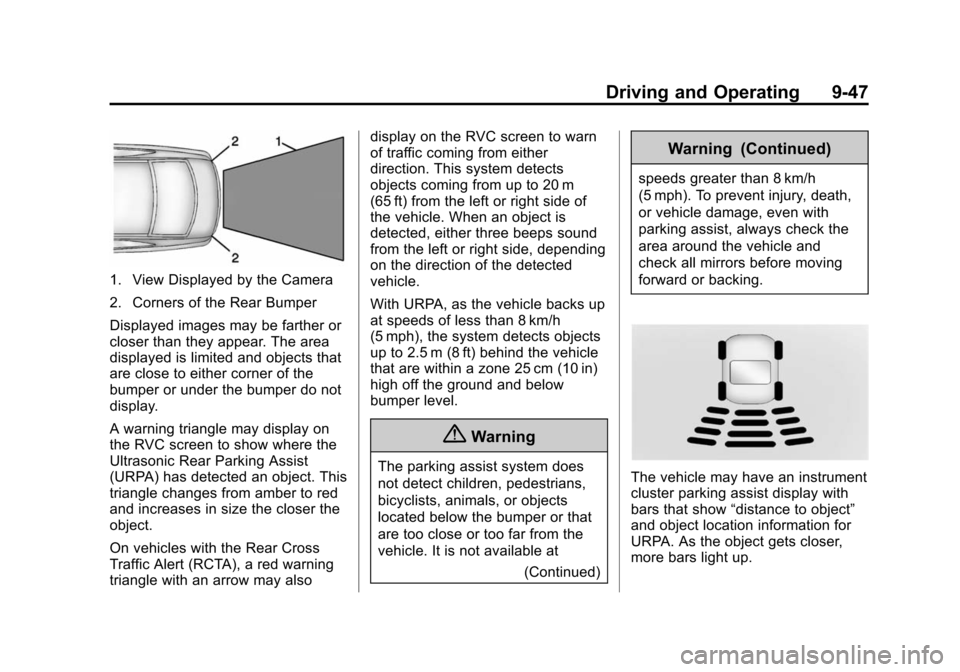
1. View Displayed by the Camera
2. Corners of the Rear Bumper
Displayed images may be farther or
closer than they appear. The area
displayed is limited and objects that
are close to either corner of the
bumper or under the bumper do not
display.
A warning triangle may display on
the RVC screen to show where the
Ultrasonic Rear Parking Assist
(URPA) has detected an object. This
triangle changes from amber to red
and increases in size the closer the
object.
On vehicles with the Rear Cross
Traffic Alert (RCTA), a red warning
triangle with an arrow may alsodisplay on the RVC screen to warn
of traffic coming from either
direction. This system detects
objects coming from up to 20 m
(65 ft) from the left or right side of
the vehicle. When an object is
detected, either three beeps sound
from the left or right side, depending
on the direction of the detected
vehicle.
With URPA, as the vehicle backs up
at speeds of less than 8 km/h
(5 mph), the system detects objects
up to 2.5 m (8 ft) behind the vehicle
that are within a zone 25 cm (10 in)
high off the ground and below
bumper level.
{Warning
The parking assist system does
not detect children, pedestrians,
bicyclists, animals, or objects
located below the bumper or that
are too close or too far from the
vehicle. It is not available at
(Continued)
Warning (Continued)
speeds greater than 8 km/h
(5 mph). To prevent injury, death,
or vehicle damage, even with
parking assist, always check the
area around the vehicle and
check all mirrors before moving
forward or backing.
The vehicle may have an instrument
cluster parking assist display with
bars that show“distance to object”
and object location information for
URPA. As the object gets closer,
more bars light up.
Page 260 of 422
Black plate (52,1)Chevrolet Impala Owner Manual (GMNA-Localizing-U.S./Canada-5772216) -
2014 - 2nd crc - 5/14/13
9-52 Driving and Operating
Automatic Braking
In some imminent front-end crash
situations, if the driver has not
applied the brakes, Automatic
Braking applies the brakes to help
reduce crash damage. It may even
help avoid some very low speed
crashes.
Automatic Braking may slow the
vehicle to a complete stop to try to
avoid a potential crash. The vehicle
will only hold at a stop briefly. A firm
press of the accelerator pedal will
also release Automatic Braking.
{Warning
Automatic Braking may
automatically brake the vehicle in
situations where it may be
unnecessary. It could respond to
a turning vehicle ahead,
guardrails, signs, and other
non-moving objects. This could
be uncomfortable and startling. To(Continued)
Warning (Continued)
override Automatic Braking, firmly
press the accelerator pedal, if it is
safe to do so.
Automatic Braking can be disabled
or reduced through vehicle
personalization. See the “Auto
Collision Preparation” portion of
“Collision/Detection Systems” under
Vehicle Personalization on
page 5-40.
{Warning
Using the Automatic Collision
Preparation System while towing
a trailer could cause you to lose
control of the vehicle and crash.
Turn the system off when towing
a trailer.
Side Blind Zone
Alert (SBZA)
If equipped, the Side Blind Zone
Alert system is a lane-changing aid
that assists drivers with avoiding
crashes that occur with vehicles in
the side blind zone (or spot) areas.
The SBZA warning display will light
up in the corresponding outside side
mirror and will flash if the turn signal
is on.
{Warning
SBZA does not alert the driver to
vehicles rapidly approaching
outside of the side blind zones,
pedestrians, bicyclists,
or animals. It may not provide
alerts when changing lanes under
all driving conditions. Failure to
use proper care when changing
lanes may result in injury, death,
or vehicle damage. Before
making a lane change, always
(Continued)