steering CHEVROLET IMPALA 2014 10.G Service Manual
[x] Cancel search | Manufacturer: CHEVROLET, Model Year: 2014, Model line: IMPALA, Model: CHEVROLET IMPALA 2014 10.GPages: 422, PDF Size: 5.62 MB
Page 244 of 422
Black plate (36,1)Chevrolet Impala Owner Manual (GMNA-Localizing-U.S./Canada-5772216) -
2014 - 2nd crc - 5/14/13
9-36 Driving and Operating
happens, the cruise control will
automatically disengage. See
Traction Control/Electronic Stability
Control on page 9-33. If a collision
alert occurs when cruise control is
activated, cruise control is
disengaged. SeeForward Collision
Alert (FCA) System on page 9-48.
When road conditions allow you to
safely use it again, the cruise
control can be turned back on.
If the brakes are applied, the cruise
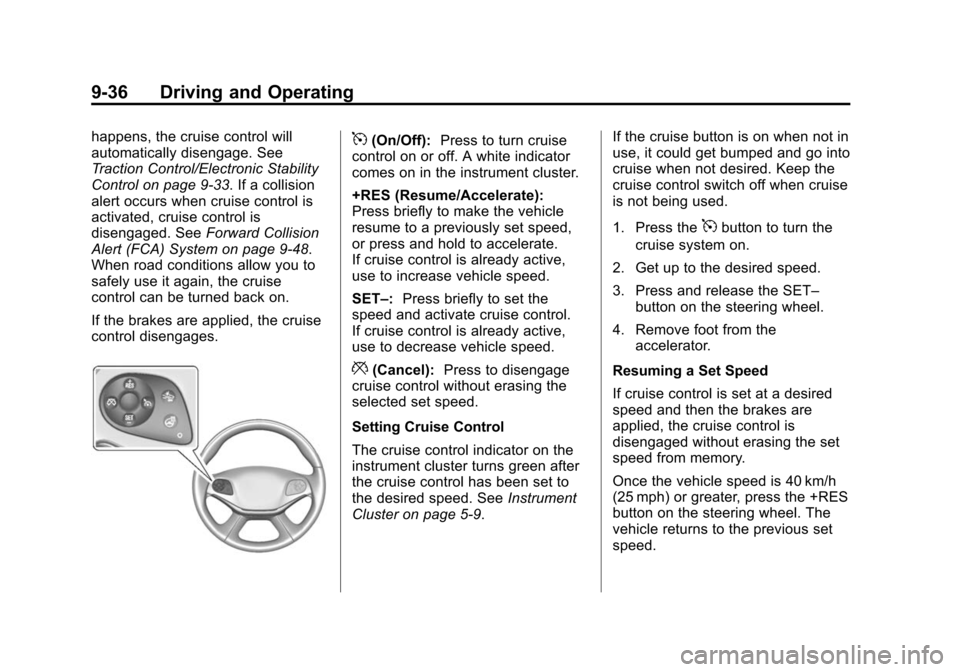
control disengages.5(On/Off): Press to turn cruise
control on or off. A white indicator
comes on in the instrument cluster.
+RES (Resume/Accelerate):
Press briefly to make the vehicle
resume to a previously set speed,
or press and hold to accelerate.
If cruise control is already active,
use to increase vehicle speed.
SET–: Press briefly to set the
speed and activate cruise control.
If cruise control is already active,
use to decrease vehicle speed.
*(Cancel): Press to disengage
cruise control without erasing the
selected set speed.
Setting Cruise Control
The cruise control indicator on the
instrument cluster turns green after
the cruise control has been set to
the desired speed. See Instrument
Cluster on page 5-9. If the cruise button is on when not in
use, it could get bumped and go into
cruise when not desired. Keep the
cruise control switch off when cruise
is not being used.
1. Press the
5button to turn the
cruise system on.
2. Get up to the desired speed.
3. Press and release the SET– button on the steering wheel.
4. Remove foot from the accelerator.
Resuming a Set Speed
If cruise control is set at a desired
speed and then the brakes are
applied, the cruise control is
disengaged without erasing the set
speed from memory.
Once the vehicle speed is 40 km/h
(25 mph) or greater, press the +RES
button on the steering wheel. The
vehicle returns to the previous set
speed.
Page 245 of 422
Black plate (37,1)Chevrolet Impala Owner Manual (GMNA-Localizing-U.S./Canada-5772216) -
2014 - 2nd crc - 5/14/13
Driving and Operating 9-37
Increasing Speed While Using
Cruise Control
If the cruise control system is
already activated:
.Press and hold the +RES button
until the desired speed is
reached, then release it.
.To increase vehicle speed in
small increments, briefly press
the +RES button. For each
press, the vehicle goes about
1.6 km/h (1 mph) faster.
Reducing Speed While Using
Cruise Control
If the cruise control system is
already activated:
.Press and hold the SET– button
until the desired lower speed is
reached, then release it.
.To decrease the vehicle speed in
smaller increments, briefly press
the SET− button. For each
press, the vehicle goes about
1.6 km/h (1 mph) slower. Passing Another Vehicle While
Using Cruise Control
Use the accelerator pedal to
increase vehicle speed. When you
take your foot off the pedal, the
vehicle will slow down to the cruise
speed you set earlier. While
pressing the accelerator pedal or
shortly following the release to
override cruise control, briefly
applying the SET−
button will result
in cruise set to the current vehicle
speed.
Using Cruise Control on Hills
How well the cruise control will work
on hills depends upon the vehicle
speed, load, and the steepness of
the hills. When going up steep hills,
you might have to step on the
accelerator pedal to maintain your
speed. When going downhill, you
might have to brake or shift to a
lower gear to keep your speed
down. If the brakes are applied the
cruise control will turn off. Ending Cruise Control
There are three ways to end cruise
control:
.To disengage cruise control,
step lightly on the brake pedal.
.Press the*button on the
steering wheel.
.To turn off the cruise control,
press the
5button on the
steering wheel.
Erasing Speed Memory
The cruise control set speed is
erased from memory by pressing
5
or if the ignition is turned off.
Adaptive Cruise Control
If equipped, Adaptive Cruise Control
(ACC) allows the driver to select the
cruise control set speed and
following gap. Read this entire
section before using this system.
The following gap is the following
time between your vehicle and a
vehicle detected directly ahead in
Page 247 of 422
:Press to turn the
system on or off. A white Adapti](/img/24/8206/w960_8206-246.png "CHEVROLET IMPALA 2014 10.G Service Manual Black plate (39,1)Chevrolet Impala Owner Manual (GMNA-Localizing-U.S./Canada-5772216) -
2014 - 2nd crc - 5/14/13
Driving and Operating 9-39
](On/Off):Press to turn the
system on or off. A white Adapti")
Black plate (39,1)Chevrolet Impala Owner Manual (GMNA-Localizing-U.S./Canada-5772216) -
2014 - 2nd crc - 5/14/13
Driving and Operating 9-39
](On/Off):Press to turn the
system on or off. A white Adaptive
Cruise Control indicator comes on.
+RES (Resume/Accelerate):
Press briefly to resume the previous
set speed or hold to accelerate.
If ACC is already active, use to
increase vehicle speed.
SET– (Set/Coast): Press briefly to
set the speed and activate ACC.
If ACC is already active, use to
decrease vehicle speed.
*(Cancel): Press to disengage
ACC without erasing the selected
set speed.
GAP (Follow Distance Gap):
Press to select a following gap time
(or distance) setting for ACC of Far,
Medium, or Near.
Setting Adaptive Cruise Control
If the cruise system is on but not in
use, it could get set and go into
cruise when not desired. Keep the
cruise control button off when cruise
is not being used.
Select the set speed desired for
cruise. This is the vehicle speed
when no vehicle is detected in
its path.
ACC will not set or resume at a
speed less than 25 km/h (16 mph).
To set ACC:
1. Press
].
2. Get up to the desired speed.
3. Press and release the SET– control on the steering wheel. 4. Remove foot from the
accelerator.
After ACC is set, it may immediately
apply the brakes if a vehicle ahead
is closer than the selected
following gap.
The ACC indicator displays on the
instrument cluster. When ACC is
active, the indicator turns green.
Be mindful of speed limits,
surrounding traffic speeds, and
weather conditions when selecting
the set speed.
Resuming a Set Speed
If the ACC is set at a desired speed
and then the brakes are applied,
ACC is disengaged without erasing
the set speed from memory.
Page 248 of 422
Black plate (40,1)Chevrolet Impala Owner Manual (GMNA-Localizing-U.S./Canada-5772216) -
2014 - 2nd crc - 5/14/13
9-40 Driving and Operating
To begin using ACC again, press
the +RES button on the steering
wheel. The vehicle returns to the
previous set speed.
Increasing Speed While ACC is at
a Set Speed
If ACC is already activated, do one
of the following:
.Use the accelerator to get to the
higher speed. Press the SET–
button. Release the control and
the accelerator pedal. The
vehicle will now cruise at the
higher speed.
When the accelerator pedal is
pressed, ACC will not brake
because it is overridden.
A warning message will appear
on the Driver Information Center
(DIC). SeeCruise Control
Messages on page 5-31.
.Press and hold the +RES button
until the desired set speed
appears on the display, then
release it.
.To increase vehicle speed in
small increments, briefly press
+RES. For each press the
vehicle goes 5 km/h (1 mph)
faster.
When it is determined that there is
no vehicle ahead or the vehicle is
beyond the selected following gap,
then the vehicle speed will increase
to the set speed.
The speedometer reading can be
displayed in either English or metric
units. See Instrument Cluster on
page 5-9. The increment value used
depends on the units displayed.
Reducing Speed While ACC is at a
Set Speed
If ACC is already activated, do one
of the following:
.Use the brake to get to the
desired lower speed. Press the
SET– button and release the
accelerator pedal. The vehicle
will now cruise at the lower
speed.
.Press and hold the SET– button
until the desired lower speed is
reached, then release it.
.To decrease the vehicle speed in
smaller increments, briefly press
SET–. For each press, the
vehicle goes about 5 km/h
(1 mph) slower.
The speedometer reading can be
displayed in either English or metric
units. See Instrument Cluster on
page 5-9. The increment value used
depends on the units displayed.
Selecting the Follow Distance Gap
When a slower moving vehicle is
detected ahead within the selected
following gap, ACC will adjust the
vehicle's speed and attempt to
maintain the follow distance gap
selected.
Press GAP on the steering wheel to
adjust the following gap. When
pressed, the current gap setting
displays briefly on the instrument
cluster.
Page 256 of 422
Black plate (48,1)Chevrolet Impala Owner Manual (GMNA-Localizing-U.S./Canada-5772216) -
2014 - 2nd crc - 5/14/13
9-48 Driving and Operating
When an object is first detected in
the rear, one beep will be heard
from the rear. When an object is
very close (<0.6 m (2 ft) in the
vehicle rear), five beeps will sound
from the rear.
Turning the Features On or Off
TheXbutton on the instrument
panel to the left of the steering
wheel is used to turn on or off the
Rear Parking Assist. The indicator
light next to the button comes on
when the features are on and turns
off when the features have been
disabled.
Turn off URPA when towing a trailer. The RVC, the RCTA system,
parking assist symbols, and
guidance lines can be turned on or
off through the infotainment system:
1. On the infotainment system,
press the Settings screen
button, or turn the MENU knob
to highlight Settings and
press MENU.
2. Select Rear Camera.
3. Press Rear Camera Display (if equipped), Rear Cross Traffic
Alert, Park Assist Symbols,
or Guidance Lines and then
select OFF or ON.
Assistance Systems for
Driving
If equipped, when driving the
vehicle forward, Forward Collision
Alert (FCA), Lane Departure
Warning (LDW), Side Blind Zone
Alert (SBZA), and/or the Active
Emergency Braking System can
help to avoid a crash or reduce
crash damage.
Forward Collision Alert
(FCA) System
If equipped, the FCA system may
help to avoid or reduce the harm
caused by front-end crashes. FCA
provides a red flashing alert on the
windshield, and beeps when
approaching a vehicle directly
ahead too quickly. FCA also
provides a visual alert if following
another vehicle much too closely.
FCA detects vehicles within a
distance of approximately 60 m
(197 ft) and operates at speeds
above 40 km/h (25 mph). If the
vehicle has Adaptive Cruise Control
(ACC), it can detect vehicles to
distances of approximately 110 m
(360 ft) and operates at all speeds.
See Adaptive Cruise Control on
page 9-37.
Page 258 of 422
Black plate (50,1)Chevrolet Impala Owner Manual (GMNA-Localizing-U.S./Canada-5772216) -
2014 - 2nd crc - 5/14/13
9-50 Driving and Operating
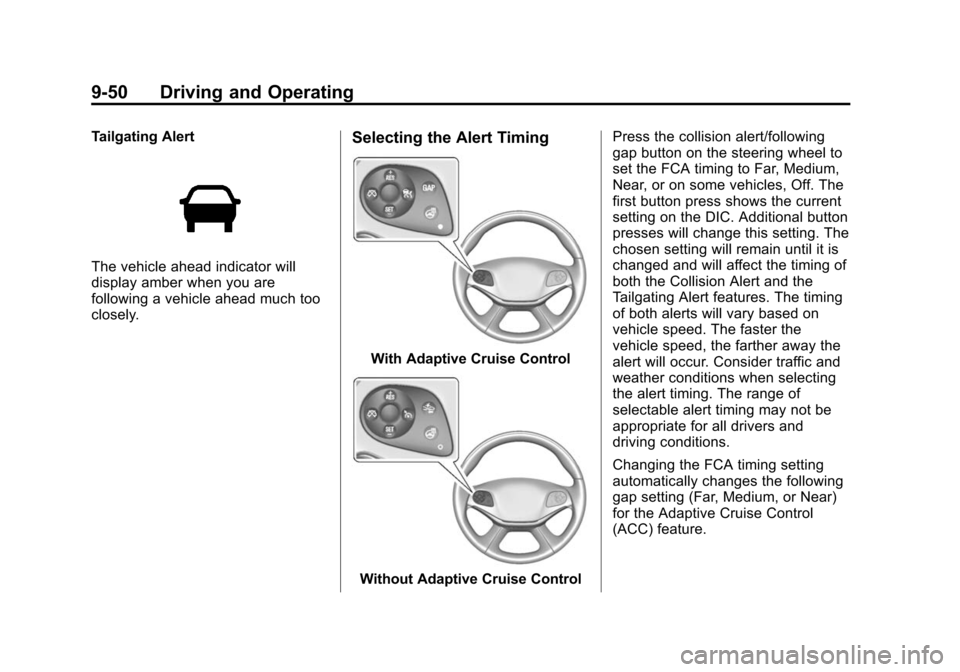
Tailgating Alert
The vehicle ahead indicator will
display amber when you are
following a vehicle ahead much too
closely.
Selecting the Alert Timing
With Adaptive Cruise Control
Without Adaptive Cruise ControlPress the collision alert/following
gap button on the steering wheel to
set the FCA timing to Far, Medium,
Near, or on some vehicles, Off. The
first button press shows the current
setting on the DIC. Additional button
presses will change this setting. The
chosen setting will remain until it is
changed and will affect the timing of
both the Collision Alert and the
Tailgating Alert features. The timing
of both alerts will vary based on
vehicle speed. The faster the
vehicle speed, the farther away the
alert will occur. Consider traffic and
weather conditions when selecting
the alert timing. The range of
selectable alert timing may not be
appropriate for all drivers and
driving conditions.
Changing the FCA timing setting
automatically changes the following
gap setting (Far, Medium, or Near)
for the Adaptive Cruise Control
(ACC) feature.
Page 263 of 422
Black plate (55,1)Chevrolet Impala Owner Manual (GMNA-Localizing-U.S./Canada-5772216) -
2014 - 2nd crc - 5/14/13
Driving and Operating 9-55
Warning (Continued)
.Warn that the vehicle is
crossing a lane marking if the
system does not detect the
lane marking.
If LDW only detects lane
markings on one side of the road,
it will only warn you when
departing the lane on the side
where it has detected a lane
marker. Even with LDW, always
keep your attention on the road
and maintain proper vehicle
position within the lane, or vehicle
damage, injury, or death could
occur. Always keep the
windshield clean and do not use
LDW in bad weather conditions.
How the System Works
The LDW camera sensor is on the
windshield ahead of the rearview
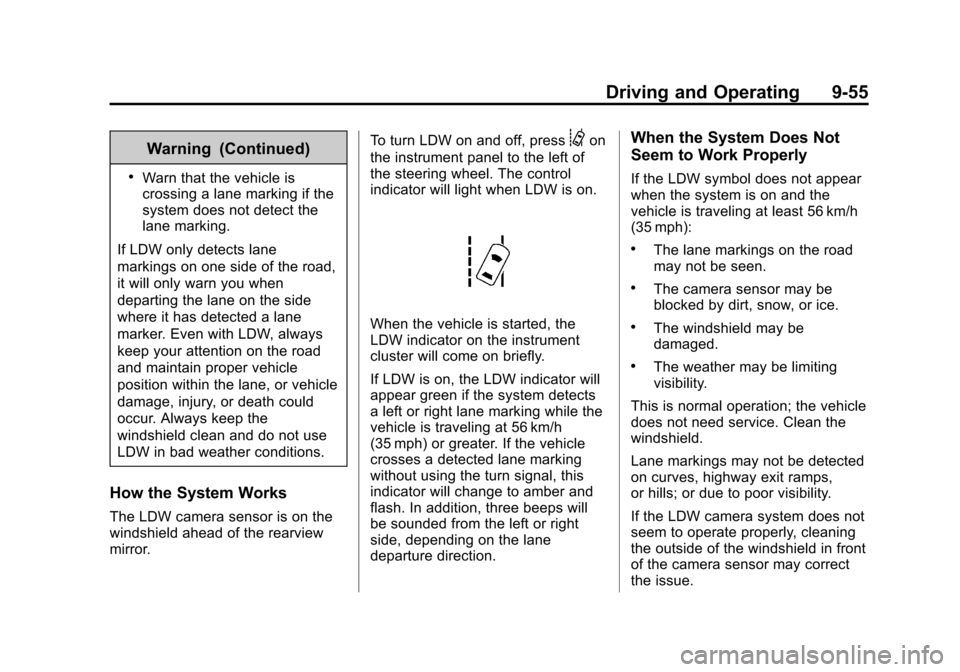
mirror. To turn LDW on and off, press
@on
the instrument panel to the left of
the steering wheel. The control
indicator will light when LDW is on.
When the vehicle is started, the
LDW indicator on the instrument
cluster will come on briefly.
If LDW is on, the LDW indicator will
appear green if the system detects
a left or right lane marking while the
vehicle is traveling at 56 km/h
(35 mph) or greater. If the vehicle
crosses a detected lane marking
without using the turn signal, this
indicator will change to amber and
flash. In addition, three beeps will
be sounded from the left or right
side, depending on the lane
departure direction.
When the System Does Not
Seem to Work Properly
If the LDW symbol does not appear
when the system is on and the
vehicle is traveling at least 56 km/h
(35 mph):
.The lane markings on the road
may not be seen.
.The camera sensor may be
blocked by dirt, snow, or ice.
.The windshield may be
damaged.
.The weather may be limiting
visibility.
This is normal operation; the vehicle
does not need service. Clean the
windshield.
Lane markings may not be detected
on curves, highway exit ramps,
or hills; or due to poor visibility.
If the LDW camera system does not
seem to operate properly, cleaning
the outside of the windshield in front
of the camera sensor may correct
the issue.
Page 270 of 422
Black plate (62,1)Chevrolet Impala Owner Manual (GMNA-Localizing-U.S./Canada-5772216) -
2014 - 2nd crc - 5/14/13
9-62 Driving and Operating
Towing a trailer requires a certain
amount of experience. The
combination you are driving is
longer and not as responsive as the
vehicle itself. Get acquainted with
the handling and braking of the rig
before setting out for the open road.
Before starting, check all trailer hitch
parts and attachments, safety
chains, electrical connectors, lamps,
tires, and mirrors. If the trailer has
electric brakes, start the
combination moving and then apply
the trailer brake controller by hand
to be sure the brakes work.
During the trip, check occasionally
to be sure that the load is secure
and the lamps and any trailer
brakes still work.
Following Distance
Stay at least twice as far behind the
vehicle ahead as you would when
driving the vehicle without a trailer.
This can help to avoid heavy
braking and sudden turns.
Passing
More passing distance is needed
when towing a trailer. The
combination will not accelerate as
quickly and is longer so it is
necessary to go much farther
beyond the passed vehicle before
returning to the lane.
Backing Up
Hold the bottom of the steering
wheel with one hand. To move the
trailer to the left, move that hand to
the left. To move the trailer to the
right, move your hand to the right.
Always back up slowly and,
if possible, have someone
guide you.
Making Turns
{Caution
Making very sharp turns while
trailering could cause the trailer to
come in contact with the vehicle.(Continued)
Caution (Continued)
The vehicle could be damaged.
Avoid making very sharp turns
while trailering.
When turning with a trailer, make
wider turns than normal. Do this so
the trailer will not strike soft
shoulders, curbs, road signs, trees,
or other objects. Avoid jerky or
sudden maneuvers. Signal well in
advance.
If the trailer turn signal bulbs burn
out, the arrows on the instrument
cluster will still flash for turns. It is
important to check occasionally to
be sure the trailer bulbs are still
working.
Driving on Grades
Reduce speed and shift to a lower
gear before starting down a long or
steep downgrade. If the
transmission is not shifted down, the
brakes might get hot and no longer
work well.
Page 288 of 422
Black plate (14,1)Chevrolet Impala Owner Manual (GMNA-Localizing-U.S./Canada-5772216) -
2014 - 2nd crc - 5/14/13
10-14 Vehicle Care
Engine Oil Life System
When to Change Engine Oil
This vehicle has a computer system
that indicates when to change the
engine oil and filter. This is based
on a combination of factors which
include engine revolutions, engine
temperature, and miles driven.
Based on driving conditions, the
mileage at which an oil change is
indicated can vary considerably. For
the oil life system to work properly,
the system must be reset every time
the oil is changed.
When the system has calculated
that oil life has been diminished, it
indicates that an oil change is
necessary. A CHANGE ENGINE
OIL SOON message comes on. See
Engine Oil Messages on page 5-33.
Change the oil as soon as possible
within the next 1 000 km (600 mi).
It is possible that, if driving under
the best conditions, the oil life
system might indicate that an oil
change is not necessary for up to a
year. The engine oil and filter mustbe changed at least once a year
and at this time the system must be
reset. Your dealer has trained
service people who will perform this
work and reset the system. It is also
important to check the oil regularly
over the course of an oil drain
interval and keep it at the proper
level.
If the system is ever reset
accidentally, the oil must be
changed at 5 000 km (3,000 mi)
since the last oil change.
Remember to reset the oil life
system whenever the oil is changed.
How to Reset the Engine Oil
Life System
Reset the system whenever the
engine oil is changed so that the
system can calculate the next
engine oil change. To reset the
system:
1. Using the DIC controls on the
right side of the steering wheel,
display REMAINING OIL LIFE
on the DIC. See Driver
Information Center (DIC) on page 5-27. When remaining oil
life is low, the CHANGE
ENGINE OIL SOON message
will appear on the display. See
Engine Oil Messages on
page 5-33.
2. Press
Von the DIC controls and
hold down for a few seconds to
clear the CHANGE ENGINE OIL
SOON message and reset the
oil life at 100%.
Be careful not to reset the oil life
display accidentally at any time
other than after the oil is
changed. It cannot be reset
accurately until the next oil
change.
The oil life system can also be reset
as follows:
1. Turn the ignition on with the engine off.
Page 312 of 422
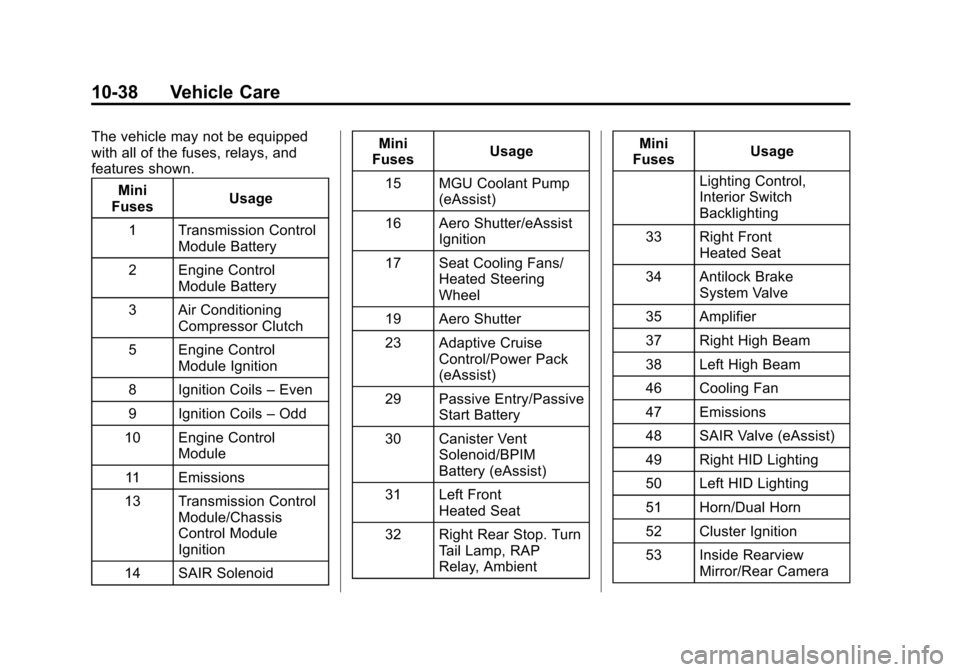
Black plate (38,1)Chevrolet Impala Owner Manual (GMNA-Localizing-U.S./Canada-5772216) -
2014 - 2nd crc - 5/14/13
10-38 Vehicle Care
The vehicle may not be equipped
with all of the fuses, relays, and
features shown.Mini
Fuses Usage
1 Transmission Control Module Battery
2 Engine Control Module Battery
3 Air Conditioning Compressor Clutch
5 Engine Control Module Ignition
8 Ignition Coils –Even
9 Ignition Coils –Odd
10 Engine Control Module
11 Emissions
13 Transmission Control Module/Chassis
Control Module
Ignition
14 SAIR Solenoid Mini
Fuses Usage
15 MGU Coolant Pump (eAssist)
16 Aero Shutter/eAssist Ignition
17 Seat Cooling Fans/ Heated Steering
Wheel
19 Aero Shutter
23 Adaptive Cruise Control/Power Pack
(eAssist)
29 Passive Entry/Passive Start Battery
30 Canister Vent Solenoid/BPIM
Battery (eAssist)
31 Left Front Heated Seat
32 Right Rear Stop. Turn Tail Lamp, RAP
Relay, Ambient Mini
Fuses Usage
Lighting Control,
Interior Switch
Backlighting
33 Right Front Heated Seat
34 Antilock Brake System Valve
35 Amplifier
37 Right High Beam
38 Left High Beam
46 Cooling Fan
47 Emissions
48 SAIR Valve (eAssist)
49 Right HID Lighting
50 Left HID Lighting
51 Horn/Dual Horn
52 Cluster Ignition
53 Inside Rearview Mirror/Rear Camera