ECO mode CHEVROLET IMPALA 2015 10.G User Guide
[x] Cancel search | Manufacturer: CHEVROLET, Model Year: 2015, Model line: IMPALA, Model: CHEVROLET IMPALA 2015 10.GPages: 413, PDF Size: 5.51 MB
Page 145 of 413
Black plate (30,1)Chevrolet Impala Owner Manual (GMNA-Localizing-U.S./Canada-7576026) -
2015 - crc 2nd edition - 8/21/14
5-30 Instruments and Controls
gas pedal. When this occurs, ACC
will not brake. SeeAdaptive Cruise
Control on page 9-35.
SERVICE ADAPTIVE CRUISE
CONTROL
This message displays when the
Adaptive Cruise Control (ACC)
needs service. Take the vehicle to
your dealer.
SHIFT TO PARK BEFORE
EXITING
This message may display if
Adaptive Cruise Control (ACC) is
engaged holding the vehicle at a
stop, and the driver attempts to exit
the vehicle. Put the vehicle in
P (Park) before exiting.
Door Ajar Messages
DOOR OPEN
A door open symbol will display on
the DIC showing which door is
open. If the vehicle has been shifted
out of P (Park), a DOOR OPEN
message will also be displayed. If the shift lever is in M (Manual
Mode), the DOOR OPEN message
will display if the vehicle starts to
move. Close the door completely.
HOOD OPEN
This message will display along with
a hood open symbol when the hood
is open. Close the hood completely.
TRUNK OPEN
This message will display along with
a symbol when the trunk is open.
Close the trunk completely.
Engine Cooling System
Messages
A/C OFF DUE TO HIGH
ENGINE TEMP
This message displays when the
engine coolant becomes hotter than
the normal operating temperature.
To avoid added strain on a hot
engine, the air conditioning
compressor automatically turns off.
When the coolant temperature
returns to normal, the airconditioning compressor turns back
on. The vehicle can continue to be
driven.
If this message continues to appear,
have the system repaired by your
dealer as soon as possible to avoid
damage to the engine.
ENGINE OVERHEATED
—
IDLE ENGINE
This message displays when the
engine coolant temperature is too
hot. Stop and allow the vehicle to
idle until it cools down.
ENGINE OVERHEATED —
STOP ENGINE
This message displays and a
continuous chime sounds if the
engine cooling system reaches
unsafe temperatures for operation.
Stop and turn off the vehicle as
soon as it is safe to do so to avoid
severe damage. This message
clears when the engine has cooled
to a safe operating temperature.
Page 154 of 413
Black plate (39,1)Chevrolet Impala Owner Manual (GMNA-Localizing-U.S./Canada-7576026) -
2015 - crc 2nd edition - 8/21/14
Instruments and Controls 5-39
Vehicle
Select and the following may
display:
.Climate and Air Quality
.Collision/Detection Systems
.Comfort and Convenience
.Lighting
.Power Door Locks
.Remote Lock, Unlock, Start
Climate and Air Quality
Select and the following may
display:
.Auto Fan Max Speed
.Air Conditioning Mode
.Auto Defog
.Auto Rear Defog
Auto Fan Max Speed
This feature will set the maximum
auto fan speed.
Select Low, Medium, or High. Air Conditioning Mode
This feature changes the mode of
the air conditioning.
Select Off, On, or Last Setting.
Auto Defog
When set to On, the front defog will
automatically react to temperature
and humidity conditions that may
cause fogging. Only vehicles with
the dual automatic climate control
will have this option.
Select Off or On.
Auto Rear Defog
If equipped, this allows the Auto
Rear Defog to be turned on or off.
This feature will automatically turn
on the rear window defogger when it
is cold outside.
Select Off or On.
Collision/Detection Systems
Select and the following may
display:
.Auto Collision Preparation
.Go Notifier
.Side Blind Zone Alert
.Rear Cross Traffic Alert
Auto Collision Preparation
This feature will turn on or off the
Forward Collision Alert feature as
well as the Automatic Braking
capability of the Auto Collision
Preparation feature. With the Alert
and Brake setting, both Forward
Collision Alert as well as the
Automatic Braking capability of the
Auto Collision Preparation feature
are available. The Alert setting
disables most automatic braking
functions of the Auto Collision
Preparation feature. Some
last-second automatic braking
capability is still provided with the
Alert setting, but it is much less
likely to be triggered by most driving
conditions. Off disables all Forward
Collision Alert and Automatic
Braking capabilities of the Auto
Collision Preparation feature.
Select Off, Alert and Brake, or Alert.
Page 176 of 413
Black plate (5,1)Chevrolet Impala Owner Manual (GMNA-Localizing-U.S./Canada-7576026) -
2015 - crc 2nd edition - 8/21/14
Infotainment System 7-5
PHONE:Select the PHONE screen
icon to display the Phone main
page. See Bluetooth (Overview) on
page 7-19 orBluetooth
(Infotainment Controls - Base
Radio) on page 7-21 orBluetooth
(Voice Recognition - Base Radio) on
page 7-25.
NAV: Select the NAV screen icon
to display the last Turn-by-Turn
maneuver if a destination was
downloaded. See Navigation on
page 14-3.
SETTINGS: Select the SETTINGS
screen icon to display the Settings
main page. See “Setting Radio
Preferences” following.
Setting Radio Preferences
Select the SETTINGS screen icon
to display the Settings menu and
the following may display:
Time:SeeClock (Base Radio) on
page 5-5 orClock (Uplevel Radio)
on page 5-6. Language (Language):
This will
set the display language in the radio
and instrument cluster. Select to
display a list of languages. Select
q
BACK to go back to the
previous menu.
Valet Mode:
Type a four-digit code on the
circular numeric keypad:
1. Turn the MENU knob to highlight
a number.
2. Press the MENU knob to select it. Do this for each one of the
four digits. Select Enter to go to
the confirmation screen.
3. Re-enter the four-digit code. Select LOCK to lock the system.
This will also lock out access to
the storage behind the radio,
if equipped. See Instrument
Panel Storage on page 4-1.
4. Type the four-digit code to unlock the system. Select
q
BACK to go back to the
previous menu. Radio:
See“Radio Setup” later in
this section.
Vehicle: SeeVehicle
Personalization on page 5-37.
Display: Press the MENU knob to
turn the display on or off.
Return to Factory Settings: See
“Return to Factory Settings” later in
this section.
Radio Setup
From the RADIO/BAND screen icon,
the following may be displayed:
Manage Favorites:
.Turn the MENU knob and press
to select a favorite.
.To delete a favorite, press
the button just below the
DELETE screen button.
.To move a favorite, press
the MOVE screen button.
Turn the MENU knob to
select a new location, then
press the DROP screen
button to select the new
location.
Page 190 of 413
Black plate (19,1)Chevrolet Impala Owner Manual (GMNA-Localizing-U.S./Canada-7576026) -
2015 - crc 2nd edition - 8/21/14
Infotainment System 7-19
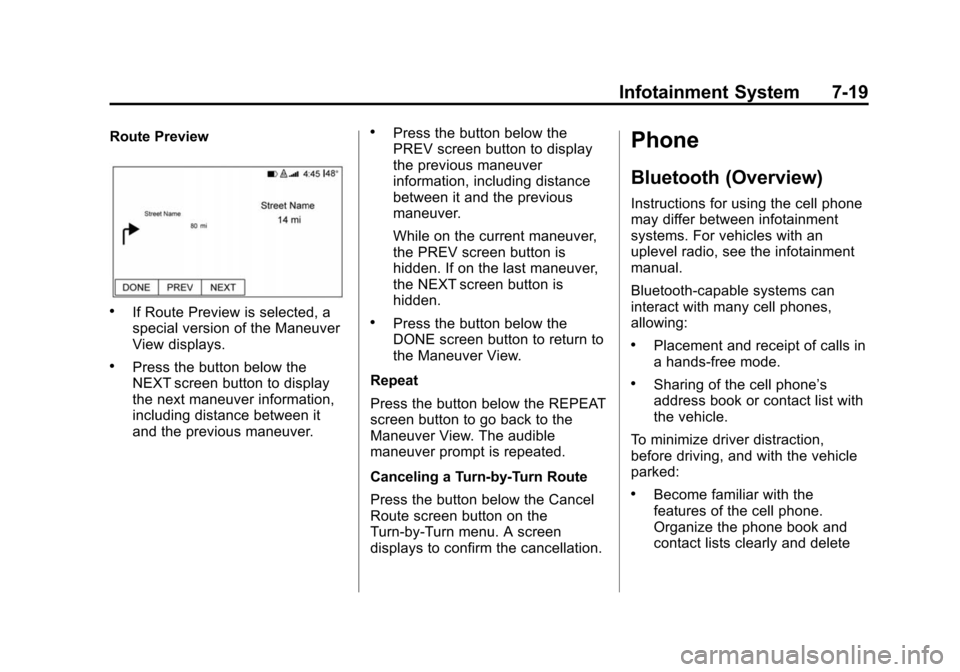
Route Preview
.If Route Preview is selected, a
special version of the Maneuver
View displays.
.Press the button below the
NEXT screen button to display
the next maneuver information,
including distance between it
and the previous maneuver.
.Press the button below the
PREV screen button to display
the previous maneuver
information, including distance
between it and the previous
maneuver.
While on the current maneuver,
the PREV screen button is
hidden. If on the last maneuver,
the NEXT screen button is
hidden.
.Press the button below the
DONE screen button to return to
the Maneuver View.
Repeat
Press the button below the REPEAT
screen button to go back to the
Maneuver View. The audible
maneuver prompt is repeated.
Canceling a Turn-by-Turn Route
Press the button below the Cancel
Route screen button on the
Turn-by-Turn menu. A screen
displays to confirm the cancellation.
Phone
Bluetooth (Overview)
Instructions for using the cell phone
may differ between infotainment
systems. For vehicles with an
uplevel radio, see the infotainment
manual.
Bluetooth-capable systems can
interact with many cell phones,
allowing:
.Placement and receipt of calls in
a hands-free mode.
.Sharing of the cell phone’s
address book or contact list with
the vehicle.
To minimize driver distraction,
before driving, and with the vehicle
parked:
.Become familiar with the
features of the cell phone.
Organize the phone book and
contact lists clearly and delete
Page 192 of 413
Black plate (21,1)Chevrolet Impala Owner Manual (GMNA-Localizing-U.S./Canada-7576026) -
2015 - crc 2nd edition - 8/21/14
Infotainment System 7-21
PHONE:From the Home Page,
select to enter the phone main
menu. See Bluetooth (Overview) on
page 7-19 orBluetooth
(Infotainment Controls - Base
Radio) on page 7-21 orBluetooth
(Voice Recognition - Base Radio) on
page 7-25.
Voice Recognition
The voice recognition system uses
commands to control the system
and dial phone numbers.
Noise: The system may not
recognize voice commands if there
is too much background noise, such
as noise from open windows or loud
talking inside the vehicle.
When to Speak: A tone sounds to
indicate that the system is ready for
a voice command. Wait for the tone
and then speak.
How to Speak: Speak clearly in a
calm and natural voice.
Audio System
When using the Bluetooth system,
sound comes through the vehicle's
front audio system speakers and
overrides the audio system. Use the
Oknob during a call to change the
volume level. The system maintains
a minimum volume level.
Bluetooth Audio Quality
Turn off the Echo and Noise
cancellation feature on your phone,
if supported, for the best hands-free
performance.
See www.gm.com/bluetooth.
Other Information
The Bluetooth®word mark and
logos are owned by the Bluetooth®
SIG, Inc. and any use of such marks
by General Motors is under license.
Other trademarks and trade names
are those of their respective owners.
Bluetooth (Infotainment
Controls - Base Radio)
For information about how to
navigate the menu system using the
infotainment controls, see Overview
on page 7-3.
Switching to Handset or
Hands-Free Mode
To switch between handset mode
and hands-free mode, use the
OnStar command, “transfer call.”
Pairing
A Bluetooth-enabled cell phone
must be paired to the Bluetooth
system and then connected to the
vehicle before it can be used. See
your cell phone manufacturer's user
guide for Bluetooth functions before
pairing the cell phone. If a Bluetooth
phone is not connected, calls can
be made using OnStar Hands-Free
Calling, if available. See OnStar
Overview on page 14-1, if equipped.
Page 206 of 413
Black plate (3,1)Chevrolet Impala Owner Manual (GMNA-Localizing-U.S./Canada-7576026) -
2015 - crc 2nd edition - 8/21/14
Climate Controls 8-3
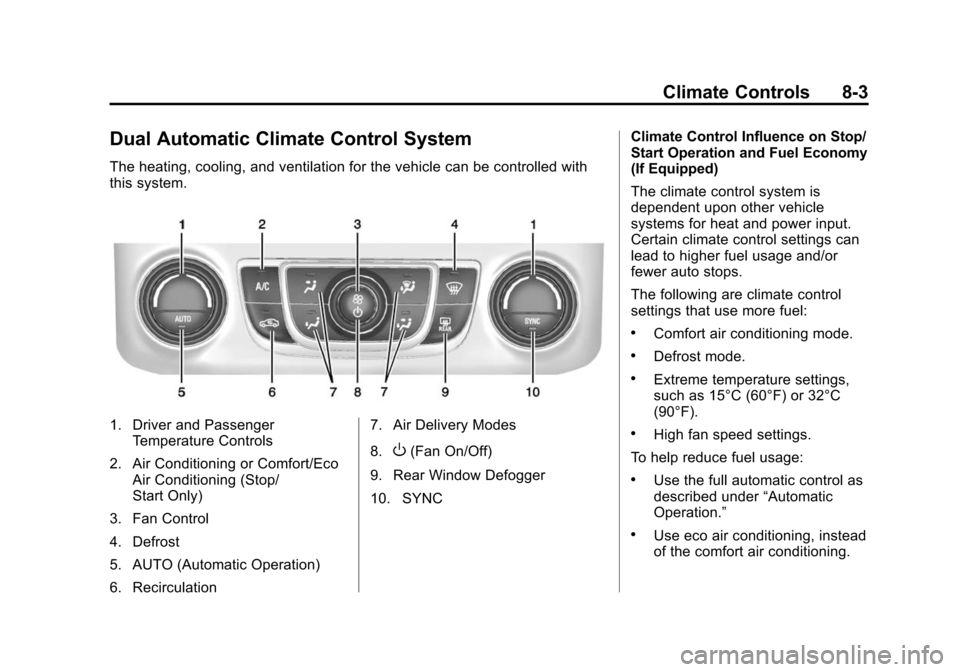
Dual Automatic Climate Control System
The heating, cooling, and ventilation for the vehicle can be controlled with
this system.
1. Driver and PassengerTemperature Controls
2. Air Conditioning or Comfort/Eco Air Conditioning (Stop/
Start Only)
3. Fan Control
4. Defrost
5. AUTO (Automatic Operation)
6. Recirculation 7. Air Delivery Modes
8.
O(Fan On/Off)
9. Rear Window Defogger
10. SYNC Climate Control Influence on Stop/
Start Operation and Fuel Economy
(If Equipped)
The climate control system is
dependent upon other vehicle
systems for heat and power input.
Certain climate control settings can
lead to higher fuel usage and/or
fewer auto stops.
The following are climate control
settings that use more fuel:
.Comfort air conditioning mode.
.Defrost mode.
.Extreme temperature settings,
such as 15°C (60°F) or 32°C
(90°F).
.High fan speed settings.
To help reduce fuel usage:
.Use the full automatic control as
described under “Automatic
Operation.”
.Use eco air conditioning, instead
of the comfort air conditioning.
Page 208 of 413
Black plate (5,1)Chevrolet Impala Owner Manual (GMNA-Localizing-U.S./Canada-7576026) -
2015 - crc 2nd edition - 8/21/14
Climate Controls 8-5
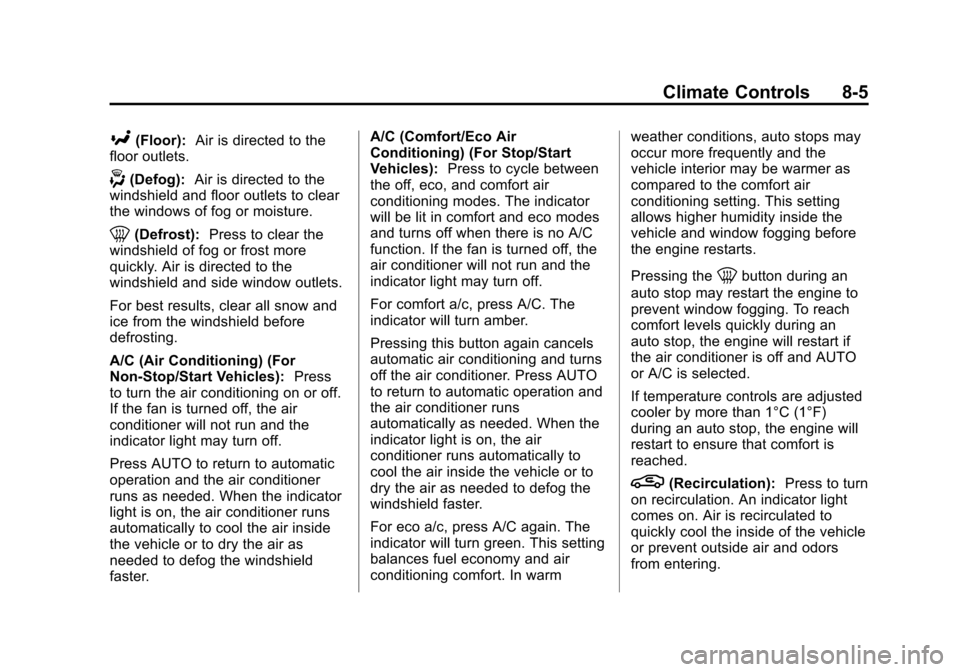
[(Floor):Air is directed to the
floor outlets.
-(Defog): Air is directed to the
windshield and floor outlets to clear
the windows of fog or moisture.
0(Defrost): Press to clear the
windshield of fog or frost more
quickly. Air is directed to the
windshield and side window outlets.
For best results, clear all snow and
ice from the windshield before
defrosting.
A/C (Air Conditioning) (For
Non-Stop/Start Vehicles): Press
to turn the air conditioning on or off.
If the fan is turned off, the air
conditioner will not run and the
indicator light may turn off.
Press AUTO to return to automatic
operation and the air conditioner
runs as needed. When the indicator
light is on, the air conditioner runs
automatically to cool the air inside
the vehicle or to dry the air as
needed to defog the windshield
faster. A/C (Comfort/Eco Air
Conditioning) (For Stop/Start
Vehicles):
Press to cycle between
the off, eco, and comfort air
conditioning modes. The indicator
will be lit in comfort and eco modes
and turns off when there is no A/C
function. If the fan is turned off, the
air conditioner will not run and the
indicator light may turn off.
For comfort a/c, press A/C. The
indicator will turn amber.
Pressing this button again cancels
automatic air conditioning and turns
off the air conditioner. Press AUTO
to return to automatic operation and
the air conditioner runs
automatically as needed. When the
indicator light is on, the air
conditioner runs automatically to
cool the air inside the vehicle or to
dry the air as needed to defog the
windshield faster.
For eco a/c, press A/C again. The
indicator will turn green. This setting
balances fuel economy and air
conditioning comfort. In warm weather conditions, auto stops may
occur more frequently and the
vehicle interior may be warmer as
compared to the comfort air
conditioning setting. This setting
allows higher humidity inside the
vehicle and window fogging before
the engine restarts.
Pressing the
0button during an
auto stop may restart the engine to
prevent window fogging. To reach
comfort levels quickly during an
auto stop, the engine will restart if
the air conditioner is off and AUTO
or A/C is selected.
If temperature controls are adjusted
cooler by more than 1°C (1°F)
during an auto stop, the engine will
restart to ensure that comfort is
reached.
L(Recirculation): Press to turn
on recirculation. An indicator light
comes on. Air is recirculated to
quickly cool the inside of the vehicle
or prevent outside air and odors
from entering.
Page 212 of 413

Black plate (1,1)Chevrolet Impala Owner Manual (GMNA-Localizing-U.S./Canada-7576026) -
2015 - crc 2nd edition - 8/21/14
Driving and Operating 9-1
Driving and
Operating
Driving Information
Distracted Driving . . . . . . . . . . . . . 9-2
Defensive Driving . . . . . . . . . . . . . 9-3
Drunk Driving . . . . . . . . . . . . . . . . . 9-3
Control of a Vehicle . . . . . . . . . . . 9-3
Braking . . . . . . . . . . . . . . . . . . . . . . . 9-3
Steering . . . . . . . . . . . . . . . . . . . . . . . 9-4
Off-Road Recovery . . . . . . . . . . . . 9-4
Loss of Control . . . . . . . . . . . . . . . . 9-5
Track Events and CompetitiveDriving . . . . . . . . . . . . . . . . . . . . . . . 9-5
Driving on Wet Roads . . . . . . . . . 9-6
Hill and Mountain Roads . . . . . . 9-7
Winter Driving . . . . . . . . . . . . . . . . . 9-8
If the Vehicle Is Stuck . . . . . . . . . 9-9
Vehicle Load Limits . . . . . . . . . . 9-10
Starting and Operating
New Vehicle Break-In . . . . . . . . 9-14
Ignition Positions (Keyless Access) . . . . . . . . . . . . . . . . . . . . 9-14
Ignition Positions (Key Access) . . . . . . . . . . . . . . . . . . . . 9-16
Starting the Engine . . . . . . . . . . 9-18 Engine Heater . . . . . . . . . . . . . . . 9-20
Retained Accessory
Power (RAP) . . . . . . . . . . . . . . . 9-22
Shifting Into Park . . . . . . . . . . . . 9-22
Shifting out of Park . . . . . . . . . . 9-23
Parking over Things That Burn . . . . . . . . . . . . . . . . . . 9-24
Engine Exhaust
Engine Exhaust . . . . . . . . . . . . . . 9-24
Running the Vehicle WhileParked . . . . . . . . . . . . . . . . . . . . . 9-25
Automatic Transmission
Automatic Transmission . . . . . 9-25
Manual Mode . . . . . . . . . . . . . . . . 9-27
Brakes
Antilock BrakeSystem (ABS) . . . . . . . . . . . . . . 9-28
Parking Brake . . . . . . . . . . . . . . . 9-29
Brake Assist . . . . . . . . . . . . . . . . . 9-30
Hill Start Assist (HSA) . . . . . . . 9-30
Ride Control Systems
Traction Control/Electronic Stability Control . . . . . . . . . . . . 9-31
Cruise Control
Cruise Control . . . . . . . . . . . . . . . 9-33
Adaptive Cruise Control . . . . . 9-35
Driver Assistance Systems
Driver AssistanceSystems . . . . . . . . . . . . . . . . . . . . 9-43
Assistance Systems for Parking or Backing . . . . . . . . . 9-44
Assistance Systems for Driving . . . . . . . . . . . . . . . . . . . . . 9-46
Forward Collision Alert (FCA) System . . . . . . . . . . . . . . . . . . . . . 9-46
Active Emergency Braking System . . . . . . . . . . . . . . . . . . . . . 9-48
Side Blind Zone Alert (SBZA) . . . . . . . . . . . . . . . 9-50
Lane Departure
Warning (LDW) . . . . . . . . . . . . . 9-52
Fuel
Fuel . . . . . . . . . . . . . . . . . . . . . . . . . 9-54
California FuelRequirements . . . . . . . . . . . . . . 9-55
Fuels in Foreign Countries . . . 9-55
Fuel Additives . . . . . . . . . . . . . . . 9-55
Page 227 of 413
Black plate (16,1)Chevrolet Impala Owner Manual (GMNA-Localizing-U.S./Canada-7576026) -
2015 - crc 2nd edition - 8/21/14
9-16 Driving and Operating
If the vehicle cannot be pulled over,
and must be shut off while driving,
press and hold the ENGINE START/
STOP button for longer than
two seconds, or press twice in
five seconds.
ACC/ACCESSORY (Amber
Indicator Light):This mode allows
some electrical accessories to be
used when the engine is off.
With the ignition off, pressing the
button one time without the brake
pedal applied will place the ignition
system in ACC/ACCESSORY.
The ignition will switch from ACC/
ACCESSORY to OFF after
five minutes to prevent battery
rundown.
ON/RUN/START (Green Indicator
Light): This mode is for driving and
starting. With the ignition off, and
the brake pedal applied, pressing
the button once will place the
ignition system in ON/RUN/START.
Once engine cranking begins,
release the button. Engine cranking
will continue until the engine starts. See
Starting the Engine on
page 9-18. The ignition will then
remain in ON/RUN.
Service Only Mode
This power mode is available for
service and diagnostics, and to
verify the proper operation of the
malfunction indicator lamp as may
be required for emission inspection
purposes. With the vehicle off, and
the brake pedal not applied,
pressing and holding the button for
more than five seconds will place
the vehicle in Service Only Mode.
The instruments and audio systems
will operate as they do in ON/RUN,
but the vehicle will not be able to be
driven. The engine will not start in
Service Only Mode. Press the
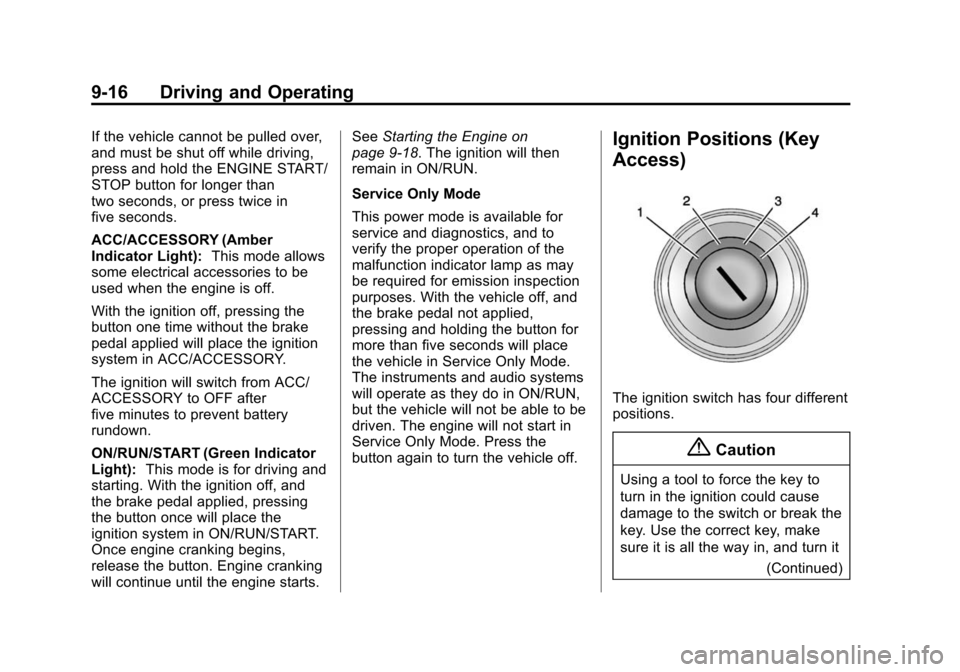
button again to turn the vehicle off.Ignition Positions (Key
Access)
The ignition switch has four different
positions.
{Caution
Using a tool to force the key to
turn in the ignition could cause
damage to the switch or break the
key. Use the correct key, make
sure it is all the way in, and turn it
(Continued)
Page 231 of 413
Black plate (20,1)Chevrolet Impala Owner Manual (GMNA-Localizing-U.S./Canada-7576026) -
2015 - crc 2nd edition - 8/21/14
9-20 Driving and Operating
vehicle starts briefly but then
stops again, do the same thing.
This clears the extra gasoline
from the engine. Do not race the
engine immediately after starting
it. Operate the engine and
transmission gently until the oil
warms up and lubricates all
moving parts.
Stop/Start System
{Warning
Exiting the vehicle without first
shifting into P (Park) may cause
the vehicle to move. You or others
may be injured. Because the
vehicle has the auto engine stop/
start feature, the vehicle's engine
might seem to be shut off;
however, once the brake pedal is
released, the engine will start up
again.
Shift to P (Park) and turn the
ignition to LOCK/OFF, before
exiting the vehicle.If equipped with the 2.5L L4 Engine,
the vehicle has a fuel saving stop/
start system to shut off the engine to
help conserve fuel.
Auto Engine Stop/Start
When the brakes are applied and
the vehicle is at a complete stop,
the engine may turn off. When
stopped, the tachometer displays
AUTO STOP. See
Tachometer on
page 5-12. When the brake pedal is
released or the accelerator pedal
pushed, the engine will restart.
Auto stop may be deactivated if:
.A minimum vehicle speed is not
reached.
.The engine or transmission is
not at the required operating
temperature.
.The outside temperature is not
in the required operating range,
typically below -10°C (14°F) or
above 50°C (122°F).
.The shift lever is in any gear
other than D (Drive).
.The battery charge is low.
.The interior comfort level has not
reached the required level for
the climate control system or
defog settings. Use the eco
(green indicator on) air
conditioning mode for better
efficiency. See Dual Automatic
Climate Control System on
page 8-3.
.The auto stop time is greater
than two minutes.
Engine Heater
The engine coolant heater,
if equipped, can help in cold
weather conditions at or below −18°
C (0°F) for easier starting and better
fuel economy during engine
warm-up. Plug in the coolant heater
at least four hours before starting
the vehicle. An internal thermostat
in the plug end of the cord will
prevent engine coolant heater
operation at temperatures above
−18°C (0°F).