USB port CHEVROLET IMPALA 2016 10.G Owners Manual
[x] Cancel search | Manufacturer: CHEVROLET, Model Year: 2016, Model line: IMPALA, Model: CHEVROLET IMPALA 2016 10.GPages: 377, PDF Size: 5.07 MB
Page 8 of 377

Chevrolet Impala Owner Manual (GMNA-Localizing-U.S/Canada-9086448) -
2016 - CRC - 5/20/15
In Brief 7
1.Instrument Panel Illumination
Control 0151.
2. Air Vents 0188.
3. Trunk Release. See Trunk
0 41.
Parking Assist Button. See
Assistance Systems for
Parking or Backing 0228 (If
Equipped).
Lane Departure Warning
(LDW) Button. See Lane
Departure Warning (LDW)
0 235.
4. Turn Signal Lever. See Turn
and Lane-Change Signals
0 151.
5. Instrument Cluster 0112.
Driver Information Center (DIC)
0 127.
6. Windshield Wiper/Washer
0106.
7. Hazard Warning Flashers
0150.
8. Light Sensor. See Automatic
Headlamp System 0150. 9. Storage Area with USB Port
Inside (If Equipped). See
Instrument Panel Storage 099
and USB Port 0164.
10. Infotainment 0155.
11. Climate Control Systems
0181.
Dual Automatic Climate Control
System 0184.
12. Storage Area with Accessory Power Outlet Inside. See
Center Console Storage 0100
and Power Outlets 0108.
13. Heated and Ventilated Front
Seats 060 (If Equipped).
14. Traction Control/Electronic
Stability Control 0216.
15. Shift Lever. See Automatic
Transmission 0211.
16. Ignition Positions (Keyless
Access) 0201 orIgnition
Positions (Key Access) 0203.
17. Steering Wheel Controls 0105.
Driver Information Center
Buttons. See Driver Information
Center (DIC) 0127. 18.
Steering Wheel Controls 0105
(Out of View).
19. Horn 0105.
20. Steering Wheel Adjustment
0104.
21. Cruise Control 0218 (If
Equipped).
Adaptive Cruise Control 0220
(If Equipped).
Heated Steering Wheel 0105
(If Equipped).
Forward Collision Alert (FCA)
System 0230 (If Equipped).
22. Instrument Panel Storage 099
(If Equipped).
Fuse Cover. See Instrument
Panel Fuse Block 0280.
23. Hood Release. See Hood
0 250.
24. Data Link Connector (Out of View). See Malfunction
Indicator Lamp (Check Engine
Light) 0120.
25. Electric Parking Brake. See Parking Brake 0214.
Page 22 of 377
Chevrolet Impala Owner Manual (GMNA-Localizing-U.S/Canada-9086448) -
2016 - CRC - 5/20/15
In Brief 21
Portable Audio Devices
This vehicle has a 3.5 mm (1/8 in)
auxiliary input jack. If equipped,
there are up to two USB ports in the
center console and one in the
storage behind the radio. External
devices such as iPods
®, laptop
computers, MP3 players, CD
changers, and USB storage devices
may be connected, depending on
the audio system.
See Auxiliary Jack 0167 andUSB
Port 0164.
Bluetooth®
The Bluetooth®system allows users
with a Bluetooth-enabled cell phone
to make and receive hands-free
calls using the vehicle audio system
and controls.
The Bluetooth-enabled cell phone
must be paired with the in-vehicle
Bluetooth system before it can be
used in the vehicle. Not all phones
will support all functions. See
Bluetooth (Overview) 0168 or
Bluetooth (Infotainment Controls -
Base Radio) 0170 orBluetooth
(Voice Recognition - Base Radio)
0 174.
Steering Wheel Controls
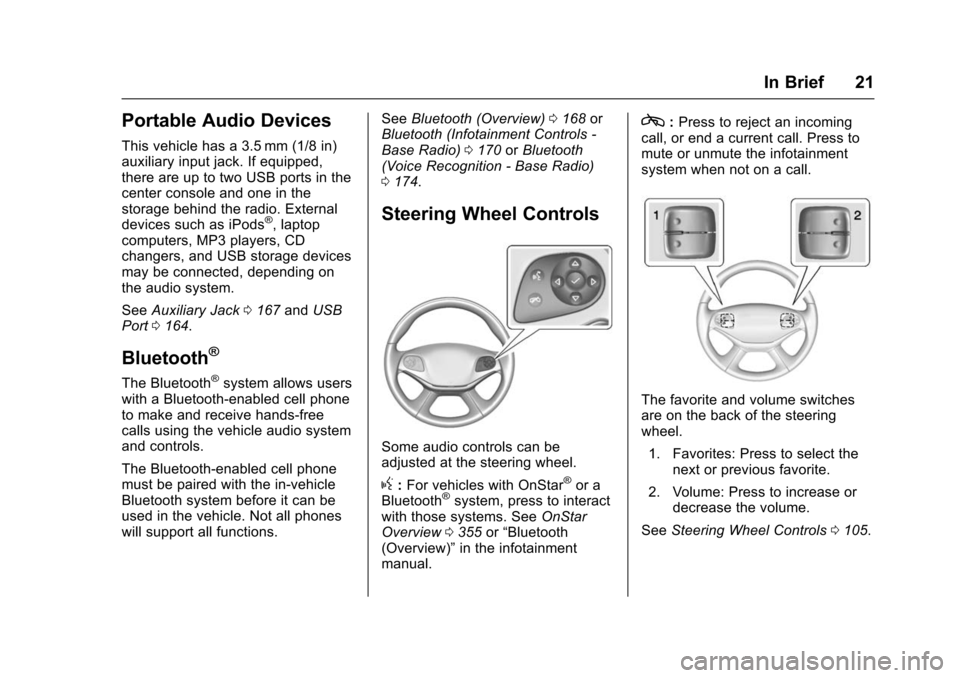
Some audio controls can be
adjusted at the steering wheel.
g:For vehicles with OnStar®or a
Bluetooth®system, press to interact
with those systems. See OnStar
Overview 0355 or“Bluetooth
(Overview)” in the infotainment
manual.
c: Press to reject an incoming
call, or end a current call. Press to
mute or unmute the infotainment
system when not on a call.
The favorite and volume switches
are on the back of the steering
wheel.
1. Favorites: Press to select the next or previous favorite.
2. Volume: Press to increase or decrease the volume.
See Steering Wheel Controls 0105.
Page 100 of 377
Chevrolet Impala Owner Manual (GMNA-Localizing-U.S/Canada-9086448) -
2016 - CRC - 5/20/15
Storage 99
Storage
Storage Compartments
Storage Compartments . . . . . . . . 99
Instrument Panel Storage . . . . . . 99
Glove Box . . . . . . . . . . . . . . . . . . . . 100
Cupholders . . . . . . . . . . . . . . . . . . . 100
Center Console Storage . . . . . . 100
Umbrella Storage . . . . . . . . . . . . . 101
Additional Storage Features
Cargo ManagementSystem . . . . . . . . . . . . . . . . . . . . . . 101
Convenience Net . . . . . . . . . . . . . 102
Storage
Compartments
{Warning
Do not store heavy or sharp
objects in storage compartments.
In a crash, these objects may
cause the cover to open and
could result in injury.
Instrument Panel Storage
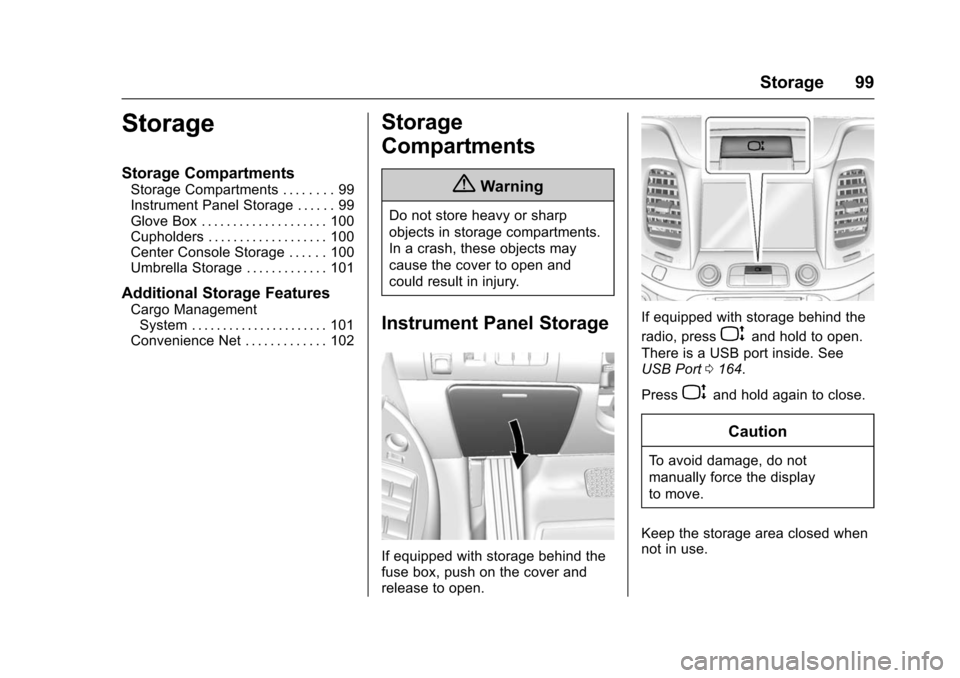
If equipped with storage behind the
fuse box, push on the cover and
release to open.
If equipped with storage behind the
radio, press
Pand hold to open.
There is a USB port inside. See
USB Port 0164.
Press
Pand hold again to close.
Caution
To avoid damage, do not
manually force the display
to move.
Keep the storage area closed when
not in use.
Page 102 of 377
Chevrolet Impala Owner Manual (GMNA-Localizing-U.S/Canada-9086448) -
2016 - CRC - 5/20/15
Storage 101
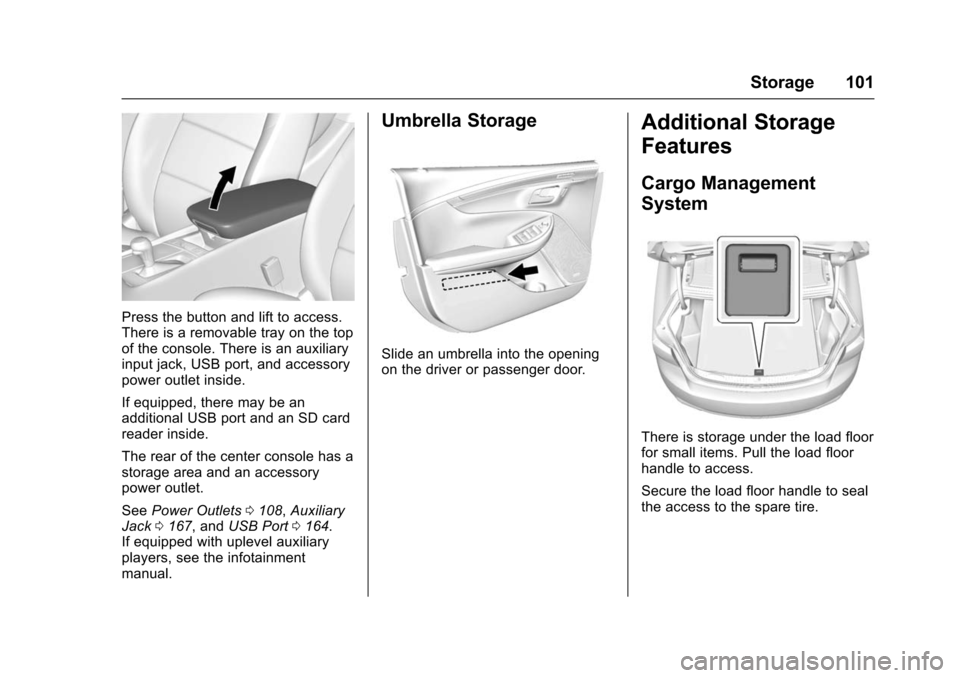
Press the button and lift to access.
There is a removable tray on the top
of the console. There is an auxiliary
input jack, USB port, and accessory
power outlet inside.
If equipped, there may be an
additional USB port and an SD card
reader inside.
The rear of the center console has a
storage area and an accessory
power outlet.
SeePower Outlets 0108, Auxiliary
Jack 0167, and USB Port 0164.
If equipped with uplevel auxiliary
players, see the infotainment
manual.
Umbrella Storage
Slide an umbrella into the opening
on the driver or passenger door.
Additional Storage
Features
Cargo Management
System
There is storage under the load floor
for small items. Pull the load floor
handle to access.
Secure the load floor handle to seal
the access to the spare tire.
Page 156 of 377
Chevrolet Impala Owner Manual (GMNA-Localizing-U.S/Canada-9086448) -
2016 - CRC - 5/20/15
Infotainment System 155
Infotainment
System
Introduction
Infotainment . . . . . . . . . . . . . . . . . . 155
Theft-Deterrent Feature . . . . . . 156
Overview . . . . . . . . . . . . . . . . . . . . . 157
Home Page . . . . . . . . . . . . . . . . . . 158
Software Updates . . . . . . . . . . . . 160
Radio
AM-FM Radio . . . . . . . . . . . . . . . . 161
Satellite Radio . . . . . . . . . . . . . . . . 162
Radio Reception . . . . . . . . . . . . . . 163
Backglass Antenna . . . . . . . . . . . 163
Multi-Band Antenna . . . . . . . . . . 164
Audio Players
USB Port . . . . . . . . . . . . . . . . . . . . . 164
SD Card Reader . . . . . . . . . . . . . . 167
Auxiliary Jack . . . . . . . . . . . . . . . . 167
Phone
Bluetooth (Overview) . . . . . . . . . 168
Bluetooth (InfotainmentControls - Base Radio) . . . . . . 170
Bluetooth (Voice Recognition - Base Radio) . . . . . . . . . . . . . . . . 174
Trademarks and License
Agreements
Trademarks and LicenseAgreements . . . . . . . . . . . . . . . . . 179
Introduction
Infotainment
Base radio information is included in
this manual. See the infotainment
manual for information on other
available infotainment systems.
Read the following pages to
become familiar with these features.
{Warning
Taking your eyes off the road for
too long or too often while using
any infotainment feature can
cause a crash. You or others
could be injured or killed. Do not
give extended attention to
infotainment tasks while driving.
Limit your glances at the vehicle
displays and focus your attention
on driving. Use voice commands
whenever possible.
The infotainment system has built-in
features intended to help avoid
distraction by disabling some
functions when driving. These
Page 165 of 377
Chevrolet Impala Owner Manual (GMNA-Localizing-U.S/Canada-9086448) -
2016 - CRC - 5/20/15
164 Infotainment System
in the glass. If the inside surface is
damaged, it could interfere with
radio reception. For proper radio
reception, the antenna connector
needs to be properly attached to the
post on the glass.
If attaching a cell phone antenna to
the glass, attach it between the grid
lines.
Caution
Using a razor blade or sharp
object to clear the inside rear
window can damage the rear
window antenna and/or the rear
window defogger. Repairs would
not be covered by the vehicle
warranty. Do not clear the inside
rear window with sharp objects.
Caution
Do not apply aftermarket glass
tinting with metallic film. The
metallic film in some tinting(Continued)
Caution (Continued)
materials will interfere with or
distort the incoming radio
reception. Any damage caused to
the backglass antenna due to
metallic tinting materials will not
be covered by the vehicle
warranty.
Multi-Band Antenna
The roof antenna is for OnStar®,
SiriusXM®Satellite Radio, and GPS
(Global Positioning System). Keep
clear of obstructions for clear
reception. If the vehicle has a
sunroof, and it is open, reception
can also be affected.
Audio Players
USB Port
Playing from a USB
A USB mass storage device or
Media Transfer Protocol (MTP)
device can be connected to the
USB port.
If equipped, there are up to two
USB ports in the center console and
if equipped with storage behind the
radio, there is a USB port inside.
USB MP3 Player and USB Drives
. The USB MP3 players and USB
drives connected must comply
with the USB Mass Storage
Class specification (USB MSC).
. Hard disk drives are not
supported.
To play a USB device:
. Connect the USB.
. Press the MEDIA button on the
faceplate until the connected
device is shown.
Page 166 of 377
Chevrolet Impala Owner Manual (GMNA-Localizing-U.S/Canada-9086448) -
2016 - CRC - 5/20/15
Infotainment System 165
While the USB source is active, use
the icons on the screen to operate
USB function:
t(Seek Previous/Fast Reverse):
. Press to seek to the beginning of
the current or previous track.
If the track has been playing for
less than five seconds, it seeks
to the previous track. If longer
than five seconds, the current
track starts from the beginning.
. Press and hold to fast reverse
through a track. Release the
button to return to playing
speed. Elapsed time displays.
u(Seek Next/Fast Forward):
. Press to seek to the next track.
. Press and hold to fast forward
through a track. Release the
button to return to playing
speed. Elapsed time displays.
j/r(Pause/Play): Press to pause.
Press again to resume.
Z(Shuffle): PressZto play the
songs in random order. Press again
to turn off. USB Menu
Press the MENU knob to display the
USB menu and the following may
display:
Browse :
Select to display the files
and folders on the USB device.
Tone Settings : Select to adjust
Bass, Midrange, Treble, Balance,
Fade, and EQ (Equalizer). See
“Tone Settings” underAM-FM Radio
0 161.
Auto Volume : If equipped, this
feature adjusts the volume based on
the vehicle speed. Select the level
between off, low, medium-low,
medium, medium-high, and high.
Press
qBACK to go to the
previous menu.
EQ (Equalizer) Settings :
If equipped, this feature adjusts the
pre-defined EQ Modes. See “EQ
(Equalizer) Settings” inAM-FM
Radio 0161.
DSP Modes : If equipped, this
feature adjusts the DSP Modes.
See “DSP Modes” inAM-FM Radio
0 161.
Playing from an iPod®
This feature supports the following
iPod models:
.
iPod nano
®(1st, 2nd, 3rd, and
4th generation)
. iPod with video (5.0 and 5.5
generation).
. iPod classic
®(6th generation)
. iPod touch
®(1st and 2nd
generation)
There may be problems with
operation and function in the
following situations:
. When connecting an iPod on
which a more recent version of
the firmware is installed than is
supported by the infotainment
system.
. When connecting an iPod on
which firmware from other
providers is installed.
To connect and control an iPod: 1. Connect one end of the standard iPod USB cable to the
iPod's dock connector.
Page 167 of 377
Chevrolet Impala Owner Manual (GMNA-Localizing-U.S/Canada-9086448) -
2016 - CRC - 5/20/15
166 Infotainment System
2. Connect the other end to theUSB port in the center console.
3. Press the MEDIA button to select the source.
iPod music information displays on
the radio’s display and begins
playing through the vehicle’s audio
system.
The iPod battery recharges
automatically while the vehicle is on.
When the vehicle is off while an
iPod is connected using the iPod
USB cable, the iPod battery stops
charging and the iPod automatically
turns off.
If the iPod is an unsupported model,
it can still be listened to in the
vehicle by connecting to the
auxiliary input jack using a standard
3.5 mm (1/8 in) stereo cable.
iPod Menu
Press the MENU knob to display the
iPod Menu and the following may
display:
Browse : Select to display the files
or songs on the iPod. See “Browse
iPod Media” later in this section. Tone Settings :
Select to adjust
Bass, Midrange, Treble, Balance,
Fade, and EQ (Equalizer). See
“Tone Settings” underAM-FM Radio
0 161.
Auto Volume : If equipped, this
feature adjusts the volume based on
the vehicle speed. Select the level
between off, low, medium-low,
medium, medium-high, and high.
Press
qBACK to go to the
previous menu.
EQ (Equalizer) Settings :
If equipped, this feature adjusts the
pre-defined EQ Modes. See “EQ
(Equalizer) Settings” inAM-FM
Radio 0161.
DSP Modes : If equipped, this
feature adjusts the DSP Modes.
See “DSP Modes” inAM-FM Radio
0 161.
Browse iPod Media
Use the following to browse:
Playlists: 1. Turn the MENU knob to highlight and press to view the
playlists stored on the iPod. 2. Turn the MENU knob to
highlight and press to select a
playlist name to view a list of
all songs in the playlist.
3. Turn the MENU knob to highlight and press to select
the song from the list to begin
playback.
Artists:
1. Turn the MENU knob to highlight and press to view the
artists stored on the iPod.
2. Turn the MENU knob to highlight and press to select an
artist name to view a list of all
albums by the artist.
3. Turn the MENU knob to highlight and press to select
the album from the list.
4. To begin playback, select a song from the album.
Albums: 1. Turn the MENU knob to highlight and press to view the
albums stored on the iPod.
Page 168 of 377
Chevrolet Impala Owner Manual (GMNA-Localizing-U.S/Canada-9086448) -
2016 - CRC - 5/20/15
Infotainment System 167
2. Turn the MENU knob tohighlight and press to select an
album name to view a list of all
songs on the album.
3. Turn the MENU knob to highlight and press to select
the song from the list to begin
playback.
Genres:
1. Turn the MENU knob to highlight and press to view the
genres stored on the iPod.
2. Turn the MENU knob to highlight and press to select a
genre name to view a list of
artists of that genre.
3. Turn the MENU knob to highlight and press to select to
view albums by that artist.
4. Turn the MENU knob to highlight and press to select an
album to view songs.
5. Turn the MENU knob to highlight and press to select
the song from the list to begin
playback. Songs:
1. Turn the MENU knob to highlight and press to view a
list of all songs stored on
the iPod.
2. Turn the MENU knob to highlight and press to select
the song from the list to begin
playback.
Playing from an iPhone®
or iPad®
This feature supports iPhone 3G,
iPhone 3GS, iPhone 4, and iPad.
Follow the same instructions as
stated earlier for using an iPod.
SD Card Reader
If equipped, the SD card reader is in
the center console. See Center
Console Storage 0100.
1. Plug the SD card into the reader.
2. Press the MEDIA button to select the SD device. If an SD card has already been
connected, but a different source is
currently active, press the MEDIA
screen button repeatedly to cycle
through all of the available audio
source screens, until the SD card
screen is shown.
Playing Music from the SD Card
An SD card is played the same way
a USB device is played. See
USB
Port 0164.
Auxiliary Jack
The AUX jack is in the center
console. See Center Console
Storage 0100.
Possible auxiliary audio sources
include:
. Laptop computer
. Audio music player
This jack is not an audio output. Do
not plug headphones into the
auxiliary input jack. Auxiliary
devices should be set up while the
vehicle is in P (Park).
Page 373 of 377

Chevrolet Impala Owner Manual (GMNA-Localizing-U.S/Canada-9086448) -
2016 - CRC - 5/20/15
372 Index
Oil (cont'd)Pressure Light . . . . . . . . . . . . . . . . 125
Older Children, Restraints . . . . . . . 81
Online Owner Center . . . . . . . . . . . 344
OnStar . . . . . . . . . . . . . . . . . . . . . . . . . 353
OnStar
®Additional
Information . . . . . . . . . . . . . . . . . . . . 359
OnStar
®Connections . . . . . . . . . . . 357
OnStar®Diagnostics . . . . . . . . . . . . 359
OnStar®Emergency . . . . . . . . . . . . 356
OnStar®Navigation . . . . . . . . . . . . . 356
OnStar®Overview . . . . . . . . . . . . . . 355
OnStar®Security . . . . . . . . . . . . . . . 356
Operating Mode
Overheated EngineProtection . . . . . . . . . . . . . . . . . . . 265
Ordering Service Publications . . . . . . . . . . 350
Outlets Power . . . . . . . . . . . . . . . . . . . . . . . . 108
Overheated Engine Protection Operating Mode . . . . 265
Overheating, Engine . . . . . . . . . . . . 264
Overview . . . . . . . . . . . . . . . . . . . . . . . 157
P
Park
Shifting Into . . . . . . . . . . . . . . . . . . . 208
Shifting Out of . . . . . . . . . . . . . . . . 209
Parking
Brake . . . . . . . . . . . . . . . . . . . . . . . . . 214
Brake and P (Park)Mechanism Check . . . . . . . . . . 270
Over Things That Burn . . . . . . . 210
Parking or Backing
Assistance Systems . . . . . . . . . . 228
Passenger Airbag Status Indicator . . . . . . . . . . . . . . . . . . . . . . 118
Passenger Compartment Air
Filter . . . . . . . . . . . . . . . . . . . . . . . . . . 189
Passenger Sensing System . . . . . 75
Perchlorate Materials Requirements, California . . . . . . 249
Personalization
Vehicle . . . . . . . . . . . . . . . . . . . . . . . 138
Phone Bluetooth . . . . . . . . . . . 168, 170, 174
Port USB . . . . . . . . . . . . . . . . . . . . . . . . . . 164
Power Door Locks . . . . . . . . . . . . . . . . . . . . . 39
Mirrors . . . . . . . . . . . . . . . . . . . . . . . . . . 45
Outlets . . . . . . . . . . . . . . . . . . . . . . . 108 Power (cont'd)
Protection, Battery . . . . . . . . . . . . 154
Retained Accessory (RAP) . . . 208
Seat Adjustment . . . . . . . . . . . . . . . . 56
Windows . . . . . . . . . . . . . . . . . . . . . . . 47
Pregnancy, Using Safety Belts . . . 67
Privacy Vehicle Data Recording . . . . . . . 352
Program
Courtesy Transportation . . . . . . 347
Proposition 65 Warning,
California . . . . . . . . . . . .249, 268, 310
R
Radio Frequency Statement . . . . 351
Radio Reception . . . . . . . . . . . . . . . . 163
RadiosAM-FM Radio . . . . . . . . . . . . . . . . . 161
Satellite . . . . . . . . . . . . . . . . . . . . . . . 162
Reading Lamps . . . . . . . . . . . . . . . . . 152
Rear Seat Armrest . . . . . . . . . . . . . . . 62
Rear Seats . . . . . . . . . . . . . . . . . . . . . . 61
Rearview Mirrors . . . . . . . . . . . . . . . . 47 Automatic Dimming . . . . . . . . . . . . . 47
Reclining Seatbacks . . . . . . . . . . . . . 57
Recommended Fluids and Lubricants . . . . . . . . . . . . . . . . . . . . . 334