consol CHEVROLET IMPALA 2017 10.G Owner's Manual
[x] Cancel search | Manufacturer: CHEVROLET, Model Year: 2017, Model line: IMPALA, Model: CHEVROLET IMPALA 2017 10.GPages: 378, PDF Size: 6.09 MB
Page 147 of 378
Chevrolet Impala Owner Manual (GMNA-Localizing-U.S./Canada-9921197) -
2017 - crc - 3/30/16
146 Instruments and Controls
Universal Remote
System
SeeRadio Frequency
Statement 0352.
Universal Remote System
Programming
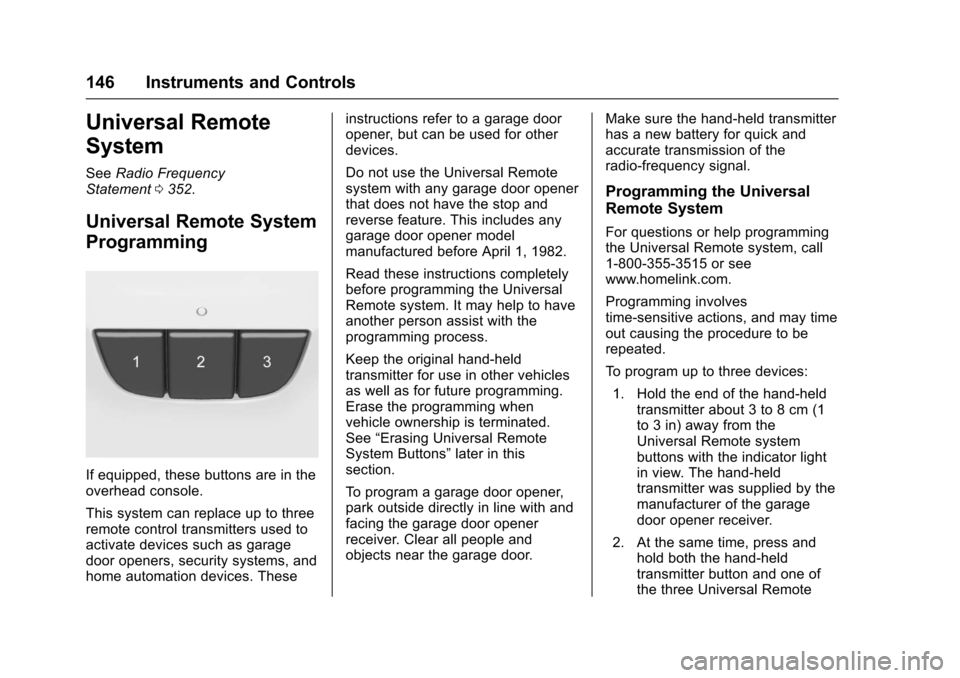
If equipped, these buttons are in the
overhead console.
This system can replace up to three
remote control transmitters used to
activate devices such as garage
door openers, security systems, and
home automation devices. These instructions refer to a garage door
opener, but can be used for other
devices.
Do not use the Universal Remote
system with any garage door opener
that does not have the stop and
reverse feature. This includes any
garage door opener model
manufactured before April 1, 1982.
Read these instructions completely
before programming the Universal
Remote system. It may help to have
another person assist with the
programming process.
Keep the original hand-held
transmitter for use in other vehicles
as well as for future programming.
Erase the programming when
vehicle ownership is terminated.
See
“Erasing Universal Remote
System Buttons” later in this
section.
To program a garage door opener,
park outside directly in line with and
facing the garage door opener
receiver. Clear all people and
objects near the garage door. Make sure the hand-held transmitter
has a new battery for quick and
accurate transmission of the
radio-frequency signal.
Programming the Universal
Remote System
For questions or help programming
the Universal Remote system, call
1-800-355-3515 or see
www.homelink.com.
Programming involves
time-sensitive actions, and may time
out causing the procedure to be
repeated.
To program up to three devices:
1. Hold the end of the hand-held transmitter about 3 to 8 cm (1
to 3 in) away from the
Universal Remote system
buttons with the indicator light
in view. The hand-held
transmitter was supplied by the
manufacturer of the garage
door opener receiver.
2. At the same time, press and hold both the hand-held
transmitter button and one of
the three Universal Remote
Page 154 of 378
Chevrolet Impala Owner Manual (GMNA-Localizing-U.S./Canada-9921197) -
2017 - crc - 3/30/16
Lighting 153
Dome Lamps
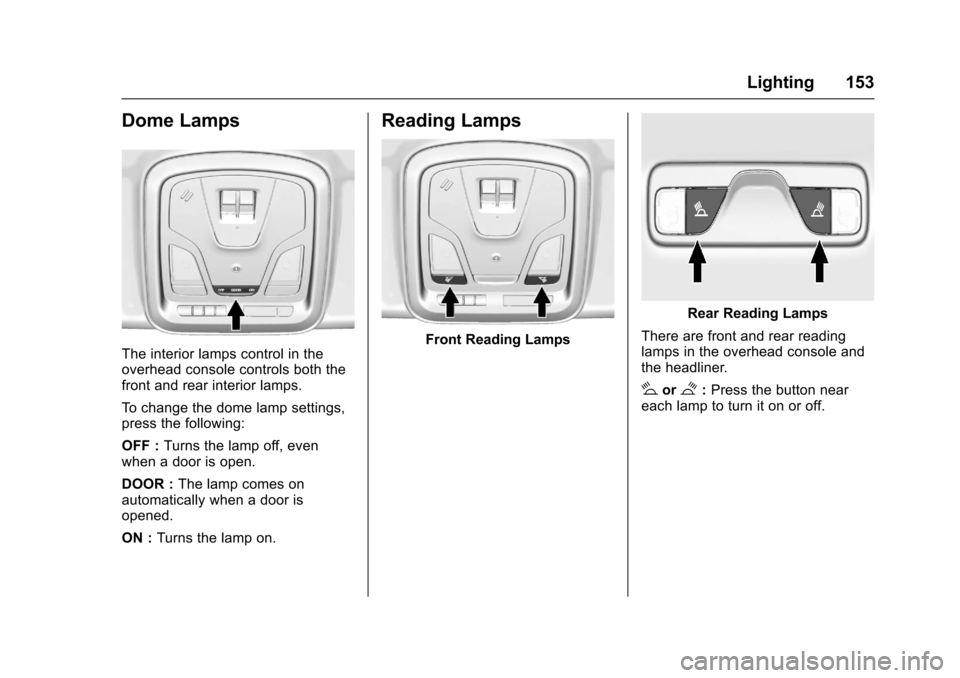
The interior lamps control in the
overhead console controls both the
front and rear interior lamps.
To change the dome lamp settings,
press the following:
OFF :Turns the lamp off, even
when a door is open.
DOOR : The lamp comes on
automatically when a door is
opened.
ON : Turns the lamp on.
Reading Lamps
Front Reading Lamps
Rear Reading Lamps
There are front and rear reading
lamps in the overhead console and
the headliner.
#or$: Press the button near
each lamp to turn it on or off.
Page 166 of 378
Chevrolet Impala Owner Manual (GMNA-Localizing-U.S./Canada-9921197) -
2017 - crc - 3/30/16
Infotainment System 165
in the glass. If the inside surface is
damaged, it could interfere with
radio reception. For proper radio
reception, the antenna connector
needs to be properly attached to the
post on the glass.
If attaching a cell phone antenna to
the glass, attach it between the grid
lines.
Caution
Using a razor blade or sharp
object to clear the inside rear
window can damage the rear
window antenna and/or the rear
window defogger. Repairs would
not be covered by the vehicle
warranty. Do not clear the inside
rear window with sharp objects.
Caution
Do not apply aftermarket glass
tinting with metallic film. The
metallic film in some tinting
materials will interfere with or
distort the incoming radio
reception. Any damage caused to
the backglass antenna due to
metallic tinting materials will not
be covered by the vehicle
warranty.
Multi-Band Antenna
The roof antenna is for OnStar®,
SiriusXM®Satellite Radio, and GPS
(Global Positioning System). Keep
clear of obstructions for clear
reception. If the vehicle has a
sunroof, and it is open, reception
can also be affected.
Audio Players
Avoiding Untrusted Media
Devices
When using media devices such as
CDs, DVDs, Blu-Ray Discs®, SD
cards, USB drives, and mobile
devices, consider the source.
Untrusted media devices could
contain files that affect system
operation or performance. Avoid use
if the content or origin cannot be
trusted.
USB Port
Playing from a USB
A USB mass storage device or
Media Transfer Protocol (MTP)
device can be connected to the
USB port.
If equipped, there are up to two
USB ports in the center console and
if equipped with storage behind the
radio, there is a USB port inside.
Page 168 of 378
Chevrolet Impala Owner Manual (GMNA-Localizing-U.S./Canada-9921197) -
2017 - crc - 3/30/16
Infotainment System 167
There may be problems with
operation and function in the
following situations:
.When connecting an iPod on
which a more recent version of
the firmware is installed than is
supported by the infotainment
system.
. When connecting an iPod on
which firmware from other
providers is installed.
To connect and control an iPod: 1. Connect one end of the standard iPod USB cable to the
iPod's dock connector.
2. Connect the other end to the USB port in the center console.
3. Press the MEDIA button to select the source.
iPod music information displays on
the radio’s display and begins
playing through the vehicle’s audio
system.
The iPod battery recharges
automatically while the vehicle is on.
When the vehicle is off while an
iPod is connected using the iPod USB cable, the iPod battery stops
charging and the iPod automatically
turns off.
If the iPod is an unsupported model,
it can still be listened to in the
vehicle by connecting to the
auxiliary input jack using a standard
3.5 mm (1/8 in) stereo cable.
iPod Menu
Press the MENU knob to display the
iPod Menu and the following may
display:
Browse :
Select to display the files
or songs on the iPod. See “Browse
iPod Media” later in this section.
Tone Settings : Select to adjust
Bass, Midrange, Treble, Balance,
Fade, and EQ (Equalizer). See
“Tone Settings” underAM-FM
Radio 0162.
Auto Volume : If equipped, this
feature adjusts the volume based on
the vehicle speed. Select the level
between off, low, medium-low,
medium, medium-high, and high.
Press
qBACK to go to the
previous menu. EQ (Equalizer) Settings :
If equipped, this feature adjusts the
pre-defined EQ Modes. See
“EQ
(Equalizer) Settings” inAM-FM
Radio 0162.
DSP Modes : If equipped, this
feature adjusts the DSP Modes.
See “DSP Modes” inAM-FM
Radio 0162.
Browse iPod Media
Use the following to browse:
Playlists: 1. Turn the MENU knob to highlight and press to view the
playlists stored on the iPod.
2. Turn the MENU knob to highlight and press to select a
playlist name to view a list of
all songs in the playlist.
3. Turn the MENU knob to highlight and press to select
the song from the list to begin
playback.
Artists: 1. Turn the MENU knob to highlight and press to view the
artists stored on the iPod.
Page 169 of 378
Chevrolet Impala Owner Manual (GMNA-Localizing-U.S./Canada-9921197) -
2017 - crc - 3/30/16
168 Infotainment System
2. Turn the MENU knob tohighlight and press to select an
artist name to view a list of all
albums by the artist.
3. Turn the MENU knob to highlight and press to select
the album from the list.
4. To begin playback, select a song from the album.
Albums: 1. Turn the MENU knob to highlight and press to view the
albums stored on the iPod.
2. Turn the MENU knob to highlight and press to select an
album name to view a list of all
songs on the album.
3. Turn the MENU knob to highlight and press to select
the song from the list to begin
playback.
Genres: 1. Turn the MENU knob to highlight and press to view the
genres stored on the iPod. 2. Turn the MENU knob to
highlight and press to select a
genre name to view a list of
artists of that genre.
3. Turn the MENU knob to highlight and press to select to
view albums by that artist.
4. Turn the MENU knob to highlight and press to select an
album to view songs.
5. Turn the MENU knob to highlight and press to select
the song from the list to begin
playback.
Songs: 1. Turn the MENU knob to highlight and press to view a
list of all songs stored on
the iPod.
2. Turn the MENU knob to highlight and press to select
the song from the list to begin
playback.
Playing from an iPhone®
or iPad®
This feature supports iPhone 3G,
iPhone 3GS, iPhone 4, and iPad. Follow the same instructions as
stated earlier for using an iPod.
SD Card Reader
If equipped, the SD card reader is in
the center console. See
Center
Console Storage 0101.
1. Plug the SD card into the reader.
2. Press the MEDIA button to select the SD device.
If an SD card has already been
connected, but a different source is
currently active, press the MEDIA
screen button repeatedly to cycle
through all of the available audio
source screens, until the SD card
screen is shown.
Playing Music from the SD Card
An SD card is played the same way
a USB device is played. See USB
Port 0165.
Auxiliary Jack
The AUX jack is in the center
console. See Center Console
Storage 0101.
Page 220 of 378
Chevrolet Impala Owner Manual (GMNA-Localizing-U.S./Canada-9921197) -
2017 - crc - 3/30/16
Driving and Operating 219
2. Turn the engine off and wait15 seconds.
3. Start the engine.
Drive the vehicle. If
dcomes on
and stays on, the vehicle may need
more time to diagnose the problem.
If the condition persists, see your
dealer.
Turning the Systems Off
and On
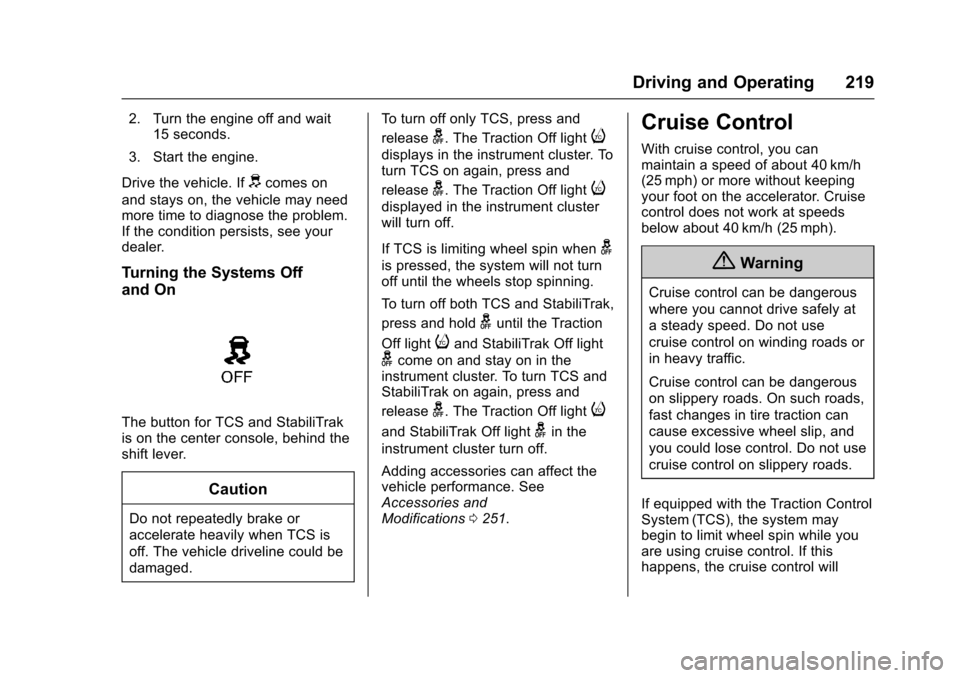
The button for TCS and StabiliTrak
is on the center console, behind the
shift lever.
Caution
Do not repeatedly brake or
accelerate heavily when TCS is
off. The vehicle driveline could be
damaged. To turn off only TCS, press and
release
g. The Traction Off lighti
displays in the instrument cluster. To
turn TCS on again, press and
release
g. The Traction Off lighti
displayed in the instrument cluster
will turn off.
If TCS is limiting wheel spin when
g
is pressed, the system will not turn
off until the wheels stop spinning.
To turn off both TCS and StabiliTrak,
press and hold
guntil the Traction
Off light
iand StabiliTrak Off light
gcome on and stay on in the
instrument cluster. To turn TCS and
StabiliTrak on again, press and
release
g. The Traction Off lighti
and StabiliTrak Off lightgin the
instrument cluster turn off.
Adding accessories can affect the
vehicle performance. See
Accessories and
Modifications 0251.
Cruise Control
With cruise control, you can
maintain a speed of about 40 km/h
(25 mph) or more without keeping
your foot on the accelerator. Cruise
control does not work at speeds
below about 40 km/h (25 mph).
{Warning
Cruise control can be dangerous
where you cannot drive safely at
a steady speed. Do not use
cruise control on winding roads or
in heavy traffic.
Cruise control can be dangerous
on slippery roads. On such roads,
fast changes in tire traction can
cause excessive wheel slip, and
you could lose control. Do not use
cruise control on slippery roads.
If equipped with the Traction Control
System (TCS), the system may
begin to limit wheel spin while you
are using cruise control. If this
happens, the cruise control will
Page 283 of 378
Chevrolet Impala Owner Manual (GMNA-Localizing-U.S./Canada-9921197) -
2017 - crc - 3/30/16
282 Vehicle Care
To access the fuses on vehicles not
equipped with a storage bin:1. Pull the lower edge of the cover rearward. The clips on
the lower edge will release,
and the upper edge will fall
away from the instrument
panel.
2. To replace the cover, hook the upper edge of the cover on the
instrument panel, and swing
the lower edge of the cover into
place.
3. Press the lower edge of the cover until the clips engage.
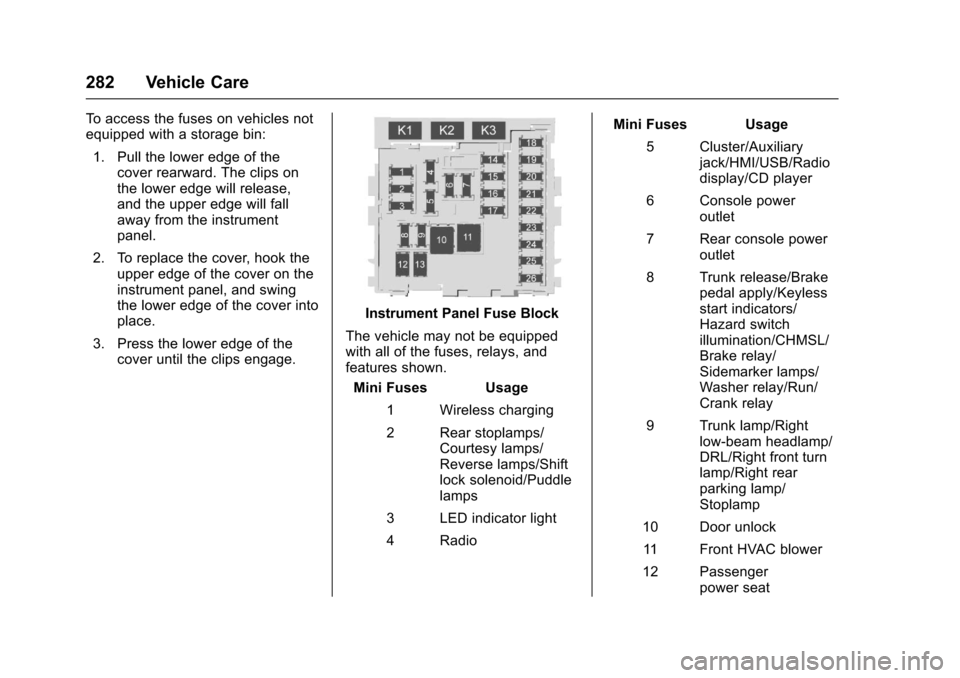
Instrument Panel Fuse Block
The vehicle may not be equipped
with all of the fuses, relays, and
features shown. Mini Fuses Usage
1 Wireless charging
2 Rear stoplamps/ Courtesy lamps/
Reverse lamps/Shift
lock solenoid/Puddle
lamps
3 LED indicator light
4 Radio Mini Fuses Usage
5 Cluster/Auxiliary jack/HMI/USB/Radio
display/CD player
6 Console power outlet
7 Rear console power outlet
8 Trunk release/Brake pedal apply/Keyless
start indicators/
Hazard switch
illumination/CHMSL/
Brake relay/
Sidemarker lamps/
Washer relay/Run/
Crank relay
9 Trunk lamp/Right low-beam headlamp/
DRL/Right front turn
lamp/Right rear
parking lamp/
Stoplamp
10 Door unlock 11 Front HVAC blower
12 Passenger power seat
Page 369 of 378

Chevrolet Impala Owner Manual (GMNA-Localizing-U.S./Canada-9921197) -
2017 - crc - 3/30/16
368 Index
Card ReaderSD . . . . . . . . . . . . . . . . . . . . . . . . . . . . 168
Cargo Management System . . . . . . . . . 102
Caution, Danger, and Warning . . . . 3
Center Console Storage . . . . . . . . 101
Chains, Tire . . . . . . . . . . . . . . . . . . . . 303
Charging Wireless . . . . . . . . . . . . . . . . . . . . . . .110
Charging System Light . . . . . . . . . 120
Check Ignition Transmission Lock . . . 271
Malfunction IndicatorEngine Light . . . . . . . . . . . . . . . . 120
Child Restraints Infants and Young Children . . . . . 83
Lower Anchors and Tethers
for Children . . . . . . . . . . . . . . . . . . . 88
Older Children . . . . . . . . . . . . . . . . . . 81
Securing . . . . . . . . . . . . . . . . . . . . 94, 96
Systems . . . . . . . . . . . . . . . . . . . . . . . . 85
Cleaning Exterior Care . . . . . . . . . . . . . . . . . 316
Interior Care . . . . . . . . . . . . . . . . . . 321
Climate Control Systems . . . . . . . 182
Air Conditioning . . . . . . . . . . . . . . 182
Dual Automatic . . . . . . . . . . . . . . . 185
Heating . . . . . . . . . . . . . . . . . . . . . . . 182 Clock . . . . . . . . . . . . . . . . . . . . . . 108, 109
Cluster, Instrument . . . . . . . . . . . . . 113
Collision Damage Repair . . . . . . . 349
Compact Spare Tire . . . . . . . . . . . . 310
Compartments
Storage . . . . . . . . . . . . . . . . . . . . . . . 100
Compass . . . . . . . . . . . . . . . . . . . . . . . 108
Messages . . . . . . . . . . . . . . . . . . . . 131
Connections OnStar
®. . . . . . . . . . . . . . . . . . . . . . 358
Control
Traction and ElectronicStability . . . . . . . . . . . . . . . . . . . . . 218
Control of a Vehicle . . . . . . . . . . . . . 193
Convenience Net . . . . . . . . . . . . . . . 103
Convex Mirrors . . . . . . . . . . . . . . . . . . 46
Coolant Engine . . . . . . . . . . . . . . . . . . . . . . . . 262
Engine Temperature Gauge . . .117
Cooling System . . . . . . . . . . . . . . . . . 261 Engine Messages . . . . . . . . . . . . 132
Courtesy Lamps . . . . . . . . . . . . . . . . 152
Courtesy Transportation Program . . . . . . . . . . . . . . . . . . . . . . . 348
Cruise Control . . . . . . . . . . . . . . . . . . 219
Light . . . . . . . . . . . . . . . . . . . . . . . . . . 127
Messages . . . . . . . . . . . . . . . . . . . . 131
Cruise Control, Adaptive . . . . . . . . 221 Cupholders . . . . . . . . . . . . . . . . . . . . . 101
Customer Assistance . . . . . . . . . . . 345
Offices . . . . . . . . . . . . . . . . . . . . . . . . 344
Text Telephone (TTY)Users . . . . . . . . . . . . . . . . . . . . . . . 345
Customer Information Service Publications
Ordering Information . . . . . . . . 351
Customer Satisfaction Procedure . . . . . . . . . . . . . . . . . . . . . 342
D
Damage Repair, Collision . . . . . . . 349
Danger, Warning, and Caution . . . . 3
Data CollectionInfotainment System . . . . . . . . . . 355
OnStar . . . . . . . . . . . . . . . . . . . . . . . 355
Data Recorders, Event . . . . . . . . . 354
Daytime Running Lamps (DRL) . . . . . . . . . . . . . . . . . . 150
Defensive Driving . . . . . . . . . . . . . . . 193
Delayed Locking . . . . . . . . . . . . . . . . . 40
Diagnostics
OnStar
®. . . . . . . . . . . . . . . . . . . . . . 360
Distracted Driving . . . . . . . . . . . . . . . 192
Dome Lamps . . . . . . . . . . . . . . . . . . . 153
Door Ajar Light . . . . . . . . . . . . . . . . . . . . . 127
Ajar Messages . . . . . . . . . . . . . . . 132
Page 376 of 378

Chevrolet Impala Owner Manual (GMNA-Localizing-U.S./Canada-9921197) -
2017 - crc - 3/30/16
Index 375
Seats (cont'd)Rear . . . . . . . . . . . . . . . . . . . . . . . . . . . . 61
Reclining Seatbacks . . . . . . . . . . . . 57
Securing Child Restraints . . . . 94, 96
Security
Light . . . . . . . . . . . . . . . . . . . . . . . . . . 126
Messages . . . . . . . . . . . . . . . . . . . . 137
OnStar
®. . . . . . . . . . . . . . . . . . . . . . 357
Vehicle . . . . . . . . . . . . . . . . . . . . . . . . . 43
Vehicle Alarm . . . . . . . . . . . . . . . . . . . 43
Service . . . . . . . . . . . . . . . . . . . . . . . . . 190 Accessories andModifications . . . . . . . . . . . . . . . . 251
Climate Control System . . . . . . . 182
Doing Your Own Work . . . . . . . . 251
Engine Soon Light . . . . . . . . . . . . 120
Maintenance Records . . . . . . . . 337
Maintenance, General
Information . . . . . . . . . . . . . . . . . . 325
Parts Identification Label . . . . . 338
Publications Ordering Information . . . . . . . . . . . . . . . . . . 351
Scheduling Appointments . . . . . 348
Vehicle Messages . . . . . . . . . . . . 137
Service Electric Parking Brake Light . . . . . . . . . . . . . . . . . . . . 123
Services Special Application . . . . . . . . . . . 332 Servicing the Airbag . . . . . . . . . . . . . 79
Shift Lock Control Function
Check, Automatic
Transmission . . . . . . . . . . . . . . . . . . 270
Shifting Into Park . . . . . . . . . . . . . . . . . . . . . . 209
Out of Park . . . . . . . . . . . . . . . . . . . 210
Side Blind Zone Alert (SBZA) . . . 235
Signals, Turn and Lane-Change . . . . . . . . . . . . . . . . . 152
Software Updates . . . . . . . . . . . . . . 161
Spare Tire
Compact . . . . . . . . . . . . . . . . . . . . . . 310
Special Application Services . . . . 332
Specifications and Capacities . . . . . . . . . . . . . . . . . . . . . 339
Speedometer . . . . . . . . . . . . . . . . . . . 116
StabiliTrak OFF Light . . . . . . . . . . . . . . . . . . . . . 125
Start Assist, Hill . . . . . . . . . . . . . . . . . 217
Start Vehicle, Remote . . . . . . . . . . . 36
Starter Switch Check . . . . . . . . . . . 270
Starting the Engine . . . . . . . . . . . . . 206
Starting the Vehicle Messages . . . . . . . . . . . . . . . . . . . . . 137
Steering . . . . . . . . . . . . . . . . . . . . . . . . 194 Heated Wheel . . . . . . . . . . . . . . . . 106
Wheel Adjustment . . . . . . . . . . . . 105 Steering (cont'd)
Wheel Controls . . . . . . . . . . . . . . . 106
Stoplamps and Back-up Lamps Bulb Replacement . . . . . . . . . . . . 275
Storage Areas Cargo ManagementSystem . . . . . . . . . . . . . . . . . . . . . . 102
Center Console . . . . . . . . . . . . . . . 101
Convenience Net . . . . . . . . . . . . . 103
Glove Box . . . . . . . . . . . . . . . . . . . . 101
Instrument Panel . . . . . . . . . . . . . 100
Umbrella . . . . . . . . . . . . . . . . . . . . . . 102
Storage Compartments . . . . . . . . . 100
Stuck Vehicle . . . . . . . . . . . . . . . . . . . 198
Summer Tires . . . . . . . . . . . . . . . . . . 285
Sun Visors . . . . . . . . . . . . . . . . . . . . . . . 50
Sunroof . . . . . . . . . . . . . . . . . . . . . . . . . . 50
Symbols . . . . . . . . . . . . . . . . . . . . . . . . . . 3
System Forward CollisionAlert (FCA) . . . . . . . . . . . . . . . . . . 231
Infotainment . . . . . . . . . . . . . 156, 355
Systems
Driver Assistance . . . . . . . . . . . . . 228