lock CHEVROLET IMPALA 2017 10.G Owners Manual
[x] Cancel search | Manufacturer: CHEVROLET, Model Year: 2017, Model line: IMPALA, Model: CHEVROLET IMPALA 2017 10.GPages: 378, PDF Size: 6.09 MB
Page 4 of 378
Chevrolet Impala Owner Manual (GMNA-Localizing-U.S./Canada-9921197) -
2017 - crc - 3/30/16
Introduction 3
Danger, Warning, and
Caution
Warning messages found on vehicle
labels and in this manual describe
hazards and what to do to avoid or
reduce them.
{Danger
Danger indicates a hazard with a
high level of risk which will result
in serious injury or death.
{Warning
Warning indicates a hazard that
could result in injury or death.
Caution
Caution indicates a hazard that
could result in property or vehicle
damage.
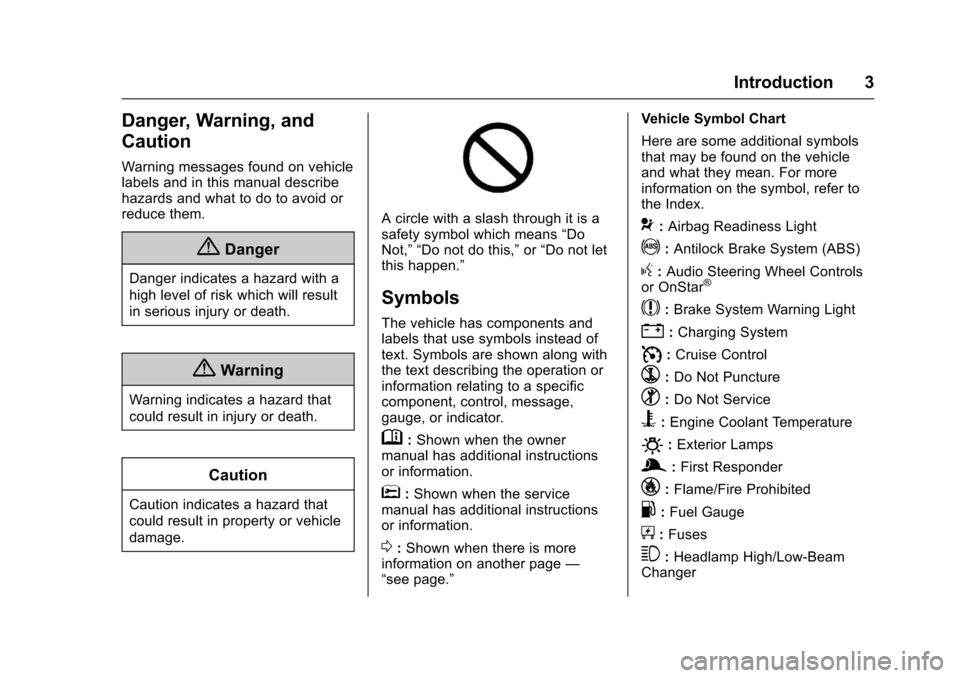
A circle with a slash through it is a
safety symbol which means“Do
Not,” “Do not do this,” or“Do not let
this happen.”
Symbols
The vehicle has components and
labels that use symbols instead of
text. Symbols are shown along with
the text describing the operation or
information relating to a specific
component, control, message,
gauge, or indicator.
M: Shown when the owner
manual has additional instructions
or information.
*: Shown when the service
manual has additional instructions
or information.
0: Shown when there is more
information on another page —
“see page.” Vehicle Symbol Chart
Here are some additional symbols
that may be found on the vehicle
and what they mean. For more
information on the symbol, refer to
the Index.
9:
Airbag Readiness Light
!:Antilock Brake System (ABS)
g: Audio Steering Wheel Controls
or OnStar®
$: Brake System Warning Light
":Charging System
I: Cruise Control
`:Do Not Puncture
^:Do Not Service
B:Engine Coolant Temperature
O:Exterior Lamps
g: First Responder
_:Flame/Fire Prohibited
.:Fuel Gauge
+: Fuses
3:Headlamp High/Low-Beam
Changer
Page 6 of 378
Chevrolet Impala Owner Manual (GMNA-Localizing-U.S./Canada-9921197) -
2017 - crc - 3/30/16
In Brief 5
In Brief
Instrument Panel
Instrument Panel . . . . . . . . . . . . . . . . 6
Initial Drive Information
Initial Drive Information . . . . . . . . . . 8
Stop/Start System . . . . . . . . . . . . . . . 8
Remote Keyless Entry (RKE)System . . . . . . . . . . . . . . . . . . . . . . . . 8
Remote Vehicle Start . . . . . . . . . . . 8
Door Locks . . . . . . . . . . . . . . . . . . . . . 9
Trunk . . . . . . . . . . . . . . . . . . . . . . . . . . 10
Windows . . . . . . . . . . . . . . . . . . . . . . . 10
Seat Adjustment . . . . . . . . . . . . . . . 10
Memory Features . . . . . . . . . . . . . . 12
Second Row Seats . . . . . . . . . . . . 13
Heated and Ventilated Seats . . . 13
Head Restraint Adjustment . . . . 13
Safety Belts . . . . . . . . . . . . . . . . . . . . 13
Passenger Sensing System . . . 14
Mirror Adjustment . . . . . . . . . . . . . . 14
Steering Wheel Adjustment . . . . 15
Interior Lighting . . . . . . . . . . . . . . . . 15
Exterior Lighting . . . . . . . . . . . . . . . 16
Windshield Wiper/Washer . . . . . . 17
Climate Controls . . . . . . . . . . . . . . . 17
Transmission . . . . . . . . . . . . . . . . . . 19
Vehicle Features
Infotainment System . . . . . . . . . . . 20
Radio(s) . . . . . . . . . . . . . . . . . . . . . . . 20
Satellite Radio . . . . . . . . . . . . . . . . . 20
Portable Audio Devices . . . . . . . . 21
Bluetooth
®. . . . . . . . . . . . . . . . . . . . . 21
Steering Wheel Controls . . . . . . . 21
Cruise Control . . . . . . . . . . . . . . . . . 22
Driver Information Center (DIC) . . . . . . . . . . . . . . . . . 22
Forward Collision Alert (FCA) System . . . . . . . . . . . . . . . . . . . . . . . 22
Forward Automatic Braking (FAB) . . . . . . . . . . . . . . . . 23
Lane Departure Warning (LDW) . . . . . . . . . . . . . . . 23
Lane Change Alert (LCA) . . . . . . 23
Rear Vision Camera (RVC) . . . . 23
Rear Cross Traffic Alert (RCTA) System . . . . . . . . . . . . . . . . . . . . . . . 23
Parking Assist . . . . . . . . . . . . . . . . . 23
Power Outlets . . . . . . . . . . . . . . . . . 24
Universal Remote System . . . . . 24
Sunroof . . . . . . . . . . . . . . . . . . . . . . . . 24
Performance and Maintenance
Traction Control/Electronic Stability Control . . . . . . . . . . . . . . 25
Tire Pressure Monitor . . . . . . . . . . 26
Fuel . . . . . . . . . . . . . . . . . . . . . . . . . . . 26
E85 or FlexFuel . . . . . . . . . . . . . . . . 26 Engine Oil Life System . . . . . . . . 26
Driving for Better Fuel
Economy . . . . . . . . . . . . . . . . . . . . . 27
Roadside Assistance Program . . . . . . . . . . . . . . . . . . . . . . 27
Page 8 of 378

Chevrolet Impala Owner Manual (GMNA-Localizing-U.S./Canada-9921197) -
2017 - crc - 3/30/16
In Brief 7
1.Instrument Panel Illumination
Control 0152.
2. Air Vents 0189.
3. Trunk Release. See Trunk 041.
Parking Assist Button. See
Assistance Systems for
Parking or Backing 0229 (If
Equipped).
Lane Departure Warning
(LDW) Button. See Lane
Departure Warning
(LDW) 0237.
4. Turn Signal Lever. See Turn
and Lane-Change
Signals 0152.
5. Instrument Cluster 0113.
Driver Information Center
(DIC) 0128.
6. Windshield Wiper/
Washer 0107.
7. Hazard Warning
Flashers 0151.
8. Light Sensor. See Automatic
Headlamp System 0151. 9. Storage Area with USB Port
Inside (If Equipped). See
Instrument Panel Storage
0100 andUSB Port 0165.
10. Infotainment 0156.
11. Climate Control
Systems 0182.
Dual Automatic Climate Control
System 0185.
12. Storage Area with Accessory Power Outlet Inside. See
Center Console Storage 0101
and Power Outlets 0109.
13. Heated and Ventilated Front
Seats 060 (If Equipped).
14. Traction Control/Electronic
Stability Control 0218.
15. Shift Lever. See Automatic
Transmission 0212.
16. Ignition Positions (Keyless
Access) 0204 orIgnition
Positions (Key Access) 0202.
17. Steering Wheel Controls 0106.
Driver Information Center
Buttons. See Driver Information
Center (DIC) 0128. 18.
Steering Wheel Controls 0106
(Out of View).
19. Horn 0106.
20. Steering Wheel
Adjustment 0105.
21. Cruise Control 0219 (If
Equipped).
Adaptive Cruise Control 0221
(If Equipped).
Heated Steering Wheel 0106
(If Equipped).
Forward Collision Alert (FCA)
System 0231 (If Equipped).
22. Instrument Panel Storage
0100 (If Equipped).
Fuse Cover. See Instrument
Panel Fuse Block 0281.
23. Hood Release. See Hood 0252.
24. Data Link Connector (Out of View). See Malfunction
Indicator Lamp (Check Engine
Light) 0120.
25. Electric Parking Brake 0215.
Page 9 of 378
Chevrolet Impala Owner Manual (GMNA-Localizing-U.S./Canada-9921197) -
2017 - crc - 3/30/16
8 In Brief
Initial Drive
Information
This section provides a brief
overview about some of the
important features that may or may
not be on your specific vehicle.
For more detailed information, refer
to each of the features which can be
found later in this owner manual.
Stop/Start System
The vehicle may have a fuel saving
stop/start system to shut off the
engine and help conserve fuel.
When the brakes are applied and
the vehicle is at a complete stop,
the engine may turn off. When the
brake pedal is released or the
accelerator pedal is pushed, the
engine will restart. SeeStarting the
Engine 0206.
Remote Keyless Entry
(RKE) System
The Remote Keyless Entry (RKE)
transmitter may work up to 60 m
(197 ft) away from the vehicle.
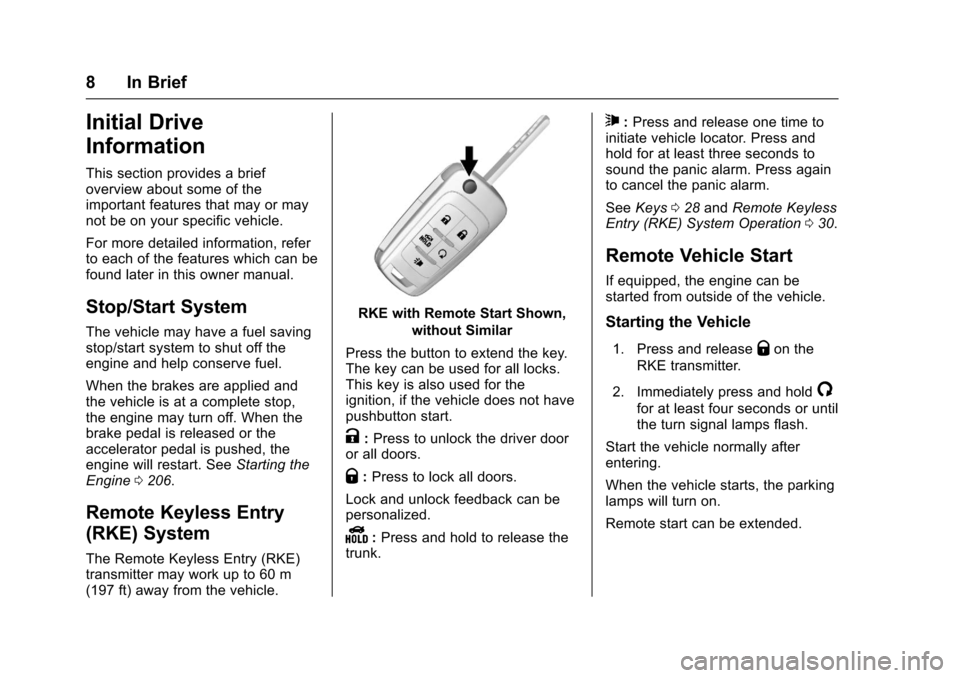
RKE with Remote Start Shown,
without Similar
Press the button to extend the key.
The key can be used for all locks.
This key is also used for the
ignition, if the vehicle does not have
pushbutton start.
K: Press to unlock the driver door
or all doors.
Q: Press to lock all doors.
Lock and unlock feedback can be
personalized.
Y: Press and hold to release the
trunk.
7: Press and release one time to
initiate vehicle locator. Press and
hold for at least three seconds to
sound the panic alarm. Press again
to cancel the panic alarm.
See Keys 028 and Remote Keyless
Entry (RKE) System Operation 030.
Remote Vehicle Start
If equipped, the engine can be
started from outside of the vehicle.
Starting the Vehicle
1. Press and releaseQon the
RKE transmitter.
2. Immediately press and hold
/
for at least four seconds or until
the turn signal lamps flash.
Start the vehicle normally after
entering.
When the vehicle starts, the parking
lamps will turn on.
Remote start can be extended.
Page 10 of 378
Chevrolet Impala Owner Manual (GMNA-Localizing-U.S./Canada-9921197) -
2017 - crc - 3/30/16
In Brief 9
Canceling a Remote Start
To cancel a remote start, do one of
the following:
.Press and hold
/until the
parking lamps turn off.
. Turn on the hazard warning
flashers.
. Turn the vehicle on and then off.
See Remote Vehicle Start 036.
Door Locks
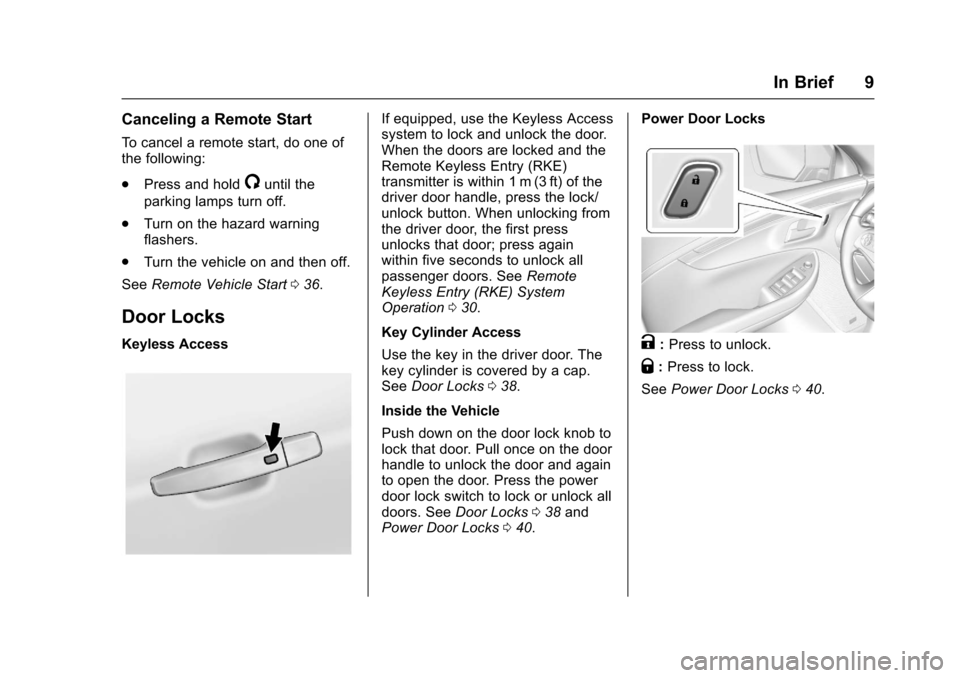
Keyless Access
If equipped, use the Keyless Access
system to lock and unlock the door.
When the doors are locked and the
Remote Keyless Entry (RKE)
transmitter is within 1 m (3 ft) of the
driver door handle, press the lock/
unlock button. When unlocking from
the driver door, the first press
unlocks that door; press again
within five seconds to unlock all
passenger doors. See Remote
Keyless Entry (RKE) System
Operation 030.
Key Cylinder Access
Use the key in the driver door. The
key cylinder is covered by a cap.
See Door Locks 038.
Inside the Vehicle
Push down on the door lock knob to
lock that door. Pull once on the door
handle to unlock the door and again
to open the door. Press the power
door lock switch to lock or unlock all
doors. See Door Locks 038 and
Power Door Locks 040. Power Door Locks
K:
Press to unlock.
Q: Press to lock.
See Power Door Locks 040.
Page 11 of 378
Chevrolet Impala Owner Manual (GMNA-Localizing-U.S./Canada-9921197) -
2017 - crc - 3/30/16
10 In Brief
Trunk
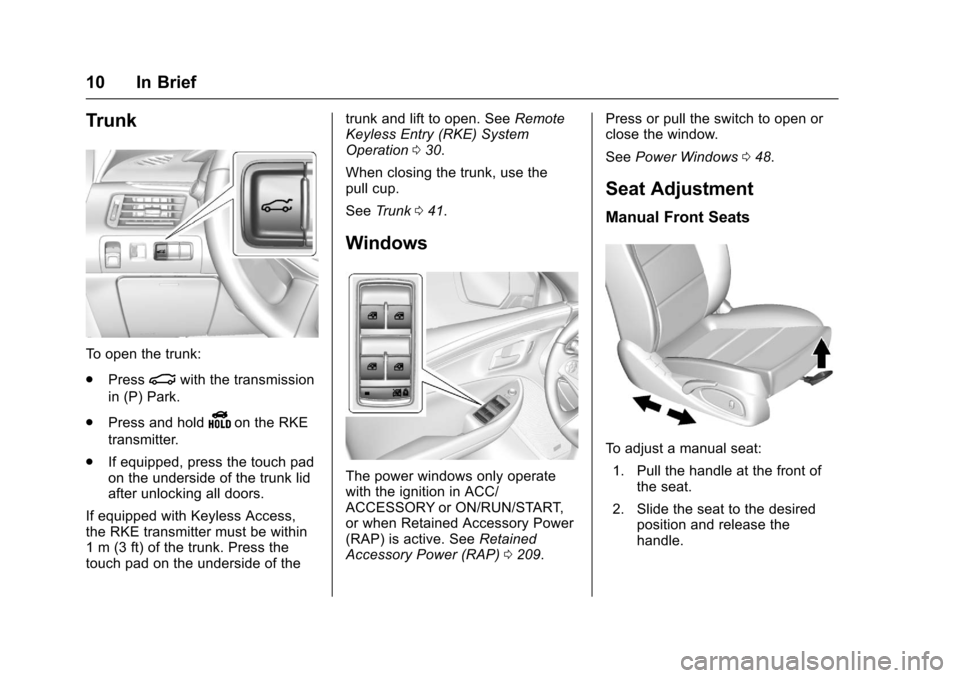
To open the trunk:
.Press
|with the transmission
in (P) Park.
. Press and hold
Yon the RKE
transmitter.
. If equipped, press the touch pad
on the underside of the trunk lid
after unlocking all doors.
If equipped with Keyless Access,
the RKE transmitter must be within
1 m (3 ft) of the trunk. Press the
touch pad on the underside of the trunk and lift to open. See
Remote
Keyless Entry (RKE) System
Operation 030.
When closing the trunk, use the
pull cup.
See Trunk 041.
Windows
The power windows only operate
with the ignition in ACC/
ACCESSORY or ON/RUN/START,
or when Retained Accessory Power
(RAP) is active. See Retained
Accessory Power (RAP) 0209. Press or pull the switch to open or
close the window.
See
Power Windows 048.
Seat Adjustment
Manual Front Seats
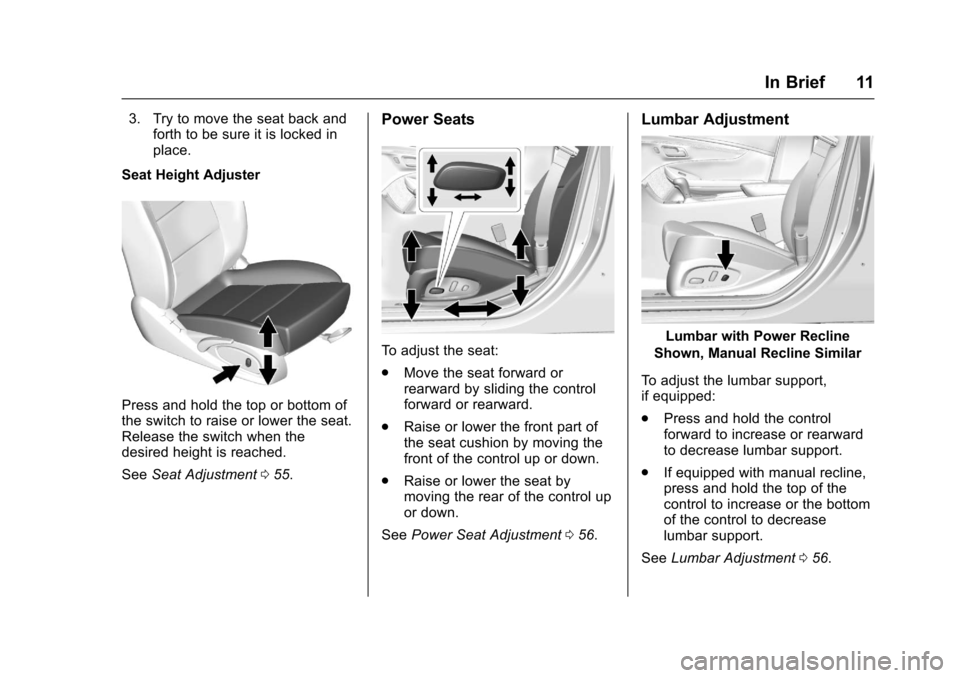
To adjust a manual seat:
1. Pull the handle at the front of the seat.
2. Slide the seat to the desired position and release the
handle.
Page 12 of 378
Chevrolet Impala Owner Manual (GMNA-Localizing-U.S./Canada-9921197) -
2017 - crc - 3/30/16
In Brief 11
3. Try to move the seat back andforth to be sure it is locked in
place.
Seat Height Adjuster
Press and hold the top or bottom of
the switch to raise or lower the seat.
Release the switch when the
desired height is reached.
See Seat Adjustment 055.
Power Seats
To adjust the seat:
.
Move the seat forward or
rearward by sliding the control
forward or rearward.
. Raise or lower the front part of
the seat cushion by moving the
front of the control up or down.
. Raise or lower the seat by
moving the rear of the control up
or down.
See Power Seat Adjustment 056.
Lumbar Adjustment
Lumbar with Power Recline
Shown, Manual Recline Similar
To adjust the lumbar support,
if equipped:
. Press and hold the control
forward to increase or rearward
to decrease lumbar support.
. If equipped with manual recline,
press and hold the top of the
control to increase or the bottom
of the control to decrease
lumbar support.
See Lumbar Adjustment 056.
Page 13 of 378
Chevrolet Impala Owner Manual (GMNA-Localizing-U.S./Canada-9921197) -
2017 - crc - 3/30/16
12 In Brief
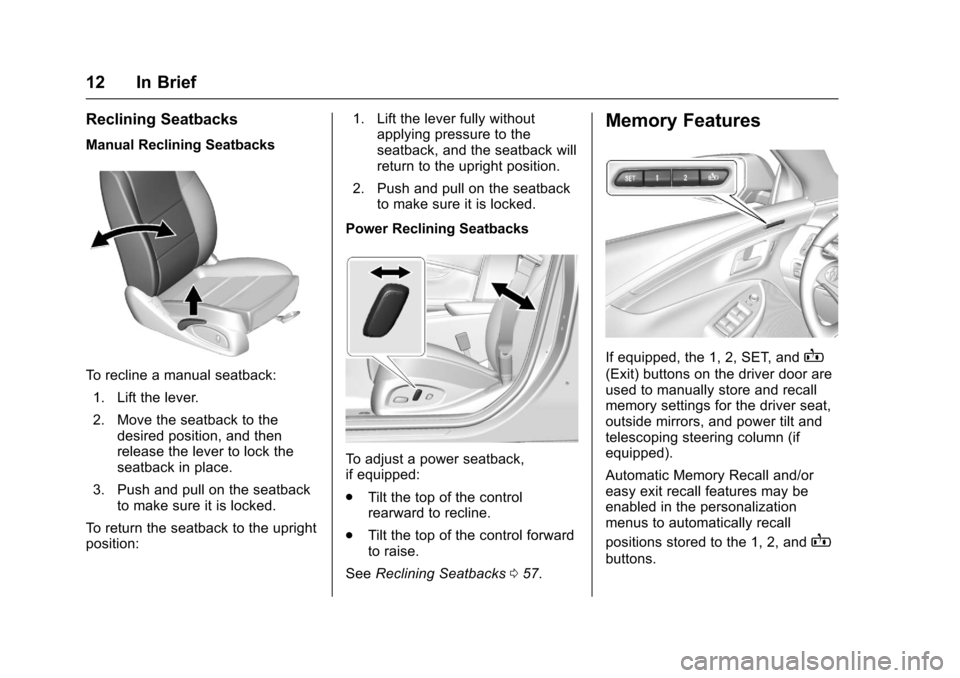
Reclining Seatbacks
Manual Reclining Seatbacks
To recline a manual seatback:1. Lift the lever.
2. Move the seatback to the desired position, and then
release the lever to lock the
seatback in place.
3. Push and pull on the seatback to make sure it is locked.
To return the seatback to the upright
position: 1. Lift the lever fully without
applying pressure to the
seatback, and the seatback will
return to the upright position.
2. Push and pull on the seatback to make sure it is locked.
Power Reclining Seatbacks
To adjust a power seatback,
if equipped:
. Tilt the top of the control
rearward to recline.
. Tilt the top of the control forward
to raise.
See Reclining Seatbacks 057.
Memory Features
If equipped, the 1, 2, SET, andB
(Exit) buttons on the driver door are
used to manually store and recall
memory settings for the driver seat,
outside mirrors, and power tilt and
telescoping steering column (if
equipped).
Automatic Memory Recall and/or
easy exit recall features may be
enabled in the personalization
menus to automatically recall
positions stored to the 1, 2, and
B
buttons.
Page 16 of 378
Chevrolet Impala Owner Manual (GMNA-Localizing-U.S./Canada-9921197) -
2017 - crc - 3/30/16
In Brief 15
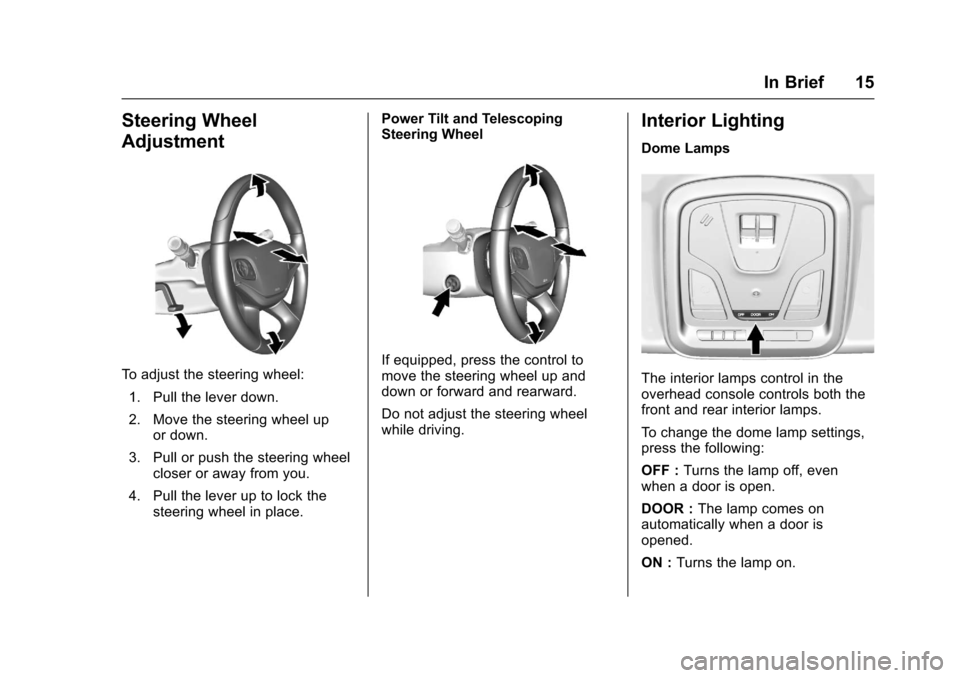
Steering Wheel
Adjustment
To adjust the steering wheel:1. Pull the lever down.
2. Move the steering wheel up or down.
3. Pull or push the steering wheel closer or away from you.
4. Pull the lever up to lock the steering wheel in place. Power Tilt and Telescoping
Steering WheelIf equipped, press the control to
move the steering wheel up and
down or forward and rearward.
Do not adjust the steering wheel
while driving.
Interior Lighting
Dome Lamps
The interior lamps control in the
overhead console controls both the
front and rear interior lamps.
To change the dome lamp settings,
press the following:
OFF :
Turns the lamp off, even
when a door is open.
DOOR : The lamp comes on
automatically when a door is
opened.
ON : Turns the lamp on.
Page 21 of 378
Chevrolet Impala Owner Manual (GMNA-Localizing-U.S./Canada-9921197) -
2017 - crc - 3/30/16
20 In Brief
Vehicle Features
Infotainment System
The base radio information is
included in this manual. See the
infotainment manual for information
on the uplevel radios, audio players,
phone, navigation system, and
voice or speech recognition. There
is also information on settings and
downloadable applications (if
equipped).
Radio(s)
O
:Press to turn the system on.
Press and hold to turn it off. When
on, press to mute; press again to
unmute. Turn to increase or
decrease the volume.
RADIO : Press to choose between
FM, AM, and SiriusXM
®,
if equipped.
MEDIA : Press to change the audio
source between USB, SD card,
and AUX.
{: Press to go to the Home Page.
MENU : Press to select a menu.
g:Press to seek the previous
station or track.
l: Press to seek the next station
or track.
See Overview 0158 about these
and other radio features.
Storing Radio Station Presets
Up to 25 preset stations from all
bands can be stored in the favorite
lists in any order. Up to five stations
can be stored in each favorite page
and the number of favorite pages
can be set.
To store the station to a position in
the list, while on the active source
main page, such as AM, FM,
or SiriusXM (if equipped), press and
hold a favorites/soft key button on
the faceplate.
See “Storing Radio Station Presets”
under AM-FM Radio 0162.
Setting the Clock
See Clock (Base Radio) 0108 or
Clock (Uplevel Radio) 0109.
Satellite Radio
Vehicles with a SiriusXM®satellite
radio tuner and a valid SiriusXM
satellite radio subscription can
receive SiriusXM programming.
SiriusXM Satellite Radio
Service
SiriusXM is a satellite radio service
based in the 48 contiguous United
States and 10 Canadian provinces.
SiriusXM satellite radio has a wide
variety of programming and
commercial-free music, coast to
coast, and in digital-quality sound.
A fee is required to receive the
SiriusXM service.
For more information refer to:
. www.siriusxm.com or call
1-888-601-6296 (U.S.).
. www.siriusxm.ca or call
1-877-438-9677 (Canada).
See Satellite Radio 0163.