Fan speed CHEVROLET IMPALA 2018 User Guide
[x] Cancel search | Manufacturer: CHEVROLET, Model Year: 2018, Model line: IMPALA, Model: CHEVROLET IMPALA 2018Pages: 345, PDF Size: 5.81 MB
Page 231 of 345
Chevrolet Impala Owner Manual (GMNA-Localizing-U.S./Canada-11348316) -
2018 - CRC - 8/22/17
230 Vehicle Care
SeeOverheated Engine Protection
Operating Mode 0230 for
information on driving to a safe
place in an emergency.
If No Steam Is Coming from
the Engine Compartment
If an engine overheat warning is
displayed but no steam can be seen
or heard, the problem might not be
too serious. Sometimes the engine
can get a little too hot when the
vehicle:
. Climbs a long hill on a hot day.
. Stops after high-speed driving.
. Idles for long periods in traffic.
. Tows a trailer.
If the overheat warning displays with
no sign of steam:
1. Turn the air conditioning off.
2. Turn the heater on to the highest temperature and to the
highest fan speed. Open the
windows as necessary. 3. When it is safe to do so, pull off
the road, shift to P (Park) or
N (Neutral), and let the
engine idle.
If the coolant temperature gauge is
no longer in the overheat zone, the
vehicle can be driven. Continue to
drive the vehicle slowly for about
10 minutes. Keep a safe vehicle
distance from the vehicle in front.
If the warning does not come back
on, continue to drive normally and
have the cooling system checked
for proper fill and function.
If the warning continues, pull over,
stop, and park the vehicle
right away.
If there is no sign of steam, idle the
engine for three minutes while
parked. If the warning is still
displayed, turn off the engine until it
cools down. Also, see Overheated
Engine Protection Operating Mode
0 230.
Overheated Engine
Protection
Operating Mode
This emergency operating mode
allows the vehicle to be driven to a
safe place in an emergency
situation. If an overheated engine
condition exists, an overheat
protection mode which alternates
firing groups of cylinders helps
prevent engine damage. In this
mode, there is significant loss in
power and engine performance.
The engine coolant temperature
gauge indicates if an overheat
condition exists. Driving extended
distances and/or towing a trailer in
the overheat protection mode
should be avoided.
Washer Fluid
What to Use
When windshield washer fluid is
needed, be sure to read the
manufacturer's instructions before
use. If operating the vehicle in an
area where the temperature may fall
Page 246 of 345
Chevrolet Impala Owner Manual (GMNA-Localizing-U.S./Canada-11348316) -
2018 - CRC - 8/22/17
Vehicle Care 245
The vehicle may not be equipped
with all of the fuses, relays, and
features shown.Fuses Usage
1 Transmission control module battery
2 Engine control module battery / A/C Clutch
3 A/C clutch
4 Engine control module battery
5 Engine control module/Ignition
6 Front wiper
7 Engine control module ignition
8 Ignition coils –even
9 Ignition coils –odd
10 Engine control module 11 Miscellaneous 1
12 Starter Fuses Usage
13 Transmission control module/Chassis
control module/
Ignition
14 Cabin Coolant pump
17 Body/Ignition 2
18 Battery disconnect unit/Ignition
19 Aeroshutter
20 Transmission auxiliary pump
21 Rear power window
22 Sunroof
23 Adaptive cruise control
24 Front power window
25 Retained accessory power
26 ABS pump
27 Electric parking brake
28 Rear defogger Fuses Usage
29 Passive entry/Passive start
30 Canister vent solenoid
31 Heated seat, driver
32 Body control module 6
33 Heated seat, passenger
34 ABS valve
35 Amplifier
37 Right high-beam headlamp
38 Left high-beam headlamp
41 Vacuum pump
42 Cooling fan high speed
44 Starter 2
45 Cooling fan low speed
46 Cooling fan control
47 Miscellaneous 2
49 Right HID headlamp
Page 247 of 345
Chevrolet Impala Owner Manual (GMNA-Localizing-U.S./Canada-11348316) -
2018 - CRC - 8/22/17
246 Vehicle Care
FusesUsage
50 Left HID headlamp
51 Horn/Dual horn
52 Display/Ignition
53 Body/Ignition
54 Instrument panel/ Ignition
55 Exterior rearview mirror
56 Front washer
60 Heated mirror
62 Obstacle detection
64 Rain sensor/Rear seat audio
66 Trunk release
67 Chassis control module
69 Battery voltage sensor
71 Memory seat
Relays Usage
1 A/C clutch Relays
Usage
2 Starter
4 Front wiper speed
5 Front wiper control
6 Cabin Coolant pump
7 Powertrain
8 Transmission auxiliary pump
9 Cooling fan high speed
10 Cooling fan low speed 11 Starter
13 Cooling fan control
14 Low-beam HID headlamp
15 Run/Crank
17 Rear defogger
Instrument Panel Fuse
Block
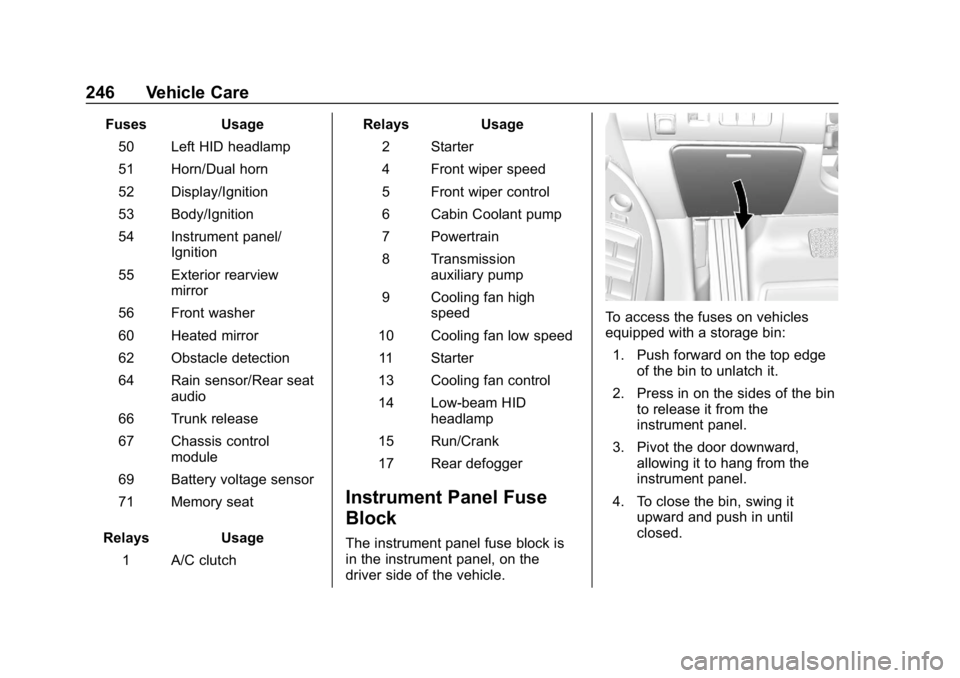
The instrument panel fuse block is
in the instrument panel, on the
driver side of the vehicle.
To access the fuses on vehicles
equipped with a storage bin: 1. Push forward on the top edge of the bin to unlatch it.
2. Press in on the sides of the bin to release it from the
instrument panel.
3. Pivot the door downward, allowing it to hang from the
instrument panel.
4. To close the bin, swing it upward and push in until
closed.
Page 279 of 345
Chevrolet Impala Owner Manual (GMNA-Localizing-U.S./Canada-11348316) -
2018 - CRC - 8/22/17
278 Vehicle Care
{Warning
An electric fan can start up even
when the engine is not running
and can injure you. Keep hands,
clothing, and tools away from any
underhood electric fan.
{Warning
Using a match near a battery can
cause battery gas to explode.
People have been hurt doing this,
and some have been blinded.
Use a flashlight if you need more
light.
Battery fluid contains acid that
can burn you. Do not get it on
you. If you accidentally get it in
your eyes or on your skin, flush
the place with water and get
medical help immediately.
{Warning
Fans or other moving engine
parts can injure you badly. Keep
your hands away from moving
parts once the engine is running.
5. Connect one end of the red positive (+) cable to the jump
start positive (+) terminal (1).
Use a remote positive (+)
terminal if the vehicle has one.
6. Do not let the other end of the red positive (+) cable touch
metal. Connect it to the
positive (+) terminal of the good
battery. Use a remote
positive (+) terminal if the
vehicle has one.
7. Connect one end of the black negative (–) cable to the
negative (–) terminal of the
good battery. Use a remote
negative (−) terminal if the
vehicle has one. Do not let the other end touch
anything until the next step.
The other end of the
negative (–) cable does not go
to the dead battery. It goes to a
remote negative (–) post on the
driver side shock tower.
8. Connect the other end of the black negative (–) cable to the
jump start negative (–)
grounding post (2).
9. Start the engine in the vehicle with the good battery and run
the engine at idle speed for at
least four minutes.
10. Try to start the vehicle that had the dead battery. If it will not
start after a few tries, it
probably needs service.
Caution
If the jumper cables are
connected or removed in the
wrong order, electrical shorting
may occur and damage the
vehicle. The repairs would not be
(Continued)
Page 338 of 345

Chevrolet Impala Owner Manual (GMNA-Localizing-U.S./Canada-11348316) -
2018 - CRC - 8/22/17
Index 337
FusesEngine Compartment Fuse
Block . . . . . . . . . . . . . . . . . . . . . . . . 243
Fuses and Circuit Breakers . . . 243
Instrument Panel Fuse Block . . . . . . . . . . . . . . . . . . . . . . . . 246
G
Garage Door Opener . . . . . . . . . . . 135Programming . . . . . . . . . . . . . . . . . 135
Gas Strut(s) . . . . . . . . . . . . . . . . . . . . 236
Gauges Engine CoolantTemperature . . . . . . . . . . . . . . . . .115
Fuel . . . . . . . . . . . . . . . . . . . . . . . . . . .114
Odometer . . . . . . . . . . . . . . . . . . . . . .113
Speedometer . . . . . . . . . . . . . . . . . .113
Tachometer . . . . . . . . . . . . . . . . . . . .113
Trip Odometer . . . . . . . . . . . . . . . . .113
Warning Lights and Indicators . . . . . . . . . . . . . . . . . . . 109
General Information Service and Maintenance . . . . . 291
Towing . . . . . . . . . . . . . . . . . . . . . . . . 206
Vehicle Care . . . . . . . . . . . . . . . . . . 214
Glove Box . . . . . . . . . . . . . . . . . . . . . . 100
GM Mobility Reimbursement
Program . . . . . . . . . . . . . . . . . . . . . . . 311
H
Halogen Bulbs . . . . . . . . . . . . . . . . . . 238
Hazard Warning Flashers . . . . . . . 141
Head Restraints . . . . . . . . . . . . . . . . . 50
HeadlampsAiming . . . . . . . . . . . . . . . . . . . . . . . . 237
Automatic . . . . . . . . . . . . . . . . . . . . . 141
Bulb Replacement . . . . . . . . . . . . 238
Daytime RunningLamps (DRL) . . . . . . . . . . . . . . . . 140
Flash-to-Pass . . . . . . . . . . . . . . . . . 140
Headlamps, Front Turn Signal, Sidemarker, and
Parking Lamps . . . . . . . . . . . . . . 238
High Intensity Discharge (HID) Lighting . . . . . . . . . . . . . . . 238
High-Beam On Light . . . . . . . . . . 124
High/Low Beam Changer . . . . . 140
Lamps On Reminder . . . . . . . . . 124
Heated Steering Wheel . . . . . . . . . . . . . . . 104
Heated and Ventilated Front Seats . . . . . . . . . . . . . . . . . . . . . . . . . . 59
Heated Mirrors . . . . . . . . . . . . . . . . . . . 44
Heater
Engine . . . . . . . . . . . . . . . . . . . . . . . . 171
Heating . . . . . . . . . . . . . . . . . . . . 147, 150 High Voltage Devices and
Wiring . . . . . . . . . . . . . . . . . . . . . . . . . 242
High-Beam On Light . . . . . . . . . . . . 124
High-Speed Operation . . . . . . . . . . 258
Hill and Mountain Roads . . . . . . . . 161
Hill Start Assist (HSA) . . . . . . . . . . 180
Hood . . . . . . . . . . . . . . . . . . . . . . . . . . . 216
Horn . . . . . . . . . . . . . . . . . . . . . . . . . . . . 104
How to Wear Seat Belts Properly . . . . . . . . . . . . . . . . . . . . . . . . 63
HVAC . . . . . . . . . . . . . . . . . . . . . . 147, 150
I
Ignition Positions . . . . . . . . . . . . . . . 167
Immobilizer . . . . . . . . . . . . . . . . . . . . . . 42
Indicator Vehicle Ahead . . . . . . . . . . . . . . . . 121
Infants and Young Children, Restraints . . . . . . . . . . . . . . . . . . . . . . 82
Infotainment . . . . . . . . . . . . . . . . . . . . 146
Infotainment System . . . . . . . . . . . . 320
Instrument Cluster . . . . . . . . . . . . . . 110
Instrument Panel Storage Area . . . . . . . . . . . . . . . . . . . 99
Interior Rearview Mirrors . . . . . . . . . 45
Introduction . . . . . . . . . . . . . . . . . . . . . . . 2