instrument panel CHEVROLET IMPALA 2018 Owner's Guide
[x] Cancel search | Manufacturer: CHEVROLET, Model Year: 2018, Model line: IMPALA, Model: CHEVROLET IMPALA 2018Pages: 345, PDF Size: 5.81 MB
Page 152 of 345
Chevrolet Impala Owner Manual (GMNA-Localizing-U.S./Canada-11348316) -
2018 - CRC - 8/22/17
Climate Controls 151
.Turn off the air conditioning
when it is not needed.
. Only use defrost when needed
to clear the windows.
Automatic Operation
The system automatically heats or
cools the vehicle to the desired
temperature:
. Fan Speed
. Air Delivery Mode
. Air Conditioning
. Recirculation
When AUTO is lit, all four functions
operate automatically. Each function
can also be manually set and the
setting is displayed. Functions not
manually set will continue to be
automatically controlled, even if the
AUTO indicator is not lit.
For automatic operation: 1. Press AUTO.
2. Set the temperature. Allow the system time to stabilize. Then
adjust the temperature as
needed for best comfort. To improve fuel efficiency and to
cool the vehicle faster, recirculation
may be automatically selected in
warm weather.
The recirculation light will not come
on when automatically controlled.
Press
hto manually select
recirculation; press it again to select
outside air.
Manual Operation
Driver and Passenger
Temperature Control : The
temperature can be adjusted
separately for the driver and
passenger.
Turn the knob clockwise or
counterclockwise to increase or
decrease the driver or passenger
temperature setting.
SYNC : Press to link all climate
zone settings to the driver settings.
The SYNC indicator light will turn
on. When the passenger settings
are adjusted, the SYNC indicator
light is off.
O: Press the knob to turn the fan
on or off. Fan Control :
Turn the knob
clockwise or counterclockwise to
increase or decrease the fan speed.
Press AUTO to return to automatic
operation.
Air Delivery Modes : Press
Y,\,
[, or-to change the direction of
the airflow. An indicator light comes
on in the selected mode button.
Changing the mode cancels the
automatic operation and the system
goes into manual mode. Press
AUTO to return to automatic
operation.
Y: Air is directed to the instrument
panel outlets.
\: Air is directed to the instrument
panel outlets and the floor outlets.
[: Air is directed to the floor
outlets.
-: Air is directed to the windshield
and floor outlets to clear the
windows of fog or moisture.
Page 154 of 345
Chevrolet Impala Owner Manual (GMNA-Localizing-U.S./Canada-11348316) -
2018 - CRC - 8/22/17
Climate Controls 153
on, see“Climate and Air Quality”
under Vehicle Personalization
0 128.
Rear Window Defogger
K:Press to turn the rear window
defogger on or off. An indicator light
on the button comes on to show that
the rear window defogger is on.
The upper region of gridlines on the
rear window are antenna lines and
are not intended to heat when the
defogger is activated.
If equipped with heated outside
mirrors, they turn on with the rear
window defogger and help to clear
fog or frost from the surface of the
mirror. See Heated Mirrors 044.
Caution
Using a razor blade or sharp
object on the inside rear window
can damage the antenna or
defogger. Repairs would not be
covered by the vehicle warranty.
Do not stick anything to the rear
window. Remote Start Climate Control
Operation :
If equipped with remote
start, the climate control system
may run when the vehicle is started
remotely. The system uses the
driver ’s previous settings to heat or
cool the inside of the vehicle. The
rear defog may come on during
remote start based on cold ambient
conditions. The rear defog indicator
light may not come on during a
remote start. The front heated seats
may turn on if it is cold outside. The
heated seat indicator lights may not
come on during a remote start.
See Remote Vehicle Start 034 and
Heated and Ventilated Front Seats
0 59, if equipped.
Sensors
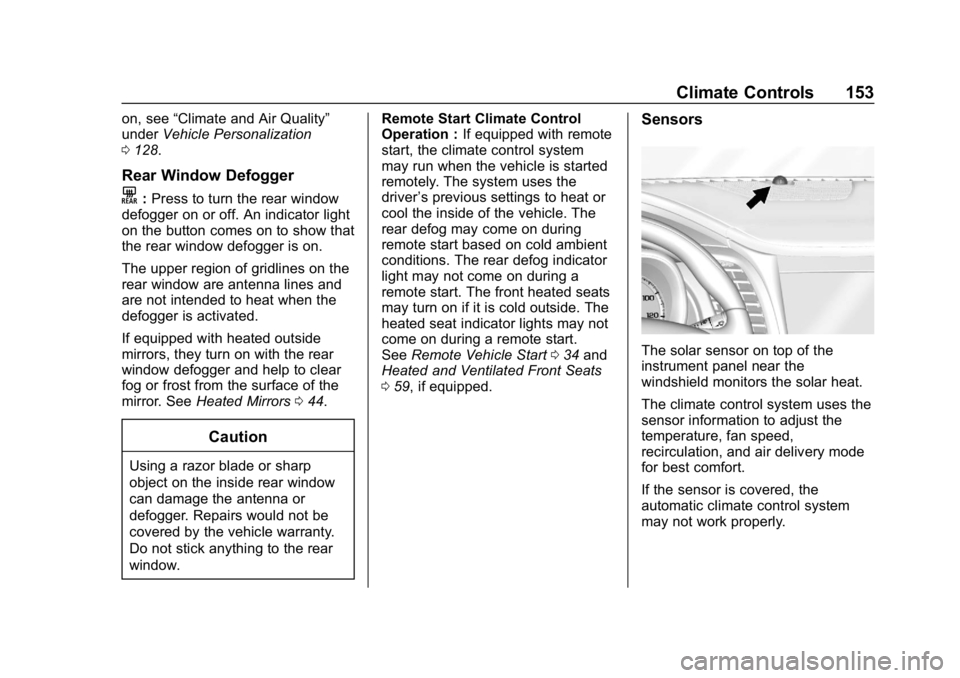
The solar sensor on top of the
instrument panel near the
windshield monitors the solar heat.
The climate control system uses the
sensor information to adjust the
temperature, fan speed,
recirculation, and air delivery mode
for best comfort.
If the sensor is covered, the
automatic climate control system
may not work properly.
Page 164 of 345
Chevrolet Impala Owner Manual (GMNA-Localizing-U.S./Canada-11348316) -
2018 - CRC - 8/22/17
Driving and Operating 163
Warning (Continued)
.Open a window about 5 cm
(2 in) on the vehicle side
that is away from the wind,
to bring in fresh air.
. Fully open the air outlets on
or under the instrument
panel.
. Adjust the climate control
system to circulate the air
inside the vehicle and set
the fan speed to the highest
setting. See “Climate
Control Systems.”
For more information about CO,
see Engine Exhaust 0174.
To save fuel, run the engine for
short periods to warm the vehicle
and then shut the engine off and
partially close the window. Moving
about to keep warm also helps.
If it takes time for help to arrive,
when running the engine, push the
accelerator pedal slightly so the
engine runs faster than the idle speed. This keeps the battery
charged to restart the vehicle and to
signal for help with the headlamps.
Do this as little as possible, to
save fuel.
If the Vehicle Is Stuck
Slowly and cautiously spin the
wheels to free the vehicle when
stuck in sand, mud, ice, or snow.
If stuck too severely for the traction
system to free the vehicle, turn the
traction system off and use the
rocking method. See
Traction
Control/Electronic Stability Control
0 181.
{Warning
If the vehicle's tires spin at high
speed, they can explode, and you
or others could be injured. The
vehicle can overheat, causing an
engine compartment fire or other
damage. Spin the wheels as little
as possible and avoid going
above 56 km/h (35 mph).
Rocking the Vehicle to Get
it Out
Turn the steering wheel left and
right to clear the area around the
front wheels. Turn off any traction
system. Shift back and forth
between R (Reverse) and a low
forward gear, spinning the wheels
as little as possible. To prevent
transmission wear, wait until the
wheels stop spinning before shifting
gears. Release the accelerator
pedal while shifting, and press
lightly on the accelerator pedal
when the transmission is in gear.
Slowly spinning the wheels in the
forward and reverse directions
causes a rocking motion that could
free the vehicle. If that does not get
the vehicle out after a few tries, it
might need to be towed out. If the
vehicle does need to be towed out,
see Towing the Vehicle 0279.
Vehicle Load Limits
It is very important to know how
much weight the vehicle can
carry. This weight is called the
Page 195 of 345
Chevrolet Impala Owner Manual (GMNA-Localizing-U.S./Canada-11348316) -
2018 - CRC - 8/22/17
194 Driving and Operating
Blocked sensors will not detect
objects and can also cause false
detections. Keep the sensors clean
of mud, dirt, snow, ice, and slush;
and clean sensors after a car wash
in freezing temperatures.
{Warning
The Parking Assist system does
not detect children, pedestrians,
bicyclists, animals, or objects
located below the bumper or that
are too close or too far from the
vehicle. It is not available at
speeds greater than 8 km/h
(5 mph). To prevent injury, death,
or vehicle damage, even with
Parking Assist, always check the
area around the vehicle and
check all mirrors before moving
forward or backing.The instrument cluster may have a
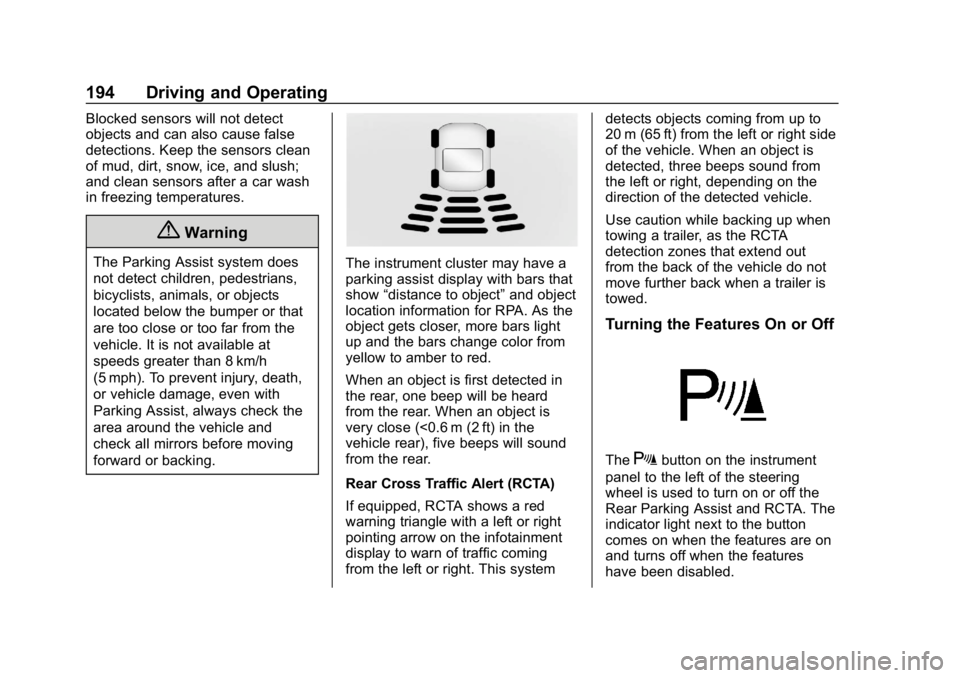
parking assist display with bars that
show“distance to object” and object
location information for RPA. As the
object gets closer, more bars light
up and the bars change color from
yellow to amber to red.
When an object is first detected in
the rear, one beep will be heard
from the rear. When an object is
very close (<0.6 m (2 ft) in the
vehicle rear), five beeps will sound
from the rear.
Rear Cross Traffic Alert (RCTA)
If equipped, RCTA shows a red
warning triangle with a left or right
pointing arrow on the infotainment
display to warn of traffic coming
from the left or right. This system detects objects coming from up to
20 m (65 ft) from the left or right side
of the vehicle. When an object is
detected, three beeps sound from
the left or right, depending on the
direction of the detected vehicle.
Use caution while backing up when
towing a trailer, as the RCTA
detection zones that extend out
from the back of the vehicle do not
move further back when a trailer is
towed.
Turning the Features On or Off
TheXbutton on the instrument
panel to the left of the steering
wheel is used to turn on or off the
Rear Parking Assist and RCTA. The
indicator light next to the button
comes on when the features are on
and turns off when the features
have been disabled.
Page 202 of 345
Chevrolet Impala Owner Manual (GMNA-Localizing-U.S./Canada-11348316) -
2018 - CRC - 8/22/17
Driving and Operating 201
Warning (Continued)
the windshield or
headlamps are blocked by
dirt, snow, or ice; if they are
not in proper condition; or if
the sun shines directly into
the camera.
. Detect road edges.
. Detect lanes on winding or
hilly roads.
If LDW only detects lane
markings on one side of the road,
it will only warn you when
departing the lane on the side
where it has detected a lane
marking. Always keep your
attention on the road and
maintain proper vehicle position
within the lane, or vehicle
damage, injury, or death could
occur. Always keep the
windshield, headlamps, and
camera sensors clean and in
good repair. Do not use LDW in
bad weather conditions.
How the System Works
The LDW camera sensor is on the
windshield ahead of the rearview
mirror.
To turn LDW on and off, press
@on
the instrument panel to the left of
the steering wheel. The control
indicator will light when LDW is on.
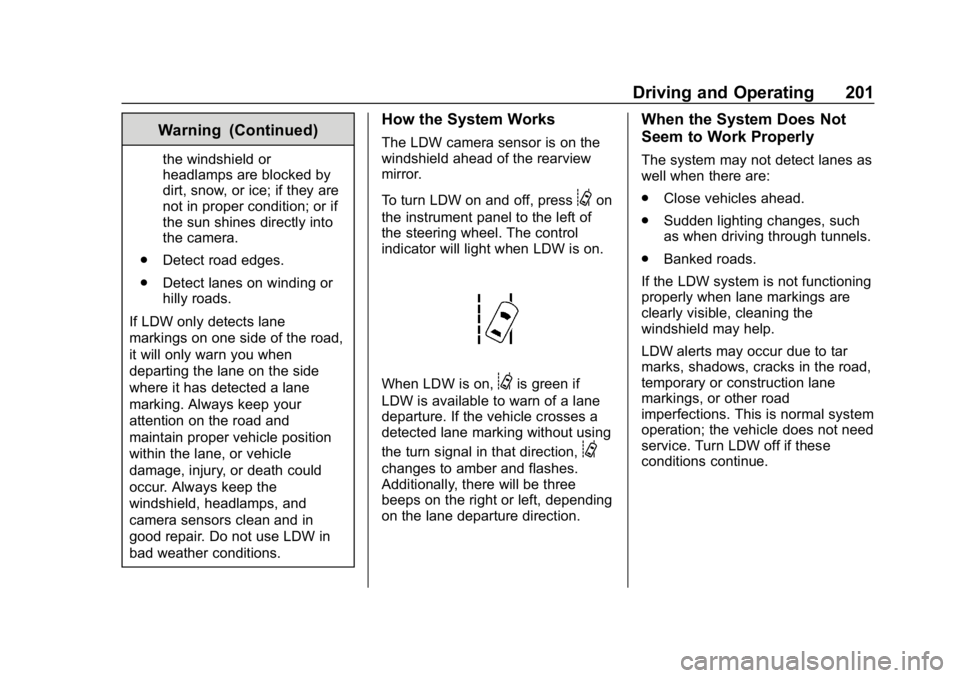
When LDW is on,@is green if
LDW is available to warn of a lane
departure. If the vehicle crosses a
detected lane marking without using
the turn signal in that direction,
@
changes to amber and flashes.
Additionally, there will be three
beeps on the right or left, depending
on the lane departure direction.
When the System Does Not
Seem to Work Properly
The system may not detect lanes as
well when there are:
. Close vehicles ahead.
. Sudden lighting changes, such
as when driving through tunnels.
. Banked roads.
If the LDW system is not functioning
properly when lane markings are
clearly visible, cleaning the
windshield may help.
LDW alerts may occur due to tar
marks, shadows, cracks in the road,
temporary or construction lane
markings, or other road
imperfections. This is normal system
operation; the vehicle does not need
service. Turn LDW off if these
conditions continue.
Page 208 of 345
Chevrolet Impala Owner Manual (GMNA-Localizing-U.S./Canada-11348316) -
2018 - CRC - 8/22/17
Driving and Operating 207
.Do not tow a trailer during the
first 800 km (500 mi) to prevent
damage to the engine, axle,
or other parts.
. Then during the first 800 km
(500 mi) of trailer towing, do not
drive over 80 km/h (50 mph) and
do not make starts at full throttle.
. Vehicles can tow in D (Drive).
Shift the transmission to a lower
gear if the transmission shifts
too often under heavy loads and/
or hilly conditions.
. Do not use Adaptive Cruise
Control when towing.
. The Forward Automatic Braking
System should be set to Off
when towing. See Forward
Automatic Braking (FAB) 0197.
. Turn off Parking Assist when
towing.{Warning
When towing a trailer, exhaust
gases may collect at the rear of
the vehicle and enter if the
liftgate, trunk/hatch, or rear-most
window is open.
When towing a trailer:
. Do not drive with the
liftgate, trunk/hatch,
or rear-most window open.
. Fully open the air outlets on
or under the instrument
panel.
. Also adjust the climate
control system to a setting
that brings in only outside
air. See “Climate Control
Systems” in the Index.
For more information about
carbon monoxide, see Engine
Exhaust 0174.
Towing a trailer requires a certain
amount of experience. The
combination you are driving is longer and not as responsive as the
vehicle itself. Get acquainted with
the handling and braking of the rig
before setting out for the open road.
Before starting, check all trailer hitch
parts and attachments, safety
chains, electrical connectors, lamps,
tires, and mirrors. If the trailer has
electric brakes, start the
combination moving and then apply
the trailer brake controller by hand
to be sure the brakes work.
During the trip, check occasionally
to be sure that the load is secure
and the lamps and any trailer
brakes still work.
Following Distance
Stay at least twice as far behind the
vehicle ahead as you would when
driving the vehicle without a trailer.
This can help to avoid heavy
braking and sudden turns.
Passing
More passing distance is needed
when towing a trailer. The
combination will not accelerate as
quickly and is longer so it is
Page 214 of 345
Chevrolet Impala Owner Manual (GMNA-Localizing-U.S./Canada-11348316) -
2018 - CRC - 8/22/17
Vehicle Care 213
Vehicle Care
General Information
General Information . . . . . . . . . . 214
California Proposition65 Warning . . . . . . . . . . . . . . . . . 214
California Perchlorate Materials Requirements . . . . . 215
Accessories and Modifications . . . . . . . . . . . . . . . . 215
Vehicle Checks
Doing Your OwnService Work . . . . . . . . . . . . . . . 215
Hood . . . . . . . . . . . . . . . . . . . . . . . . . 216
Engine Compartment Overview . . . . . . . . . . . . . . . . . . . . 217
Engine Oil . . . . . . . . . . . . . . . . . . . . 220
Engine Oil Life System . . . . . . . 222
Automatic Transmission Fluid . . . . . . . . . . . . . . . . . . . . . . . . 223
Engine Air Cleaner/Filter . . . . . . 224
Cooling System . . . . . . . . . . . . . . 225
Engine Overheating . . . . . . . . . . 229
Overheated Engine Protection Operating Mode . . . . . . . . . . . . . 230
Washer Fluid . . . . . . . . . . . . . . . . . 230
Brakes . . . . . . . . . . . . . . . . . . . . . . . 231
Brake Fluid . . . . . . . . . . . . . . . . . . . 232 Battery - North America . . . . . . 233
Starter Switch Check . . . . . . . . . 234
Automatic Transmission Shift
Lock Control Function
Check . . . . . . . . . . . . . . . . . . . . . . . 235
Park Brake and P (Park) Mechanism Check . . . . . . . . . . 235
Wiper Blade Replacement . . . . 235
Windshield Replacement . . . . . 236
Gas Strut(s) . . . . . . . . . . . . . . . . . . 236
Headlamp Aiming
Headlamp Aiming . . . . . . . . . . . . 237
Bulb Replacement
Bulb Replacement . . . . . . . . . . . . 238
Halogen Bulbs . . . . . . . . . . . . . . . . 238
High Intensity Discharge (HID) Lighting . . . . . . . . . . . . . . . . . . . . . 238
LED Lighting . . . . . . . . . . . . . . . . . 238
Headlamps, Front Turn Signal, Sidemarker, and Parking
Lamps . . . . . . . . . . . . . . . . . . . . . . 238
Taillamps, Turn Signal, Stoplamps, and Back-Up
Lamps . . . . . . . . . . . . . . . . . . . . . . 240
License Plate Lamp . . . . . . . . . . 241
Electrical System
High Voltage Devices and Wiring . . . . . . . . . . . . . . . . . . . . . . . 242 Electrical System Overload . . . 242
Fuses and Circuit Breakers . . . 243
Engine Compartment Fuse
Block . . . . . . . . . . . . . . . . . . . . . . . . 243
Instrument Panel Fuse
Block . . . . . . . . . . . . . . . . . . . . . . . . 246
Wheels and Tires
Tires . . . . . . . . . . . . . . . . . . . . . . . . . . 248
All-Season Tires . . . . . . . . . . . . . . 249
Winter Tires . . . . . . . . . . . . . . . . . . 250
Low-Profile Tires . . . . . . . . . . . . . 250
Summer Tires . . . . . . . . . . . . . . . . 250
Tire Sidewall Labeling . . . . . . . . 251
Tire Designations . . . . . . . . . . . . . 253
Tire Terminology andDefinitions . . . . . . . . . . . . . . . . . . 254
Tire Pressure . . . . . . . . . . . . . . . . . 256
Tire Pressure for High-Speed Operation . . . . . . . . . . . . . . . . . . . 258
Tire Pressure Monitor System . . . . . . . . . . . . . . . . . . . . . . 258
Tire Pressure Monitor Operation . . . . . . . . . . . . . . . . . . . 259
Tire Inspection . . . . . . . . . . . . . . . . 262
Tire Rotation . . . . . . . . . . . . . . . . . 262
When It Is Time for New Tires . . . . . . . . . . . . . . . . . . . . . . . . 263
Buying New Tires . . . . . . . . . . . . . 264
Different Size Tires and Wheels . . . . . . . . . . . . . . . . . . . . . . 265
Page 217 of 345
Chevrolet Impala Owner Manual (GMNA-Localizing-U.S./Canada-11348316) -
2018 - CRC - 8/22/17
216 Vehicle Care
Keep a record with all parts receipts
and list the mileage and the date of
any service work performed. See
Maintenance Records0303.
Caution
Even small amounts of
contamination can cause damage
to vehicle systems. Do not allow
contaminants to contact the fluids,
reservoir caps, or dipsticks.
Hood
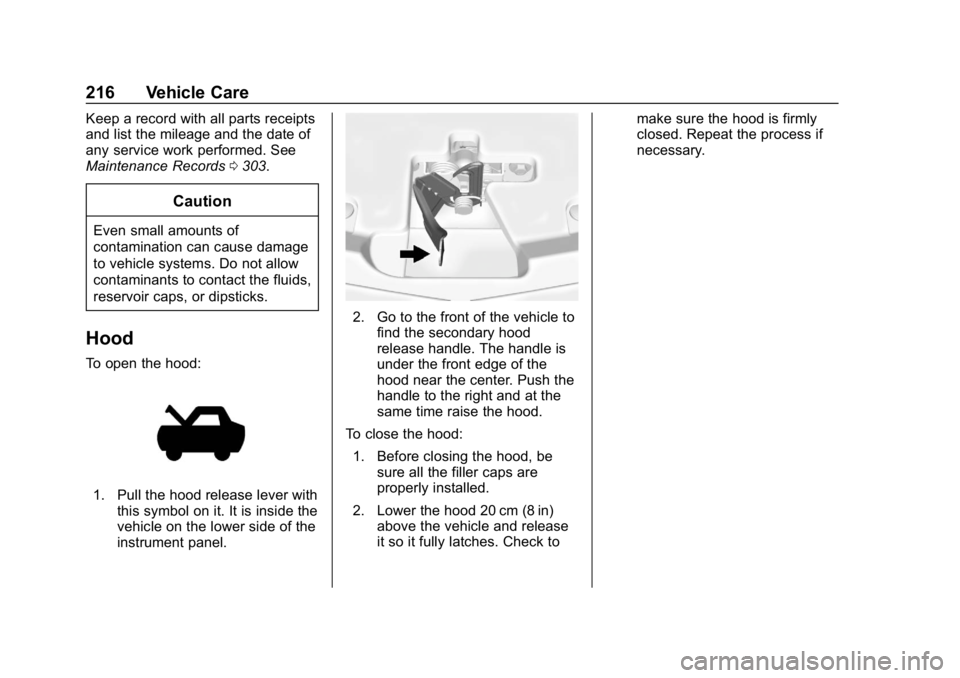
To open the hood:
1. Pull the hood release lever with
this symbol on it. It is inside the
vehicle on the lower side of the
instrument panel.
2. Go to the front of the vehicle tofind the secondary hood
release handle. The handle is
under the front edge of the
hood near the center. Push the
handle to the right and at the
same time raise the hood.
To close the hood: 1. Before closing the hood, be sure all the filler caps are
properly installed.
2. Lower the hood 20 cm (8 in) above the vehicle and release
it so it fully latches. Check to make sure the hood is firmly
closed. Repeat the process if
necessary.
Page 247 of 345
Chevrolet Impala Owner Manual (GMNA-Localizing-U.S./Canada-11348316) -
2018 - CRC - 8/22/17
246 Vehicle Care
FusesUsage
50 Left HID headlamp
51 Horn/Dual horn
52 Display/Ignition
53 Body/Ignition
54 Instrument panel/ Ignition
55 Exterior rearview mirror
56 Front washer
60 Heated mirror
62 Obstacle detection
64 Rain sensor/Rear seat audio
66 Trunk release
67 Chassis control module
69 Battery voltage sensor
71 Memory seat
Relays Usage
1 A/C clutch Relays
Usage
2 Starter
4 Front wiper speed
5 Front wiper control
6 Cabin Coolant pump
7 Powertrain
8 Transmission auxiliary pump
9 Cooling fan high speed
10 Cooling fan low speed 11 Starter
13 Cooling fan control
14 Low-beam HID headlamp
15 Run/Crank
17 Rear defogger
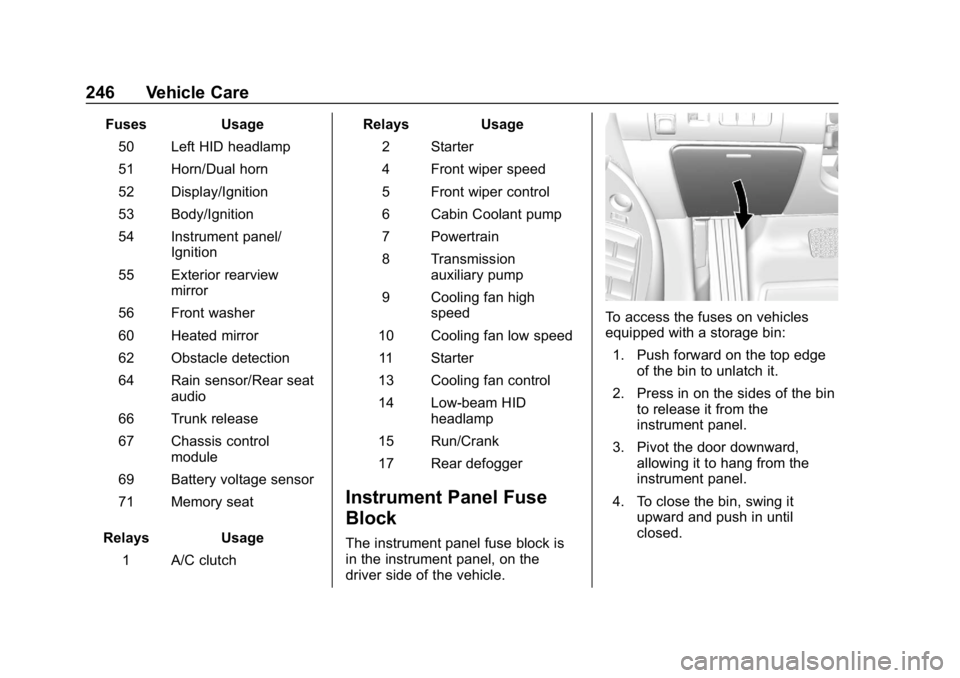
Instrument Panel Fuse
Block
The instrument panel fuse block is
in the instrument panel, on the
driver side of the vehicle.
To access the fuses on vehicles
equipped with a storage bin: 1. Push forward on the top edge of the bin to unlatch it.
2. Press in on the sides of the bin to release it from the
instrument panel.
3. Pivot the door downward, allowing it to hang from the
instrument panel.
4. To close the bin, swing it upward and push in until
closed.
Page 248 of 345
Chevrolet Impala Owner Manual (GMNA-Localizing-U.S./Canada-11348316) -
2018 - CRC - 8/22/17
Vehicle Care 247
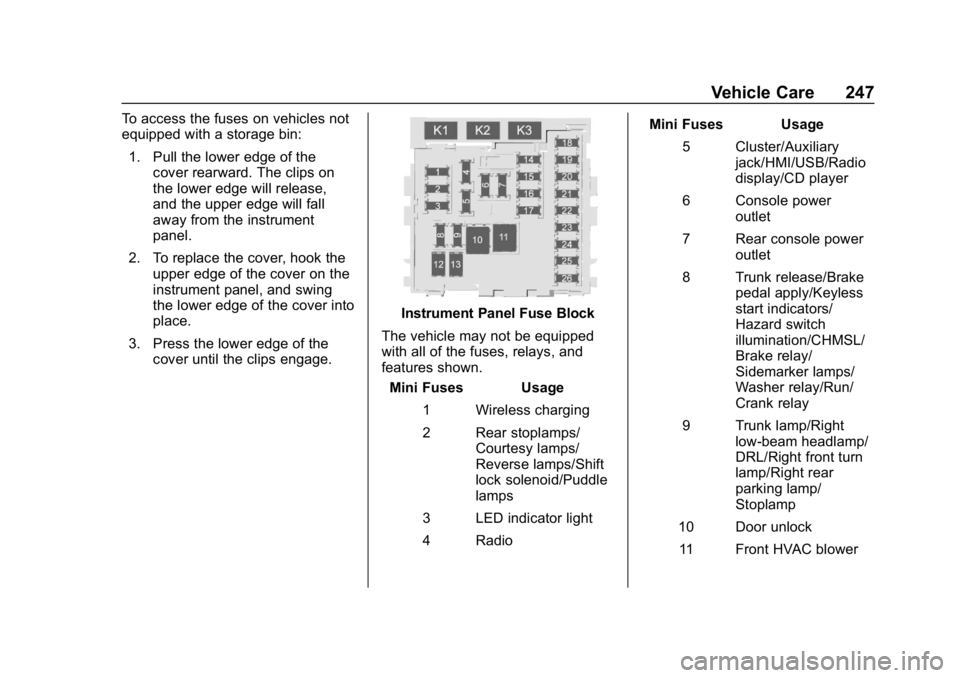
To access the fuses on vehicles not
equipped with a storage bin:1. Pull the lower edge of the cover rearward. The clips on
the lower edge will release,
and the upper edge will fall
away from the instrument
panel.
2. To replace the cover, hook the upper edge of the cover on the
instrument panel, and swing
the lower edge of the cover into
place.
3. Press the lower edge of the cover until the clips engage.
Instrument Panel Fuse Block
The vehicle may not be equipped
with all of the fuses, relays, and
features shown. Mini Fuses Usage
1 Wireless charging
2 Rear stoplamps/ Courtesy lamps/
Reverse lamps/Shift
lock solenoid/Puddle
lamps
3 LED indicator light
4 Radio Mini Fuses Usage
5 Cluster/Auxiliary jack/HMI/USB/Radio
display/CD player
6 Console power outlet
7 Rear console power outlet
8 Trunk release/Brake pedal apply/Keyless
start indicators/
Hazard switch
illumination/CHMSL/
Brake relay/
Sidemarker lamps/
Washer relay/Run/
Crank relay
9 Trunk lamp/Right low-beam headlamp/
DRL/Right front turn
lamp/Right rear
parking lamp/
Stoplamp
10 Door unlock 11 Front HVAC blower