remote start CHEVROLET IMPALA 2018 Owner's Guide
[x] Cancel search | Manufacturer: CHEVROLET, Model Year: 2018, Model line: IMPALA, Model: CHEVROLET IMPALA 2018Pages: 345, PDF Size: 5.81 MB
Page 170 of 345
Chevrolet Impala Owner Manual (GMNA-Localizing-U.S./Canada-11348316) -
2018 - CRC - 8/22/17
Driving and Operating 169
The ignition will switch from ACC/
ACCESSORY to off after
five minutes to prevent battery
rundown.
ON/RUN/START (Green Indicator
Light) :This mode is for driving and
starting. With the ignition off, and
the brake pedal applied, pressing
the button once will place the
ignition system in ON/RUN/START.
Once engine cranking begins,
release the button. Engine cranking
will continue until the engine starts.
See Starting the Engine 0169. The
ignition will then remain in ON/RUN.
Service Mode
This power mode is available for
service and diagnostics, and to
verify the proper operation of the
malfunction indicator lamp as may
be required for emission inspection
purposes. With the vehicle off, and
the brake pedal not applied,
pressing and holding ENGINE
START/STOP for more than
five seconds will place the vehicle in
Service Mode. The instruments and
audio systems will operate as they
do in ON/RUN, but the vehicle will not be able to be driven. The engine
will not start in Service Mode. Press
ENGINE START/STOP again to turn
the vehicle off.
Starting the Engine
Move the shift lever to P (Park) or
N (Neutral). To restart the engine
when the vehicle is already moving,
use N (Neutral) only.
Caution
Do not try to shift to P (Park) if the
vehicle is moving. If you do, you
could damage the transmission.
Shift to P (Park) only when the
vehicle is stopped.
Caution
If you add electrical parts or
accessories, you could change
the way the engine operates. Any
resulting damage would not be
(Continued)
Caution (Continued)
covered by the vehicle warranty.
SeeAdd-On Electrical Equipment
0 211.
Starting Procedure 1. The Remote Keyless Entry (RKE) transmitter must
be in the vehicle. Press
ENGINE START/STOP with the
brake pedal applied. The
engine will continue cranking
until it starts.
The idle speed will go down as
the engine gets warm. Do not
race the engine immediately
after starting it.
If the RKE transmitter is not in
the vehicle, if there is
interference, or if the RKE
battery is low, a Driver
Information Center (DIC)
message will display. See
Driver Information Center (DIC)
0125.
Page 278 of 345
Chevrolet Impala Owner Manual (GMNA-Localizing-U.S./Canada-11348316) -
2018 - CRC - 8/22/17
Vehicle Care 277
Caution
Ignoring these steps could result
in costly damage to the vehicle
that would not be covered by the
vehicle warranty. Trying to start
the vehicle by pushing or pulling it
will not work, and it could damage
the vehicle.
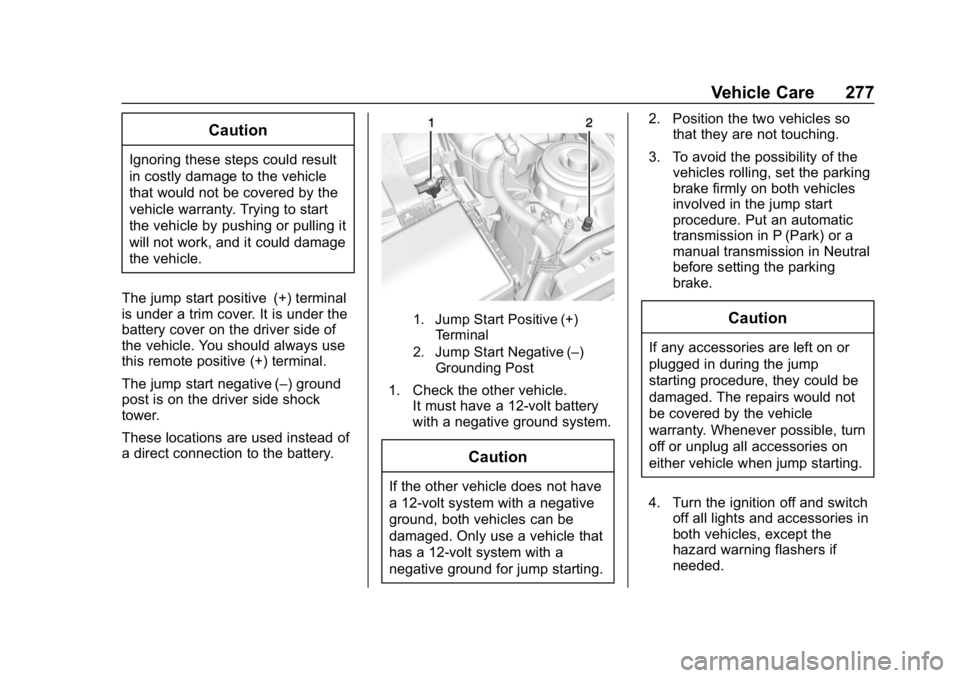
The jump start positive (+) terminal
is under a trim cover. It is under the
battery cover on the driver side of
the vehicle. You should always use
this remote positive (+) terminal.
The jump start negative (–) ground
post is on the driver side shock
tower.
These locations are used instead of
a direct connection to the battery.
1. Jump Start Positive (+) Terminal
2. Jump Start Negative (–) Grounding Post
1. Check the other vehicle. It must have a 12-volt battery
with a negative ground system.
Caution
If the other vehicle does not have
a 12-volt system with a negative
ground, both vehicles can be
damaged. Only use a vehicle that
has a 12-volt system with a
negative ground for jump starting. 2. Position the two vehicles so
that they are not touching.
3. To avoid the possibility of the vehicles rolling, set the parking
brake firmly on both vehicles
involved in the jump start
procedure. Put an automatic
transmission in P (Park) or a
manual transmission in Neutral
before setting the parking
brake.
Caution
If any accessories are left on or
plugged in during the jump
starting procedure, they could be
damaged. The repairs would not
be covered by the vehicle
warranty. Whenever possible, turn
off or unplug all accessories on
either vehicle when jump starting.
4. Turn the ignition off and switch off all lights and accessories in
both vehicles, except the
hazard warning flashers if
needed.
Page 279 of 345
Chevrolet Impala Owner Manual (GMNA-Localizing-U.S./Canada-11348316) -
2018 - CRC - 8/22/17
278 Vehicle Care
{Warning
An electric fan can start up even
when the engine is not running
and can injure you. Keep hands,
clothing, and tools away from any
underhood electric fan.
{Warning
Using a match near a battery can
cause battery gas to explode.
People have been hurt doing this,
and some have been blinded.
Use a flashlight if you need more
light.
Battery fluid contains acid that
can burn you. Do not get it on
you. If you accidentally get it in
your eyes or on your skin, flush
the place with water and get
medical help immediately.
{Warning
Fans or other moving engine
parts can injure you badly. Keep
your hands away from moving
parts once the engine is running.
5. Connect one end of the red positive (+) cable to the jump
start positive (+) terminal (1).
Use a remote positive (+)
terminal if the vehicle has one.
6. Do not let the other end of the red positive (+) cable touch
metal. Connect it to the
positive (+) terminal of the good
battery. Use a remote
positive (+) terminal if the
vehicle has one.
7. Connect one end of the black negative (–) cable to the
negative (–) terminal of the
good battery. Use a remote
negative (−) terminal if the
vehicle has one. Do not let the other end touch
anything until the next step.
The other end of the
negative (–) cable does not go
to the dead battery. It goes to a
remote negative (–) post on the
driver side shock tower.
8. Connect the other end of the black negative (–) cable to the
jump start negative (–)
grounding post (2).
9. Start the engine in the vehicle with the good battery and run
the engine at idle speed for at
least four minutes.
10. Try to start the vehicle that had the dead battery. If it will not
start after a few tries, it
probably needs service.
Caution
If the jumper cables are
connected or removed in the
wrong order, electrical shorting
may occur and damage the
vehicle. The repairs would not be
(Continued)
Page 313 of 345
Chevrolet Impala Owner Manual (GMNA-Localizing-U.S./Canada-11348316) -
2018 - CRC - 8/22/17
312 Customer Information
Roadside Assistance is not a part of
the New Vehicle Limited Warranty.
General Motors North America and
Chevrolet reserve the right to make
any changes or discontinue the
Roadside Assistance program at
any time without notification.
General Motors North America and
Chevrolet reserve the right to limit
services or payment to an owner or
driver if they decide the claims are
made too often, or the same type of
claim is made many times.
Services Provided
.Emergency Fuel Delivery:
Delivery of enough fuel for the
vehicle to get to the nearest
service station.
. Lock-Out Service: Service to
unlock the vehicle if you are
locked out. A remote unlock may
be available if you have OnStar.
For security reasons, the driver
must present identification
before this service is given.
. Emergency Tow from a Public
Road or Highway: Tow to the
nearest Chevrolet dealer for warranty service, or if the vehicle
was in a crash and cannot be
driven. Assistance is not given
when the vehicle is stuck in the
sand, mud, or snow.
. Flat Tire Change: Service to
change a flat tire with the spare
tire. The spare tire, if equipped,
must be in good condition and
properly inflated. It is the owner's
responsibility for the repair or
replacement of the tire if it is not
covered by the warranty.
. Battery Jump Start: Service to
jump start a dead battery.
. Trip Interruption Benefits and
Assistance: If your trip is
interrupted due to a warranty
event, incidental expenses may
be reimbursed within the
Powertrain warranty period.
Items considered are reasonable
and customary hotel, meals,
rental car, or a vehicle being
delivered back to the customer,
up to 500 miles.
Services Not Included in
Roadside Assistance
. Impound towing caused by
violation of any laws
. Legal fines
. Mounting, dismounting,
or changing of snow tires,
chains, or other traction devices
Service is not provided if a vehicle
is in an area that is not accessible
to the service vehicle or is not a
regularly traveled or maintained
public road, which includes ice and
winter roads. Off-road use is not
covered.
Services Specific to
Canadian-Purchased Vehicles
. Fuel Delivery: Reimbursement
is up to 7 liters. If available,
diesel fuel delivery may be
restricted. Propane and other
fuels are not provided through
this service.
. Lock-Out Service: Vehicle
registration is required.
Page 324 of 345
Chevrolet Impala Owner Manual (GMNA-Localizing-U.S./Canada-11348316) -
2018 - CRC - 8/22/17
OnStar 323
Security
If equipped, OnStar provides these
services:
.With Stolen Vehicle Assistance,
OnStar Advisors can use GPS to
pinpoint the vehicle and help
authorities quickly recover it.
. With Remote Ignition Block,
if equipped, OnStar can block
the engine from being restarted.
. With Stolen Vehicle Slowdown,
if equipped, OnStar can work
with law enforcement to
gradually slow the vehicle down.
Theft Alarm Notification
If equipped, if the doors are locked
and the vehicle alarm sounds, a
notification by text, e-mail, or phone
call will be sent. If the vehicle is
stolen, an OnStar Advisor can work
with authorities to recover the
vehicle.
Navigation
OnStar navigation requires a
specific OnStar service plan. Press
Qto receive Turn-by-Turn
directions or have them sent to the
vehicle’s navigation screen,
if equipped.
Turn-by-Turn Navigation
1. PressQto connect to an
Advisor.
2. Request directions to be downloaded to the vehicle.
3. Follow the voice-guided commands.
Using Voice Commands
During a Planned Route
Functionality of the Voice Command
button may vary by vehicle and
region. For some vehicles, press
=
to open the OnStar app on the
infotainment display. For other
vehicles press
=as follows.
Cancel Route
1. Press
=. System responds:
“OnStar ready,” then a tone. 2. Say
“Cancel route.” System
responds: “Do you want to
cancel directions?”
3. Say “Yes.”System responds:
“OK, request completed, thank
you, goodbye.”
Route Preview
1. Press
=. System responds:
“OnStar ready,” then a tone.
2. Say “Route preview.” System
responds with the next three
maneuvers.
Repeat
1. Press
=. System responds:
“OnStar ready,” then a tone.
2. Say “Repeat.” System
responds with the last direction
given, then responds with
“OnStar ready,” then a tone.
Get My Destination
1. Press
=. System responds:
“OnStar ready,” then a tone.
Page 326 of 345
Chevrolet Impala Owner Manual (GMNA-Localizing-U.S./Canada-11348316) -
2018 - CRC - 8/22/17
OnStar 325
contacting an OnStar Advisor. On
some vehicles, Wi-Fi can also be
managed from the Wi-Fi
Hotspot menu.
MyChevrolet Mobile App (If
Available)
Download the myChevrolet mobile
app to compatible Apple and
Android smartphones. Chevrolet
users can access the following
services from a smartphone:
.Remotely start/stop the vehicle,
if factory-equipped.
. Lock/unlock doors, if equipped
with automatic locks.
. Activate the horn and lamps.
. Check the vehicle’s fuel level, oil
life, or tire pressure,
if factory-equipped with the Tire
Pressure Monitor System.
. Send destinations to the vehicle.
. Locate the vehicle on a map
(U.S. market only). .
Turn the vehicle's Wi-Fi hotspot
on/off, manage settings, and
monitor data consumption,
if equipped.
. Locate a dealer and schedule
service.
. Request roadside assistance.
. Set a parking reminder with pin
drop, take a photo, make a note,
and set a timer.
. Connect with Chevrolet on social
media.
For myChevrolet mobile app
information and compatibility, see
my.chevrolet.com.
An active OnStar service,
compatible device, factory-installed
remote start, and power locks are
required. Data rates apply. See
onstar.com for details and system
limitations.
Remote Services
Contact an OnStar Advisor to
unlock the doors or sound the horn
and flash the lamps.
OnStar AtYourService
OnStar Advisors can provide offers
from restaurants and retailers on
your route, help locate hotels,
or book a room. These services
vary by market.
OnStar Hands-Free Calling
Make and receive calls with the
built-in wireless calling service,
which requires available minutes.
Functionality of the Voice Command
button may vary by vehicle and
region. For some vehicles, press
=
to open the OnStar app on the
infotainment display, then select
Hands-Free calling. For other
vehicles press
=as follows.
Make a Call
1. Press
=. System responds:
“OnStar ready.”
2. Say “Call.”System responds:
“Call. Please say the name or
number to call.”
Page 327 of 345
Chevrolet Impala Owner Manual (GMNA-Localizing-U.S./Canada-11348316) -
2018 - CRC - 8/22/17
326 OnStar
3. Say the entire number withoutpausing, including a “1”and the
area code. System responds:
“OK, calling.”
Calling 911 Emergency
1. Press=. System responds:
“OnStar ready.”
2. Say “Call.”System responds:
“Call. Please say the name or
number to call.”
3. Say “911”without pausing.
System responds: “911.”
4. Say “Call.”System responds:
“OK, dialing 911.”
Retrieve My Number
1. Press=. System responds:
“OnStar ready.”
2. Say “My number.” System
responds: “Your OnStar
Hands-Free Calling number is,”
then says the number.
End a Call
Press=. System responds: “Call
ended.”
Verify Minutes and Expiration
Press=and say “Minutes” then
“Verify” to check how many minutes
remain and their expiration date.
Diagnostics
By monitoring and reporting on the
vehicle’s key systems, OnStar
Advanced Diagnostics provides a
way to keep up on maintenance.
Capabilities vary by model. See
www.onstar.com for details and
system limitations. Message and
data rates may apply. Advanced
Diagnostics requires an active
OnStar paid service plan, e-mail
address on file, and enrollment in
Advanced Diagnostics.
Includes:
. Diagnostic Alerts: Set
preferences to receive real-time
e-mails, texts, or monthly
reports of the vehicle’s health.
Or press
Qto have an Advisor
initiate a remote diagnostic
report. .
Proactive Alerts: Receive a
real-time e-mail or text message
regarding potential issues with
key vehicle components, such
as the battery, fuel system,
or starter system. Alerts for
potential issues appear on the
infotainment display. Proactive
Alerts are designed to help
predict specific types of issues
based on information collected
from the vehicle. Other factors
may affect vehicle performance.
Not all issues will deliver alerts.
In some cases, a dealer service
check may be required to
confirm the accuracy of the
alerts.
. Dealer Maintenance Notification:
Have the vehicle notify your
preferred dealer when it is time
for maintenance. Your dealer will
then contact you to set up an
appointment.
To begin, pressQto speak to an
Advisor, or see www.onstar.com.
Page 329 of 345
Chevrolet Impala Owner Manual (GMNA-Localizing-U.S./Canada-11348316) -
2018 - CRC - 8/22/17
328 OnStar
services. Service involving location
information about the vehicle cannot
work unless GPS signals are
available, unobstructed, and
compatible with the OnStar
hardware. OnStar services may not
work if the OnStar equipment is not
properly installed or it has not been
properly maintained. If equipment or
software is added, connected,
or modified, OnStar services may
not work. Other problems beyond
the control of OnStar—such as
hills, tall buildings, tunnels, weather,
electrical system design and
architecture of the vehicle, damage
to the vehicle in a crash, or wireless
phone network congestion or
jamming —may prevent service.
See Radio Frequency Statement
0 317.
Services for People with
Disabilities
Advisors provide services to help
with physical disabilities and
medical conditions. Press
Qto help:
. Locate a gas station with an
attendant to pump gas.
. Find a hotel, restaurant, etc.,
that meets accessibility needs.
. Provide directions to the closest
hospital or pharmacy in urgent
situations.
TTY Users
OnStar has the ability to
communicate to deaf,
hard-of-hearing, or speech-impaired
customers while in the vehicle. The
available dealer-installed TTY
system can provide in-vehicle
access to all OnStar services,
except Virtual Advisor and OnStar
Turn-by-Turn Navigation.
OnStar Personal Identification
Number (PIN)
A PIN is needed to access some
OnStar services. The PIN will need
to be changed the first time when
speaking with an Advisor. To change the OnStar PIN, contact an
OnStar Advisor by pressing
Qor
calling 1-888-4ONSTAR.
Warranty
OnStar equipment may be
warranted as part of the vehicle
warranty.
Languages
The vehicle can be programmed to
respond in multiple languages.
Press
Qand ask for an Advisor.
Advisors are available in English,
Spanish, and French. Available
languages may vary by country.
Potential Issues
OnStar cannot perform Remote
Door Unlock or Stolen Vehicle
Assistance after the vehicle has
been off continuously for 10 days
without an ignition cycle. If the
vehicle has not been started for
10 days, OnStar can contact
Roadside Assistance or a locksmith
to help gain access to the vehicle.
Page 339 of 345

Chevrolet Impala Owner Manual (GMNA-Localizing-U.S./Canada-11348316) -
2018 - CRC - 8/22/17
338 Index
J
Jump Starting - NorthAmerica . . . . . . . . . . . . . . . . . . . . . . . 276
K
Keyless EntryRemote (RKE) System . . . . . . . . . 28
Keys . . . . . . . . . . . . . . . . . . . . . . . . . . . . . 27
L
Labeling, Tire Sidewall . . . . . . . . . . 251
Lamps Courtesy . . . . . . . . . . . . . . . . . . . . . . 142
Daytime Running (DRL) . . . . . . 140
Dome . . . . . . . . . . . . . . . . . . . . . . . . . 143
Exterior Controls . . . . . . . . . . . . . . 139
Exterior Lamps OffReminder . . . . . . . . . . . . . . . . . . . 140
Exterior Lighting Battery Saver . . . . . . . . . . . . . . . . . . . . . . . 145
License Plate . . . . . . . . . . . . . . . . . 241
Malfunction Indicator
(Check Engine) . . . . . . . . . . . . . .118
On Reminder . . . . . . . . . . . . . . . . . 124
Reading . . . . . . . . . . . . . . . . . . . . . . 143
Lane Change Alert (LCA) . . . . . . . 198
Lane Departure Warning (LDW) . . . . . . . . . . . . . . . . 200 Lane Departure Warning
Light . . . . . . . . . . . . . . . . . . . . . . . . . . 121
Lap-Shoulder Belt . . . . . . . . . . . . . . . 64
LATCH System Replacing Parts after aCrash . . . . . . . . . . . . . . . . . . . . . . . . . 93
LATCH, Lower Anchors and
Tethers for Children . . . . . . . . . . . . 87
LED Lighting . . . . . . . . . . . . . . . . . . . . 238
Lighting Entry . . . . . . . . . . . . . . . . . . . . . . . . . 144
Exit . . . . . . . . . . . . . . . . . . . . . . . . . . . 144
Illumination Control . . . . . . . . . . . 142
LED . . . . . . . . . . . . . . . . . . . . . . . . . . 238
Lights Airbag Readiness . . . . . . . . . . . . . .116
Antilock Brake System
(ABS) Warning . . . . . . . . . . . . . . 121
Brake System Warning . . . . . . . .119
Charging System . . . . . . . . . . . . . .117
Check Engine (Malfunction Indicator) . . . . . . . . . . . . . . . . . . . . .118
Cruise Control . . . . . . . . . . . . . . . . 124
Door Ajar . . . . . . . . . . . . . . . . . . . . . 125
Electric Parking Brake . . . . . . . . 120
Engine Oil Pressure . . . . . . . . . . 123
Flash-to-Pass . . . . . . . . . . . . . . . . . 140
High-Beam On . . . . . . . . . . . . . . . . 124 Lights (cont'd)
High/Low Beam Changer . . . . . 140
Lane Departure Warning . . . . . . 121
Low Fuel Warning . . . . . . . . . . . . 123
Seat Belt Reminders . . . . . . . . . . .115
Security . . . . . . . . . . . . . . . . . . . . . . 124
Service Electric Parking
Brake . . . . . . . . . . . . . . . . . . . . . . . 120
StabiliTrak OFF . . . . . . . . . . . . . . . 122
Tire Pressure . . . . . . . . . . . . . . . . . 122
Traction Control System
(TCS)/StabiliTrak . . . . . . . . . . . . 122
Traction Off . . . . . . . . . . . . . . . . . . . 121
Locks
Automatic Door . . . . . . . . . . . . . . . . . 38
Delayed Locking . . . . . . . . . . . . . . . . 38
Door . . . . . . . . . . . . . . . . . . . . . . . . . . . . 35
Lockout Protection . . . . . . . . . . . . . . 38
Power Door . . . . . . . . . . . . . . . . . . . . . 38
Safety . . . . . . . . . . . . . . . . . . . . . . . . . . 39
Loss of Control . . . . . . . . . . . . . . . . . 160
Low Fuel Warning Light . . . . . . . . . 123
Low-Profile Tires . . . . . . . . . . . . . . . . 250
Lower Anchors and Tethers for Children (LATCH
System) . . . . . . . . . . . . . . . . . . . . . . . . 87
Lumbar Adjustment . . . . . . . . . . . . . . 55 Front Seats . . . . . . . . . . . . . . . . . . . . . 55
Page 341 of 345

Chevrolet Impala Owner Manual (GMNA-Localizing-U.S./Canada-11348316) -
2018 - CRC - 8/22/17
340 Index
Perchlorate MaterialsRequirements, California . . . . . . 215
Personalization Vehicle . . . . . . . . . . . . . . . . . . . . . . . 128
Power Door Locks . . . . . . . . . . . . . . . . . . . . . 38
Mirrors . . . . . . . . . . . . . . . . . . . . . . . . . . 43
Outlets . . . . . . . . . . . . . . . . . . . . . . . 106
Protection, Battery . . . . . . . . . . . . 145
Retained Accessory (RAP) . . . 172
Seat Adjustment . . . . . . . . . . . . . . . . 54
Windows . . . . . . . . . . . . . . . . . . . . . . . 45
Pregnancy, Using Seat Belts . . . . 66
Privacy Vehicle Data Recording . . . . . . . 319
Program
Courtesy Transportation . . . . . . 313
Proposition 65 Warning,
California . . . . . . . . . . . .214, 233, 276, Back Cover
R
Radio Frequency Statement . . . . 317
Reading Lamps . . . . . . . . . . . . . . . . . 143
Rear Seats . . . . . . . . . . . . . . . . . . . . . . 60
Rear Vision Camera (RVC) . . . . . 192
Rearview Mirrors . . . . . . . . . . . . . . . . 45 Rearview Mirrors (cont'd)
Automatic Dimming . . . . . . . . . . . . . 45
Reclining Seatbacks . . . . . . . . . . . . . 55
Recommended Fluids and Lubricants . . . . . . . . . . . . . . . . . . . . . 301
Records Maintenance . . . . . . . . . . . . . . . . . . 303
Recreational Vehicle Towing . . . . 279
Reimbursement Program, GM Mobility . . . . . . . . . . . . . . . . . . . 311
Remote Keyless Entry (RKE) System . . . . . . . . . . . . . . . . . . . . . . . . . 28
Remote Vehicle Start . . . . . . . . . . . . 34
Replacement Parts Airbags . . . . . . . . . . . . . . . . . . . . . . . . . 80
Maintenance . . . . . . . . . . . . . . . . . . 302
Replacing Airbag System . . . . . . . . 80
Replacing LATCH System Parts after a Crash . . . . . . . . . . . . . 93
Replacing Seat Belt System Parts after a Crash . . . . . . . . . . . . . 68
Reporting Safety Defects Canadian Government . . . . . . . . 318
General Motors . . . . . . . . . . . . . . . 318
U.S. Government . . . . . . . . . . . . . 318
Restraints Where to Put . . . . . . . . . . . . . . . . . . . 86 Retained Accessory
Power (RAP) . . . . . . . . . . . . . . . . . . 172
Reverse Tilt Mirrors . . . . . . . . . . . . . . 44
Roads Driving, Wet . . . . . . . . . . . . . . . . . . 160
Roadside Assistance Program . . . . . . . . . . . . . . . . . . . . . . . 311
Roof Sunroof . . . . . . . . . . . . . . . . . . . . . . . . . 47
Rotation, Tires . . . . . . . . . . . . . . . . . . 262
Routing, Engine Drive Belt . . . . . . 306
Running the Vehicle While Parked . . . . . . . . . . . . . . . . . . . . . . . . 174
S
Safety Defects ReportingCanadian Government . . . . . . . . 318
General Motors . . . . . . . . . . . . . . . 318
U.S. Government . . . . . . . . . . . . . 318
Safety Locks . . . . . . . . . . . . . . . . . . . . . 39
Safety System Check . . . . . . . . . . . . 67
Scheduling Appointments . . . . . . . 313
Seat Belts . . . . . . . . . . . . . . . . . . . . . . . 62 Care . . . . . . . . . . . . . . . . . . . . . . . . . . . . 67
Extender . . . . . . . . . . . . . . . . . . . . . . . . 67
How to Wear Seat BeltsProperly . . . . . . . . . . . . . . . . . . . . . . . 63
Lap-Shoulder Belt . . . . . . . . . . . . . . 64