engine CHEVROLET IMPALA 2018 Owner's Guide
[x] Cancel search | Manufacturer: CHEVROLET, Model Year: 2018, Model line: IMPALA, Model: CHEVROLET IMPALA 2018Pages: 345, PDF Size: 5.81 MB
Page 129 of 345
Chevrolet Impala Owner Manual (GMNA-Localizing-U.S./Canada-11348316) -
2018 - CRC - 8/22/17
128 Instruments and Controls
.Brakes
. Ride Control Systems
. Driver Assistance Systems
. Cruise Control
. Lighting and Bulb Replacement
. Wiper/Washer Systems
. Doors and Windows
. Seat Belts
. Airbag Systems
. Engine and Transmission
. Tire Pressure
. Battery
Engine Power Messages
ENGINE POWER IS REDUCED
This message displays when the
vehicle's propulsion power is
reduced. Reduced propulsion power
can affect the vehicle's ability to
accelerate. If this message is on,
but there is no observed reduction
in performance, proceed to your
destination. The performance may
be reduced the next time the vehicle is driven. The vehicle may be driven
while this message is on, but
maximum acceleration and speed
may be reduced. Anytime this
message stays on, or displays
repeatedly, the vehicle should be
taken to your dealer for service as
soon as possible.
Vehicle Speed Messages
SPEED LIMITED TO
XXX KM/H (MPH)
This message shows that the
vehicle speed has been limited to
the speed displayed. The limited
speed is a protection for various
propulsion and vehicle systems,
such as lubrication, thermal,
suspension, Teen Driver if
equipped, or tires.
Vehicle
Personalization
The audio system controls are used
to access the personalization
menus for customizing vehicle
features.
Infotainment System Audio
System Controls
To access the personalization
menus:
1. Touch SETTINGS on the Home Page on the infotainment
display.
2. Touch the desired feature to display a list of available
options.
3. Touch to select the desired feature setting.
4. Press
qBACK to return to the
previous menu.
Personalization Menus
The following list of features may be
available:
. Time and Date
Page 142 of 345
Chevrolet Impala Owner Manual (GMNA-Localizing-U.S./Canada-11348316) -
2018 - CRC - 8/22/17
Lighting 141
Automatic Headlamp
System
When the exterior lamp control is
set to AUTO and it is dark enough
outside, the headlamps come on
automatically.
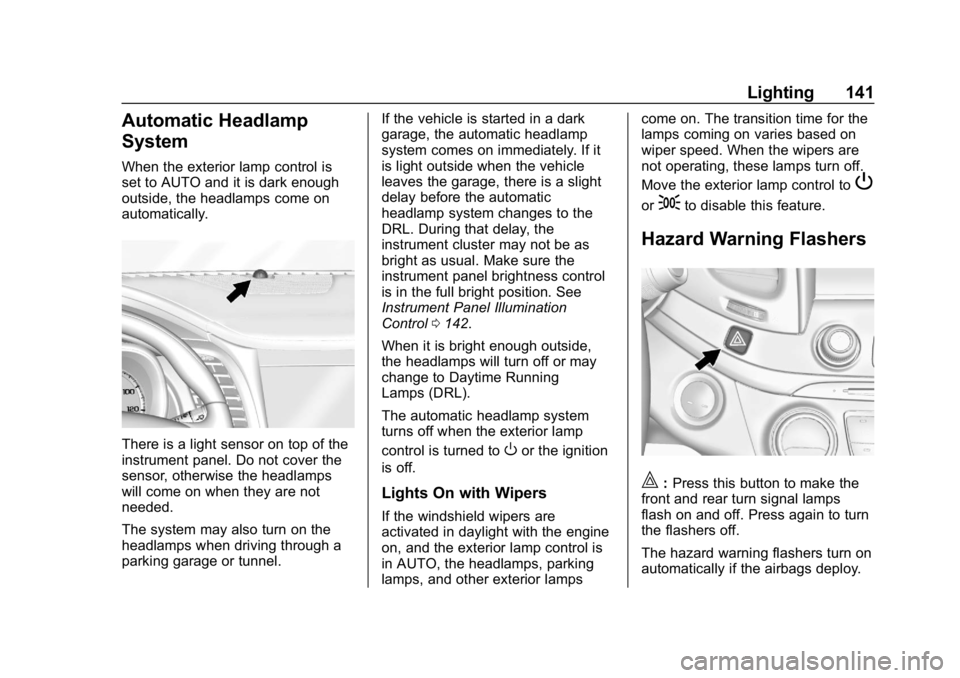
There is a light sensor on top of the
instrument panel. Do not cover the
sensor, otherwise the headlamps
will come on when they are not
needed.
The system may also turn on the
headlamps when driving through a
parking garage or tunnel.If the vehicle is started in a dark
garage, the automatic headlamp
system comes on immediately. If it
is light outside when the vehicle
leaves the garage, there is a slight
delay before the automatic
headlamp system changes to the
DRL. During that delay, the
instrument cluster may not be as
bright as usual. Make sure the
instrument panel brightness control
is in the full bright position. See
Instrument Panel Illumination
Control
0142.
When it is bright enough outside,
the headlamps will turn off or may
change to Daytime Running
Lamps (DRL).
The automatic headlamp system
turns off when the exterior lamp
control is turned toOor the ignition
is off.
Lights On with Wipers
If the windshield wipers are
activated in daylight with the engine
on, and the exterior lamp control is
in AUTO, the headlamps, parking
lamps, and other exterior lamps come on. The transition time for the
lamps coming on varies based on
wiper speed. When the wipers are
not operating, these lamps turn off.
Move the exterior lamp control to
P
or;to disable this feature.
Hazard Warning Flashers
|:
Press this button to make the
front and rear turn signal lamps
flash on and off. Press again to turn
the flashers off.
The hazard warning flashers turn on
automatically if the airbags deploy.
Page 145 of 345
Chevrolet Impala Owner Manual (GMNA-Localizing-U.S./Canada-11348316) -
2018 - CRC - 8/22/17
144 Lighting
Lighting Features
Entry Lighting
Some exterior lamps and most of
the interior lamps turn on briefly at
night or in areas with limited lighting
when the Remote Keyless Entry
(RKE) transmitter
Kbutton is
pressed. See Remote Keyless Entry
(RKE) System Operation 028. After
about 30 seconds the exterior lamps
turn off, then the dome lamps and
remaining interior lamps dim to off.
Entry lighting can be disabled
manually by turning the ignition on
or to ACC/ACCESSORY, or by
pressing
Qon the RKE transmitter.
This feature can be changed. See
Vehicle Personalization 0128.
Exit Lighting
Some exterior lamps and interior
lights come on at night, or in areas
with limited lighting, when the driver
door is opened after the ignition is
turned off. The dome lamp comes
on after the ignition is turned off. The exterior lamps and dome lamp
remain on for a set amount of time,
then automatically turn off.
The exterior lamps turn off
immediately by turning the exterior
lamp control off.
This feature can be changed. See
Vehicle Personalization
0128.
Battery Load
Management
The vehicle has Electric Power
Management (EPM) that estimates
the battery's temperature and state
of charge. It then adjusts the voltage
for best performance and extended
life of the battery.
When the battery's state of charge
is low, the voltage is raised slightly
to quickly bring the charge back up.
When the state of charge is high,
the voltage is lowered slightly to
prevent overcharging. If the vehicle
has a voltmeter gauge or a voltage
display on the Driver Information
Center (DIC), you may see the voltage move up or down. This is
normal. If there is a problem, an
alert will be displayed.
The battery can be discharged at
idle if the electrical loads are very
high. This is true for all vehicles.
This is because the generator
(alternator) may not be spinning fast
enough at idle to produce all of the
power needed for very high
electrical loads.
A high electrical load occurs when
several of the following are on, such
as: headlamps, high beams, rear
window defogger, climate control fan
at high speed, heated seats, engine
cooling fans, trailer loads, and loads
plugged into accessory power
outlets.
EPM works to prevent excessive
discharge of the battery. It does this
by balancing the generator's output
and the vehicle's electrical needs.
It can increase engine idle speed to
generate more power whenever
needed. It can temporarily reduce
the power demands of some
accessories.
Page 149 of 345
Chevrolet Impala Owner Manual (GMNA-Localizing-U.S./Canada-11348316) -
2018 - CRC - 8/22/17
148 Climate Controls
The following are climate control
settings that use more fuel:
.Comfort air conditioning mode
. Defrost mode
. Extreme temperature settings,
such as 15 °C (60 °F) or 32 °C
(90 °F)
. High fan speed settings
To help reduce fuel usage:
. Use eco air conditioning, instead
of the comfort air conditioning.
. Select a temperature setting that
is higher in hot weather and
lower in cold weather.
. Turn off the air conditioning
when it is not needed.
. Only use defrost when needed
to clear the windows.
Fan Control : Turn the knob
clockwise or counterclockwise to
increase or decrease the fan speed.
Temperature Control : Turn the
knob clockwise or counterclockwise
to increase or decrease the
temperature setting. Air Delivery Modes :
PressY,\,
[, or-to change the direction of
the airflow. An indicator light comes
on in the selected mode button.
Y: Air is directed to the instrument
panel outlets.
\: Air is directed to the instrument
panel outlets and the floor outlets.
[: Air is directed to the floor
outlets.
-: Air is directed to the windshield
and floor outlets to clear the
windows of fog or moisture.
0: Press to clear the windshield
of fog or frost more quickly. Air is
directed to the windshield and side
window outlets.
For best results, clear all snow and
ice from the windshield before
defrosting.
A/C (For Non-Stop/Start
Vehicles) : Press to turn the air
conditioning on or off. If the fan is
turned off, the air conditioner will not
run and the indicator light may
turn off. A/C (For Stop/Start Vehicles) :
Press to cycle between the off, eco,
and comfort air conditioning modes.
The indicator will be lit in comfort
and eco modes and turns off when
there is no A/C function. If the fan is
turned off, the air conditioner will not
run and the indicator light may
turn off.
For comfort a/c, press A/C. The
indicator will turn amber.
For eco a/c, press A/C again. The
indicator will turn green. This setting
balances fuel economy and air
conditioning comfort. In warm
weather conditions, auto stops may
occur more frequently and the
vehicle interior may be warmer as
compared to the comfort air
conditioning setting. This setting
allows higher humidity inside the
vehicle and window fogging before
the engine restarts.
Pressing
0during an auto stop
may restart the engine to prevent
window fogging. To reach comfort
levels quickly during an auto stop,
Page 150 of 345
Chevrolet Impala Owner Manual (GMNA-Localizing-U.S./Canada-11348316) -
2018 - CRC - 8/22/17
Climate Controls 149
the engine will restart if the air
conditioner is off and A/C is
selected.
If temperature controls are adjusted
cooler during an auto stop, the
engine may restart to ensure that
comfort is reached.
L:Press to turn on
recirculation. An indicator light
comes on. Air is recirculated to
quickly cool the inside of the vehicle
or reduce the outside air and odors
that may enter.
Rear Window Defogger
K: Press to turn the rear window
defogger on or off. An indicator light
on the button comes on to show that
the rear window defogger is on.
The upper region of gridlines on the
rear window are antenna lines and
are not intended to heat when the
defogger is activated.
If equipped with heated outside
mirrors, they turn on with the rear
window defogger and help to clear
fog or frost from the surface of the
mirror. See Heated Mirrors 044.
Caution
Using a razor blade or sharp
object on the inside rear window
can damage the antenna or
defogger. Repairs would not be
covered by the vehicle warranty.
Do not stick anything to the rear
window.
Page 153 of 345
Chevrolet Impala Owner Manual (GMNA-Localizing-U.S./Canada-11348316) -
2018 - CRC - 8/22/17
152 Climate Controls
0:Press to clear the windshield
of fog or frost more quickly. Air is
directed to the windshield and side
window outlets.
For best results, clear all snow and
ice from the windshield before
defrosting.
A/C (For Non-Stop/Start
Vehicles) : Press to turn the air
conditioning on or off. If the fan is
turned off, the air conditioner will not
run and the indicator light may
turn off.
Press AUTO to return to automatic
operation and the air conditioner
runs as needed. When the indicator
light is on, the air conditioner runs
automatically to cool the air inside
the vehicle or to dry the air as
needed to defog the windshield
faster.
A/C (For Stop/Start Vehicles) :
Press to cycle between the off, eco,
and comfort air conditioning modes.
The indicator will be lit in comfort
and eco modes and turns off when
there is no A/C function. If the fan is turned off, the air conditioner will not
run and the indicator light may
turn off.
Press AUTO to return to automatic
operation and the air conditioner
runs automatically as needed. When
the indicator light is on, the air
conditioner runs automatically to
cool the air inside the vehicle or to
dry the air as needed to defog the
windshield faster.
For comfort a/c, press A/C. The
indicator will turn amber.
For eco a/c, press A/C again. The
indicator will turn green. This setting
balances fuel economy and air
conditioning comfort. In warm
weather conditions, auto stops may
occur more frequently and the
vehicle interior may be warmer as
compared to the comfort air
conditioning setting. This setting
allows higher humidity inside the
vehicle and window fogging before
the engine restarts.
Pressing
0during an auto stop
may restart the engine to prevent
window fogging. To reach comfort levels quickly during an auto stop,
the engine will restart if the air
conditioner is off and AUTO or A/C
is selected.
If temperature controls are adjusted
cooler during an auto stop, the
engine may restart to ensure that
comfort is reached.
L:
Press to turn on
recirculation. An indicator light
comes on. Air is recirculated to
quickly cool the inside of the vehicle
or prevent outside air and odors
from entering.
Auto Defog : The climate control
system may have a sensor to
automatically detect high humidity
inside the vehicle. When high
humidity is detected, the climate
control system may adjust to
outside air supply and turn on the
air conditioner. The fan speed may
slightly increase to help prevent
fogging. If the climate control
system does not detect possible
window fogging, it returns to normal
operation. To turn Auto Defog off or
Page 157 of 345
Chevrolet Impala Owner Manual (GMNA-Localizing-U.S./Canada-11348316) -
2018 - CRC - 8/22/17
156 Driving and Operating
Driving and
Operating
Driving Information
Distracted Driving . . . . . . . . . . . . 157
Defensive Driving . . . . . . . . . . . . . 158
Drunk Driving . . . . . . . . . . . . . . . . . 158
Control of a Vehicle . . . . . . . . . . . 158
Braking . . . . . . . . . . . . . . . . . . . . . . . 158
Steering . . . . . . . . . . . . . . . . . . . . . . 159
Off-Road Recovery . . . . . . . . . . . 159
Loss of Control . . . . . . . . . . . . . . . 160
Driving on Wet Roads . . . . . . . . 160
Hill and Mountain Roads . . . . . 161
Winter Driving . . . . . . . . . . . . . . . . 162
If the Vehicle Is Stuck . . . . . . . . 163
Vehicle Load Limits . . . . . . . . . . . 163
Starting and Operating
New Vehicle Break-In . . . . . . . . . 167
Ignition Positions . . . . . . . . . . . . . 167
Starting the Engine . . . . . . . . . . . 169
Engine Heater . . . . . . . . . . . . . . . . 171
Retained AccessoryPower (RAP) . . . . . . . . . . . . . . . . 172
Shifting Into Park . . . . . . . . . . . . . 172
Shifting out of Park . . . . . . . . . . . 173 Parking over Things
That Burn . . . . . . . . . . . . . . . . . . . 173
Extended Parking . . . . . . . . . . . . 174
Engine Exhaust
Engine Exhaust . . . . . . . . . . . . . . 174
Running the Vehicle While Parked . . . . . . . . . . . . . . . . . . . . . . 174
Automatic Transmission
Automatic Transmission . . . . . . 175
Manual Mode . . . . . . . . . . . . . . . . . 177
Brakes
Antilock BrakeSystem (ABS) . . . . . . . . . . . . . . . 178
Electric Parking Brake . . . . . . . . 178
Brake Assist . . . . . . . . . . . . . . . . . . 180
Hill Start Assist (HSA) . . . . . . . . 180
Ride Control Systems
Traction Control/Electronic Stability Control . . . . . . . . . . . . . 181
Cruise Control
Cruise Control . . . . . . . . . . . . . . . . 182
Adaptive Cruise Control . . . . . . 184
Driver Assistance Systems
Driver Assistance Systems . . . 192
Assistance Systems forParking or Backing . . . . . . . . . . 192 Assistance Systems for
Driving . . . . . . . . . . . . . . . . . . . . . . 195
Forward Collision Alert (FCA) System . . . . . . . . . . . . . . . . . . . . . . 195
Forward Automatic
Braking (FAB) . . . . . . . . . . . . . . . 197
Side Blind Zone Alert (SBZA) . . . . . . . . . . . . . . . . 198
Lane Change Alert (LCA) . . . . . 198
Lane Departure Warning (LDW) . . . . . . . . . . . . . 200
Fuel
Fuel . . . . . . . . . . . . . . . . . . . . . . . . . . 202
California FuelRequirements . . . . . . . . . . . . . . . 202
Fuels in Foreign Countries . . . 203
Fuel Additives . . . . . . . . . . . . . . . . 203
E85 or FlexFuel . . . . . . . . . . . . . . 203
Filling the Tank . . . . . . . . . . . . . . . 204
Filling a Portable Fuel
Container . . . . . . . . . . . . . . . . . . . 206
Trailer Towing
General TowingInformation . . . . . . . . . . . . . . . . . . 206
Driving Characteristics and Towing Tips . . . . . . . . . . . . . . . . . 206
Trailer Towing . . . . . . . . . . . . . . . . 209
Towing Equipment . . . . . . . . . . . . 210
Page 159 of 345
Chevrolet Impala Owner Manual (GMNA-Localizing-U.S./Canada-11348316) -
2018 - CRC - 8/22/17
158 Driving and Operating
{Warning
Taking your eyes off the road too
long or too often could cause a
crash resulting in injury or death.
Focus your attention on driving.
Refer to the infotainment section for
more information on using that
system and the navigation system,
if equipped, including pairing and
using a cell phone.
Defensive Driving
Defensive driving means “always
expect the unexpected.” The first
step in driving defensively is to wear
the seat belt. See Seat Belts062.
. Assume that other road users
(pedestrians, bicyclists, and
other drivers) are going to be
careless and make mistakes.
Anticipate what they might do
and be ready.
. Allow enough following distance
between you and the driver in
front of you. .
Focus on the task of driving.
Drunk Driving
Death and injury associated with
drinking and driving is a global
tragedy.
{Warning
Drinking and then driving is very
dangerous. Your reflexes,
perceptions, attentiveness, and
judgment can be affected by even
a small amount of alcohol. You
can have a serious —or even
fatal —collision if you drive after
drinking.
Do not drink and drive or ride with
a driver who has been drinking.
Ride home in a cab; or if you are
with a group, designate a driver
who will not drink.
Control of a Vehicle
Braking, steering, and accelerating
are important factors in helping to
control a vehicle while driving.
Braking
Braking action involves perception
time and reaction time. Deciding to
push the brake pedal is perception
time. Actually doing it is
reaction time.
Average driver reaction time is
about three-quarters of a second. In
that time, a vehicle moving at
100 km/h (60 mph) travels 20 m
(66 ft), which could be a lot of
distance in an emergency.
Helpful braking tips to keep in mind
include:
. Keep enough distance between
you and the vehicle in front
of you.
. Avoid needless heavy braking.
. Keep pace with traffic.
If the engine ever stops while the
vehicle is being driven, brake
normally but do not pump the
brakes. Doing so could make the
pedal harder to push down. If the
engine stops, there will be some
power brake assist but it will be
used when the brake is applied.
Page 162 of 345
Chevrolet Impala Owner Manual (GMNA-Localizing-U.S./Canada-11348316) -
2018 - CRC - 8/22/17
Driving and Operating 161
Warning (Continued)
Flowing or rushing water creates
strong forces. Driving through
flowing water could cause the
vehicle to be carried away. If this
happens, you and other vehicle
occupants could drown. Do not
ignore police warnings and be
very cautious about trying to drive
through flowing water.
Hydroplaning
Hydroplaning is dangerous. Water
can build up under the vehicle's
tires so they actually ride on the
water. This can happen if the road is
wet enough and you are going fast
enough. When the vehicle is
hydroplaning, it has little or no
contact with the road.
There is no hard and fast rule about
hydroplaning. The best advice is to
slow down when the road is wet.
Other Rainy Weather Tips
Besides slowing down, other wet
weather driving tips include:
.Allow extra following distance.
. Pass with caution.
. Keep windshield wiping
equipment in good shape.
. Keep the windshield washer fluid
reservoir filled.
. Have good tires with proper
tread depth. See Tires0248.
. Turn off cruise control.
Hill and Mountain Roads
Driving on steep hills or through
mountains is different than driving
on flat or rolling terrain. Tips include:
.Keep the vehicle serviced and in
good shape.
. Check all fluid levels and brakes,
tires, cooling system, and
transmission.
. Shift to a lower gear when going
down steep or long hills.
{Warning
Using the brakes to slow the
vehicle on a long downhill slope
can cause brake overheating, can
reduce brake performance, and
could result in a loss of braking.
Shift the transmission to a lower
gear to let the engine assist the
brakes on a steep downhill slope.
{Warning
Coasting downhill in N (Neutral)
or with the ignition off is
dangerous. This can cause
overheating of the brakes and
loss of steering assist. Always
have the engine running and the
vehicle in gear.
. Drive at speeds that keep the
vehicle in its own lane. Do not
swing wide or cross the
center line.
Page 163 of 345
Chevrolet Impala Owner Manual (GMNA-Localizing-U.S./Canada-11348316) -
2018 - CRC - 8/22/17
162 Driving and Operating
.Be alert on top of hills;
something could be in your lane
(e.g., stalled car, accident).
. Pay attention to special road
signs (e.g., falling rocks area,
winding roads, long grades,
passing or no-passing zones)
and take appropriate action.
Winter Driving
Driving on Snow or Ice
Snow or ice between the tires and
the road creates less traction or
grip, so drive carefully. Wet ice can
occur at about 0 °C (32 °F) when
freezing rain begins to fall. Avoid
driving on wet ice or in freezing rain
until roads can be treated.
For Slippery Road Driving:
.Accelerate gently. Accelerating
too quickly causes the wheels to
spin and makes the surface
under the tires slick. .
Turn on Traction Control. See
Traction Control/Electronic
Stability Control 0181.
. The Antilock Brake System
(ABS) improves vehicle stability
during hard stops, but the
brakes should be applied sooner
than when on dry pavement.
See Antilock Brake System
(ABS) 0178.
. Allow greater following distance
and watch for slippery spots. Icy
patches can occur on otherwise
clear roads in shaded areas.
The surface of a curve or an
overpass can remain icy when
the surrounding roads are clear.
Avoid sudden steering
maneuvers and braking while
on ice.
. Turn off cruise control.
Blizzard Conditions
Stop the vehicle in a safe place and
signal for help. Stay with the vehicle
unless there is help nearby. If possible, use Roadside
Assistance. See
Roadside
Assistance Program 0311. To get
help and keep everyone in the
vehicle safe:
. Turn on the hazard warning
flashers.
. Tie a red cloth to an outside
mirror.
{Warning
Snow can trap engine exhaust
under the vehicle. This may
cause exhaust gases to get
inside. Engine exhaust contains
carbon monoxide (CO), which
cannot be seen or smelled. It can
cause unconsciousness and even
death.
If the vehicle is stuck in snow:
. Clear snow from the base of
the vehicle, especially any
blocking the exhaust pipe.
(Continued)