light CHEVROLET LOW CAB FORWARD 2017 Workshop Manual
[x] Cancel search | Manufacturer: CHEVROLET, Model Year: 2017, Model line: LOW CAB FORWARD, Model: CHEVROLET LOW CAB FORWARD 2017Pages: 414, PDF Size: 7.97 MB
Page 102 of 414
Chevrolet Low Cab Forward Owner Manual (GMNA-Localizing-U.S.-
10716700) - 2017 - crc - 12/6/16
Instruments and Controls 101
displays amber, the next change of
transmission oil and differential oil is
near or has been reached.
FUEL FILTER
When this message and light
display green, it shows the distance
remaining until the next fuel filter
change. When this message
displays amber, the next change of
fuel filter is near or has been
reached.
STEERING OIL
When this message and light
display green, it shows the distance
remaining until the next power
steering fluid change. When this
message displays amber, the next
change of power steering fluid is
near or has been reached.
TIRE ROTATION
When this message and light show
green with OFF, it means the
vehicle has been shipped from the
factory with no tire rotation interval
set. When this message displays
green it has the distance until the
next tire rotation displayed. Whenthis message displays amber the
next tire rotation is near or has
already been reached.
STARTER
When this message and light is
green, it displays the number of
engine starts remaining until a
starter motor is replaced. When this
message and light is amber, it
displays when the time for a starter
motor replacement is near or has
already been reached.
For the starter indicator light, the
displayed color will change from
green to amber when remaining
time is below 0 times and the
screen is selected.
For resetting or setting maintenance
data intervals, see
Driver
Information Center (DIC) (Diesel
Only) 093.
Hour Meter
HOUR METER
This message and light indicate how
many hours the engine has been
run. The figure(s) on the left side of the decimal point indicate hours
while the figure on the right side
indicates 1/10 of an hour.
Warning Buzzers
A warning buzzer may not sound if
there is a problem with the buzzer
system. If this occurs, the system
needs to be inspected. See your
dealer.
All Vehicles
A warning buzzer sounds under the
following conditions:
.
Seat Belt— continuous beep.
See Seat Belt Reminders 083.
Gasoline Vehicles
A warning buzzer sounds under the
following conditions:
.
Brake booster —continuous
beep. See Brake System
Warning Light (Parking Brake
Light) 084.
Page 103 of 414
Chevrolet Low Cab Forward Owner Manual (GMNA-Localizing-U.S.-
10716700) - 2017 - crc - 12/6/16
102 Instruments and Controls
Diesel Vehicles
A warning buzzer sounds under the
following conditions:
.Brake booster —continuous
beep. See Brake System
Warning Light (Parking Brake
Light) 084
. Engine overheat —
continuous beep
. Low engine coolant —beep
. Engine alarm and automatic
shutdown —beep
. Diesel particulate filter (DPF)
switch regeneration —Three
short beeps or three long beeps
. Selective catalytic reduction
(SCR) system —one short
beep, three short beeps, nine
quick beeps, continuous beep
See Diesel Exhaust Fluid 0189 and
Engine Alarm and Automatic
Shutdown (Diesel Only) 0174.
Page 104 of 414
Chevrolet Low Cab Forward Owner Manual (GMNA-Localizing-U.S.-
10716700) - 2017 - crc - 12/6/16
Lighting 103
Lighting
Exterior Lighting
Exterior Lamp Controls . . . . . . . 103
Headlamp High/Low-BeamChanger . . . . . . . . . . . . . . . . . . . . 104
Flash-to-Pass . . . . . . . . . . . . . . . . 104
Hazard Warning Flashers . . . . . 105
Turn and Lane-Change Signals . . . . . . . . . . . . . . . . . . . . . . 105
Cornering Lamps . . . . . . . . . . . . . 106
Interior Lighting
Instrument Panel Illumination Control . . . . . . . . . . . . . . . . . . . . . . 106
Cargo Lamp . . . . . . . . . . . . . . . . . . 107
Dome Lamps . . . . . . . . . . . . . . . . . 107
Exterior Lighting
Exterior Lamp Controls
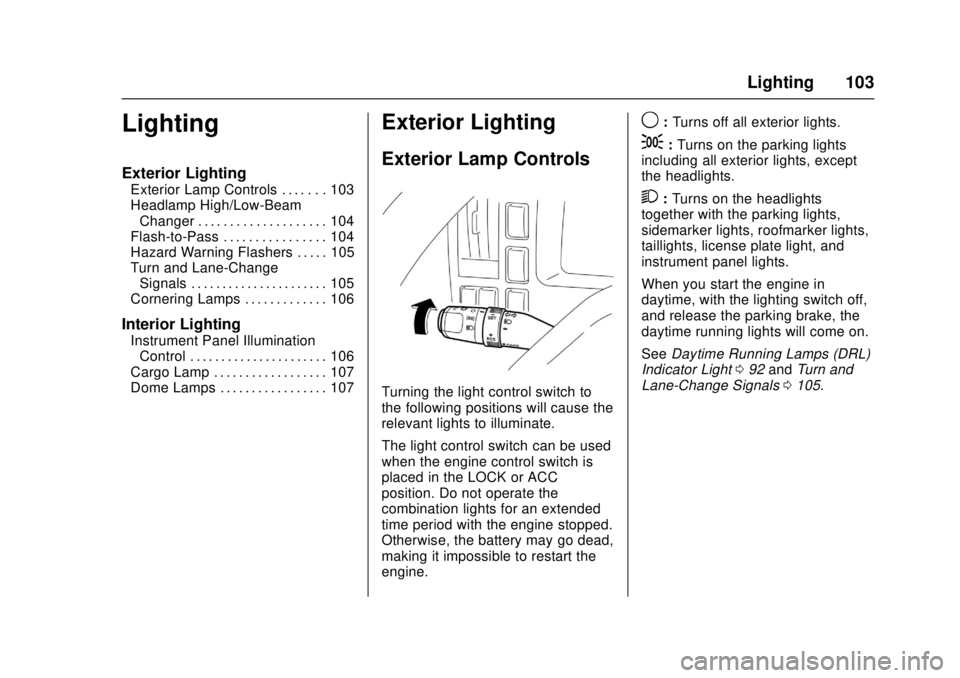
Turning the light control switch to
the following positions will cause the
relevant lights to illuminate.
The light control switch can be used
when the engine control switch is
placed in the LOCK or ACC
position. Do not operate the
combination lights for an extended
time period with the engine stopped.
Otherwise, the battery may go dead,
making it impossible to restart the
engine.
9: Turns off all exterior lights.
;:Turns on the parking lights
including all exterior lights, except
the headlights.
2: Turns on the headlights
together with the parking lights,
sidemarker lights, roofmarker lights,
taillights, license plate light, and
instrument panel lights.
When you start the engine in
daytime, with the lighting switch off,
and release the parking brake, the
daytime running lights will come on.
See Daytime Running Lamps (DRL)
Indicator Light 092 and Turn and
Lane-Change Signals 0105.
Page 105 of 414
Chevrolet Low Cab Forward Owner Manual (GMNA-Localizing-U.S.-
10716700) - 2017 - crc - 12/6/16
104 Lighting
Headlamp High/
Low-Beam Changer
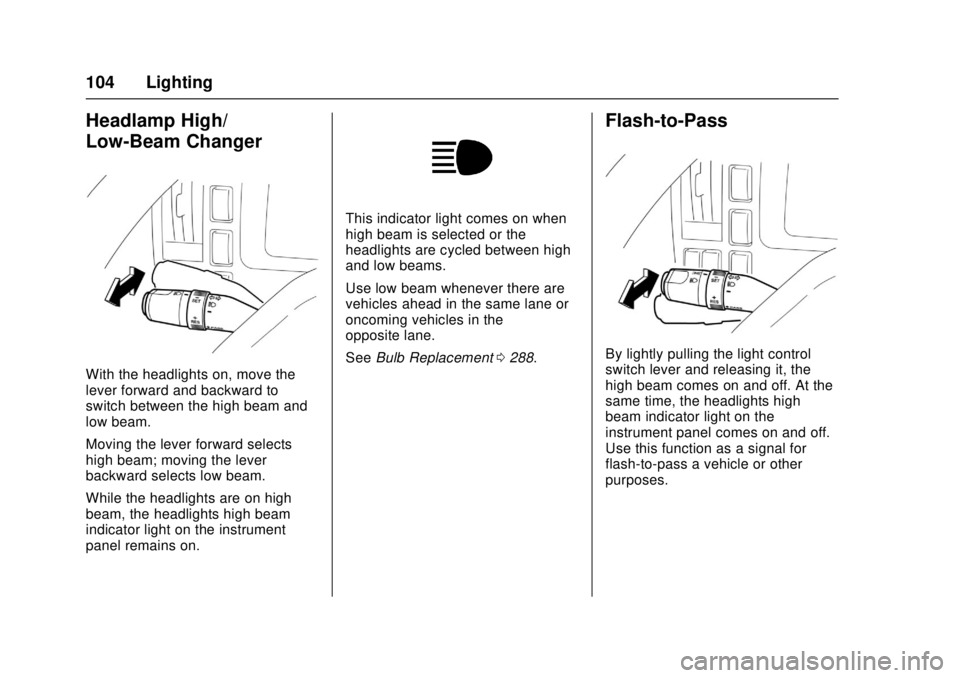
With the headlights on, move the
lever forward and backward to
switch between the high beam and
low beam.
Moving the lever forward selects
high beam; moving the lever
backward selects low beam.
While the headlights are on high
beam, the headlights high beam
indicator light on the instrument
panel remains on.
This indicator light comes on when
high beam is selected or the
headlights are cycled between high
and low beams.
Use low beam whenever there are
vehicles ahead in the same lane or
oncoming vehicles in the
opposite lane.
SeeBulb Replacement 0288.
Flash-to-Pass
By lightly pulling the light control
switch lever and releasing it, the
high beam comes on and off. At the
same time, the headlights high
beam indicator light on the
instrument panel comes on and off.
Use this function as a signal for
flash-to-pass a vehicle or other
purposes.
Page 106 of 414
Chevrolet Low Cab Forward Owner Manual (GMNA-Localizing-U.S.-
10716700) - 2017 - crc - 12/6/16
Lighting 105
Hazard Warning Flashers
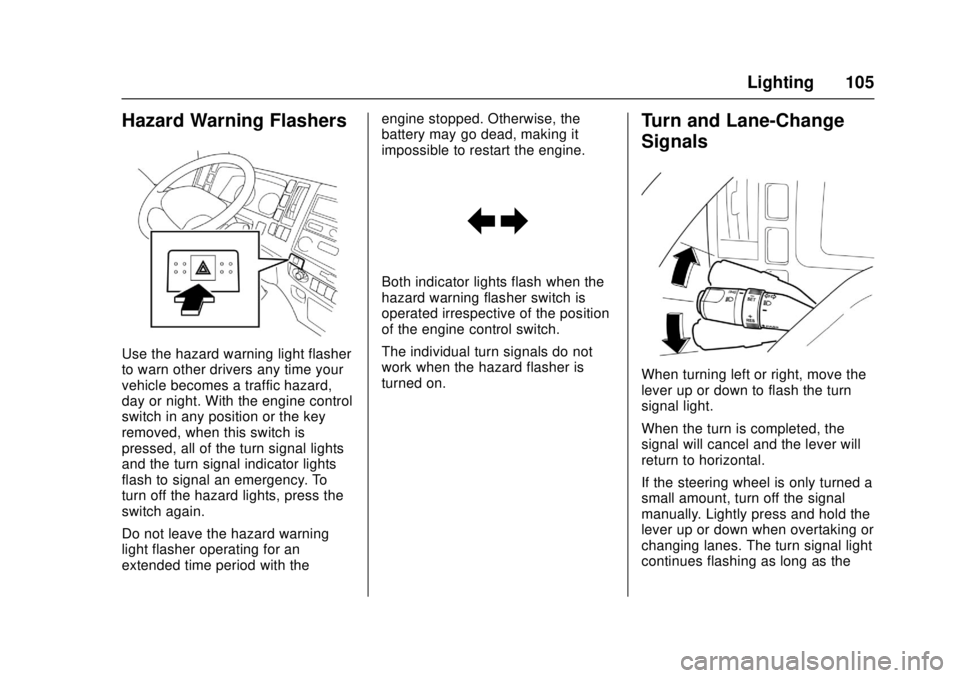
Use the hazard warning light flasher
to warn other drivers any time your
vehicle becomes a traffic hazard,
day or night. With the engine control
switch in any position or the key
removed, when this switch is
pressed, all of the turn signal lights
and the turn signal indicator lights
flash to signal an emergency. To
turn off the hazard lights, press the
switch again.
Do not leave the hazard warning
light flasher operating for an
extended time period with theengine stopped. Otherwise, the
battery may go dead, making it
impossible to restart the engine.
Both indicator lights flash when the
hazard warning flasher switch is
operated irrespective of the position
of the engine control switch.
The individual turn signals do not
work when the hazard flasher is
turned on.
Turn and Lane-Change
Signals
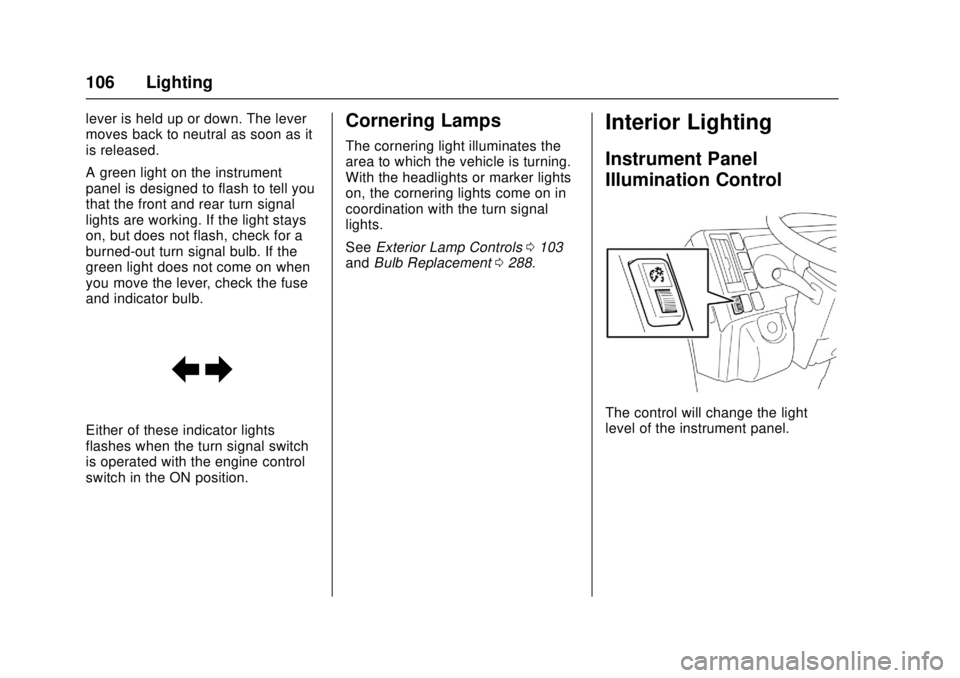
When turning left or right, move the
lever up or down to flash the turn
signal light.
When the turn is completed, the
signal will cancel and the lever will
return to horizontal.
If the steering wheel is only turned a
small amount, turn off the signal
manually. Lightly press and hold the
lever up or down when overtaking or
changing lanes. The turn signal light
continues flashing as long as the
Page 107 of 414
Chevrolet Low Cab Forward Owner Manual (GMNA-Localizing-U.S.-
10716700) - 2017 - crc - 12/6/16
106 Lighting
lever is held up or down. The lever
moves back to neutral as soon as it
is released.
A green light on the instrument
panel is designed to flash to tell you
that the front and rear turn signal
lights are working. If the light stays
on, but does not flash, check for a
burned-out turn signal bulb. If the
green light does not come on when
you move the lever, check the fuse
and indicator bulb.
Either of these indicator lights
flashes when the turn signal switch
is operated with the engine control
switch in the ON position.
Cornering Lamps
The cornering light illuminates the
area to which the vehicle is turning.
With the headlights or marker lights
on, the cornering lights come on in
coordination with the turn signal
lights.
SeeExterior Lamp Controls 0103
and Bulb Replacement 0288.
Interior Lighting
Instrument Panel
Illumination Control
The control will change the light
level of the instrument panel.
Page 108 of 414

Chevrolet Low Cab Forward Owner Manual (GMNA-Localizing-U.S.-
10716700) - 2017 - crc - 12/6/16
Lighting 107
Cargo Lamp
When this switch is pressed, the
rear body interior light comes on
and the indicator light on the switch
comes on.
Dome Lamps
Front Light
The dome light operates regardless
of the engine control switch position.
The switch has three positions.
ON :The light stays on regardless
of the doors being open or closed.
OFF : The light stays off regardless
of the doors being open or closed.
Between ON and OFF, the light
comes on when the driver's door is
opened. Rear Light (Crew Cab Model Only)
The dome light operates regardless
of the engine control switch position.
The switch has three positions.
ON :
The light stays on regardless
of the doors being open or closed.
OFF : The light stays off regardless
of the doors being open or closed.
Between ON and OFF, the light
comes on when the driver's door is
opened.
Page 114 of 414
Chevrolet Low Cab Forward Owner Manual (GMNA-Localizing-U.S.-
10716700) - 2017 - crc - 12/6/16
Infotainment System 113
they can interfere with each other,
making it difficult to hear the
broadcast.
Static - AM is easily affected by
external sources of electrical noise,
such as high tension power lines,
lightning, or electrical motors. This
results in static.
Certification
For Federal Communications
Commission (FCC) compliance
information for this device, see
Radio Frequency Statement0404.
Fixed Mast Antenna
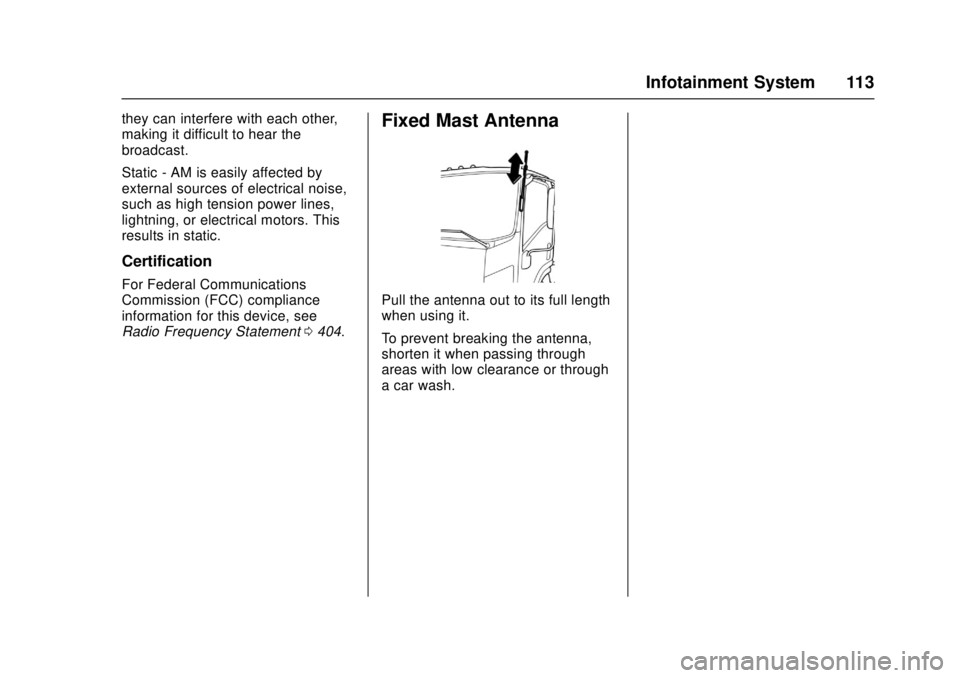
Pull the antenna out to its full length
when using it.
To prevent breaking the antenna,
shorten it when passing through
areas with low clearance or through
a car wash.
Page 119 of 414
Chevrolet Low Cab Forward Owner Manual (GMNA-Localizing-U.S.-
10716700) - 2017 - crc - 12/6/16
118 Infotainment System
CD, C-thru Disc with transparent or
translucent recorded parts may not
be inserted and ejected accurately.
Please do not use them.
SACD (Super Audio CD) can only
be played in the CD level of a
hybrid disc.
CCCD (Copy Control CD) may not
play as it does not meet the
standard CD requirements.
CD-EXTRA can be played as a
music CD. The sound of a data
track of a Mixed Mode CD cannot
be played. Only music tracks can be
played. A Mixed Mode CD mixed
with DTS can also not be played
accurately. This device accepts
8 cm (3 in) CD. Plug in the device
directly without using an adapter,
etc. to avoid damage.
When Removing a Disc
Do not leave discs inside the player
or partially inserted for a long time.
This may scratch the discs and
make them unusable. Remove the
disc horizontally from the main
device. Do not pull it violently
towards the top.Also do not pull it down hard while
removing. The disc may become
damaged and the audio may skip.
Do not insert objects other than
discs into the disc slot or insert
more than one disc at a time.
Handling a Disc
Avoid exposing the disc to direct
sunlight and always keep it in a
case. Otherwise, the disc will bend
and become unusable.
Do not stick any paper tape to the
recording side or the label side as it
may lead the disc to malfunction.
Do not use a disc with cracks or if it
is severely bent as it may lead to
damage.
Hold the disc without touching the
recording side as this may make the
disc dirty and lead to the audio
skipping.
Using benzene, record disc cleaner,
or anti-static fluids may damage the
disc. Using a dirty disc will damage
the disc and lead to audio skipping.
When the disc is dirty, use a
commercial disc cleaner to gently
clean it from the inside to the
outside. Do not use lens cleaner.
Do not use the types of disc
described below because such
discs may cause a breakdown.
.
Adapters or discs with special
properties, such as Dual Discs
and printable discs.
. Discs with transparent or
semitransparent sections on the
recording side.
. Discs with copy protection.
New Disc
Some new discs may have burrs
found in the center hole or at the
edges. Remove these burrs with a
ballpoint pen, etc. before using
the disc.
If they are not removed, the disc
may not be read accurately and
cause improper operation.
Rental Discs
Do not use any disc that has
cellophane tape or any rental disc
that has glue from the label exposed
Page 128 of 414
Chevrolet Low Cab Forward Owner Manual (GMNA-Localizing-U.S.-
10716700) - 2017 - crc - 12/6/16
Climate Controls 127
O:Use this position to prevent
dusty or otherwise contaminated
outside air from entering the cab,
such as in a tunnel or in congested
traffic.
Extended use of the inside air
recirculation position causes the
windshield and windows to fog up
easily, making visibility poor. For
good ventilation, switch to outside
air as soon as possible.
Temperature Control Knob : Use
this knob to select the preferred cab
interior temperature. Turn the knob
counterclockwise to lower the outlet
air temperature and clockwise to
raise it.
Fan Speed Control Knob : The fan
speed can be adjusted to any of the
four speeds available.
Air Conditioning (A/C) Switch :
Press this switch to use the air
conditioning system. The indicator
light inside the switch will come on
to show that the air conditioning
system is in operation. The air
conditioning system can also be
used for dehumidifying while the heater is being used. To turn off the
air conditioning, push this switch in
again.
When the defrost mode is selected,
the air conditioner compressor will
be on.
Even if the A/C switch is turned on,
the air conditioning system will not
operate when the fan speed control
knob is placed in the stop position.
Make sure that the fan speed
control knob is in a position other
than the stop position.
Even in seasons when the air
conditioning system is not used,
occasionally operate the system for
a few minutes with the engine
running at a low speed in order to
keep the system's components
lubricated.
Ventilation
Outside Air Ventilation :
Press the
A/C switch to the off position. Turn
the outlet selector knob to the
preferred position. Move the air
selector lever to the
Pposition. Set the temperature control knob to
the desired position. Adjust the fan
speed control knob to the preferred
speed.
How to Use the Heater
Normal Heating :
Set the outlet
selector knob to the
6or-
position. Use the-position for
warming your feet while defogging
the windshield.
Set the air selector lever to the
P
position. Adjust the temperature
control knob and the fan speed
control knob to the desired
positions.
To dehumidify the cab interior while
heating, press the A/C switch to the
on position.
As the heater uses the heat from
the engine coolant, its heating effect
is weak when the engine coolant
temperature is low.
Maximum Heating : Turn the outlet
selector knob to the
6position, set
the air selector lever to the
O