audio CHEVROLET LOW CAB FORWARD 2018 User Guide
[x] Cancel search | Manufacturer: CHEVROLET, Model Year: 2018, Model line: LOW CAB FORWARD, Model: CHEVROLET LOW CAB FORWARD 2018Pages: 358, PDF Size: 6.32 MB
Page 113 of 358

Chevrolet Low Cab Forward Owner Manual (GMNA-Localizing-U.S.-
11254764) - 2018 - crc - 12/5/16
112 Infotainment System
Message/Description
E5 This message appears
when there is no file
recorded or no playable
music file on the USB
device.
Connect a USB device that
contains playable
music data.
E7 This message appears
when there is a music file
that is not in a playable
format recorded on the USB
device.
Connect a USB device that
contains playable
music data.
USB Devices
USB Memory Standards
Supported file formats:
FAT 12/16/32
.
Supported audio formats:
MP3/WMA.
. Maximum current: 1 A. .
Compatibility: USB 1.1/2.0
(maximum transfer speed is
same as USB 1.1).
. Mass memory support: Supports
USB mass storage class.
. Does not support USB hubs or
multi card readers.
Supported MP3/WMA File
Standards
Discs formatted in the FAT 12/16/32
file system can be used.
Files with extensions compatible to
MP3 and WMA can be played
(.mp3, .wma).
Compatible with ID3 tag ver.1.0,
ver.1.1, ver.2.2 and ver.2.3.
Compatible to WMA tag.
The sampling frequency
corresponds as follows.
MP3 file:
. MPEG1 LAYER3 - 32/44.1/
48(kHz).
. MPEG2 LAYER3 - 16/22.05/
24(kHz). .
MPEG2.5 LAYER3 - 8/11.025/
12(kHz).
. MPEG1 LAYER3 - 32/40/48/56/
64/80/96/112/128/160/192/224/
256/320(kbps).
. MPEG2/2.5 LAYER3 - 16/24/32/
40/48/56/64/80/96/112/128/
160(kbps).
WMA file:
. 32/ 44.1/48 (kHz).
. Ver.7,8,9 - 48/64/80/96/128/160/
192 kbps.
WMA files are only compatible with
2ch playback.
MP3 files are compatible to the
respective modes of stereo, joint
stereo, dual channel, monaural.
MP3 files are compatible to VBR
(variable bit rate).
Not compatible to M3u playlists.
When the FAST UP/DOWN
functions on the MP3 file recorded
on the VBR are operated, the
playback time may not synchronize.
Page 114 of 358
Chevrolet Low Cab Forward Owner Manual (GMNA-Localizing-U.S.-
11254764) - 2018 - crc - 12/5/16
Infotainment System 113
MP3/WMA files are compatible with
up to 8 levels of folders. However,
when there are many levels, it may
take some time before the first file is
played. Therefore, a two-level folder
is recommended.
Maximum characters for a folder/file
name: 64 (including extension).
A maximum of 700 folders and
3,000 files can be played in a single
memory device.
Auxiliary Devices
AUX Operations
Connecting Your Portable Audio
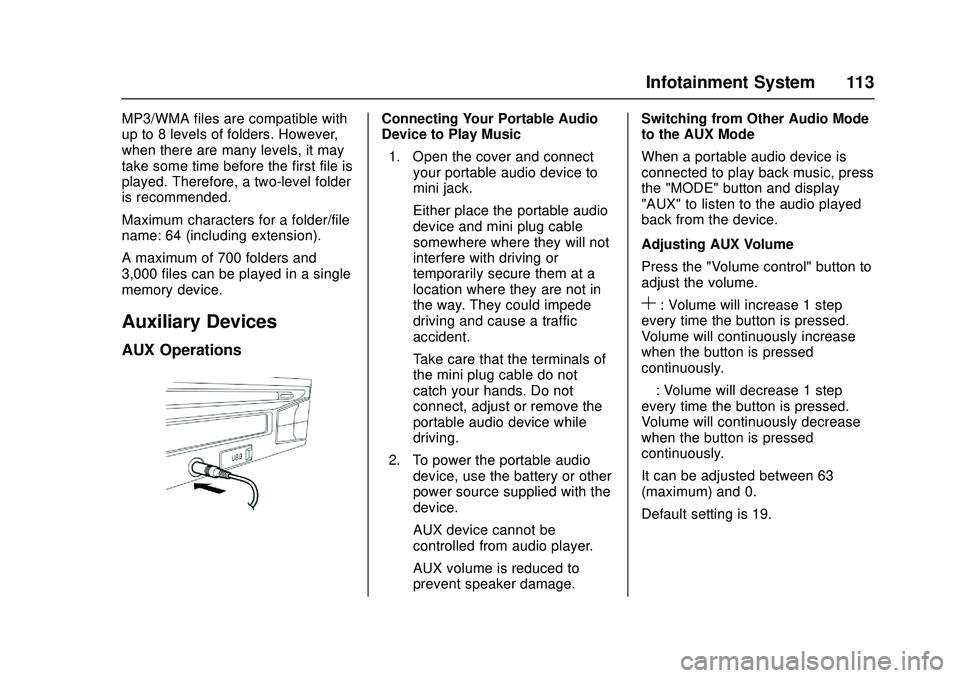
Device to Play Music1. Open the cover and connect your portable audio device to
mini jack.
Either place the portable audio
device and mini plug cable
somewhere where they will not
interfere with driving or
temporarily secure them at a
location where they are not in
the way. They could impede
driving and cause a traffic
accident.
Take care that the terminals of
the mini plug cable do not
catch your hands. Do not
connect, adjust or remove the
portable audio device while
driving.
2. To power the portable audio device, use the battery or other
power source supplied with the
device.
AUX device cannot be
controlled from audio player.
AUX volume is reduced to
prevent speaker damage. Switching from Other Audio Mode
to the AUX Mode
When a portable audio device is
connected to play back music, press
the "MODE" button and display
"AUX" to listen to the audio played
back from the device.
Adjusting AUX Volume
Press the "Volume control" button to
adjust the volume.
S: Volume will increase 1 step
every time the button is pressed.
Volume will continuously increase
when the button is pressed
continuously.
—: Volume will decrease 1 step
every time the button is pressed.
Volume will continuously decrease
when the button is pressed
continuously.
It can be adjusted between 63
(maximum) and 0.
Default setting is 19.
Page 149 of 358

Chevrolet Low Cab Forward Owner Manual (GMNA-Localizing-U.S.-
11254764) - 2018 - crc - 12/5/16
148 Driving and Operating
vehicle break-in procedure.
Increased parking brake
performance will result when the
parking brake is burnished as
specified below:
.Make 10 moderate stops, using
the hand brake, from 16 km/h
(10 MPH) while spacing the
stops a minimum of 4 km
(2.5 miles) apart.
. Operate the vehicle at 32 km/h
(20 MPH) between stops.
Pedals
Sit in a correct driving position on
the seat and operate the brake
pedal (1) and accelerator pedal (2)
with your right foot. To avoid
accidentally pressing the wrong
pedal, check the pedal positions
and practice putting your foot on the
desired pedal.
{Warning
A can or bottle rolling on the floor
may prevent brake pedal
operation if it is caught under the
pedal. This is very dangerous.
A floor mat must be placed
correctly. An incorrectly installed
floor mat may hinder the free
movement of each pedal. You
and others could be seriously
injured.
Ignition Positions
Engine Control Switch
{Warning
While driving, never turn the
engine control switch to the
LOCK position. The key could be
removed from the switch, which
then locks the steering wheel.
This is extremely dangerous.
You and others could be seriously
injured.
Caution
After starting the engine, do not
turn the engine control switch to
the START position. Otherwise,
the starter motor may be
damaged.
Using electrical devices such as
the audio system for an extended
time period with the engine
stopped can completely discharge
the battery.
Page 150 of 358

Chevrolet Low Cab Forward Owner Manual (GMNA-Localizing-U.S.-
11254764) - 2018 - crc - 12/5/16
Driving and Operating 149
The starting circuit, engine alarm
circuits and accessory circuits are
all controlled by the engine control
switch.1 LOCK :Lock is in the position
fully counterclockwise. In this
position, the key can be inserted or
removed. To place the engine
control switch in the LOCK position,
press and hold the key in the ACC
position and then turn it to the
LOCK position. If you will leave the
vehicle, remove the key and turn the
steering wheel until it locks. The
steering wheel will be locked to help
prevent theft.
2 ACC : Accessory is in the first
position clockwise. In this position,
the audio and other accessories can
be used with the engine stopped.
3 ON : This ON position is in the
second position clockwise. The key
stays in this position while the
engine is running. Engine control,
warning circuits, gauge circuits, and
accessory circuits are energized.
The engine cylinder heaters or glow
plugs are also turned on when the
switch is in the ON position. The
wait-to-start light will come on and
stay on until the glow plugs are heated enough. When this light
goes off, turn the switch to the
START position.
4 START :
On all engines, start is in
the position furthest clockwise. The
engine is started in this position.
Turn the key against spring
pressure to energize the starter.
When key is released, spring
pressure returns it to the ON
position. Release the key as soon
as the engine has started.
If the key cannot be turned from the
LOCK position to the ON position,
lightly move the steering wheel
clockwise and counterclockwise
while trying to turn the key.
Starting and Stopping the
Vehicle
Check around the Vehicle before
Starting the Engine
Proper care and operation will not
only extend the service life of your
vehicle but also improve fuel
economy.
Page 216 of 358
Chevrolet Low Cab Forward Owner Manual (GMNA-Localizing-U.S.-
11254764) - 2018 - crc - 12/5/16
Driving and Operating 215
Conversions and
Add-Ons
Add-On Electrical
Equipment
Installing Electrical Equipment
{Warning
Inappropriate installation or
removal of audio, radio or other
electrical equipment can
adversely affect other electrical
equipment and cause a
breakdown or fire. Be sure to
have electrical equipment
installed or removed by your
dealer. You and others could be
seriously injured.
Do not install any unauthorized
radio set, or any radio set or
antenna that does not comply with
relevant standards. Noise from the
radio set could cause
electromagnetic interference with
the vehicle's electronic equipment and other systems, resulting in a
vehicle breakdown or in a
malfunction of electronic equipment.
Consult your dealer if you wish to
install radio equipment.
Power Take-Off (PTO)
If equipped, the PTO is a device
that is used to provide engine power
to special equipment directly from
the engine or through the
transmission. For details about the
PTO operation, refer to the separate
instruction manual provided by its
maker.
If the optional PTO function is used
for long periods of time, make sure
to regularly check the diesel
particulate filter (DPF) indicator.
Automatic DPF regeneration will not
take place while the PTO function is
active.
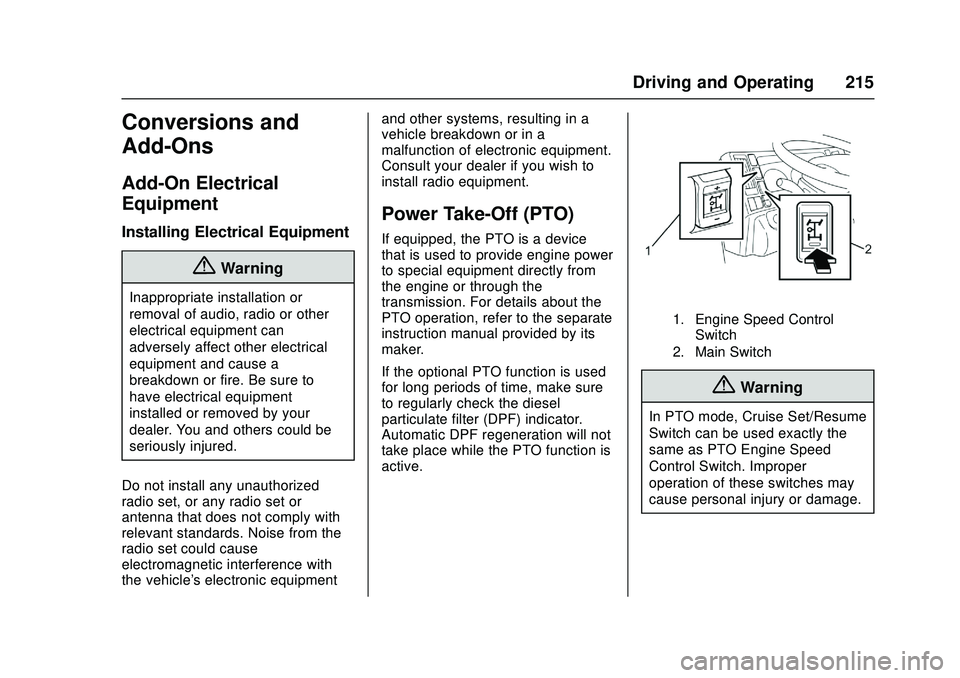
1. Engine Speed Control
Switch
2. Main Switch
{Warning
In PTO mode, Cruise Set/Resume
Switch can be used exactly the
same as PTO Engine Speed
Control Switch. Improper
operation of these switches may
cause personal injury or damage.
Page 268 of 358

Chevrolet Low Cab Forward Owner Manual (GMNA-Localizing-U.S.-
11254764) - 2018 - crc - 12/5/16
Vehicle Care 267
Fuse and Relay Location–Cab InteriorFuse locations:
No. Description Rating
1 RR P / WINDOW 25A
2 – –
3 ROOM LAMP, AUDIO 10A
4 DOOR LOCK 15A
5 TRAILER BRAKE 15A
6 P/ WINDOW 25A
7 ABS 10A
8 WIPER 25A
9 H / LAMP LO (LH) 10A
10 LAMPS (BATT) 10A 11 H / LAMP LO (RH) 10A
12 BRAKE LAMPS 10A
13 STARTER 10A
14 H / LAMP HI (LH) 10A
15 H / LAMP HI (RH) 10A
Page 269 of 358
Chevrolet Low Cab Forward Owner Manual (GMNA-Localizing-U.S.-
11254764) - 2018 - crc - 12/5/16
268 Vehicle Care
No. Description Rating16 MIRROR HEATER 15A
17 IGNITION 2 10A
18 IGNITION 1 10A
19 – –
20 ECM 10A
21 METER 10A
22 ECU (BATT) 10A
23 MIRROR 10A
24 AUDIO, ACC 15A
25 HORN 15A
26 TURN, HAZARD 15A
27 TAIL LAMPS 10A
28 ILLUMI- NATIONS 10A
29 CORNERING LAMPS 10A
30 AIR CONDITIONER 10A
31 – –
32 – – No. Description Rating
33 – –
34 – –
D-1 CIGAR 20A
D-2 ACCESS- ORIES SOCKET 15A
D-3 POWER SOURCE 20A
D-4 – –
Page 300 of 358
Chevrolet Low Cab Forward Owner Manual (GMNA-Localizing-U.S.-
11254764) - 2018 - crc - 12/5/16
Vehicle Care 299
Interior Care
General
Remove dust and dirt from the
interior of the cab using an
automotive cleaner or vacuum
cleaner, and gently wipe surfaces
clean using a cloth wet with warm or
cold water.
{Warning
Water should never be sprayed
directly into the interior of the cab
when cleaning. Failure to observe
this precaution can lead to vehicle
malfunction and possibly to fire if
water should enter the audio
system or other electrical
components located underneath
the floor carpet.
Petroleum ether, gasoline and
other organic solvents should not
be used to clean seat belts. In
addition, seat belt webbing should
be neither bleached nor redyed.
Failure to observe these(Continued)
Warning (Continued)
precautions can lead to the
performance or strength of the
seat belts being impaired. In the
case of a collision, therefore, the
seat belts could be insufficiently
effective, and serious
life-threatening injuries could
result. When cleaning, use warm
water in which a small amount of
neutral detergent has been
dissolved to gently wipe the seat
belts.
Follow the manufacturer's advice
whenever cleaning agents or
other chemicals are used, inside
or outside the vehicle. Some
cleaners may be poisonous or
flammable, and improper use may
cause personal injury or damage.
When cleaning the inside or
outside of the vehicle, do not use
volatile cleaning solvents, such as
acetone, lacquer thinners, enamel
reducers, nail polish removers; or
such cleaning materials as(Continued)
Warning (Continued)
laundry soaps, bleaches or
reducing agents, except as noted
in the following fabric cleaning
advice on stain removal. Never
use carbon tetrachloride,
gasoline, benzene or naphtha for
any cleaning purpose.
Open all vehicle doors for
ventilation when ANY cleaning
agents or other chemicals are
used in the interior. Overexposure
to some vapors may result in a
health problem that is more likely
to occur in small, unventilated
spaces.
You and others could be seriously
injured.
The interior of the vehicle must
never be cleaned using acidic or
alkaline solvents, or petroleum
ether, gasoline, and other organic
solvents. Failure to observe this
precaution can result in
discoloration and staining. It should
be noted that certain types of
Page 301 of 358
Chevrolet Low Cab Forward Owner Manual (GMNA-Localizing-U.S.-
11254764) - 2018 - crc - 12/5/16
300 Vehicle Care
cleaning products contain these
compounds. Be sure to read
cleaning product labels carefully.
Air fresheners (liquid, solid, gel or
plate types) must not come into
direct contact with, or spill onto,
interior components such as the air
conditioning or audio system.
Compounds contained in these
products can cause discoloration,
staining or peeling of paint.
Glass cleaners that contain these
compounds must not be used to
clean the inside of the windshield or
window glass. To clean the glass,
wipe it using a cloth wet with warm
or cold water.
To avoid possible permanent
discoloration of light colored seats,
Do not let materials with non-fast
colors come into contact with seat
trim materials until these materials
are totally dry. This includes certain
types of casual clothing, such as
colored denims, corduroys, leathers
and suedes; also decorative paper,
With the use of modern trim
materials, it is very important that
you use proper cleaning techniquesand cleaners. Failing to do this on
the first cleaning may result in water
spots, spot rings or setting of stains
or soilage - all of which are more
difficult to remove in a second
cleaning.
Dust and loose dirt that collect on
interior fabric should be removed
often with a vacuum cleaner or soft
bristle brush. Wipe vinyl or leather
trim regularly with a clean, damp
cloth. Normal trim soils, spots or
stains can be cleaned with these
cleaners.
Remember these basic steps before
cleaning:
.
Remove stains as quickly as
possible before they
become "set".
. Use a clean cloth or sponge,
and change to a clean area
often. A soft brush maybe used
if stains persist.
. Use solvent-type cleaners only
in a well ventilated area: also, do
not saturate the stained area. .
If a ring forms after spot
cleaning, clean the entire area
immediately.
. Follow specific instructions on
cleaner labels.
General Cleaning of Soiled or
Water Spotted Fabric Type
Trim with Foam Type Cleaner
Vacuum the area thoroughly to
remove any loose dirt.
Always clean a whole trim panel or
section. Mask surrounding trim
along stitch or welt lines.
Use suds on a clean sponge. Do
not brush wet suede. Do not
saturate the material or rub it
harshly. Immediately after cleaning,
remove suds with a sponge and
rinse with a clean wet sponge. Wipe
off remaining residue with a slightly
damp absorbent towel or cloth.
Important —Immediately after
wiping, force-dry the fabric with an
air hose. A heat dryer or heat lamp
may be used. Use caution with a
heat dryer or lamp to help prevent
damage.
Page 352 of 358

Chevrolet Low Cab Forward Owner Manual (GMNA-Localizing-U.S.-
11254764) - 2018 - crc - 12/5/16
Index 351
IndexA
Accessories and Modifica-tions . . . . . . . . . . . . . . . . . . . . . . . . . . 218
Add-On Electrical Equipment . . . 215
Additional Maintenance and Care . . . . . . . . . . . . . . . . . . . . . . 323
Adjustments Seat, Initial Drive . . . . . . . . . . . . . . . 38
Agreements Trademarks and License . . . . . .114
Air Cleaner/Filter, Engine . . . . . . . 231
Air Conditioning . . . . . . . . . . . . . . . . 115
Air Filter, Passenger Com- partment . . . . . . . . . . . . . . . . . . . . . . 119
Air Vents . . . . . . . . . . . . . . . . . . . . . . . 118
AM-FM Radio . . . . . . . . . . . . . . . . . . . . 97
Antenna Fixed Mast . . . . . . . . . . . . . . . . . . . 102
Antilock Brake System (ABS) . . . 196
Warning Light . . . . . . . . . . . . . . . . . . . 77
Appearance Care Exterior . . . . . . . . . . . . . . . . . . . . . . . 293
Interior . . . . . . . . . . . . . . . . . . . . . . . . 299
Ashtrays . . . . . . . . . . . . . . . . . . . . . . . . . 68
Assistance Program,
Roadside . . . . . . . . . . . . . . . . . . . . . . 344
Audio Players CD . . . . . . . . . . . . . . . . . . . . . . . . . . . 103 Automatic
Transmission . . . . . . . . . . . . . . . . . 185
Transmission Fluid . . . . . . . . . . . 229
Automatic Transmission Selector Lever . . . . . . . . . . . . . . . . 194
Shift Lock Control FunctionCheck . . . . . . . . . . . . . . . . . . . . . . . 251
Automatic Transmission Fluid Temperature Warning Light . . . . . 78
Automatic Transmission Overdrive Off . . . . . . . . . . . . . . . . . . 195
Auxiliary Devices . . . . . . . . . . . . . . . . . . . . . . . .113
Axle, Rear . . . . . . . . . . . . . . . . . . . . . . 249
B
Battery . . . . . . . . . . . . . . . . . . . . . . . . . 247
Battery - North America . . . . . . . . . 287
Battery Warning Light . . . . . . . . . . . . 73
Biodiesel . . . . . . . . . . . . . . . . . . . . . . . 207
Blade Replacement, Wiper . . . . . 252
Brake Exhaust . . . . . . . . . . . . . . . . . . . . . . 201
System Warning Light . . . . . . . . . . 75
Brakes . . . . . . . . . . . . . . . . . . . . . . . . . . 242 Antilock . . . . . . . . . . . . . . . . . . . . . . . 196
Exhaust Light . . . . . . . . . . . . . . . . . . . 78
Fluid . . . . . . . . . . . . . . . . . . . . . . . . . . 246
Parking . . . . . . . . . . . . . . . . . . . . . . . 200