light CHEVROLET LOW CAB FORWARD 2018 User Guide
[x] Cancel search | Manufacturer: CHEVROLET, Model Year: 2018, Model line: LOW CAB FORWARD, Model: CHEVROLET LOW CAB FORWARD 2018Pages: 358, PDF Size: 6.32 MB
Page 25 of 358
Chevrolet Low Cab Forward Owner Manual (GMNA-Localizing-U.S.-
11254764) - 2018 - crc - 12/5/16
24 In Brief
Diesel Exhaust Fluid
Diesel Exhaust Fluid (DEF) is used
with diesel engines to reduce the
amount of regulated emissions
produced. The DEF system must be
maintained for the vehicle to run
properly.
DEF is not a fuel additive. For
refilling instructions, seeDiesel
Exhaust Fluid 0170. DEF should
not be mixed with or added to diesel
fuel. DEF freezes when exposed to
temperature below −11 °C (12 ° F).
Locating Diesel Exhaust Fluid
DEF can be purchased at a dealer.
It can also be purchased at
authorized vehicle and truck
dealerships. Additionally, some
diesel truck fueling stations or
retailers may have DEF for
purchase. See Recommended
Fluids and Lubricants 0326. When the remaining level of DEF
becomes excessively low the DEF
gauge will change color from green
to amber. In addition, warning and
indicator lights will come on and
engine power will be reduced so the
vehicle speed will not exceed
89 km/h (55 MPH). See
Diesel
Exhaust Fluid 0170.
Page 27 of 358
Chevrolet Low Cab Forward Owner Manual (GMNA-Localizing-U.S.-
11254764) - 2018 - crc - 12/5/16
26 Keys, Doors, and Windows
If you resell the vehicle, be sure to
hand over the plate with key code to
the new owner together with the
vehicle.
Remote Keyless Entry
(RKE) System
SeeRadio Frequency Statement
0 348.
If there is a decrease in the Remote
Keyless Entry (RKE) operating
range:
. Check the distance. The
transmitter may be too far from
the vehicle.
. Check the location. Other
vehicles or objects may be
blocking the signal.
. Check the transmitter's battery.
See “Replacing the Battery in
the Remote Control Unit” later in
this section.
. If the transmitter is still not
working correctly, see your
dealer or a qualified technician
for service.
Remote Keyless Entry
(RKE) System Operation
The keyless entry system allows
you to lock/unlock the doors by
simply pressing the remote control
button rather than inserting the key
into the lock.
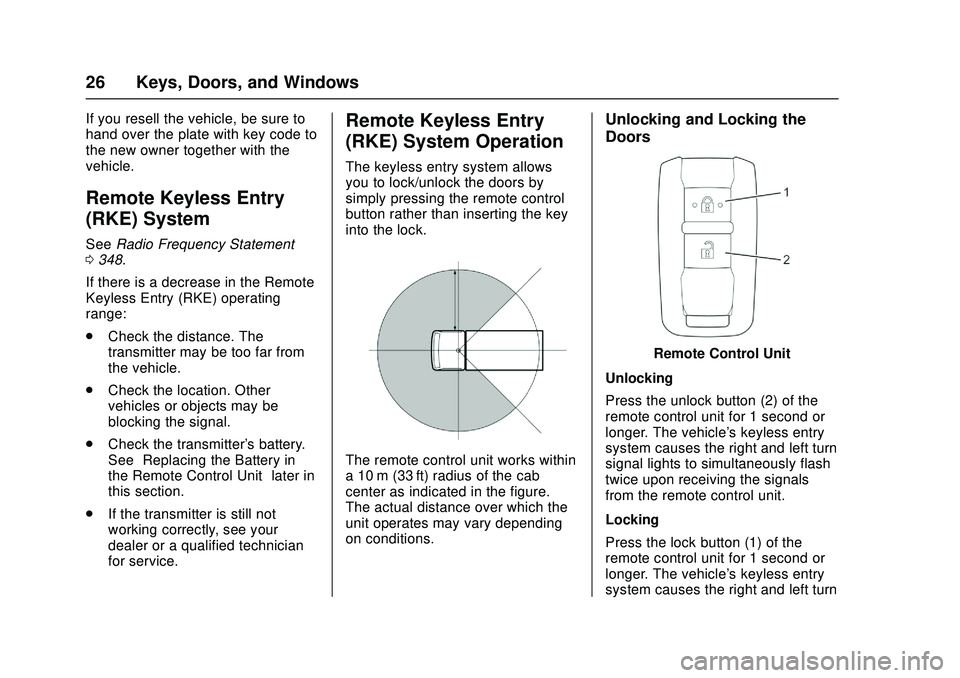
The remote control unit works within
a 10 m (33 ft) radius of the cab
center as indicated in the figure.
The actual distance over which the
unit operates may vary depending
on conditions.
Unlocking and Locking the
Doors
Remote Control Unit
Unlocking
Press the unlock button (2) of the
remote control unit for 1 second or
longer. The vehicle's keyless entry
system causes the right and left turn
signal lights to simultaneously flash
twice upon receiving the signals
from the remote control unit.
Locking
Press the lock button (1) of the
remote control unit for 1 second or
longer. The vehicle's keyless entry
system causes the right and left turn
Page 28 of 358
Chevrolet Low Cab Forward Owner Manual (GMNA-Localizing-U.S.-
11254764) - 2018 - crc - 12/5/16
Keys, Doors, and Windows 27
signal lights to simultaneously flash
once upon receiving the signals
from the remote control unit.
Should you lose the remote control
unit, please contact your dealer.
After locking the doors using the
remote control unit, be sure to
check that they are locked by
pulling the door handles.
Avoid getting water on the remote
control unit, dropping it, hitting it
against another object, or stepping
on it; otherwise, the remote control
unit could malfunction.
Do not leave the remote control unit
on the dashboard or any other
surface where the unit might be
exposed to high temperatures
(exceeding 60°C/140°F). Doing so
may result in shorter battery life or
malfunction of the remote
control unit.
If the keyless entry system fails to
operate normally, lock and unlock
the doors using the key and have
the system inspected by your
dealer.The lock or unlock buttons on the
remote control unit must be fully
pressed for more than 1 second
to work.
If you do not open any doors within
about 30 seconds after pressing the
unlock button to unlock the doors,
the automatic locking function of the
system will lock the doors again to
prevent theft.
In areas near a TV tower, electric
power plant, radio station, etc. or
under any conditions involving
strong electrical disturbances, the
remote control unit operating range
might change or the keyless entry
system might not work.
The keyless entry system does not
operate in the following cases:
.
The engine control switch is in
the "ON" position.
. The key is inserted in the engine
control switch.
. One of the doors is open.Replacing the Battery in the
Remote Control Unit
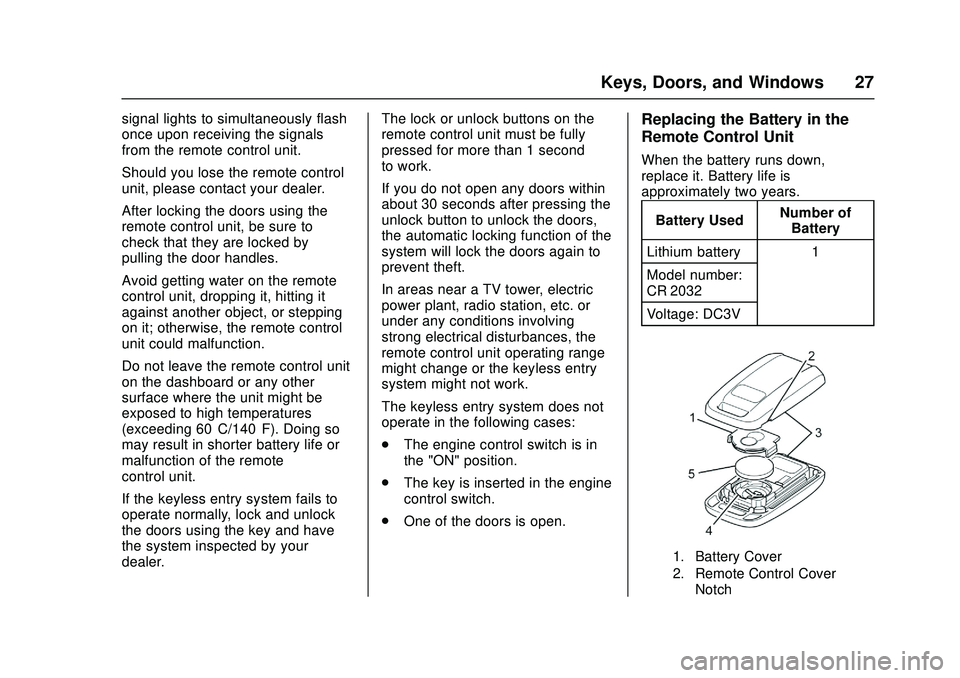
When the battery runs down,
replace it. Battery life is
approximately two years.
Battery Used Number of
Battery
Lithium battery 1
Model number:
CR 2032
Voltage: DC3V
1. Battery Cover
2. Remote Control Cover Notch
Page 30 of 358
Chevrolet Low Cab Forward Owner Manual (GMNA-Localizing-U.S.-
11254764) - 2018 - crc - 12/5/16
Keys, Doors, and Windows 29
{Warning
When changing the battery, use
only a battery of the same type as
the original battery, or an
equivalent. Otherwise, there is a
risk of explosion.
Do not place the battery in direct
sunlight, or near a fire or other
sources of heat.
Be sure to install the battery with
the "+" and "-" sides correctly
oriented. Incorrect installation will
result in leakage of chemicals
from inside the battery or other
operational problems.
You and others could be seriously
injured.
The battery life varies depending on
how the remote control unit is used.
The battery has reached its end of
life when the remote control unit
works intermittently or does not
work at all. Replace the battery as
soon as this happens.
Getting In and Out of the
Vehicle
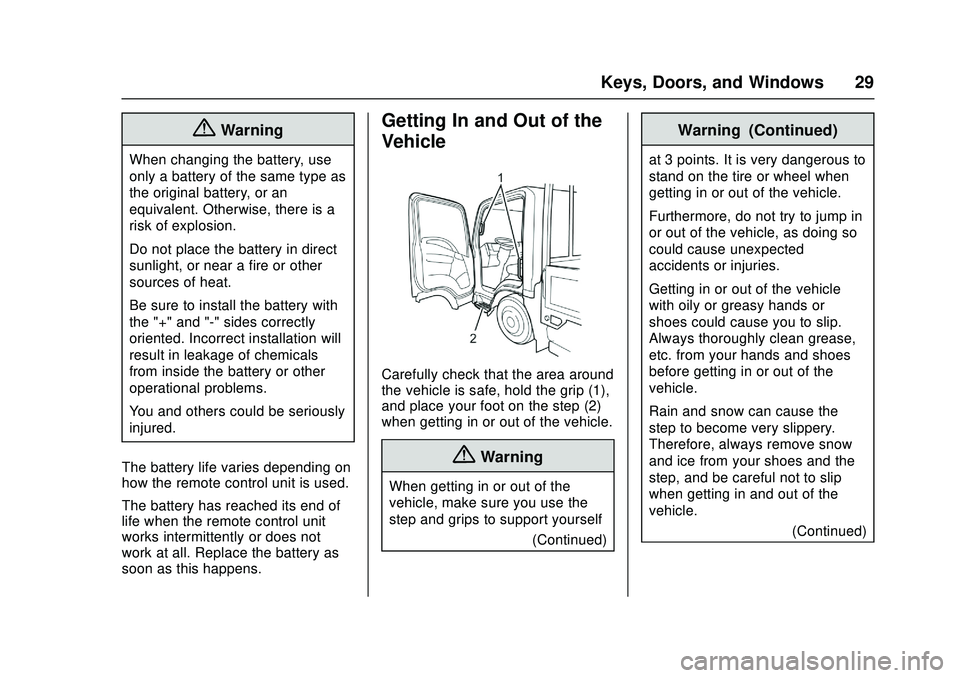
Carefully check that the area around
the vehicle is safe, hold the grip (1),
and place your foot on the step (2)
when getting in or out of the vehicle.
{Warning
When getting in or out of the
vehicle, make sure you use the
step and grips to support yourself (Continued)
Warning (Continued)
at 3 points. It is very dangerous to
stand on the tire or wheel when
getting in or out of the vehicle.
Furthermore, do not try to jump in
or out of the vehicle, as doing so
could cause unexpected
accidents or injuries.
Getting in or out of the vehicle
with oily or greasy hands or
shoes could cause you to slip.
Always thoroughly clean grease,
etc. from your hands and shoes
before getting in or out of the
vehicle.
Rain and snow can cause the
step to become very slippery.
Therefore, always remove snow
and ice from your shoes and the
step, and be careful not to slip
when getting in and out of the
vehicle.(Continued)
Page 34 of 358
Chevrolet Low Cab Forward Owner Manual (GMNA-Localizing-U.S.-
11254764) - 2018 - crc - 12/5/16
Keys, Doors, and Windows 33
Power Door Locks
Power Door Lock (Central
Door Lock)
How the Power Door Lock System
Operates
When you lock the driver's door
using the key or by operating the
lock button, the power door lock
system will automatically lock all
doors simultaneously.
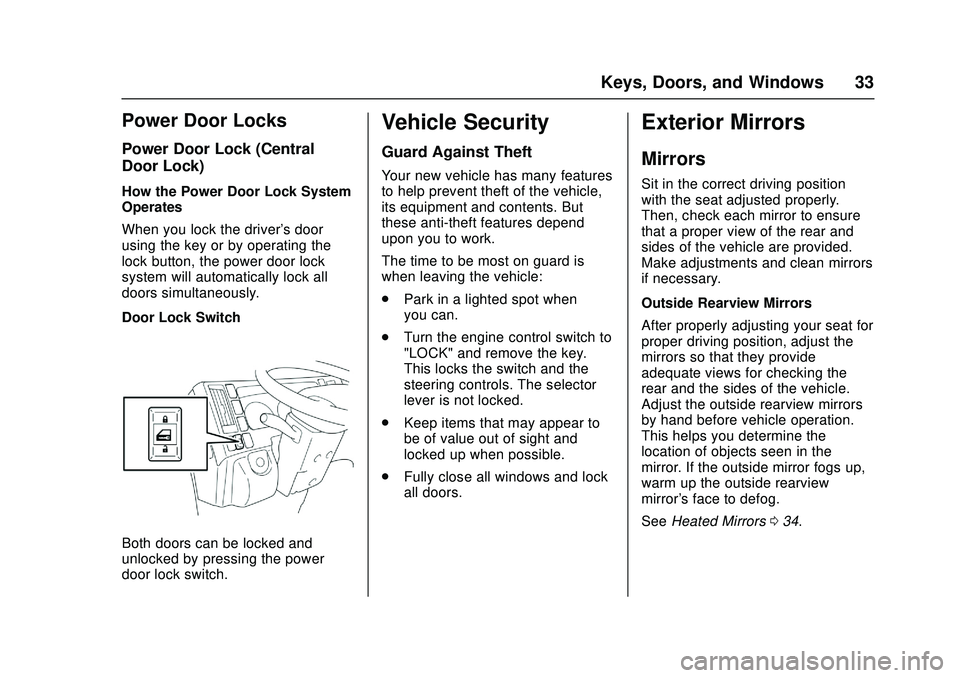
Door Lock Switch
Both doors can be locked and
unlocked by pressing the power
door lock switch.
Vehicle Security
Guard Against Theft
Your new vehicle has many features
to help prevent theft of the vehicle,
its equipment and contents. But
these anti-theft features depend
upon you to work.
The time to be most on guard is
when leaving the vehicle:
.Park in a lighted spot when
you can.
. Turn the engine control switch to
"LOCK" and remove the key.
This locks the switch and the
steering controls. The selector
lever is not locked.
. Keep items that may appear to
be of value out of sight and
locked up when possible.
. Fully close all windows and lock
all doors.
Exterior Mirrors
Mirrors
Sit in the correct driving position
with the seat adjusted properly.
Then, check each mirror to ensure
that a proper view of the rear and
sides of the vehicle are provided.
Make adjustments and clean mirrors
if necessary.
Outside Rearview Mirrors
After properly adjusting your seat for
proper driving position, adjust the
mirrors so that they provide
adequate views for checking the
rear and the sides of the vehicle.
Adjust the outside rearview mirrors
by hand before vehicle operation.
This helps you determine the
location of objects seen in the
mirror. If the outside mirror fogs up,
warm up the outside rearview
mirror's face to defog.
See Heated Mirrors 034.
Page 35 of 358

Chevrolet Low Cab Forward Owner Manual (GMNA-Localizing-U.S.-
11254764) - 2018 - crc - 12/5/16
34 Keys, Doors, and Windows
{Warning
Before driving, be sure to adjust
the seat and mirrors to positions
that give you a correct driving
posture.
Do not adjust the outside mirrors
while operating the vehicle.
Adjust the mirrors when the
vehicle is stationary, not while the
vehicle is in motion.
When checking the rear of the
vehicle with mirrors, be careful
that this does not distract your
attention from the traffic ahead.
Rearview mirrors may make the
vehicle behind you appear farther
away than it really is. Use these
mirrors very carefully until you are
able to correctly determine
distances from the images.(Continued)
Warning (Continued)
Keep the mirrors in mind when
passing another vehicle on a
narrow road, moving the vehicle
into a garage or driving near
pedestrians.
Do not drive with the mirrors
folded.
You and others could be seriously
injured.
Heated Mirrors
If the outside mirrors fog up, press
the outside rearview mirror heater
switch to defog them. When the
switch is pressed the indicating light
will illuminate. If the switch is
pressed once again, it will switch to
“OFF”, and the operation indicating
light will go out.
Do not use this switch while the
engine is stopped. Due to high
power consumption, the battery can
be discharged.
Turn off the switch as soon as
defogging is complete.
Page 36 of 358

Chevrolet Low Cab Forward Owner Manual (GMNA-Localizing-U.S.-
11254764) - 2018 - crc - 12/5/16
Keys, Doors, and Windows 35
Windows
Power Windows
{Warning
If you are traveling with a child,
do not leave the child alone in the
vehicle. If the child touches the
controls or equipment, an
accident could occur. (For
example, the vehicle could move
or a fire could start.) Also, the cab
inside could become dangerously
hot in hot weather.
{Warning
Before closing the windows, make
sure that there is no risk of a
hand, head, or anything else
being trapped in the moving
window.
You and others could be seriously
injured.
{Warning
Regardless of whether the vehicle
is moving or stationary, you must
never allow a child to put his/her
head, hands, or other body part
out of the window. Allowing such
behavior would be dangerous
because the child could hit an
obstacle.
You and others could be seriously
injured.
The power windows operate only
when the engine control switch is in
the ON position. Open each door
window by pressing the power
window switch; close each one by
raising the switch.
Window Switches on
Driver ’s Door
The power window switch on the
driver ’s door can operate both
driver ’s (2) and passenger ’s (1)
power windows.
To Open the Driver ’s Window
Lightly pressing the driver-side
window switch will lower the driver ’s
window until the switch is released
(manual mode operation). When the
switch is firmly pressed, the window
will lower completely without the
need to press the switch
continuously (automatic mode
operation). If you want to stop the
Page 37 of 358

Chevrolet Low Cab Forward Owner Manual (GMNA-Localizing-U.S.-
11254764) - 2018 - crc - 12/5/16
36 Keys, Doors, and Windows
automatic movement of the window
before it lowers completely, raise the
switch lightly.
To Close the Driver’s Window
Lightly raising the driver-side
window switch will cause the
driver's window to move up until the
switch is released.
To Open the Passenger ’s Window
The passenger's window continues
to lower while the passenger-side
switch on the driver's door is being
pressed.
To Close the Passenger ’s Window
The passenger's window continues
to move up while the
passenger-side switch on the
driver's door is being raised.
Window Switches on
Passenger ’s Door and Rear
Doors (If equipped)
The power window switch on the
passenger's door can raise and
lower the passenger's side window only, while, if equipped, the rear
power window switches can raise
and lower the rear door windows.
{Warning
Be sure to warn passengers not
to let any part of the body
become trapped or caught in a
moving window.
You and others could be seriously
injured.
The window continues to lower
while the window switch is being
pressed and continues to rise while
the switch is being raised. It will
stop moving at any position when
the switch is released.
When the rear power window lock
switch is in the “LOCK”position, it is
not possible to open and close the
rear windows.
Window Switches on Center of
Dashboard (Crew Cab Model)
The power window switch on the
instrument panel and rear door can
raise and lower the rear door
window.
To Open a Rear Window
Rear Power Window Switch
The window glass will move
downward while you are pushing
the bottom part of the switch.
To Close a Rear Window
The window glass will move upward
while you are pushing the top part of
the switch.
Page 38 of 358
Chevrolet Low Cab Forward Owner Manual (GMNA-Localizing-U.S.-
11254764) - 2018 - crc - 12/5/16
Keys, Doors, and Windows 37
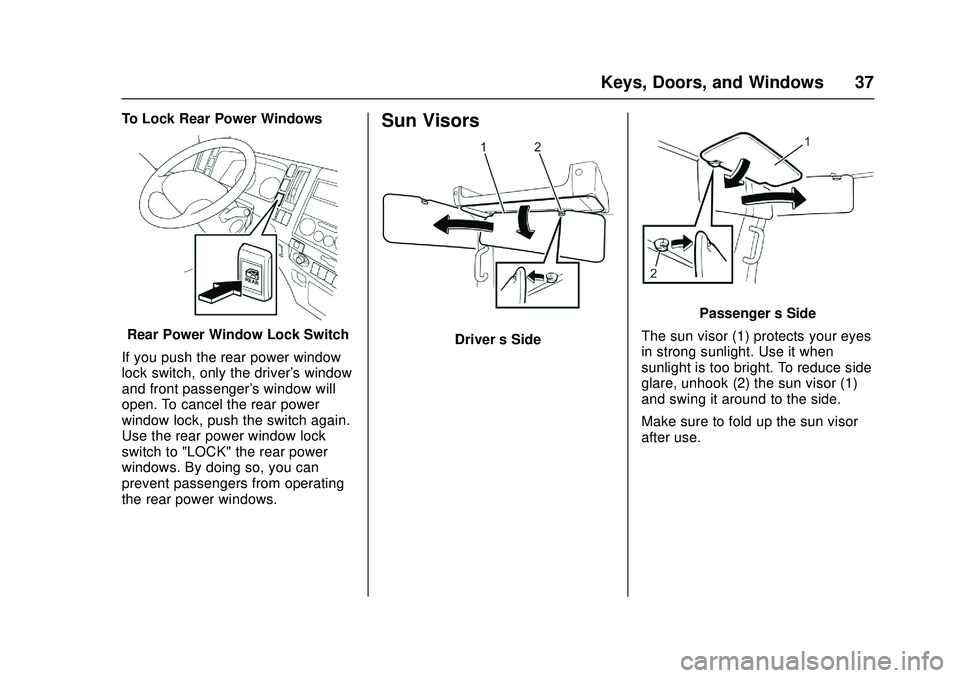
To Lock Rear Power Windows
Rear Power Window Lock Switch
If you push the rear power window
lock switch, only the driver's window
and front passenger's window will
open. To cancel the rear power
window lock, push the switch again.
Use the rear power window lock
switch to "LOCK" the rear power
windows. By doing so, you can
prevent passengers from operating
the rear power windows.
Sun Visors
Driver ’s Side
Passenger ’s Side
The sun visor (1) protects your eyes
in strong sunlight. Use it when
sunlight is too bright. To reduce side
glare, unhook (2) the sun visor (1)
and swing it around to the side.
Make sure to fold up the sun visor
after use.
Page 42 of 358

Chevrolet Low Cab Forward Owner Manual (GMNA-Localizing-U.S.-
11254764) - 2018 - crc - 12/5/16
Seats and Restraints 41
To recline the seatback, raise the
seatback tilt lever and gently lean
back to the desired position.
To move the seatback forward, lean
forward with your back slightly clear
of the seatback and raise the lever.
After making adjustments, check
that the seatback is fully locked.
Suspension Adjustment
Avoid making any kind of contact
with the pointer on the scale. Doing
so may result in damage to the
pointer, preventing appropriate
weight adjustments from being
possible.Before sitting on the seat, use the
knob to adjust the suspension to
suit your weight. Turn the knob
clockwise to move the pointer down
the scale and counterclockwise to
move it up the scale. The pointer
should be alongside your weight on
the scale.
The range of adjustment is
50-130 kg (110-290 lbs). If your
weight is outside this range, the
suspension may not be fully
effective. However, you will be able
to sit in the correct position for
driving.
Passenger’s Seat/Center Seat
{Warning
Baggage must not be placed on
the center seat. If the baggage
falls on the floor when braking, it
may prevent the driver from
operating the pedals. You and
others could be seriously injured.
Passenger ’s Seat