cruise control CHEVROLET LOW CAB FORWARD 2018 Owner's Manual
[x] Cancel search | Manufacturer: CHEVROLET, Model Year: 2018, Model line: LOW CAB FORWARD, Model: CHEVROLET LOW CAB FORWARD 2018Pages: 358, PDF Size: 6.32 MB
Page 10 of 358
Chevrolet Low Cab Forward Owner Manual (GMNA-Localizing-U.S.-
11254764) - 2018 - crc - 12/5/16
In Brief 9
In Brief
Instrument Panel
Instrument Panel . . . . . . . . . . . . . . 10
Instrument Panel(Driver Side) . . . . . . . . . . . . . . . . . . 12
Instrument Panel (Vehicle Interior) . . . . . . . . . . . . . . . . . . . . . . . 13
Initial Drive Information
Initial Drive Information . . . . . . . . 14
Remote Keyless Entry (RKE)System . . . . . . . . . . . . . . . . . . . . . . . 14
Getting In and Out of the Vehicle . . . . . . . . . . . . . . . . . . . . . . . 14
Door Locks . . . . . . . . . . . . . . . . . . . . 14
Windows . . . . . . . . . . . . . . . . . . . . . . . 15
Seat Adjustment . . . . . . . . . . . . . . . 16
Seat Belts . . . . . . . . . . . . . . . . . . . . . 17
Mirror Adjustment . . . . . . . . . . . . . . 18
Steering Wheel Adjustment . . . . 18
Interior Lighting . . . . . . . . . . . . . . . . 19
Exterior Lighting . . . . . . . . . . . . . . . 19
Windshield Wiper/Washer . . . . . . 20
Climate Controls . . . . . . . . . . . . . . . 20
Vehicle Features
Radio(s) . . . . . . . . . . . . . . . . . . . . . . . 21
Portable Audio Devices . . . . . . . . 22
Cruise Control . . . . . . . . . . . . . . . . . 22 Driver Information
Center (DIC) . . . . . . . . . . . . . . . . . 22
Power Outlets . . . . . . . . . . . . . . . . . 23
Performance and Maintenance
Driving for Better Fuel Economy . . . . . . . . . . . . . . . . . . . . . 23
Diesel Exhaust Fluid . . . . . . . . . . . 24
Page 12 of 358
Chevrolet Low Cab Forward Owner Manual (GMNA-Localizing-U.S.-
11254764) - 2018 - crc - 12/5/16
In Brief 11
1. Air Flow Direction ControlLever. See Air Vents0118.
2. Exterior Lamp Controls 092.
Cruise Control Set Switch. See
Cruise Control 0202.
3. Windshield Wiper and Windshield Washer Switch.
See Windshield Wiper/Washer
0 66.
Exhaust Brake Switch. See
Exhaust Brake 0201.
4. Heater and Manual Air Conditioner. See Climate
Control Systems 0115.
5. Radio with CD/USB. See AM-FM Radio 097.
6. Small Article Storage Pockets. See Instrument Panel Storage
0 55.
7. Windshield Washer Fluid Tank. See Washer Fluid 0241.
8. Glove Box 055.
9. Relay Box. See Electrical
System Overload 0264.
10. Cupholders 056. 11. Hook. See
Shopping Bag
Hooks 058.
12. Card Holder. See Instrument
Panel Storage 055.
13. Cigarette Lighter 067.
14. Accessory Power Outlet. See Power Outlets 067.
Page 13 of 358
Chevrolet Low Cab Forward Owner Manual (GMNA-Localizing-U.S.-
11254764) - 2018 - crc - 12/5/16
12 In Brief
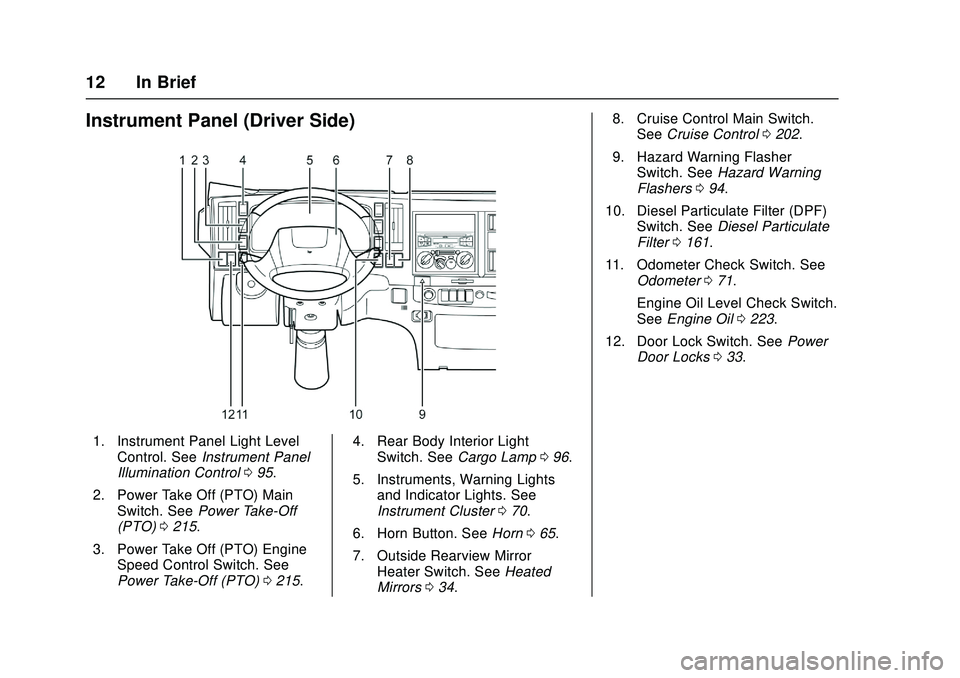
Instrument Panel (Driver Side)
1. Instrument Panel Light LevelControl. See Instrument Panel
Illumination Control 095.
2. Power Take Off (PTO) Main Switch. See Power Take-Off
(PTO) 0215.
3. Power Take Off (PTO) Engine Speed Control Switch. See
Power Take-Off (PTO) 0215. 4. Rear Body Interior Light
Switch. See Cargo Lamp 096.
5. Instruments, Warning Lights and Indicator Lights. See
Instrument Cluster 070.
6. Horn Button. See Horn065.
7. Outside Rearview Mirror Heater Switch. See Heated
Mirrors 034. 8. Cruise Control Main Switch.
See Cruise Control 0202.
9. Hazard Warning Flasher Switch. See Hazard Warning
Flashers 094.
10. Diesel Particulate Filter (DPF) Switch. See Diesel Particulate
Filter 0161.
11. Odometer Check Switch. See Odometer 071.
Engine Oil Level Check Switch.
See Engine Oil 0223.
12. Door Lock Switch. See Power
Door Locks 033.
Page 23 of 358
Chevrolet Low Cab Forward Owner Manual (GMNA-Localizing-U.S.-
11254764) - 2018 - crc - 12/5/16
22 In Brief
CD Player
To play a CD, seeCD Player0103.
Portable Audio Devices
This vehicle is equipped with a
3.5 mm (1/8 in) auxiliary input jack
and a USB port in the radio
faceplate. External devices such as
iPods
®, laptop computers, MP3
players, and USB storage devices
may be connected.
See USB Port 0110 and Auxiliary
Devices 0113.
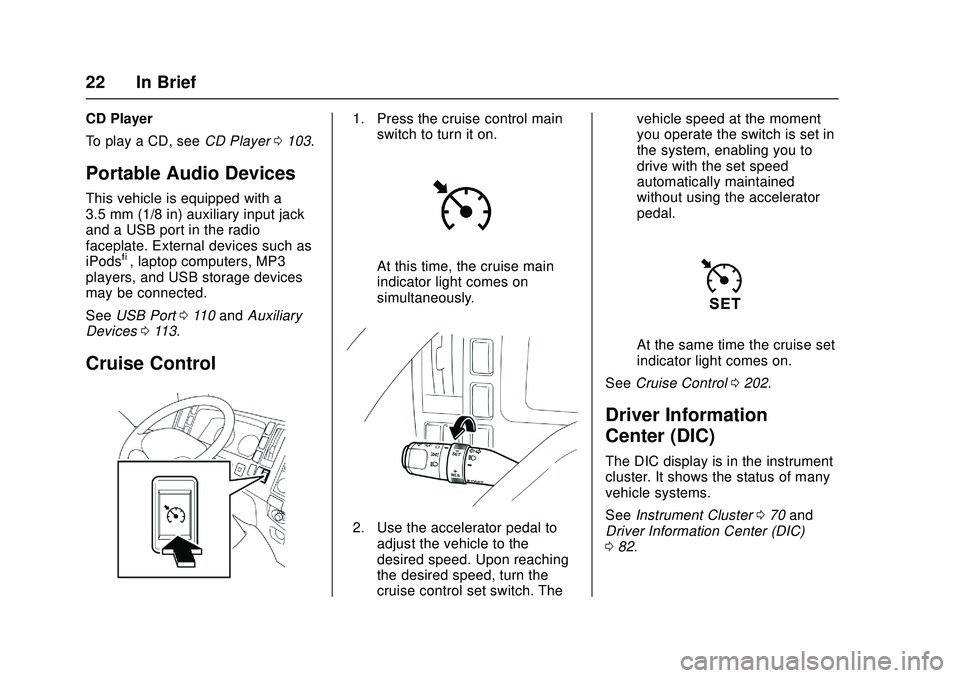
Cruise Control
1. Press the cruise control main
switch to turn it on.
At this time, the cruise main
indicator light comes on
simultaneously.
2. Use the accelerator pedal to
adjust the vehicle to the
desired speed. Upon reaching
the desired speed, turn the
cruise control set switch. The vehicle speed at the moment
you operate the switch is set in
the system, enabling you to
drive with the set speed
automatically maintained
without using the accelerator
pedal.
At the same time the cruise set
indicator light comes on.
See Cruise Control 0202.
Driver Information
Center (DIC)
The DIC display is in the instrument
cluster. It shows the status of many
vehicle systems.
See Instrument Cluster 070 and
Driver Information Center (DIC)
0 82.
Page 65 of 358
Chevrolet Low Cab Forward Owner Manual (GMNA-Localizing-U.S.-
11254764) - 2018 - crc - 12/5/16
64 Instruments and Controls
Instruments and
Controls
Controls
Steering Wheel Adjustment . . . . 65
Horn . . . . . . . . . . . . . . . . . . . . . . . . . . . 65
Windshield Wiper/Washer . . . . . . 66
Power Outlets . . . . . . . . . . . . . . . . . 67
Cigarette Lighter . . . . . . . . . . . . . . . 67
Ashtrays . . . . . . . . . . . . . . . . . . . . . . . 68
Warning Lights, Gauges, and
Indicators
Warning Lights, Gauges, andIndicators . . . . . . . . . . . . . . . . . . . . 69
Instrument Cluster . . . . . . . . . . . . . 70
Speedometer . . . . . . . . . . . . . . . . . . 71
Odometer . . . . . . . . . . . . . . . . . . . . . . 71
Trip Odometer . . . . . . . . . . . . . . . . . 71
Tachometer . . . . . . . . . . . . . . . . . . . . 72
Fuel Gauge . . . . . . . . . . . . . . . . . . . . 72
Engine Coolant Temperature Gauge . . . . . . . . . . . . . . . . . . . . . . . . 72
Diesel Exhaust Fluid (DEF) Gauge . . . . . . . . . . . . . . . . . . . . . . . . 73
Seat Belt Reminders . . . . . . . . . . . 73
Battery Warning Light . . . . . . . . . . 73
Malfunction Indicator Lamp (Check Engine Light) . . . . . . . . . 74 Service Vehicle Soon Light . . . . 74
Brake System Warning Light
(Parking Brake Light) . . . . . . . . . 75
Antilock Brake System (ABS) Warning Light . . . . . . . . . . . . . . . . 77
Exhaust Brake Light . . . . . . . . . . . 78
Service Transmission Warning Light . . . . . . . . . . . . . . . . . . . . . . . . . 78
Automatic Transmission Fluid Temperature Warning Light . . . 78
Overdrive Off Light . . . . . . . . . . . . . 79
Wait-to-Start Light . . . . . . . . . . . . . 79
Engine Oil Pressure Light . . . . . . 79
Engine Oil Level Indicator Light . . . . . . . . . . . . . . . . . . . . . . . . . 80
Diesel Exhaust Fluid (DEF) Warning Light . . . . . . . . . . . . . . . . 80
Engine Shutdown Warning Light . . . . . . . . . . . . . . . . . . . . . . . . . 80
Idle Shutdown Light . . . . . . . . . . . . 81
Reduced Engine Power Light . . . . . . . . . . . . . . . . . . . . . . . . . 81
High-Beam On Light . . . . . . . . . . . 81
Daytime Running Lamps (DRL) Indicator Light . . . . . . . . . . . . . . . . 82
Cruise Control Light . . . . . . . . . . . 82
Information Displays
Driver Information Center (DIC) . . . . . . . . . . . . . . . . . 82
Vehicle Messages
Vehicle Messages . . . . . . . . . . . . . 86
Warning Buzzers . . . . . . . . . . . . . . 91
Page 83 of 358
Chevrolet Low Cab Forward Owner Manual (GMNA-Localizing-U.S.-
11254764) - 2018 - crc - 12/5/16
82 Instruments and Controls
Daytime Running Lamps
(DRL) Indicator Light
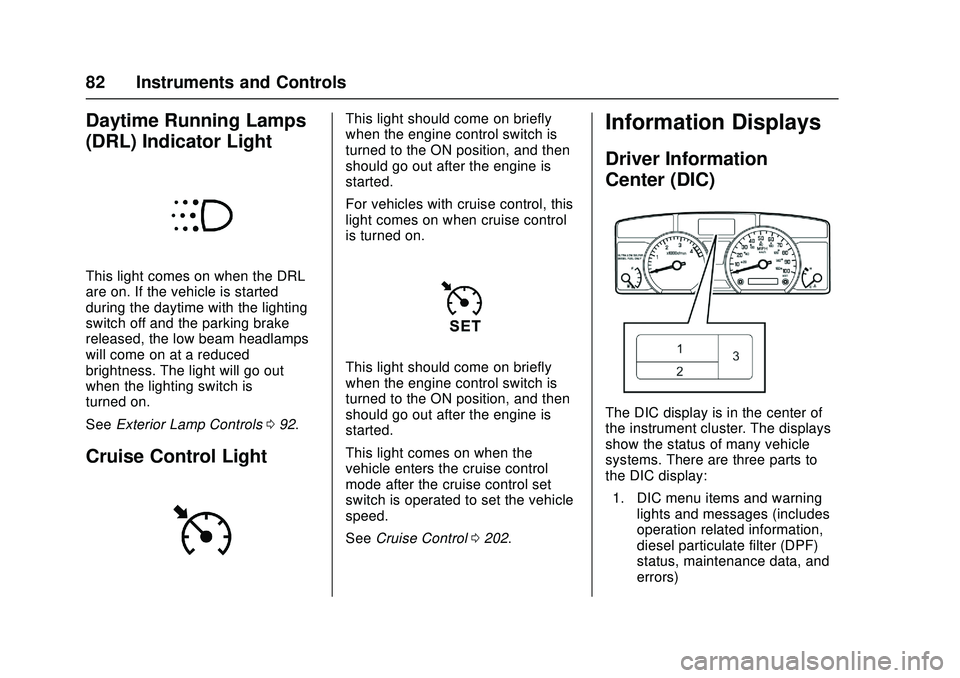
This light comes on when the DRL
are on. If the vehicle is started
during the daytime with the lighting
switch off and the parking brake
released, the low beam headlamps
will come on at a reduced
brightness. The light will go out
when the lighting switch is
turned on.
SeeExterior Lamp Controls 092.
Cruise Control Light
This light should come on briefly
when the engine control switch is
turned to the ON position, and then
should go out after the engine is
started.
For vehicles with cruise control, this
light comes on when cruise control
is turned on.
This light should come on briefly
when the engine control switch is
turned to the ON position, and then
should go out after the engine is
started.
This light comes on when the
vehicle enters the cruise control
mode after the cruise control set
switch is operated to set the vehicle
speed.
See Cruise Control 0202.
Information Displays
Driver Information
Center (DIC)
The DIC display is in the center of
the instrument cluster. The displays
show the status of many vehicle
systems. There are three parts to
the DIC display:
1. DIC menu items and warning lights and messages (includes
operation related information,
diesel particulate filter (DPF)
status, maintenance data, and
errors)
Page 122 of 358

Chevrolet Low Cab Forward Owner Manual (GMNA-Localizing-U.S.-
11254764) - 2018 - crc - 12/5/16
Driving and Operating 121
Driving and
Operating
Driving Information
Driver Behavior . . . . . . . . . . . . . . . 122
Distracted Driving . . . . . . . . . . . . 122
Control of a Vehicle . . . . . . . . . . . 122
Braking . . . . . . . . . . . . . . . . . . . . . . . 126
Steering . . . . . . . . . . . . . . . . . . . . . . 131
Driving on Wet Roads . . . . . . . . 132
Hill and Mountain Roads . . . . . 132
Winter Driving . . . . . . . . . . . . . . . . 133
If the Vehicle Is Stuck . . . . . . . . 136
Emergencies(Troubleshooting) . . . . . . . . . . . 137
Emergencies (Disabled Vehicle) . . . . . . . . . . . . . . . . . . . . . 146
Starting and Operating
New Vehicle Break-In . . . . . . . . . 147
Pedals . . . . . . . . . . . . . . . . . . . . . . . . 148
Ignition Positions . . . . . . . . . . . . . 148
Starting and Stopping theVehicle . . . . . . . . . . . . . . . . . . . . . . 149
Operating Temperature . . . . . . . 153
Winter Cover . . . . . . . . . . . . . . . . . 154
Engine Heater . . . . . . . . . . . . . . . . 154
Engine Alarm and Automatic Shutdown . . . . . . . . . . . . . . . . . . . 155 Idle Shutdown . . . . . . . . . . . . . . . . 155
High Idle System . . . . . . . . . . . . . 155
Engine Checks Before
Operating . . . . . . . . . . . . . . . . . . . 156
Parking over Things
That Burn . . . . . . . . . . . . . . . . . . . 157
Engine Exhaust
Engine Exhaust . . . . . . . . . . . . . . 159
Running the Vehicle WhileParked . . . . . . . . . . . . . . . . . . . . . . 160
Diesel Particulate Filter
Diesel Particulate Filter . . . . . . . 161
Diesel Exhaust Fluid
Diesel Exhaust Fluid . . . . . . . . . . 170
Automatic Transmission
Automatic Transmission . . . . . . 185
Selector Lever . . . . . . . . . . . . . . . . 194
Overdrive Off . . . . . . . . . . . . . . . . . 195
Brakes
Antilock BrakeSystem (ABS) . . . . . . . . . . . . . . . 196
Parking Brake . . . . . . . . . . . . . . . . 200
Exhaust Brake . . . . . . . . . . . . . . . . 201
Cruise Control
Cruise Control . . . . . . . . . . . . . . . . 202
Fuel
Fuel for Diesel Engines . . . . . . . 206
Biodiesel . . . . . . . . . . . . . . . . . . . . . 207
Cold Weather Operation . . . . . . 209
Water in Fuel . . . . . . . . . . . . . . . . . 209
Running Out of Fuel . . . . . . . . . . 212
Filling the Tank . . . . . . . . . . . . . . . 213
Conversions and Add-Ons
Add-On Electrical Equipment . . . . . . . . . . . . . . . . . . 215
Power Take-Off (PTO) . . . . . . . . 215
Page 157 of 358

Chevrolet Low Cab Forward Owner Manual (GMNA-Localizing-U.S.-
11254764) - 2018 - crc - 12/5/16
156 Driving and Operating
Activating High Idle Mode
Follow the below procedure to
activate the high idle mode:1. Set the parking brake.
2. Set the selector lever in P (Park) or N (Neutral) position.
3. Do not press the brake pedal. 4. Press the cruise control main
switch to set it to ON. At this
time, the operation indicating
light will turn to green.
5. Turn and hold the cruise control set switch in the SET
position. After approximately
3 seconds the cruise control
set indicator light will begin to
flash slowly and the engine idle
will increase to 1,200 r/min.
Canceling High Idle Mode
Any of the following actions will
cancel high idle mode.
. The cruise control main switch is
set to OFF.
. The brake pedal is pressed.
. The parking brake is released.
. The selector lever is moved from
P (Park) or N (Neutral) position.
. The accelerator pedal is
pressed, accelerating the engine
beyond the engine speed
threshold.
The cruise set indicator light will
stop flashing and the engine speed
will return to normal.
Engine Checks Before
Operating
Checks Before Operating
Allow the engine to warm up before
placing the engine under heavy load
driving. While the engine is warming
up under light load, the following
checks should be made:
1. Observe the red engine oil pressure warning light. The
light should go out when the
engine is running. If it stays on,
shut the engine off and find the
cause.
2. Look at the engine coolant temperature gauge. If the
gauge reaches the H (HOT)
area, stop the engine and find
the cause of the overheating.
3. Check that the battery warning light has gone out. The light
should go off and stay off at
normal idle speeds. If the light
does not go out or comes on
during normal operation, have
the charging system checked.
Page 203 of 358

Chevrolet Low Cab Forward Owner Manual (GMNA-Localizing-U.S.-
11254764) - 2018 - crc - 12/5/16
202 Driving and Operating
Even if the selector lever is placed
in the N position, the exhaust brake
does not disengage until the engine
is warmed up if the warm-up system
is on.
Conditions for Inoperable Exhaust
Brake
Under the following conditions, the
exhaust brake does not engage
even if the exhaust brake indicator
light comes on:
.The accelerator pedal is
pressed.
. The selector lever is in the N
position.
. The vehicle is traveling at
5 km/h (3 MPH) or lower speeds.
If your vehicle is equipped with an
anti-lock brake system (ABS), the
exhaust brake may disengage
during ABS operation even when
the exhaust brake switch is in the
ON position and the exhaust brake
indicator light is on. The exhaust
brake may disengage temporarily as
the vehicle passes over a bump
even when the brake pedal is not
pressed. It is advisable to operate the
exhaust brake when descending a
slope or when stop and go driving is
involved.
The selection of transmission gears
and engine speed when operating
the brake system is important. The
exhaust brake is more effective in
the lower gears and at the higher
engine speeds. See
Exhaust Brake
Light 078.Cruise Control
The cruise control function allows
you to drive the vehicle at a
constant speed without operating
the accelerator pedal. Use this
function when the vehicle speed is
between 40 to 160 km/h (25 to 100
MPH). This function should only be
used when driving without frequent
starts and stops.
{Warning
Cruise control can be dangerous
where you cannot drive safely at
a steady speed. Do not use
cruise control on winding roads or
in heavy traffic. You and others
could be seriously injured.
Cruise control can be dangerous
on slippery roads. On such roads,
fast changes in tire traction can
cause needless wheel spinning,
and you could lose control. Do
not use cruise control on slippery
roads. You and others could be
seriously injured.
Page 204 of 358
Chevrolet Low Cab Forward Owner Manual (GMNA-Localizing-U.S.-
11254764) - 2018 - crc - 12/5/16
Driving and Operating 203
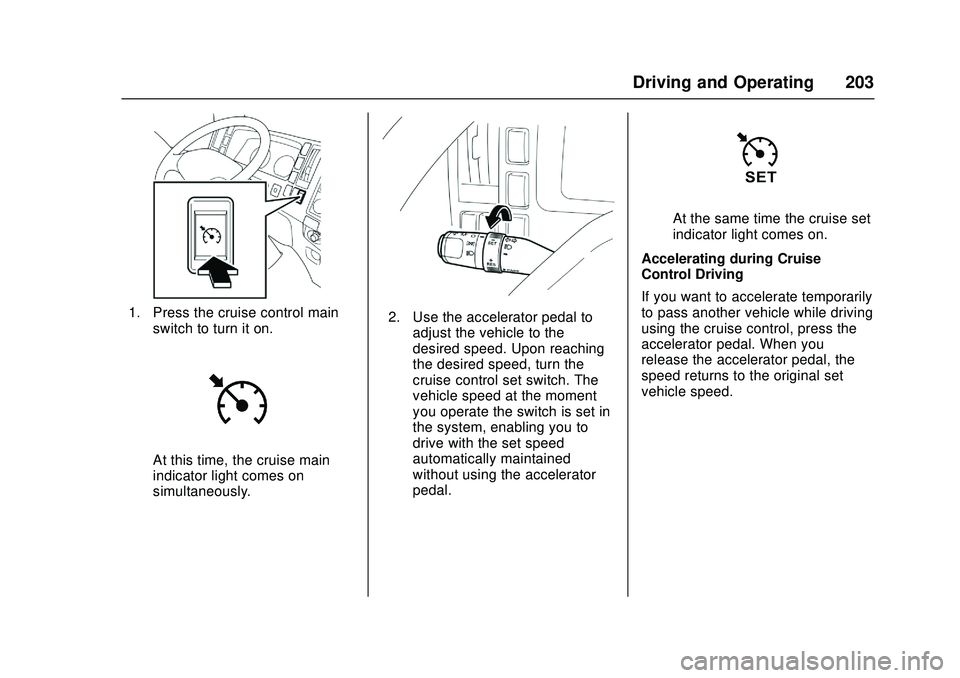
1. Press the cruise control mainswitch to turn it on.
At this time, the cruise main
indicator light comes on
simultaneously.
2. Use the accelerator pedal toadjust the vehicle to the
desired speed. Upon reaching
the desired speed, turn the
cruise control set switch. The
vehicle speed at the moment
you operate the switch is set in
the system, enabling you to
drive with the set speed
automatically maintained
without using the accelerator
pedal.
At the same time the cruise set
indicator light comes on.
Accelerating during Cruise
Control Driving
If you want to accelerate temporarily
to pass another vehicle while driving
using the cruise control, press the
accelerator pedal. When you
release the accelerator pedal, the
speed returns to the original set
vehicle speed.