change time CHEVROLET LOW CAB FORWARD 2019 User Guide
[x] Cancel search | Manufacturer: CHEVROLET, Model Year: 2019, Model line: LOW CAB FORWARD, Model: CHEVROLET LOW CAB FORWARD 2019Pages: 382, PDF Size: 5.95 MB
Page 112 of 382

Chevrolet Low Cab Forward 5.2L Diesel Engine 4500/5500 Series (GMNA-
Localizing-U.S.-12407814) - 2019 - crc - 12/13/17
Infotainment System 111
.Press 2 twice to play the files
from the folder being played in
the USB Memory in random
order.
After the player has played the last
file, it starts playing the first file of
the same folder.
FLD
vis displayed.
To cancel, press 2 again. FLD
v
disappears.
Selecting the Music File from the
Category List 1. Press LIST for less than one second. LIST is displayed.
To cancel the category
selection mode, press LIST
again or press Back.
2. Turn MODE/
O/ENTER to
select the category of your
choice, and then press
ENTER. The category changes
in the following order:
PLAYING ↔FOLDER ↔FILE
↔ PLAYING... 3. Turn MODE/
O/ENTER to
select the folder or file of your
choice from the list, and then
press ENTER.
When the file is selected, the
player starts playing the file.
When FOLDER is selected,
select the file in the folder to
start playback. To return to the
list selection or category
selection mode, press BACK
for less than one second.
To cancel the category
selection mode, press and hold
down Back for more than
one second.
Go Back to the First Position
(Home Jump)
You can go back to the first file of
the first folder on the USB Memory
being played from any position of it.
This function is called Home Jump.
For example: If Home Jump is used
when playing File 5 in Folder 4, it
goes back to File 1 in Folder 1 and
starts playing. Display the Text Information
1. Press and hold down LIST for more than one second.
2. Turn MODE/
O/ENTER to
select the display item of your
choice, and then press
ENTER.
The display item changes in
the following order.
FL/TR NO (Folder number/File
number) ↔TIME (Playback
time) ↔FOLDER (Folder
name) ↔FILE (File name) ↔
ALBUM (Album title)* ↔
TRACK (Track title) ↔ARTIST
(Artist name) ↔FL/TR NO...
* It is not displayed during the
WMA file playback.
If the text information is too long to
fit into the display window, press
and hold down FUNC for more than
one second to switch to the
next page.
Texts recorded with characters other
than alphanumeric characters and
symbols will appear as "*"
(asterisks).
Page 114 of 382

Chevrolet Low Cab Forward 5.2L Diesel Engine 4500/5500 Series (GMNA-
Localizing-U.S.-12407814) - 2019 - crc - 12/13/17
Infotainment System 113
Playing Music Files in the iPod
(When the iPod is Connected)1. Press MODE/
O/ENTER.
2. Turn MODE/
O/ENTER to
select IPOD, and then press
ENTER. The music file starts
playing.
{Warning
. Either place the iPod and
iPod connection cable
somewhere where they do
not interfere with driving or
temporarily secure them at
a location where they are
not in the way. They could
impede driving and cause a
crash.
. Make sure not to touch the
terminals of the iPod
connection cable.
. Do not connect, operate or
remove the iPod while
driving. Pausing the Music
Press 3 to pause the music. To
resume, press 4.
File Selection
Press
yorzto select the music
file of your choice.
. Press
yto advance to the
next file.
. Press
zto return to the
previous file. Press again to
return to the previous file.
Fast Forwarding/Fast Reversing
Press and hold
yorzto fast
forward or fast reverse the
music file.
. Press
yto fast forward.
. Press
zto fast reverse.
Release to stop.
Repeat Playback
Press 1 to repeat the same file
being played.
wis displayed. To cancel, press twice.
w
disappears.
When the iPod is removed from the
main unit under the Repeat setting,
the iPod switches to the repeat
playback mode.
Random Playback (SHUFFLE)
Press 2.
The mode changes as follows each
time you press 2:
OFF
→Album Shuffle →Track
Shuffle →OFF
. Album Shuffle:
vis displayed
and the albums will be played
back in shuffle mode (tracks
within an album will not be
shuffled).
. Track Shuffle: FLD
vis
displayed and the selected list
will be played back in
shuffle mode.
When the iPod is removed from the
main unit under the Shuffle setting,
the iPod switches to the shuffle
playback mode.
Page 116 of 382
Chevrolet Low Cab Forward 5.2L Diesel Engine 4500/5500 Series (GMNA-
Localizing-U.S.-12407814) - 2019 - crc - 12/13/17
Infotainment System 115
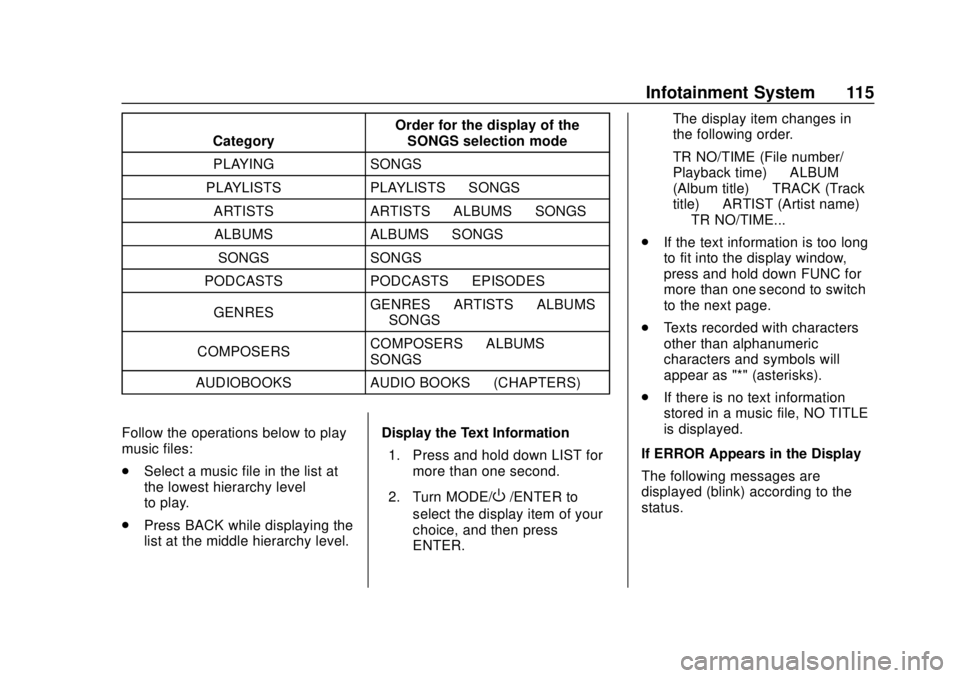
CategoryOrder for the display of the
SONGS selection mode
PLAYING SONGS
PLAYLISTS PLAYLISTS →SONGS
ARTISTS ARTISTS →ALBUMS →SONGS
ALBUMS ALBUMS →SONGS
SONGS SONGS
PODCASTS PODCASTS →EPISODES
GENRES GENRES
→ARTISTS →ALBUMS
→ SONGS
COMPOSERS COMPOSERS
→ALBUMS →
SONGS
AUDIOBOOKS AUDIO BOOKS →(CHAPTERS)
Follow the operations below to play
music files:
. Select a music file in the list at
the lowest hierarchy level
to play.
. Press BACK while displaying the
list at the middle hierarchy level. Display the Text Information
1. Press and hold down LIST for more than one second.
2. Turn MODE/
O/ENTER to
select the display item of your
choice, and then press
ENTER. The display item changes in
the following order.
TR NO/TIME (File number/
Playback time)
↔ALBUM
(Album title) ↔TRACK (Track
title) ↔ARTIST (Artist name)
↔ TR NO/TIME...
. If the text information is too long
to fit into the display window,
press and hold down FUNC for
more than one second to switch
to the next page.
. Texts recorded with characters
other than alphanumeric
characters and symbols will
appear as "*" (asterisks).
. If there is no text information
stored in a music file, NO TITLE
is displayed.
If ERROR Appears in the Display
The following messages are
displayed (blink) according to the
status.
Page 121 of 382
Chevrolet Low Cab Forward 5.2L Diesel Engine 4500/5500 Series (GMNA-
Localizing-U.S.-12407814) - 2019 - crc - 12/13/17
120 Infotainment System
To cancel, press 2 again.
Display the Text Information1. Press and hold LIST for more than one second.
2. Turn MODE/
O/ENTER to
select the display item of your
choice, and then press enter.
The display item changes in the
following order.
. TR NO/TIME: Track number/
Playback time
. ALBUM: Album title
. TRACK: Track title
. ARTIST: Artist name
If the text information is too long to
fit into the display window, press
and hold down FUNC for more than
one second to switch to the
next page.
Texts recorded with characters other
than alphanumeric characters and
symbols will appear as "*"
(asterisks). If there is no text information stored
in a music file, NO TITLE is
displayed.
Displaying the Registered
Portable Device
1. Press FUNC.
2. Turn MODE/
O/ENTER to
select BLUETOOTH, and then
press ENTER.
3. Turn MODE/
O/ENTER to
select LIST AUDIO, and then
press ENTER.
4. Turn MODE/
O/ENTER to
select device name, and then
press ENTER.
5. Turn MODE/
O/ENTER to
select the display item of your
choice, and then press
ENTER.
SELECT: Connect the
registered portable device.
SEARCHING is displayed. DISCONNECT: Disconnect the
registered portable device.
DISCONNECT? is displayed,
press ENTER.
DELETE: Delete the registered
portable device. When
DELETE? is displayed, press
ENTER.
METHOD: Change the
connection method. Select
FROM VEHICLE, to connect
the portable device by
operating from the unit. Select
FROM AUDIO, to connect the
unit from the portable device.
If ERROR Appears in the Display
The following message is displayed
according to the status.
NO CONNECT: This message
appears when the unit is not
connected to the portable device.
Page 165 of 382

Chevrolet Low Cab Forward 5.2L Diesel Engine 4500/5500 Series (GMNA-
Localizing-U.S.-12407814) - 2019 - crc - 12/13/17
164 Driving and Operating
Emergencies (Disabled
Vehicle)
When the Vehicle
Breaks Down
When the Vehicle Stops While
Driving
The brake booster will no longer
operate and brake effectiveness will
be reduced. If the engine cannot be
started, promptly have the vehicle
inspected and repaired.
If the engine stopped because the
vehicle ran out of fuel while driving,
refueling alone will not be enough to
restart the engine. Bleed the fuel
system after refueling the vehicle.
When the Fuel Tank is Empty
SeeRunning Out of Fuel 0233.
When the Engine Stalls and
Cannot Be Restarted
Move the selector lever to the "N"
position and push the vehicle to a
safe place.
{Warning
Vehicle operations will change, so
stop the vehicle in a safe place
with the following in mind.
The power steering system will
not work so the steering wheel
will be hard to turn. It will require
more strength than during normal
operation.
As the brake booster will no
longer be functional, brake
effectiveness will be greatly
reduced. Be sure to apply more
pressure than usual to the brake
pedal.
If the power assist steering
system goes out because the
engine has stopped or the assist
system has malfunctioned, the
vehicle can still be steered.
However, much greater effort is
needed, especially in sharp turns
or at low speeds.
You and others could be seriously
injured. When the Vehicle Breaks Down
During Driving
1. Use the hazard warning flasher any time to warn other drivers,
day or night, and pull the
vehicle immediately over to a
safe place that does not
impede traffic (shoulder). Place
triangle reflectors to alert other
traffic to the presence of your
vehicle.
2. If the vehicle can be exited safely, have the other
passengers get out and wait in
a safe place.
3. If the vehicle can be exited safely, walk to a safe place and
take appropriate measures by
using the closest
telephone, etc.
See Hazard Warning Flashers 094.
Page 179 of 382

Chevrolet Low Cab Forward 5.2L Diesel Engine 4500/5500 Series (GMNA-
Localizing-U.S.-12407814) - 2019 - crc - 12/13/17
178 Driving and Operating
Warning (Continued)
joint, or a hole or crack caused by
corrosion), have checks and
maintenance performed by the
nearest dealer. Continuing to use
the vehicle without having the
defect repaired would be
dangerous because exhaust
gases could get into the cab and
cause carbon monoxide
poisoning.
If at any time you think exhaust
fumes are entering the cab, have
the cause determined and
corrected as soon as possible.
If you must drive under these
conditions, drive only with all
windows fully open. Prevent
carbon monoxide from entering
the cab. The best way is to keep
the engine exhaust system, cab
and cab ventilation system
properly maintained.(Continued)
Warning (Continued)
We recommend that the exhaust
system and cab be inspected by
a competent technician:
. Each time the vehicle has
an oil change.
. Whenever a change is
noticed in the sound of the
exhaust system.
. Whenever the exhaust
system, underbody or cab is
damaged or becomes
corroded.
To allow proper operation of your
vehicle's ventilation system, keep
the air inlet grille clear of snow,
leaves or other obstructions at all
times. Do not park with the
engine running or idle this vehicle
for more than 10 minutes with the
ventilation system control switch
in the OFF position. Even with the
ventilation system on, running the
engine while parked or stopped (Continued)
Warning (Continued)
for longer periods of time is not
recommended. Entry of carbon
monoxide into the cab is possible
with a poorly repaired, damaged,
or corroded exhaust system or
cab. Do not run the engine in
confined areas (such as garages,
next to a building or near another
stopped vehicles with engine
running) any more than needed to
move the vehicle.
When the vehicle has to be
stopped in an unconfined area
with the engine running for any
more than a few minutes, take the
following steps:
. Adjust the heating or cooling
system to force outside air
into the cab.
. With temperature and outlet
selector knob in any
position:
(Continued)
Page 187 of 382
Chevrolet Low Cab Forward 5.2L Diesel Engine 4500/5500 Series (GMNA-
Localizing-U.S.-12407814) - 2019 - crc - 12/13/17
186 Driving and Operating
displayed on the DIC, the message
will change to red. The selectable
(switch) regeneration required
warning light (red) indicates the
DPF filter is nearly full of PM, a
condition which may be damaging
to the filter.
DPF regeneration should be
completed immediately if the
selectable (switch) regeneration
required warning light (red) is
displayed on the DIC.
Continued driving without
performing DPF regeneration will
cause the check engine malfunction
indicator light and reduced engine
power indicator light to come on, an
engine power reduction, and may
cause damage to the DPF filter. See
Driver Information Center (DIC)
082.
When operating the PTO for a long
time if your vehicle is so equipped,
make sure that the regeneration
required warning light or selectable
(switch) regeneration required
warning light (amber) is not
turning on. Once the Switch regeneration is
started, it cannot be switched to the
Running regeneration if interrupted.
When the Switch regeneration is
selected, end regeneration in a
single operation if possible.
During the regeneration, the engine
speed may vary, causing the
exhaust brake valve to be
deactivated. However, while the
regeneration in progress indicator
light (amber) appears, regeneration
is still taking place, so continue to
perform regeneration until the
message goes off.
The time needed to complete
regeneration differs depending on
the outside temperature.
The exhaust brake or exhaust
throttle is activated during DPF
regeneration. The exhaust brake or
exhaust throttle starting to operate
or being disengaged will produce a
sound, but this does not indicate a
failure.
During regeneration, white smoke
may be temporarily produced from
the exhaust pipe. This results from
combustion of PM, it does not
indicate a failure.
Switch regeneration will complete
earlier immediately after driving than
when the engine is cold.
The engine coolant temperature
may rise during switch regeneration.
Interruption of Switch
Regeneration
If you must interrupt regeneration for
an unavoidable reason, press the
DPF switch again.
The regeneration in progress
indicator light (amber) changes to
the selectable (switch) regeneration
required warning light (amber).
Then, you can drive the vehicle.
If you interrupt regeneration, you
need to perform regeneration again.
Perform switch regeneration
beginning with Step 1 as soon as
possible.
Page 189 of 382

Chevrolet Low Cab Forward 5.2L Diesel Engine 4500/5500 Series (GMNA-
Localizing-U.S.-12407814) - 2019 - crc - 12/13/17
188 Driving and Operating
3. Run the engine at idle. Be surethe accelerator pedal is not
pressed and the PTO switch (if
equipped) is OFF.
4. Press and hold the DPF switch until the amber checking PM
Level indicator light appears on
the DIC.
5. If Selectable regeneration is available, the selectable
(switch) regeneration required
warning light (amber) will
appear on the DIC. If this
indicator light does not appear
on the DIC, the PM level in the DPF filter is OK and DPF
regeneration is not needed at
this time.
6. Press and release the DPF switch to begin regeneration.
7. The selectable (switch) regeneration required warning
light (amber) will change to
regeneration in progress
indicator light.
8. Do not leave the vehicle during the regeneration. Regeneration
normally completes in about
20 minutes, if the engine is at operating temperature.
Regeneration may take longer
if the engine is cold.
9. When the regeneration in progress indicator light goes
out, the Selectable
regeneration is complete.
If the Selectable regeneration is
interrupted, a selectable (switch)
regeneration required warning light
(amber) will appear on the DIC. You
must complete the DPF
regeneration by performing the
Switch regeneration as soon as
possible when Selectable
regeneration is interrupted.
If you continue driving too long with
the selectable (switch) regeneration
required warning light (amber)
displayed on the DIC, the warning
light will change to red. The
selectable (switch) regeneration
required warning light (red) indicates
the DPF filter is nearly full of PM, a
condition which may be damaging
to the filter. DPF regeneration
should be completed immediately if
Page 217 of 382

Chevrolet Low Cab Forward 5.2L Diesel Engine 4500/5500 Series (GMNA-
Localizing-U.S.-12407814) - 2019 - crc - 12/13/17
216 Driving and Operating
Overdrive Off Indicator Light
Indicator lightFunction Usage conditions
Goes Off. 6-Speed (4-speed + overdrive) automatic
change (Overdrive ON). Use under normal driving conditions.
Comes On. 4-speed automatic change, but no change to
overdrive (overdrive OFF). Used when a light engine brake is required.
Doing so will reduce the number of gear
changes making the ride smoother on roads
that have many hills.
. During cold weather, the
transmission may not shift to the
5th or 6th gear (overdrive) until
the engine warms up.
. Even if the engine is stopped
with the overdrive OFF, the
overdrive will be ON the next
time the engine is started.
Brakes
Antilock Brake
System (ABS)
Wheels may be locked and slip
during sudden braking or braking on
a slippery road surface such as a
snowy road. ABS is a device to
prevent the wheels from locking by
detecting a slippery condition during
braking and securing the directional
stability and handling stability of the
vehicle. ABS only assists in limited
road conditions and will not prevent
a crash if you exceed safe driving
speeds for road conditions. Always
drive safely.
{Warning
The braking distance on slippery
road surfaces is longer than that
on a normal dry paved road even
with an ABS-equipped vehicle. In
addition the braking distance can
be slightly longer in deep snow
and on a gravel road when ABS
is activated. Therefore, always
keep in mind the road condition
and tire condition (type of tires
and worn condition), observe safe
(Continued)
Page 229 of 382

Chevrolet Low Cab Forward 5.2L Diesel Engine 4500/5500 Series (GMNA-
Localizing-U.S.-12407814) - 2019 - crc - 12/13/17
228 Driving and Operating
damage, such fuel can also
affect emission control. Before
using any diesel fuel, check with
the service station operator to
see if the fuel has been mixed
with engine oil.
. Do not use any fuel additive
(other than as recommended
under "Biocides" in Water in
Fuel 0231). At the time this
manual was printed, no other
fuel additive was recommended.
(See your authorized dealer to
find out if this has changed.)
. Take care not to run out of diesel
fuel. If you do run out of fuel,
you may need to bleed air out of
the supply pump to re-start the
engine after fuel has been filled.
Your vehicle is designed to use
either Number 1-D or Number 2-D
diesel fuel. However, for better fuel
economy, use Number 2-D diesel
fuel whenever possible. At
temperatures below -7 °C (20 °F),
Number 2-D fuel may pose
operating problems (see "Cold
Weather Operation" which follows).
At colder temperatures, use Number 1-D fuel (if available) or use a
"winterized" Number 2-D (a blend of
Number 1-D and Number 2-D). This
blended fuel is usually called
Number 2-D also, but can be used
in colder temperatures than Number
2-D fuel which has not been
"winterized". Check with the service
station operator to be sure you get
the properly blended fuel.
Do not use fuels other than those
recommended in this manual. Doing
so may adversely affect the engine.
DIESEL FUEL/APPLICABLE
STANDARD (Sulfur content below 15ppm)
ASTM
(AMERICAN
SOCIETY FOR
TESTING and
MATERIALS) Based on D975
Number 1–D
S15 or Number
2-D S15 (below
15 ppm)Biodiesel
Biodiesel, may also be referred to
as FAME blended (Fatty-acid methyl
ester) fuel is a renewable fuel
produced from vegetable oils or
animal fats that have been
chemically modified to make it
compatible with diesel fuel.
Caution
Do not use home-made biodiesel
or home test kits because the
quality cannot be verified by
approved scientific methods. Do
not use raw vegetable oil or other
unmodified bio-oils, fats,
or blends of vegetable oil with
diesel. They could damage the
fuel system and engine, and
damages would not be covered
by the vehicle warranty.