light CHEVROLET LOW CAB FORWARD 2019 Repair Manual
[x] Cancel search | Manufacturer: CHEVROLET, Model Year: 2019, Model line: LOW CAB FORWARD, Model: CHEVROLET LOW CAB FORWARD 2019Pages: 382, PDF Size: 5.95 MB
Page 133 of 382

Chevrolet Low Cab Forward 5.2L Diesel Engine 4500/5500 Series (GMNA-
Localizing-U.S.-12407814) - 2019 - crc - 12/13/17
132 Climate Controls
O:Use this position to prevent
dusty or otherwise contaminated
outside air from entering the cab,
such as in a tunnel or in congested
traffic.
Extended use of the inside air
recirculation position causes the
windshield and windows to fog up
easily, making visibility poor. For
good ventilation, switch to outside
air as soon as possible.
Temperature Control Knob : Use
this knob to select the preferred cab
interior temperature. Turn the knob
counterclockwise to lower the outlet
air temperature and clockwise to
raise it.
Fan Speed Control Knob : The fan
speed can be adjusted to any of the
four speeds available.
Air Conditioning (A/C) Switch :
Press this switch to use the air
conditioning system. The indicator
light inside the switch will come on
to show that the air conditioning
system is in operation. The air
conditioning system can also be
used for dehumidifying while the heater is being used. To turn off the
air conditioning, push this switch in
again.
When the defrost mode is selected,
the air conditioner compressor will
be on.
Even if the A/C switch is turned on,
the air conditioning system will not
operate when the fan speed control
knob is placed in the stop position.
Make sure that the fan speed
control knob is in a position other
than the stop position.
Even in seasons when the air
conditioning system is not used,
occasionally operate the system for
a few minutes with the engine
running at a low speed in order to
keep the system's components
lubricated.
Ventilation
Outside Air Ventilation :
Press the
A/C switch to the off position. Turn
the outlet selector knob to the
preferred position. Move the air
selector lever to the
Pposition. Set the temperature control knob to
the desired position. Adjust the fan
speed control knob to the preferred
speed.
How to Use the Heater
Normal Heating :
Set the outlet
selector knob to the
6or-
position. Use the-position for
warming your feet while defogging
the windshield.
Set the air selector lever to the
P
position. Adjust the temperature
control knob and the fan speed
control knob to the desired
positions.
To dehumidify the cab interior while
heating, press the A/C switch to the
on position.
As the heater uses the heat from
the engine coolant, its heating effect
is weak when the engine coolant
temperature is low.
Maximum Heating : Turn the outlet
selector knob to the
6position, set
the air selector lever to the
O
Page 134 of 382
Chevrolet Low Cab Forward 5.2L Diesel Engine 4500/5500 Series (GMNA-
Localizing-U.S.-12407814) - 2019 - crc - 12/13/17
Climate Controls 133
position, and turn the temperature
control knob fully towards the high
temperature direction.
Set the fan speed control knob to
the maximum speed position.
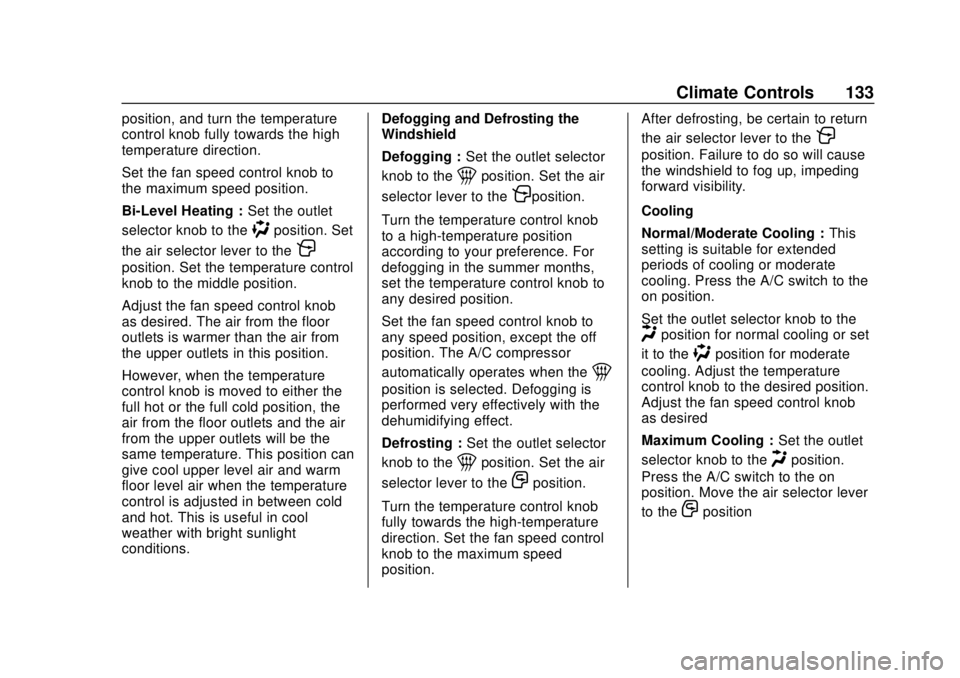
Bi-Level Heating :Set the outlet
selector knob to the
)position. Set
the air selector lever to the
P
position. Set the temperature control
knob to the middle position.
Adjust the fan speed control knob
as desired. The air from the floor
outlets is warmer than the air from
the upper outlets in this position.
However, when the temperature
control knob is moved to either the
full hot or the full cold position, the
air from the floor outlets and the air
from the upper outlets will be the
same temperature. This position can
give cool upper level air and warm
floor level air when the temperature
control is adjusted in between cold
and hot. This is useful in cool
weather with bright sunlight
conditions. Defogging and Defrosting the
Windshield
Defogging :
Set the outlet selector
knob to the
1position. Set the air
selector lever to the
Pposition.
Turn the temperature control knob
to a high-temperature position
according to your preference. For
defogging in the summer months,
set the temperature control knob to
any desired position.
Set the fan speed control knob to
any speed position, except the off
position. The A/C compressor
automatically operates when the
1
position is selected. Defogging is
performed very effectively with the
dehumidifying effect.
Defrosting : Set the outlet selector
knob to the
1position. Set the air
selector lever to the
Oposition.
Turn the temperature control knob
fully towards the high-temperature
direction. Set the fan speed control
knob to the maximum speed
position. After defrosting, be certain to return
the air selector lever to the
P
position. Failure to do so will cause
the windshield to fog up, impeding
forward visibility.
Cooling
Normal/Moderate Cooling :
This
setting is suitable for extended
periods of cooling or moderate
cooling. Press the A/C switch to the
on position.
Set the outlet selector knob to the
Hposition for normal cooling or set
it to the
)position for moderate
cooling. Adjust the temperature
control knob to the desired position.
Adjust the fan speed control knob
as desired
Maximum Cooling : Set the outlet
selector knob to the
Hposition.
Press the A/C switch to the on
position. Move the air selector lever
to the
Oposition
Page 135 of 382
Chevrolet Low Cab Forward 5.2L Diesel Engine 4500/5500 Series (GMNA-
Localizing-U.S.-12407814) - 2019 - crc - 12/13/17
134 Climate Controls
Turn the temperature control knob
fully towards the low-temperature
direction. Set the fan speed control
knob to the maximum speed
position.
After prolonged parking in direct
sunlight, open the windows or doors
to ventilate the interior of the cab
and release the heat.
During cooling operation, mist may
come out of the air outlets. This
results from quick cooling of humid
air, and does not indicate any
problem.
After maximum cooling, be certain
to return the air selector lever to the
Pposition. Failure to do so will
cause the windshield to fog up,
impeding forward visibility.
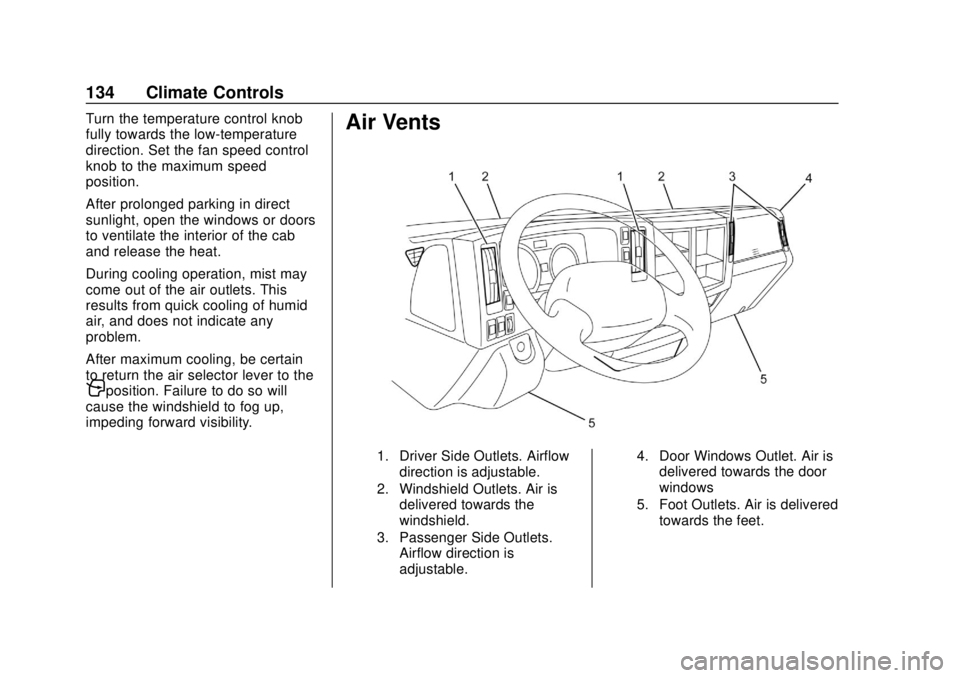
Air Vents
1. Driver Side Outlets. Airflow
direction is adjustable.
2. Windshield Outlets. Air is delivered towards the
windshield.
3. Passenger Side Outlets. Airflow direction is
adjustable. 4. Door Windows Outlet. Air is
delivered towards the door
windows
5. Foot Outlets. Air is delivered towards the feet.
Page 141 of 382

Chevrolet Low Cab Forward 5.2L Diesel Engine 4500/5500 Series (GMNA-
Localizing-U.S.-12407814) - 2019 - crc - 12/13/17
140 Driving and Operating
Warning (Continued)
If a warning light comes on or a
buzzer sounds while you are
driving, immediately stop the
vehicle in a safe place and
perform checks.
Slow down sufficiently when
approaching a curve. Applying the
brakes or sharply turning the
steering wheel while turning the
curve could cause the cargo to
shift, the tires to slip and the
vehicle to tip onto its side.
Avoid scraping the tire sidewalls
against curbstones or driving over
dips and protrusions in the road
surface. You could damage the
tires, resulting in a blowout or
flat tire.
You and others could be seriously
injured.
Pulling Away After Stopping
and Parking
Before pulling away, check that
there are no children or obstructions
around the vehicle and confirm that
it is safe to pull away.
If you cannot see the area behind
your vehicle well enough to confirm
it is safe to back up, get out of the
vehicle and check behind it.
Make it a habit to look around and
confirm that it is safe to pull away
after a temporary stop (at traffic
lights, for example).
If the Windshield Fogs Up
Use the heater to blow hot air on the
windshield or dehumidify the cabin
using the air conditioner and place
the outlet selector knob in the
5or
4position.
Place the air selector lever in the
outside air position.
Nighttime Visibility
If there is an old film on the
windshield, the lights of oncoming
traffic will be reflected in many directions, making it hard for you to
see ahead. Use glass cleaner to
clean the glass and the wiper
blades.
Worn wiper blades cannot wipe the
windshield clean and thus cannot
maintain visibility. When the wiper
blades become worn, replace them
with new ones.
Do Not Attach Accessories to
the Windshield or Windows
{Warning
Do not attach ornaments, films or
other accessories to the
windshield or windows. They
would impair visibility. Also, any
plastic suction cups used to
attach accessories could cause a
fire or a crash by acting as
lenses.
You and others could be seriously
injured.
Page 142 of 382

Chevrolet Low Cab Forward 5.2L Diesel Engine 4500/5500 Series (GMNA-
Localizing-U.S.-12407814) - 2019 - crc - 12/13/17
Driving and Operating 141
Never Stop the Engine While
Driving
{Warning
Do not move the engine control
switch away from the "ON"
position while the vehicle is being
driven.
If the engine stops while the
vehicle is moving, the brake
booster does not work, and the
brakes would not work properly.
The engine could also be
damaged.
Stopping the engine while driving
would be extremely dangerous
because the power steering
would stop working, making the
steering wheel extremely hard
to turn.
Stopping the engine while driving
would be extremely dangerous
because the warning lights,(Continued)
Warning (Continued)
indicator lights and other
electrical circuitry would
completely stop working.
Placing the engine control switch
in the "LOCK" position while
driving would be extremely
dangerous because the key could
come out, causing the steering
wheel to lock so that you could
not turn it.
You and others could be seriously
injured.
Avoid Unnecessary Idling of
the Engine
If the engine idles too long, the
engine coolant temperature will fall
below the operating range. Low
engine operating temperature
causes several conditions that are
harmful to engine operation and life.
Incomplete combustion of fuel in an
engine that is not fully warmed-up
causes crankcase dilution and
forms lacquer and gummy deposits on valves, pistons, and rings. It also
causes rapid accumulation of
sludge within the engine.
Driving at Night
Nighttime driving is more dangerous
than daytime driving because the
field of view is narrower. Keep your
speed down, and maintain an ample
headway distance.
Metallic Plinking Sound from
the Muffler
Immediately after stopping the
engine, you may hear a metallic
plinking sound from the muffler. This
sound occurs as the muffler cools
down and contracts. It does not
indicate an abnormality or
breakdown.
Page 144 of 382
Chevrolet Low Cab Forward 5.2L Diesel Engine 4500/5500 Series (GMNA-
Localizing-U.S.-12407814) - 2019 - crc - 12/13/17
Driving and Operating 143
fluid leakage, fuel leakage and
component damage. If any part of
the vehicle is damaged or broken,
promptly have the vehicle inspected
and repaired.
Highways
.Speeds on highways are higher
than those on regular roads, so
there is more danger. Also, a
breakdown on a highway
represents a hazard to other
vehicles and can cause a crash.
Concentrate on safe driving.
Remember to perform daily
pre-operation inspections and
use highway driving techniques.
When performing daily
pre-operation inspections,
perform the checks shown in the
table on the left with particularly
great care.
Refer to Owner Checks and
Services 0340.
. When merging with traffic on a
highway, use the turn signal
lights to indicate your intentions
ahead of time. Speed up
sufficiently when you are in the acceleration lane. Pay attention
to vehicles behind you and to
conditions in the lane you are
joining. Merge in such a way that
you do not obstruct vehicles in
the lane.
. Your sense of how fast you are
traveling becomes distorted on
long highway drives. Constantly
keep an eye on the
speedometer, and maintain a
suitable headway distance.
. During high-speed driving, even
a little turn of the steering wheel
causes a big movement of the
vehicle. Turn the steering wheel
slowly.
. Excessive use of the brake
pedal is extremely dangerous
because it rapidly wears the
brake linings and causes brake
fade. Make effective use of the
engine brake and the exhaust
brake when you want to
decelerate.
. When you want to turn off a
highway, use the turn signal
lights to indicate your intentions ahead of time. Paying attention
to vehicles behind you, turn off
the highway smoothly so as not
to obstruct other vehicles.
Brake Fade : Frequent use of the
brakes can cause the brakes to
overheat so that the frictional force
of the brake linings decreases and
the brakes become less effective
than normal. This phenomenon is
called brake fade.
Braking
Brake Operation
The brakes give strong braking
force with only light pressure on the
pedal. Do not press the brake pedal
hard except in the event of an
emergency.
Actual stopping distances vary
greatly. Your ability to stop safely
will be greatly affected by the
surface of the road, whether it is
pavement or gravel; the condition of
the road, whether it is wet, dry or
icy; tire tread; the condition of the
brakes; the weight of the vehicle;
the weight of the load; and the
Page 145 of 382
Chevrolet Low Cab Forward 5.2L Diesel Engine 4500/5500 Series (GMNA-
Localizing-U.S.-12407814) - 2019 - crc - 12/13/17
144 Driving and Operating
amount of brake force applied.
Please allow for realistic stopping
distances to avoid unnecessary
heavy braking. That means better
braking, longer brake life and safer
driving.
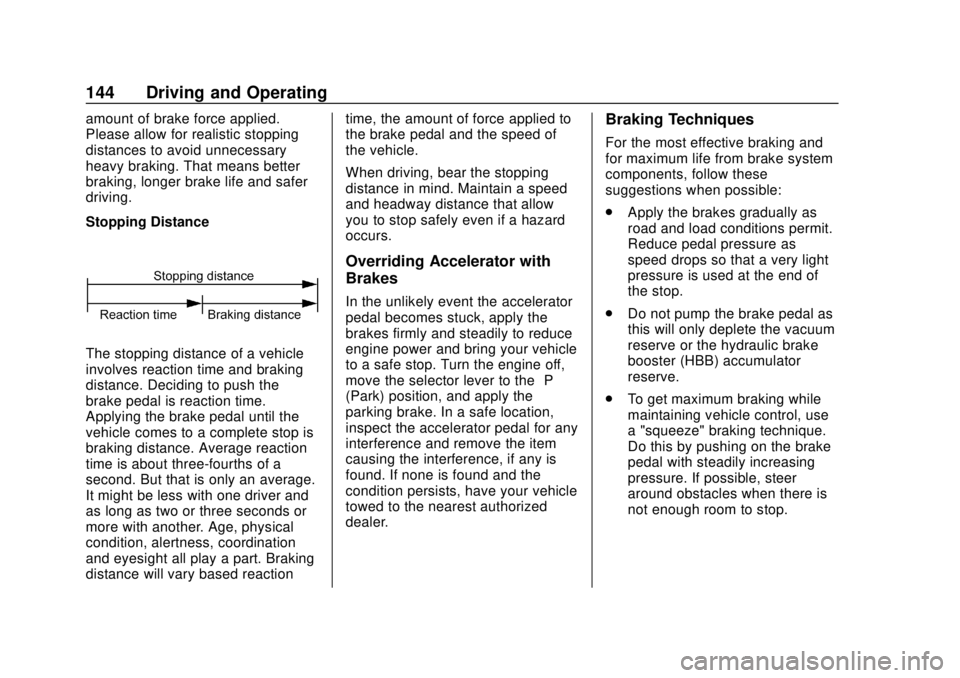
Stopping Distance
The stopping distance of a vehicle
involves reaction time and braking
distance. Deciding to push the
brake pedal is reaction time.
Applying the brake pedal until the
vehicle comes to a complete stop is
braking distance. Average reaction
time is about three-fourths of a
second. But that is only an average.
It might be less with one driver and
as long as two or three seconds or
more with another. Age, physical
condition, alertness, coordination
and eyesight all play a part. Braking
distance will vary based reactiontime, the amount of force applied to
the brake pedal and the speed of
the vehicle.
When driving, bear the stopping
distance in mind. Maintain a speed
and headway distance that allow
you to stop safely even if a hazard
occurs.
Overriding Accelerator with
Brakes
In the unlikely event the accelerator
pedal becomes stuck, apply the
brakes firmly and steadily to reduce
engine power and bring your vehicle
to a safe stop. Turn the engine off,
move the selector lever to the
“P”
(Park) position, and apply the
parking brake. In a safe location,
inspect the accelerator pedal for any
interference and remove the item
causing the interference, if any is
found. If none is found and the
condition persists, have your vehicle
towed to the nearest authorized
dealer.
Braking Techniques
For the most effective braking and
for maximum life from brake system
components, follow these
suggestions when possible:
. Apply the brakes gradually as
road and load conditions permit.
Reduce pedal pressure as
speed drops so that a very light
pressure is used at the end of
the stop.
. Do not pump the brake pedal as
this will only deplete the vacuum
reserve or the hydraulic brake
booster (HBB) accumulator
reserve.
. To get maximum braking while
maintaining vehicle control, use
a "squeeze" braking technique.
Do this by pushing on the brake
pedal with steadily increasing
pressure. If possible, steer
around obstacles when there is
not enough room to stop.
Page 146 of 382

Chevrolet Low Cab Forward 5.2L Diesel Engine 4500/5500 Series (GMNA-
Localizing-U.S.-12407814) - 2019 - crc - 12/13/17
Driving and Operating 145
Brake System Warning Light
Caution
If brake low vacuum warning light
(4500HD, 4500XD models), brake
booster warning light (5500HD,
5500XD models), or brake system
warning light comes on during
operation, have brake system
checked immediately.
Refer to Warning Lights, Gauges,
and Indicators 068.
When the Brakes Do Not Work
{Warning
It is very dangerous to suddenly
pull the parking brake lever all the
way while moving at high speed.
Reduce speed first by shifting
down and then gradually pull the
parking brake lever.
You and others could be seriously
injured. The exhaust brake should be turned
on as soon as service brake
malfunction is detected. This will
slow the engine speed. With the
engine speed under control and
providing the grade conditions
permit, the transmission can be
progressively downshifted using the
exhaust brake in each gear.
Eventually the exhaust brake should
slow the vehicle to a controllable
“crawl.”
Gradually pull the parking
brake lever while firmly holding on
to the steering wheel. Stop the
vehicle on the side of the road. The
vehicle should not be driven further
until corrective measures are taken.
See Exhaust Brake 0222 and
Parking Brake 0220.
Riding the Brake
{Warning
"Riding the brake" by resting your
foot on the pedal, when you do
not intend to brake, can overheat
the brakes and wear out the (Continued)
Warning (Continued)
brake linings faster. This may also
damage the brakes and will waste
fuel. It can also result in reduced
braking performance.
You and others could be seriously
injured.
Applying the Parking Brake
Except in an emergency, do not
apply the parking brake until the
vehicle has come to a complete
stop. Applying the parking brake
before the vehicle has stopped can
cause a breakdown.
Refer toParking Brake 0220.
Parking Safely on a Slope
Avoid parking your vehicle on a
slope as much as possible and
choose a level and flat place. If you
must park your vehicle on a slope,
be sure to set the parking brake
fully. Make sure that the vehicle
does not move, and block the
wheels with chocks for added
Page 147 of 382

Chevrolet Low Cab Forward 5.2L Diesel Engine 4500/5500 Series (GMNA-
Localizing-U.S.-12407814) - 2019 - crc - 12/13/17
146 Driving and Operating
safety. Also, leave the vehicle in
gear to further ensure that it will not
move. Leave the steering wheel
turned such that the vehicle will be
stopped by an obstruction (for
example, the curb) in the unlikely
event that it moves.
Stopping and Parking with the
Engine Running
{Warning
When parking with the engine
running, first come to a complete
stop, then firmly apply the parking
brake, then move the selector
lever to the "P" (Park) position.
Unless you take these steps, any
unintended pressure on the
accelerator pedal could cause a
crash.
To reduce the chance of personal
injury and/or vehicle damage due
to engine overheating, never
leave the engine idling without an
alert driver present. If the engine(Continued)
Warning (Continued)
should overheat, as indicated by
the engine coolant temperature
gauge, immediate action is
required to correct the condition.
Continued operation of the
engine, even for a short time, may
result in a fire. Do not engage the
exhaust brake while the engine is
idling as this may cause engine
overheating.
The diesel particulate filter (DPF)
may automatically start
regeneration when the vehicle is
stopped and parked with the
engine running. To prevent a fire,
make sure there is no flammable
material near the muffler, DPF,
and exhaust pipe. Be careful not
to get burned by hot exhaust
gases.
You and others could be seriously
injured. Do Not Forget to Release the
Parking Brake
Pulling away with the parking brake
still applied can damage the brake
system.
Before pulling away, make sure the
parking brake is not set by checking
that the parking brake indicator light
is not on.
Be Sure to Have the Engine
Running When the Vehicle is
Moving
{Warning
When the engine is not running,
the power steering system does
not work so the steering wheel is
hard to turn. Also, the brake
booster does not work so there is
little braking ability. If you coast
down a slope without the engine
running, you would not be able to
properly control the vehicle and
could have a crash.
Page 153 of 382

Chevrolet Low Cab Forward 5.2L Diesel Engine 4500/5500 Series (GMNA-
Localizing-U.S.-12407814) - 2019 - crc - 12/13/17
152 Driving and Operating
Before Sitting in the Driver’s Seat
Remove snow and ice from your
shoes when getting into the vehicle.
If you try to drive with snow on your
shoes, your shoes would slip on the
pedals and you would not be able to
press the pedals properly, meaning
that your driving would be
inconsistent. Also, the cabin could
become more humid, causing the
glass to fog up.
Check Fuel Level
Fuel consumption increases when
tire chains are used. Determine how
much fuel you need to reach your
destination and fill up the tank in
advance. Refer to Fuel for Diesel
Engines 0227.
Removing Snow from Glass
and Underbody
Do not use a sharp implement to
remove snow. Sharp edges could
damage rubber parts.
To maintain an adequate field of
view, use a plastic scraper to
remove snow and frost from the
glass surfaces. By using a plastic scraper, you can remove the snow
and frost without scratching the
glass. At this time, check whether
the wiper blades are frozen onto the
glass.
Also, look under the vehicle and
remove any lumps of ice that are
stuck to the underbody. Be careful
not to damage components.
Driving on Snowy or Frozen
Roads
On slippery roads, never accelerate
rapidly, brake hard, decelerate
rapidly or make sharp turns of the
steering wheel.
There is a risk of reduced grip
between the tires and road surface
and of increased braking distances.
The danger of icy road surfaces is
particularly great on bridges, in
shady places and where there are
puddles.
Keep your speed down and be sure
to use tire chains or winter tires on
snowy or frozen road surfaces.
Use engine brakes together with the
foot brakes to decelerate. Using the
exhaust brake on a slippery road
surface could cause the tires to slip.
Pay Attention to the Way the
Steering Wheel Turns and Feels
On snowy roads, water and snow
splashed up by the tires can freeze
and accumulate inside the fenders,
making the steering wheel hard to
turn. From time to time, get out of
the vehicle and remove any
accumulated snow.
Check the Brakes from Time
to Time
When the vehicle is driven or
parked on a snowy surface, ice can
form on the brakes, decreasing their
effectiveness. From time to time
while you are driving, press the
brake pedal lightly and check the
effectiveness of the brakes. Pay
attention to vehicles both ahead of
and behind you when checking the
brakes in this way.
Also, check the effectiveness of the
brakes as soon as possible when
starting to drive the vehicle after it