remote start CHEVROLET MALIBU 2004 5.G User Guide
[x] Cancel search | Manufacturer: CHEVROLET, Model Year: 2004, Model line: MALIBU, Model: CHEVROLET MALIBU 2004 5.GPages: 426, PDF Size: 3.98 MB
Page 184 of 426
xSEEKw:Press the down arrow to go to the start
of the current track if it has been playing for more
than eight seconds. If you press this arrow more than
once, the player will continue moving backward
through the CD.
Press the up arrow to go to the start of the next track.
If you press this arrow more than once, the player
will continue moving forward through the CD.
If you hold either arrow for more than two seconds,
the CD will enter CD scan mode and the CD will play
the rst 10 seconds of each track. Press either
arrow again to stop scanning.
DISP (Display):Press this knob to see how long the
current track has been playing. T, the track number,
and the elapsed time of the track will appear on the
display. To change the default on the display (time or
elapsed time), press the knob until you see the display
you want, then hold the knob for two seconds. The radio
will produce one beep and the selected display will now
be the default. Pressing this button will also display text
on commercially recorded CDs (if available).AUTO TONE/AUTO EQ (Automatic Equalization):
Press this button to select the desired equalization
setting while playing a CD. The equalization will
be automatically recalled whenever you play a CD.
For more information, see AUTO TONE/AUTO EQ
listed previously in this section.
BAND:Press this button to listen to the radio when a
CD is playing. The inactive CD will remain safely
inside the radio for future listening.
SRCE (Source):Press this button to play a CD or to
access a remote device (if installed) when listening
to the radio.
EJECT /
Z(Eject):Press this button to eject a CD.
Eject may be activated with either the ignition or
radio off. CDs may be loaded with the radio and ignition
off if this button is pressed rst.
3-68
Page 197 of 426
The elapsed time of the track will appear on the display.
RPT (Repeat):Press this button once to hear a track
over again. REPEAT ON and RPT will appear on
the display. The current track will continue to repeat.
Press RPT again to turn off repeat play. REPEAT OFF
will appear on the display and RPT will disappear
from the display.
RDM (Random):Press this button to hear the tracks in
random, rather than sequential, order. T#, RANDOM,
and RDM will appear on the display. T and the
track number will appear on the display when each
track starts to play. Press RDM again to turn off random
play. RANDOM OFF will appear on the display and
RDM will disappear from the display.
xSEEKw:Press the down arrow to go to the start of
the current track if it has been playing for more than eight
seconds. If you press this arrow more than once, the
player will continue moving backward through the CD.
Press the up arrow to go to the start of the next track.
If you press this arrow more than once, the player will
continue moving forward through the CD.
If you hold either arrow for more than two seconds, the
CD will enter CD scan mode and the CD will play the rst
10 seconds of each track. Press either arrow again to
stop scanning.DISP (Display):Press this knob to see how long the
current track has been playing. T, the track number, and
the elapsed time of the track will appear on the display.
To change the default on the display (time or elapsed
time), press the knob until you see the display you want,
then hold the knob for two seconds. The radio will
produce one beep and the selected display will now be
the default. Pressing this button will also display text on
commercially recorded CDs (if available).
AUTO TONE/AUTO EQ (Automatic Equalization):
Press this button to select the desired equalization
setting while playing a CD. The equalization will
be automatically recalled whenever you play a CD.
For more information, see AUTO TONE/AUTO EQ listed
previously in this section.
BAND:Press this button to listen to the radio when a
cassette tape or CD is playing. The tape or CD will
remain safely inside the radio for future listening.
SRCE (Source):Press this button to play a tape,
CD, or a remote device (if installed) when listening to
the radio. The inactive tape or CD will remain safely
inside the radio for future listening.
EJECT /
Z(Eject):Press this button, located to the
left of the CD slot, to eject a CD. Eject may be activated
with either the ignition or radio off. CDs may be loaded
with the radio and ignition off if this button is pressed rst.
3-81
Page 216 of 426
DVD Player
The DVD player is located on the end of the oor
console under the video screen.
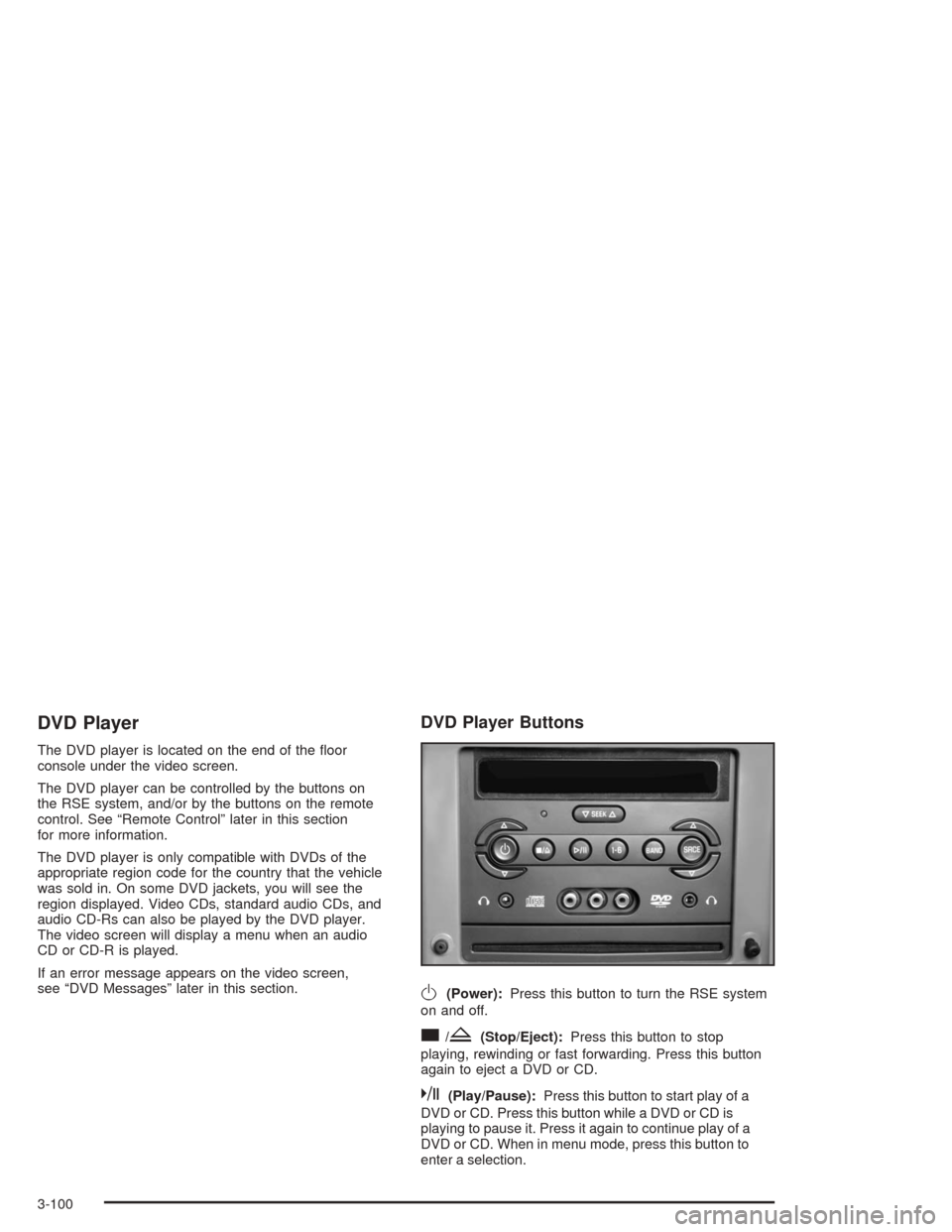
The DVD player can be controlled by the buttons on
the RSE system, and/or by the buttons on the remote
control. See “Remote Control” later in this section
for more information.
The DVD player is only compatible with DVDs of the
appropriate region code for the country that the vehicle
was sold in. On some DVD jackets, you will see the
region displayed. Video CDs, standard audio CDs, and
audio CD-Rs can also be played by the DVD player.
The video screen will display a menu when an audio
CD or CD-R is played.
If an error message appears on the video screen,
see “DVD Messages” later in this section.
DVD Player Buttons
O(Power):Press this button to turn the RSE system
on and off.
c/Z(Stop/Eject):Press this button to stop
playing, rewinding or fast forwarding. Press this button
again to eject a DVD or CD.
k(Play/Pause):Press this button to start play of a
DVD or CD. Press this button while a DVD or CD is
playing to pause it. Press it again to continue play of a
DVD or CD. When in menu mode, press this button to
enter a selection.
3-100
Page 217 of 426
1–6 (Preset Pushbuttons):This button is inactive
when in DVD mode.
BAND:Press this button to switch between FM1,
FM2, or AM, XM1 or XM2 (48 contiguous US states,
if equipped). If the front seat passengers are listening
to the DVD player, the rear seat passengers cannot
select XM1 or XM2.
SRCE (Source):Press this button to switch between
playing a cassette tape or a CD.
xSEEKw:Press the down arrow to go to the
beginning of the current chapter or track if more than
ve seconds have played. Press the up arrow to
go to the next chapter or track. This button may not
work when the DVD is playing the copyright information
or the previews.
xw(Volume):Press the up or down arrow to
increase or decrease the volume on the wired
headphones (not included). The arrows on the left side
are for the left headphone and the arrows on the
right side are for the right headphone.
Playing a Disc
To play a disc, gently insert the disc with the label side
up into the loading slot. The DVD player will continue
loading the disc and the player will automatically start if
the vehicle is in run, accessory or RAP.
If a disc is already in the player, make sure that the
DVD player is on, then press the play/pause button on
the player faceplate or on the remote control.
Some DVDs will not allow you to fast forward or skip
the copyright information or previews. Some DVDs will
begin playing after the previews have nished. If the
DVD does not begin playing at the main title, refer to the
on-screen instructions.
3-101
Page 220 of 426
z(Set-up Menu):Press this button to adjust the
color, tint, brightness, contrast, and display mode
(normal, full, or zoom). The dynamic range compression
feature can be used to reduce loud audio and increase
low audio produced by some DVDs.
e(Audio):Press this button to display a menu that
will only appear when a DVD is being played. The format
and content of this function is dependent on the disc.
r(Fast Reverse):Press this button to fast reverse
the DVD or CD. To stop fast reversing, press this button
again. This button may not work when the DVD is
playing the copyright information or the previews.
SRCE (Source):Press this button to toggle between
the DVD player and an auxiliary source.
c(Stop):Press this button to stop playing, rewinding,
or fast forwarding a DVD or CD. Press this button
twice to return to the beginning of the DVD.
t(Previous Track/Chapter):Press this button to
return to the start of the current track or chapter. Press
this button again to return to the previous track or
chapter. This button may not work when the DVD is
playing the copyright information or the previews.
1 through 0 (Numeric Keypad):The remote control
numeric keypad provides you with the capability of direct
chapter, title, and track number selection.
\:Press this button, within 3 seconds after inputting
a numeric selection to clear all numeric inputs. Press
this button before inputting the number.
}10:Press the button, to select chapter, title, and
track numbers greater than 9. Press this button before
inputting the number.
P(Illumination):Press this button to turn the remote
control backlight on. The backlight will time out after
about 7 to 10 seconds if no other button is pressed while
the backlight is on.
y(Main DVD Menu):Press this button to access
the DVD menu. The DVD menu is different on every
DVD. Use the up, down, left, and right arrow buttons to
move the cursor around the DVD menu. After making
a selection press the enter button. This button only
operates when using a DVD.
r(Enter):Press this button to select the choices
that are highlighted in any menu.
q(Return):Press this button to exit the current
active menu and return to the previous menu. This
button will operate only when a DVD is being played
and a menu is active.
3-104
Page 221 of 426
|(Camera Angle):This button changes camera
angles on DVDs that have this feature when a DVD is
playing. The format and content of this function is
dependent on the disc.
{(Subtitle):This button turns on subtitles and
moves through subtitle options when a DVD is playing.
The format and content of this function is dependent
on the disc.
[(Fast Forward):Press this button to fast forward
the DVD or CD. To stop fast forwarding, press this
button again. This button may not work when the DVD
is playing the copyright information or the previews.
s(Play/Pause):Press this button to start play of a
DVD or CD. Press this button while a DVD or CD is
playing to pause it. Press this button again to continue
the play of the DVD or CD.
Slow Play:When the DVD is playing, press the pause
button then press the fast forward button. The DVD
will continue playing in a slow play mode. To cancel
slow play mode, press the play/pause button.
u(Next Track/Chapter):Press this button to advance
to the beginning of the next track or chapter. This
button may not work when the DVD is playing the
copyright information or the previews.
Setup Menu
To access the setup menu, ensure that a DVD disc is in
the player and the video is stopped. Press the display
button. Once the menu is activated, use the remote
control directional arrows and the enter button to
navigate the screen icons.
Picture Preferences
The USER PREFERENCE SETTINGS menu allows you
to modify the default viewing preferences from the
display. Use the remote control up and down arrow
buttons to select. The movie may stop while selections
are being made.
TV Shape:The default video screen display may be
selected from 4:3 letterbox, 4:3 panscan, or 16:9.
Black Level Shift:The default black level to the video
screen may be adjusted.
Video Shift:The default position of the video on the
display may be adjusted.
Color Settings:The default color setting of the video
screen may be selected from Personal, Rich, Natural,
Soft, or Animation.
Personal Color:The default setting for Saturation,
Brightness, and Contrast may be adjusted.
3-105
Page 225 of 426
Problem Recommended Action
The picture does not
ll the screen. There
are black borders on
the top and bottom or
on both sides or it
looks stretched out.Press and release the
size control button on the
remote control. This will
ll the screen. If there are
borders on the top and
bottom, the movie may
have been made that way
for a standard screen.
I ejected the disc and
tried to take it out,
but it was pulled back
into the slot.Eject the disc again.
The language in the
audio or on the screen
is wrong.Press the main display
menu button on the
DVD player or the remote
control and change the
audio or language selection
on the DVD menu.
The remote control
does not work.Point the remote control
directly at the transmitter
window. The batteries
could be weak or put in
wrong. The parental control
button might have been
pressed. (The remote
control will not work the
RSA control, only the
RSE system).Problem Recommended Action
How do I get subtitles
on or off?Press the display button
on the remote control to
go to the DVDs main
menu. Then follow the
screen prompts.
After stopping the
player, I push the play
button but sometimes
the DVD starts where
I left off, and sometimes
at the beginning.Press the stop button on
the remote control to
resume where the DVD
left off. Press the stop
button twice to start the
DVD at the beginning.
If the power is off and the
DVD is still in the player,
press the play button.
The DVD is playing
but there is no picture
or sound. The auxiliary
source is running but
there is no picture
or sound.Press and release the
AUX button on the remote
control or the SRCE and
play buttons on the DVD
player to get to auxiliary
input. Check to make sure
that the auxiliary source is
connected to the inputs
properly.
The audio or video
skips or jumps.The DVD could be dirty
or scratched. Try cleaning
the DVD.
3-109
Page 226 of 426
Problem Recommended Action
When I return to the
DVD from the system
menu, sometimes it
plays from the beginning
and sometimes from
where it left off.If the stop button was
pressed once, it resumes
play from where it left off.
If the stop button was
pressed twice, it will start
at the beginning of the
DVD. However, if a change
was made to the menu
the DVD will start from
where it left off, even if
the stop button was only
pressed once.
The fast forward,
reverse, previous
and next functions
do not work.Some commands that do
one thing for DVDs will
not always work or
perform the same function
for audio CDs or games.
These functions may also
be disabled when the DVD
is playing the copyright
information or previews.Problem Recommended Action
My disc is stuck in the
player. The eject button
does not work.Press the eject button on
the DVD player. Turn the
power off, then on again,
then press the eject button
on the DVD player. Do not
attempt to force or remove
the disc from the player. If
the problem persists, return
to your dealer for further
assistance.
I lost the remote control
and/or the headphones.Contact your dealer for
assistance.
What is the best way
to clean the screen?Wipe the video screen with
a soft cloth that is slightly
damp with water.
Sometimes the wireless
headphone audio
cuts out or buzzes
for a moment, then it
comes back.This could be caused by
blocking the transmitting
area between the
headphones and the
transmitter on the DVD
player. Make sure nothing
is between the headphones
and the DVD player.
3-110
Page 231 of 426
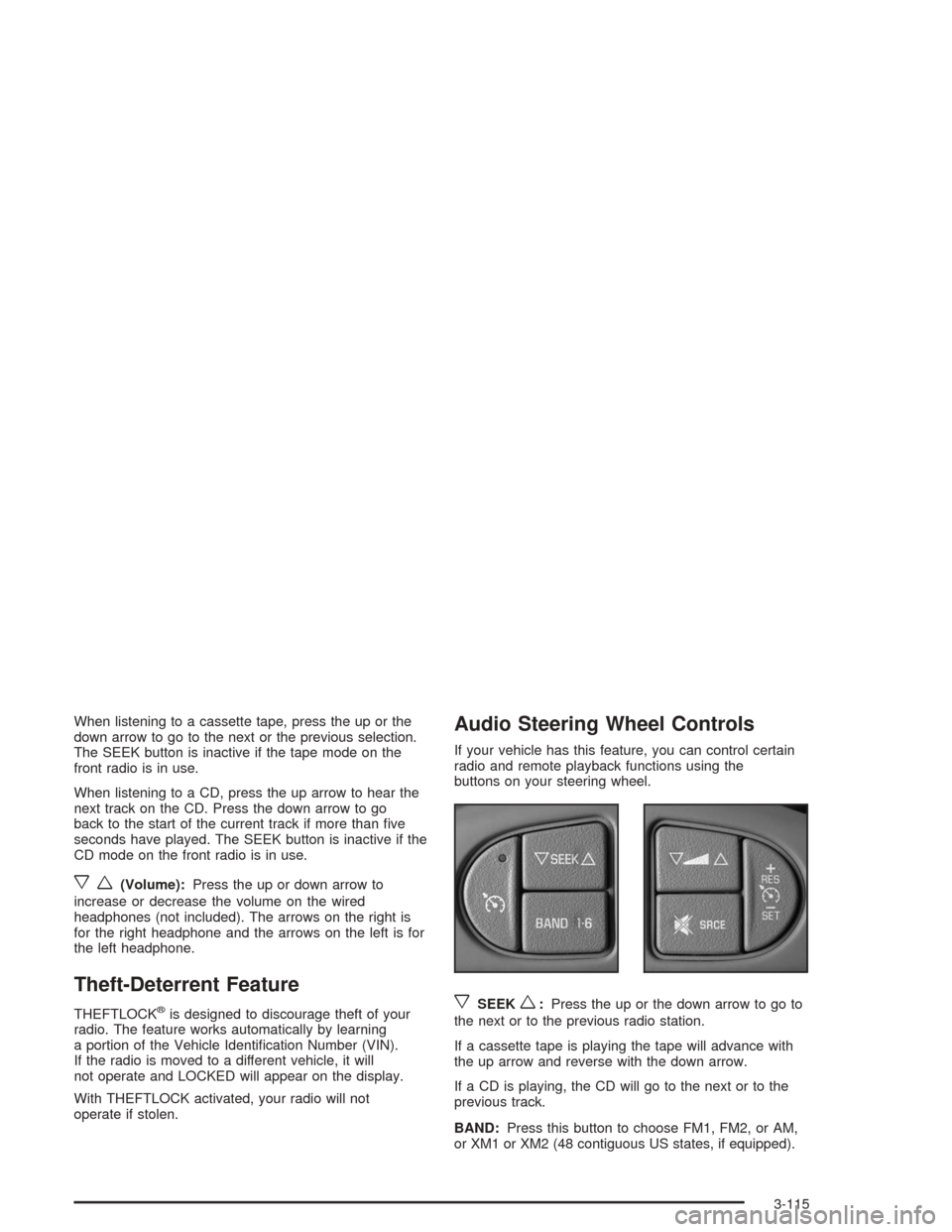
When listening to a cassette tape, press the up or the
down arrow to go to the next or the previous selection.
The SEEK button is inactive if the tape mode on the
front radio is in use.
When listening to a CD, press the up arrow to hear the
next track on the CD. Press the down arrow to go
back to the start of the current track if more than ve
seconds have played. The SEEK button is inactive if the
CD mode on the front radio is in use.
xw(Volume):Press the up or down arrow to
increase or decrease the volume on the wired
headphones (not included). The arrows on the right is
for the right headphone and the arrows on the left is for
the left headphone.
Theft-Deterrent Feature
THEFTLOCK®is designed to discourage theft of your
radio. The feature works automatically by learning
a portion of the Vehicle Identication Number (VIN).
If the radio is moved to a different vehicle, it will
not operate and LOCKED will appear on the display.
With THEFTLOCK activated, your radio will not
operate if stolen.
Audio Steering Wheel Controls
If your vehicle has this feature, you can control certain
radio and remote playback functions using the
buttons on your steering wheel.
xSEEKw:Press the up or the down arrow to go to
the next or to the previous radio station.
If a cassette tape is playing the tape will advance with
the up arrow and reverse with the down arrow.
If a CD is playing, the CD will go to the next or to the
previous track.
BAND:Press this button to choose FM1, FM2, or AM,
or XM1 or XM2 (48 contiguous US states, if equipped).
3-115
Page 325 of 426

Don’t let the other end touch anything until the next
step. The other end of the negative (−) cable doesn’t
go to the dead battery. It goes to a heavy, unpainted
metal engine part or to a remote negative (−)
terminal on the vehicle with the dead battery.9. Connect the other end of the negative (−) cable at
least 18 inches (45 cm) away from the dead battery,
but not near engine parts that move. The electrical
connection is just as good there, and the chance
of sparks getting back to the battery is much less.
If the THEFT SYSTEM light ashes, wait until
the light stops ashing.
10. Now start the vehicle with the good battery and run
the engine for a while.
11. Try to start the vehicle that had the dead battery.
If it won’t start after a few tries, it probably needs
service.
Notice:If the jumper cables are removed in the
wrong order, electrical shorting may occur and
damage the vehicle. The repairs would not be
covered by your warranty. Remove the jumper
cables in the correct order, making sure that the
cables do not touch each other or other metal.
5-43