door lock CHEVROLET MALIBU 2004 5.G Owner's Manual
[x] Cancel search | Manufacturer: CHEVROLET, Model Year: 2004, Model line: MALIBU, Model: CHEVROLET MALIBU 2004 5.GPages: 426, PDF Size: 3.98 MB
Page 136 of 426
Cargo Lamp
If your vehicle is the MAXX model, it has a cargo lamp.
The cargo lamp comes on when the liftgate is opened.
If you want to leave the liftgate open you can turn off the
cargo lamp by pushing on the lens.
Battery Run-Down Protection
Your vehicle has a battery run-down protection feature
designed to protect your vehicle’s battery.
When any interior lamp (trunk, reading, or visor vanity)
is left on while the ignition is turned off, the battery
run-down protection system will automatically shut the
lamp(s) off after 20 minutes. This will avoid draining
the battery.
To reactivate the interior lamps, do one of the following:
Turn on the ignition.
Turn the exterior lamp control off and then on.
Open a door.
Press any remote keyless entry transmitter button
(if equipped).
Press the remote trunk release button.
Press the power door lock switch.The battery run-down feature will also be activated
when any door on the vehicle is left open and the
ignition is in OFF.
Accessory Power Outlets
With accessory power outlets you can plug in auxiliary
electrical equipment such as a cellular telephone.
For vehicles with anti-lock brake system (ABS), the
accessory power outlets are located on the front of the
center console storage area and also inside the
console storage compartment. Vehicles without ABS,
both outlets are located on the front of the center
console storage area. The compartment has notches
that allow power cords to be routed outside of the
console while the lid is closed. There is also an outlet in
the rear cargo area of the MAXX.
Notice:Leaving electrical equipment on for
extended periods will drain the battery. Always turn
off electrical equipment when not in use and do
not plug in equipment that exceeds the maximum
amperage rating.
3-20
Page 163 of 426
AV SPEED:Press the INFO button until AV SPEED
appears in the display. This is the vehicle’s average
speed in miles per hour or kilometers per hour.
Press and hold the ENTER button while AV SPEED
is displayed to reset the average vehicle speed.
OIL LIFE:Press the button until OIL LIFE appears in
the display. The Oil Life Monitor system shows an
estimate of the oil’s remaining useful life. It will show
100% when the system is reset after an oil change.
It will alert you to change your oil on a schedule
consistent with your driving conditions.
Always reset the engine oil life after an oil change.
The oil change reminder does not measure how much
oil you have in your engine. So, be sure to check your
oil level often.
Personalization
The following options can be accessed in order by
pressing the MENU button anytime while the vehicle is
in ON. Press this button to scroll through each option.
All of the personalization options may not be available
on your vehicle. Only the options available will be
displayed on your DIC.
Oil Life Monitor Reset
Units Selection (English/Metric)
Remote Start Capability
Horn Chirp During Remote Keyless Entry Locking
Horn Chirp During Remote Keyless Entry Unlocking
Exterior Light Flash During Remote Keyless
Entry Locking or Unlocking
Delayed Locking
Automatic Vehicle Unlocking: Specic Doors
Automatic Vehicle Unlocking: When Key is Off or
When Shift To Park
Exterior Perimeter Lighting During Remote Keyless
Entry Unlock
Security System Passive or Remote Keyless
Entry Arming
Select Language: (English, French, Spanish or
German)
When the desired option is reached, use the ENTER
button to toggle between the modes of that option.
To make a selection, press the MENU button again.
If no selection is made within 10 seconds, the display
will revert back to the previous information displayed.
The MENU mode is exited when the INFO button is
pressed, a ten second time period has elapsed, the
ignition is turned to OFF or the end of the MENU list
is reached.
3-47
Page 165 of 426
LIGHT FLASH:If your vehicle has remote keyless
entry, this feature which allows the vehicle’s exterior
perimeter lighting to ash every time the LOCK or
UNLOCK button on the remote keyless entry transmitter
is pressed, can be enabled or disabled. When LIGHT
FLASH appears on the display, press the ENTER
button to move between OFF and ON. When you have
made your choice, press the MENU button to record
your selection. The initial setting from the factory is ON.
DELAY LOCK:The delayed locking feature, which
delays the actual locking of the vehicle, can be
enabled or disabled. When DELAY LOCK appears on
the display, use the ENTER button to move between
OFF and ON. When you have made your choice,
press the MENU button to record your selection.
The initial setting from the factory is ON.
AUTO UNLK:The automatic door unlocking feature,
which allows the vehicle to automatically unlock certain
doors can be enabled or disabled. When AUTO UNLK
appears on the display, use the ENTER button to move
between: ALL, DRVR or NONE. When you have made
your choice, press and the MENU button to record your
selection. The initial setting from the factory is ALL.UNLK:This feature determines when the automatic
door unlocking will occur, when either the key is turned
to OFF or the vehicle is shifted into PARK (P). When
UNLK appears on the display, use the ENTER button to
move between KEY OFF and SHIFT TO P. When
you have made your choice, press the MENU button to
record your selection. The initial setting from the
factory is SHIFT TO P.
EXT LIGHTS:If your vehicle has remote keyless entry,
this feature, which allows the vehicle’s exterior perimeter
lighting to turn on each time the UNLOCK button on the
remote keyless entry transmitter is pressed, can be
enabled or disabled. When EXT LIGHTS appears on the
display, use the ENTER button to move between ON
and OFF. When you have made your choice, press the
MENU button to record your selection. The initial setting
from the factory is ON.
SECURITY:If your vehicle has the remote keyless entry
system, this feature allows you to select the method used
to arm the vehicle’s security system. When SECURITY
appears on the display, use the ENTER button to move
between RKE and PASSIVE. When you have made your
choice, press the MENU button to record your selection.
SeeContent Theft-Deterrent on page 2-18for more
information.
3-49
Page 291 of 426
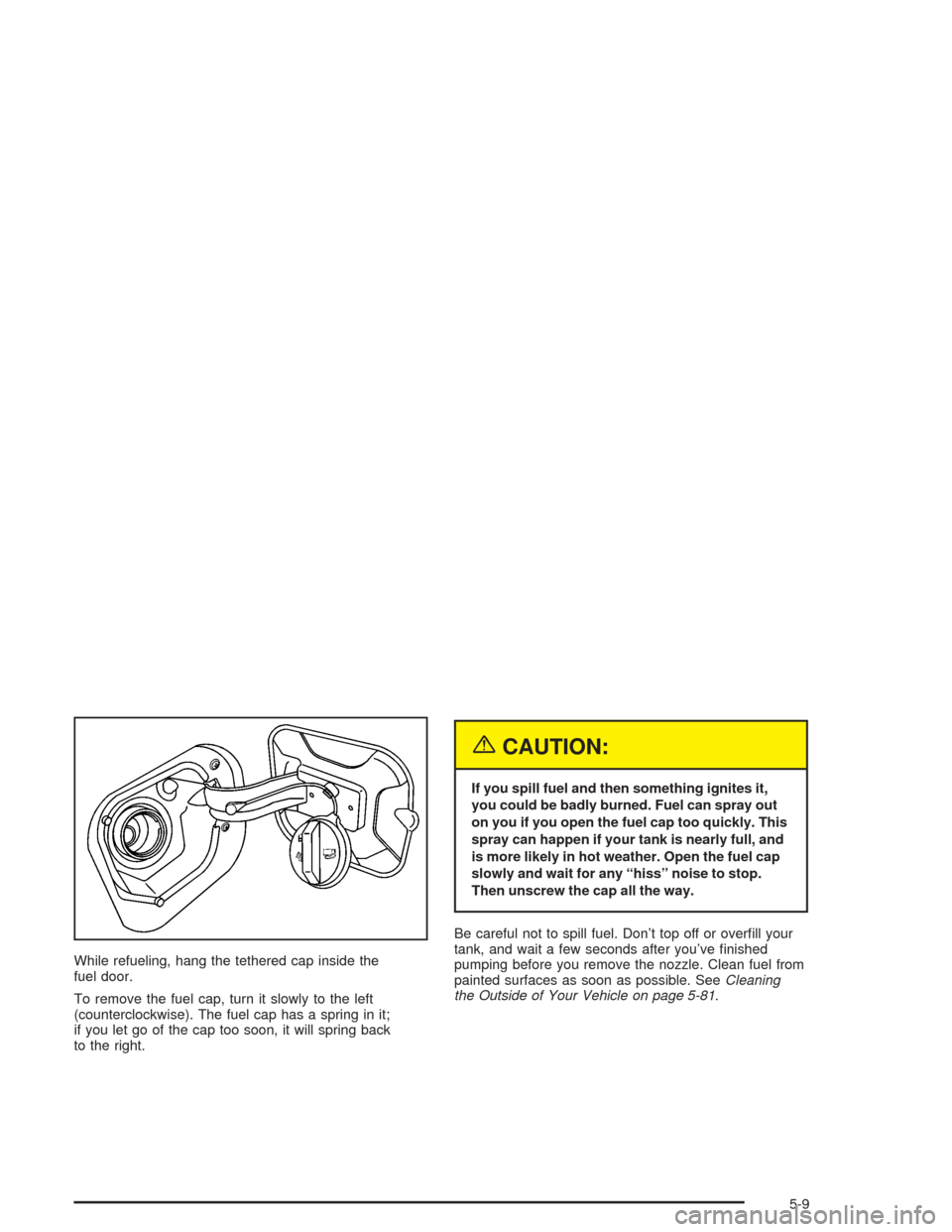
While refueling, hang the tethered cap inside the
fuel door.
To remove the fuel cap, turn it slowly to the left
(counterclockwise). The fuel cap has a spring in it;
if you let go of the cap too soon, it will spring back
to the right.
{CAUTION:
If you spill fuel and then something ignites it,
you could be badly burned. Fuel can spray out
on you if you open the fuel cap too quickly. This
spray can happen if your tank is nearly full, and
is more likely in hot weather. Open the fuel cap
slowly and wait for any “hiss” noise to stop.
Then unscrew the cap all the way.
Be careful not to spill fuel. Don’t top off or overll your
tank, and wait a few seconds after you’ve nished
pumping before you remove the nozzle. Clean fuel from
painted surfaces as soon as possible. SeeCleaning
the Outside of Your Vehicle on page 5-81.
5-9
Page 370 of 426
Fuses
The wiring circuits in your vehicle are protected from
short circuits by fuses and fusible thermal links in
the wiring itself.
Look at the silver-colored band inside the fuse. If the
band is broken or melted, replace the fuse. Be sure you
replace a bad fuse with a new one of the identical
size and rating.
If you ever have a problem on the road and don’t have
a spare fuse, you can borrow one that has the same
amperage. Just pick a feature of your vehicle that
you can get along without — like the radio or cigarette
lighter — and use its fuse, if it is the correct amperage.
Replace it as soon as you can.There are three fuse blocks in your vehicle: one in the
center of the instrument panel, one in the engine
compartment and one in the trunk.
There is a fuse puller located on the instrument panel
fuse block. It can be used to easily remove fuses
from the fuse block.
The instrument panel fuse blocks is located at on the
lower front side of the console, on the passenger side of
the vehicle. To access the fuses, open the fuse panel
door by pulling out.
To reinstall the door, insert the hooks at the front end
rst, then push the door into the center console panel to
secure it.
5-88
Page 372 of 426
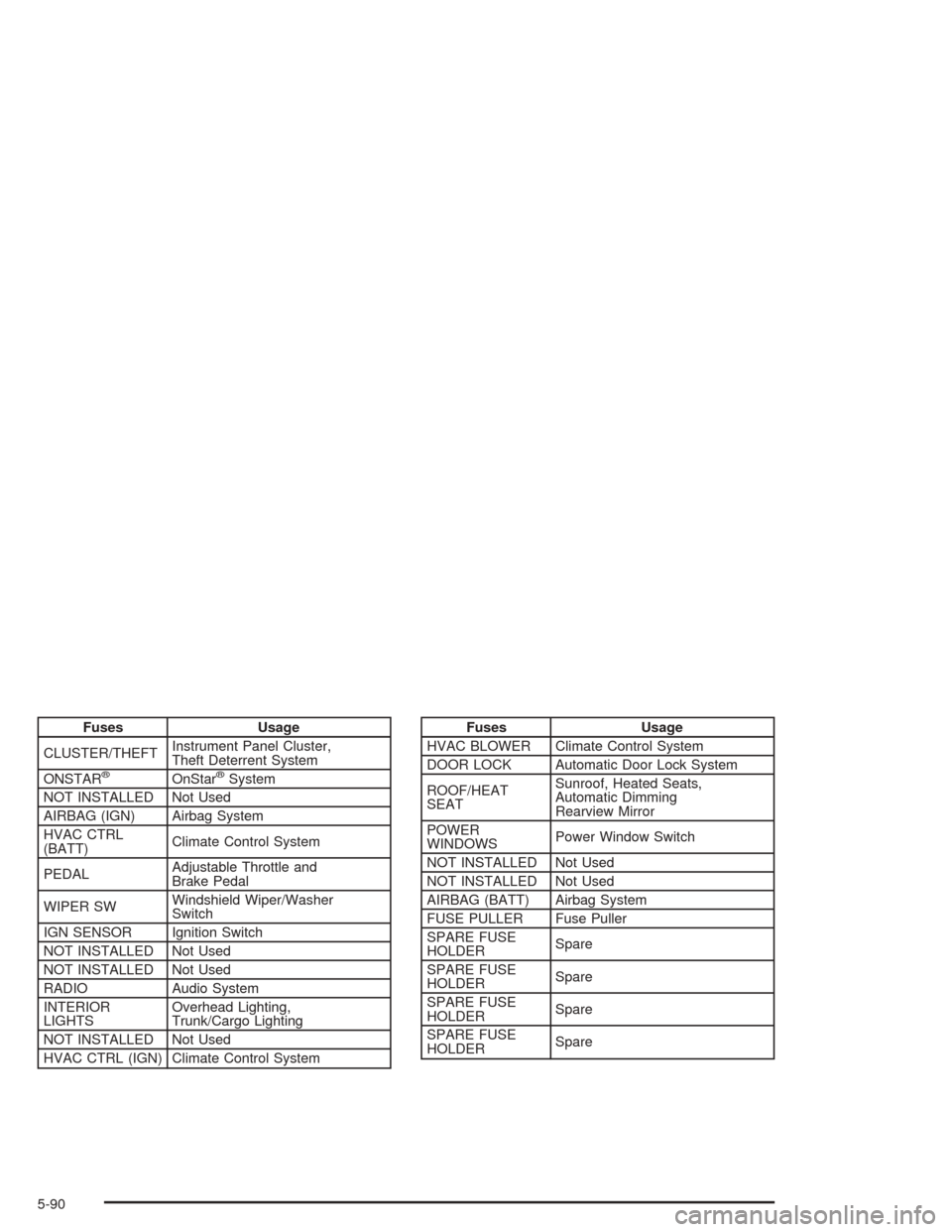
Fuses Usage
CLUSTER/THEFTInstrument Panel Cluster,
Theft Deterrent System
ONSTAR
®OnStar®System
NOT INSTALLED Not Used
AIRBAG (IGN) Airbag System
HVAC CTRL
(BATT)Climate Control System
PEDALAdjustable Throttle and
Brake Pedal
WIPER SWWindshield Wiper/Washer
Switch
IGN SENSOR Ignition Switch
NOT INSTALLED Not Used
NOT INSTALLED Not Used
RADIO Audio System
INTERIOR
LIGHTSOverhead Lighting,
Trunk/Cargo Lighting
NOT INSTALLED Not Used
HVAC CTRL (IGN) Climate Control System
Fuses Usage
HVAC BLOWER Climate Control System
DOOR LOCK Automatic Door Lock System
ROOF/HEAT
SEATSunroof, Heated Seats,
Automatic Dimming
Rearview Mirror
POWER
WINDOWSPower Window Switch
NOT INSTALLED Not Used
NOT INSTALLED Not Used
AIRBAG (BATT) Airbag System
FUSE PULLER Fuse Puller
SPARE FUSE
HOLDERSpare
SPARE FUSE
HOLDERSpare
SPARE FUSE
HOLDERSpare
SPARE FUSE
HOLDERSpare
5-90
Page 376 of 426

Fuses Usage
1 Not Used
2 Driver Seat Controls
3 Not Used
4 (Resistor) Driver Door Key Lock CylinderFuses Usage
5 Emission
6 Parklamps
7 Not Used
8 Not Used
5-94
Page 386 of 426
(f)Lubricate all key lock cylinders, door hinges and
latches, hood hinges and latches and trunk lid hinges
and latches. More frequent lubrication may be required
when exposed to a corrosive environment. Applying
silicone grease on weatherstrips with a clean cloth will
make them last longer, seal better and not stick or
squeak.
(g)Check system for interference or binding and for
damaged or missing parts. Replace parts as needed.
Replace any components that have high effort or
excessive wear. Do not lubricate accelerator or cruise
control cables.
(h)Change automatic transaxle uid and lter if the
vehicle is mainly driven under one or more of these
conditions:
In heavy city traffic where the outside temperature
regularly reaches 90°F (32°C) or higher.
In hilly or mountainous terrain.
When doing frequent trailer towing.
Uses such as found in taxi, police or delivery
service.If you do not use your vehicle under any of these
conditions, the uid and lter do not require changing.
(i)Drain, ush and rell cooling system. See Engine
Coolant on page 5-24for what to use. Inspect hoses.
Clean radiator, condenser, pressure cap and ller neck.
Pressure test the cooling system and pressure cap.
(j)A uid loss in any vehicle system could indicate a
problem. Have the system inspected and repaired and
the uid level checked. Add uid if needed.
6-8
Page 390 of 426
Recommended Fluids and
Lubricants
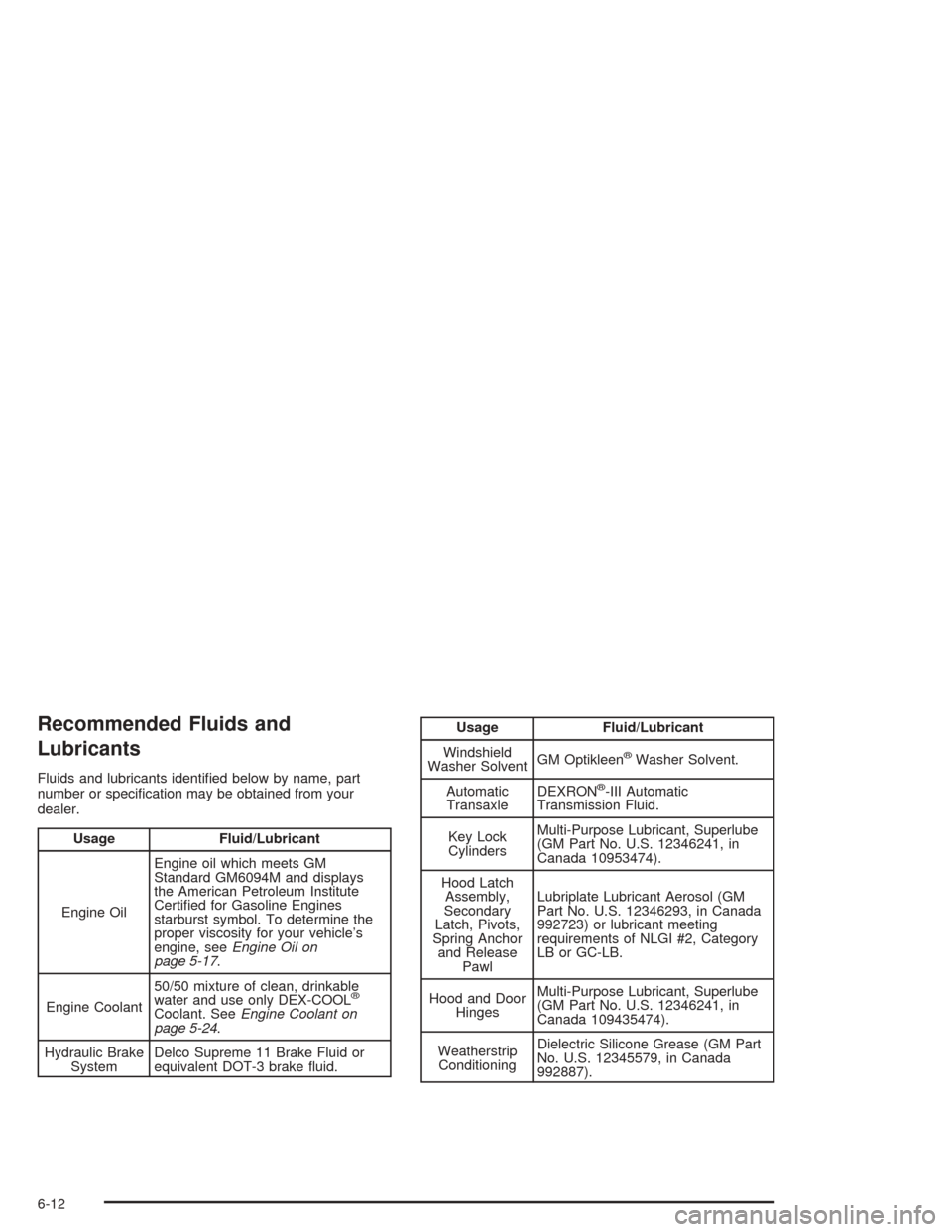
Fluids and lubricants identied below by name, part
number or specication may be obtained from your
dealer.
Usage Fluid/Lubricant
Engine OilEngine oil which meets GM
Standard GM6094M and displays
the American Petroleum Institute
Certied for Gasoline Engines
starburst symbol. To determine the
proper viscosity for your vehicle’s
engine, seeEngine Oil on
page 5-17.
Engine Coolant50/50 mixture of clean, drinkable
water and use only DEX-COOL
®
Coolant. SeeEngine Coolant on
page 5-24.
Hydraulic Brake
SystemDelco Supreme 11 Brake Fluid or
equivalent DOT-3 brake uid.
Usage Fluid/Lubricant
Windshield
Washer SolventGM Optikleen
®Washer Solvent.
Automatic
TransaxleDEXRON
®-III Automatic
Transmission Fluid.
Key Lock
CylindersMulti-Purpose Lubricant, Superlube
(GM Part No. U.S. 12346241, in
Canada 10953474).
Hood Latch
Assembly,
Secondary
Latch, Pivots,
Spring Anchor
and Release
PawlLubriplate Lubricant Aerosol (GM
Part No. U.S. 12346293, in Canada
992723) or lubricant meeting
requirements of NLGI #2, Category
LB or GC-LB.
Hood and Door
HingesMulti-Purpose Lubricant, Superlube
(GM Part No. U.S. 12346241, in
Canada 109435474).
Weatherstrip
ConditioningDielectric Silicone Grease (GM Part
No. U.S. 12345579, in Canada
992887).
6-12
Page 414 of 426
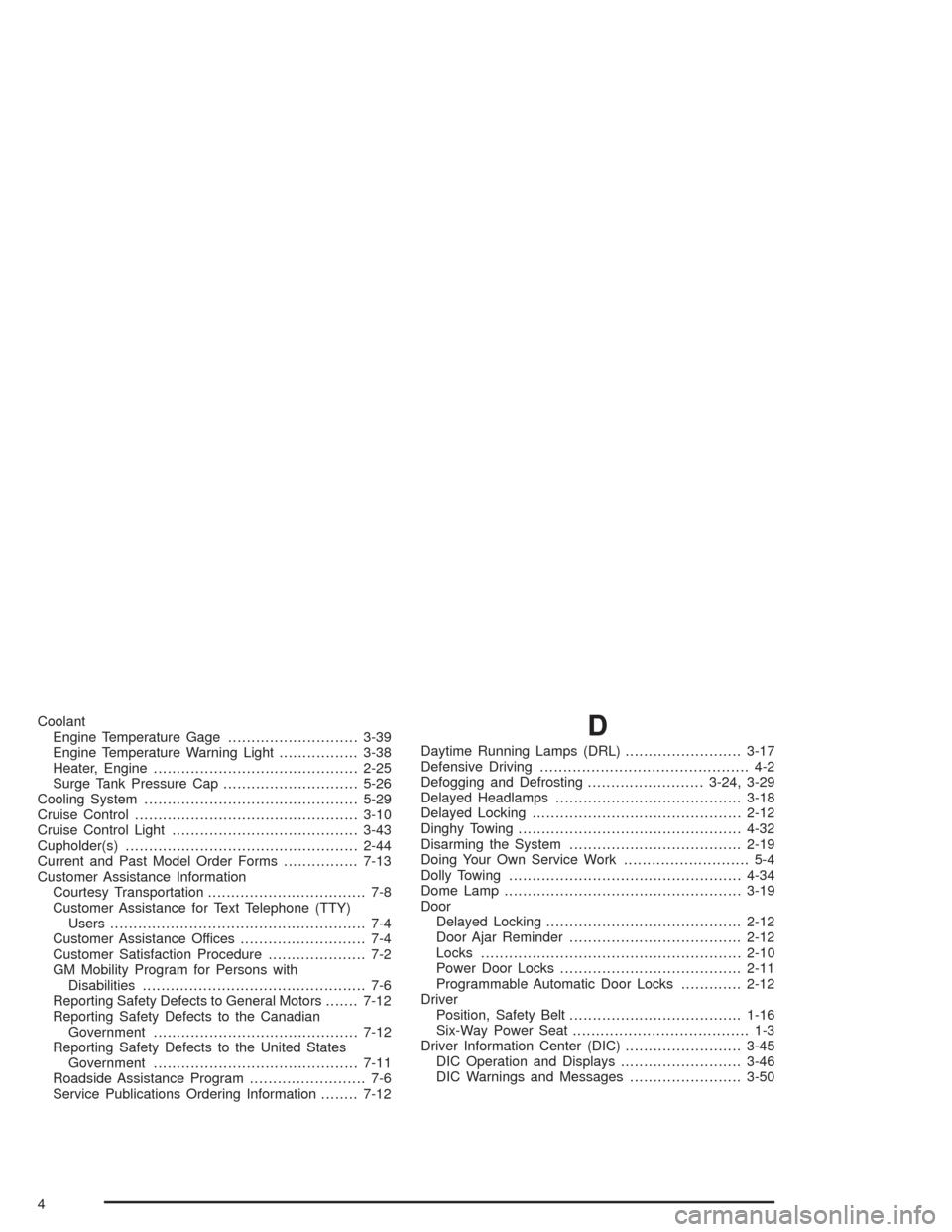
Coolant
Engine Temperature Gage............................3-39
Engine Temperature Warning Light.................3-38
Heater, Engine............................................2-25
Surge Tank Pressure Cap.............................5-26
Cooling System..............................................5-29
Cruise Control................................................3-10
Cruise Control Light........................................3-43
Cupholder(s)..................................................2-44
Current and Past Model Order Forms................7-13
Customer Assistance Information
Courtesy Transportation.................................. 7-8
Customer Assistance for Text Telephone (TTY)
Users....................................................... 7-4
Customer Assistance Offices........................... 7-4
Customer Satisfaction Procedure..................... 7-2
GM Mobility Program for Persons with
Disabilities................................................ 7-6
Reporting Safety Defects to General Motors.......7-12
Reporting Safety Defects to the Canadian
Government............................................7-12
Reporting Safety Defects to the United States
Government............................................7-11
Roadside Assistance Program......................... 7-6
Service Publications Ordering Information........7-12D
Daytime Running Lamps (DRL).........................3-17
Defensive Driving............................................. 4-2
Defogging and Defrosting.........................3-24, 3-29
Delayed Headlamps........................................3-18
Delayed Locking.............................................2-12
Dinghy Towing................................................4-32
Disarming the System.....................................2-19
Doing Your Own Service Work........................... 5-4
Dolly Towing..................................................4-34
Dome Lamp...................................................3-19
Door
Delayed Locking..........................................2-12
Door Ajar Reminder.....................................2-12
Locks........................................................2-10
Power Door Locks.......................................2-11
Programmable Automatic Door Locks.............2-12
Driver
Position, Safety Belt.....................................1-16
Six-Way Power Seat...................................... 1-3
Driver Information Center (DIC).........................3-45
DIC Operation and Displays..........................3-46
DIC Warnings and Messages........................3-50
4