horn CHEVROLET MALIBU 2004 5.G Owners Manual
[x] Cancel search | Manufacturer: CHEVROLET, Model Year: 2004, Model line: MALIBU, Model: CHEVROLET MALIBU 2004 5.GPages: 426, PDF Size: 3.98 MB
Page 74 of 426
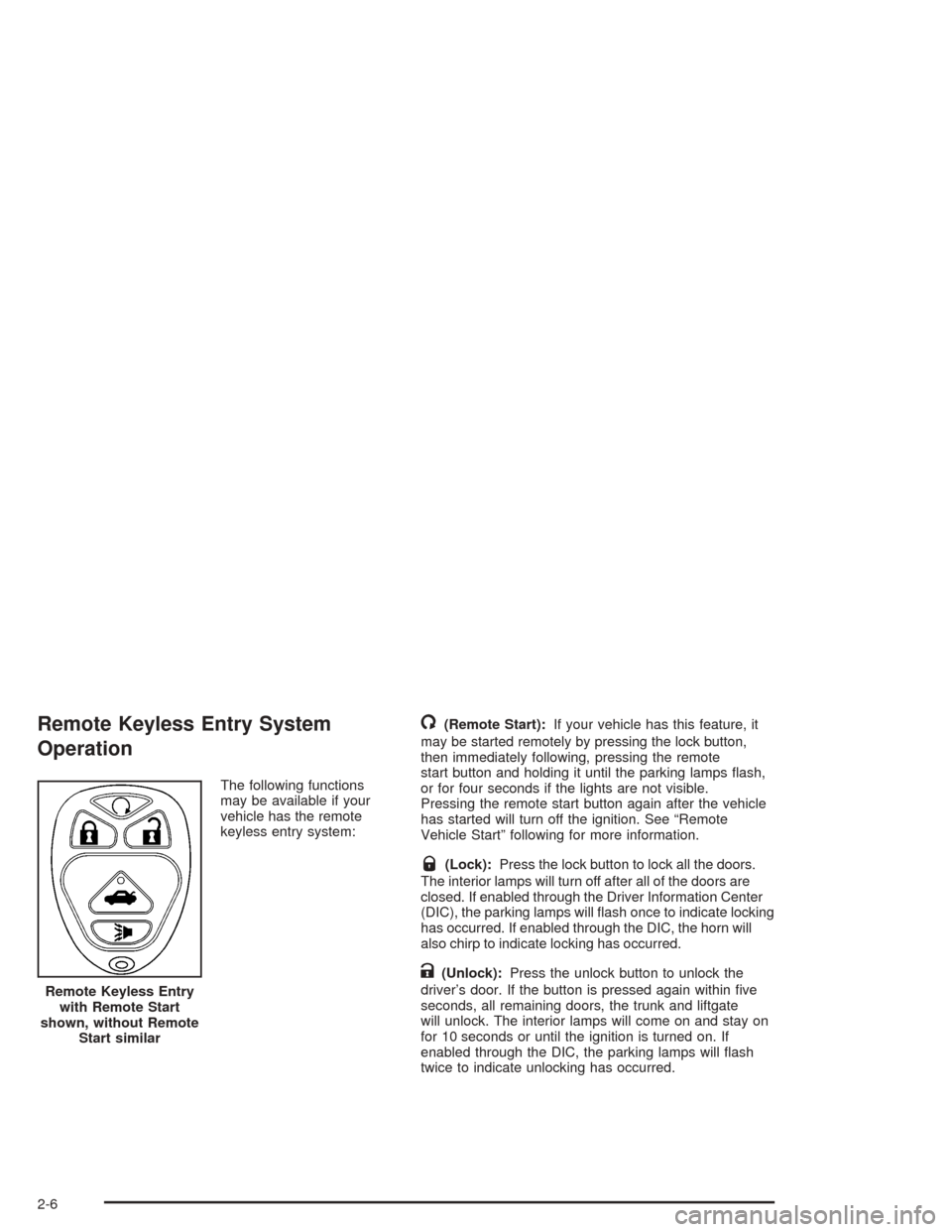
Remote Keyless Entry System
Operation
The following functions
may be available if your
vehicle has the remote
keyless entry system:
/(Remote Start):If your vehicle has this feature, it
may be started remotely by pressing the lock button,
then immediately following, pressing the remote
start button and holding it until the parking lamps ash,
or for four seconds if the lights are not visible.
Pressing the remote start button again after the vehicle
has started will turn off the ignition. See “Remote
Vehicle Start” following for more information.
Q(Lock):Press the lock button to lock all the doors.
The interior lamps will turn off after all of the doors are
closed. If enabled through the Driver Information Center
(DIC), the parking lamps will ash once to indicate locking
has occurred. If enabled through the DIC, the horn will
also chirp to indicate locking has occurred.
K(Unlock):Press the unlock button to unlock the
driver’s door. If the button is pressed again within ve
seconds, all remaining doors, the trunk and liftgate
will unlock. The interior lamps will come on and stay on
for 10 seconds or until the ignition is turned on. If
enabled through the DIC, the parking lamps will ash
twice to indicate unlocking has occurred. Remote Keyless Entry
with Remote Start
shown, without Remote
Start similar
2-6
Page 75 of 426
V(Remote Trunk Release):The trunk or liftgate
will open when this button on the transmitter is pressed
and held. You can open the trunk with the transmitter
when the vehicle is in PARK (P) or NEUTRAL (N). The
interior lamps will come on for 10 seconds or until
the ignition switch is turned to ON.
7(Vehicle Locator/Panic Alarm):Press this button
to locate your vehicle. The horn will chirp three times
and the headlamps and parking lamps will ash
three times. Press and hold the button for three seconds
to sound the panic alarm. The horn will chirp and the
headlamps and parking lamps will ash for two minutes.
Press the button again to cancel the panic alarm.
Programmable Horn Chirp
Through the DIC, you may choose whether or not to
have a horn chirp when you use the remote keyless
entry transmitter to lock or unlock the doors.
SeeDIC Operation and Displays on page 3-46for more
information.
Matching Transmitter(s) to Your
Vehicle
Each remote keyless entry transmitter is coded to
prevent another transmitter from unlocking your vehicle.
If a transmitter is lost or stolen, a replacement can
be purchased through your dealer. Remember to bring
any remaining transmitters with you when you go to
your dealer. When the dealer matches the replacement
transmitter to your vehicle, any remaining transmitters
must also be matched. Once your dealer has coded the
new transmitter, the lost transmitter will not unlock
your vehicle. Each vehicle can have a maximum of four
transmitters matched to it.
2-7
Page 80 of 426
Door Ajar Reminder
If one of the doors on your vehicle is not closed
properly, while the ignition is on and the shift lever is
moved from PARK (P) or NEUTRAL (N), you will hear a
chime. Also, the door ajar message will display
through the Driver Information Center until the doors are
closed. SeeDIC Warnings and Messages on page 3-50
for more information.
Delayed Locking
This feature will allow the driver to delay the actual
locking of the vehicle. This feature will not operate if the
key is left in the ignition. SeeLockout Protection on
page 2-13later in this section.
When the driver’s power door lock switch or the
transmitter lock button is pressed once, with the key
removed from the ignition and the driver’s door open,
three chimes will be heard to signal the delay. The doors
will not lock immediately. Five seconds after the last door
has been closed, all of the doors will lock and the parking
lamps will ash once. The horn will also chirp if the horn
chirp feature is enabled. SeeDIC Operation and Displays
on page 3-46for more information.
If a door is opened before the ve seconds has elapsed,
the doors will not lock until ve seconds after all
doors are closed.If the power door lock switch or the transmitter lock
button is pressed twice when leaving the vehicle, the
doors will lock immediately.
If the power door unlock switch or the transmitter unlock
button is pressed, the doors will unlock immediately
and not lock automatically after the doors are closed.
This feature is turned on at the factory but may be
turned off through the DIC.
Programmable Automatic
Door Locks
Your vehicle is programmed at the factory that when the
doors are closed, the ignition is on and the shift lever
is moved out of PARK (P), all the doors will lock.
If someone needs to exit the vehicle once the doors are
locked, have that person use the manual lock knob
or power door unlock switch.
The power door locks and unlocks can be programmed
to operate differently through prompts displayed on
the Driver Information Center (DIC). These prompts
allow you to choose various lock and unlock settings.
For more information on programming, seeDIC
Operation and Displays on page 3-46.
When the ignition is switched from ON to OFF, all the
doors will unlock.
2-12
Page 87 of 426
Disarming the System
If the system is armed, you can disarm the system by:
Pressing the unlock button on the transmitter
Turning the ignition to ON or
Turning the driver’s door key lock cylinder once
toward the rear of the vehicle.
Once the system is disarmed, the security light will stop
ashing.
How the System Alarm is Activated
If the system is armed,
Opening the driver’s door will cause a ten second
pre-alarm chirp followed by a thirty second full
alarm of horn and lights.
Opening any other door or the liftgate will
immediately cause a full alarm for thirty seconds of
horn and lights.
If an alarm event has nished and all the doors and the
liftgate are closed, the system will re-arm itself.
How to Turn Off the System Alarm
If the system alarm is active, it can be deactivated by:
Pressing the lock button on the transmitter to
turn off the alarm. The system will also re-arm itself.
Pressing the unlock button on the transmitter to turn
off the alarm and disarm the system
Putting the key in the driver’s door key lock cylinder
and turning it to the rear of the vehicle to turn off
the alarm and disarm the system or
Putting the key in the ignition and turning it to ON
to turn off the alarm and disarm the system.
How to Detect a Tamper Condition
If you hear three chirps when you press the unlock and
lock buttons on the transmitter, that means the
content theft security system alarm was triggered while
you were away.
2-19
Page 117 of 426
Instrument Panel Overview...............................3-4
Hazard Warning Flashers................................3-6
Other Warning Devices...................................3-7
Horn.............................................................3-7
Tilt Wheel.....................................................3-7
Turn Signal/Multifunction Lever.........................3-8
Exterior Lamps.............................................3-14
Interior Lamps..............................................3-19
Accessory Power Outlets...............................3-20
Climate Controls............................................3-21
Climate Control System.................................3-21
Automatic Climate Control System...................3-25
Outlet Adjustment.........................................3-30
Warning Lights, Gages, and Indicators............3-31
Instrument Panel Cluster................................3-32
Speedometer and Odometer...........................3-33
Tachometer.................................................3-33
Safety Belt Reminder Light.............................3-34
Air Bag Readiness Light................................3-34
Charging System Light..................................3-35
Brake System Warning Light..........................3-36
Anti-Lock Brake System
Warning Light...........................................3-37
Enhanced Traction System
Warning Light...........................................3-37
Enhanced Traction System Active Light............3-38Engine Coolant Temperature Warning Light......3-38
Engine Coolant Temperature Gage..................3-39
Malfunction Indicator Lamp.............................3-39
Oil Pressure Light.........................................3-42
Security Light...............................................3-43
Cruise Control Light......................................3-43
Service Vehicle Soon Light............................3-44
Fuel Gage...................................................3-44
Driver Information Center (DIC).......................3-45
DIC Operation and Displays...........................3-46
DIC Warnings and Messages.........................3-50
Audio System(s).............................................3-52
Setting the Time for Radios without Radio
Data Systems (RDS)..................................3-52
Setting the Time for Radios with Radio Data
Systems (RDS).........................................3-53
Radio with CD (Base Level)...........................3-53
Radio with CD (Up Level)..............................3-58
Radio with Cassette and CD..........................3-69
Radio with Six-Disc CD.................................3-82
Rear Seat Entertainment System....................3-96
Rear Seat Audio (RSA)
(Without Entertainment System).................3-111
Rear Seat Audio (RSA)
(With Entertainment System).....................3-113
Theft-Deterrent Feature................................3-115
Section 3 Instrument Panel
3-1
Page 121 of 426
The main components of your instrument panel are
the following:
A. Side Window Outlets. SeeClimate Control System
on page 3-21.
B. Turn Signal/Multifunction Lever. SeeTurn
Signal/Multifunction Lever on page 3-8.
C. Steering Wheel Controls and Cruise Controls.
SeeAudio Steering Wheel Controls on page 3-115
and “Cruise Control” underTurn Signal/Multifunction
Lever on page 3-8.
D. Instrument Panel Cluster. SeeInstrument Panel
Cluster on page 3-32.
E. Windshield Wiper/Washer Lever. See “Windshield
Wipers” underTurn Signal/Multifunction Lever
on page 3-8.
F. Ignition Switch. SeeIgnition Positions on page 2-22.
G. Hazard Warning Flasher. SeeHazard Warning
Flashers on page 3-6.
H. Center Air Outlets. SeeClimate Control System
on page 3-21.
I. Audio System. SeeAudio System(s) on page 3-52.
J. Climate Control System. SeeClimate Control
System on page 3-21.K. Glove Box. SeeGlove Box on page 2-44.
L. Side Air Outlets. SeeClimate Control System
on page 3-21.
M. Adjustable Pedal Buttons. SeeAdjustable Throttle
and Brake Pedal on page 2-24.
N. Instrument Panel Brightness Control. See “Instrument
Panel Brightness” underInterior Lamps on page 3-19.
O. Storage Compartment
P. Fog Lamps. SeeExterior Lamps on page 3-14.
Q. Hood Release. SeeHood Release on page 5-12.
R. Parking Brake. SeeParking Brake on page 2-29.
S. Horn. SeeHorn on page 3-7.
T. Accessory Power Outlet. SeeAccessory Power
Outlets on page 3-20.
U. Shift Lever. SeeShifting Into Park (P) on page 2-30.
V. Center Console Storage Compartment. See
Center Console Storage Area on page 2-45.
W. Traction Control Button (If Equipped). SeeEnhanced
Traction System (ETS) on page 4-9.
3-5
Page 123 of 426
Other Warning Devices
If you carry reective triangles, you can set one up at
the side of the road about 300 feet (100 m) behind
your vehicle.
Horn
You can sound the horn by pressing in the area of the
horn symbol on your steering wheel.
Tilt Wheel
A tilt wheel allows you to adjust the steering wheel
before you drive. You can raise the steering wheel to
the highest level to give your legs more room when you
enter and exit the vehicle.
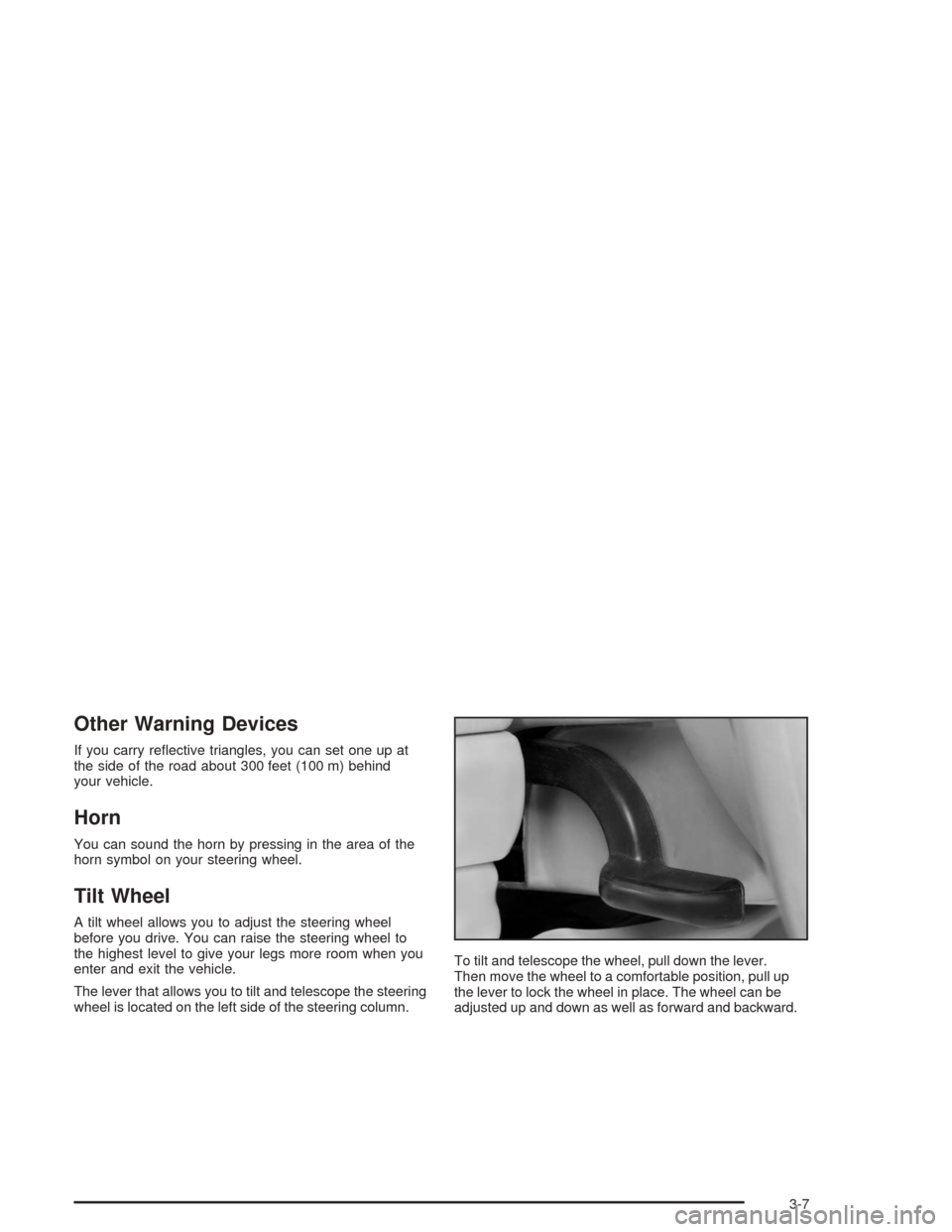
The lever that allows you to tilt and telescope the steering
wheel is located on the left side of the steering column.To tilt and telescope the wheel, pull down the lever.
Then move the wheel to a comfortable position, pull up
the lever to lock the wheel in place. The wheel can be
adjusted up and down as well as forward and backward.
3-7
Page 163 of 426
AV SPEED:Press the INFO button until AV SPEED
appears in the display. This is the vehicle’s average
speed in miles per hour or kilometers per hour.
Press and hold the ENTER button while AV SPEED
is displayed to reset the average vehicle speed.
OIL LIFE:Press the button until OIL LIFE appears in
the display. The Oil Life Monitor system shows an
estimate of the oil’s remaining useful life. It will show
100% when the system is reset after an oil change.
It will alert you to change your oil on a schedule
consistent with your driving conditions.
Always reset the engine oil life after an oil change.
The oil change reminder does not measure how much
oil you have in your engine. So, be sure to check your
oil level often.
Personalization
The following options can be accessed in order by
pressing the MENU button anytime while the vehicle is
in ON. Press this button to scroll through each option.
All of the personalization options may not be available
on your vehicle. Only the options available will be
displayed on your DIC.
Oil Life Monitor Reset
Units Selection (English/Metric)
Remote Start Capability
Horn Chirp During Remote Keyless Entry Locking
Horn Chirp During Remote Keyless Entry Unlocking
Exterior Light Flash During Remote Keyless
Entry Locking or Unlocking
Delayed Locking
Automatic Vehicle Unlocking: Specic Doors
Automatic Vehicle Unlocking: When Key is Off or
When Shift To Park
Exterior Perimeter Lighting During Remote Keyless
Entry Unlock
Security System Passive or Remote Keyless
Entry Arming
Select Language: (English, French, Spanish or
German)
When the desired option is reached, use the ENTER
button to toggle between the modes of that option.
To make a selection, press the MENU button again.
If no selection is made within 10 seconds, the display
will revert back to the previous information displayed.
The MENU mode is exited when the INFO button is
pressed, a ten second time period has elapsed, the
ignition is turned to OFF or the end of the MENU list
is reached.
3-47
Page 164 of 426
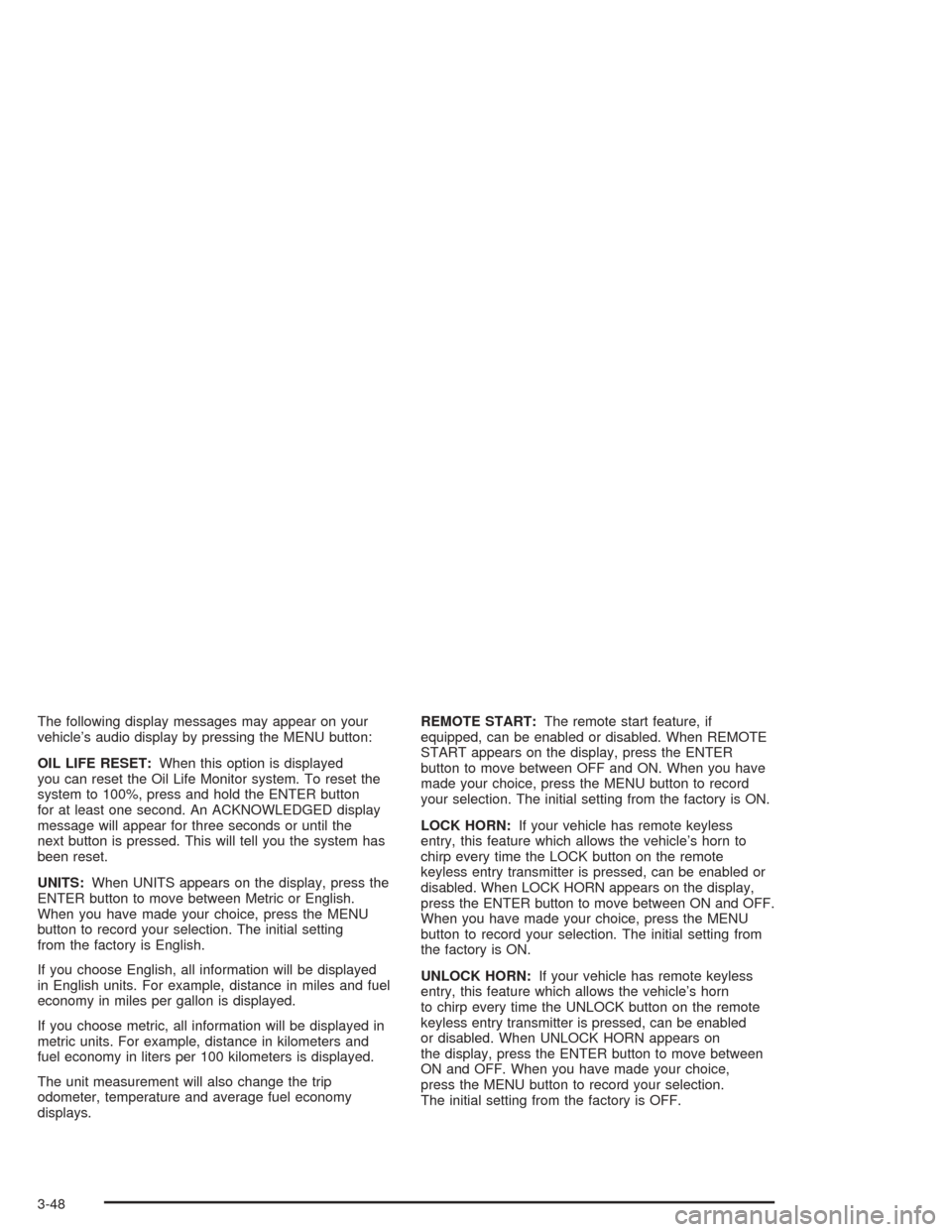
The following display messages may appear on your
vehicle’s audio display by pressing the MENU button:
OIL LIFE RESET:When this option is displayed
you can reset the Oil Life Monitor system. To reset the
system to 100%, press and hold the ENTER button
for at least one second. An ACKNOWLEDGED display
message will appear for three seconds or until the
next button is pressed. This will tell you the system has
been reset.
UNITS:When UNITS appears on the display, press the
ENTER button to move between Metric or English.
When you have made your choice, press the MENU
button to record your selection. The initial setting
from the factory is English.
If you choose English, all information will be displayed
in English units. For example, distance in miles and fuel
economy in miles per gallon is displayed.
If you choose metric, all information will be displayed in
metric units. For example, distance in kilometers and
fuel economy in liters per 100 kilometers is displayed.
The unit measurement will also change the trip
odometer, temperature and average fuel economy
displays.REMOTE START:The remote start feature, if
equipped, can be enabled or disabled. When REMOTE
START appears on the display, press the ENTER
button to move between OFF and ON. When you have
made your choice, press the MENU button to record
your selection. The initial setting from the factory is ON.
LOCK HORN:If your vehicle has remote keyless
entry, this feature which allows the vehicle’s horn to
chirp every time the LOCK button on the remote
keyless entry transmitter is pressed, can be enabled or
disabled. When LOCK HORN appears on the display,
press the ENTER button to move between ON and OFF.
When you have made your choice, press the MENU
button to record your selection. The initial setting from
the factory is ON.
UNLOCK HORN:If your vehicle has remote keyless
entry, this feature which allows the vehicle’s horn
to chirp every time the UNLOCK button on the remote
keyless entry transmitter is pressed, can be enabled
or disabled. When UNLOCK HORN appears on
the display, press the ENTER button to move between
ON and OFF. When you have made your choice,
press the MENU button to record your selection.
The initial setting from the factory is OFF.
3-48
Page 374 of 426
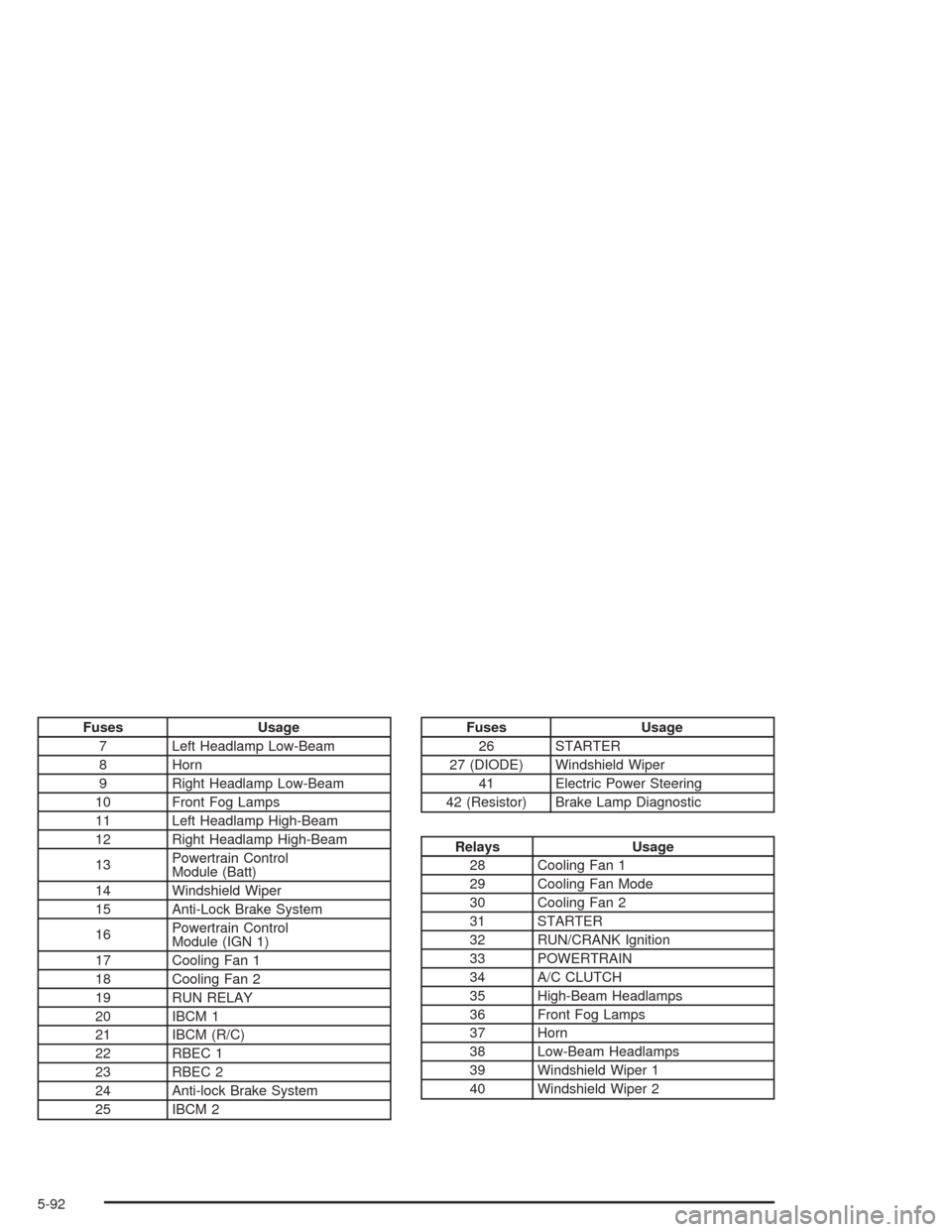
Fuses Usage
7 Left Headlamp Low-Beam
8 Horn
9 Right Headlamp Low-Beam
10 Front Fog Lamps
11 Left Headlamp High-Beam
12 Right Headlamp High-Beam
13Powertrain Control
Module (Batt)
14 Windshield Wiper
15 Anti-Lock Brake System
16Powertrain Control
Module (IGN 1)
17 Cooling Fan 1
18 Cooling Fan 2
19 RUN RELAY
20 IBCM 1
21 IBCM (R/C)
22 RBEC 1
23 RBEC 2
24 Anti-lock Brake System
25 IBCM 2Fuses Usage
26 STARTER
27 (DIODE) Windshield Wiper
41 Electric Power Steering
42 (Resistor) Brake Lamp Diagnostic
Relays Usage
28 Cooling Fan 1
29 Cooling Fan Mode
30 Cooling Fan 2
31 STARTER
32 RUN/CRANK Ignition
33 POWERTRAIN
34 A/C CLUTCH
35 High-Beam Headlamps
36 Front Fog Lamps
37 Horn
38 Low-Beam Headlamps
39 Windshield Wiper 1
40 Windshield Wiper 2
5-92