phone CHEVROLET MALIBU 2005 5.G User Guide
[x] Cancel search | Manufacturer: CHEVROLET, Model Year: 2005, Model line: MALIBU, Model: CHEVROLET MALIBU 2005 5.GPages: 434, PDF Size: 2.61 MB
Page 235 of 434
Audio Output
Audio from the DVD player or auxiliary devices can be
heard through the following possible sources:
Wireless Headphones
Vehicle’s Speakers
Wired Headphones (not included)
Only one audio source can be heard through the
vehicles speakers at a time.
The RSE system or an auxiliary device can be heard
through all of the vehicles speakers when the following
occurs:
The RSE system is off
A DVD or auxiliary device is playing
The front audio system is on and the SRCE button
is pressed to enable the RSE system
The headphone symbol will appear on the radio display
when the RSE system is on and the headphone
symbol will disappear from the display when it is off.To turn the vehicles rear speakers on and off, press the
power button on the RSE system or on the remote
control. When the rear speakers are off, the audio from
the RSE system can be heard through both the
wireless headphones and the vehicles front speakers at
the same time.
The RSE system can be heard through the wired
headphones, not included, on the RSE system when
the following occurs:
The RSE system is on
A DVD or auxiliary device is playing
The volume on the radio may vary when switching
between a radio station, CD, DVD, cassette, or auxiliary
device.
If there is a decreased audio signal during CD or DVD
play, there may be a low hissing noise through the
speakers and/or headphones. If the hissing sound in the
wireless headphones seems excessive, make sure
that the headphone batteries are fully charged. Some
amount of hissing is normal.
3-105
Page 236 of 434
Video Screen
The video screen is located on the back of the oor
console. Open the video screen by rotating the screen
up and adjust its position as desired.
The video screen may not be able to be rotated up if
the rear seat is too far forward. See “Rear Sliding Seat
(MAXX Only)” underRear Seat Operation on page 1-8
for more information.
When the video screen is not in use, push it down into
its stored position.
The DVD player and display will continue to operate
when the video screen is in either the up or down
positions.
The window on the RSE system contains the transmitter
for the wireless headphones and the remote control.
If the screen is in the closed position, the signals will not
be available for the operation of the headphones or
the remote control.
Notice:Avoid directly touching the video screen,
as damage may occur. See “Cleaning the Video
Screen” later in this section for more information.
DVD Player
The DVD player is located on the end of the oor
console under the video screen.
The DVD player can be controlled by the buttons on the
RSE system and/or by the buttons on the remote
control. See “Remote Control” later in this section for
more information.
The DVD player is only compatible with DVDs of the
appropriate region code for the country that the vehicle
was sold in. The DVD region code is printed on the
jackets of most DVDs. Video CDs, standard audio CDs,
and audio CD-Rs can be played by the DVD player.
The video screen will display a menu when an audio CD
or CD-R is playing.
If an error message appears on the video screen, see
“DVD Messages” later in this section.
3-106
Page 237 of 434
DVD Player Buttons
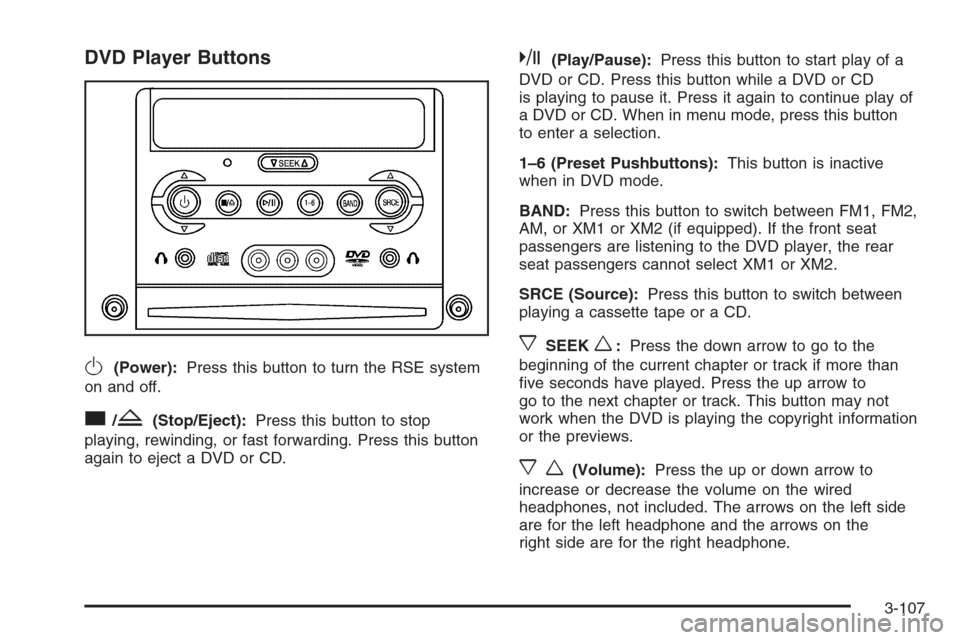
O(Power):Press this button to turn the RSE system
on and off.
c/Z(Stop/Eject):Press this button to stop
playing, rewinding, or fast forwarding. Press this button
again to eject a DVD or CD.
k(Play/Pause):Press this button to start play of a
DVD or CD. Press this button while a DVD or CD
is playing to pause it. Press it again to continue play of
a DVD or CD. When in menu mode, press this button
to enter a selection.
1–6 (Preset Pushbuttons):This button is inactive
when in DVD mode.
BAND:Press this button to switch between FM1, FM2,
AM, or XM1 or XM2 (if equipped). If the front seat
passengers are listening to the DVD player, the rear
seat passengers cannot select XM1 or XM2.
SRCE (Source):Press this button to switch between
playing a cassette tape or a CD.
xSEEKw:Press the down arrow to go to the
beginning of the current chapter or track if more than
ve seconds have played. Press the up arrow to
go to the next chapter or track. This button may not
work when the DVD is playing the copyright information
or the previews.
xw(Volume):Press the up or down arrow to
increase or decrease the volume on the wired
headphones, not included. The arrows on the left side
are for the left headphone and the arrows on the
right side are for the right headphone.
3-107
Page 239 of 434
Remote Control
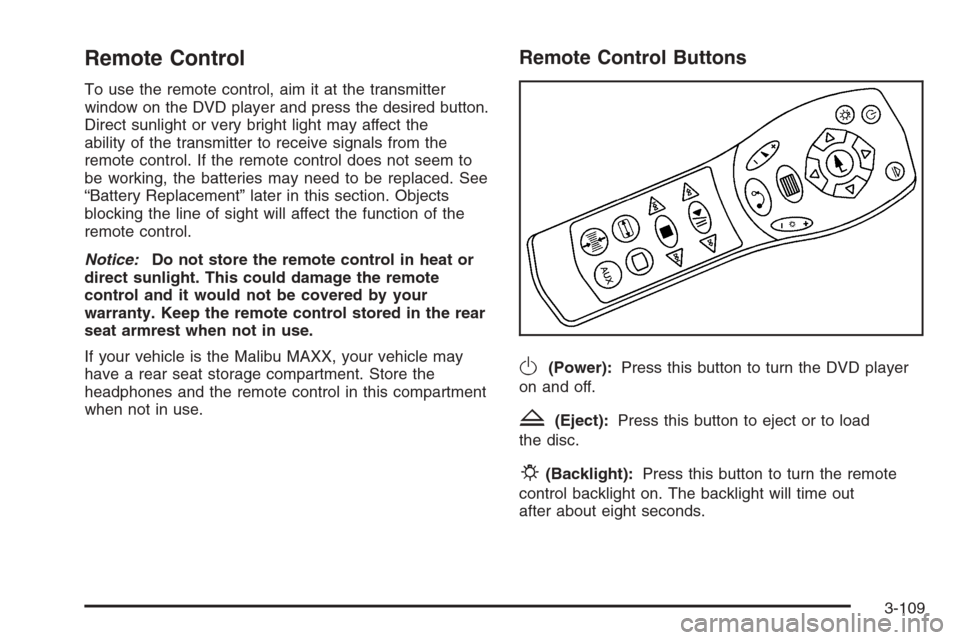
To use the remote control, aim it at the transmitter
window on the DVD player and press the desired button.
Direct sunlight or very bright light may affect the
ability of the transmitter to receive signals from the
remote control. If the remote control does not seem to
be working, the batteries may need to be replaced. See
“Battery Replacement” later in this section. Objects
blocking the line of sight will affect the function of the
remote control.
Notice:Do not store the remote control in heat or
direct sunlight. This could damage the remote
control and it would not be covered by your
warranty. Keep the remote control stored in the rear
seat armrest when not in use.
If your vehicle is the Malibu MAXX, your vehicle may
have a rear seat storage compartment. Store the
headphones and the remote control in this compartment
when not in use.
Remote Control Buttons
O(Power):Press this button to turn the DVD player
on and off.
Z(Eject):Press this button to eject or to load
the disc.
P(Backlight):Press this button to turn the remote
control backlight on. The backlight will time out
after about eight seconds.
3-109
Page 240 of 434
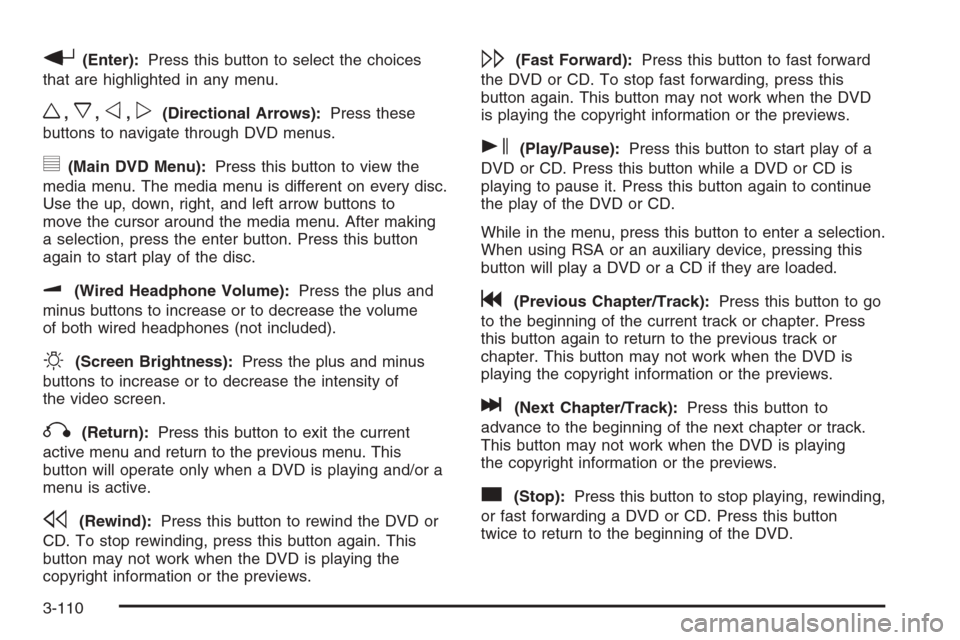
r(Enter):Press this button to select the choices
that are highlighted in any menu.
w,x,o,p(Directional Arrows):Press these
buttons to navigate through DVD menus.
y(Main DVD Menu):Press this button to view the
media menu. The media menu is different on every disc.
Use the up, down, right, and left arrow buttons to
move the cursor around the media menu. After making
a selection, press the enter button. Press this button
again to start play of the disc.
u(Wired Headphone Volume):Press the plus and
minus buttons to increase or to decrease the volume
of both wired headphones (not included).
O(Screen Brightness):Press the plus and minus
buttons to increase or to decrease the intensity of
the video screen.
q(Return):Press this button to exit the current
active menu and return to the previous menu. This
button will operate only when a DVD is playing and/or a
menu is active.
s(Rewind):Press this button to rewind the DVD or
CD. To stop rewinding, press this button again. This
button may not work when the DVD is playing the
copyright information or the previews.
\(Fast Forward):Press this button to fast forward
the DVD or CD. To stop fast forwarding, press this
button again. This button may not work when the DVD
is playing the copyright information or the previews.
s(Play/Pause):Press this button to start play of a
DVD or CD. Press this button while a DVD or CD is
playing to pause it. Press this button again to continue
the play of the DVD or CD.
While in the menu, press this button to enter a selection.
When using RSA or an auxiliary device, pressing this
button will play a DVD or a CD if they are loaded.
g(Previous Chapter/Track):Press this button to go
to the beginning of the current track or chapter. Press
this button again to return to the previous track or
chapter. This button may not work when the DVD is
playing the copyright information or the previews.
l(Next Chapter/Track):Press this button to
advance to the beginning of the next chapter or track.
This button may not work when the DVD is playing
the copyright information or the previews.
c(Stop):Press this button to stop playing, rewinding,
or fast forwarding a DVD or CD. Press this button
twice to return to the beginning of the DVD.
3-110
Page 245 of 434
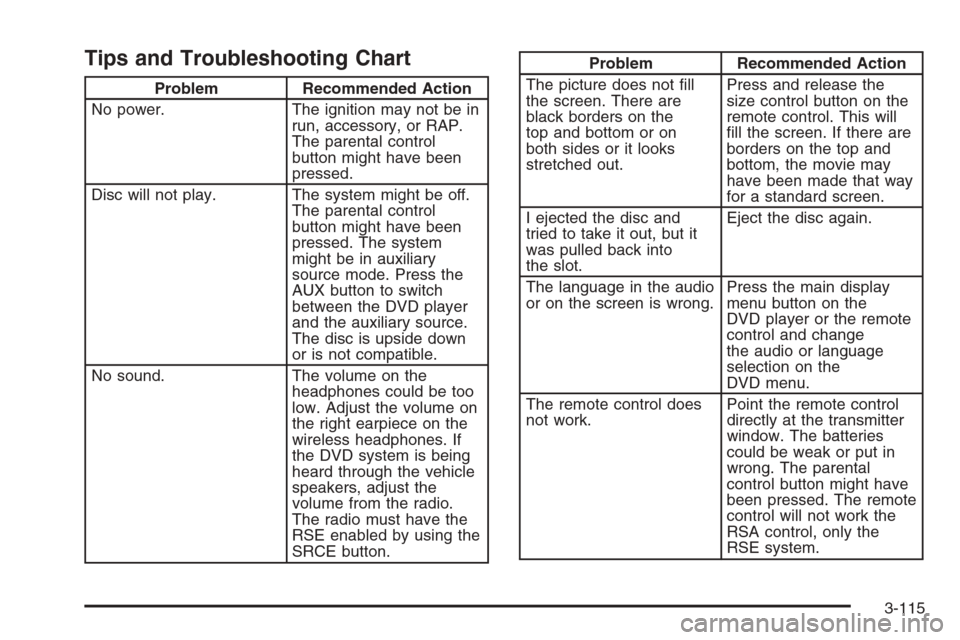
Tips and Troubleshooting Chart
Problem Recommended Action
No power. The ignition may not be in
run, accessory, or RAP.
The parental control
button might have been
pressed.
Disc will not play. The system might be off.
The parental control
button might have been
pressed. The system
might be in auxiliary
source mode. Press the
AUX button to switch
between the DVD player
and the auxiliary source.
The disc is upside down
or is not compatible.
No sound. The volume on the
headphones could be too
low. Adjust the volume on
the right earpiece on the
wireless headphones. If
the DVD system is being
heard through the vehicle
speakers, adjust the
volume from the radio.
The radio must have the
RSE enabled by using the
SRCE button.
Problem Recommended Action
The picture does not ll
the screen. There are
black borders on the
top and bottom or on
both sides or it looks
stretched out.Press and release the
size control button on the
remote control. This will
ll the screen. If there are
borders on the top and
bottom, the movie may
have been made that way
for a standard screen.
I ejected the disc and
tried to take it out, but it
was pulled back into
the slot.Eject the disc again.
The language in the audio
or on the screen is wrong.Press the main display
menu button on the
DVD player or the remote
control and change
the audio or language
selection on the
DVD menu.
The remote control does
not work.Point the remote control
directly at the transmitter
window. The batteries
could be weak or put in
wrong. The parental
control button might have
been pressed. The remote
control will not work the
RSA control, only the
RSE system.
3-115
Page 247 of 434
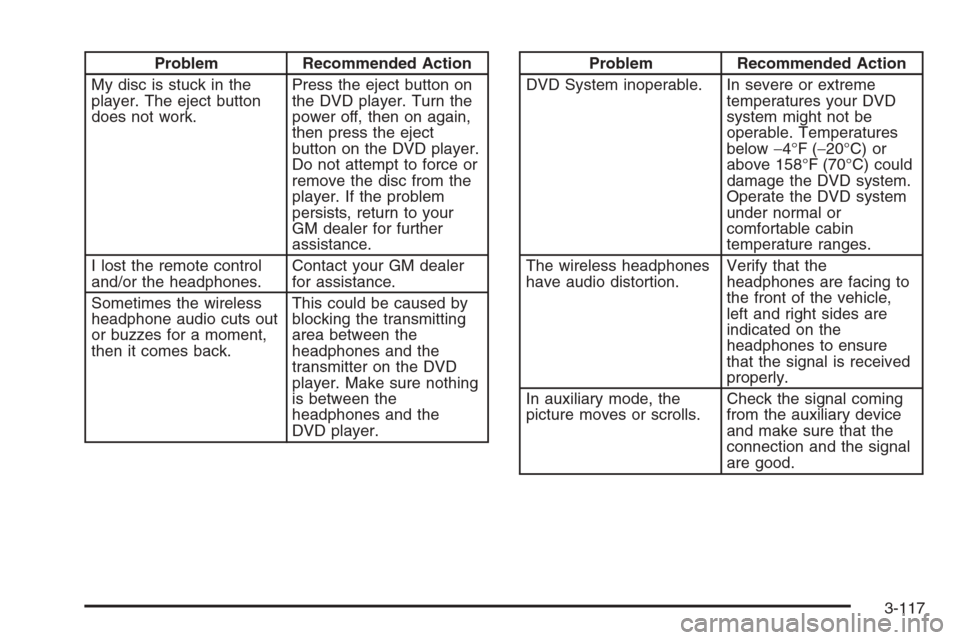
Problem Recommended Action
My disc is stuck in the
player. The eject button
does not work.Press the eject button on
the DVD player. Turn the
power off, then on again,
then press the eject
button on the DVD player.
Do not attempt to force or
remove the disc from the
player. If the problem
persists, return to your
GM dealer for further
assistance.
I lost the remote control
and/or the headphones.Contact your GM dealer
for assistance.
Sometimes the wireless
headphone audio cuts out
or buzzes for a moment,
then it comes back.This could be caused by
blocking the transmitting
area between the
headphones and the
transmitter on the DVD
player. Make sure nothing
is between the
headphones and the
DVD player.Problem Recommended Action
DVD System inoperable. In severe or extreme
temperatures your DVD
system might not be
operable. Temperatures
below−4°F (−20°C) or
above 158°F (70°C) could
damage the DVD system.
Operate the DVD system
under normal or
comfortable cabin
temperature ranges.
The wireless headphones
have audio distortion.Verify that the
headphones are facing to
the front of the vehicle,
left and right sides are
indicated on the
headphones to ensure
that the signal is received
properly.
In auxiliary mode, the
picture moves or scrolls.Check the signal coming
from the auxiliary device
and make sure that the
connection and the signal
are good.
3-117
Page 248 of 434
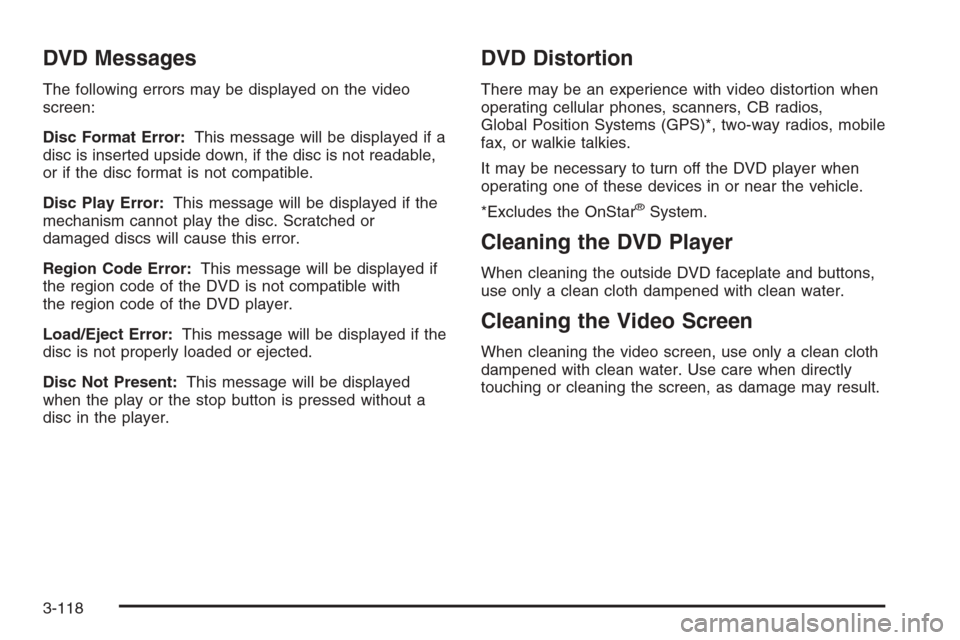
DVD Messages
The following errors may be displayed on the video
screen:
Disc Format Error:This message will be displayed if a
disc is inserted upside down, if the disc is not readable,
or if the disc format is not compatible.
Disc Play Error:This message will be displayed if the
mechanism cannot play the disc. Scratched or
damaged discs will cause this error.
Region Code Error:This message will be displayed if
the region code of the DVD is not compatible with
the region code of the DVD player.
Load/Eject Error:This message will be displayed if the
disc is not properly loaded or ejected.
Disc Not Present:This message will be displayed
when the play or the stop button is pressed without a
disc in the player.
DVD Distortion
There may be an experience with video distortion when
operating cellular phones, scanners, CB radios,
Global Position Systems (GPS)*, two-way radios, mobile
fax, or walkie talkies.
It may be necessary to turn off the DVD player when
operating one of these devices in or near the vehicle.
*Excludes the OnStar
®System.
Cleaning the DVD Player
When cleaning the outside DVD faceplate and buttons,
use only a clean cloth dampened with clean water.
Cleaning the Video Screen
When cleaning the video screen, use only a clean cloth
dampened with clean water. Use care when directly
touching or cleaning the screen, as damage may result.
3-118
Page 249 of 434
Rear Seat Audio (RSA) (Without
Rear Seat Entertainment)
This feature allows rear seat passengers to listen to and
control any of the sources: radio, cassette, and CDs.
An audio or radio source may be listened to but cannot
be changed from the RSE if the front seat passengers
have selected the same source from the front seat
controls. (For example, the radio station selected with
the front seat controls cannot be changed by the
rear seat control(s)).
The front seat audio controls always have priority over
the RSA controls. If the front seat passengers switch
to the same source as the RSA, the RSA will no longer
control the source.You can operate the RSA when the main radio is off.
You can use wired headphones (not included) or
the wireless headphones. The wired headphones
connect to the outlets on the RSA system. The rear seat
passengers have control of the volume for each set of
wired headphones. Adjust the volume on the wireless
headphones by turning the volume control on each
headset.
Primary Radio Controls
The following function is controlled by the main radio:
PWR (Power):Front seat passengers can turn the RSA
off by quickly pressing this knob twice.
3-119
Page 250 of 434
Rear Seat Radio Controls
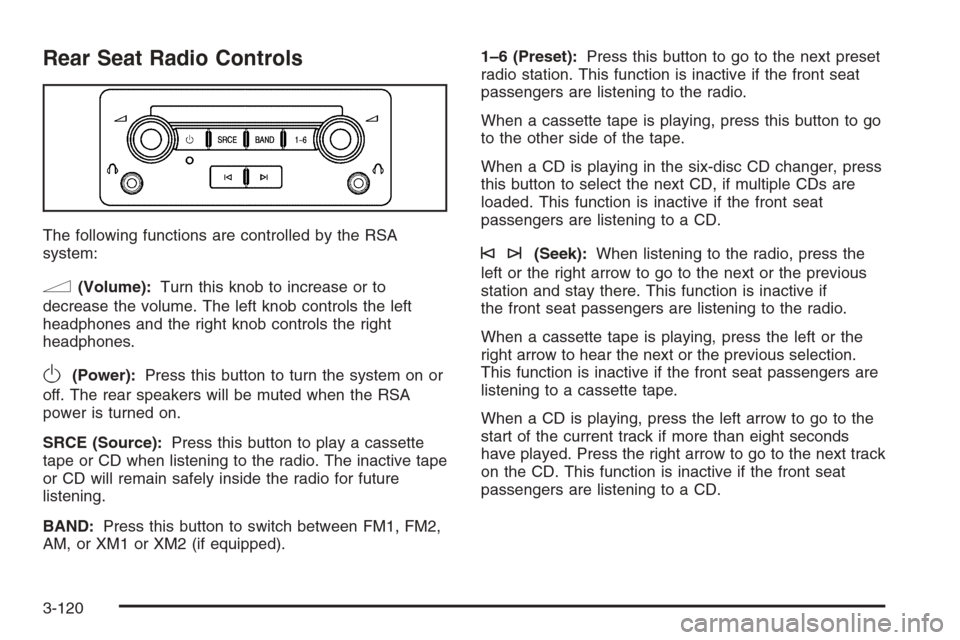
The following functions are controlled by the RSA
system:
n(Volume):Turn this knob to increase or to
decrease the volume. The left knob controls the left
headphones and the right knob controls the right
headphones.
O(Power):Press this button to turn the system on or
off. The rear speakers will be muted when the RSA
power is turned on.
SRCE (Source):Press this button to play a cassette
tape or CD when listening to the radio. The inactive tape
or CD will remain safely inside the radio for future
listening.
BAND:Press this button to switch between FM1, FM2,
AM, or XM1 or XM2 (if equipped).1–6 (Preset):Press this button to go to the next preset
radio station. This function is inactive if the front seat
passengers are listening to the radio.
When a cassette tape is playing, press this button to go
to the other side of the tape.
When a CD is playing in the six-disc CD changer, press
this button to select the next CD, if multiple CDs are
loaded. This function is inactive if the front seat
passengers are listening to a CD.
©¨(Seek):When listening to the radio, press the
left or the right arrow to go to the next or the previous
station and stay there. This function is inactive if
the front seat passengers are listening to the radio.
When a cassette tape is playing, press the left or the
right arrow to hear the next or the previous selection.
This function is inactive if the front seat passengers are
listening to a cassette tape.
When a CD is playing, press the left arrow to go to the
start of the current track if more than eight seconds
have played. Press the right arrow to go to the next track
on the CD. This function is inactive if the front seat
passengers are listening to a CD.
3-120