remote start CHEVROLET MALIBU 2005 5.G User Guide
[x] Cancel search | Manufacturer: CHEVROLET, Model Year: 2005, Model line: MALIBU, Model: CHEVROLET MALIBU 2005 5.GPages: 434, PDF Size: 2.61 MB
Page 167 of 434
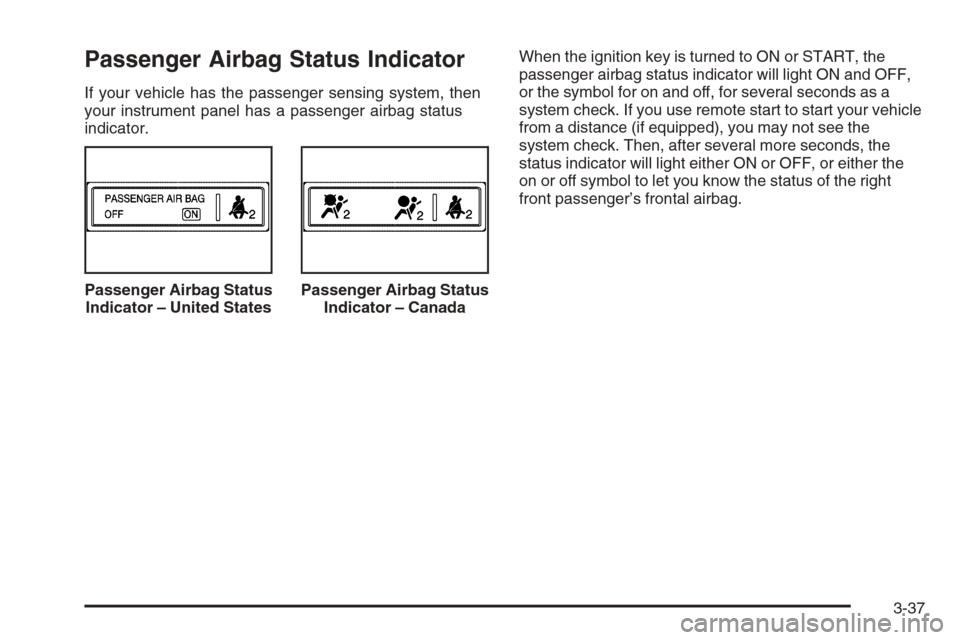
Passenger Airbag Status Indicator
If your vehicle has the passenger sensing system, then
your instrument panel has a passenger airbag status
indicator.When the ignition key is turned to ON or START, the
passenger airbag status indicator will light ON and OFF,
or the symbol for on and off, for several seconds as a
system check. If you use remote start to start your vehicle
from a distance (if equipped), you may not see the
system check. Then, after several more seconds, the
status indicator will light either ON or OFF, or either the
on or off symbol to let you know the status of the right
front passenger’s frontal airbag.
Passenger Airbag Status
Indicator – United States
Passenger Airbag Status
Indicator – Canada
3-37
Page 183 of 434
In addition to the engine oil life system monitoring the
oil life, additional maintenance is recommended in the
Maintenance Schedule in this manual. SeeEngine Oil
on page 5-15andScheduled Maintenance on page 6-4.
Always reset the engine oil life system after an oil
change. See “How to Reset the Engine Oil Life System”
underEngine Oil Life System on page 5-18.
Personalization
The following options can be accessed in order by
pressing the MENU button anytime while the vehicle
is in on. Press this button to scroll through each option.
All of the personalization options may not be available
on your vehicle. Only the options available will be
displayed on your DIC.
Oil Life Reset
Units Selection (English/Metric)
Remote Start Capability
Horn Chirp During Remote Keyless Entry Locking
Horn Chirp During Remote Keyless Entry Unlocking
Exterior Light Flash During Remote Keyless
Entry Locking or Unlocking
Delayed Locking
Automatic Vehicle Unlocking: Specic Doors
Automatic Vehicle Unlocking: When Key is Off or
When Shift To Park
Exterior Perimeter Lighting During Remote Keyless
Entry Unlock
Security System Passive or Remote Keyless Entry
Arming
Select Language: (English, French, Spanish or
German)
When the desired option is reached, use the ENTER
button to toggle between the modes of that option.
To make a selection, press the MENU button again.
If no selection is made within ten seconds, the display
will revert back to the previous information displayed.
The MENU mode is exited when the INFO button is
pressed, a ten second time period has elapsed, the
ignition is turned to off or the end of the MENU list is
reached.
The following display messages may appear on your
vehicle’s audio display by pressing the MENU button:
OIL LIFE RESET:When this option is displayed, you
can reset the engine oil life system. To reset the system
to 100%, press and hold the ENTER button for at least
one second. An ACKNOWLEDGED display message
will appear for three seconds or until the next button is
pressed. This will tell you the system has been reset.
SeeEngine Oil Life System on page 5-18for more
information.
3-53
Page 184 of 434
UNITS:When UNITS appears on the display, press the
ENTER button to move between METRIC or ENGLISH.
When you have made your choice, press the MENU
button to record your selection. The initial setting from
the factory is English.
If you choose English, all information will be displayed
in English units. For example, distance in miles and fuel
economy in miles per gallon is displayed.
If you choose metric, all information will be displayed in
metric units. For example, distance in kilometers and
fuel economy in liters per 100 kilometers is displayed.
The unit measurement will also change the trip
odometer, temperature and average fuel economy
displays.
REMOTE START:The remote start feature, if
equipped, can be enabled or disabled. When REMOTE
START appears on the display, press the ENTER
button to move between OFF and ON. When you have
made your choice, press the MENU button to record
your selection. The initial setting from the factory is ON.
LOCK HORN:If your vehicle has remote keyless
entry, this feature which allows the vehicle’s horn to
chirp every time the lock button on the remote keyless
entry transmitter is pressed, can be enabled or
disabled. When LOCK HORN appears on the display,
press the ENTER button to move between ON and OFF.When you have made your choice, press the MENU
button to record your selection. The initial setting from
the factory is OFF.
UNLOCK HORN:If your vehicle has remote keyless
entry, this feature which allows the vehicle’s horn
to chirp every time the unlock button on the remote
keyless entry transmitter is pressed, can be enabled or
disabled. When UNLOCK HORN appears on the
display, press the ENTER button to move between ON
and OFF. When you have made your choice, press
the MENU button to record your selection. The initial
setting from the factory is OFF.
LIGHT FLASH:If your vehicle has remote keyless
entry, this feature which allows the vehicle’s exterior
perimeter lighting to ash every time the lock or unlock
button on the remote keyless entry transmitter is
pressed, can be enabled or disabled. When LIGHT
FLASH appears on the display, press the ENTER button
to move between OFF and ON. When you have
made your choice, press the MENU button to record
your selection. The initial setting from the factory is ON.
DELAY LOCK:The delayed locking feature, which
delays the actual locking of the vehicle, can be enabled
or disabled. When DELAY LOCK appears on the
display, use the ENTER button to move between OFF
and ON. When you have made your choice, press
the MENU button to record your selection. The initial
setting from the factory is ON.
3-54
Page 204 of 434
RDM (Random):Press this button to hear the tracks in
random, rather than sequential, order. T#, RANDOM,
and RDM will appear on the display. T and the
track number will appear on the display when each
track starts to play. Press RDM again to turn off random
play. RANDOM OFF will appear on the display and
RDM will disappear from the display.
xSEEKw:Press the down arrow to go to the start of
the current track if more than eight seconds have played.
If this arrow is pressed more than once, the player will
continue moving backward through the CD.
Press the up arrow to go to the start of the next track. If
this arrow is pressed more than once, the player will
continue moving forward through the CD.
If either arrow is held or pressed for more than
two seconds, the CD will enter CD scan mode and the
CD will play the rst 10 seconds of each track. Press
either arrow again to stop scanning.DISP (Display):Press this knob to see how long the
current track has been playing. T, the track number, and
the elapsed time of the track will appear on the
display. To change the default on the display, time or
elapsed time, press the knob until you see the display
you want, then hold the knob for two seconds. The radio
will produce one beep and the selected display will
now be the default. Pressing this button will also display
text on commercially recorded CDs (if available).
AUTO TONE/AUTO EQ (Automatic Equalization):
Press this button to select the desired equalization
setting while playing a CD. The equalization will
be automatically recalled whenever a CD is played.
For more information, see AUTO TONE/AUTO EQ listed
previously in this section.
BAND:Press this button to listen to the radio when a
CD is playing. The inactive CD will remain safely
inside the radio for future listening.
SRCE (Source):Press this button to play a CD or to
access a remote device (if installed) when listening
to the radio.
EJECT /
Z(Eject):Press this button to eject a CD.
Eject may be activated with either the ignition or
radio off. CDs may be loaded with the ignition and radio
off if this button is pressed rst.
3-74
Page 217 of 434
RPT (Repeat):Press this button once to hear a track
over again. REPEAT ON and RPT will appear on
the display. The current track will continue to repeat.
Press RPT again to turn off repeat play. REPEAT OFF
will appear on the display and RPT will disappear
from the display.
RDM (Random):Press this button to hear the tracks in
random, rather than sequential, order. T#, RANDOM,
and RDM will appear on the display. T and the
track number will appear on the display when each
track starts to play. Press RDM again to turn off random
play. RANDOM OFF will appear on the display and
RDM will disappear from the display.
xSEEKw:Press the down arrow to go to the start
of the current track if it has been playing for more
than eight seconds. If this arrow is pressed more than
once, the player will continue moving backward
through the CD.
Press the up arrow to go to the start of the next track.
If this arrow is pressed more than once, the player
will continue moving forward through the CD.
If either arrow is held for more than two seconds, the
CD will enter CD scan mode and the CD will play
the rst 10 seconds of each track. Press either arrow
again to stop scanning.DISP (Display):Press this knob to see how long the
current track has been playing. T, the track number, and
the elapsed time of the track will appear on the
display. To change the default on the display, time or
elapsed time, press the knob until you see the display
you want, then hold the knob for two seconds. The radio
will produce one beep and the selected display will
now be the default. Pressing this button will also display
text on commercially recorded CDs (if available).
AUTO TONE/AUTO EQ (Automatic Equalization):
Press this button to select the desired equalization
setting while playing a CD. The equalization will
be recalled whenever a CD is played. For more
information, see AUTO TONE/AUTO EQ listed
previously in this section.
BAND:Press this button to listen to the radio when a
cassette tape or CD is playing. The inactive tape or CD
will remain safely inside the radio for future listening.
SRCE (Source):Press this button to play a tape, CD,
or a remote device (if installed) when listening to the
radio. The inactive tape or CD will remain safely inside
the radio for future listening.
EJECT /
Z(Eject):Press this button, located to the
left of the CD slot, to eject a CD. Eject may be
activated with either the ignition or radio off. CDs may
be loaded with the ignition and radio off if this button
is pressed rst.
3-87
Page 230 of 434
RDM (Random):With random, you can listen to the
tracks in random, rather than sequential, order, on
one CD or on all of the CDs.
To use random, do one of the following:
To play the tracks on the CD you are listening to in
random order, press the RDM button. RANDOM
TRACKS and RDM will appear on the display. Press
RDM again to turn off random play. RANDOM
OFF will appear on the display and RDM will
disappear from the display.
To play the tracks on all of the CDs that are loaded,
in random order, press and hold the RDM button for
more than two seconds. You will hear a beep,
RANDOM ALL CDS, and RDM will appear on the
display. Press RDM again to turn off random
play. RANDOM OFF will appear on the display and
RDM will disappear from the display.
xSEEKw:Press the down arrow to go to the start
of the current track, if more than eight seconds have
played. Press the up arrow to go to the beginning of the
next track. If either arrow is held or pressed more
than once, the player will continue moving backward or
forward through the CD.
To scan the current CD, press and hold either SEEK
arrow for more than two seconds. The CD will go to the
next track, play the rst 10 seconds, then go on to
the next track. Press either SEEK arrow again to stop
scanning.To scan all of the CDs loaded, press and hold either
SEEK arrow for more than four seconds. The CD will go
to the next CD, play the rst 10 seconds of the rst
track, then go on to the next CD. Press either SEEK
arrow again to stop scanning.
DISP (Display):Press this knob to switch between
time, temperature, and the elapsed time of the track. To
change the default on the display (CD#/Track#/Time,
CD#/Track#/Temperature, or Track#/Elapsed
Time/Temperature), press the knob until you see the
display you want, then hold the knob for two seconds.
The radio will produce one beep and the selected
display will now be the default.
AUTO TONE/AUTO EQ (Automatic Equalization):
Press this button to select the desired equalization
setting while playing a CD. The equalization will be set
whenever a CD is played. For more information, see
“AUTO TONE” or “AUTO EQ” listed previously in
this section.
BAND:Press this button to listen to the radio when a
CD is playing. The inactive CD(s) will remain safely
inside the radio for future listening.
SRCE (Source):Press this button to play a CD or to
access the remote device, when listening to the radio.
3-100
Page 238 of 434
Playing a Disc
To play a disc, gently insert the disc, with the label side
up, into the loading slot. The DVD player will continue
loading the disc and the player will automatically start if
the vehicle is in run, accessory, or RAP.
If a disc is already in the player, make sure that the
DVD player is on, then press the play/pause button on
the player faceplate or on the remote control.
Some DVDs will not allow fast forwarding or skipping of
the copyright information or the previews. Some
DVDs will begin playing after the previews have nished.
If the DVD does not begin playing at the main title,
refer to the on-screen instructions.
Stopping and Resuming Playback
To stop playing a disc, press and release the stop
button on the DVD player faceplate or the remote
control.
To resume playback, press the play/pause button on
the DVD player faceplate or the remote control.
The movie should resume play from where it was last
stopped if the disc has not been ejected or the stop
button has not been pressed twice on the remote
control.If the disc has been ejected or if the stop button has
been pressed twice on the remote control, press the play
button once to resume play at the beginning of the
disc. A resume symbol will appear momentarily on the
video screen. When the resume symbol is displayed,
press the play button again to resume playback
from where the disc last stopped.
Ejecting a Disc
Press the eject button, on the DVD player or the remote
control, to eject the disc.
If a disc is ejected from the player, but not removed, the
DVD player will reload the disc after a short period of
time. The disc will be stored in the DVD player.
The DVD player will not resume play of the disc
automatically.
3-108
Page 246 of 434
Problem Recommended Action
How do I get subtitles on
or off?Press the display button
on the remote control to
go to the DVDs main
menu. Then follow the
screen prompts.
After stopping the player, I
push the play button but
sometimes the DVD starts
where I left off, and
sometimes at the
beginning.Press the stop button on
the remote control to
resume where the DVD
left off. Press the stop
button twice to start the
DVD at the beginning. If
the power is off and the
DVD is still in the player,
press the play button.
The DVD is playing but
there is no picture or
sound. The auxiliary
source is running but
there is no picture or
sound.Press and release the
AUX button on the remote
control or the SRCE and
play buttons on the DVD
player to get to auxiliary
input. Check to make sure
that the auxiliary source is
connected to the inputs
properly.
The audio or video skips
or jumps.The DVD could be dirty or
scratched. Try cleaning
the DVD.Problem Recommended Action
When I return to the DVD
from the system menu,
sometimes it plays from
the beginning and
sometimes from where it
left off.If the stop button was
pressed once, it resumes
play from where it left off.
If the stop button was
pressed twice, it will start
at the beginning of the
DVD. However, if a
change was made to the
menu the DVD will start
from where it left off, even
if the stop button was only
pressed once.
The fast forward, reverse,
previous, and next
functions do not work.Some commands that do
one thing for DVDs will
not always work or
perform the same function
for audio CDs or games.
These functions may also
be disabled when the
DVD is playing the
copyright information or
the previews.
3-116
Page 339 of 434
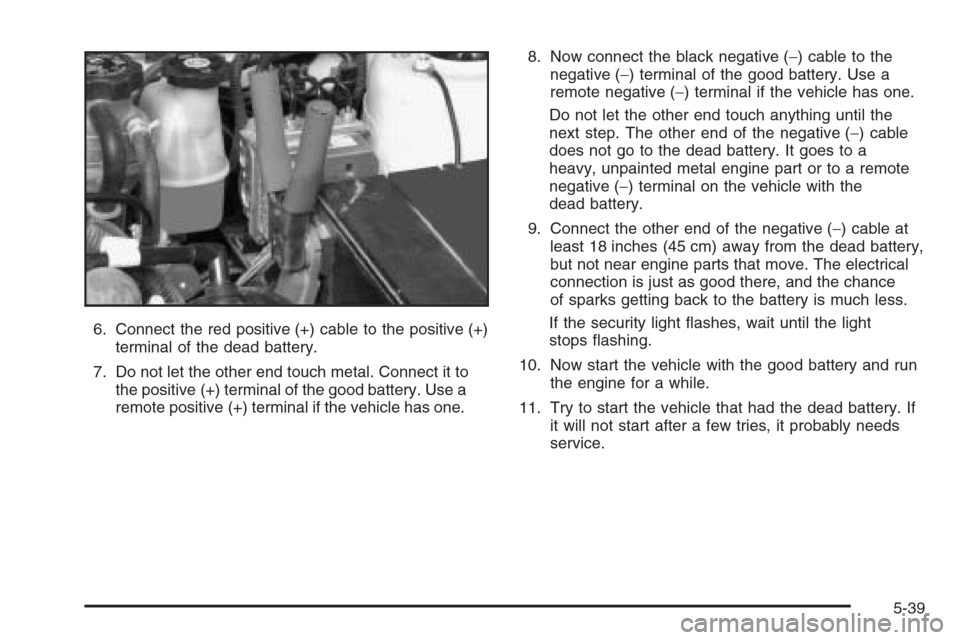
6. Connect the red positive (+) cable to the positive (+)
terminal of the dead battery.
7. Do not let the other end touch metal. Connect it to
the positive (+) terminal of the good battery. Use a
remote positive (+) terminal if the vehicle has one.8. Now connect the black negative (−) cable to the
negative (−) terminal of the good battery. Use a
remote negative (−) terminal if the vehicle has one.
Do not let the other end touch anything until the
next step. The other end of the negative (−) cable
does not go to the dead battery. It goes to a
heavy, unpainted metal engine part or to a remote
negative (−) terminal on the vehicle with the
dead battery.
9. Connect the other end of the negative (−) cable at
least 18 inches (45 cm) away from the dead battery,
but not near engine parts that move. The electrical
connection is just as good there, and the chance
of sparks getting back to the battery is much less.
If the security light ashes, wait until the light
stops ashing.
10. Now start the vehicle with the good battery and run
the engine for a while.
11. Try to start the vehicle that had the dead battery. If
it will not start after a few tries, it probably needs
service.
5-39