key CHEVROLET MALIBU 2005 5.G Service Manual
[x] Cancel search | Manufacturer: CHEVROLET, Model Year: 2005, Model line: MALIBU, Model: CHEVROLET MALIBU 2005 5.GPages: 434, PDF Size: 2.61 MB
Page 185 of 434
AUTO UNLK (Unlock):The automatic door unlocking
feature, which allows the vehicle to automatically
unlock certain doors can be enabled or disabled. When
AUTO UNLK appears on the display, use the ENTER
button to move between: ALL, DRIVER or NONE. When
you have made your choice, press and the MENU
button to record your selection. The initial setting from
the factory is ALL.
UNLK (Unlock):This feature determines when the
automatic door unlocking will occur, when either the key
is turned to OFF or the vehicle is shifted into PARK (P).
When UNLK appears on the display, use the ENTER
button to move between KEY OFF and SHIFT TO P.
When you have made your choice, press the MENU
button to record your selection. The initial setting from the
factory is SHIFT TO P.
EXT (Exterior) LIGHTS:If your vehicle has remote
keyless entry, this feature, which allows the vehicle’s
exterior perimeter lighting to turn on each time the
unlock button on the remote keyless entry transmitter is
pressed, can be enabled or disabled. When EXT
LIGHTS appears on the display, use the ENTER button
to move between ON and OFF. When you have
made your choice, press the MENU button to record
your selection. The initial setting from the factory is ON.SECURITY:If your vehicle has the remote keyless
entry system, this feature allows you to select the
method used to arm the vehicle’s security system. When
SECURITY appears on the display, use the ENTER
button to move between RKE and PASSIVE. When you
have made your choice, press the MENU button to
record your selection. SeeContent Theft-Deterrent on
page 2-18for more information.
LANGUAGE:To select your choice of language, use
the ENTER button to move between the optional
languages.
The languages are English, French, German and
Spanish.
Choosing a language will display all of the information
on the DIC in the desired language.
When you have made your choice, press the MENU
button for at least one second to record your selection.
The initial setting from the factory is ENGLISH.
ENTER:The ENTER button is used to reset certain
functions and turn off or acknowledge messages on the
DIC display. The ENTER button also toggles through
the options available in each personalization menu.
3-55
Page 187 of 434
ENG (Engine) PWR (Power) REDUCED:This
message informs you that the vehicle has reduced
engine power to avoid damaging the engine.
ICE POSSIBLE:This message appears when the
outside air temperature is cold enough to create icy road
conditions.
KEY FOB BATT (Battery) LOW:This message is
displayed if the remote keyless entry transmitter battery
is low. You should replace the battery in the transmitter.
See “Battery Replacement” underRemote Keyless
Entry System Operation on page 2-5.
LOW COOLANT:This message is displayed when
there is a low level of engine coolant. Have the cooling
system serviced by your GM dealer as soon as
possible.
LOW FUEL:This message is displayed when your
vehicle is low on fuel. You should rell the fuel tank as
soon as possible. You will also see a low fuel warning
light on the instrument panel cluster. SeeFuel on
page 5-5andFilling the Tank on page 5-8.LOW WASHER FLUID:This message is displayed
when your vehicle is low on windshield washer uid. You
should rell the windshield washer uid reservoir as
soon as possible. See “Adding Washer Fluid” under
Windshield Washer Fluid on page 5-30.
POWER STEERING:This message is displayed if a
problem has been detected with the electric power
steering. Have your vehicle serviced by your GM dealer
immediately.
PUSH PARK PEDAL:This message is displayed if the
parking brake is left engaged. SeeParking Brake on
page 2-29for more information.
SERVICE AIR BAG:There is a problem with the airbag
system when this message appears. Let only a
qualied technician work on your vehicle. Have your
vehicle serviced by your GM dealer immediately.
TRUNK OR GATE AJAR:This message is displayed
when the trunk lid or liftgate of your vehicle is not closed
completely. You should make sure that the trunk lid or
liftgate is closed completely.
3-57
Page 243 of 434
Menu Bar
The menu bar can be displayed across the top of the
screen by pressing the DISPLAY button on the remote
control. Selecting icons from the menu bar allows
adjustments to the audio and video settings. Use the
remote control left and right arrow buttons to scroll
through the menu bar. A description of the highlighted
icon will appear at the bottom of the screen. Use
the down arrow to display the options for the
highlighted icon.
The movie may stop playing while selections are
being made.
Current Subtitle Language:The subtitle language
may be selected as Off, English, Spanish, or French.
The actual subtitle language is dependent on whether a
DVD supports the selected language.
Current Audio Language:The audio language may be
selected as Off, English, Spanish, or French. The
actual audio language is dependent on whether a DVD
supports the selected language.
Smart Color:This color setting may be selected
without changing the default from the color
settings menu.Sound Mode:This analog output may be changed
without changing the default from the analog
output menu.
Frame-by-Frame:The DVD will pause and may be
viewed frame-by-frame, in forward or reverse, by using
the remote control arrow buttons. Press play to
resume play of the DVD. DVD audio will not be available
during selection.
Slow Motion:The DVD will pause and may be viewed
in slow motion, at various speeds, in forward or
reverse, by using the remote control arrow buttons.
Press play to resume play of the DVD. DVD audio will
not be available during selection.
Scan Speeds:The DVD may be viewed in fast motion,
at various speeds, in forward or reverse, by using the
remote control arrow buttons. Press play to resume play
of the DVD. DVD audio will not be available during
selection.
Enlarge Picture:The DVD will pause and the frame
may be enlarged by using the remote control arrow key
buttons. Pressing the enter button on the remote
control allows panning of the frame using the remote
control arrow buttons. Press play to resume play of the
DVD. DVD audio will not be available during selection.
3-113
Page 259 of 434
Many adults — by some estimates, nearly half the adult
population — choose never to drink alcohol, so they
never drive after drinking. For persons under 21,
it is against the law in every U.S. state to drink alcohol.
There are good medical, psychological, and
developmental reasons for these laws.
The obvious way to eliminate the leading highway
safety problem is for people never to drink alcohol and
then drive. But what if people do? How much is “too
much” if someone plans to drive? It is a lot less
than many might think. Although it depends on each
person and situation, here is some general information
on the problem.
The Blood Alcohol Concentration (BAC) of someone
who is drinking depends upon four things:
The amount of alcohol consumed
The drinker’s body weight
The amount of food that is consumed before and
during drinking
The length of time it has taken the drinker to
consume the alcohol
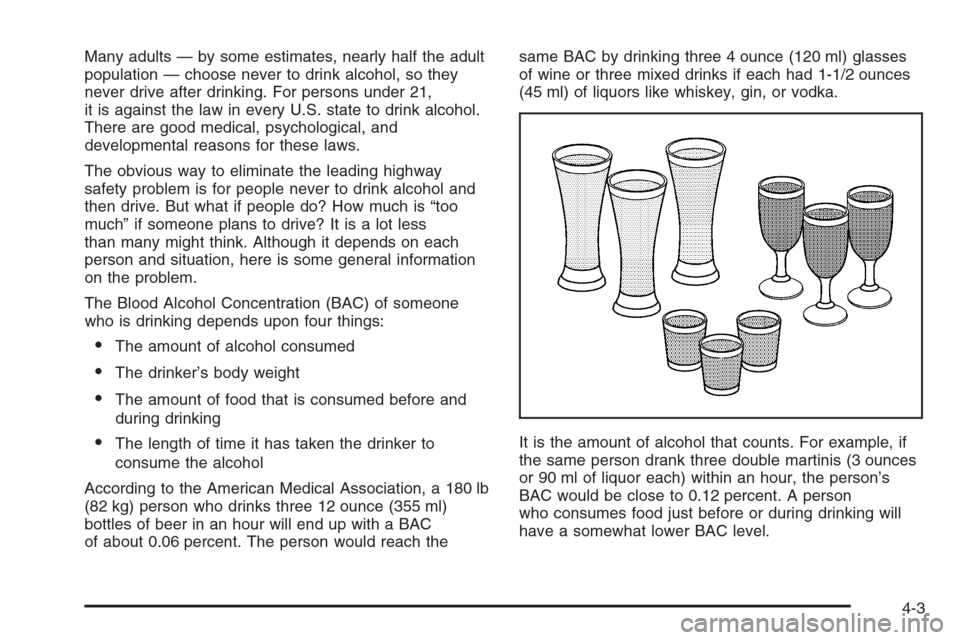
According to the American Medical Association, a 180 lb
(82 kg) person who drinks three 12 ounce (355 ml)
bottles of beer in an hour will end up with a BAC
of about 0.06 percent. The person would reach thesame BAC by drinking three 4 ounce (120 ml) glasses
of wine or three mixed drinks if each had 1-1/2 ounces
(45 ml) of liquors like whiskey, gin, or vodka.
It is the amount of alcohol that counts. For example, if
the same person drank three double martinis (3 ounces
or 90 ml of liquor each) within an hour, the person’s
BAC would be close to 0.12 percent. A person
who consumes food just before or during drinking will
have a somewhat lower BAC level.
4-3
Page 292 of 434
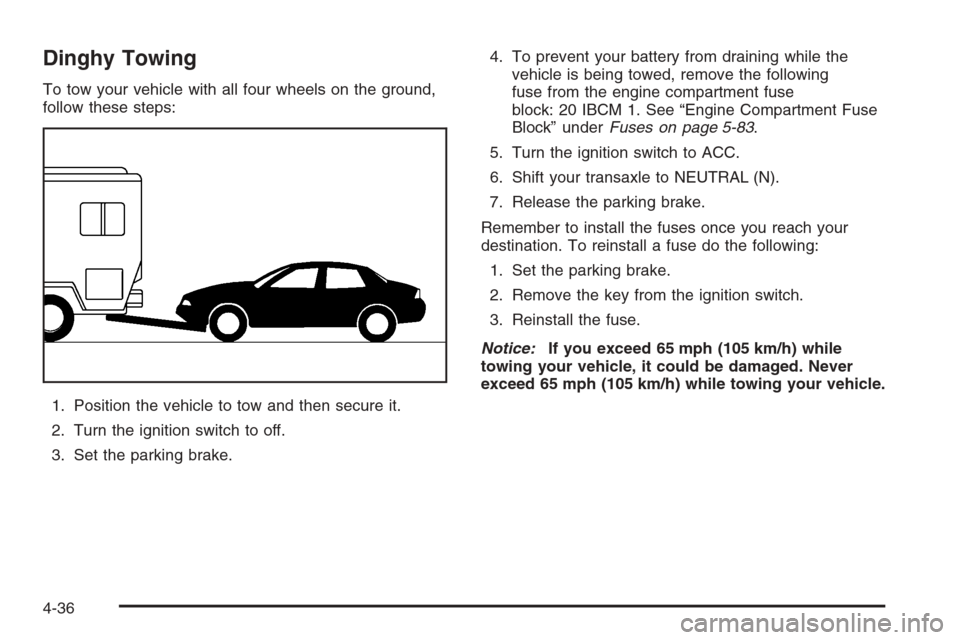
Dinghy Towing
To tow your vehicle with all four wheels on the ground,
follow these steps:
1. Position the vehicle to tow and then secure it.
2. Turn the ignition switch to off.
3. Set the parking brake.4. To prevent your battery from draining while the
vehicle is being towed, remove the following
fuse from the engine compartment fuse
block: 20 IBCM 1. See “Engine Compartment Fuse
Block” underFuses on page 5-83.
5. Turn the ignition switch to ACC.
6. Shift your transaxle to NEUTRAL (N).
7. Release the parking brake.
Remember to install the fuses once you reach your
destination. To reinstall a fuse do the following:
1. Set the parking brake.
2. Remove the key from the ignition switch.
3. Reinstall the fuse.
Notice:If you exceed 65 mph (105 km/h) while
towing your vehicle, it could be damaged. Never
exceed 65 mph (105 km/h) while towing your vehicle.
4-36
Page 293 of 434
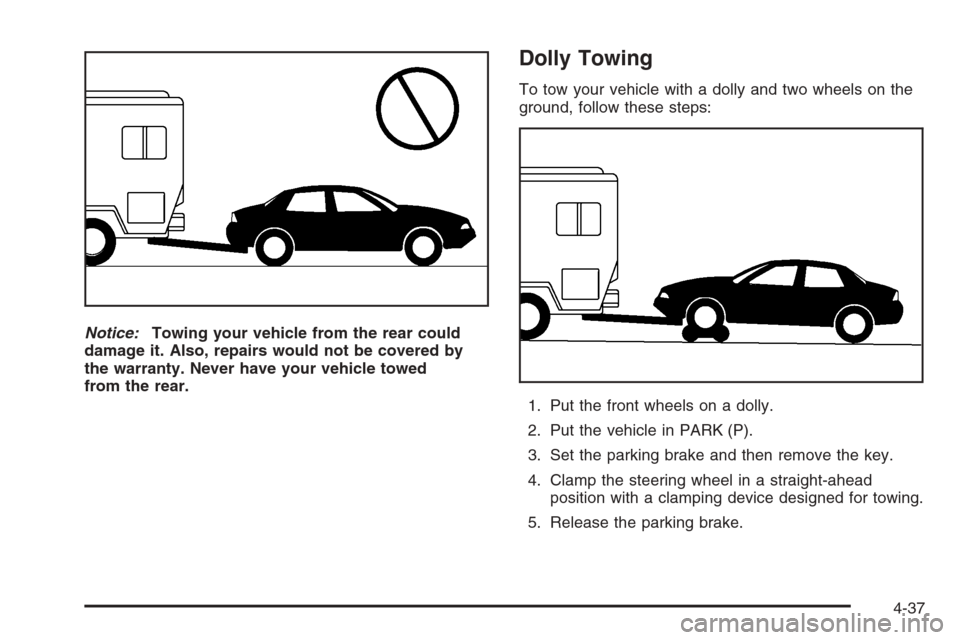
Notice:Towing your vehicle from the rear could
damage it. Also, repairs would not be covered by
the warranty. Never have your vehicle towed
from the rear.
Dolly Towing
To tow your vehicle with a dolly and two wheels on the
ground, follow these steps:
1. Put the front wheels on a dolly.
2. Put the vehicle in PARK (P).
3. Set the parking brake and then remove the key.
4. Clamp the steering wheel in a straight-ahead
position with a clamping device designed for towing.
5. Release the parking brake.
4-37
Page 319 of 434
How to Reset the Engine Oil Life
System
The Engine Oil Life System calculates when to change
your engine oil and lter based on vehicle use.
Anytime your oil is changed, reset the system so it can
calculate when the next oil change is required. If a
situation occurs where you change your oil prior to a
Change Oil Soon message being turned on, reset
the system.
After changing the engine oil, reset the system by
performing the following steps:
1. Display OIL LIFE RESET on the DIC.
2. Press and hold the ENTER button for at least
one second. An ACKNOWLEDGED display
message will appear for three seconds or until the
next button is pressed. This will tell you the
system has been reset.
3. Turn the key to OFF.
If the Change Oil Soon message comes back on when
you start your vehicle, the engine oil life system has
not reset. Repeat the procedure.
What to Do with Used Oil
Used engine oil contains certain elements that may be
unhealthy for your skin and could even cause cancer.
Do not let used oil stay on your skin for very long. Clean
your skin and nails with soap and water, or a good
hand cleaner. Wash or properly dispose of clothing or
rags containing used engine oil. See the manufacturer’s
warnings about the use and disposal of oil products.
Used oil can be a threat to the environment. If you
change your own oil, be sure to drain all the oil from the
lter before disposal. Never dispose of oil by putting it
in the trash, pouring it on the ground, into sewers, or into
streams or bodies of water. Instead, recycle it by
taking it to a place that collects used oil. If you have a
problem properly disposing of your used oil, ask
your dealer, a service station or a local recycling center
for help.
5-19
Page 389 of 434
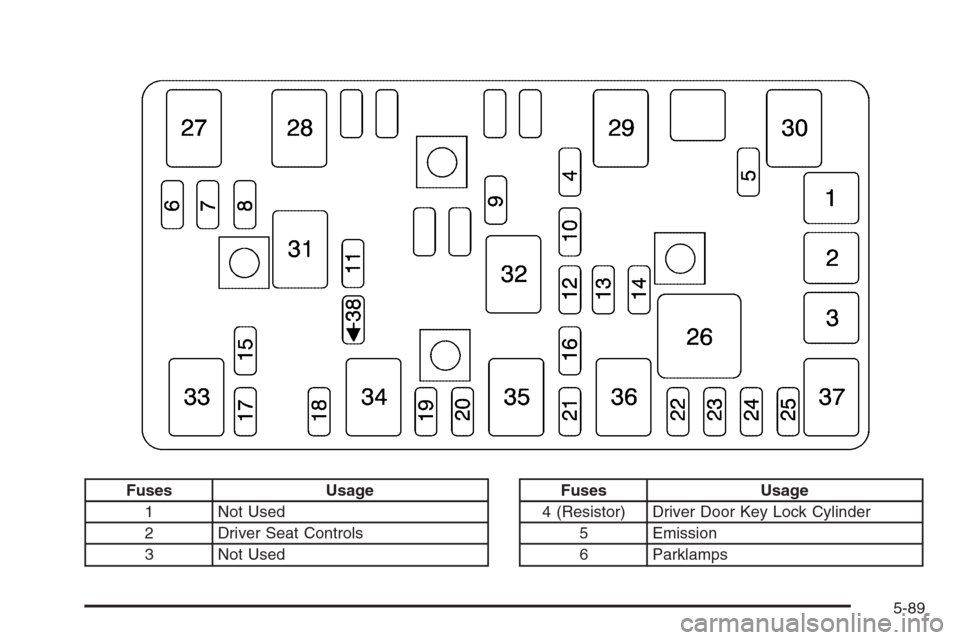
Fuses Usage
1 Not Used
2 Driver Seat Controls
3 Not UsedFuses Usage
4 (Resistor) Driver Door Key Lock Cylinder
5 Emission
6 Parklamps
5-89
Page 390 of 434
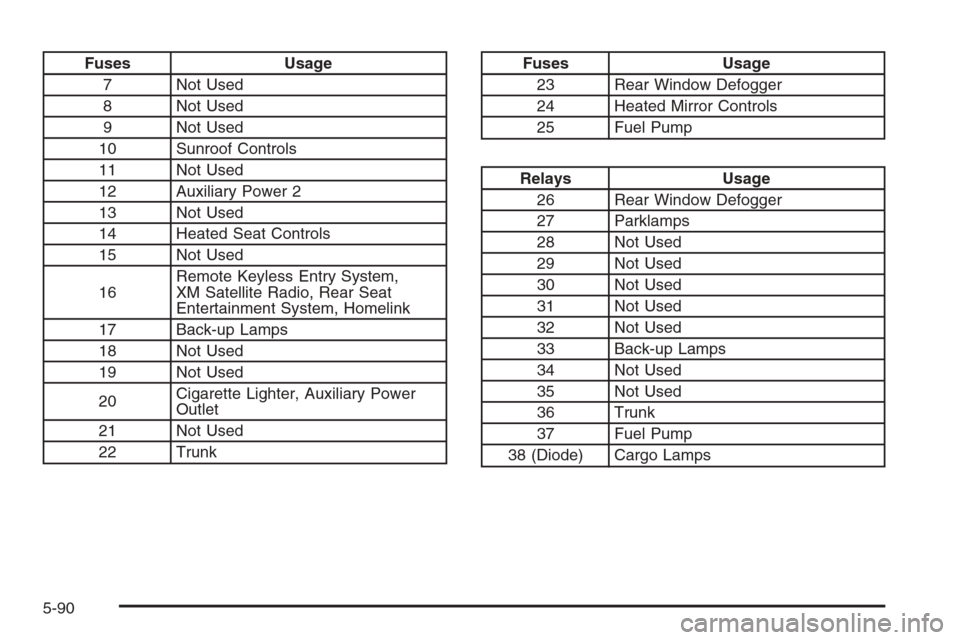
Fuses Usage
7 Not Used
8 Not Used
9 Not Used
10 Sunroof Controls
11 Not Used
12 Auxiliary Power 2
13 Not Used
14 Heated Seat Controls
15 Not Used
16Remote Keyless Entry System,
XM Satellite Radio, Rear Seat
Entertainment System, Homelink
17 Back-up Lamps
18 Not Used
19 Not Used
20Cigarette Lighter, Auxiliary Power
Outlet
21 Not Used
22 TrunkFuses Usage
23 Rear Window Defogger
24 Heated Mirror Controls
25 Fuel Pump
Relays Usage
26 Rear Window Defogger
27 Parklamps
28 Not Used
29 Not Used
30 Not Used
31 Not Used
32 Not Used
33 Back-up Lamps
34 Not Used
35 Not Used
36 Trunk
37 Fuel Pump
38 (Diode) Cargo Lamps
5-90
Page 399 of 434
Maintenance Footnotes
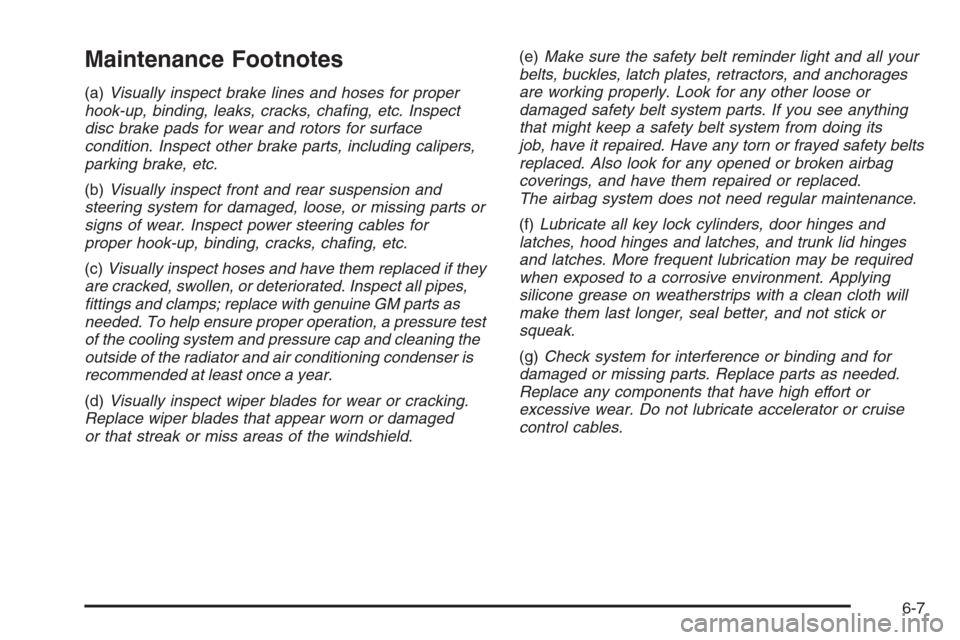
(a)Visually inspect brake lines and hoses for proper
hook-up, binding, leaks, cracks, chang, etc. Inspect
disc brake pads for wear and rotors for surface
condition. Inspect other brake parts, including calipers,
parking brake, etc.
(b)Visually inspect front and rear suspension and
steering system for damaged, loose, or missing parts or
signs of wear. Inspect power steering cables for
proper hook-up, binding, cracks, chang, etc.
(c)Visually inspect hoses and have them replaced if they
are cracked, swollen, or deteriorated. Inspect all pipes,
ttings and clamps; replace with genuine GM parts as
needed. To help ensure proper operation, a pressure test
of the cooling system and pressure cap and cleaning the
outside of the radiator and air conditioning condenser is
recommended at least once a year.
(d)Visually inspect wiper blades for wear or cracking.
Replace wiper blades that appear worn or damaged
or that streak or miss areas of the windshield.(e)Make sure the safety belt reminder light and all your
belts, buckles, latch plates, retractors, and anchorages
are working properly. Look for any other loose or
damaged safety belt system parts. If you see anything
that might keep a safety belt system from doing its
job, have it repaired. Have any torn or frayed safety belts
replaced. Also look for any opened or broken airbag
coverings, and have them repaired or replaced.
The airbag system does not need regular maintenance.
(f)Lubricate all key lock cylinders, door hinges and
latches, hood hinges and latches, and trunk lid hinges
and latches. More frequent lubrication may be required
when exposed to a corrosive environment. Applying
silicone grease on weatherstrips with a clean cloth will
make them last longer, seal better, and not stick or
squeak.
(g)Check system for interference or binding and for
damaged or missing parts. Replace parts as needed.
Replace any components that have high effort or
excessive wear. Do not lubricate accelerator or cruise
control cables.
6-7