reset CHEVROLET MALIBU 2007 6.G Owner's Manual
[x] Cancel search | Manufacturer: CHEVROLET, Model Year: 2007, Model line: MALIBU, Model: CHEVROLET MALIBU 2007 6.GPages: 510, PDF Size: 2.8 MB
Page 279 of 510
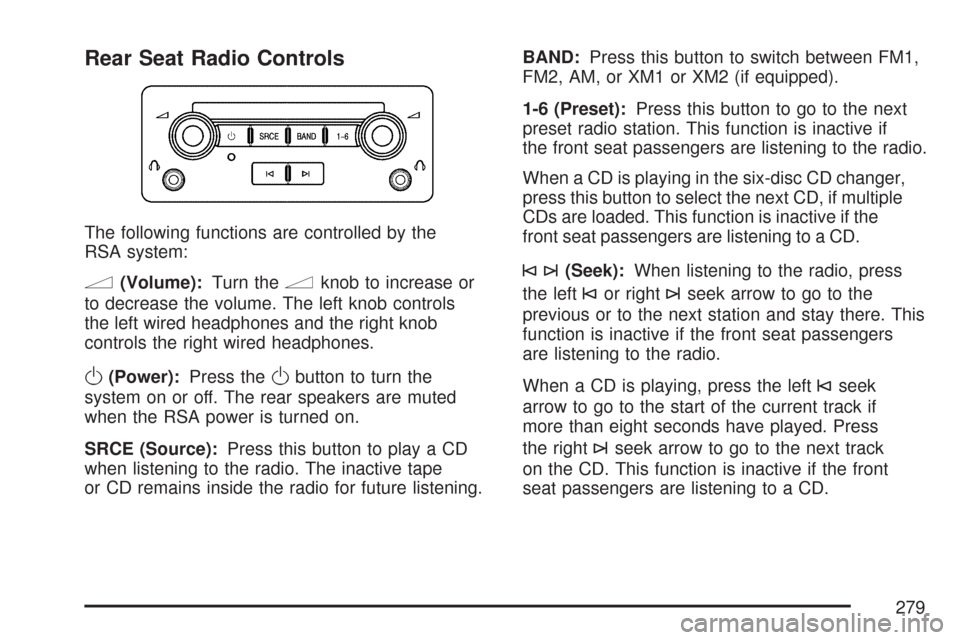
Rear Seat Radio Controls
The following functions are controlled by the
RSA system:
n(Volume):Turn thenknob to increase or
to decrease the volume. The left knob controls
the left wired headphones and the right knob
controls the right wired headphones.
O(Power):Press theObutton to turn the
system on or off. The rear speakers are muted
when the RSA power is turned on.
SRCE (Source):Press this button to play a CD
when listening to the radio. The inactive tape
or CD remains inside the radio for future listening.BAND:Press this button to switch between FM1,
FM2, AM, or XM1 or XM2 (if equipped).
1-6 (Preset):Press this button to go to the next
preset radio station. This function is inactive if
the front seat passengers are listening to the radio.
When a CD is playing in the six-disc CD changer,
press this button to select the next CD, if multiple
CDs are loaded. This function is inactive if the
front seat passengers are listening to a CD.
©¨(Seek):When listening to the radio, press
the left
©or right¨seek arrow to go to the
previous or to the next station and stay there. This
function is inactive if the front seat passengers
are listening to the radio.
When a CD is playing, press the left
©seek
arrow to go to the start of the current track if
more than eight seconds have played. Press
the right
¨seek arrow to go to the next track
on the CD. This function is inactive if the front
seat passengers are listening to a CD.
279
Page 280 of 510
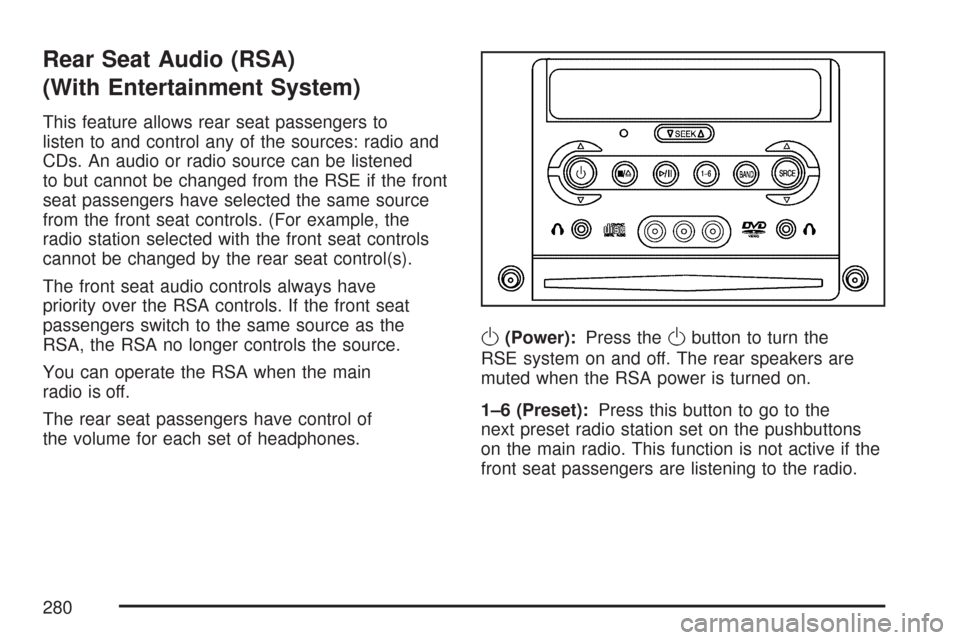
Rear Seat Audio (RSA)
(With Entertainment System)
This feature allows rear seat passengers to
listen to and control any of the sources: radio and
CDs. An audio or radio source can be listened
to but cannot be changed from the RSE if the front
seat passengers have selected the same source
from the front seat controls. (For example, the
radio station selected with the front seat controls
cannot be changed by the rear seat control(s).
The front seat audio controls always have
priority over the RSA controls. If the front seat
passengers switch to the same source as the
RSA, the RSA no longer controls the source.
You can operate the RSA when the main
radio is off.
The rear seat passengers have control of
the volume for each set of headphones.
O(Power):Press theObutton to turn the
RSE system on and off. The rear speakers are
muted when the RSA power is turned on.
1–6 (Preset):Press this button to go to the
next preset radio station set on the pushbuttons
on the main radio. This function is not active if the
front seat passengers are listening to the radio.
280
Page 282 of 510
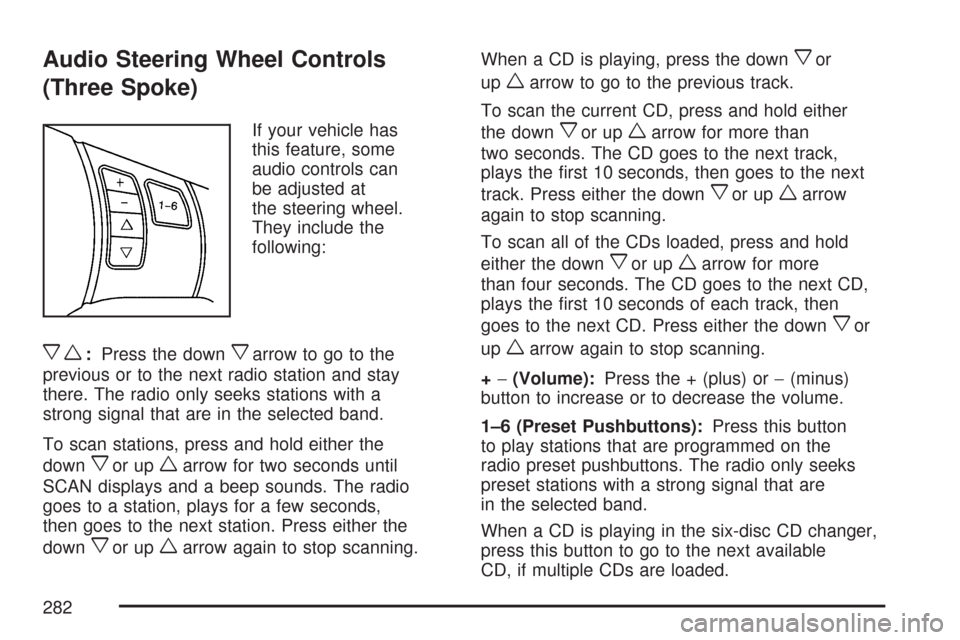
Audio Steering Wheel Controls
(Three Spoke)
If your vehicle has
this feature, some
audio controls can
be adjusted at
the steering wheel.
They include the
following:
xw:Press the downxarrow to go to the
previous or to the next radio station and stay
there. The radio only seeks stations with a
strong signal that are in the selected band.
To scan stations, press and hold either the
down
xor upwarrow for two seconds until
SCAN displays and a beep sounds. The radio
goes to a station, plays for a few seconds,
then goes to the next station. Press either the
down
xor upwarrow again to stop scanning.When a CD is playing, press the down
xor
up
warrow to go to the previous track.
To scan the current CD, press and hold either
the down
xor upwarrow for more than
two seconds. The CD goes to the next track,
plays the rst 10 seconds, then goes to the next
track. Press either the down
xor upwarrow
again to stop scanning.
To scan all of the CDs loaded, press and hold
either the down
xor upwarrow for more
than four seconds. The CD goes to the next CD,
plays the rst 10 seconds of each track, then
goes to the next CD. Press either the down
xor
up
warrow again to stop scanning.
+−(Volume):Press the + (plus) or−(minus)
button to increase or to decrease the volume.
1–6 (Preset Pushbuttons):Press this button
to play stations that are programmed on the
radio preset pushbuttons. The radio only seeks
preset stations with a strong signal that are
in the selected band.
When a CD is playing in the six-disc CD changer,
press this button to go to the next available
CD, if multiple CDs are loaded.
282
Page 283 of 510
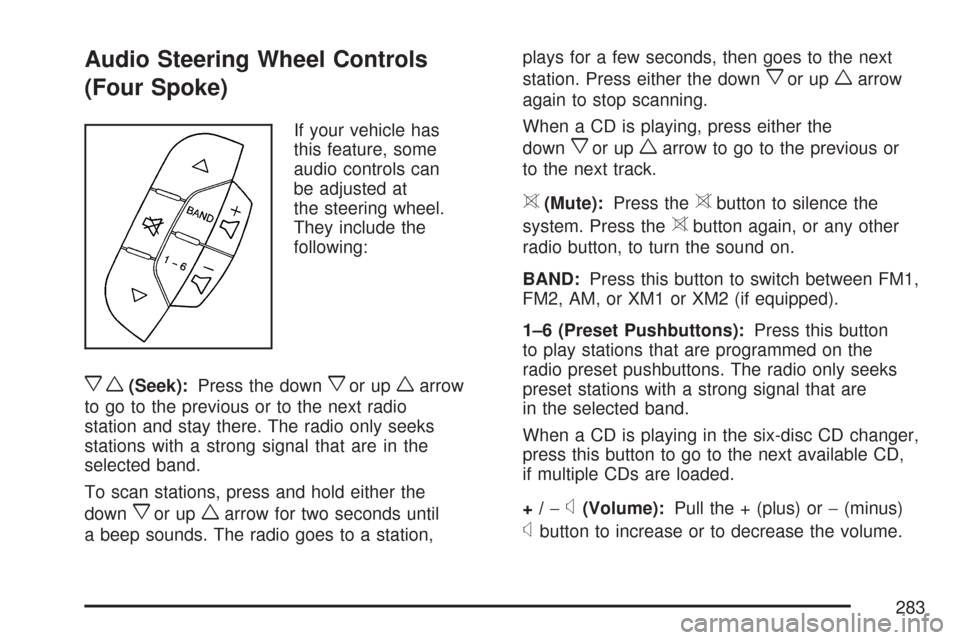
Audio Steering Wheel Controls
(Four Spoke)
If your vehicle has
this feature, some
audio controls can
be adjusted at
the steering wheel.
They include the
following:
xw(Seek):Press the downxor upwarrow
to go to the previous or to the next radio
station and stay there. The radio only seeks
stations with a strong signal that are in the
selected band.
To scan stations, press and hold either the
down
xor upwarrow for two seconds until
a beep sounds. The radio goes to a station,plays for a few seconds, then goes to the next
station. Press either the down
xor upwarrow
again to stop scanning.
When a CD is playing, press either the
down
xor upwarrow to go to the previous or
to the next track.
>(Mute):Press the>button to silence the
system. Press the
>button again, or any other
radio button, to turn the sound on.
BAND:Press this button to switch between FM1,
FM2, AM, or XM1 or XM2 (if equipped).
1–6 (Preset Pushbuttons):Press this button
to play stations that are programmed on the
radio preset pushbuttons. The radio only seeks
preset stations with a strong signal that are
in the selected band.
When a CD is playing in the six-disc CD changer,
press this button to go to the next available CD,
if multiple CDs are loaded.
+/−
x(Volume):Pull the + (plus) or−(minus)
xbutton to increase or to decrease the volume.
283
Page 362 of 510
If you are in an area of extreme cold, where the
temperature falls below−20°F (−29°C), it is
recommended that you use either an SAE 5W-30
synthetic oil or an SAE 0W-30 oil. Both provide
easier cold starting and better protection for
the engine at extremely low temperatures.
Engine Oil Additives
Do not add anything to the oil. The recommended
oils with the starburst symbol that meet GM
Standard GM6094M are all you need for good
performance and engine protection.
Engine Oil Life System
When to Change Engine Oil
Your vehicle has a computer system that lets you
know when to change the engine oil and lter.
This is based on engine revolutions and engine
temperature, and not on mileage. Based on driving
conditions, the mileage at which an oil change
will be indicated can vary considerably. For the oil
life system to work properly, you must reset the
system every time the oil is changed.When the system has calculated that oil life has
been diminished, it will indicate that an oil change
is necessary. A CHANGE OIL SOON message
will come on. SeeDIC Warnings and Messages on
page 222. Change the oil as soon as possible
within the next 600 miles (1 000 km). It is possible
that, if you are driving under the best conditions,
the oil life system may not indicate that an oil
change is necessary for over a year. However, the
engine oil and lter must be changed at least
once a year and at this time the system must be
reset. Your dealer has GM-trained service
people who will perform this work using genuine
GM parts and reset the system. It is also important
to check the oil regularly and keep it at the
proper level.
If the system is ever reset accidentally, you must
change the oil at 3,000 miles (5 000 km) since
your last oil change. Remember to reset the oil life
system whenever the oil is changed.
362
Page 363 of 510
How to Reset the Engine Oil Life
System
The Engine Oil Life System calculates when to
change the engine oil and lter based on vehicle
use. Anytime the oil is changed, reset the
system so it can calculate when the next oil
change is required. If a situation occurs where you
change the oil prior to a CHANGE OIL SOON
message being turned on, reset the system.
After changing the engine oil, reset the system by
performing the following steps:
1. Display OIL LIFE RESET on the DIC.
2. Press and hold the ENTER button for at least
one second. An ACKNOWLEDGED display
message will appear for three seconds or until
the next button is pressed. This will tell you
the system has been reset.
3. Turn the key to OFF.
If the CHANGE OIL SOON message comes back
on when you start your vehicle, the engine oil
life system has not reset. Repeat the procedure.
What to Do with Used Oil
Used engine oil contains certain elements that
may be unhealthy for your skin and could
even cause cancer. Do not let used oil stay on
your skin for very long. Clean your skin and nails
with soap and water, or a good hand cleaner.
Wash or properly dispose of clothing or rags
containing used engine oil. See the manufacturer’s
warnings about the use and disposal of oil
products.
Used oil can be a threat to the environment. If you
change your own oil, be sure to drain all the oil from
the lter before disposal. Never dispose of oil by
putting it in the trash, pouring it on the ground, into
sewers, or into streams or bodies of water. Instead,
recycle it by taking it to a place that collects used
oil. If you have a problem properly disposing of
used oil, ask your dealer, a service station, or a
local recycling center for help.
363
Page 373 of 510
If you get the overheat warning with no sign of
steam, try this for a minute or so:
1. In heavy traffic, let the engine idle in
NEUTRAL (N) while stopped. If it is safe to do
so, pull off the road, shift to PARK (P) or
NEUTRAL (N) and let the engine idle.
2. Turn on your heater to full hot at the highest
fan speed and open the windows as
necessary.
If you no longer have the overheat warning, you
can drive. Just to be safe, drive slower for
about 10 minutes. If the warning does not come
back on, you can drive normally.
If the warning continues, pull over, stop, and park
your vehicle right away.
If there is still no sign of steam, idle the engine for
three minutes while you are parked. If you still
have the warning, turn off the engine and
get everyone out of the vehicle until it cools down.
You may decide not to lift the hood but to get
service help right away.Overheated Engine Protection
Operating Mode (3.5L V6 and
3.9L V6 Engines)
This emergency operating mode allows your
vehicle to be driven to a safe place in an
emergency situation. If an overheated engine
condition exists, an overheat protection mode
which alternates ring groups of cylinders helps
prevent engine damage. In this mode, you
will notice a signicant loss in power and engine
performance. The temperature gage will
indicate an overheat condition exists. Driving
extended miles (km) and/or towing a trailer in the
overheat protection mode should be avoided.
Notice:After driving in the overheated engine
protection operating mode, to avoid engine
damage, allow the engine to cool before
attempting any repair. The engine oil will be
severely degraded. Repair the cause of coolant
loss, change the oil and reset the oil life system.
SeeEngine Oil on page 359.
373
Page 460 of 510
Owner Checks and Services on page 464tells you
what should be checked, when to check it, and
what you can easily do to help keep your vehicle
in good condition.
The proper replacement parts, uids, and lubricants
to use are listed inRecommended Fluids and
Lubricants on page 468andNormal Maintenance
Replacement Parts on page 469. When your
vehicle is serviced, make sure these are used. All
parts should be replaced and all necessary repairs
done before you or anyone else drives the vehicle.
We recommend the use of genuine GM parts.
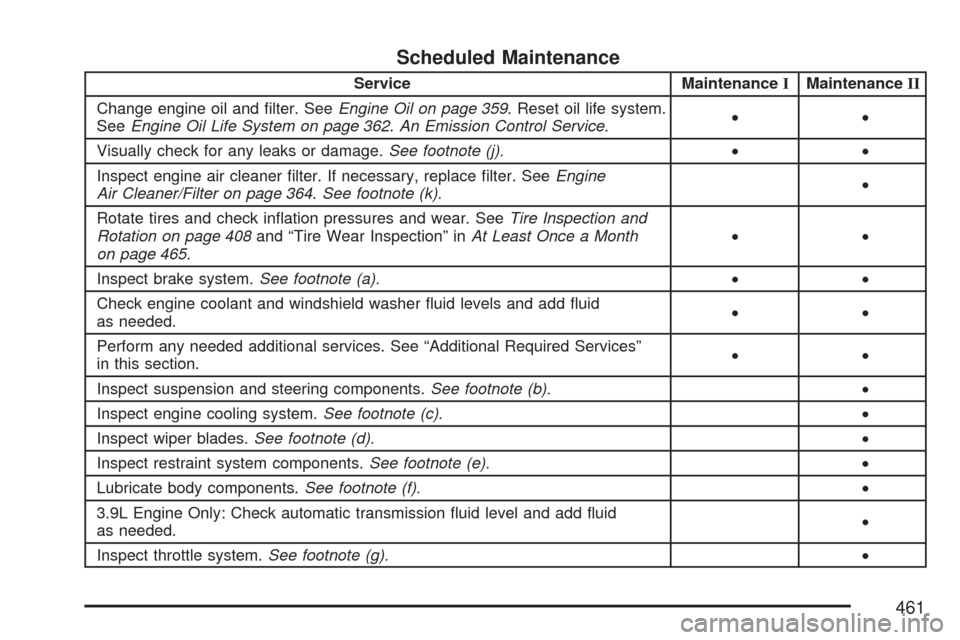
Scheduled Maintenance
When the CHANGE OIL SOON message in the
Driver Information Center (DIC) comes on, it means
that service is required for your vehicle. Have your
vehicle serviced as soon as possible within the next
600 miles (1 000 km). It is possible that, if you are
driving under the best conditions, the engine oil life
system may not indicate that vehicle service is
necessary for over a year. However, the engine oil
and lter must be changed at least once a year and
at this time the system must be reset. Your dealer/
retailer has trained service technicians who will
perform this work using genuine parts and reset
the system.If the engine oil life system is ever reset
accidentally, you must service your vehicle within
3,000 miles (5 000 km) since your last service.
Remember to reset the oil life system whenever
the oil is changed. SeeEngine Oil Life System on
page 362for information on the Engine Oil Life
System and resetting the system.
When the CHANGE OIL SOON message appears,
certain services, checks, and inspections are
required. Required services are described in the
following for “MaintenanceI” and “MaintenanceII.”
Generally, it is recommended that your rst service
be MaintenanceI, your second service be
MaintenanceII, and that you alternate
MaintenanceIand MaintenanceIIthereafter.
However, in some cases, MaintenanceIImay be
required more often.
MaintenanceI— Use MaintenanceIif the
message comes on within 10 months since the
vehicle was purchased or MaintenanceII
was performed.
MaintenanceII— Use MaintenanceIIif the
previous service performed was MaintenanceI.
Always use MaintenanceIIwhenever the message
comes on 10 months or more since the last
service or if the message has not come on at all
for one year.
460
Page 461 of 510
Scheduled Maintenance
Service MaintenanceIMaintenanceII
Change engine oil and lter. SeeEngine Oil on page 359. Reset oil life system.
SeeEngine Oil Life System on page 362.An Emission Control Service.••
Visually check for any leaks or damage.See footnote (j).••
Inspect engine air cleaner lter. If necessary, replace lter. SeeEngine
Air Cleaner/Filter on page 364.See footnote (k).•
Rotate tires and check ination pressures and wear. SeeTire Inspection and
Rotation on page 408and “Tire Wear Inspection” inAt Least Once a Month
on page 465.••
Inspect brake system.See footnote (a).••
Check engine coolant and windshield washer uid levels and add uid
as needed.••
Perform any needed additional services. See “Additional Required Services”
in this section.••
Inspect suspension and steering components.See footnote (b).•
Inspect engine cooling system.See footnote (c).•
Inspect wiper blades.See footnote (d).•
Inspect restraint system components.See footnote (e).•
Lubricate body components.See footnote (f).•
3.9L Engine Only: Check automatic transmission uid level and add uid
as needed.•
Inspect throttle system.See footnote (g).•
461