display CHEVROLET MALIBU 2007 6.G Manual PDF
[x] Cancel search | Manufacturer: CHEVROLET, Model Year: 2007, Model line: MALIBU, Model: CHEVROLET MALIBU 2007 6.GPages: 510, PDF Size: 2.8 MB
Page 275 of 510
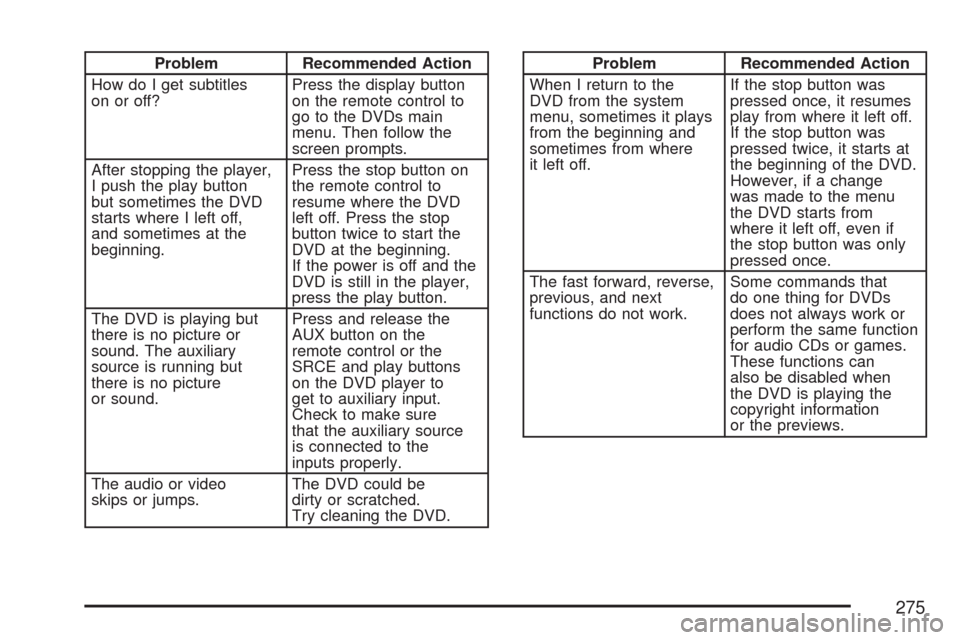
Problem Recommended Action
How do I get subtitles
on or off?Press the display button
on the remote control to
go to the DVDs main
menu. Then follow the
screen prompts.
After stopping the player,
I push the play button
but sometimes the DVD
starts where I left off,
and sometimes at the
beginning.Press the stop button on
the remote control to
resume where the DVD
left off. Press the stop
button twice to start the
DVD at the beginning.
If the power is off and the
DVD is still in the player,
press the play button.
The DVD is playing but
there is no picture or
sound. The auxiliary
source is running but
there is no picture
or sound.Press and release the
AUX button on the
remote control or the
SRCE and play buttons
on the DVD player to
get to auxiliary input.
Check to make sure
that the auxiliary source
is connected to the
inputs properly.
The audio or video
skips or jumps.The DVD could be
dirty or scratched.
Try cleaning the DVD.Problem Recommended Action
When I return to the
DVD from the system
menu, sometimes it plays
from the beginning and
sometimes from where
it left off.If the stop button was
pressed once, it resumes
play from where it left off.
If the stop button was
pressed twice, it starts at
the beginning of the DVD.
However, if a change
was made to the menu
the DVD starts from
where it left off, even if
the stop button was only
pressed once.
The fast forward, reverse,
previous, and next
functions do not work.Some commands that
do one thing for DVDs
does not always work or
perform the same function
for audio CDs or games.
These functions can
also be disabled when
the DVD is playing the
copyright information
or the previews.
275
Page 277 of 510
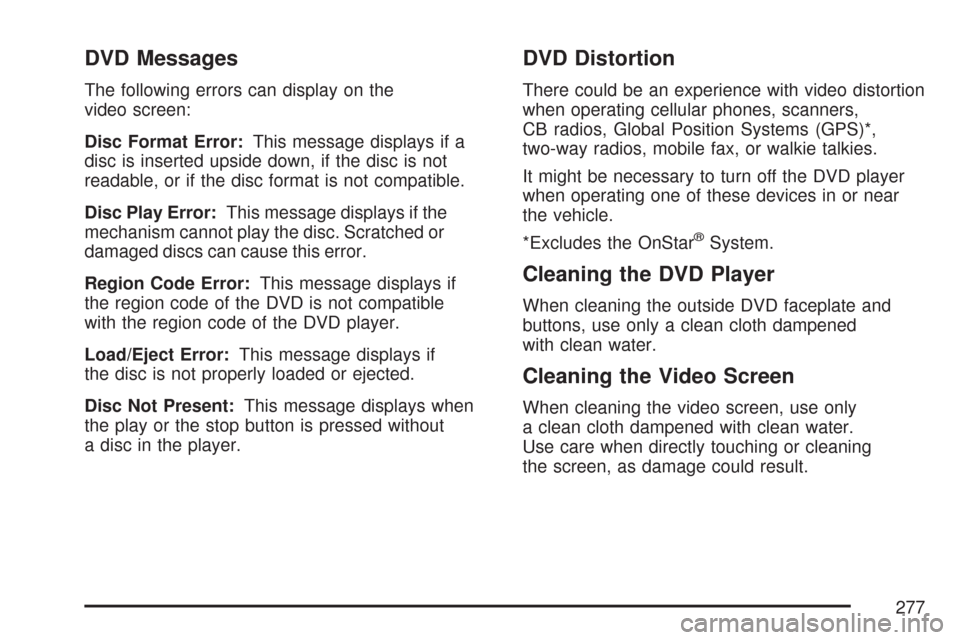
DVD Messages
The following errors can display on the
video screen:
Disc Format Error:This message displays if a
disc is inserted upside down, if the disc is not
readable, or if the disc format is not compatible.
Disc Play Error:This message displays if the
mechanism cannot play the disc. Scratched or
damaged discs can cause this error.
Region Code Error:This message displays if
the region code of the DVD is not compatible
with the region code of the DVD player.
Load/Eject Error:This message displays if
the disc is not properly loaded or ejected.
Disc Not Present:This message displays when
the play or the stop button is pressed without
a disc in the player.
DVD Distortion
There could be an experience with video distortion
when operating cellular phones, scanners,
CB radios, Global Position Systems (GPS)*,
two-way radios, mobile fax, or walkie talkies.
It might be necessary to turn off the DVD player
when operating one of these devices in or near
the vehicle.
*Excludes the OnStar
®System.
Cleaning the DVD Player
When cleaning the outside DVD faceplate and
buttons, use only a clean cloth dampened
with clean water.
Cleaning the Video Screen
When cleaning the video screen, use only
a clean cloth dampened with clean water.
Use care when directly touching or cleaning
the screen, as damage could result.
277
Page 281 of 510
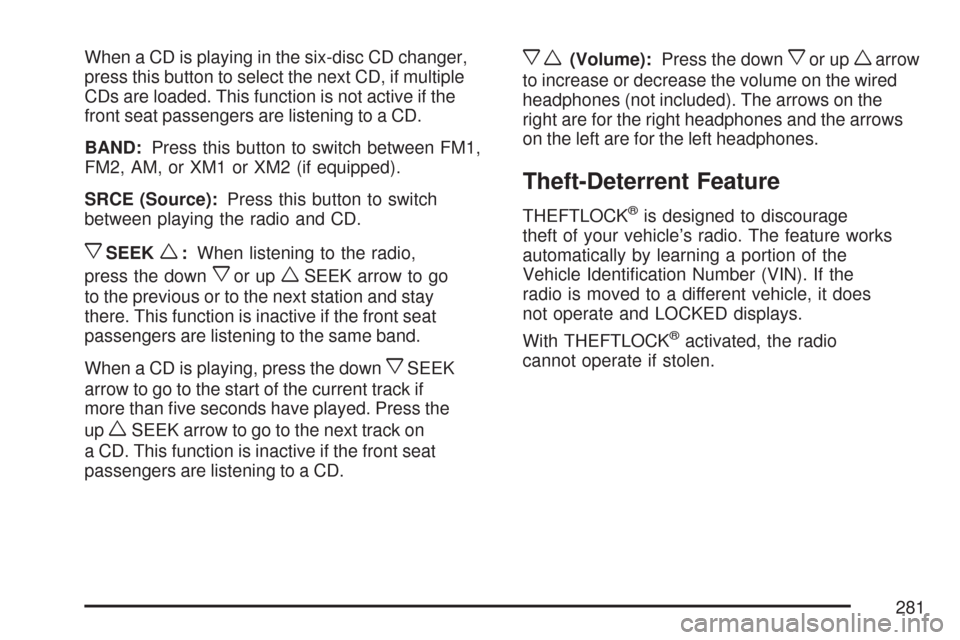
When a CD is playing in the six-disc CD changer,
press this button to select the next CD, if multiple
CDs are loaded. This function is not active if the
front seat passengers are listening to a CD.
BAND:Press this button to switch between FM1,
FM2, AM, or XM1 or XM2 (if equipped).
SRCE (Source):Press this button to switch
between playing the radio and CD.
xSEEKw:When listening to the radio,
press the down
xor upwSEEK arrow to go
to the previous or to the next station and stay
there. This function is inactive if the front seat
passengers are listening to the same band.
When a CD is playing, press the down
xSEEK
arrow to go to the start of the current track if
more than ve seconds have played. Press the
up
wSEEK arrow to go to the next track on
a CD. This function is inactive if the front seat
passengers are listening to a CD.
xw(Volume):Press the downxor upwarrow
to increase or decrease the volume on the wired
headphones (not included). The arrows on the
right are for the right headphones and the arrows
on the left are for the left headphones.
Theft-Deterrent Feature
THEFTLOCK®is designed to discourage
theft of your vehicle’s radio. The feature works
automatically by learning a portion of the
Vehicle Identication Number (VIN). If the
radio is moved to a different vehicle, it does
not operate and LOCKED displays.
With THEFTLOCK
®activated, the radio
cannot operate if stolen.
281
Page 282 of 510
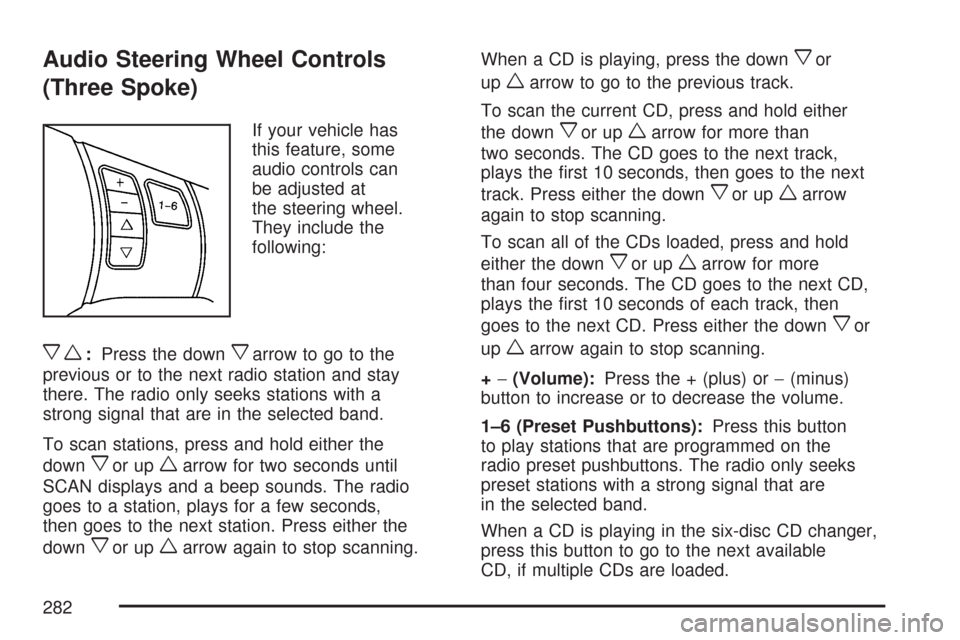
Audio Steering Wheel Controls
(Three Spoke)
If your vehicle has
this feature, some
audio controls can
be adjusted at
the steering wheel.
They include the
following:
xw:Press the downxarrow to go to the
previous or to the next radio station and stay
there. The radio only seeks stations with a
strong signal that are in the selected band.
To scan stations, press and hold either the
down
xor upwarrow for two seconds until
SCAN displays and a beep sounds. The radio
goes to a station, plays for a few seconds,
then goes to the next station. Press either the
down
xor upwarrow again to stop scanning.When a CD is playing, press the down
xor
up
warrow to go to the previous track.
To scan the current CD, press and hold either
the down
xor upwarrow for more than
two seconds. The CD goes to the next track,
plays the rst 10 seconds, then goes to the next
track. Press either the down
xor upwarrow
again to stop scanning.
To scan all of the CDs loaded, press and hold
either the down
xor upwarrow for more
than four seconds. The CD goes to the next CD,
plays the rst 10 seconds of each track, then
goes to the next CD. Press either the down
xor
up
warrow again to stop scanning.
+−(Volume):Press the + (plus) or−(minus)
button to increase or to decrease the volume.
1–6 (Preset Pushbuttons):Press this button
to play stations that are programmed on the
radio preset pushbuttons. The radio only seeks
preset stations with a strong signal that are
in the selected band.
When a CD is playing in the six-disc CD changer,
press this button to go to the next available
CD, if multiple CDs are loaded.
282
Page 284 of 510
Radio Reception
Frequency interference and static during normal
radio reception can occur if items such as
cellphone chargers, vehicle convenience
accessories, and external electronic devices
are plugged into the accessory power outlet.
If there is interference or static, unplug the
item from the accessory power outlet.
AM
The range for most AM stations is greater than
for FM, especially at night. The longer range
can cause station frequencies to interfere with
each other. For better radio reception, most
AM radio stations boost the power levels during
the day, and then reduce these levels during
the night. Static can also occur when things
like storms and power lines interfere with radio
reception. When this happens, try reducing
the treble on your radio.
FM Stereo
FM stereo gives the best sound, but FM signals
reach about 10 to 40 miles (16 to 65 km). Tall
buildings or hills can interfere with FM signals,
causing the sound to fade in and out.
XM™ Satellite Radio Service
XM™ Satellite Radio Service gives digital radio
reception from coast-to-coast in the 48 contiguous
United States, and in Canada. Just as with FM,
tall buildings or hills can interfere with satellite
radio signals, causing the sound to fade in and out.
In addition, traveling or standing under heavy
foliage, bridges, garages, or tunnels can cause
loss of the XM™ signal for a period of time.
The radio could display NO XM SIGNAL to
indicate interference.
284
Page 350 of 510
{CAUTION:
Fuel can spray out on you if you open the
fuel cap too quickly. If you spill fuel and
then something ignites it, you could be
badly burned. This spray can happen if
your tank is nearly full, and is more likely
in hot weather. Open the fuel cap slowly
and wait for any hiss noise to stop. Then
unscrew the cap all the way.
Be careful not to spill fuel. Do not top off or overll
the tank and wait a few seconds after you have
nished pumping before removing the nozzle.
Clean fuel from painted surfaces as soon as
possible. SeeWashing Your Vehicle on page 439.
When replacing the fuel cap, turn it clockwise until
it clicks. Make sure the cap is fully installed.
The diagnostic system can determine if the fuel
cap has been left off or improperly installed.
This would allow fuel to evaporate into the
atmosphere. SeeMalfunction Indicator Lamp
on page 212.The CHECK GAS CAP message will be displayed
on the Driver Information Center (DIC) if the
fuel cap is not properly installed. SeeDIC
Warnings and Messages on page 222for more
information.
{CAUTION:
If a re starts while you are refueling, do
not remove the nozzle. Shut off the ow of
fuel by shutting off the pump or by
notifying the station attendant. Leave the
area immediately.
Notice:If you need a new fuel cap, be sure to
get the right type. Your dealer/retailer can
get one for you. If you get the wrong type, it
may not t properly. This may cause your
malfunction indicator lamp to light and may
damage your fuel tank and emissions system.
SeeMalfunction Indicator Lamp on page 212.
350
Page 363 of 510
How to Reset the Engine Oil Life
System
The Engine Oil Life System calculates when to
change the engine oil and lter based on vehicle
use. Anytime the oil is changed, reset the
system so it can calculate when the next oil
change is required. If a situation occurs where you
change the oil prior to a CHANGE OIL SOON
message being turned on, reset the system.
After changing the engine oil, reset the system by
performing the following steps:
1. Display OIL LIFE RESET on the DIC.
2. Press and hold the ENTER button for at least
one second. An ACKNOWLEDGED display
message will appear for three seconds or until
the next button is pressed. This will tell you
the system has been reset.
3. Turn the key to OFF.
If the CHANGE OIL SOON message comes back
on when you start your vehicle, the engine oil
life system has not reset. Repeat the procedure.
What to Do with Used Oil
Used engine oil contains certain elements that
may be unhealthy for your skin and could
even cause cancer. Do not let used oil stay on
your skin for very long. Clean your skin and nails
with soap and water, or a good hand cleaner.
Wash or properly dispose of clothing or rags
containing used engine oil. See the manufacturer’s
warnings about the use and disposal of oil
products.
Used oil can be a threat to the environment. If you
change your own oil, be sure to drain all the oil from
the lter before disposal. Never dispose of oil by
putting it in the trash, pouring it on the ground, into
sewers, or into streams or bodies of water. Instead,
recycle it by taking it to a place that collects used
oil. If you have a problem properly disposing of
used oil, ask your dealer, a service station, or a
local recycling center for help.
363
Page 380 of 510
Windshield Washer Fluid
What to Use
When you need windshield washer uid, be sure
to read the manufacturer’s instructions before
use. If you will be operating your vehicle in an area
where the temperature may fall below freezing,
use a uid that has sufficient protection against
freezing.
Adding Washer Fluid
When the windshield washer uid reservoir is low,
a LOW WASHER FLUID message will be
displayed on the Driver Information Center (DIC).
SeeDIC Warnings and Messages on page 222
for more information.
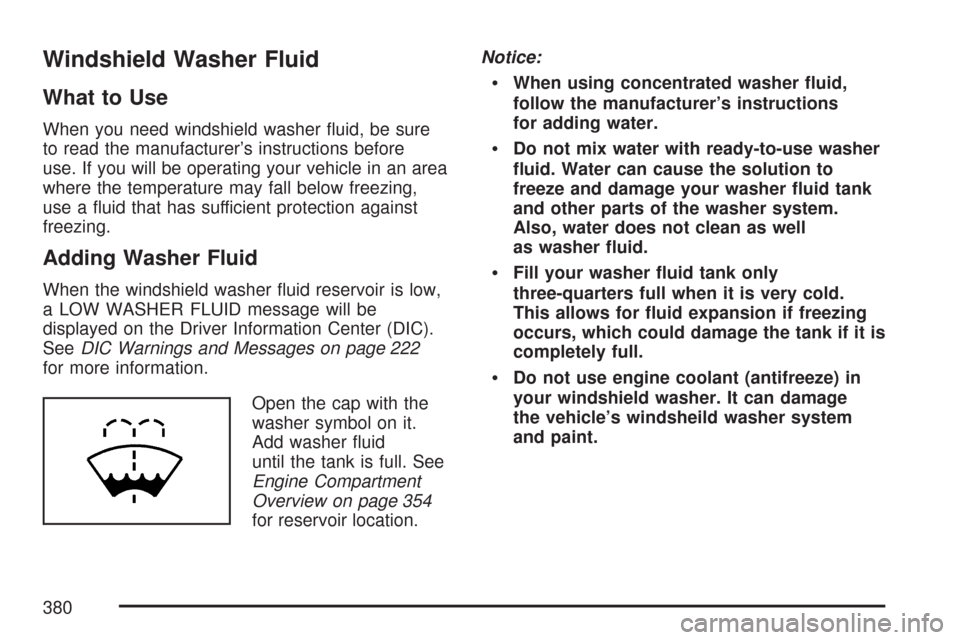
Open the cap with the
washer symbol on it.
Add washer uid
until the tank is full. See
Engine Compartment
Overview on page 354
for reservoir location.Notice:
When using concentrated washer uid,
follow the manufacturer’s instructions
for adding water.
Do not mix water with ready-to-use washer
uid. Water can cause the solution to
freeze and damage your washer uid tank
and other parts of the washer system.
Also, water does not clean as well
as washer uid.
Fill your washer uid tank only
three-quarters full when it is very cold.
This allows for uid expansion if freezing
occurs, which could damage the tank if it is
completely full.
Do not use engine coolant (antifreeze) in
your windshield washer. It can damage
the vehicle’s windsheild washer system
and paint.
380
Page 468 of 510
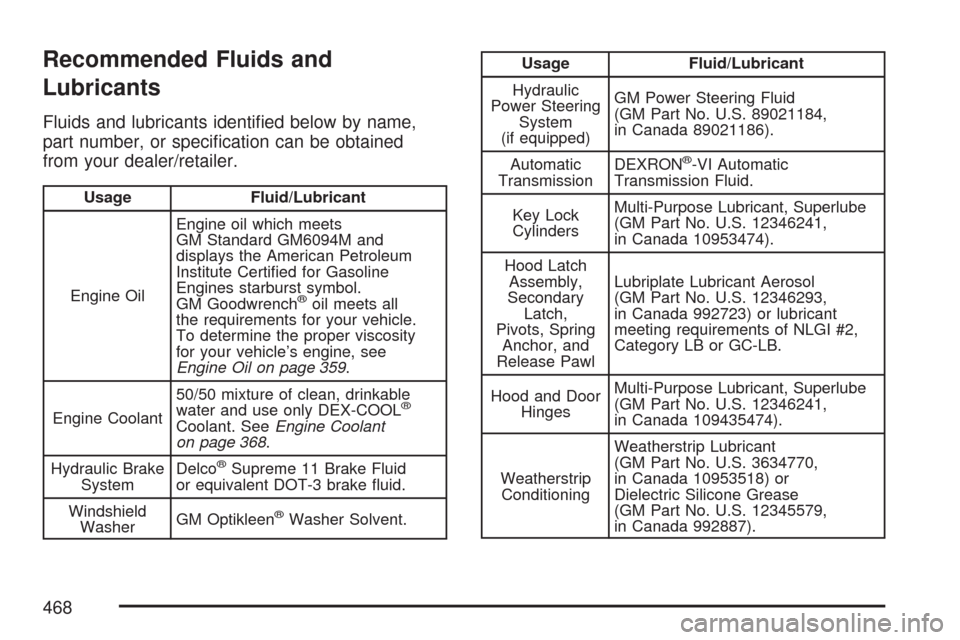
Recommended Fluids and
Lubricants
Fluids and lubricants identied below by name,
part number, or specication can be obtained
from your dealer/retailer.
Usage Fluid/Lubricant
Engine OilEngine oil which meets
GM Standard GM6094M and
displays the American Petroleum
Institute Certied for Gasoline
Engines starburst symbol.
GM Goodwrench
®oil meets all
the requirements for your vehicle.
To determine the proper viscosity
for your vehicle’s engine, see
Engine Oil on page 359.
Engine Coolant50/50 mixture of clean, drinkable
water and use only DEX-COOL
®
Coolant. SeeEngine Coolant
on page 368.
Hydraulic Brake
SystemDelco
®Supreme 11 Brake Fluid
or equivalent DOT-3 brake uid.
Windshield
WasherGM Optikleen
®Washer Solvent.
Usage Fluid/Lubricant
Hydraulic
Power Steering
System
(if equipped)GM Power Steering Fluid
(GM Part No. U.S. 89021184,
in Canada 89021186).
Automatic
TransmissionDEXRON
®-VI Automatic
Transmission Fluid.
Key Lock
CylindersMulti-Purpose Lubricant, Superlube
(GM Part No. U.S. 12346241,
in Canada 10953474).
Hood Latch
Assembly,
Secondary
Latch,
Pivots, Spring
Anchor, and
Release PawlLubriplate Lubricant Aerosol
(GM Part No. U.S. 12346293,
in Canada 992723) or lubricant
meeting requirements of NLGI #2,
Category LB or GC-LB.
Hood and Door
HingesMulti-Purpose Lubricant, Superlube
(GM Part No. U.S. 12346241,
in Canada 109435474).
Weatherstrip
ConditioningWeatherstrip Lubricant
(GM Part No. U.S. 3634770,
in Canada 10953518) or
Dielectric Silicone Grease
(GM Part No. U.S. 12345579,
in Canada 992887).
468
Page 499 of 510
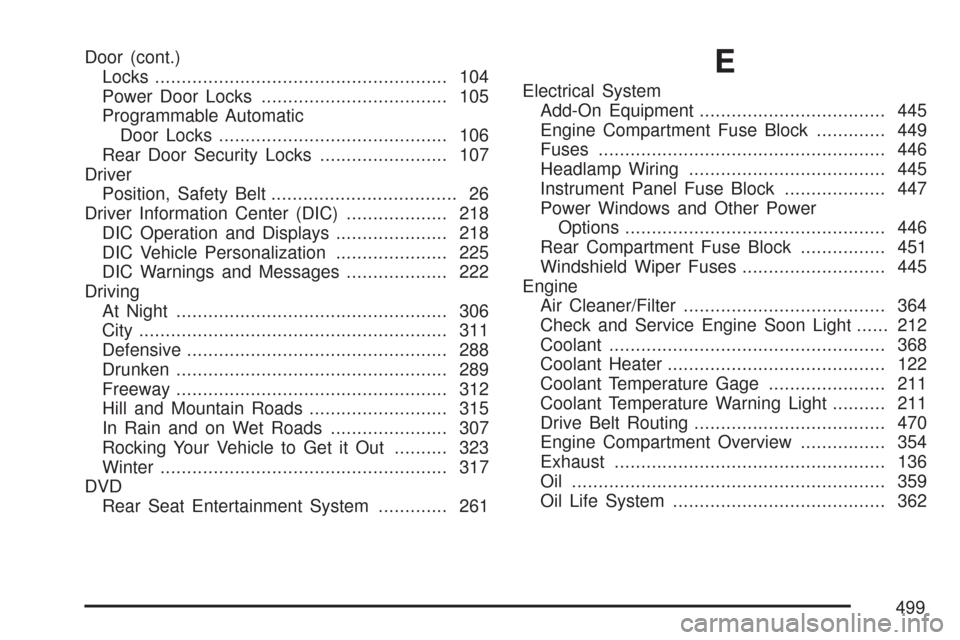
Door (cont.)
Locks....................................................... 104
Power Door Locks................................... 105
Programmable Automatic
Door Locks........................................... 106
Rear Door Security Locks........................ 107
Driver
Position, Safety Belt................................... 26
Driver Information Center (DIC)................... 218
DIC Operation and Displays..................... 218
DIC Vehicle Personalization..................... 225
DIC Warnings and Messages................... 222
Driving
At Night................................................... 306
City.......................................................... 311
Defensive................................................. 288
Drunken................................................... 289
Freeway................................................... 312
Hill and Mountain Roads.......................... 315
In Rain and on Wet Roads...................... 307
Rocking Your Vehicle to Get it Out.......... 323
Winter...................................................... 317
DVD
Rear Seat Entertainment System............. 261E
Electrical System
Add-On Equipment................................... 445
Engine Compartment Fuse Block............. 449
Fuses...................................................... 446
Headlamp Wiring..................................... 445
Instrument Panel Fuse Block................... 447
Power Windows and Other Power
Options................................................. 446
Rear Compartment Fuse Block................ 451
Windshield Wiper Fuses........................... 445
Engine
Air Cleaner/Filter...................................... 364
Check and Service Engine Soon Light...... 212
Coolant.................................................... 368
Coolant Heater......................................... 122
Coolant Temperature Gage...................... 211
Coolant Temperature Warning Light.......... 211
Drive Belt Routing.................................... 470
Engine Compartment Overview................ 354
Exhaust................................................... 136
Oil ........................................................... 359
Oil Life System........................................ 362
499