light CHEVROLET MALIBU 2007 6.G Manual Online
[x] Cancel search | Manufacturer: CHEVROLET, Model Year: 2007, Model line: MALIBU, Model: CHEVROLET MALIBU 2007 6.GPages: 510, PDF Size: 2.8 MB
Page 227 of 510
UNLK (Unlock):This screen displays only if
DRIVER or ALL is selected for the AUTO UNLK
option. This option determines when the automatic
door unlocking will occur, when either the key is
turned to OFF or the vehicle is shifted into
PARK (P). When UNLK appears on the display,
press the enter button to move between KEY OFF
and SHIFT TO P (Park). When you have made
your choice, press the MENU button to record your
selection. The initial setting from the factory is
SHIFT TO P (Park). SeeProgrammable Automatic
Door Locks on page 106for more information.
EXT (Exterior) LIGHTS:If your vehicle has
Remote Keyless Entry (RKE), this option, which
allows the vehicle’s exterior perimeter lighting
to turn on each time the unlock button on the RKE
transmitter is pressed, can be enabled or disabled.
When EXT LIGHTS appears on the display, press
the enter button to move between ON and OFF.When you have made your choice, press the MENU
button to record your selection. The initial setting
from the factory is ON.
LANGUAGE:To select your choice of language,
press the enter button to move between the
optional languages.
The languages are ENGLISH, FRENCH,
SPANISH, and GERMAN.
Choosing a language will display all of the
information on the DIC in the desired language.
When you have made your choice, press the
MENU button for at least one second to record
your selection. The initial setting from the factory
is ENGLISH.
227
Page 261 of 510
Rear Seat Entertainment System
Your vehicle may have a DVD Rear Seat
Entertainment (RSE) system. The RSE system
includes a DVD player, a video display screen,
two sets of wireless headphones, and a
remote control.
This system also functions as a rear seat
audio (RSA) system. SeeRear Seat Audio (RSA)
(Without Entertainment System) on page 278
orRear Seat Audio (RSA) (With Entertainment
System) on page 280for more information.
Parental Control
The RSE system may be disabled from the
driver’s seat by pressing the power button on the
radio twice. To resume use of the RSE system
press the RSE power button.
Before You Drive
The RSE is designed for rear seat passengers
only. The driver cannot safely view the video
screen while driving and should not try to do so.The DVD system is designed to be inoperable
when the vehicle is exposed to extremely low or
high temperatures, in order to protect your system
from damage. Operate the DVD system under
normal or comfortable cabin temperature ranges.
Headphones
The RSE system includes two sets of wireless
headphones.
The wireless headphones have an ON/OFF button
and a volume control. To use the headphones
press, the ON/OFF button. An indicator light on
the headphones illuminate. If the light does
not illuminate, the batteries might need to be
replaced. See “Battery Replacement” later in this
section for more information. Press the button
to turn the headphones OFF when not in use.
If the RSE system is shut off or if the headphones
are out of range of the transmitters, located
at the top of the DVD player, for more than
three minutes, the headphones shut off
automatically to save the battery power.
If you move too far forward or step out of the
vehicle, the headphones lose the audio signal.
261
Page 262 of 510
To adjust the volume on the wireless headphones,
use the volume control on the headphones.
Make sure that the headphones are worn correctly,
left to right, to ensure the signal is received
properly.
Notice:Do not store the headphones in heat
or direct sunlight. This could damage the
headphones and repairs will not be covered
by your warranty. Keep the headphones
stored in a cool, dry place.
MAXX vehicles with the RSE system may have
a rear seat storage compartment. Store the
headphones and the remote control in this
compartment when not in use.
The MAXX vehicles may also include two sets of
wireless headphones with foam ear pads that
can be replaced.
Foam ear pads on the rear seat headphones
can become worn or damaged. The headphone
foam ear pads can become damaged if they
are not handled or stored properly. If the
headphone foam ear pads do become damaged
or worn out, the foam pads can be replaced
separately from the headphone set. It is not
necessary to replace the complete headphone set.The headphone replacement foam ear pads can
be ordered in pairs. See your dealer/retailer
for more information.
If there is a decreased audio signal during CD
or DVD play, there could be a low hissing
noise through the speakers and/or headphones.
If the hissing sound in the wireless headphones
seems excessive, make sure that the headphone
batteries are fully charged. Some amount of
hissing is normal.
Battery Replacement
To change the batteries, do the following:
1. Loosen the screw on the battery compartment
door located on the left side of the headphone
earpiece.
2. Replace the two AAA batteries in the
compartment. Make sure that they are
installed correctly using the diagram on
the inside of the battery compartment.
3. Replace the battery compartment door and
tighten the screw.
If the headphones are to be stored for a long
period of time, remove the batteries, and keep
them in a cool, dry place.
262
Page 267 of 510
Stopping and Resuming Playback
To stop playing a disc, press and release
the
c/Z(stop) button on the DVD player
faceplate or the remote control.
To resume playback, press the
k(play/pause)
button on the DVD player faceplate or the remote
control. The movie should resume play from
where it was last stopped if the disc has not been
ejected or the stop button has not been pressed
twice on the remote control.
If the disc has been ejected or if the stop button
has been pressed twice on the remote control,
press the
k(play) button once to resume play
at the beginning of the disc. A resume symbol
appears momentarily on the video screen.
When the resume symbol is displayed, press
the
k(play) button again to resume playback
from where the disc last stopped.
Ejecting a Disc
Press thec/Z(eject) button, on the DVD
player or the remote control, to eject the disc.If a disc is ejected from the player, but not
removed, the DVD player reloads the disc after
a short period of time. The disc is stored in
the DVD player. The DVD player does not
resume play of the disc automatically.
Remote Control
To use the remote control, aim it at the transmitter
window on the DVD player and press the desired
button. Direct sunlight or very bright light could
affect the ability of the transmitter to receive signals
from the remote control. If the remote control does
not seem to be working, the batteries might need
to be replaced. See “Battery Replacement” later
in this section. Objects blocking the line of sight
affects the function of the remote control.
Notice:Do not store the remote control in
heat or direct sunlight. This could damage the
remote control and it would not be covered
by your warranty. Keep the remote control
stored in the rear seat armrest when not in use.
If your vehicle is the Malibu MAXX, your vehicle
may have a rear seat storage compartment.
Store the headphones and the remote control in
this compartment when not in use.
267
Page 268 of 510
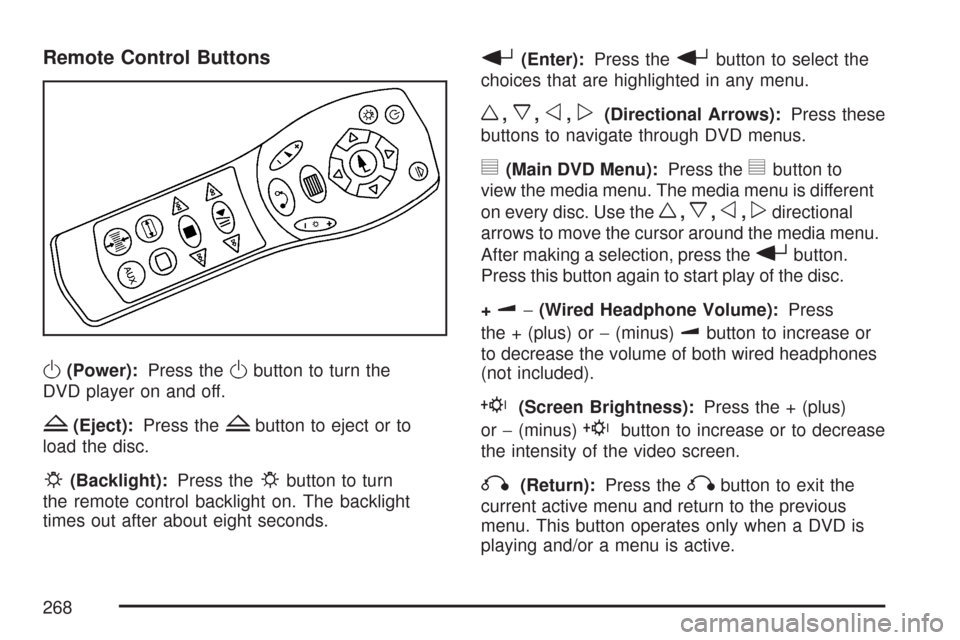
Remote Control Buttons
O(Power):Press theObutton to turn the
DVD player on and off.
Z(Eject):Press theZbutton to eject or to
load the disc.
P(Backlight):Press thePbutton to turn
the remote control backlight on. The backlight
times out after about eight seconds.
r(Enter):Press therbutton to select the
choices that are highlighted in any menu.
w,x,o,p(Directional Arrows):Press these
buttons to navigate through DVD menus.
y(Main DVD Menu):Press theybutton to
view the media menu. The media menu is different
on every disc. Use the
w,x,o,pdirectional
arrows to move the cursor around the media menu.
After making a selection, press the
rbutton.
Press this button again to start play of the disc.
+
u−(Wired Headphone Volume):Press
the + (plus) or−(minus)
ubutton to increase or
to decrease the volume of both wired headphones
(not included).
E(Screen Brightness):Press the + (plus)
or−(minus)
Ebutton to increase or to decrease
the intensity of the video screen.
q(Return):Press theqbutton to exit the
current active menu and return to the previous
menu. This button operates only when a DVD is
playing and/or a menu is active.
268
Page 272 of 510
Menu Bar
The menu bar can be displayed across the top of
the screen by pressing the
z(display) button
on the remote control. Selecting icons from
the menu bar allows adjustments to the audio and
video settings. Use the remote control left and
right arrow buttons to scroll through the menu bar.
A description of the highlighted icon appears at
the bottom of the screen. Use the down arrow to
display the options for the highlighted icon.
The movie can stop playing while selections are
being made.
Current Subtitle Language:The subtitle
language can be selected as Off, English,
Spanish, or French. The actual subtitle language
is dependent on whether a DVD supports the
selected language.
Current Audio Language:The audio language
can be selected as Off, English, Spanish, or
French. The actual audio language is dependent
on whether a DVD supports the selected language.
Smart Color:This color setting can be selected
without changing the default from the color
settings menu.Sound Mode:This analog output can be changed
without changing the default from the analog
output menu.
Frame-by-Frame:The DVD pauses and can
be viewed frame-by-frame, in forward or reverse,
by using the remote control arrow buttons.
Press
s(play) to resume play of the DVD.
DVD audio does not be available during selection.
Slow Motion:The DVD pauses and can be viewed
in slow motion, at various speeds, in forward or
reverse, by using the remote control arrow buttons.
Press
s(play) to resume play of the DVD.
DVD audio is not available during selection.
Scan Speeds:The DVD can be viewed in fast
motion, at various speeds, in forward or reverse,
by using the remote control arrow buttons.
Press
s(play) to resume play of the DVD.
DVD audio is not available during selection.
Enlarge Picture:The DVD pauses and the frame
can be enlarged by using the remote control arrow
key buttons. Pressing the
r(enter) button on the
remote control allows panning of the frame using
the remote control arrow buttons. Press
s(play)
to resume play of the DVD. DVD audio is not
available during selection.
272
Page 273 of 510
Title:Move between DVD titles by using the
remote control arrow buttons.
Chapter:Move between DVD chapters by
using the remote control arrow buttons.
Time Search:The user can jump to different
areas of a DVD by using the remote control
arrow and
r(enter) buttons to select a
specic time position.
Favorite Track Selection (FTS):You can
program the unit to play only your favorite track
selections from a DVD or Audio CD. For a
DVD, FTS is accessed from the Menu bar.
For a CD, the FTS screen displays immediately
when the CD is inserted. From the screen, choose
the tracks on the CD that you wish to store,
using the remote control right and left arrows and
the
rbutton to select. The player remembers
the selections and each time the CD is inserted
in the player, only those tracks are played, if FTS
is turned on. The player can remember selections
for up to 50 discs. To remove FTS for a disc,
the disc must be in the player and the highlighted
tracks must be de-selected. Use the right and
left arrow buttons and the
rbutton or select
CLEAR ALL on the display.Not all DVDs support all of the feature defaults
in the setup menus. In the event a feature is
not supported, defaults are provided by the
DVD media.
Exit the setup menu by pressing the
q(return)
button on the remote control. If changes are made
to the setup menu, the DVD resumes play from
the beginning.
Battery Replacement
To change the remote control batteries, do the
following:
1. Unclip the battery door located on the back
of the remote control.
2. Replace the two AA batteries. Make sure that
they are installed correctly, using the diagram
on the inside of the battery compartment.
3. Close the battery door.
If the remote control is to be stored for a long
period of time, remove the batteries and keep
them in a cool, dry place.
273
Page 285 of 510
Care of Your CDs and DVDs
Handle CDs carefully. Store them in their original
cases or other protective cases and away from
direct sunlight and dust. The CD player scans
the bottom surface of the disc. If the surface
of a CD is damaged, such as cracked, broken,
or scratched, the CD does not play properly or
not at all. If the surface of a CD is soiled, take
a soft, lint free cloth or dampen a clean, soft cloth
in a mild, neutral detergent solution mixed with
water, and clean it. Make sure the wiping process
starts from the center to the edge.
Do not touch the bottom side of a CD while
handling it; this could damage the surface.
Pick up CDs by grasping the outer edges or
the edge of the hole and the outer edge.
Care of the CD and DVD Player
The use of CD lens cleaners for CDs is not
advised, due to the risk of contaminating the
lens of the CD optics with lubricants internal to
the CD mechanism.
Fixed Mast Antenna (MAXX Only)
The xed mast antenna can withstand most
car washes without being damaged. If the mast
should ever become slightly bent, straighten it out
by hand. If the mast is badly bent, replace it.
Check occasionally to make sure the mast is still
tightened to the rear quarter panel.
285
Page 292 of 510
Control of a Vehicle
You have three systems that make your vehicle
go where you want it to go. They are the brakes,
the steering, and the accelerator. All three
systems have to do their work at the places
where the tires meet the road.
Sometimes, as when you are driving on snow or
ice, it is easy to ask more of those control systems
than the tires and road can provide. That means
you can lose control of your vehicle.
Adding non-GM accessories can affect your
vehicle’s performance. SeeAccessories and
Modications on page 344.
Braking
SeeBrake System Warning Light on page 206.
Braking action involves perception time and
reaction time.
First, you have to decide to push on the brake
pedal. That is perception time. Then you have to
bring up your foot and do it. That is reaction time.Average reaction time is about three-fourths
of a second. But that is only an average. It might
be less with one driver and as long as two or
three seconds or more with another. Age, physical
condition, alertness, coordination, and eyesight all
play a part. So do alcohol, drugs, and frustration.
But even in three-fourths of a second, a vehicle
moving at 60 mph (100 km/h) travels 66 feet
(20 m). That could be a lot of distance in an
emergency, so keeping enough space between
your vehicle and others is important.
And, of course, actual stopping distances vary
greatly with the surface of the road, whether it is
pavement or gravel; the condition of the road,
whether it is wet, dry, or icy; tire tread; the condition
of the brakes; the weight of the vehicle; and the
amount of brake force applied.
Avoid needless heavy braking. Some people drive
in spurts — heavy acceleration followed by heavy
braking — rather than keeping pace with traffic.
This is a mistake. The brakes may not have time to
cool between hard stops. The brakes will wear out
much faster if you do a lot of heavy braking. If you
keep pace with the traffic and allow realistic
following distances, you will eliminate a lot of
unnecessary braking. That means better braking
and longer brake life.
292
Page 293 of 510
If your vehicle’s engine ever stops while you are
driving, brake normally but do not pump the
brakes. If you do, the pedal may get harder to
push down. If the engine stops, you will still have
some power brake assist. But you will use it
when you brake. Once the power assist is used
up, it may take longer to stop and the brake pedal
will be harder to push.
Adding non-GM accessories can affect your
vehicle’s performance. SeeAccessories and
Modications on page 344.
Anti-Lock Brake System (ABS)
Your vehicle might have the Anti-Lock Brake
System (ABS), an advanced electronic braking
system that will help prevent a braking skid.
If your vehicle has
ABS, this warning
light on the instrument
panel will come on
briey when you start
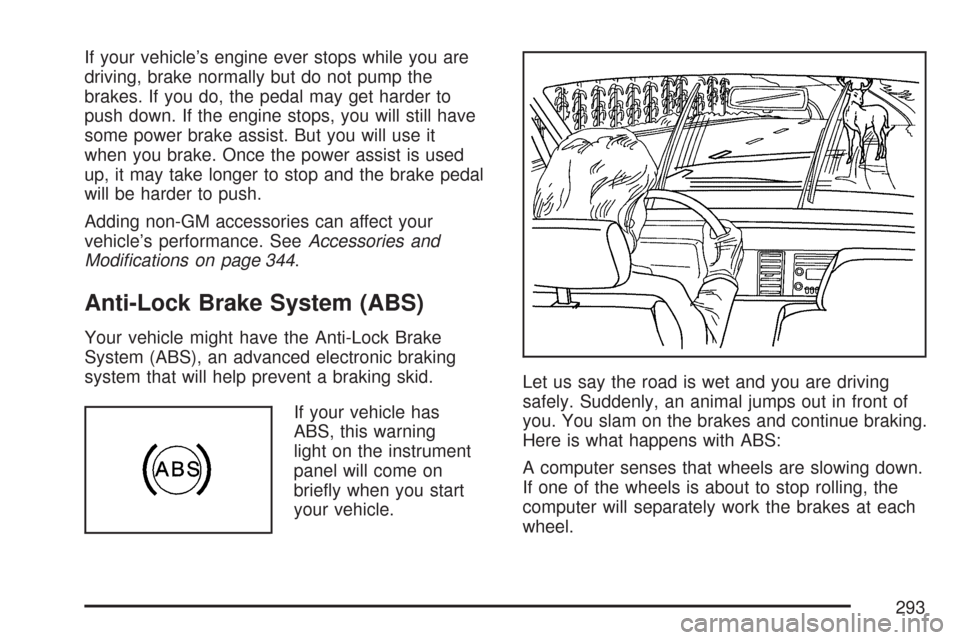
your vehicle.Let us say the road is wet and you are driving
safely. Suddenly, an animal jumps out in front of
you. You slam on the brakes and continue braking.
Here is what happens with ABS:
A computer senses that wheels are slowing down.
If one of the wheels is about to stop rolling, the
computer will separately work the brakes at each
wheel.
293