remote control CHEVROLET MALIBU 2008 6.G User Guide
[x] Cancel search | Manufacturer: CHEVROLET, Model Year: 2008, Model line: MALIBU, Model: CHEVROLET MALIBU 2008 6.GPages: 412, PDF Size: 2.22 MB
Page 129 of 412
5. After entering all of the switch positions, again,
rmly press and release all three buttons at the
same time. The indicator lights will turn on.
6. Press and hold the button that will be used to
control the garage door until the garage door
moves. The indicator light above the selected button
should slowly blink. This button may need to be
held for up to 55 seconds.
7. Immediately release the button when the garage
door moves. The indicator light will blink rapidly
until programming is complete.
8. Press and release the same button again. The
garage door should move, conrming that
programming is successful and complete.
To program another Fixed Code device such as an
additional garage door opener, a security device,
or home automation device, repeat Steps 1-8, choosing
a different button in Step 6 than what was used for
the garage door opener.
Using Universal Home Remote
Press and hold the appropriate button for at least half of
a second. The indicator light will come on while the
signal is being transmitted.
Reprogramming Universal Home
Remote Buttons
Any of the three buttons can be reprogrammed by
repeating the instructions.
Erasing Universal Home Remote
Buttons
The programmed buttons should be erased when the
vehicle is sold or the lease ends.
To erase either Rolling Code or Fixed Code on the
Universal Home Remote device:
1. Press and hold the two outside buttons at the same
time for approximately 20 seconds, until the
indicator lights, located directly above the buttons,
begin to blink rapidly.
2. Once the indicator lights begin to blink, release both
buttons. The codes from all buttons will be erased.
For help or information on the Universal Home Remote
System, call the customer assistance phone number
underCustomer Assistance Offices on page 7-6.
2-51
Page 150 of 412
Overhead Ambient Lighting
These lamps will automatically turn on and off as
controlled by the light sensor located on top of the
instrument panel.
Rear Reading Lamps
The vehicle’s dome lamp may have two rear reading
lamps. Press the lens of the reading lamps to turn them
on or off.
Trunk Lamp
The trunk lamp comes on when the trunk is open and
turns off when it is closed.
Battery Run-Down Protection
Your vehicle has a battery run-down protection feature
designed to protect the vehicle’s battery.
When any interior lamp (trunk, reading, or visor vanity)
is left on while the ignition is turned off, the battery
run-down protection system will automatically shut the
lamp(s) off after 20 minutes. This will avoid draining
the battery.
To reactivate the interior lamps, do one of the following:
Turn on the ignition.
Turn the exterior lamp control off and then on.
Open a door.
Press any Remote Keyless Entry (RKE) transmitter
button (if equipped).
Press the remote trunk release button.
Press the power door lock switch.
The battery run-down feature will also be activated
when any door on the vehicle is left open and the
ignition is in LOCK/OFF.
3-18
Page 152 of 412
Power Outlet 115 Volt Alternating
Current
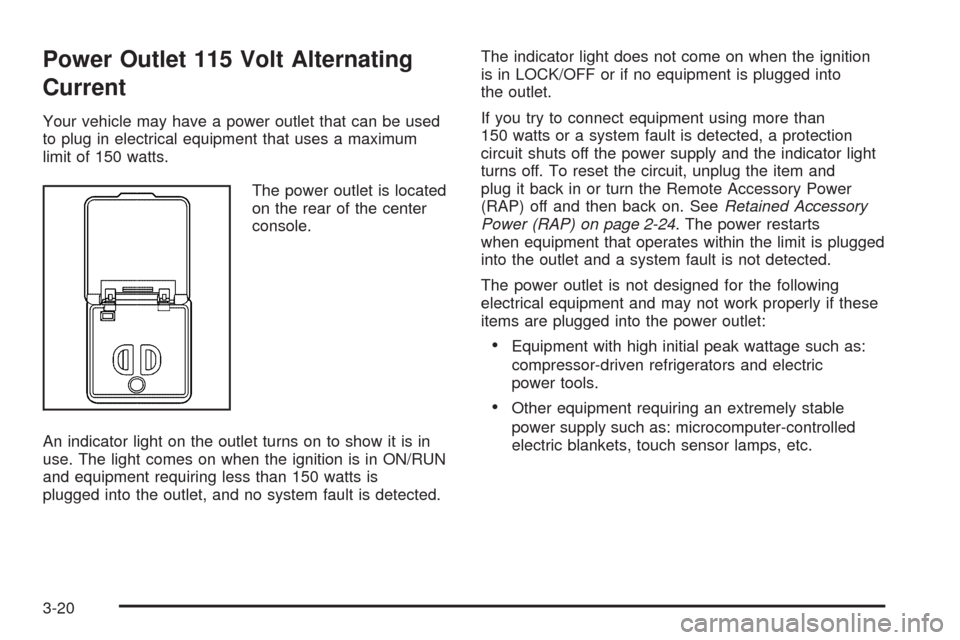
Your vehicle may have a power outlet that can be used
to plug in electrical equipment that uses a maximum
limit of 150 watts.
The power outlet is located
on the rear of the center
console.
An indicator light on the outlet turns on to show it is in
use. The light comes on when the ignition is in ON/RUN
and equipment requiring less than 150 watts is
plugged into the outlet, and no system fault is detected.The indicator light does not come on when the ignition
is in LOCK/OFF or if no equipment is plugged into
the outlet.
If you try to connect equipment using more than
150 watts or a system fault is detected, a protection
circuit shuts off the power supply and the indicator light
turns off. To reset the circuit, unplug the item and
plug it back in or turn the Remote Accessory Power
(RAP) off and then back on. SeeRetained Accessory
Power (RAP) on page 2-24. The power restarts
when equipment that operates within the limit is plugged
into the outlet and a system fault is not detected.
The power outlet is not designed for the following
electrical equipment and may not work properly if these
items are plugged into the power outlet:
Equipment with high initial peak wattage such as:
compressor-driven refrigerators and electric
power tools.
Other equipment requiring an extremely stable
power supply such as: microcomputer-controlled
electric blankets, touch sensor lamps, etc.
3-20
Page 156 of 412
Rear Window Defogger
The rear window defogger uses a warming grid to
remove fog or frost from the rear window.
that the rear window defogger is activated. Be sure
to clear as much snow from the rear window as possible.
If driving below 50 mph (80 km/h), the rear window
defogger turns off about 15 minutes after the button is
pressed. If turned on again, the defogger only runs
for about seven minutes before turning off. The defogger
can also be turned off by pressing the button again or
by turning off the engine.
If your vehicle’s speed is maintained above 50 mph
(80 km/h), the rear window defogger remains on once
the button is pressed.
If your vehicle has heated outside mirrors, the surface
of the outside mirrors heat when the rear window
defogger is activated. SeeOutside Power Mirrors on
page 2-41.
Notice:Do not use anything sharp on the inside of
the rear window. If you do, you could cut or
damage the warming grid, and the repairs would not
be covered by the vehicle warranty. Do not attach
a temporary vehicle license, tape, a decal or
anything similar to the defogger grid.
Remote Start Climate Control Operation
If your vehicle has the remote start feature and it
is activated, the climate control system heats or cools
the inside of the vehicle using the modes that were
set before the vehicle was turned off. The climate control
knobs will remain active during a remote start.
However, the climate control buttons will be inactive
until the ignition is turned on by the key. If the fan is off,
the climate control system will not operate during
remote start. SeeRemote Keyless Entry (RKE) System
Operation on page 2-5.
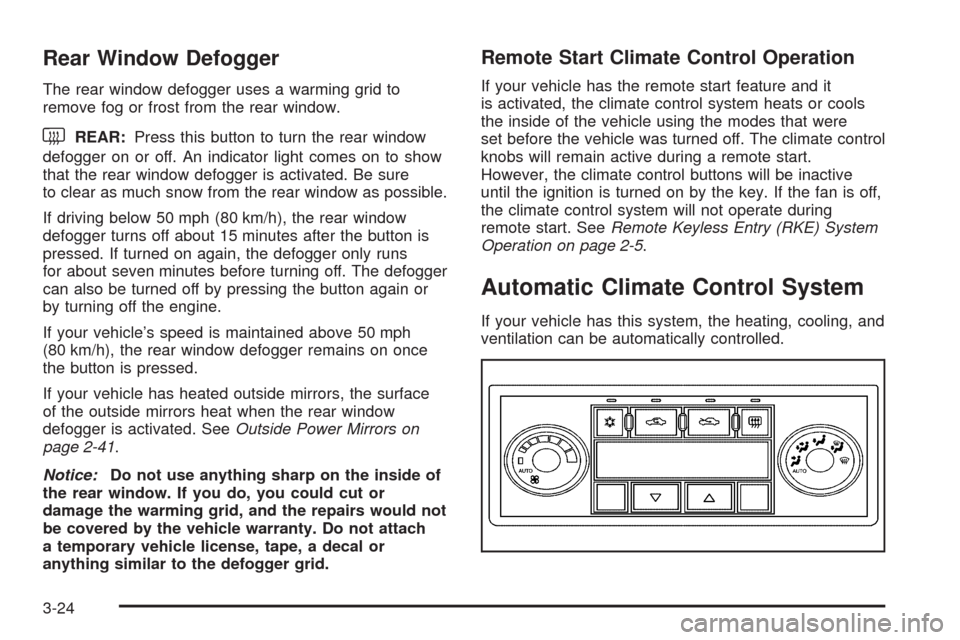
Automatic Climate Control System
If your vehicle has this system, the heating, cooling, and
ventilation can be automatically controlled.
3-24
Page 161 of 412
Remote Start Climate Control Operation
If the vehicle has remote start and it is activated,
the climate control system heats and cools the inside of
the vehicle using the previous system settings before
the vehicle was turned off. The climate control knobs will
remain active during a remote start. However, the
climate control buttons will be inactive until the ignition
is turned on by the key. If the fan is off, the climate
control system will not operate during remote start.
With the automatic climate control system, the climate
control displays “RS” in place of the temperature to
indicate that remote start is activated. For best
performance, turn both the fan and mode knobs to
AUTO. If the temperature is cold enough and the mode
knob is set to AUTO, the system begins in defrost to
clear the windows. SeeRemote Keyless Entry
(RKE) System Operation on page 2-5.
Outlet Adjustment
Use the lever located in the center of each outlet by
moving it either up and down or side-to-side, to change
the direction and amount of airow in the vehicle.
Operation Tips
Clear away any ice, snow, or leaves from the air
inlets at the base of the windshield that may
block the ow of air into the vehicle.
Do not use non-GM approved hood deectors as
they could adversely affect the performance of
the system.
Keep the path under the front seats clear of objects
to help circulate the air inside of the vehicle more
effectively.
When an objectionable odor outside the vehicle is
encountered, use the recirculation mode, with the
temperature knob at a comfortable setting to prevent
the odor from entering the vehicle through the
ventilation system. This can be helpful when driving
through a long tunnel with poor ventilation.
However, extended usage of this mode in cold or
cool weather can cause window fogging.
3-29
Page 183 of 412
KEY FOB BATT (Battery) LOW
This message displays if the Remote Keyless Entry
(RKE) transmitter battery is low. Replace the battery in
the transmitter. See “Battery Replacement” under
Remote Keyless Entry (RKE) System Operation on
page 2-5.
LOW FUEL
This message displays when your vehicle is low on fuel.
Rell the fuel tank as soon as possible. SeeFuel
Gage on page 3-45,Fuel on page 5-5, andFilling the
Tank on page 5-8for more information.
LOW TRACTION
If your vehicle has the Traction Control System (TCS),
this message displays and the ESC/TCS light on
the instrument panel cluster ashes when the system is
actively limiting wheel spin. Slippery road conditions
may exist if this message is displayed, so adjust
your driving accordingly. This message stays on for a
few seconds after the system stops limiting wheel spin.
SeeTraction Control System (TCS) on page 4-6and
Electronic Stability Control (ESC)/Traction Control
System (TCS) Indicator/Warning Light on page 3-39for
more information.
LOW WASHER FLUID
This message displays when the vehicle’s windshield
washer uid is low. Fill the windshield washer uid
reservoir to the proper level as soon as possible.
SeeWindshield Washer Fluid on page 5-38.
POWER STEERING
On some vehicles, this message displays if a problem
has been detected with the electric power steering. Have
your vehicle serviced by your dealer/retailer immediately.
PUSH PARK PEDAL
This message displays if the parking brake is left
engaged. SeeParking Brake on page 2-34for more
information.
SERVICE AIR BAG
This message displays when there is a problem with the
airbag system. Have your vehicle serviced by your
dealer/retailer immediately.
3-51
Page 357 of 412
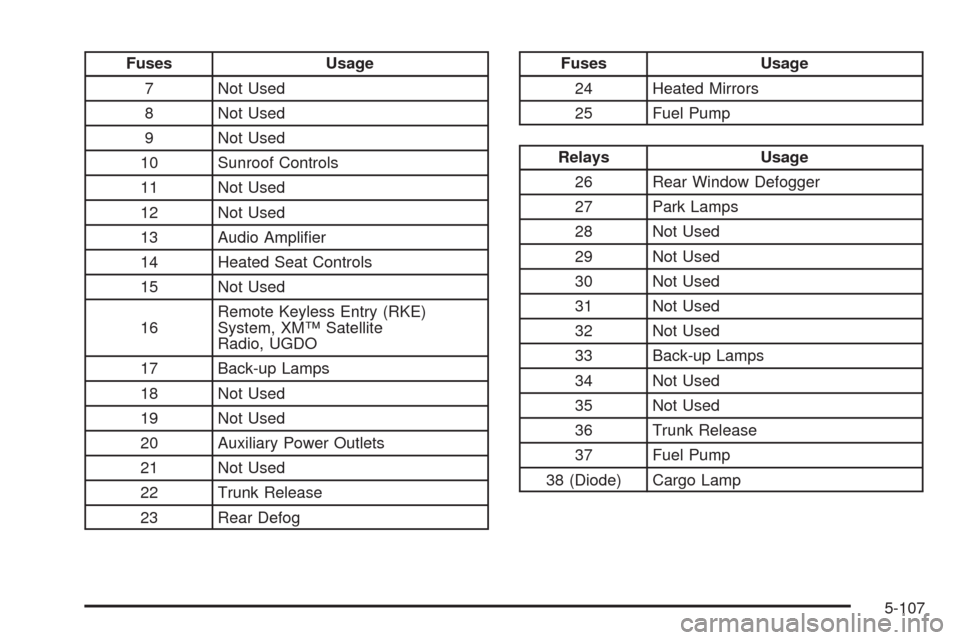
Fuses Usage
7 Not Used
8 Not Used
9 Not Used
10 Sunroof Controls
11 Not Used
12 Not Used
13 Audio Amplier
14 Heated Seat Controls
15 Not Used
16Remote Keyless Entry (RKE)
System, XM™ Satellite
Radio, UGDO
17 Back-up Lamps
18 Not Used
19 Not Used
20 Auxiliary Power Outlets
21 Not Used
22 Trunk Release
23 Rear DefogFuses Usage
24 Heated Mirrors
25 Fuel Pump
Relays Usage
26 Rear Window Defogger
27 Park Lamps
28 Not Used
29 Not Used
30 Not Used
31 Not Used
32 Not Used
33 Back-up Lamps
34 Not Used
35 Not Used
36 Trunk Release
37 Fuel Pump
38 (Diode) Cargo Lamp
5-107
Page 410 of 412
Spare Tire
Compact....................................................5-88
Installing....................................................5-81
Removing...................................................5-79
Storing.......................................................5-87
Specications, Capacities...............................5-108
Speedometer..................................................3-32
Split Folding Rear Seat..................................... 1-9
Start Vehicle, Remote....................................... 2-7
Starting the Engine.........................................2-24
Steering........................................................4-10
Steering Wheel Controls, Audio.........................3-79
Steering Wheel, Tilt and Telescopic..................... 3-7
Storage Areas
Center Console Storage Area........................2-52
Convenience Net.........................................2-53
Cupholders.................................................2-52
Driver Storage Compartment.........................2-53
Front Storage Area......................................2-52
Glove Box..................................................2-52
Instrument Panel Storage Area......................2-52
Stuck in Sand, Mud, Ice, or Snow.....................4-20
Sun Visors.....................................................2-18
Sunroof.........................................................2-53T
Tachometer....................................................3-32
Taillamps
Turn Signal, and Stoplamps..........................5-49
Telescopic Wheel.............................................. 3-7
Theft-Deterrent, Radio.....................................3-79
Theft-Deterrent Systems...................................2-18
Content Theft-Deterrent................................2-18
PASS-Key
®III+ Electronic Immobilizer............2-20
PASS-Key®III+ Electronic Immobilizer
Operation................................................2-20
Tilt Wheel........................................................ 3-7
Time, Setting..................................................3-60
Tire
Pressure Light.............................................3-41
Tires.............................................................5-52
Aluminum Wheels, Cleaning..........................5-94
Buying New Tires........................................5-70
Chains.......................................................5-76
Changing a Flat Tire....................................5-78
Cleaning....................................................5-95
Compact Spare Tire.....................................5-88
Different Size..............................................5-72
12
Page 411 of 412
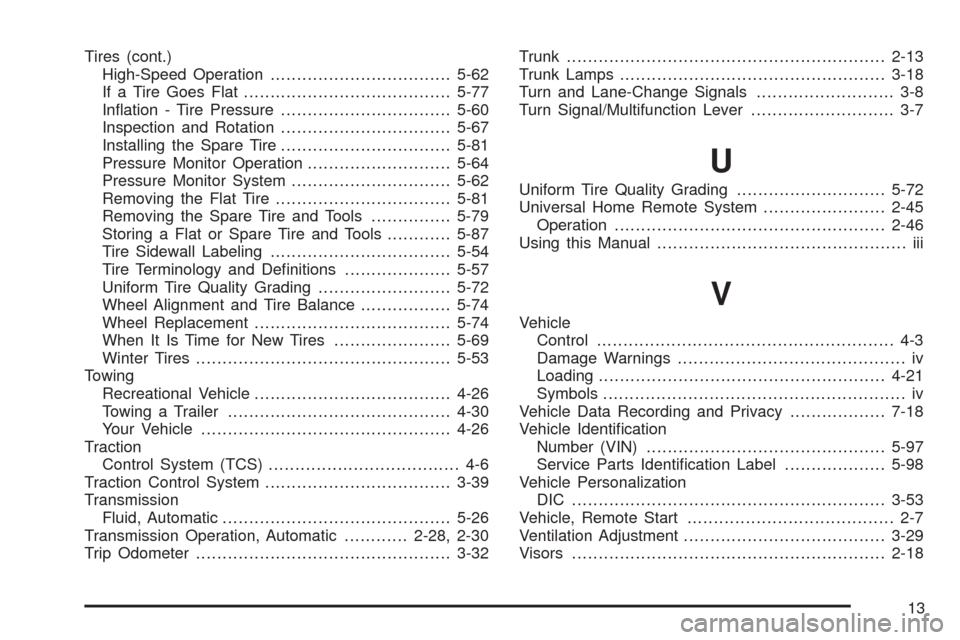
Tires (cont.)
High-Speed Operation..................................5-62
If a Tire Goes Flat.......................................5-77
Ination - Tire Pressure................................5-60
Inspection and Rotation................................5-67
Installing the Spare Tire................................5-81
Pressure Monitor Operation...........................5-64
Pressure Monitor System..............................5-62
Removing the Flat Tire.................................5-81
Removing the Spare Tire and Tools...............5-79
Storing a Flat or Spare Tire and Tools............5-87
Tire Sidewall Labeling..................................5-54
Tire Terminology and Denitions....................5-57
Uniform Tire Quality Grading.........................5-72
Wheel Alignment and Tire Balance.................5-74
Wheel Replacement.....................................5-74
When It Is Time for New Tires......................5-69
Winter Tires................................................5-53
Towing
Recreational Vehicle.....................................4-26
Towing a Trailer..........................................4-30
Your Vehicle...............................................4-26
Traction
Control System (TCS).................................... 4-6
Traction Control System...................................3-39
Transmission
Fluid, Automatic...........................................5-26
Transmission Operation, Automatic............2-28, 2-30
Trip Odometer................................................3-32Trunk............................................................2-13
Trunk Lamps..................................................3-18
Turn and Lane-Change Signals.......................... 3-8
Turn Signal/Multifunction Lever........................... 3-7
U
Uniform Tire Quality Grading............................5-72
Universal Home Remote System.......................2-45
Operation...................................................2-46
Using this Manual............................................... iii
V
Vehicle
Control........................................................ 4-3
Damage Warnings........................................... iv
Loading......................................................4-21
Symbols......................................................... iv
Vehicle Data Recording and Privacy..................7-18
Vehicle Identication
Number (VIN).............................................5-97
Service Parts Identication Label...................5-98
Vehicle Personalization
DIC ...........................................................3-53
Vehicle, Remote Start....................................... 2-7
Ventilation Adjustment......................................3-29
Visors...........................................................2-18
13