brakes CHEVROLET MALIBU 2011 7.G User Guide
[x] Cancel search | Manufacturer: CHEVROLET, Model Year: 2011, Model line: MALIBU, Model: CHEVROLET MALIBU 2011 7.GPages: 382, PDF Size: 5.81 MB
Page 212 of 382
Black plate (18,1)Chevrolet Malibu Owner Manual - 2011
9-18 Driving and Operating
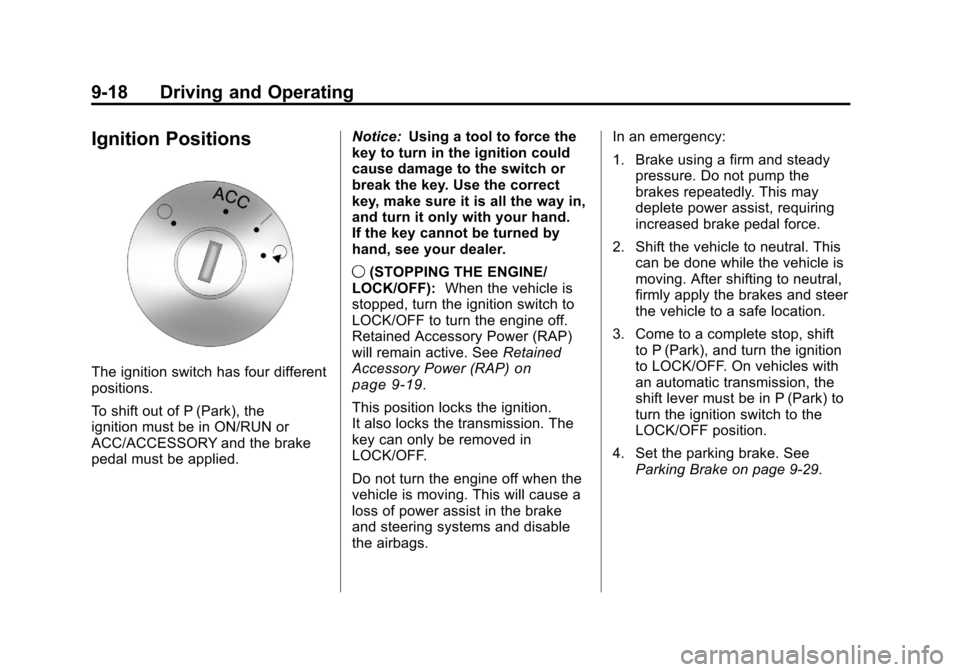
Ignition Positions
The ignition switch has four different
positions.
To shift out of P (Park), the
ignition must be in ON/RUN or
ACC/ACCESSORY and the brake
pedal must be applied.Notice:
Using a tool to force the
key to turn in the ignition could
cause damage to the switch or
break the key. Use the correct
key, make sure it is all the way in,
and turn it only with your hand.
If the key cannot be turned by
hand, see your dealer.
9 (STOPPING THE ENGINE/
LOCK/OFF): When the vehicle is
stopped, turn the ignition switch to
LOCK/OFF to turn the engine off.
Retained Accessory Power (RAP)
will remain active. See Retained
Accessory Power (RAP)on
page 9‑19.
This position locks the ignition.
It also locks the transmission. The
key can only be removed in
LOCK/OFF.
Do not turn the engine off when the
vehicle is moving. This will cause a
loss of power assist in the brake
and steering systems and disable
the airbags. In an emergency:
1. Brake using a firm and steady
pressure. Do not pump the
brakes repeatedly. This may
deplete power assist, requiring
increased brake pedal force.
2. Shift the vehicle to neutral. This can be done while the vehicle is
moving. After shifting to neutral,
firmly apply the brakes and steer
the vehicle to a safe location.
3. Come to a complete stop, shift to P (Park), and turn the ignition
to LOCK/OFF. On vehicles with
an automatic transmission, the
shift lever must be in P (Park) to
turn the ignition switch to the
LOCK/OFF position.
4. Set the parking brake. See Parking Brake on page 9‑29.
Page 222 of 382
Black plate (28,1)Chevrolet Malibu Owner Manual - 2011
9-28 Driving and Operating
While using the DSC feature the
transmission will have firmer shifting
and sportier performance. You can
use this for sport driving or when
climbing hills to stay in gear longer
or to downshift for more power or
engine braking.
The transmission will only allow you
to shift into gears appropriate for the
vehicle speed and engine
revolutions per minute (RPM):
.The transmission will not
automatically shift to the next
higher gear if the vehicle speed
or engine RPM is too low.
.The transmission will not allow
shifting to the next lower gear if
the vehicle speed or engine
RPM is too high. Second or Third Gear Start
Feature
When accelerating the vehicle from
a stop in snowy and icy conditions,
you may want to shift the gear
select tap switch into Second or
Third gear. A higher gear allows you
to gain more traction on slippery
surfaces.
With the DSC feature, the vehicle
can be set to pull away in Second or
Third gear.
1. Move the shift lever from
D (Drive) into the
M (Manual Mode).
2. With the vehicle stopped, press (+) end of the button to
select Second or Third gear. The
vehicle will start from a stop
position in Second or Third gear.
3. Once moving select the desired drive gear.
Brakes
Antilock Brake
System (ABS)
This vehicle has the Antilock Brake
System (ABS), an advanced
electronic braking system that helps
prevent a braking skid.
When the engine is started and the
vehicle begins to drive away, ABS
checks itself. A momentary motor or
clicking noise might be heard while
this test is going on, and it might
even be noticed that the brake
pedal moves a little. This is normal.
If there is a problem with ABS, this
warning light stays on. See Antilock
Brake System (ABS) Warning Light
on page 5‑19.
Page 223 of 382
Black plate (29,1)Chevrolet Malibu Owner Manual - 2011
Driving and Operating 9-29
If driving safely on a wet road and it
becomes necessary to slam on the
brakes and continue braking to
avoid a sudden obstacle, a
computer senses that the wheels
are slowing down. If one of the
wheels is about to stop rolling, the
computer will separately work the
brakes at each wheel.
ABS can change the brake pressure
to each wheel, as required, faster
than any driver could. This can help
the driver steer around the obstacle
while braking hard.
As the brakes are applied, the
computer keeps receiving updates
on wheel speed and controls
braking pressure accordingly.
Remember: ABS does not change
the time needed to get a foot up to
the brake pedal or always decrease
stopping distance. If you get tooclose to the vehicle in front of you,
there will not be enough time to
apply the brakes if that vehicle
suddenly slows or stops. Always
leave enough room up ahead to
stop, even with ABS.
Using ABS
Do not pump the brakes. Just hold
the brake pedal down firmly and let
ABS work. You might hear the ABS
pump or motor operating and feel
the brake pedal pulsate, but this is
normal.
Braking in Emergencies
ABS allows the driver to steer and
brake at the same time. In many
emergencies, steering can help
more than even the very best
braking.
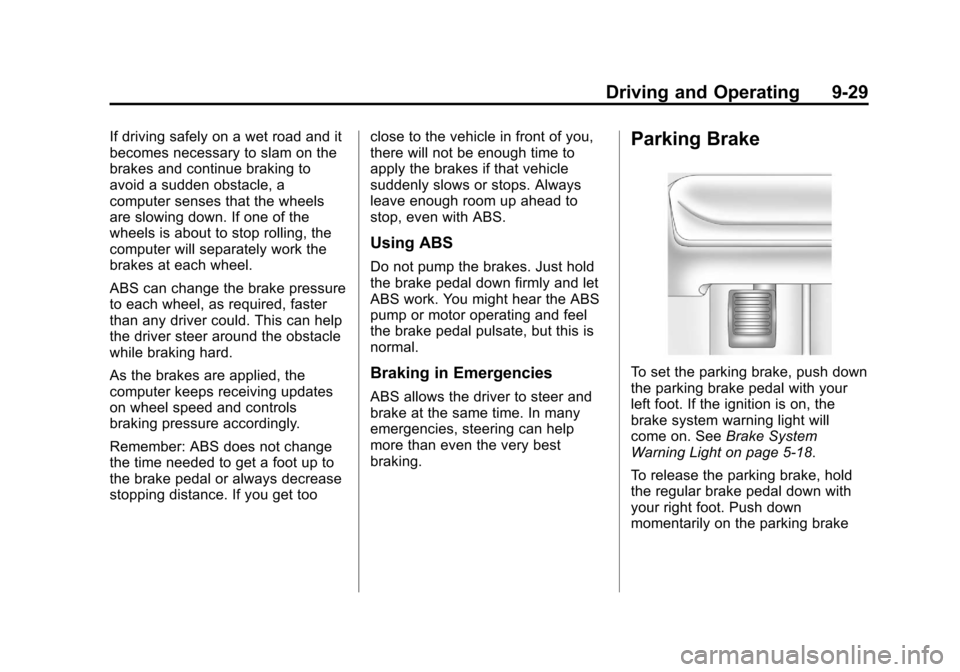
Parking Brake
To set the parking brake, push down
the parking brake pedal with your
left foot. If the ignition is on, the
brake system warning light will
come on. See
Brake System
Warning Light on page 5‑18.
To release the parking brake, hold
the regular brake pedal down with
your right foot. Push down
momentarily on the parking brake
Page 224 of 382
Black plate (30,1)Chevrolet Malibu Owner Manual - 2011
9-30 Driving and Operating
pedal with your left foot until you
feel the pedal release. If the parking
brake is not released when you
begin to drive, the brake system
warning light comes on and a chime
sounds as a warning that the
parking brake is still on.
The PUSH PARK PEDAL message
will also display in the Driver
Information Center (DIC) as a
reminder to release the parking
brake. SeeDriver Information
Center (DIC) on page 5‑23.
Notice: Driving with the parking
brake on can overheat the brake
system and cause premature
wear or damage to brake system
parts. Make sure that the parking
brake is fully released and the
brake warning light is off before
driving.
If you are towing a trailer and are
parking on a hill, see Driving
Characteristics and Towing Tips
on
page 9‑43.
Brake Assist
This vehicle has a brake assist
feature designed to assist the driver
in stopping or decreasing vehicle
speed in emergency driving
conditions. This feature uses the
stability system hydraulic brake
control module to supplement the
power brake system under
conditions where the driver has
quickly and forcefully applied the
brake pedal in an attempt to quickly
stop or slow down the vehicle. The
stability system hydraulic brake
control module increases brake
pressure at each corner of the
vehicle until the ABS activates.
Minor brake pedal pulsation or
pedal movement during this time is
normal and the driver should
continue to apply the brake pedal as
the driving situation dictates. The
brake assist feature will
automatically disengage when the
brake pedal is released or brake
pedal pressure is quickly
decreased.
Ride Control Systems
Traction Control
System (TCS)
The vehicle may have a Traction
Control System (TCS) that limits
wheel spin. This is especially useful
in slippery road conditions. The
system operates only if it senses
that the front wheels are spinning
too much or are beginning to lose
traction. When this happens, the
system works the front brakes and
reduces engine power by closing
the throttle and managing engine
spark to limit wheel spin.
This light will flash when the traction
control system is limiting wheel spin.
Page 225 of 382
Black plate (31,1)Chevrolet Malibu Owner Manual - 2011
Driving and Operating 9-31
The system may be heard or felt
while it is working, but this is
normal.
If the vehicle is in cruise control
when TCS begins to limit wheel
spin, the cruise control will
automatically disengage. The cruise
control may be re-engaged when
road conditions allow. SeeCruise
Control on page 9‑34.
When this light is on solid and either
the SERVICE TRACTION or
TRACTION OFF message is
displayed, the system will not limit
wheel spin.
Adjust your driving accordingly. See
Ride Control System Messages
on
page 5‑28for more information. The Traction Control System is
automatically enabled whenever the
vehicle is started. To limit wheel
spin, especially in slippery road
conditions, always leave the system
enabled. TCS can be turned off if
needed.
It is recommended to leave the
system on for normal driving
conditions, but it may be necessary
to turn the system off if the vehicle
is stuck in sand, mud, ice or snow,
and you want to
“rock”the vehicle to
attempt to free it. It may also be
necessary to turn off the system
when driving in extreme off-road
conditions where high wheel spin is
required. See If the Vehicle is Stuck
on page 9‑11.
To turn the system off or on, press
and release this button located on
the center console.
The DIC will display the appropriate
message as described previously
when the button is pressed.
Traction Control Operation
Traction control limits wheel spin by
reducing engine power to the
wheels (engine speed management)
and by applying brakes to each
individual wheel (brake-traction
control) as necessary.
The traction control system is
enabled automatically when the
vehicle is started, and it will activate
and flash the ESC/TCS light and
display the LOW TRACTION
Page 228 of 382
Black plate (34,1)Chevrolet Malibu Owner Manual - 2011
9-34 Driving and Operating
and you want to“rock”the vehicle to
attempt to free it. It may also be
necessary to turn off the system
when driving in extreme off-road
conditions where high wheel spin is
required. See If the Vehicle is Stuck
on page 9‑11.
ESC may also turn off automatically
if it determines that a problem exists
with the system. The ESC OFF and
SERVICE ESC messages and the
ESC/TCS light will be on solid to
warn the driver that ESC is disabled
and requires service. If the problem
does not clear after restarting the
vehicle, see your dealer for service.
See Ride Control System Messages
on page 5‑28for more information.
Adding non‐dealer/non‐retailer
accessories can affect the vehicle's
performance. See Accessories and
Modifications
on page 10‑3for
more information.
Cruise Control
Cruise control lets a speed of about
40 km/h (25 mph) or more be
maintained without keeping your
foot on the accelerator. This can
really help on long trips. Cruise
control does not work at speeds
below 40 km/h (25 mph).
When the brakes are applied, the
cruise control shuts off.
If the vehicle is in cruise control and
the Traction Control System (TCS)
or Enhanced Traction System (ETS)
begins to limit wheel spin, the cruise
control automatically disengages.
See Traction Control System (TCS)
on page 9‑30andElectronic
Stability Control (ESC)on
page 9‑32. When road conditions
allow, the cruise control can be used
again.
{WARNING
Cruise control can be dangerous
where you cannot drive safely at
a steady speed. So, do not use
the cruise control on winding
roads or in heavy traffic.
Cruise control can be dangerous
on slippery roads. On such roads,
fast changes in tire traction can
cause excessive wheel slip, and
you could lose control. Do not use
cruise control on slippery roads.
Page 229 of 382
Black plate (35,1)Chevrolet Malibu Owner Manual - 2011
Driving and Operating 9-35
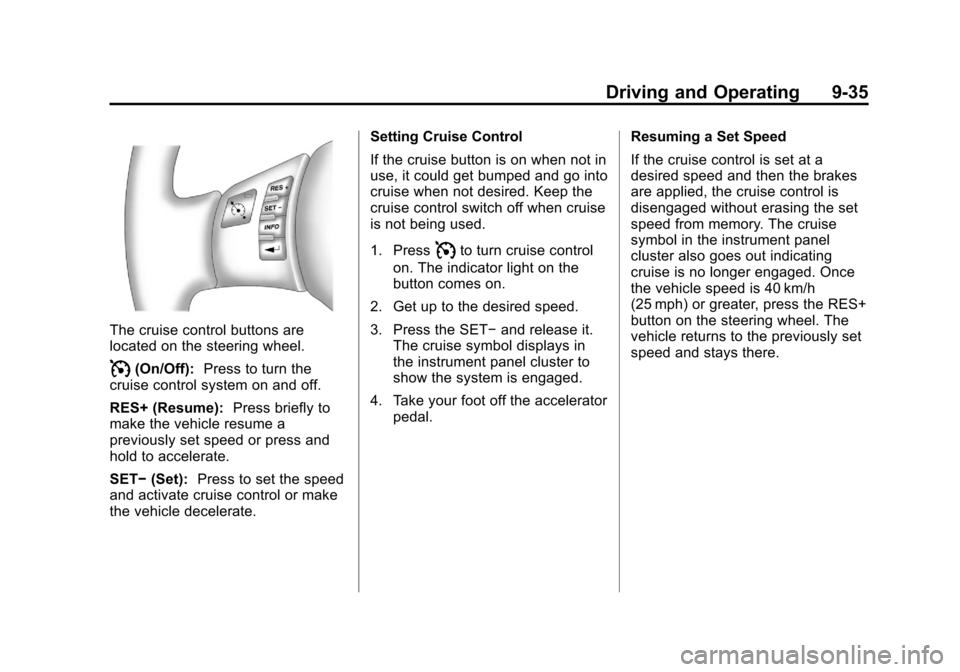
The cruise control buttons are
located on the steering wheel.
I(On/Off):Press to turn the
cruise control system on and off.
RES+ (Resume): Press briefly to
make the vehicle resume a
previously set speed or press and
hold to accelerate.
SET− (Set): Press to set the speed
and activate cruise control or make
the vehicle decelerate. Setting Cruise Control
If the cruise button is on when not in
use, it could get bumped and go into
cruise when not desired. Keep the
cruise control switch off when cruise
is not being used.
1. Press
Ito turn cruise control
on. The indicator light on the
button comes on.
2. Get up to the desired speed.
3. Press the SET− and release it.
The cruise symbol displays in
the instrument panel cluster to
show the system is engaged.
4. Take your foot off the accelerator pedal. Resuming a Set Speed
If the cruise control is set at a
desired speed and then the brakes
are applied, the cruise control is
disengaged without erasing the set
speed from memory. The cruise
symbol in the instrument panel
cluster also goes out indicating
cruise is no longer engaged. Once
the vehicle speed is 40 km/h
(25 mph) or greater, press the RES+
button on the steering wheel. The
vehicle returns to the previously set
speed and stays there.
Page 230 of 382
Black plate (36,1)Chevrolet Malibu Owner Manual - 2011
9-36 Driving and Operating
Increasing Speed While Using
Cruise Control
If the cruise control system is
already activated,
.Press and hold the RES+ button
on the steering wheel until the
desired speed is reached, then
release it.
.To increase the vehicle speed in
small amounts, press the RES+
button briefly. Each time this is
done, the vehicle goes about
1.6 km/h (1 mph) faster.
Reducing Speed While Using
Cruise Control
If the cruise control system is
already activated,
.Press and hold the SET− on the
steering wheel until the lower
speed desired is reached, then
release it.
.To slow down in small amounts,
press the SET− button briefly.
Each time this is done, the
vehicle goes about 1.6 km/h
(1 mph) slower.
Passing Another Vehicle While
Using Cruise Control
Use the accelerator pedal to
increase the vehicle speed. When
you take your foot off the pedal, the
vehicle will slow down to the
previously set cruise control speed.
Using Cruise Control on Hills
How well the cruise control works
on hills depends upon the vehicle
speed, load, and the steepness of
the hills. When going up steep hills,
you might have to step on the
accelerator pedal to maintain the
vehicle speed. When going
downhill, you might have to brake or
shift to a lower gear to keep the
vehicle at a lower speed. When the
brakes are applied this ends the
cruise control. Ending Cruise Control
There are two ways to end cruise
control:
.To disengage the cruise control,
step lightly on the brake pedal.
.To turn off cruise control, press
the
Ibutton.
Erasing Speed Memory
The cruise control set speed is
erased from memory, by pressing
the
Ibutton or if the ignition is
turned off.
Page 237 of 382
Black plate (43,1)Chevrolet Malibu Owner Manual - 2011
Driving and Operating 9-43
Towing
General Towing
Information
Only use towing equipment that has
been designed for the vehicle.
Contact your dealer or trailering
dealer for assistance with preparing
the vehicle for towing a trailer.
See the following trailer towing
information in this section:
.For information on driving while
towing a trailer, see“Driving
Characteristics and
Towing Tips.”
.For maximum vehicle and trailer
weights, see “Trailer Towing.”
.For information on equipment to
tow a trailer, see “Towing
Equipment.”
For information on towing a disabled
vehicle, see Towing the Vehicle
on
page 10‑83. For information on
towing the vehicle behind another vehicle such as a motorhome, see
Recreational Vehicle Towing
on
page 10‑83.
Driving Characteristics
and Towing Tips
{WARNING
The driver can lose control when
pulling a trailer if the correct
equipment is not used or the
vehicle is not driven properly. For
example, if the trailer is too
heavy, the brakes may not work
well —or even at all. The driver
and passengers could be
seriously injured. The vehicle may
also be damaged; the resulting
repairs would not be covered by
the vehicle warranty. Pull a trailer
only if all the steps in this section
have been followed. Ask your
dealer for advice and information
about towing a trailer with the
vehicle. The vehicle can tow a trailer when
equipped with the proper trailer
towing equipment. For trailering
capacity, see
Trailer Towing
on
page 9‑46. Trailering changes
handling, acceleration, braking,
durability and fuel economy. With
the added weight, the engine,
transmission, wheel assemblies and
tires are forced to work harder and
under greater loads. The trailer also
adds wind resistance, increasing the
pulling requirements. For safe
trailering, correctly use the proper
trailering equipment.
The following information has
important trailering tips and rules for
your safety and that of your
passengers. Read this section
carefully before pulling a trailer.
Pulling A Trailer
Here are some important points:
.There are many laws, including
speed limit restrictions that apply
to trailering. Check for legal
requirements with state or
provincial police.
Page 238 of 382
Black plate (44,1)Chevrolet Malibu Owner Manual - 2011
9-44 Driving and Operating
.Do not tow a trailer at all during
the first 1 600 km (1,000 miles)
the new vehicle is driven. The
engine, axle or other parts could
be damaged.
.During the first 800 km
(500 miles) that a trailer is
towed, do not drive over 80 km/h
(50 mph) and do not make starts
at full throttle. This reduces wear
on the vehicle.
.The vehicle can tow in D (Drive).
Use a lower gear if the
transmission shifts too often.
.Obey speed limit restrictions.
Do not drive faster than the
maximum posted speed for
trailers, or no more than 90 km/h
(55 mph), to reduce wear on the
vehicle.
Driving with a Trailer
Towing a trailer requires experience.
Get familiar with handling and
braking with the added trailerweight. The vehicle is now longer
and not as responsive as the
vehicle is by itself.
Check all trailer hitch parts and
attachments, safety chains,
electrical connectors, lamps, tires
and mirror adjustments. If the trailer
has electric brakes, start the vehicle
and trailer moving and then apply
the trailer brake controller by hand
to be sure the brakes are working.
During the trip, check regularly to be
sure that the load is secure, and the
lamps and trailer brakes are working
properly.
Towing with a Stability Control
System
When towing, the sound of the
stability control system might be
heard. The system is reacting to the
vehicle movement caused by the
trailer, which mainly occurs during
cornering. This is normal when
towing heavier trailers.
Following Distance
Stay at least twice as far behind the
vehicle ahead as you would when
driving the vehicle without a trailer.
This can help to avoid situations
that require heavy braking and
sudden turns.
Passing
More passing distance is needed
when towing a trailer. Because the
rig is longer, it is necessary to go
farther beyond the passed vehicle
before returning to the lane.
Backing Up
Hold the bottom of the steering
wheel with one hand. To move the
trailer to the left, move that hand to
the left. To move the trailer to the
right, move your hand to the right.
Always back up slowly and,
if possible, have someone
guide you.