trunk CHEVROLET MALIBU 2011 7.G User Guide
[x] Cancel search | Manufacturer: CHEVROLET, Model Year: 2011, Model line: MALIBU, Model: CHEVROLET MALIBU 2011 7.GPages: 382, PDF Size: 5.81 MB
Page 143 of 382
Black plate (33,1)Chevrolet Malibu Owner Manual - 2011
Instruments and Controls 5-33
To select a setting and move on to
the next feature, press the
information button while the desired
setting is displayed on the DIC.
UNLOCK HORN
This feature, which allows the
vehicle's horn to chirp on the first
press of the unlock button on the
Remote Keyless Entry (RKE)
transmitter, can be enabled or
disabled. When UNLOCK HORN
appears on the display, press and
hold the reset button for at least
one second to scroll through the
available settings:
OFF (default):The horn will not
chirp when the unlock button on the
RKE transmitter is pressed.
ON: The horn will chirp on the first
press of the unlock button on the
RKE transmitter.
See Remote Keyless Entry (RKE)
System Operation
on page 2‑3for
more information. To select a setting and move on to
the next feature, press the
information button while the desired
setting is displayed on the DIC.
LIGHT FLASH
This feature, which allows the
vehicle's exterior hazard/turn signal
lighting to flash every time the lock,
unlock, or trunk release buttons on
the Remote Keyless Entry (RKE)
transmitter are pressed, can be
enabled or disabled. When LIGHT
FLASH appears on the display,
press and hold the reset button for
at least one second to scroll through
the available settings:
OFF:
The exterior hazard/turn
signal lighting will not flash when
the lock, unlock, or trunk release
buttons on the RKE transmitter are
pressed. ON (default):
The exterior hazard/
turn signal lighting will flash when
the lock, unlock, or trunk release
buttons on the RKE transmitter are
pressed.
See Remote Keyless Entry (RKE)
System Operation
on page 2‑3for
more information.
To select a setting and move on to
the next feature, press the
information button while the desired
setting is displayed on the DIC.
DELAY LOCK
This feature, which delays the
actual locking of the vehicle, can be
enabled or disabled. When DELAY
LOCK appears on the display, press
and hold the reset button for at least
one second to scroll through the
available settings:
ON (default): The doors will not
lock until five seconds after the last
door is closed. You can temporarily
override delayed locking by
Page 153 of 382
Black plate (7,1)Chevrolet Malibu Owner Manual - 2011
Lighting 6-7
EPM works to prevent excessive
discharge of the battery. It does this
by balancing the generator's output
and the vehicle's electrical needs.
It can increase engine idle speed to
generate more power, whenever
needed. It can temporarily reduce
the power demands of some
accessories.
Normally, these actions occur in
steps or levels, without being
noticeable. In rare cases at the
highest levels of corrective action,
this action may be noticeable to the
driver. If so, a Driver Information
Center (DIC) message might be
displayed, such as BATTERY
SAVER ACTIVE, BATTERY
VOLTAGE LOW, or LOW BATTERY.
If one of these messages displays, it
is recommended that the driver
reduce the electrical loads as much
as possible. SeeDriver Information
Center (DIC) on page 5‑23.Battery Power Protection
The vehicle has a battery run-down
protection feature designed to
protect the vehicle's battery.
When any interior lamp (trunk,
reading, or visor vanity) is left on
while the ignition is turned off, the
battery run-down protection system
will automatically shut the lamp(s)
off after 20 minutes. This will avoid
draining the battery.
To reactivate the interior lamps, do
one of the following:
.Turn on the ignition.
.Turn the exterior lamp control off
and then on.
.Open a door.
.Press any Remote Keyless
Entry (RKE) transmitter button (if
equipped).
.Press the remote trunk release
button.
.Press the power door lock
switch.
The battery run-down feature will
also be activated when any door on
the vehicle is left open and the
ignition is in LOCK/OFF.
Page 236 of 382
Black plate (42,1)Chevrolet Malibu Owner Manual - 2011
9-42 Driving and Operating
{WARNING
If a fire starts while you are
refueling, do not remove the
nozzle. Shut off the flow of fuel by
shutting off the pump or by
notifying the station attendant.
Leave the area immediately.
Notice: If a new fuel cap is
needed, be sure to get the right
type of cap from your dealer. The
wrong type fuel cap might not fit
properly, might cause the
malfunction indicator lamp to
light, and could damage the fuel
tank and emissions system. See
Malfunction Indicator Lamp
on
page 5‑16.
Filling a Portable Fuel
Container
{WARNING
Never fill a portable fuel container
while it is in the vehicle. Static
electricity discharge from the
container can ignite the fuel
vapor. You can be badly burned
and the vehicle damaged if this
occurs. To help avoid injury to you
and others:
.Dispense fuel only into
approved containers.
.Do not fill a container while it
is inside a vehicle, in a
vehicle's trunk, pickup bed,
or on any surface other than
the ground.
(Continued)
WARNING (Continued)
.Bring the fill nozzle in contact
with the inside of the fill
opening before operating the
nozzle. Contact should be
maintained until the filling is
complete.
.Do not smoke while
pumping fuel.
.Do not use a cellular phone
while pumping fuel.
Page 270 of 382
Black plate (28,1)Chevrolet Malibu Owner Manual - 2011
10-28 Vehicle Care
Bulb Replacement
For the proper type of replacement
bulbs, seeReplacement Bulbson
page 10‑29.
For any bulb changing procedure
not listed in this section, contact
your dealer.
Halogen Bulbs
{WARNING
Halogen bulbs have pressurized
gas inside and can burst if you
drop or scratch the bulb. You or
others could be injured. Be sure
to read and follow the instructions
on the bulb package.
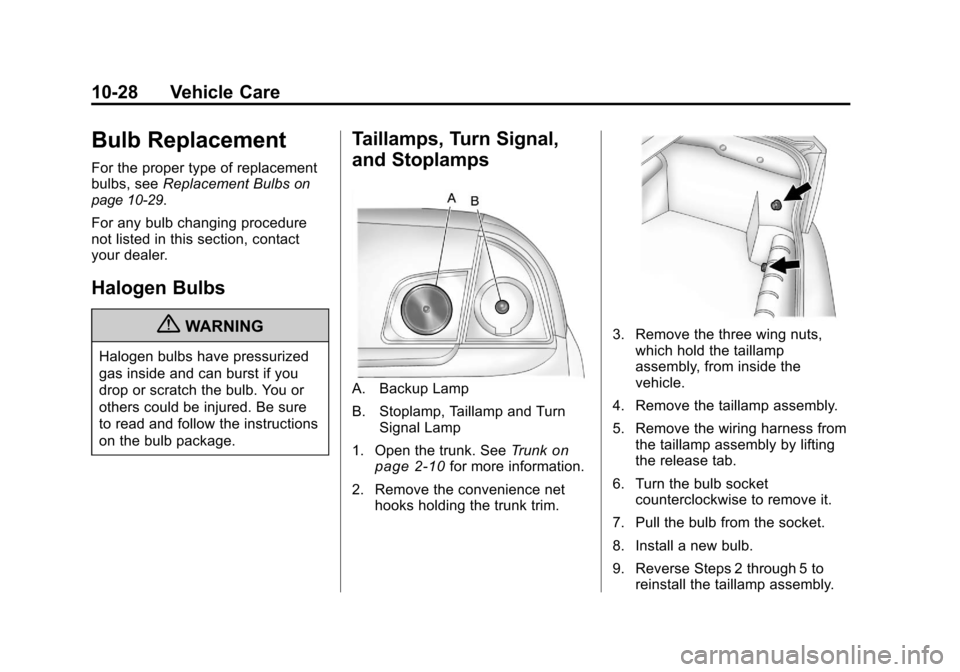
Taillamps, Turn Signal,
and Stoplamps
A. Backup Lamp
B. Stoplamp, Taillamp and Turn Signal Lamp
1. Open the trunk. See Trunk
on
page 2‑10for more information.
2. Remove the convenience net hooks holding the trunk trim.
3. Remove the three wing nuts,which hold the taillamp
assembly, from inside the
vehicle.
4. Remove the taillamp assembly.
5. Remove the wiring harness from the taillamp assembly by lifting
the release tab.
6. Turn the bulb socket counterclockwise to remove it.
7. Pull the bulb from the socket.
8. Install a new bulb.
9. Reverse Steps 2 through 5 to reinstall the taillamp assembly.
Page 271 of 382
Black plate (29,1)Chevrolet Malibu Owner Manual - 2011
Vehicle Care 10-29
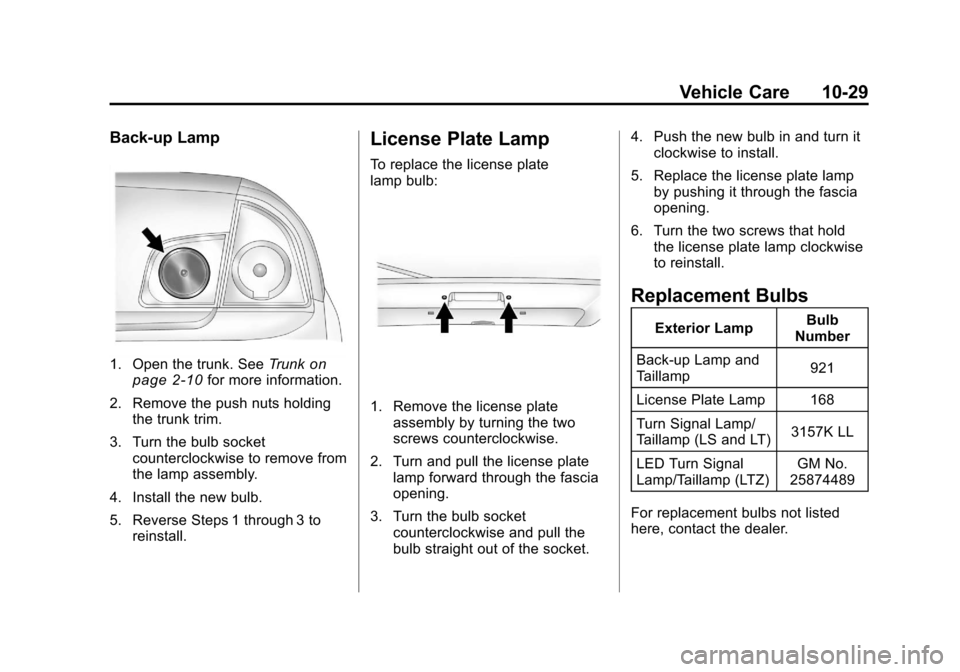
Back-up Lamp
1. Open the trunk. SeeTrunkon
page 2‑10for more information.
2. Remove the push nuts holding the trunk trim.
3. Turn the bulb socket counterclockwise to remove from
the lamp assembly.
4. Install the new bulb.
5. Reverse Steps 1 through 3 to reinstall.
License Plate Lamp
To replace the license plate
lamp bulb:
1. Remove the license plateassembly by turning the two
screws counterclockwise.
2. Turn and pull the license plate lamp forward through the fascia
opening.
3. Turn the bulb socket counterclockwise and pull the
bulb straight out of the socket. 4. Push the new bulb in and turn it
clockwise to install.
5. Replace the license plate lamp by pushing it through the fascia
opening.
6. Turn the two screws that hold the license plate lamp clockwise
to reinstall.
Replacement Bulbs
Exterior Lamp Bulb
Number
Back-up Lamp and
Taillamp 921
License Plate Lamp 168
Turn Signal Lamp/
Taillamp (LS and LT) 3157K LL
LED Turn Signal
Lamp/Taillamp (LTZ) GM No.
25874489
For replacement bulbs not listed
here, contact the dealer.
Page 277 of 382
Black plate (35,1)Chevrolet Malibu Owner Manual - 2011
Vehicle Care 10-35
FusesUsage
RADIO Audio System
INTERIOR
LIGHTS Interior Lamps
NOT
INSTALLED Not Used
POWER
WINDOWS Power Windows
HVAC
CTRL (IGN) Heating Ventilation
Air Conditioning
Control (Ignition)
HVAC
BLOWER Heating Ventilation
Air Conditioning
Blower Switch
DOOR LOCK Door Locks
ROOF/
HEAT SEAT Sunroof,
Heated Seat
NOT
INSTALLED Not Used Fuses
Usage
NOT
INSTALLED Not Used
AIRBAG
(BATT) Airbag (Battery)
SPARE FUSE
HOLDER Spare Fuse Holder
SPARE FUSE
HOLDER Spare Fuse Holder
SPARE FUSE
HOLDER Spare Fuse Holder
SPARE FUSE
HOLDER Spare Fuse Holder
FUSE
PULLER Fuse PullerRear Compartment Fuse
Block
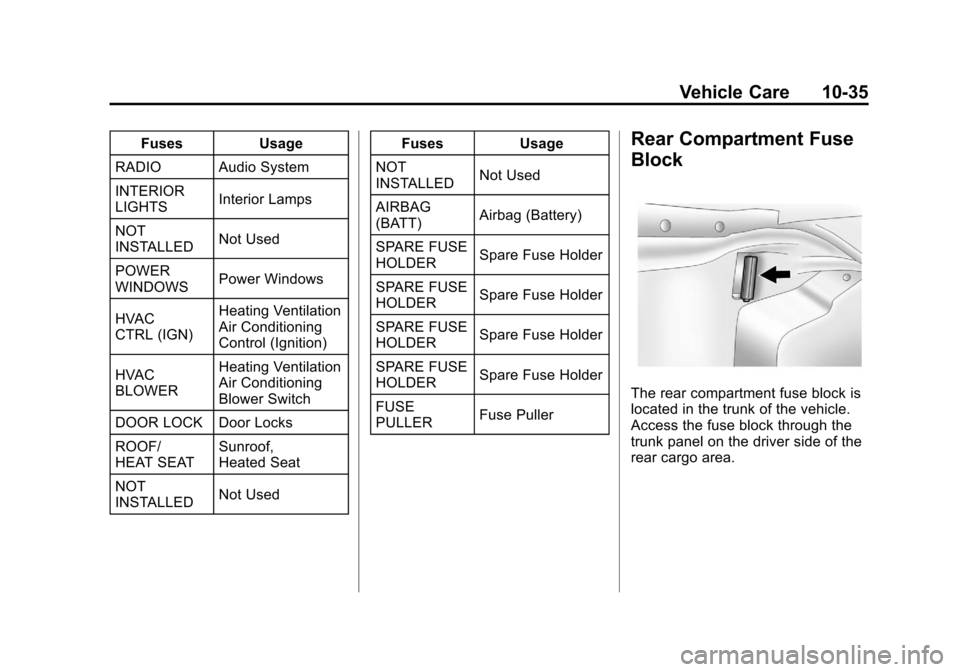
The rear compartment fuse block is
located in the trunk of the vehicle.
Access the fuse block through the
trunk panel on the driver side of the
rear cargo area.
Page 279 of 382
Black plate (37,1)Chevrolet Malibu Owner Manual - 2011
Vehicle Care 10-37
FusesUsage
17 Back-up Lamps
18 Not Used
19 Not Used
20 Auxiliary Power
Outlets
21 Not Used
22 Trunk Release
23 Rear Defog
24 Heated Mirrors
25 Fuel Pump Relays
Usage
26 Rear Window
Defogger
27 Park Lamps
28 Not Used
29 Not Used
30 Not Used
31 Not Used
32 Not Used
33 Back-up Lamps Relays
Usage
34 Not Used
35 Not Used
36 Trunk Release
37 Fuel Pump
38 (Diode) Cargo Lamp
Page 310 of 382
Black plate (68,1)Chevrolet Malibu Owner Manual - 2011
10-68 Vehicle Care
4. Replace with a new canisterwhich is available from your
dealer.
5. Push the new canister into place.
6. Screw the connector (B) to the canister (A).
7. Slide the plastic cover back on.
Storing the Tire Sealant
and Compressor Kit
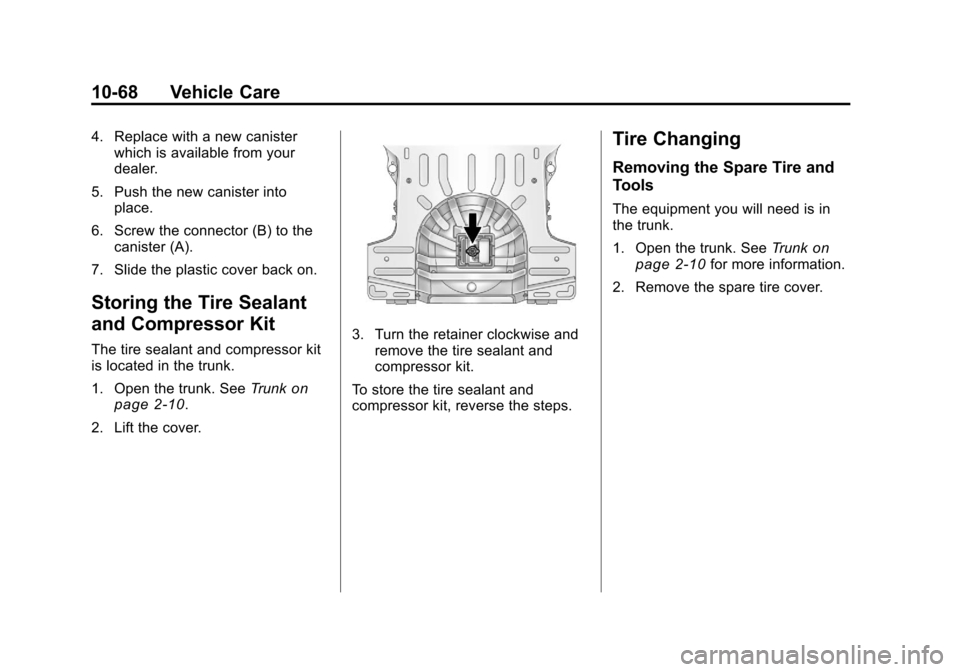
The tire sealant and compressor kit
is located in the trunk.
1. Open the trunk. See Trunk
on
page 2‑10.
2. Lift the cover.
3. Turn the retainer clockwise and remove the tire sealant and
compressor kit.
To store the tire sealant and
compressor kit, reverse the steps.
Tire Changing
Removing the Spare Tire and
Tools
The equipment you will need is in
the trunk.
1. Open the trunk. See Trunk
on
page 2‑10for more information.
2. Remove the spare tire cover.
Page 311 of 382
Black plate (69,1)Chevrolet Malibu Owner Manual - 2011
Vehicle Care 10-69
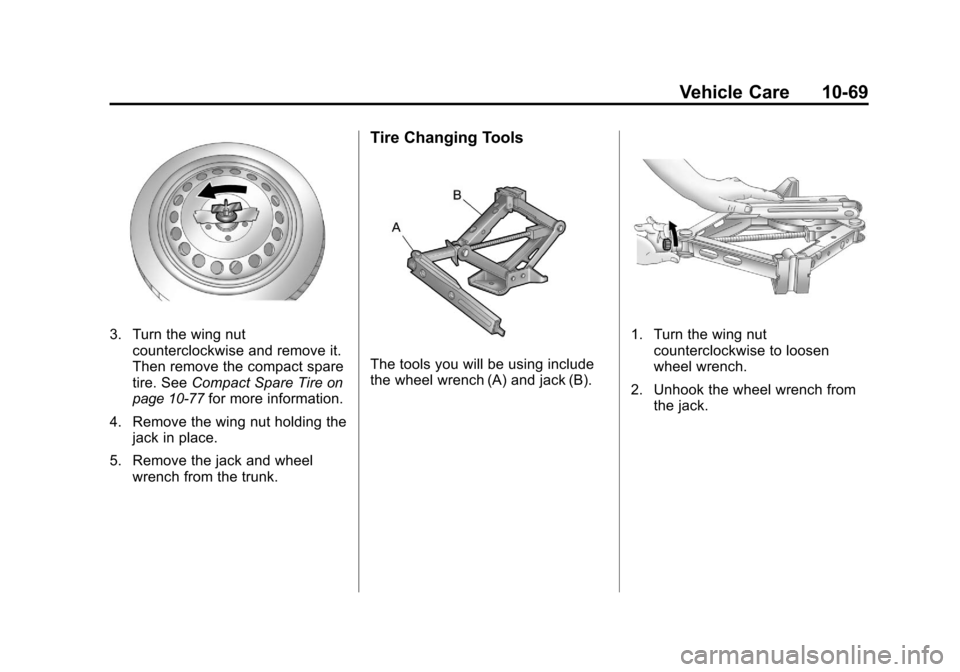
3. Turn the wing nutcounterclockwise and remove it.
Then remove the compact spare
tire. See Compact Spare Tire
on
page 10‑77for more information.
4. Remove the wing nut holding the jack in place.
5. Remove the jack and wheel wrench from the trunk.
Tire Changing Tools
The tools you will be using include
the wheel wrench (A) and jack (B).
1. Turn the wing nutcounterclockwise to loosen
wheel wrench.
2. Unhook the wheel wrench from the jack.
Page 316 of 382
Black plate (74,1)Chevrolet Malibu Owner Manual - 2011
10-74 Vehicle Care
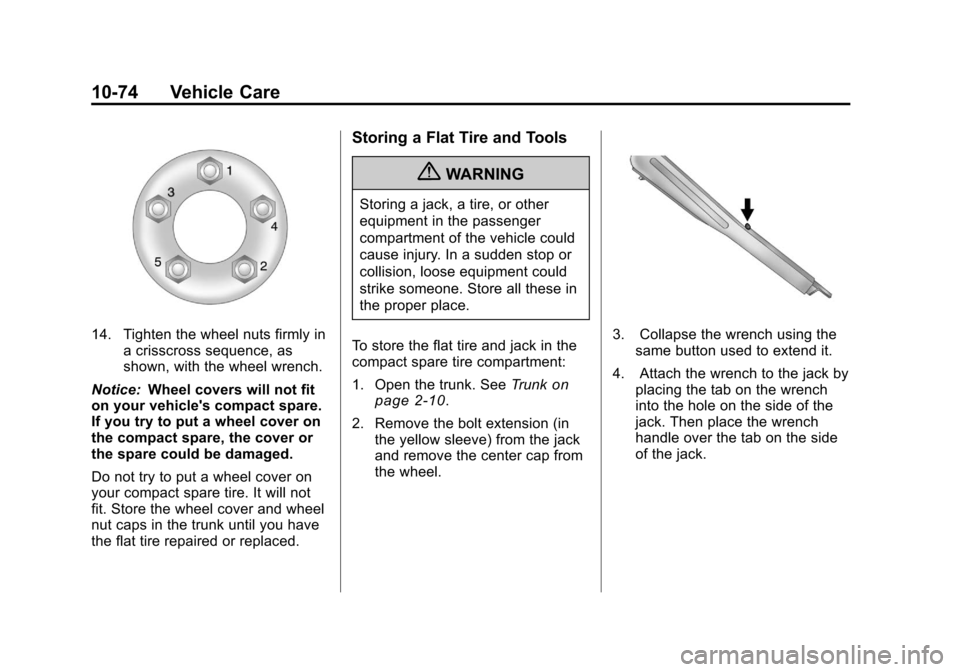
14. Tighten the wheel nuts firmly ina crisscross sequence, as
shown, with the wheel wrench.
Notice: Wheel covers will not fit
on your vehicle's compact spare.
If you try to put a wheel cover on
the compact spare, the cover or
the spare could be damaged.
Do not try to put a wheel cover on
your compact spare tire. It will not
fit. Store the wheel cover and wheel
nut caps in the trunk until you have
the flat tire repaired or replaced.
Storing a Flat Tire and Tools
{WARNING
Storing a jack, a tire, or other
equipment in the passenger
compartment of the vehicle could
cause injury. In a sudden stop or
collision, loose equipment could
strike someone. Store all these in
the proper place.
To store the flat tire and jack in the
compact spare tire compartment:
1. Open the trunk. See Trunk
on
page 2‑10.
2. Remove the bolt extension (in the yellow sleeve) from the jack
and remove the center cap from
the wheel.
3. Collapse the wrench using thesame button used to extend it.
4. Attach the wrench to the jack by placing the tab on the wrench
into the hole on the side of the
jack. Then place the wrench
handle over the tab on the side
of the jack.