display CHEVROLET MALIBU 2011 7.G Workshop Manual
[x] Cancel search | Manufacturer: CHEVROLET, Model Year: 2011, Model line: MALIBU, Model: CHEVROLET MALIBU 2011 7.GPages: 382, PDF Size: 5.81 MB
Page 189 of 382
Black plate (5,1)Chevrolet Malibu Owner Manual - 2011
Climate Controls 8-5
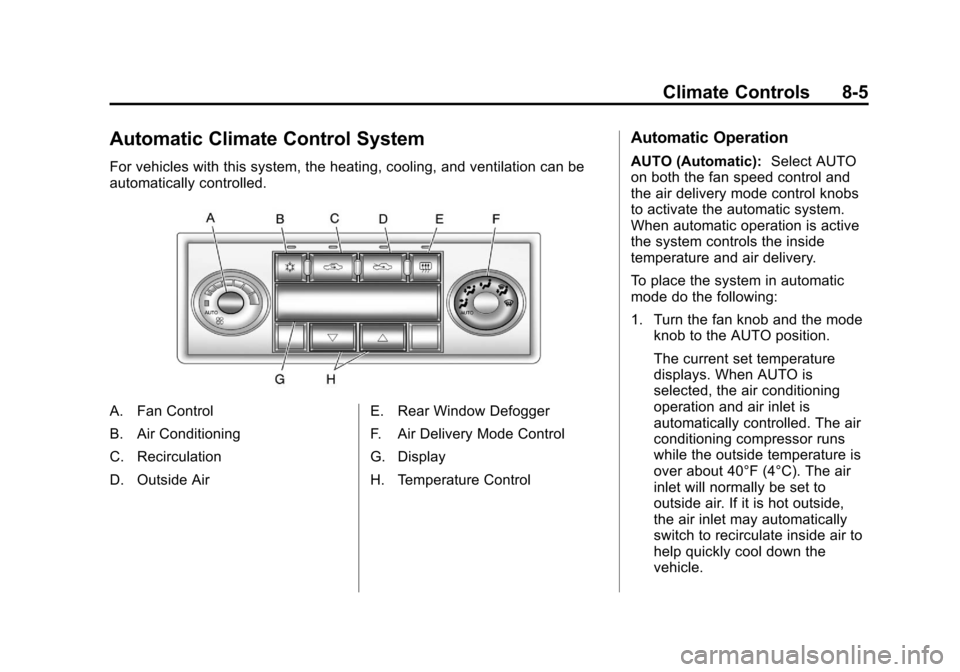
Automatic Climate Control System
For vehicles with this system, the heating, cooling, and ventilation can be
automatically controlled.
A. Fan Control
B. Air Conditioning
C. Recirculation
D. Outside AirE. Rear Window Defogger
F. Air Delivery Mode Control
G. Display
H. Temperature Control
Automatic Operation
AUTO (Automatic):
Select AUTO
on both the fan speed control and
the air delivery mode control knobs
to activate the automatic system.
When automatic operation is active
the system controls the inside
temperature and air delivery.
To place the system in automatic
mode do the following:
1. Turn the fan knob and the mode knob to the AUTO position.
The current set temperature
displays. When AUTO is
selected, the air conditioning
operation and air inlet is
automatically controlled. The air
conditioning compressor runs
while the outside temperature is
over about 40°F (4°C). The air
inlet will normally be set to
outside air. If it is hot outside,
the air inlet may automatically
switch to recirculate inside air to
help quickly cool down the
vehicle.
Page 192 of 382
Black plate (8,1)Chevrolet Malibu Owner Manual - 2011
8-8 Climate Controls
When the weather is cool or damp,
operating the system in recirculation
for extended periods of time can
cause fogging of the vehicle's
windows. To clear the fog, select
either defog or defrost. Make sure
the air conditioning is on. Allow the
air conditioning to run automatically
to help dehumidify the air.
Rear Window Defogger
The rear window defogger uses a
warming grid to remove fog from the
rear window.
<(Rear):Press to turn the rear
window defogger on or off. An
indicator light comes on to show
that the rear window defogger is on.
If driving below 80 km/h (50 mph),
the rear window defogger turns off
about 15 minutes after the button is
pressed. If additional warming time
is needed, press the button again. If the vehicle's speed is maintained
above 80 km/h (50 mph), the rear
window defogger remains on once
the button is pressed.
For vehicles with heated outside
mirrors, the surface of the outside
mirrors will also heat when the rear
window defogger is activated. See
Heated Mirrors on page 2‑15.
Notice:
Do not use a razor blade
or sharp object to clear the inside
rear window. Do not adhere
anything to the defogger grid
lines in the rear glass. These
actions may damage the rear
defogger. Repairs would not be
covered by your warranty. Remote Start Climate Control
Operation
For vehicles with remote start, when
it is activated the climate control
system heats and cools the inside of
the vehicle using the previous
system settings before the vehicle
was turned off. The climate control
knobs will remain active during a
remote start. However, the climate
control buttons will be inactive until
the ignition is turned on by the key.
If the fan is off, the climate control
system will not operate during
remote start.
With the automatic climate control
system, the climate control displays
“RS”
in place of the temperature to
indicate that remote start is
activated. For best performance,
turn both the fan and mode knobs to
AUTO. If the temperature is cold
enough and the mode knob is set to
AUTO, the system begins in defrost
to clear the windows. See Remote
Keyless Entry (RKE) System
Operation on page 2‑3.
Page 213 of 382
Black plate (19,1)Chevrolet Malibu Owner Manual - 2011
Driving and Operating 9-19
The steering can bind with the
wheels turned off center. If this
happens, move the steering wheel
from right to left while turning the
key to ACC/ACCESSORY. If this
doesn't work, the vehicle needs
service.
ACC (ACC/ACCESSORY):This
position lets you use things like the
radio and windshield wipers while
the engine is not running.
R (ON/RUN): This position can be
used to operate the electrical
accessories and to display some
instrument panel warning lights. The
switch will stay in this position while
the engine is running. If you leave the key in the ACC/
ACCESSORY or ON/RUN position
with the engine off, the battery could
be drained. You may not be able to
start the vehicle if the battery is
allowed to drain for an extended
period of time.
/
(START): This position starts the
engine. When the engine starts,
release the key. The ignition switch
will return to the ON/RUN position
for driving.
A warning tone will sound when the
driver door is opened, the ignition is
in ACC/ACCESSORY or LOCK/OFF
and the key is in the ignition.Retained Accessory
Power (RAP)
These vehicle accessories can be
used for up to 10 minutes after the
engine is turned off:
.Audio System
.Power Windows
.Heated Seats (if equipped)
.Sunroof (if equipped)
These features continue to work up
to 10 minutes after the ignition is
turned to LOCK/OFF.
The power windows, heated seats,
and sunroof will work until any door
is opened.
The radio continues to work until the
driver door is opened.
All these features operate when the
key is in the ON/RUN or ACC/
ACCESSORY.
Page 221 of 382
Black plate (27,1)Chevrolet Malibu Owner Manual - 2011
Driving and Operating 9-27
Notice:Shifting out of P (Park) or
N (Neutral) with the engine
running at high speed may
damage the transmission. The
repairs would not be covered by
the vehicle warranty. Be sure the
engine is not running at high
speed when shifting the vehicle.
D (Drive): This position is for
normal driving. It provides the best
fuel economy. If you need more
power for passing, and you are:
.Going less than 56 km/h
(35 mph), push the accelerator
pedal about halfway down.
.Going about 56 km/h (35 mph) or
more, push the accelerator all
the way down.
M (Manual Mode): This position,
allows you to change gears similar
to a manual transmission. If the
vehicle has this feature, see Driver
Shift Control (DSC).
Manual Mode
Driver Shift Control (DSC)
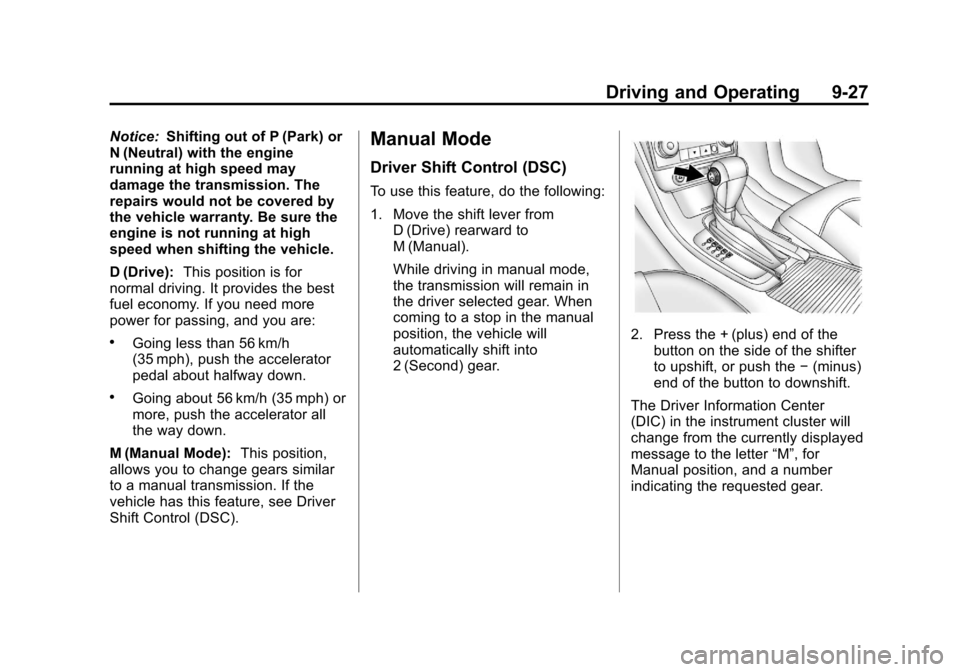
To use this feature, do the following:
1. Move the shift lever from
D (Drive) rearward to
M (Manual).
While driving in manual mode,
the transmission will remain in
the driver selected gear. When
coming to a stop in the manual
position, the vehicle will
automatically shift into
2 (Second) gear.
2. Press the + (plus) end of thebutton on the side of the shifter
to upshift, or push the −(minus)
end of the button to downshift.
The Driver Information Center
(DIC) in the instrument cluster will
change from the currently displayed
message to the letter “M”, for
Manual position, and a number
indicating the requested gear.
Page 224 of 382
Black plate (30,1)Chevrolet Malibu Owner Manual - 2011
9-30 Driving and Operating
pedal with your left foot until you
feel the pedal release. If the parking
brake is not released when you
begin to drive, the brake system
warning light comes on and a chime
sounds as a warning that the
parking brake is still on.
The PUSH PARK PEDAL message
will also display in the Driver
Information Center (DIC) as a
reminder to release the parking
brake. SeeDriver Information
Center (DIC) on page 5‑23.
Notice: Driving with the parking
brake on can overheat the brake
system and cause premature
wear or damage to brake system
parts. Make sure that the parking
brake is fully released and the
brake warning light is off before
driving.
If you are towing a trailer and are
parking on a hill, see Driving
Characteristics and Towing Tips
on
page 9‑43.
Brake Assist
This vehicle has a brake assist
feature designed to assist the driver
in stopping or decreasing vehicle
speed in emergency driving
conditions. This feature uses the
stability system hydraulic brake
control module to supplement the
power brake system under
conditions where the driver has
quickly and forcefully applied the
brake pedal in an attempt to quickly
stop or slow down the vehicle. The
stability system hydraulic brake
control module increases brake
pressure at each corner of the
vehicle until the ABS activates.
Minor brake pedal pulsation or
pedal movement during this time is
normal and the driver should
continue to apply the brake pedal as
the driving situation dictates. The
brake assist feature will
automatically disengage when the
brake pedal is released or brake
pedal pressure is quickly
decreased.
Ride Control Systems
Traction Control
System (TCS)
The vehicle may have a Traction
Control System (TCS) that limits
wheel spin. This is especially useful
in slippery road conditions. The
system operates only if it senses
that the front wheels are spinning
too much or are beginning to lose
traction. When this happens, the
system works the front brakes and
reduces engine power by closing
the throttle and managing engine
spark to limit wheel spin.
This light will flash when the traction
control system is limiting wheel spin.
Page 225 of 382
Black plate (31,1)Chevrolet Malibu Owner Manual - 2011
Driving and Operating 9-31
The system may be heard or felt
while it is working, but this is
normal.
If the vehicle is in cruise control
when TCS begins to limit wheel
spin, the cruise control will
automatically disengage. The cruise
control may be re-engaged when
road conditions allow. SeeCruise
Control on page 9‑34.
When this light is on solid and either
the SERVICE TRACTION or
TRACTION OFF message is
displayed, the system will not limit
wheel spin.
Adjust your driving accordingly. See
Ride Control System Messages
on
page 5‑28for more information. The Traction Control System is
automatically enabled whenever the
vehicle is started. To limit wheel
spin, especially in slippery road
conditions, always leave the system
enabled. TCS can be turned off if
needed.
It is recommended to leave the
system on for normal driving
conditions, but it may be necessary
to turn the system off if the vehicle
is stuck in sand, mud, ice or snow,
and you want to
“rock”the vehicle to
attempt to free it. It may also be
necessary to turn off the system
when driving in extreme off-road
conditions where high wheel spin is
required. See If the Vehicle is Stuck
on page 9‑11.
To turn the system off or on, press
and release this button located on
the center console.
The DIC will display the appropriate
message as described previously
when the button is pressed.
Traction Control Operation
Traction control limits wheel spin by
reducing engine power to the
wheels (engine speed management)
and by applying brakes to each
individual wheel (brake-traction
control) as necessary.
The traction control system is
enabled automatically when the
vehicle is started, and it will activate
and flash the ESC/TCS light and
display the LOW TRACTION
Page 226 of 382
Black plate (32,1)Chevrolet Malibu Owner Manual - 2011
9-32 Driving and Operating
message if it senses either of the
front wheels are spinning or
beginning to lose traction while
driving. For more information on the
LOW TRACTION message, see
Ride Control System Messages
on
page 5‑28.
Notice: If the wheel(s) of one axle
are allowed to spin excessively
while the ESC/TCS, ABS and
Brake warning lights and the
SERVICE ESC and/or SERVICE
TRACTION messages are
displayed, the differential could
be damaged. The repairs would
not be covered by the vehicle
warranty. Reduce engine power
and do not spin the wheel(s)
excessively while these lights and
this message are displayed.
Notice: When traction control is
turned off, it is possible to lose
traction. If you attempt to shift
with the front wheels spinning
with a loss of traction, it is
possible to cause damage to the transmission. Do not attempt to
shift when the front wheels do not
have traction. Damage caused by
misuse of the vehicle is not
covered. See your warranty book
for additional information.
The traction control system may
activate on dry or rough roads or
under conditions such as heavy
acceleration while turning or
abrupt upshifts/downshifts of the
transmission. When this happens, a
reduction in acceleration may be
noticed, or a noise or vibration may
be heard. This is normal.
If the vehicle is in cruise control
when the system activates, the
ESC/TCS light will flash and the
cruise control will automatically
disengage. The cruise control
may be re-engaged when road
conditions allow. See
Cruise Control
on page 9‑34. Adding non‐dealer/non‐retailer
accessories can affect the vehicle's
performance. See
Accessories and
Modifications
on page 10‑3for
more information.
Electronic Stability
Control (ESC)
The vehicle has an Electronic
Stability Control (ESC) system
which combines antilock brake,
traction and stability control systems
and helps the driver maintain
directional control of the vehicle in
most driving conditions.
When you first start the vehicle and
begin to drive away, the system
performs several diagnostic checks
to ensure there are no problems.
The system may be heard or felt
while it is working. This is normal
and does not mean there is a
problem with the vehicle. The
system should initialize before the
vehicle reaches 32 km/h (20 mph).
Page 227 of 382
Black plate (33,1)Chevrolet Malibu Owner Manual - 2011
Driving and Operating 9-33
If the system fails to turn on or
activate, the ESC/TCS light will be
on solid, and the ESC OFF or
SERVICE ESC message will be
displayed.
For more information, seeRide
Control System Messages
on
page 5‑28.
This light will flash on the instrument
panel cluster when the ESC system
is both on and activated.
The system may be heard or felt
while it is working; this is normal.
When the light is on solid and either
the SERVICE ESC or ESC OFF
message is displayed, the system
will not assist the driver in
maintaining directional control of the vehicle. Adjust your driving
accordingly. See
Ride Control
System Messages on page 5‑28.
The Electronic Stability Control
(ESC) system is automatically
enabled whenever the vehicle is
started. To assist the driver with
vehicle directional control,
especially in slippery road
conditions, the system should
always be left on. But, ESC can be
turned off if needed.
If the vehicle is in cruise control
when the system begins to assist
the driver maintain directional
control of the vehicle, the ESC/TCS
light will flash and the cruise control
will automatically disengage. The
cruise control system may be
re-engaged when road conditions
allow. See Cruise Control
on
page 9‑34.
The ESC/TCS button is located on
the instrument panel.
The traction control system can be
turned off or back on by pressing
the ESC/TCS button. To disable
both traction control and ESC, press
and hold the button briefly.
When the ESC system is turned off,
the TRACTION OFF and ESC OFF
messages will appear, and the ESC/
TCS light will be on solid to warn
the driver that both traction control
and ESC are disabled.
It is recommended to leave the
system on for normal driving
conditions, but it may be necessary
to turn the system off if the vehicle
is stuck in sand, mud, ice or snow,
Page 229 of 382
Black plate (35,1)Chevrolet Malibu Owner Manual - 2011
Driving and Operating 9-35
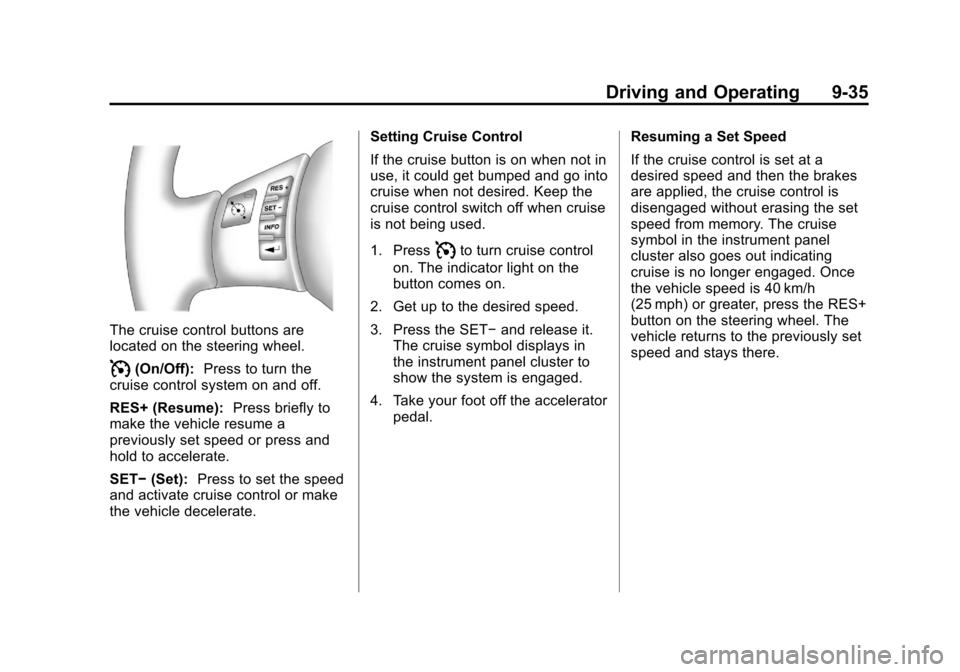
The cruise control buttons are
located on the steering wheel.
I(On/Off):Press to turn the
cruise control system on and off.
RES+ (Resume): Press briefly to
make the vehicle resume a
previously set speed or press and
hold to accelerate.
SET− (Set): Press to set the speed
and activate cruise control or make
the vehicle decelerate. Setting Cruise Control
If the cruise button is on when not in
use, it could get bumped and go into
cruise when not desired. Keep the
cruise control switch off when cruise
is not being used.
1. Press
Ito turn cruise control
on. The indicator light on the
button comes on.
2. Get up to the desired speed.
3. Press the SET− and release it.
The cruise symbol displays in
the instrument panel cluster to
show the system is engaged.
4. Take your foot off the accelerator pedal. Resuming a Set Speed
If the cruise control is set at a
desired speed and then the brakes
are applied, the cruise control is
disengaged without erasing the set
speed from memory. The cruise
symbol in the instrument panel
cluster also goes out indicating
cruise is no longer engaged. Once
the vehicle speed is 40 km/h
(25 mph) or greater, press the RES+
button on the steering wheel. The
vehicle returns to the previously set
speed and stays there.
Page 253 of 382
Black plate (11,1)Chevrolet Malibu Owner Manual - 2011
Vehicle Care 10-11
This certification mark indicates that
the oil has been approved to the
dexos™specification.
Your vehicle was filled at the factory
with dexos™ approved engine oil.
Notice: Use only engine oil that is
approved to the dexos™
specification or an equivalent
engine oil of the appropriate
viscosity grade. Engine oils
approved to the dexos™
specification will show the
dexos™ symbol on the container.
Failure to use the recommended
engine oil or equivalent can result
in engine damage not covered by
the vehicle warranty. If you are
unsure whether your oil is
approved to the dexos™
specification, ask your service
provider. Use of Substitute Engine Oils if
dexos™
is unavailable: In the event
that dexos™ approved engine oil is
not available at an oil change or for
maintaining proper oil level, you
may use substitute engine oil
displaying the API Starburst symbol
and of SAE 5W-30 viscosity grade.
Use of oils that do not meet the
dexos™ specification, however, may
result in reduced performance under
certain circumstances.
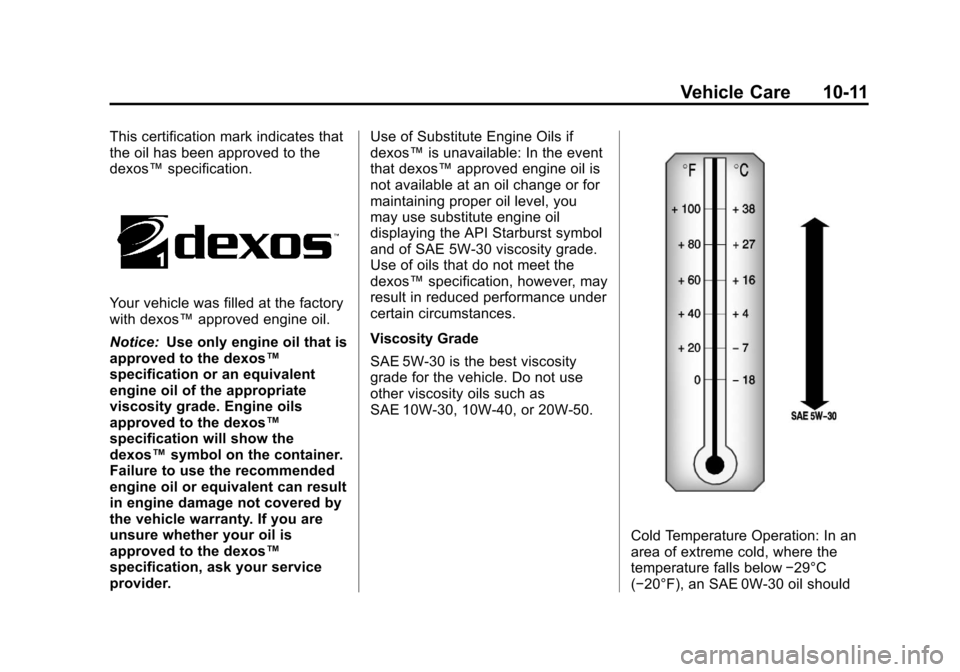
Viscosity Grade
SAE 5W-30 is the best viscosity
grade for the vehicle. Do not use
other viscosity oils such as
SAE 10W‐30, 10W‐40, or 20W-50.
Cold Temperature Operation: In an
area of extreme cold, where the
temperature falls below −29°C
(−20°F), an SAE 0W-30 oil should